1
English
Option 2 (Connecting a TV Set for Video and Hifi Equipment for
Audio)
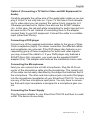
Carefully separate the yellow wire of the audio/video cable so you can
plug it to the TV set only later on. If your TV Set has a Cinch receptacle for video input you can connect the yellow Cinch connector to it.
Otherwise proceed as for Option One and use the SCART adapter
(In). In this case, the red and white receptacles for audio input will not
be used on the TV set. Instead of connecting them to the adapter,
connect them to your Hifi equipment. Connect the cable to a suitable
input (other than Phono).
Connecting a DVD player
Connect one of the supplied audio/video cables to the group of three
Cinch receptacles (Input). For easier connection, the different cables
and receptacles are coloured. If the DVD player also features a corresponding group of three receptacles for audio and video signals,
you may connect the cable to it. If your DVD player only features a
SCART (Euro AV) connector, you must use the supplied SCART
adapter (Out). The adapter also features the mentioned colour code.
Connecting the Microphones
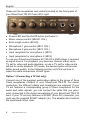
Next you can connect one or both microphones. Plug the XLR connector of the microphone cable into the microphone. The correct end
of the cable can be easily identified by the shape that matches that of
the microphone. The other end has a phone jack connector that plugs
into the microphone receptacles of your SilverCrest TM-210. You may
use any of the two microphone input jacks. You only have to remember that each input receptacle is assigned to a microphone gain control.
Connecting the Power Supply
Plug the power adapter to your SilverCrest TM-210 and then to a wall
outlet. The device is now ready.
Silvercrest TM-210 (V1.1)
7