1
User’s Guide
Overview of Your Scanner Features
These features help you create the best possible scans, no matter what shape your original is in.
Guide to the Scanner Parts
Check this section to identify the parts of your scanner.
Placing Originals in the Scanner
Follow the steps here to place your original documents or photos on the scanner.
Scanning Your Originals
Follow the step- by- step instructions here to scan your original documents or photos using any of the available scanning methods.
Scanning Special Projects
Follow the instructions here for specific scanning projects you may need to create.
Maintenance
Follow the guidelines here to maintain and transport your scanner.
Solving Problems
If you have a problem using your scanner or its software, check here for solutions.
Technical Specifications
Check here for technical details about your scanner and its accessories.
Safety
Copyright and Trademarks
Home > Overview of Your Scanner Features
Overview of Your Scanner Features
These features help you create the best possible scans, no matter what shape your original is in.
Scanning Documents With the Carrier Sheet
Text Enhancement
Home > Guide to the Scanner Parts
Guide to the Scanner Parts
Check these sections to identify the parts of your scanner.
Scanner Parts
Control Panel
Home > Placing Originals in the Scanner
Placing Originals in the Scanner
Follow the steps here to place your original documents or photos on the scanner.
Loading Documents
Home > Scanning Your Originals
Scanning Your Originals
Follow the step-by-step instructions here to scan your original documents or photos using any of the available scanning methods.
Starting a Scan Using the Control Panel
Starting a Scan Using Epson Scan
Scanning Documents Using Document Capture Pro (Windows only)
Scanning Documents Using Epson Scan
Selecting File Save Settings Using Epson Scan
Detailed Setting Instructions
Finishing the Scan
Home > Scanning Special Projects
Scanning Special Projects
Follow these instructions for specific scanning projects you may need to create.
Scanning Documents With the Carrier Sheet
Text Enhancement
Scanning to a PDF File
Using the Scanner as a Copier
Scanning Directly to an E-mail
Converting Scanned Documents into Editable Text
Scanning Business Cards
Setting Up the LCD Screen Menu List
Scanning to a SharePoint Server or Cloud Service (Windows only)
Scanning Multi-Page Originals as Separate Files (Windows only)
Home > Maintenance
Maintenance
Follow the guidelines here to maintain and transport your scanner.
Cleaning the Scanner
Cleaning Inside the Scanner
Transporting the Scanner
Replacing the Roller Assembly Kit
Using the Security Slot
Home > Solving Problems
Solving Problems
Troubleshooting
If you have a problem using your scanner or its software, check here for solutions.
Scanner Problems
Paper Feeding Problems
Scanning Problems
Scan Quality Problems
Updating Your Scanning Software (Mac OS X only)
Uninstalling Your Scanning Software
Where To Get Help
Epson Technical Support
Other Software Technical Support
Home > Technical Specifications
Technical Specifications
Check here for technical details about your scanner and its accessories.
System Requirements
Scanner Specifications
Home > Safety
Important Safety Instructions
Restrictions on Copying
In this document, warnings, cautions, and notes indicate the following:
Warnings
must be followed carefully to avoid bodily injury.
Cautions
must be observed to avoid damage to your equipment.
Notes
contain important information and useful tips on the operation of this product.
Read all these instructions, and follow all warnings and instructions marked on the scanner.
Place the scanner close enough to the computer for the interface cable to reach it easily. Do not place or store the scanner or the
AC adapter outdoors, near excessive dirt or dust, water, heat sources, or in locations subject to shocks, vibrations, high
temperature or humidity, direct sunlight, strong light sources, or rapid changes in temperature or humidity. Do not use with wet
hands.
Place the scanner and the AC adapter near an electrical outlet where the adapter can be easily unplugged.
Caution:
Be sure the AC power cord meets the relevant local safety standards.
The AC power cord should be placed to avoid abrasions, cuts, fraying, crimping, and kinking. Do not place objects on top of the AC
power cord and do not allow the AC adapter or the AC power cord to be stepped on or run over. Be particularly careful to keep
both of the AC power cords straight at the ends and the points where they enter the AC adapter.
Use only the AC adapter that comes with your scanner. Using any other adapter could cause fire, electrical shock, or injury.
The AC adapter is designed for use with the scanner with which it was included. Do not attempt to use it with other electronic
devices unless specified.
Use only the type of power source indicated on the product’s label.
When connecting this product to a computer or other device with a cable, ensure the correct orientation of the connectors. Each
connector has only one correct orientation. Inserting a connector in the wrong orientation may damage both devices connected by
the cable.
Avoid using outlets on the same circuit as photocopiers or air control systems that regularly switch on and off.
If you use an extension cord with the scanner, make sure the total ampere rating of the devices plugged into the extension cord
does not exceed the cord’s ampere rating. Also, make sure the total ampere rating of all devices plugged into the wall outlet does
not exceed the wall outlet’s ampere rating.
Never disassemble, modify, or attempt to repair the AC adapter, scanner, or scanner option by yourself except as specifically
explained in the scanner’s guides.
Do not insert objects into any opening as they may touch dangerous voltage points or short out parts. Beware of electrical shock
hazards.
If damage occurs to the plug, replace the cord set or consult a qualified electrician. If there are fuses in the plug, make sure you
replace them with fuses of the correct size and rating.
Unplug the scanner and the AC adapter, and refer servicing to qualified service personnel under the following conditions: The AC
adapter or plug is damaged; liquid has entered the scanner or the AC adapter; the scanner or the AC adapter has been dropped
or the case has been damaged; the scanner or the AC adapter does not operate normally or exhibits a distinct change in
performance. (Do not adjust controls that are not covered by the operating instructions.)
Unplug the scanner and the AC adapter before cleaning. Clean with a damp cloth only. Do not use liquid or aerosol cleaners.
If you are not going to use the scanner for a long period, be sure to unplug the AC adapter from the electrical outlet.
WARNING:
The cords included with this product contain chemicals, including lead, known to the State of California to cause birth
defects or other reproductive harm. Wash hands after handling. (This notice is provided in accordance with Proposition
65 in Cal. Health & Safety Code § 25249.5 and following.)
Restrictions on Copying
Observe the following restrictions to ensure responsible and legal use of your scanner.
Copying of the following items is prohibited by law:
Bank bills, coins, government-issued marketable securities, government bond securities, and municipal securities
Unused postage stamps, pre-stamped postcards, and other official postal items bearing valid postage
Government-issued revenue stamps, and securities issued according to legal procedure
Exercise caution when copying the following items:
Private marketable securities (stock certificates, negotiable notes, checks, etc.), monthly passes, concession tickets, etc.
Passports, driver’s licenses, warrants of fitness, road passes, food stamps, tickets, etc.
Note:
Copying these items may also be prohibited by law.
A note concerning responsible use of copyrighted materials
Epson encourages each user to be responsible and respectful of the copyright laws when using any Epson product. While some countries’
laws permit limited copying or reuse of copyrighted material in certain circumstances, those circumstances may not be as broad as some
people assume. Contact your legal advisor for any questions regarding copyright law.
Restriction on disassembling and decompiling
You may not disassemble, decompile, or otherwise attempt to derive the source code of any software included with this product.
Top
Home > Copyright and Trademarks
Copyright and Trademarks
No part of this publication may be reproduced, stored in a retrieval system, or transmitted in any form or by any means, electronic,
mechanical, photocopying, recording, or otherwise, without the prior written permission of Seiko Epson Corporation. No patent liability is
assumed with respect to the use of the information contained herein. Neither is any liability assumed for damages resulting from the use of
the information contained herein.
Neither Seiko Epson Corporation nor its affiliates shall be liable to the purchaser of this product or third parties for damages, losses, costs,
or expenses incurred by the purchaser or third parties as a result of: accident, misuse, or abuse of this product or unauthorized
modifications, repairs, or alterations to this product.
Seiko Epson Corporation and its affiliates shall not be liable against any damages or problems arising from the use of any options or any
consumable products other than those designated as Original Epson Products or Epson Approved Products by Seiko Epson Corporation.
EPSON ® is a registered trademark, and Epson Exceed Your Vision® is a registered logomark of Seiko Epson Corporation.
WorkForce ® is a registered trademark of Seiko Epson Corporation.
Microsoft ®, Windows ®, and Windows Vista® are registered trademarks of Microsoft Corporation.
Adobe ®, Adobe Reader ®, and Acrobat ® are registered trademarks of Adobe Systems Incorporated.
Macintosh, Mac OS, and OS X are trademarks of Apple Inc., registered in the U.S. and other countries.
Presto! BizCard ® is a registered trademark of NewSoft Technology Corp.
ABBYY® and ABBYY FineReader ® names and logos are registered trademarks of ABBYY Software House.
EMC®, Captiva®, and ISIS ® are registered trademarks of EMC Corporation.
Intel ® is a registered trademark of Intel Corporation.
EPSON Scan Software is based in part on the work of the Independent JPEG Group.
libtiff
Copyright © 1988-1997 Sam Leffler
Copyright © 1991-1997 Silicon Graphics, Inc.
Permission to use, copy, modify, distribute, and sell this software and its documentation for any purpose is hereby granted
without fee, provided that (i) the above copyright notices and this permission notice appear in all copies of the software and
related documentation, and (ii) the names of Sam Leffler and Silicon Graphics may not be used in any advertising or
publicity relating to the software without the specific, prior written permission of Sam Leffler and Silicon Graphics.
THE SOFTWARE IS PROVIDED "AS-IS" AND WITHOUT WARRANTY OF ANY KIND, EXPRESS, IMPLIED OR OTHERWISE,
INCLUDING WITHOUT LIMITATION, ANY WARRANTY OF MERCHANTABILITY OR FITNESS FOR A PARTICULAR PURPOSE.
IN NO EVENT SHALL SAM LEFFLER OR SILICON GRAPHICS BE LIABLE FOR ANY SPECIAL, INCIDENTAL, INDIRECT OR
CONSEQUENTIAL DAMAGES OF ANY KIND, OR ANY DAMAGES WHATSOEVER RESULTING FROM LOSS OF USE, DATA OR
PROFITS, WHETHER OR NOT ADVISED OF THE POSSIBILITY OF DAMAGE, AND ON ANY THEORY OF LIABILITY, ARISING OUT
OF OR IN CONNECTION WITH THE USE OR PERFORMANCE OF THIS SOFTWARE.
General Notice: Other product names used herein are for identification purposes only and may be trademarks of their respective owners.
Epson disclaims any and all rights in those marks.
This information is subject to change without notice.
10/14
© 2014 Epson America, Inc.
CPD-40714
Home > Overview of Your Scanner Features
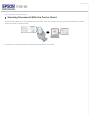
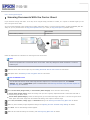
Scanning Documents With the Carrier Sheet
The carrier sheet enables you to scan documents larger than letter- or A4-size, documents having irregular shape, documents with folds or
wrinkles, and photos or valuable originals.
For instructions on using this feature, see Scanning Documents With the Carrier Sheet.
Home > Overview of Your Scanner Features
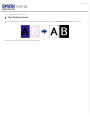
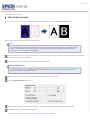
Text Enhancement
When you scan documents, you can sharpen the text and increase accuracy by using the Text Enhancement feature in Epson Scan.
For instructions on using this feature, see Text Enhancement.
Home > Guide to the Scanner Parts
Scanner Parts
User Replacable Parts
a. input tray extension
b. input tray
c. edge guides
d. cover lever
e. scanner cover
f. output tray
g. output tray extension
a.
b.
c.
d.
Power switch
DC inlet
USB interface connector
security slot
User Replacable Parts
a. paper feed roller
b. separation pad
Top
Home > Guide to the Scanner Parts
Control Panel
Lights
Buttons
LCD Screen
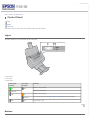
The scanner has one LCD screen, two indicator lights, and four buttons.
Lights
The status lights are on the right side of the LCD screen.
a. LCD screen
b. Error light
c. Power light
Power light
(Green)
On
Error light
(Orange)
Off
On
Flashing
Off
Ready to scan images.
Initializing or scanning.
Flashing
Off
Meaning
Off
Scanner cover is open.
An error has occurred. See The Lights Are Flashing for more information.
The scanner is off.
Top
Buttons
The buttons are below the LCD screen.
Button
Function
a.
Down arrow
Scrolls forward through the LCD screen menu list.
b.
Up arrow
Scrolls backward through the LCD screen menu list.
c.
Start
Starts scanning.
d.
Cancel
Cancels scanning.
Top
LCD Screen
You can select a preset scan job from the LCD screen menu list. Press the
Up arrow and
Down arrow buttons to scroll through the
jobs. The job name is displayed on the first line and the settings for the selected job are displayed on the second line on LCD screen. For
detailed information, see Setting Up the LCD Screen Menu List.
Note for Mac OS X users:
Only the job number is displayed on the LCD screen. To confirm the job settings, check the Button Settings tab in the
Epson Event Manager main window. See Adding and Assigning Scan Jobs (Mac OS X) for instructions.
Top
Home > Placing Originals in the Scanner
Loading Documents
Document Specifications
Loading Documents Directly
Loading Documents With the Carrier Sheet
Loading Cards
You can load your original documents into the input tray to scan multiple pages quickly.
Before loading documents into the input tray, see Document Specifications to make sure your original documents can be loaded.
Document Specifications
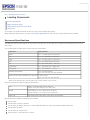
The table below lists the sizes of paper you can load into the input tray. You can load up to 75 sheets (a stack thickness of 0.3 inch/7.5
mm or less).
You can load sheets of various sizes as long as they are center aligned.
Paper size
Measurements
Letter
8.5 × 11 inches (215.9 × 279.4 mm)
A4
8.3 × 11.7 inches (210 × 297 mm)
Legal
8.5 × 14 inches (215.9 × 355.6 mm)
B5
7.2 × 10.1 inches (182 × 257 mm)
A5
5.8 × 8.3 inches (148.5 × 210 mm)
A6 (Portrait)
4.1 × 5.8 inches (105 × 148.5 mm)
A8 (Portrait)
2.0 × 2.9 inches (52 × 74 mm)
Business card (Portrait)
Up to 10 cards per stack
Up to 0.14 inch (3.8 mm) stack thickness
Plastic card (including embossed card) (Portrait) * 1 card at a time
Up to 0.05 inch (1.5 mm) thickness
* Results are not guaranteed when scanning plastic cards with shiny surfaces, such as ID cards.
Load only documents that meet the following specifications:
Size
Width: 1.4 to 8.5 inches (53.5 to 216 mm)
Length: 2.9 to 36.0 inches (73.7 to 914.4 mm)
Weight
Auto Feeding: 0.1 to 0.3 lb/m 2 (50 to 130 g/m 2)
Manual Feeding: 0.1 to 0.4 lb/m 2 (45 to 200 g/m 2)
Paper type
High-quality paper, Bond paper, Check paper, Recycled paper
Documents with the following conditions cannot be loaded:
The ink is wet.
The document is ripped or wrinkled. *
The document has staples, paper clips, or other objects attached to it; these may damage the feeder mechanism.
The document has folds. *
The document has cut-out areas. *
The document is a multi-part form or bound.*
The document has rear carbon coating.
* A document with one of these conditions can be loaded if you use the carrier sheet. See Loading Documents With the Carrier Sheet for
detailed information.
See Loading Documents Directly for instructions on loading your documents.
Top
Loading Documents Directly
Caution:
Do not feed photographs or valuable originals into the scanner directly. Misfeeding may wrinkle or damage the original. If
you scan these types of originals, use the carrier sheet.
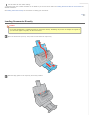
Open and extend the input tray. Then, slide out and extend the output tray.
Slide the edge guides on the input tray all the way outward.
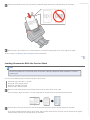
Load your documents into the input tray with the printed side facing down and the top edge facing into the feeder.
Slide the paper into the feeder until it meets resistance. Then slide the edge guides over to fit the edge of the paper.
To start scanning, see Starting a Scan Using Epson Scan for instructions.
Top
Loading Documents With the Carrier Sheet
Note:
Remove the protective film on both sides of the carrier sheet. These may damage the feeder mechanism or cause the
feeder to jam.
You can scan the following types of documents using the carrier sheet:
Documents larger than letter- or A4-size.
Documents having irregular shape.
Documents with folds or wrinkles.
Photos or other valuable originals.
Open the carrier sheet and place the document inside on the top-center of the carrier sheet.
If the document is larger than letter- or A4-size, neatly fold the document with the printed side facing outward.
Load the carrier sheet into the input tray with the printed side facing down and the top edge facing into the feeder.
If you placed a folded document into the carrier sheet, load the carrier sheet into the input tray with the left side of the original
document facing down and the top edge facing into the feeder.
Slide the carrier sheet into the feeder until it meets resistance. Then slide the edge guides over to fit the edges of the carrier sheet.
To start scanning, see Starting a Scan Using Epson Scan for instructions.
Note:
The carrier sheet should be replaced after every 500 scans* or if scratched or stained. (*Replacement timeline may vary
depending on usage.)
Top
Loading Cards
Note:
Results are not guaranteed when scanning plastic cards with shiny surfaces, such as ID cards.
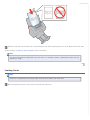
Open and extend the input tray. Then, slide out and extend the output tray.
Slide the edge guides on the input tray all the way outward.
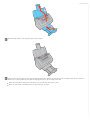
Load the card into the input tray with the printed side facing down and the left edge facing into the feeder. Slide the card into the
feeder until it meets resistance. Then slide the edge guides over to fit the edges of the card.
When you scan plastic cards (such as ID cards), you can load only one card at a time.
When you scan cards or business cards, you can load up to 10 cards.
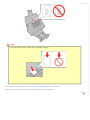
Caution:
Do not load business cards or plastic cards in landscape orientation.
To start scanning using the Epson Scan, see Starting a Scan Using Epson Scan for instructions.
To start scanning using Presto! BizCard, see Scanning Business Cards for instructions.
Top
Home > Scanning Your Originals
Starting a Scan Using the Control Panel
a. LCD screen
b.
Down arrow button
c.
Up arrow button
d.
Start button
e.
Cancel button
You can start a scan by selecting one of the following default jobs from the LCD screen menu list and pressing the
Start button. The
scan completes according to the preassigned scan action. To assign a job to the LCD screen menu, see Setting Up the LCD Screen Menu
List for instructions. To change the scan actions of a preset job, or to create a customized job, see Adding and Assigning Scan Jobs
(Windows) or Adding and Assigning Scan Jobs (Mac OS X) for instructions.
Scan to PDF (Gray) (Windows) lets you scan grayscale images. The scanner scans only one side of the documents and saves
them as one PDF file on your computer.
Scan to PDF (B&W) (Windows) lets you scan black & white images. The scanner scans only one side of the documents and saves
them as one PDF file on your computer.
Scan to PDF (Color) (Windows) lets you scan color images. The scanner scans only one side of the documents and saves them as
one PDF file on your computer.
Scan to PDF (Auto) (Windows) lets the scanner detect the image type. The scanner scans both sides of the documents and saves
them as one PDF file on your computer.
B&W PDF-Simplex (Mac OS X) lets you scan black & white images. The scanner scans only one side of the documents and saves
them as one PDF file on your computer.
Color PDF-Simplex (Mac OS X) lets you scan color images. The scanner scans only one side of the documents and saves them as
one PDF file on your computer.
B&W PDF-Duplex (Mac OS X) lets you scan black & white images. The scanner scans both sides of the documents and saves
them as one PDF file on your computer.
Color Jpeg to E-mail (Mac OS X) lets you scan a color image and attach the scanned image file to an e-mail message. See
Scanning Directly to an E-mail for instructions.
Note for Mac OS X users:
Only the job number is displayed on the LCD screen. To confirm the job settings, check the Button Settings tab in the
Epson Event Manager main window. See Adding and Assigning Scan Jobs (Mac OS X) for instructions.
Home > Scanning Your Originals
Starting a Scan Using Epson Scan
Using the Epson Scan Icon
Using Another Scanning Program
Note for Windows users:
You can also scan using Document Capture Pro. See Scanning Documents Using Document Capture Pro (Windows only)
for instructions.
Using the Epson Scan Icon
You can start Epson Scan by double-clicking the EPSON Scan icon.
Windows 8.x:
Double-click the EPSON Scan icon on the desktop or navigate to the Apps screen and select EPSON Scan.
Windows (other versions):
Double-click the EPSON Scan icon on the desktop or click the
EPSON Scan > EPSON Scan.
start button icon or Start > All Programs or Programs > EPSON >
Mac OS X:
Select Applications > Epson Software and double-click the EPSON Scan icon.
The Epson Scan window opens. See Scanning Documents Using Epson Scan for instructions on scanning with Epson Scan.
Top
Using Another Scanning Program
You can use any TWAIN-compliant scanning program to scan with your scanner. You open the program, select Epson Scan and scan.
When you are finished scanning, the scanned image opens in your scanning program so you can modify, print, and save it.
Start a TWAIN-compliant scanning program. Double-click the program icon on the desktop, if it is available, or do one of the
following:
Windows 8.x:
Navigate to the Apps screen and select the program icon.
Windows (other versions):
Click the
start button icon or Start > All Programs or Programs > program folder > program icon.
Mac OS X:
Open the Applications in your hard drive, select the program folder if necessary, and double-click the program icon.
Do one of the following:
ABBYY Fine Reader:
See Converting Scanned Documents into Editable Text for instructions.
Presto! BizCard:
See Scanning Business Cards for instructions.
Other programs:
In some programs, you must select the scanner as the “source” first. If you see a Select Source option, select it and select your
scanner there first.
Note for Windows 8, Windows 7, Windows Vista, and Windows XP users:
Do not select a WIA option for your scanner from the Import or Acquire list; you will not be able to use all the features
of your scanner.
The Epson Scan window automatically opens. See Scanning Documents Using Epson Scan for instructions on scanning with Epson Scan.
Top
Home > Scanning Your Originals
Scanning Documents Using Document Capture Pro (Windows only)
When you scan with Document Capture Pro, the program automatically saves your scanned file on your computer in the folder you specify.
You can select settings, preview, and change the scanned file settings as necessary.
Note:
The settings may vary, depending on the software version you are using. See the Help information in Document Capture
Pro for details.
Follow the steps below to scan using Document Capture Pro.
Load your documents (up to 75 pages) into the input tray with the printed side facing down and the top edge facing into the feeder.
See Loading Documents for instructions.
Do one of the following to start Document Capture Pro:
Windows 8.x: Navigate to the Apps screen and select Document Capture Pro.
Windows (other versions): Click the
Document Capture Pro.
start button icon or Start > All Programs or Programs > EPSON Software >
Note:
If you do not already have Document Capture Pro, you can obtain it online. To download Document Capture Pro, visit
Epson's driver download site at epson.com/support (U.S.) or epson.ca/support (Canada).
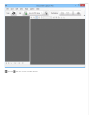
You see a window like this:
Click the
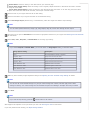
Scan icon. You see a window like this:
Note:
If you want to use a scan job that you created instead, select it from the Job list in the Document Capture Pro window,
click the
Start Job button, and skip the rest of these steps.
Select any displayed scan settings you want to use.
Note:
See the Help information in Document Capture Pro for details.
If you want to select detailed scan settings, click Detailed Settings. Select any scan settings you want to use and click OK.
Note:
When you select this option, Epson Scan starts. See Scanning Documents Using Epson Scan for details on selecting
settings in the Epson Scan window.
Click Scan. You see a preview of your scan in the Document Capture Pro window.
Check the scanned images and edit them as necessary.
Click one of the Destination icons to choose where to save your scanned file.
Note:
You may need to click the arrow next to the icons in order to see all of them. The available icons may vary, depending
on the software version you are using.
Select settings as necessary, then click OK, Send, or Print to save the scanned file.
Home > Scanning Your Originals
Scanning Documents Using Epson Scan
When you start Epson Scan, the following window appears. To scan documents, follow the steps below.
Load your documents (up to 75 pages) into the input tray with the printed side facing down and the top edge facing into the feeder.
See Loading Documents for instructions.
Start Epson Scan. See Starting a Scan Using Epson Scan for instructions.
Select one of these settings as the Document Source setting.
Single-Sided: Select this setting to scan only one side of your document page.
Double-Sided: Select this setting to scan both sides of your document page.
Carrier Sheet (Single-Sided): Select this setting to scan irregularly shaped documents or documents with folds or wrinkles
using the carrier sheet.
Carrier Sheet (Stitch Images): Select this setting to scan documents larger than letter- or A4-size using the carrier sheet.
Epson Scan scans both sides of the document, then outputs a stitched image.
Select the size of your original document as the Size setting.
Select the orientation of your original document as the Orientation setting.
Select Dual Image Output (Windows only) to simultaneously create two images with different output settings.
Note:
You can select separate Resolution, Image Type, Image Option, Edge Fill, and file save settings for each output.
Click the arrow to open the Resolution list and select an appropriate resolution for your original. See Selecting the Scan Resolution
for instructions.
Select Auto, Color, Grayscale, or Black & White as the Image Type setting.
Note:
If you select Grayscale or Black & White, you can also select an Image Option setting, as described below.
Image Option Setting
Description
None
No Image Option setting is applied.
Dropout: Red
Drops out red from the scan.
Dropout: Green
Drops out green from the scan.
Dropout: Blue
Drops out blue from the scan.
Color Enhance: Red
Enhances red in the scan.
Color Enhance: Green
Enhances green in the scan.
Color Enhance: Blue
Enhances blue in the scan.
Make any other necessary Image Adjustment settings. See Adjusting the Color and Other Image Settings for details.
Note:
You can save all of the selected settings as a group of custom settings with a Name, and later apply these custom
settings to scanning. The custom settings are also available for Epson Event Manager. See Epson Scan Help for details.
Click Scan.
Note:
If you need to stop scanning, press the
Cancel button on the scanner.
What happens next depends on how you started your scan. See Finishing the Scan for instructions.
If you have problems while scanning, see Paper Feeding Problems.
Home > Scanning Your Originals
Selecting File Save Settings Using Epson Scan
When you see the File Save Settings window, you can select the location, name, and format of the scanned image file.
Click the
File Save Settings icon on the right of the Scan button.
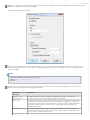
The File Save Settings window appears.
Note:
If you start Epson Scan from a TWAIN-compliant program, the
File Save Settings icon does not appear.
In the File Save Settings window, specify the file folder in which you want to save your scanned image.
Click the Documents or Pictures radio button, or the My Documents or My Pictures radio button.
If you want to select another folder, click the Other radio button, then click Browse (Windows) or Choose (Mac OS X) and select
the folder.
If you want to save your image on the desktop, click the Other radio button.
Specify the rules for a file name that each scanned image receives. An example of the file name based on the current naming rules is
displayed. To change the naming rules, click Edit.
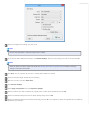
The File Name Setting window appears.
Specify a file name prefix with an alphanumeric character string. A 3-digit number is automatically added to the file name, but you
can change the Start Number if you like. If you are scanning multiple images at once, each image will receive a different 3-digit
number. Click OK.
Note:
The following characters cannot be used in the prefix.
Windows: \, /, :, _, *, ?, ", <, >, │
Mac OS X: :
Click the arrow to open the Type list and select a file format as described in the following table. Depending on the format, the
Options button may be available for making detailed settings.
Format (File
Extension)
Description
BITMAP (*.bmp)
(Windows only)
A standard image file format for Windows. Most Windows programs, including word
processing programs, can read and prepare images in this format.
JPEG (*.jpg)
A compressed file format in which the Compression Level can be selected. The JPEG format
lets you highly compress image data. However, the higher the compression, the lower the
image quality. Any lost image quality data cannot be restored, and the quality deteriorates
each time the data is saved. The TIFF format is recommended when modification and
retouching are required.
Multi-TIFF (*.tif)
A TIFF format where multiple pages are saved to the same file. You can also edit the
scanned images before saving them. See Epson Scan Help for details. To open Multi-TIFF
files, you need a program that supports it.
PDF (*.pdf)
A document format that can be read on both Windows and Macintosh systems (platform
independent). To use PDF documents in Windows, you need Adobe Reader or Acrobat.
Multi-page documents can be saved as one PDF file. When you save color or grayscale
images in PDF, you can select a Compression Level.
PICT(*.pct) (Macintosh
only)
A standard image file format for Macintosh. Most Macintosh programs, including word
processing programs, can read and prepare images in this format.
TIFF (*.tif)
A file format created for exchanging data between many programs, such as graphic and DTP
software. When scanning black & white images, you can specify the Compression type.
The check boxes at the bottom of the window give you these options:
Overwrite any files with the same name
Select this option if you want to reuse the selected file name and location and overwrite previous files with the same names.
Show this dialog box before next scan
Select this option if you want the File Save Settings window to appear automatically before you scan. If you deselect it, you
must click the
File Save Settings icon to open the window before clicking the Scan button.
Open image folder after scanning
Select this option if you want Windows Explorer or the Macintosh Finder to automatically open the folder where your scanned
image file is saved when Epson Scan finishes scanning.
Show Add Page dialog after scanning
Select this option if you want the Add Page Confirmation window to appear automatically after each scan to PDF or multi-Tiff.
The Add Page Confirmation window includes the Add page, Edit page, and Save File buttons.
Click OK.
Home > Scanning Your Originals
Detailed Setting Instructions
Selecting the Scan Resolution
Adjusting the Color and Other Image Settings
Selecting the Scan Resolution
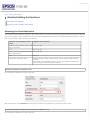
You can select a specific Resolution setting for your images. Keep in mind that higher resolution settings increase the file size and scanning
time, so do not select a higher resolution than you need. See the following table to reference the appropriate resolution setting to use so
that you do not have to take more time than necessary.
What you will do with the scanned
image
Suggested scan resolution
Send via e-mail, upload to web, or view 100 to 150 dpi
only on the screen
Print
200 to 400 dpi
Print, or convert to editable text (OCR)
(for documents only)
200 to 400 dpi
Fax
200 dpi
Enlarge after scanning at 100%
Increase Resolution setting by same amount you will increase image size after
scanning.
For example, if the resolution is 300 dpi, but you will increase the image size to
200%, change the resolution setting to 600 dpi.
Selecting the Resolution Using Epson Scan
You can select the resolution you want at any time.
Click the arrow next to the Resolution list and select the number of dpi (dots per inch) at which you want to scan.
Selecting the Resolution Using Document Capture Pro (Windows only)
You can select the resolution you want at any time.
Click the arrow next to the Resolution list and select a setting. Select the Low setting for 200 dpi (dots per inch), the Medium setting
for 300 dpi, and the High setting for 600 dpi. If you select Custom, you can pick the number of dpi at which you want to scan.
Top
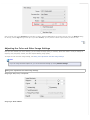
Adjusting the Color and Other Image Settings
Once you have selected your source settings, you can modify the image quality, if necessary. Epson Scan offers a variety of settings for
improving color, sharpness, contrast, and other aspects affecting image quality.
To adjust the color and other image settings, see Making Color Adjustments and Other Image Settings.
Note:
If you are using Document Capture Pro, you can access these settings by clicking Detailed Settings.
Making Color Adjustments and Other Image Settings
Image Type: Auto, Color, or Grayscale
Image Type: Black & White
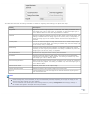
The table below describes the settings available. For details on adjusting these settings, see Epson Scan Help.
Setting
Description
Brightness
Adjusts the overall image lightness and darkness. This setting is available when
the Image Type is set to Auto, Color, or Grayscale, or when the Image Type is
set to Black & White and Auto Area Segmentation is selected.
Contrast
Adjusts the difference between the light and dark areas of the overall image. This
setting is available when the Image Type is set to Auto, Color, or Grayscale, or
when the Image Type is set to Black & White and Auto Area Segmentation is
selected.
Unsharp Mask
Turn on to make the edges of image areas clearer for an overall sharper image.
Turn off to leave softer edges. This setting is available only when the Image Type
is set to Auto, Color, or Grayscale.
Descreening
Improves results when scanning magazine or newspaper images which include
screening in their original print processes. This setting is available only when the
Image Type is set to Auto, Color, or Grayscale.
Text Enhancement
Enhances text recognition when scanning text documents.
Threshold
Adjusts the level at which the black areas in text and line art are delineated,
improving text recognition in OCR programs. This setting is available only when
the Image Type is set to Black & White.
Auto Area Segmentation
Makes grayscale images clearer and text recognition more accurate by separating
the text from the graphics. This setting is available only when the Image Type is
set to Black & White.
Remove Punch Holes
Removes punch holes in the output image.
Correct Document Skew
Detects the skew of the original images and corrects them.
Edge Fill
Corrects shadowing around the edges of the scanned document by filling them
with the selected color.
Note:
Certain settings may not be available, or may be automatically selected, depending on the type of image you are
scanning and other settings you have selected.
You can customize how certain Epson Scan settings behave by clicking Configuration and changing settings in
the window that appears. See Epson Scan Help for details.
Top
Home > Scanning Your Originals
Finishing the Scan
What happens after you scan depends on how you started your scan.
If you started your scan by running Epson Scan from the EPSON Scan icon, you see the File Save Settings window. This lets you
select the name and location of your saved scan files. See Selecting File Save Settings Using Epson Scan for details. After you
select these settings, Epson Scan starts scanning. Your scanned image is saved in the file format and location you selected. If you
did not select any settings in the File Save Settings window, the file is saved as a PDF file in Documents or My Documents.
If you started your scan by selecting a scan job on the LCD screen and pressing the
Start button, Epson Scan starts scanning.
You see a Progress screen and then the destination folder opens. Your scanned image is saved in the file format and location
selected in the job settings. For detailed information, see Setting Up the LCD Screen Menu List.
If you started your scan from a TWAIN-compliant program, your scanned image(s) opens in the program window. If Epson Scan
does not automatically close after scanning, click Close to exit the Epson Scan window and view your image(s) in the program.
Home > Scanning Special Projects
Scanning Documents With the Carrier Sheet
If your document is larger than letter- or A4-size, has an irregular shape, has folds or wrinkles, or is a photo or valuable original you can
scan it using the carrier sheet.
You can purchase additional carrier sheets from an Epson authorized reseller. To find the nearest reseller, call 800-GO-EPSON (800-4637766). Or you can purchase online at http://www.epsonstore.com (U.S. sales) or http://www.epson.ca (Canadian sales).
Part number
Carrier Sheet (5 sheets)
B12B813431
Follow the steps below for instructions on scanning with the carrier sheet.
Note:
Remove the protective film on both sides of the carrier sheet. These may damage the feeder mechanism or cause the
feeder to jam.
Place the carrier sheet into the input tray. See Loading Documents With the Carrier Sheet for instructions.
Start Epson Scan. See Starting a Scan Using Epson Scan for instructions.
Note for Windows users:
You can also scan with the carrier sheet using Document Capture Pro. In Document Capture Pro, click Detailed
Settings, then select a Carrier Sheet option as described below. See Scanning Documents Using Document Capture Pro
(Windows only) for instructions.
Select Carrier Sheet (Single-Sided) or Carrier Sheet (Stitch Images) as the Document Source setting.
Carrier Sheet (Single-Sided): Select this setting when you scan irregularly shaped documents or documents with folds or
wrinkles using the carrier sheet.
Carrier Sheet (Stitch Images): Select this setting when you scan documents larger than letter- or A4-size using the carrier
sheet. Epson Scan scans images with the double-sided setting, then outputs a stitched image.
Select Size, Orientation, Image Type, and Resolution settings. See Scanning Documents Using Epson Scan for details.
Make any other necessary Image Adjustment settings. See Adjusting the Color and Other Image Settings for details.
Click Scan. The File Save Settings window appears.
Make File Save and PDF settings as necessary. See Scanning Using Epson Scan for details.
Click OK. Epson Scan scans your document.
Note:
The carrier sheet should be replaced after every 500 scans* or if scratched or stained. (*Replacement timeline may vary
depending on usage.)
Home > Scanning Special Projects
Text Enhancement
When you scan documents, you can sharpen the text and increase accuracy by using the Text Enhancement feature.
Follow the steps below for instructions on text enhancement.
Note:
The instructions in this section are for scanning to a PDF file, but the text enhancement feature is available in all file
formats. Text enhancement is also useful when you convert scanned documents into editable text. See Converting
Scanned Documents into Editable Text for details.
Load your documents (up to 75 pages) into the input tray with the printed side facing down and the top edge facing into the feeder.
See Loading Documents for instructions.
Start Epson Scan. See Starting a Scan Using Epson Scan for instructions.
Note for Windows users:
You can also scan with text enhancement using Document Capture Pro. See Scanning Documents Using Document
Capture Pro (Windows only) for instructions.
Make necessary Source Settings. See Scanning Documents Using Epson Scan for details.
Click the Text Enhancement check box.
Make any other necessary image adjustment settings. See Adjusting the Color and Other Image Settings for details.
Click Scan. The File Save Settings window appears.
Make File Save Settings as necessary. See Scanning Using Epson Scan for details.
Click OK. Epson Scan scans your document.
Home > Scanning Special Projects
Scanning to a PDF File
Scanning Using Epson Scan
The easiest way to scan multiple document pages to a PDF file is to select one of the Scan to PDF functions (Windows), or the B&W PDF-Simplex (Mac OS
X), Color PDF-Simplex (Mac OS X), or B&W PDF-Duplex (Mac OS X) function on the LCD screen, then press the
Start button on the scanner.
Using Epson Scan, you can create a PDF file with the following features:
Scanning multiple document pages into a single PDF file: You can scan multiple document pages and save them in a single PDF file.
Assigning document security settings: You can assign password settings to the PDF file.
Creating a searchable PDF file: You can create a PDF file with search functionality, so that you can look for words in the file. (This feature is available in
Windows only.)
Specifying the number of pages in a single PDF file: You can specify the maximum number of pages that can be included in one PDF file. For example,
if you are scanning a 20-page document, and specify the page number to be included in one PDF as 4, 5 PDF files are automatically created.
Note:
You need ABBYY FineReader that came with your scanner to use some of these features. If you have installed your scanning software
as described on the Start Here sheet, it has already been installed.
Note for Mac OS X users:
If you do not already have ABBYY FineReader, you can obtain it using Epson Software Updater. See Updating Your Scanning Software
(Mac OS X only) for instructions.
Note for Windows users:
You can also scan to a PDF file using Document Capture Pro. See Scanning Documents Using Document Capture Pro (Windows only)
for instructions.
See Scanning Using Epson Scan to start scanning to a PDF file.
Scanning Using Epson Scan
Load your documents (up to 75 pages) into the input tray with the printed side facing down and the top edge facing into the feeder. See Loading
Documents for instructions.
Start Epson Scan. See Starting a Scan Using Epson Scan for instructions.
Make necessary Source Settings. See Scanning Documents Using Epson Scan for details.
Make any other necessary Image Adjustment settings. See Adjusting the Color and Other Image Settings for details.
Click Scan. The File Save Settings window appears.
Select PDF as the Type setting. The current Paper Size, Orientation, Margin, and other settings are displayed below it.
Click Options. You see the EPSON PDF Plug-in Settings window.
To create a searchable PDF file, click the Text tab, select the Create searchable PDF check box, then select your language from the Text
Language list.
Note:
The searchable PDF function is available for Windows only.
The Text Language setting is available only when ABBYY FineReader Sprint is installed.
To assign password settings to the PDF file, click the Security tab and select the password settings.
To specify the maximum number of pages that can be included in one PDF file, click the General tab and adjust the Select number to make file
setting.
For other settings in the EPSON PDF Plug-in Settings window, see Epson Scan Help for details.
Select the settings that match your document and click OK. You return to the File Save Settings window.
Make any other file save settings, and click OK. Epson Scan scans your document and displays the window below.
Note:
If you deselect the Show Add Page dialog after scanning check box in the File Save Settings window, this window does not appear
and Epson Scan automatically saves your document.
Select one of the following options:
Add page: Click this button to continue scanning and add more pages to your document. Load additional pages into the input tray, and click
Scan. When you are finished adding pages, click Edit page and go to step 11.
Edit page: Click this button if you have scanned all the necessary pages so you can edit the scanned pages before saving them in one PDF
file. Then go to step 11.
Save File: Click this button when you are ready to finish scanning and save the scanned pages into one PDF without editing them. Then go to
step 13.
You see the Editing Page window displaying thumbnail images of each scanned page.
Use the tools at the bottom of the Editing Page window to select, rotate, reorder, and delete pages.
If you want to include all the document pages in your PDF files as they currently look, click OK.
If you want to rotate pages, click the pages, or use the
left or
odd pages,
even pages, or
all pages icon to select the pages, then click the
right rotate icon to rotate them.
If you want to delete pages, click the pages, or use the
icon to delete them.
odd pages, or
even pages icon to select the pages, then click the
delete
Note:
The
delete icon is not available when all pages are selected.
For further details on the tools in the Editing Page window, see Epson Scan Help.
When you have finished editing your pages, click OK. The pages are saved in one PDF file in Pictures, My Pictures, or the location you selected in
the File Save Settings window, and you return to the Epson Scan window.
Click Close to exit Epson Scan.
Top
Home > Scanning Special Projects
Using the Scanner as a Copier
Windows
Mac OS X
You can use your scanner along with a printer connected to your computer just like you would use a copy machine. You can even enlarge and
reduce, enhance text, and adjust image brightness as you copy.
Windows
You can make copies using Document Capture Pro. Click the
Capture Pro (Windows only) for instructions.
icon after you scan your document. See Scanning Documents Using Document
Mac OS X
Load your documents (up to 75 pages) into the input tray with the printed side facing down and the top edge facing into the feeder. See
Loading Documents for instructions.
Select Applications > Epson Software > Copy Utility, and double-click the Copy Utility icon.
You see a window like this:
Select your scanner from the Scanner list at the top of the window.
Select your printer from the Printer list.
Click the Source Type box, select an Input Source, select the type of original(s) you are copying, and click OK. See the table below for
guidance.
Source Type setting
Type of document
Color Document (Single Page)
One-page color documents containing text or text and graphics, such as a flyer.
Black & White Document (Single
Page)
One-page black and white documents containing text or text and graphics, such as a
letter.
Color Document (Multiple Pages)
Multiple page color documents containing text or text and graphics, such as a
brochure.
Black & White Document (Multiple
Pages)
Multiple page black and white documents containing text or text and graphics, such as
a manual.
Click the Output Paper box, select the type and size of paper you loaded in your printer, and click OK.
Note:
If you deselect the Easy Print Setting check box in the Copy Utility window, you see the printer settings window. See your
printer documentation for instructions on selecting settings.
If you want to enlarge or reduce your image(s) as you copy it, click the Copy Size box, select the enlargement/reduction, and click OK.
If you are copying a color or black-and-white document, you can improve the definition of text and line art by leaving the Text
Enhancement check box checked.
If you need to adjust the lightness or darkness of your original(s) as you copy, click the slider beneath the Brightness setting.
Click the arrow in the Number of Copies box to select the number of copies you want, if necessary.
When you are ready to scan and print, click the Copy button.
Home > Scanning Special Projects
Scanning Directly to an E-mail
Windows
Mac OS X
Windows
You can scan and automatically attach scanned image file(s) to an e-mail message using Document Capture Pro. See Scanning Documents
Using Document Capture Pro (Windows only) for instructions.
Mac OS X
You can scan and automatically attach scanned image file(s) to an e-mail message by selecting the Color Jpeg to E-mail function on the
LCD screen.
Load your documents (up to 75 pages) into the input tray with the printed side facing down and the top edge facing into the feeder.
See Loading Documents for instructions.
Select the Color Jpeg to E-mail function on the LCD screen.
Press the
Start button.
Epson Scan scans your document and displays the Send File Via E-mail window.
Select the e-mail program you use in the Select E-mail Application list.
If you scanned photos and want to resize them, choose an option under Select Photo Size.
Note:
The box at the bottom of the window displays information about the image file(s) you are attaching to the e-mail
message.
Click OK. Your e-mail program is opened and any scanned images you selected are attached to a new e-mail message. See your email program Help if you need instructions on sending your e-mail message.
Home > Scanning Special Projects
Converting Scanned Documents into Editable Text
Windows
Mac OS X
You can scan a document and convert it into editable text using an Optical Character Recognition (OCR) program, such as ABBYY
FineReader.
OCR software cannot recognize or has difficulty recognizing the following types of documents or text:
Handwritten characters
Pages that have been copied from other copies
Faxes
Text with tightly spaced characters or line pitch
Text that is in tables or underlined
Cursive or italic fonts, and font sizes smaller than 8 points
Follow the steps below to scan and convert text using ABBYY FineReader.
Windows
Note:
The settings may vary, depending on the software version you are using. See the Help information in ABBYY FineReader
for details.
Load your documents (up to 75 pages) into the input tray with the printed side facing down and the top edge facing into the feeder.
See Loading Documents for instructions.
Do one of the following to start ABBYY FineReader:
Windows 8.x: Navigate to the Apps screen and select ABBYY FineReader 9.0 Sprint.
Windows (other versions): Click the
Sprint > ABBYY FineReader 9.0 Sprint.
You see a window like this:
start button icon or Start > All Programs or Programs > ABBYY FineReader 9.0
Select the language used in the document you are going to scan as the Document Language setting.
Click either the Scan to Other Formats icon or the icon that corresponds with the program you want to scan to.
If you see the Select Scanner window, select your product and click OK.
Note:
Do not select a WIA option for your product; it will not work correctly.
You see the scan settings window.
Select your scan settings.
Click Preview and adjust the area you want to scan, if necessary.
Reinsert your document and click Scan.
When you are finished scanning, click Close. Your document is scanned and processed into editable text, then you see the Save As
window.
Select a name and a file format for your document and click Save. The file is saved and then opened in an application associated
with the file type you selected, if available on your system.
Top
Mac OS X
Note:
The settings may vary, depending on the software version you are using. See the Help information in ABBYY FineReader
for details.
Load your documents (up to 75 pages) into the input tray with the printed side facing down and the top edge facing into the feeder.
See Loading Documents for instructions.
Select Applications and double-click the ABBYY FineReader Sprint icon.
Note:
If you do not already have ABBYY FineReader, you can obtain it using Epson Software Updater. See Updating Your
Scanning Software (Mac OS X only) for instructions.
You see a window like this:
Open the Get Images From pop-up menu and select your product.
Select the language used in the document you are going to scan as the Document Language setting.
Select the type of document you are going to scan. Epson Scan starts in the last scan mode you used.
Select your scan settings and click Scan. Your document is scanned and you see the Epson Scan window while your document is
converted to editable text.
Click Close to close the Epson Scan window and Preview window, if necessary. You see the Save Converted File As window:
Click the Save button. The file is saved and then opened in an application associated with the file type you selected, if available on
your system.
Top
Home > Scanning Special Projects
Scanning Business Cards
You can scan business cards and convert them to editable text using the Presto! BizCard software that came with your scanner.
Note:
The settings may vary, depending on the software version you are using. See the Help information in Presto! BizCard for
details.
Load the business cards (up to 10 cards) into the input tray. See Loading Cards for instructions.
Do one of the following to start Presto! BizCard:
Windows 8.x: Navigate to the Apps screen and select Presto! BizCard 5.
Windows (other versions): Select the
BizCard 5 > Presto! BizCard 5.
start button icon or Start > All Programs or Programs > NewSoft > Presto!
Mac OS X: Select Applications > Presto! BizCard 5, and double-click the Presto! BizCard 5 icon.
The Presto! BizCard window appears.
Note for Mac OS X users:
If you are using Presto! BizCard for the first time, you may be prompted to create a new card file before the
window appears.
If you do not already have Presto! BizCard, you can obtain it using Epson Software Updater. See Updating Your
Scanning Software (Mac OS X only) for instructions.
If you are using Mac OS X, select File > Scan and Recognition Setting > Scan with TWAIN User Interface.
Click the Scan icon at the top-left of the window. Epson Scan starts.
Select one of these settings as the Document Source setting:
Single-Sided: Select this setting when you scan only one side of your document page.
Double-Sided: Select this setting when you scan both sides of your document page.
Carrier Sheet (Single-Sided): Select this setting when you scan irregularly shaped documents or documents with folds or
wrinkles using the carrier sheet.
Carrier Sheet (Stitch Images): Select this setting when you scan documents larger than letter- or A4-size using the carrier
sheet. Epson Scan scans images with the double-sided setting, then outputs a stitched image.
Select Auto (Card/Business Card) as the Size setting.
Select 270° (Windows) or Portrait (Mac OS X) as the Orientation setting.
Select Auto, Color, Grayscale, or Black & White as the Image Type setting.
Select a Resolution setting between 200 and 400.
Make any other necessary Image Adjustment settings. See Adjusting the Color and Other Image Settings for details.
Click Scan. Your document is scanned, processed into editable text, and opened in the Presto! BizCard window.
Note:
If the characters in your text are not recognized very well, you can improve recognition by selecting the Text
Enhancement check box or adjusting the Threshold setting. See Adjusting the Color and Other Image Settings for
instructions.
Follow the instructions in Presto! BizCard Help to edit and save your document.
Home > Scanning Special Projects
Setting Up the LCD Screen Menu List
Adding and Assigning Scan Jobs (Windows)
Adding and Assigning Scan Jobs (Mac OS X)
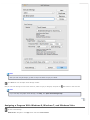
Assigning a Program With Windows 8, Windows 7, and Windows Vista
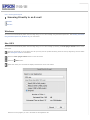
Assigning a Program With Windows XP
Each item on the LCD screen opens a pre-selected job when you select and press the
they perform are described in the table below.
Start button. The default jobs and the actions
Note for Mac OS X users:
Only the job number is displayed on the LCD screen. To confirm the job settings, check the Button Settings tab in the
Epson Event Manager main window. See Adding and Assigning Scan Jobs (Mac OS X) for instructions.
Job name
Default action
Scan to PDF (Gray) (Windows)
Scans into Grayscale images. The scanner scans only one side of the documents and
saves into PDF format.
Scan to PDF (B&W) (Windows)
Scans into Black and White images. The scanner scans only one side of the documents
and saves into PDF format.
Scan to PDF (Color) (Windows)
Scans into Color images. The scanner scans only one side of the documents and saves
into PDF format.
Scan to PDF (Auto) (Windows)
Automatically detects image type. The scanner scans both sides of the documents and
saves into PDF format.
B&W PDF-Simplex (Mac OS X)
Scans into Black and White images. The scanner scans only one side of the documents
and saves into PDF format.
Color PDF-Simplex (Mac OS X)
Scans into Color images. The scanner scans only one side of the documents and saves
into PDF format.
B&W PDF-Duplex (Mac OS X)
Scans into Black and White images. The scanner scans both sides of the documents
and saves into PDF format.
Color Jpeg to E-mail (Mac OS X)
Scans into Color images. After you scan, the Send File Via E-mail window appears.
Adding and Assigning Scan Jobs (Windows)
You can configure any of the LCD screen menu items to open a job in the Document Capture Pro to make scanning your projects even
quicker.
Do one of the following to start Document Capture Pro:
Windows 8.x: Navigate to the Apps screen and select Document Capture Pro.
Windows (other versions): Click the
Document Capture Pro.
You see a window like this:
start button icon or Start > Programs or All Programs > EPSON Software >
Click the
Manage Job icon from the toolbar at the top of the window. You see a window showing the current scan job list..
If you want to add a scan job, click Add, enter a name for the new job, select settings as necessary, and click OK. You can now use
the new scan job when you scan with Document Capture Pro.
Note:
See the Help information in Document Capture Pro for details.
If you want to assign scan jobs to the selection list on the product control panel, click Event Settings.
Select the jobs that you want to assign to any of the pull-down menus, click OK, then click OK again.
Now you can scroll through the LCD screen menu list, select the job you assigned, and press the
Start button to start the scan.
Top
Adding and Assigning Scan Jobs (Mac OS X)
You can configure any of the LCD screen menu items to open a job in the Epson Event Manager to make scanning your projects even
quicker.
Select Applications > Epson Software, and double-click the Event Manager icon.
You see the Button Settings tab in Epson Event Manager.
Select your scanner from Select Scanner.
Click the arrow next to a job description, then select a preset job or go to step 4 to create a new job. The preset jobs are listed
below.
Scan and Save: Epson Scan starts. See Scanning Documents Using Epson Scan for instructions.
Scan and Copy: Copy Utility starts. See Using the Scanner as a Copier for instructions.
If you want to create a job, click Make Job Settings. Click New, enter the Job Description and make the necessary Scan Settings,
and then click OK.
Note:
After you finish the job settings, go back to step 3 and select the job you created.
Click Close to close the Epson Event Manager window.
Now you can scroll through the LCD screen menu list, select the job you assigned, and press the
Start button to start the scan.
Note:
If you need help using Epson Event Manager, click Help, then Epson Event Manager Help.
Top
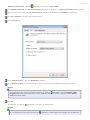
Assigning a Program With Windows 8, Windows 7, and Windows Vista
Do one of the following:
Windows 8.x: Navigate to the Apps screen and select Control Panel.
Windows (other versions): Click the
start button icon and select Control Panel.
Click Hardware and Sound, then Devices and Printers (Windows 8 and Windows 7) or Scanners and Cameras (Windows Vista).
Right-click your scanner’s icon and select Scan Properties (Windows 8 and Windows 7) or Properties (Windows Vista).
Click Yes or Continue in the User Account Control window.
Click the Events tab.
In the Select an event list, make sure Start Button is selected.
In the Start this program list, choose the program you want to assign. Only compatible programs appear in the list.
Note:
If you want to be given a choice of programs whenever you press the
Start button, click the Prompt for which
program to run radio button instead. If you want to disable the button from opening a program, click the Take no
action radio button instead.
Click OK.
Now whenever you press the
Start button, the program you assigned opens.
Note:
To run a job from the LCD screen menu when the
Start button is pressed, Epson Event Manager must be assigned in
the Start this program list.
Top
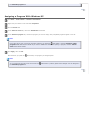
Assigning a Program With Windows XP
Click Start > Control Panel > Scanners and Cameras.
Right-click your scanner’s icon and select Properties.
Click the Events tab.
In the Select an event list, make sure Start Button is selected.
In the Start this program list, choose the program you want to assign. Only compatible programs appear in the list.
Note:
If you want to be given a choice of programs whenever you press the
Start button, click the Prompt for which
program to run radio button instead. If you want to disable the button from opening a program, click the Take no
action radio button instead.
Click Apply, then click OK.
Now whenever you press the
Start button, the program you assigned opens.
Note:
To run a job from the LCD screen menu when the
the Start this program list.
Start button is pressed, Epson Event Manager must be assigned in
Top
Home > Scanning Special Projects
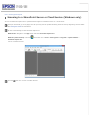
Scanning to a SharePoint Server or Cloud Service (Windows only)
You can use Document Capture Pro to upload scanned images to a SharePoint server or a cloud service.
Load your documents (up to 75 pages) into the input tray with the printed side facing down and the top edge facing into the feeder.
See Loading Documents for instructions.
Do one of the following to start Document Capture Pro:
Windows 8.x: Navigate to the Apps screen and select Document Capture Pro.
Windows (other versions): Click the
Document Capture Pro.
start button icon or Start > All Programs or Programs > Epson Software >
You see a window like this:
Click the
Scan icon. You see a window like this:
Select any displayed scan settings you want to use.
Note:
See the Help information in Document Capture Pro for details.
If you want to select detailed scan settings, click Detailed Settings. Select any scan settings you want to use and click OK.
Note:
When you select this option, Epson Scan starts. See Scanning Documents Using Epson Scan for details on selecting
settings in the Epson Scan window.
Click Scan. You see a preview of your scan in the Document Capture Pro window.
Check the scanned images and edit them as necessary.
Click one of the cloud service Destination icons to choose where to save your scanned file.
Web Folder (WebDAV)
Microsoft SharePoint server
Evernote
Google Drive
SugarSync
Note:
You may need to click the arrow next to the icons in order to see all of them. The available icons may vary, depending
on the software version you are using.
Select your Destination settings.
Note:
The settings may vary, depending on the software version you are using. See the Help information in Document Capture
Pro for details.
Select any other scan settings as necessary, and click Send. Your originals are scanned and uploaded to the indicated server.
Note:
You can also create a scan job for uploading scanned images to a SharePoint server or a cloud service. You can use the
scan job when you scan with Document Capture Pro or when you scan using the Document Capture Pro option on the
product control panel.
Home > Scanning Special Projects
Scanning Multi-Page Originals as Separate Files (Windows only)
You can use Document Capture Pro to scan multi-page originals as separate scanned files. You indicate where you want the new scanned
files to start by inserting a blank page or barcode between the pages of your original.
Note:
The settings may vary, depending on the software version you are using. See the Help information in Document Capture
Pro for details.
Load your documents (up to 75 pages) into the input tray with the printed side facing down and the top edge facing into the feeder.
See Loading Documents for instructions.
Do one of the following to start Document Capture Pro:
Windows 8.x: Navigate to the Apps screen and select Document Capture Pro.
Windows (other versions): Click the
Document Capture Pro.
start button icon or Start > All Programs or Programs > Epson Software >
You see a window like this:
Click the
Scan icon. You see a window like this:
Select any displayed scan settings you want to use.
Note:
See the Help information in Document Capture Pro for details.
If you want to select detailed scan settings, click Detailed Settings. Select any scan settings you want to use and click OK.
Note:
When you select this option, Epson Scan starts. See Scanning Documents Using Epson Scan for details on selecting
settings in the Epson Scan window.
Click Scan. You see a preview of your scan in the Document Capture Pro window.
Check the scanned images and edit them as necessary.
Open the File menu and select Batch Save.
Click File Save Settings.
Select Apply job separation and click Separation Settings.
Select the method you used to separate the originals, select a folder name specification and click OK.
Select any additional settings from the File Name Settings dialog and click OK.
Select any additional settings from the Batch Save dialog and click OK. Your originals are saved into separate files and folders as
specified by your settings.
Home > Maintenance
Cleaning the Scanner
To keep your scanner operating at its best, clean it periodically using the following procedure.
Caution:
Do not press the glass surface inside the scanner with any force.
Be careful not to scratch or damage the glass surface inside the scanner, and do not use a hard or abrasive
brush to clean it. A damaged glass surface can decrease the scan quality.
Never use alcohol, thinner, or corrosive solvent to clean the scanner. These chemicals can damage the scanner
components and the case.
Be careful not to spill liquid into the scanner mechanism or electronic components. This could permanently
damage the mechanism and circuitry.
Do not spray lubricants inside the scanner.
Turn off the scanner.
Remove all paper from the input tray.
Unplug the AC adapter from the scanner.
Clean the outer case with a cloth dampened with mild detergent and water.
Home > Maintenance
Cleaning Inside the Scanner
Opening the Scanner Cover
Cleaning the Glass Surface
Cleaning the Paper Path Rollers
Cleaning the Separation Pad
Cleaning the Paper Feed Roller
If scanned images have streaks or if scanned documents become dirty, clean inside the scanner.
Caution:
Do not press the glass surface inside the scanner with any force.
Be careful not to scratch or damage the glass surface inside the scanner, and do not use a hard or abrasive
brush to clean it. A damaged glass surface can decrease the scan quality.
Never use alcohol, thinner, or corrosive solvent to clean the scanner. These chemicals can damage the scanner
components and the case.
Be careful not to spill liquid into the scanner mechanism or electronic components. This could permanently
damage the mechanism and circuitry.
Do not spray lubricants inside the scanner.
Opening the Scanner Cover
Turn off the scanner.
Remove all paper from the input tray.
Unplug the AC adapter from the scanner.
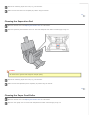
Pull the lever and open the scanner cover.
After opening the scanner cover, see the following sections:
Cleaning the Glass Surface
Cleaning the Paper Path Rollers
Cleaning the Separation Pad
Cleaning the Paper Feed Roller
When finished cleaning, close the input tray and output tray.
Top
Cleaning the Glass Surface
Open the scanner cover. See Opening the Scanner Cover for instructions.
If the glass surface inside the scanner gets dirty, clean it with a soft, dry, lint-free cloth. If the glass surface is stained with grease
or some other hard-to-remove material, use a small amount of glass cleaner with a soft cloth to remove it. Wipe off all remaining
liquid.
Caution:
Do not spray glass cleaner directly on the scanner glass.
Make sure that no dust builds up on the glass surface inside the scanner. Dust can cause abnormalities or lines in your scanned
images.
Top
Cleaning the Paper Path Rollers
Open the scanner cover. See Opening the Scanner Cover for instructions.
Wipe the rollers with a lint-free cloth dampened with water and thoroughly wrung out.
Wipe off all remaining liquid with a soft, dry, lint-free cloth.
Make sure that the rollers are completely dry before using the scanner.
Top
Cleaning the Separation Pad
Open the scanner cover. See Opening the Scanner Cover for instructions.
Wipe the separation pad downward with a lint-free cloth dampened with water and thoroughly wrung out.
Caution:
Be careful not to get the cloth caught on the pick spring.
Wipe off all remaining liquid with a soft, dry, lint-free cloth.
Make sure that the separation pad is completely dry before using the scanner.
Top
Cleaning the Paper Feed Roller
Open the scanner cover. See Opening the Scanner Cover for instructions.
Wipe the roller lightly with a lint-free cloth dampened with water and thoroughly wrung out.
Caution:
Be careful not to scratch or damage the roller.
Wipe off all remaining liquid with a soft, dry, lint-free cloth.
Make sure that the roller is completely dry before using the scanner.
Top
Home > Maintenance
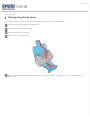
Transporting the Scanner
If you need to transport your scanner some distance, carefully prepare and repack it as described below.
Turn off the scanner, then unplug the AC adapter cord.
Disconnect all the cables from the scanner.
Remove all paper from the input tray.
Close the input tray and output tray.
Attach the packing materials that came with the scanner, then repack the scanner in its original box or a similar box that fits the
scanner snugly.
Home > Maintenance
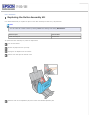
Replacing the Roller Assembly Kit
It is recommended that you replace the parts on the roller assembly kit after every 100,000 scans.
Note:
You can check the number of scans by starting EPSON Scan Settings and clicking Maintenance.
Removal part
Part number
Roller Assembly Kit
B12B813421
To replace the roller assembly kit, follow the steps below:
Turn off the scanner.
Remove all paper from the input tray.
Unplug the AC adapter from the scanner.
Pull the lever and open the scanner cover.
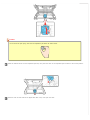
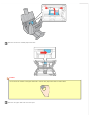
Press the hook on the separation pad, then remove the installed separation pad.
Caution:
Do not touch the pick spring. Hold the new separation pad holder as shown below.
Insert the bottom side of the new separation pad first, then press the hook on the separation pad to attach to the correct position.
Press the hook on both sides of the paper feed roller cover, then open the cover.
Slide and remove the installed paper feed roller.
Caution:
Do not touch the surface of the paper feed roller. Hold the new paper feed roller as shown below.
Slide the new paper feed roller onto the spool.
Caution:
Do not install the paper feed roller in reverse direction.
Close the paper feed roller cover, then close the scanner cover.
Turn on the scanner.
Start EPSON Scan Settings. Then, click Maintenance.
Click Reset on the right of the Number of Scans.
Click OK.
Home > Maintenance
Using the Security Slot
You can use an optional standard security lock with the security slot. To lock the scanner, insert the lock into the back of the scanner and
turn the key to lock the scanner. Then, secure the cable and the scanner to a stationary place.
See the User’s Guide that came with the security lock for detailed information.
Home > Solving Problems
Scanner Problems
The Lights Are Flashing
The Scanner Does Not Turn On
You Cannot Start Epson Scan
Pressing the Start Button Does Not Start the Correct Program
The Lights Are Flashing
When an error occurs, the scanner stops scanning and the Error and Power lights indicate the error type.
Power light
(Green)
Flashing
Error light
(Orange)
Flashing
Meaning
An error has occurred.
Make sure the scanner is connected to your computer properly.
Make sure the scanner software is fully installed. See the Start Here
sheet for instructions on installing the scanner software.
Paper is jammed in the scanner. Remove the jammed paper from the
scanner. See Paper Jams in the Scanner.
The scanner feeds more than one sheet of paper at a time.
Turn off the scanner and turn it on again. If the Error and Power lights
are still flashing, the scanner may be malfunctioning, or the scanner
light source may need to be replaced. See Epson Technical Support for
details.
Off
On
Scanner cover is open.
Top
The Scanner Does Not Turn On
Make sure your scanner’s AC adapter is securely connected to the scanner and a working electrical outlet.
Make sure the electrical outlet works. If necessary, test it by plugging in another electrical device and turning it on.
Top
You Cannot Start Epson Scan
Make sure the scanner is turned on.
Turn off the scanner and computer, then check the interface cable connection between them to make sure it is secure.
Use the USB cable that came with your scanner.
Connect the scanner directly to the computer’s USB port or through one USB hub only. The scanner may not work properly when
connected to the computer through more than one USB hub.
If you are using any TWAIN-compliant program, make sure that the correct scanner is selected as the Scanner or Source setting.
If you upgraded your computer’s operating system, you need to reinstall Epson Scan. Uninstall Epson Scan as described in
Uninstalling Your Scanning Software, then reinstall it as described on the Start Here sheet.
For Windows only:
Make sure your scanner’s name appears under Imaging device without a (?) or an exclamation (!) mark in the Device Manager window. If
the scanner’s name appears with one of these marks or as an Unknown device, uninstall Epson Scan as described in Uninstalling Your
Scanning Software, then reinstall it as described on the Start Here sheet.
Top
Pressing the Start Button Does Not Start the Correct Program
Make sure your scanner software is installed as described on the Start Here sheet.
Windows: Click the Events tab in your scanner’s Properties window and make sure Take no action is not selected. Also, make
sure the Start Button is selected in the Select an event list box, and Start this program is selected. For details, see Assigning a
Program With Windows 8, Windows 7, and Windows Vista or Assigning a Program With Windows XP.
Mac OS X: Make sure you are logged on as the user who installed the scanner software. Other users must first start Epson
Scanner Monitor in the Applications folder and then press the
Start button to scan.
Top
Home > Solving Problems
Paper Feeding Problems
Paper Jams in the Scanner
Double Feed Error (GT-S80 only)
Paper Jams in the Scanner
If paper jams inside the scanner, follow the steps below to remove jammed paper.
Turn off the scanner.
Remove all paper from the input tray.
Pull the cover lever and open the scanner cover.
Remove the jammed paper.
Note:
Remove any pages remaining inside the scanner.
If paper is jammed in the output tray, gently pull the paper out in the direction shown.
Close the scanner cover.
Top
Double Feed Error (GT-S80 only)
When the double feed error is detected even when the error does not occur, try the following solution:
Click Configuration in the Epson Scan window, select the Detect Double Feed check box, then select Standard as the Paper
Thickness.
If the error does not clear, deselect the Detect Double Feed check box.
See Epson Scan Help for details.
Top
Home > Solving Problems
Scanning Problems
Scanning Takes a Long Time
Only Part of the Document is Scanned
Event Manager Does Not Open
The LCD Screen Is Not Displaying Your Language
Scanning Takes a Long Time
Try scanning your original at a lower resolution setting to speed up scanning. See Selecting the Scan Resolution for instructions.
Computers with USB 2.0 (high speed) ports can scan faster than those with USB 1.1 ports. If you are using a USB 2.0 port with
your scanner, make sure it meets the system requirements. See System Requirements for details.
Top
Only Part of the Document is Scanned
If your scanned image is not the correct size or only part of your document scanned, open Epson Scan or Document Capture Pro and make
sure the Size or Document Size setting is correct.
Top
Event Manager Does Not Open
If you have clicked the Keep Blocking button in the Windows Security Alert window during or after installation of the Epson Software,
follow the steps below to unblock Event Manager.
Windows 8.x
Navigate to the Apps screen and select Control Panel.
Select System and Security > Allow an app through Windows Firewall.
Click the Allow another app button.
Note:
You may need to click the Change settings button first.
Select Event Manager from the Add an app list, and then click Add.
Confirm that the check box for Event Manager is selected in the Allowed apps and features list, and then click OK.
Windows (Other Versions)
Click the
start button icon or Start > Control Panel > Security or Security Center > Windows Firewall.
Click the Exceptions tab, and then click the Add Program button.
Note for Windows 7 and Windows Vista:
Click Change settings if you cannot find the Exception tab.
Select Event Manager from the Programs list, and then click OK.
Confirm that the check box for Event Manager is selected in the Programs and Services list, and then click OK.
Top
The LCD Screen Is Not Displaying Your Language
If the language displayed on the LCD screen is not your language, follow the steps below to select the language.
Press and hold both the
Up arrow and
Down arrow button for three seconds.
Press the
Up arrow or
Down arrow button to select the language.
Press the
Start button to set the language.
Top
Home > Solving Problems
Scan Quality Problems
You See Only a Few Dots in Your Scanned Image
A Line or Line of Dots Always Appears in Your Scanned Images
Straight Lines in Your Image Come Out Crooked
Your Image Is Distorted or Blurred
Your Scanned Image Is Too Dark
Ripple Patterns Appear in Your Scanned Image
Characters Are Not Recognized Well When Converted Into Editable Text (OCR)
Scanned Colors Differ from the Original Colors
Blank Pages Appear in Your Scanned Image
You See Only a Few Dots in Your Scanned Image
When scanning with the Black & White setting, change the Threshold setting. See Adjusting the Color and Other Image Settings for
instructions.
Top
A Line or Line of Dots Always Appears in Your Scanned Images
The glass surface inside the scanner may need cleaning. Clean the glass surface inside the scanner. See Cleaning Inside the
Scanner.
If you still have the problem, the glass surface inside the scanner may be scratched. Contact Epson for assistance.
Make sure the plastic card that you are scanning does not have shiny surfaces. If you scan plastic cards with shiny surfaces, a line
may appear.
Top
Straight Lines in Your Image Come Out Crooked
Make sure the document lies perfectly straight in the input tray.
Top
Your Image Is Distorted or Blurred
Make sure your document is not wrinkled or warped.
Make sure you do not move the document, or your scanner while scanning.
Make sure the scanner is placed on a flat, stable surface.
Select Unsharp Mask check box. See Adjusting the Color and Other Image Settings for instructions.
Top
Your Scanned Image Is Too Dark
Check the Brightness setting. See Adjusting the Color and Other Image Settings for instructions.
Check the brightness and contrast settings of your computer monitor.
Top
Ripple Patterns Appear in Your Scanned Image
A ripple or cross-hatch pattern (called moiré) may appear in a scanned image of a printed document. It is caused by interference from the
differing pitches in the scanner’s screen and the halftone screen in your original.
Original image
Descreening applied
Select the Descreening check box. See Adjusting the Color and Other Image Settings for instructions.
Select a lower resolution setting. See Selecting the Scan Resolution for instructions.
Top
Characters Are Not Recognized Well When Converted Into Editable Text (OCR)
Make sure the document lies perfectly straight in the input tray.
Select the Text Enhancement check box.
Adjust the Threshold setting. See Adjusting the Color and Other Image Settings for instructions.
Check your OCR software manual to see if there are any settings you can adjust in your OCR software.
Top
Scanned Colors Differ from the Original Colors
Make sure the Image Type setting is correct. See Scanning Documents Using Epson Scan or Scanning Documents Using
Document Capture Pro (Windows only) for instructions.
If you are using Epson Scan, make sure to enable the Embed ICC Profile setting. In the File Save Settings window, select JPEG
or TIFF as the Type setting. Click Options, then select the Embed ICC Profile check box. To access the File Save Settings
window, see Selecting File Save Settings Using Epson Scan.
If you are using Document Capture Pro, make sure to enable the Embed ICC Profile setting. In the window that appears after
you select a Destination icon, select JPEG or TIFF as the File Type setting. Click Options, then select the Embed ICC Profile
check box.
Printed colors can never exactly match the colors on your monitor because printers and monitors use different color systems:
monitors use RGB (red, green, and blue) and printers typically use CMYK (cyan, magenta, yellow, and black).
Top
Blank Pages Appear in Your Scanned Image
If you are using Epson Scan, select the Skip Blank Pages check box in the Configuration window. See Epson Scan Help for details.
If you are using Document Capture Pro, select the Skip Blank Page check box.
Top
Home > Solving Problems
Updating Your Scanning Software (Mac OS X only)
You can use Epson Software Updater to download updates and additional software (if available) for your scanner. Make sure your scanner is
connected to your computer before you start the program.
Select Applications > Epson Software and double-click the EPSON Software Updater icon.
The Epson Software Updater window opens.
Note:
If you do not already have Epson Software Updater, you can obtain it online. To download Epson Software Updater, visit
Epson's driver download site at epson.com/support (U.S.) or epson.ca/support (Canada).
Home > Solving Problems
Uninstalling Your Scanning Software
Uninstalling Epson Scan
Uninstalling the User’s Guide
Uninstalling Other Epson Applications
You may need to uninstall and then reinstall your scanner software to solve certain problems or if you upgrade your operating system.
Uninstalling Epson Scan
Follow the instructions in the section for your operating system to uninstall Epson Scan.
Uninstalling Epson Scan for Windows 8, Windows 7, and Windows Vista
Note:
You must log on to a Computer Administrator account.
Turn off the scanner.
Disconnect the scanner’s interface cable from your computer.
Do one of the following:
Windows 8.x: Navigate to the Apps screen and select Control Panel.
Windows (other versions): Click the
start button icon and select Control Panel.
Click Uninstall a program from the Programs category.
Select EPSON Scan from the list.
Click Uninstall/Change. In Windows Vista, click Continue when you see the User Account Control window.
Follow the on-screen instructions to uninstall Epson Scan.
In some cases, a message may appear to prompt you to restart the computer. If so, make sure I want to restart my computer
now is selected and click Finish.
Uninstalling Epson Scan for Windows XP
Note:
You must log on to a Computer Administrator account.
Turn off the scanner.
Disconnect the scanner’s interface cable from your computer.
Click Start and select Control Panel.
Double-click the Add or Remove Programs icon.
Select EPSON Scan from the list.
Click Change/Remove.
Follow the on-screen instructions to uninstall Epson Scan.
In some cases, a message may appear to prompt you to restart the computer. If so, make sure I want to restart my computer
now is selected and click Finish.
Uninstalling Epson Scan for Mac OS X
In most cases, you do not need to uninstall your scanner software before re-installing it. However, you can download the Uninstaller utility
from the Epson support website to uninstall your scanner software as described here.
Note:
If you find that re-installing your scanner software does not solve a problem, contact Epson for assistance.
To download the Uninstaller utility, visit Epson’s support website (U.S. downloads or Canadian downloads).
Follow the instructions on the screen to install the Uninstaller utility.
Quit all applications currently running on your Mac.
Double-click the Uninstaller icon.
In the Epson Uninstaller screen, select the checkbox for each software program you want to uninstall.
Click Uninstall.
Follow the on-screen instructions to uninstall the software.
Top
Uninstalling the User’s Guide
If you need to uninstall this on-screen User’s Guide, follow the steps here for your operating system.
Uninstalling the Online User’s Guide for Windows
Note:
You must log on to a Computer Administrator account.
Do one of the following:
Windows 8.x: Navigate to the Apps screen and select GT-S50_S80 User’s Guide Uninstaller.
Windows (other versions): Click the
start button icon or Start > All Programs or Programs > Epson > GT-S50_S80
User’s Guide > GT-S50_S80 User’s Guide Uninstaller.
Follow the on-screen instructions to uninstall the User’s Guide.
Uninstalling the Online User’s Guide for Mac OS X
Drag the gts50-s80_el folder and the GT-S50_S80 User’s Guide icon in the Applications/Epson Software/Guide folder into the
Trash.
Top
Uninstalling Other Epson Applications
Follow these steps to uninstall applications you do not need.
For Windows 8, Windows 7, and Windows Vista
Note:
You need an administrator account and password if you log on as a standard user.
Do one of the following:
Windows 8.x: Navigate to the Apps screen and select Control Panel.
Windows (other versions): Click the
start button icon and select Control Panel.
Click Uninstall a program from the Programs category.
Select the application you want to uninstall from the list.
Click Uninstall/Change or Uninstall. In Windows Vista, click Continue when you see the User Account Control window.
Follow the on-screen instructions to uninstall the application.
For Windows XP
Note:
You must log on to a Computer Administrator account.
Click Start and select Control Panel.
Double-click the Add or Remove Programs icon.
Select the application you want to uninstall from the list.
Click Remove or Change/Remove.
Follow the on-screen instructions to uninstall the application.
For Mac OS X
In most cases, you do not need to uninstall your scanner software before re-installing it. However, you can download the Uninstaller utility
from the Epson support website to uninstall your scanner software as described here.
Note:
If you find that re-installing your scanner software does not solve a problem, contact Epson for assistance.
To download the Uninstaller utility, visit Epson’s support website (U.S. downloads or Canadian downloads).
Follow the instructions on the screen to install the Uninstaller utility.
Quit all applications currently running on your Mac.
Double-click the Uninstaller icon.
In the Epson Uninstaller screen, select the checkbox for each software program you want to uninstall.
Click Uninstall.
Follow the on-screen instructions to uninstall the software.
Top
Home > Solving Problems
Epson Technical Support
Internet Support
Internet Support
Visit Epson’s support website at epson.com/support (U.S.) or epson.ca/support (Canada) and select your product for solutions to common
problems. You can download drivers and documentation, get FAQs and troubleshooting advice, or e-mail Epson with your questions.
Speak to a Support Representative
Before you call Epson for support, please have the following information ready:
Product name (WorkForce Pro GT-S50 or WorkForce Pro GT-S80)
Product serial number (located on the back of the scanner)
Proof of purchase (such as a store receipt) and date of purchase
Computer configuration
Description of the problem
Then call:
U.S.: (562) 276-4382, 6 AM to 8 PM, Pacific Time, Monday through Friday, and 7 AM to 4 PM Saturday.
Canada: (905) 709-3839, 6 AM to 8 PM, Pacific Time, Monday through Friday, and 7 AM to 4 PM Saturday.
Days and hours of support are subject to change without notice. Toll or long distance charges may apply.
Purchase Accessories
You can purchase genuine Epson accessories from an Epson authorized reseller. To find the nearest reseller, call 800-GO-EPSON (800-4637766). Or you can purchase online at epsonstore.com (U.S. sales) or epson.ca (Canadian sales).
Top
Home > Solving Problems
Other Software Technical Support
ABBYY FineReader
(866) 463-7689, abbyy.com, [email protected]
EMC Captiva ISIS
(800) 782-4362 (U.S.), (800) 543-4782 (Canada), emc.com
NewSoft Presto! BizCard
www.newsoftinc.com, [email protected]
Nuance ScanSoft PaperPort
(770) 702-6014, support.nuance.com
Home > Technical Specifications
System Requirements
Windows System Requirements
Macintosh System Requirements
Make sure your system meets the requirements in these sections before using it with your scanner.
Windows System Requirements
System
Windows 8.x, Windows 7, Windows Vista, Windows XP, or Windows XP Professional x64 Edition
USB 2.0 Host Driver by Microsoft must be used.
Interface
USB port (Type A) built into the main board
Display
Color monitor with 800 × 600 screen resolution or higher, and 24-bit (Full Color) color
(Color and tone reproduction are subject to the display capability of your computer system, including
the video card, display monitor, and software. See your system documentation for details.)
Top
Macintosh System Requirements
System
Mac OS X 10.9.x, 10.8.x, 10.7.x, 10.6.x, or 10.5.8. Fast User Switching on Mac OS X or later is not
supported.
Interface
Macintosh USB
Display
Color monitor with 800 × 600 screen resolution or higher, and millions of colors
(Color and tone reproduction are subject to the display capability of your computer system, including
the video card, display monitor, and software. See your system documentation for details.)
Note:
Epson Scan does not support the UNIX File System (UFS) for Mac OS X. You must install Epson Scan on a disk or in a
partition that does not use UFS or Mac OS Extended (Case-sensitive/Journaled.)
Top
Home > Technical Specifications
Scanner Specifications
General
Mechanical
Electrical
Environmental
Interfaces
Standards and Approvals
Note:
Specifications are subject to change without notice.
General
Scanner type
Sheet Feed, one pass duplex A4 color scanner
Photoelectric device
Color CCD line sensor
Effective pixels
5,100 × 21,600 pixels at 600 dpi
Document size
Max: 8.5 × 36.0 inches (216 × 914.4 mm)
Min: 2.0 × 2.9 inches (52 × 73.7 mm)
Paper input
Face-down loading
Paper output
Face-down ejection
Paper capacity
75 sheets of paper at 75 g/m 2
Scanning resolution
600 dpi (main scan)
600 dpi (sub scan)
Output resolution
75, 100, 150, 200, 240, 300, 400, 600 dpi
Image data
16 bits per pixel per color internal
1 to 8 bits per pixel per color external
Interface
One USB 2.0 Hi-speed port
Light source
White LED
Note:
Optional optical resolution is the maximum scan resolution of the CCD elements, using the definition of ISO 14473. ISO
14473 defines optical resolution as the fundamental sampling rate of the scan sensor.
Top
Mechanical
Dimensions
Width: 11.9 inches (302.0 mm)
Depth: 7.8 inches (198.0 mm)
Height: 8.4 inches (213.0 mm)
Weight
Approx. 10.1 lb (4.6 kg)
Top
Electrical
Note:
Check the label on the AC adapter or on the back of the scanner for voltage information.
Scanner
GT-S80
Rated voltage
GT-S50
DC 24.0 V
Rated input current
2.0 A
Power consumption
Operating mode
45 W
40 W
Ready mode
13 W
Sleep mode
4.2 W
Power off mode
1 W
AC Adapter
100-240 V model
AC adapter model
A421H
Rated input voltage
AC 100 to 240 V
Rated input current
1.2 A
Rated input frequency
50 to 60 Hz
Rated output voltage
DC 24.0 V
Rated output current
2.0 A
Note:
The AC adapter model varies in certain locations.
Top
Environmental
Temperature
Humidity
Operating conditions
Operating
50 to 95 ˚F (10 to 35 ˚C)
Storage
–13 to 140 ˚F (–25 to 60 ˚C)
Operating
10 to 80%, without condensation
Storage
10 to 85%, without condensation
Ordinary office or home conditions.
Avoid operating the scanner in direct sunlight, near a strong light source, or
in extremely dusty conditions.
Top
Interfaces
USB Interface
Interface type
Universal Serial Bus Specification Revision 2.0
Electrical standard
Full Speed mode (12 Mbits per second) and Hi-Speed mode (480 Mbits per second) of Universal
Serial Bus Specification Revision 2.0.
Connector type
One Type B port
Top
Standards and Approvals
Scanner
EMC
FCC Part 15 Subpart B Class B
CAN/CSA-CEI/IEC CISPR22 Class B
AC Adapter
Safety
UL60950-1
CAN/CSA-C22.2 No. 60950-1
EMC
FCC Part 15 Subpart B Class B
CAN/CSA-CEI/IEC CISPR22 Class B
Top