1
Connecting Personal Computers and Video Equipment
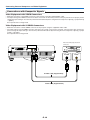
Connections with Audio Connectors
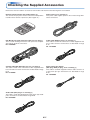
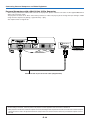
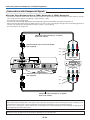
* Make the connection to the projector’s AUDIO connector using the supplied audio cable. When the audio jack of the equipment
that is to be connected is of the RCA phono type, make connection via the supplied audio conversion adapter.
* The built-in speaker of the projector provides monaural audio. To enjoy convincing audio reproduction, please connect the
audio output of the video equipment to your audio system.
* The built-in speaker outputs the audio of the equipment connected to the AUDIO connector.
White
Audio cable (Supplied item)
AUDIO OUT
L
Audio conversion adapter
(Supplied item)
Audio cable (Supplied item)
E-20
R
Red