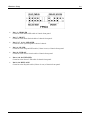
1
BE7 Series
(BE7-G, BE7-S, BE7-RAID, BE7-B, BE7)
Socket 478 System Board
User’s Manual
4200-0329-02
Rev. 1.00
Copyright and Warranty Notice
The information in this document is subject to change without notice and does not
represent a commitment on part of the vendor, who assumes no liability or
responsibility for any errors that may appear in this manual.
No warranty or representation, either expressed or implied, is made with respect to the
quality, accuracy or fitness for any particular part of this document. In no event shall
the manufacturer be liable for direct, indirect, special, incidental or consequential
damages arising from any defect or error in this manual or product.
Product names appearing in this manual are for identification purpose only and
trademarks and product names or brand names appearing in this document are the
property of their respective owners.
This document contains materials protected under International Copyright Laws. All
rights reserved. No part of this manual may be reproduced, transmitted or transcribed
without the expressed written permission of the manufacturer and authors of this
manual.
If you do not properly set the motherboard settings, causing the motherboard to
malfunction or fail, we cannot guarantee any responsibility.
BE7 Series
Contents
BE7 系列快速安裝指引............................................................................ 1
BE7 シリーズのクイックインストールガイド ................................... 3
BE7-Serie Schnellinstallationsanleitung ................................................ 5
Série BE7 Guide d’Installation Rapide .................................................. 7
Краткое руководство по установке BE7 cерия.................................. 9
Guida all’installazione veloce Scheda madre serie BE7 ......................11
CHAPTER 1.
INTRODUCTION..................................................... 1-1
1-1. FEATURES & SPECIFICATIONS ...................................................... 1-1
1-2. LAYOUT DIAGRAM (BE7-G)......................................................... 1-3
1-3. LAYOUT DIAGRAM (BE7-S) ......................................................... 1-4
1-4. LAYOUT DIAGRAM (BE7-RAID).................................................. 1-5
1-5. LAYOUT DIAGRAM (BE7-B)......................................................... 1-6
1-6. LAYOUT DIAGRAM (BE7)............................................................. 1-7
CHAPTER 2.
HARDWARE SETUP .............................................. 2-1
2-1. INSTALL THE MOTHERBOARD ...................................................... 2-1
2-2. INSTALL PENTIUM® 4 CPU AND HEATSINK SUPPORTING-BASE .. 2-2
2-3. INSTALL SYSTEM MEMORY .......................................................... 2-3
2-4. CONNECTORS, HEADERS AND SWITCHES ..................................... 2-4
CHAPTER 3.
BIOS SETUP ............................................................. 3-1
3-1. CPU SETUP [SOFTMENU™ III] ..................................................... 3-3
3-2. STANDARD CMOS FEATURES SETUP MENU ................................ 3-6
3-3. ADVANCED BIOS FEATURES SETUP MENU ................................. 3-9
3-4. ADVANCED CHIPSET FEATURES SETUP MENU ........................... 3-12
3-5. INTEGRATED PERIPHERALS ......................................................... 3-14
3-6. POWER MANAGEMENT SETUP MENU ......................................... 3-18
3-7. PNP/PCI CONFIGURATIONS ........................................................ 3-22
3-8. PC HEALTH STATUS ................................................................... 3-24
3-9. LOAD FAIL-SAFE DEFAULTS....................................................... 3-26
3-10. LOAD OPTIMIZED DEFAULTS ...................................................... 3-26
User’s Manual
3-11. SET PASSWORD ........................................................................... 3-27
3-12. SAVE & EXIT SETUP ................................................................... 3-28
3-13. EXIT WITHOUT SAVING .............................................................. 3-28
APPENDIX A.
INSTALL INTEL CHIPSET SOFTWARE UTILITY
.................................................................................... A-1
APPENDIX B.
INSTALL INTEL APPLICATION ACCELERATOR
.................................................................................... B-1
APPENDIX C.
INSTALL AUDIO DRIVER..................................... C-1
APPENDIX D.
INSTALL LAN DRIVER.......................................... D-1
APPENDIX E.
INSTALL USB 2.0 DRIVER .................................... E-1
APPENDIX F.
INSTALL SERIAL ATA RAID DRIVER (FOR BE7-G
& BE7-S) ................................................................... F-1
APPENDIX G.
HPT 372 SETUP (FOR BE7-RAID) ....................... G-1
APPENDIX H.
BIOS UPDATE GUIDE ........................................... H-1
APPENDIX I.
HARDWARE MONITORING (THE WINBOND
HARDWARE DOCTOR UTILITY) .......................... I-1
APPENDIX J.
INSTALLATION GUIDE FOR SUSPEND TO RAM
..................................................................................... J-1
APPENDIX K.
TROUBLESHOOTING (NEED ASSISTANCE?).. K-1
APPENDIX L.
HOW TO GET TECHNICAL SUPPORT ................L-1
BE7 Series
BE7 系列快速安裝指引
1
BE7 系列快速安裝指引
感謝您購買 ABIT 的主機板,此主機板是設計給 Intel Socket 478 Pentium 4 處理器使用,支援 Intel
Socket-478 架構的處理器,並支援最高至 2GB 容量的 DDR 記憶體模組。
如您要瞭解此主機板更詳細的資訊,請參閱我們的完整版使用手冊,裡面會有詳盡的說明。此快速
安裝手冊是給有經驗的系統組裝者使用,如果這是您第一次嘗試來組裝您的電腦系統,我們建議您
先去閱讀完整版的使用手冊,或是詢問技術人員來幫助您組裝您的電腦系統。
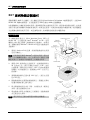
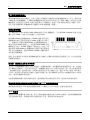
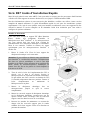
處理器的安裝
本主機板提供零出力 (Zero Insertion Force, ZIF) 式
Socket 478,以方便安裝 Intel® Pentium® 4 CPU。您所
購買的 CPU 應已配備一組散熱套件及散熱片,如果沒
有,請購買專為 Pentium® 4 Socket 478 設計的散熱套件
及散熱片。
1.
請找出 Socket 478 的位置,然後將散熱套件支座固
定在主機板上。
注意:若果您使用專為 Pentium® 4 設計的底座,請注意
底座上的金屬螺栓或墊片 (若已安裝的話)。請確定金屬
螺栓或墊片不會碰到印刷電路板上的電線或零件。
2.
請將 CPU 插座桿拉出至插座旁,然後將插座桿以
90 度角向上拉。請以正確的方向插入 CPU,由於
只能朝著一個固定的方向插入 CPU,因此如果遇到
阻礙時,切勿勉強用力。最後壓住 CPU,並且閂上
插座桿。
3.
請將散熱裝置的正面向著 CPU 放入,直至完全蓋
住 CPU 為止。
4.
將散熱裝置的支罩蓋在散熱裝置上。請確定支罩的
每邊四個鎖扣都已鎖入鎖孔。
5.
將支罩兩側的固定夾往下壓,以夾緊支座。壓固定
夾時,請注意壓按的方向。
6.
現在散熱支罩及支座應該已互相緊扣,而散熱裝置
亦已裝妥在支罩內。
注意:請記得設定正確的處理器外頻和倍頻數值。
User’s Manual
2
BE7 系列快速安裝指引
將主機板安裝到機殼上
當您將處理器安裝到主機板上之後,您便可以開始將主機板固定到電腦機殼裡去。首先;請您先將
主機板固定到電腦機殼。大多數的電腦機殼底座都有許多的固定孔位,請將主機板上的固定孔位與
機殼底座上的固定孔位對準。如果孔能對準並且有螺絲孔,就表示可使用銅柱來固定主機板。另外;
您可以使用塑膠墊片來讓螺絲與主機板的 PCB 表層隔離(絕緣)。
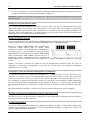
安裝系統記憶體
本主機板提供 3 組 184 腳的 DDR DIMM 插座可供記憶體擴充,可支援 DDR SDRAM 的最小記憶
體大小為 64MB,而最大的記憶體大小則為 2GB。
將 DDR DIMM 記憶體模組插入 DIMM 插槽。請注意記
憶體模組的楔子是如何對應到 DIMM 插槽上的卡榫之
上。此種設計可確保 DDR DIMM 記憶體模組僅能由一
個方向插到 DIMM 插槽之上。當您將 DDR DIMM 記憶
體模組完全插入 DIMM 插槽時,模組退出(固定)夾
應該會將 DDR DIMM 記憶體模組自兩側卡緊並緊緊地
固定住記憶體模組。請依 DIMM1~DIMM3 插槽的順序
來安裝記憶體模組。
最後,您必需將所有必需的裝置纜線連接到主機板上相關的連接頭或是連接器上面,以完成您系統
的硬體安裝動作。
連接器、連接頭以及附加卡的安裝
在任何一部電腦機殼的裡面,都必需連接一些纜線與插頭。這些纜線與插頭通常都是一對一的連接
至主機板的連接埠上,您必需注意任何一條纜線的連接方向。如果可能的話,請一併注意連接埠第
一根針腳的位置。您將會安裝一些特殊功能的附加卡到主機板上面,像是 SCSI 卡或是 AGP 顯示
卡等等。當您將它們安裝到主機板上適當的插槽之後,請以螺絲將這些附加卡與機殼背板牢牢地固
定好,避免有鬆動的情況發生。
如您想要瞭解相關且更為詳細的資訊,請參閱我們的完整版使用手冊,裡面會有詳盡的說明。
將電源供應器的電源線連接頭與主機板上的 J3/J5 連接頭連接起來
請將電源供應器的 ATX 電源接頭確實地壓入主機板上的 J3/J5 接頭,並確定連接妥當。
BIOS 的設定
當您將所有的硬體安裝完畢以後,就可以開啟電腦的電源並進入 BIOS 的選項。如您想要瞭解相關
且更為詳細的資訊,請參閱我們的完整版使用手冊,裡面會有詳盡的說明。
BE7 Series
BE7 シリーズのクイックインストールガイド
3
BE7 シリーズのクイックインストールガイド
ABIT マザーボードをお買い上げいただきましてありがとうございます。このマザーボードは
Intel Socket 478 Pentium 4 プロセッサ用に設計されています。最高 2GB の DDR メモリを搭載し
た Intel Socket-478 構造をサポートします。
このマザーボードの詳細については、ユーザーズマニュアルの完全版を参照してください。この
クイックインストールガイドは、経験あるシステム構築者向けに書かれました。今回始めてコン
ピュータシステムをセットアップする方は、まず完全版のマニュアルをお読みになるか、専門技
術者に連絡してコンピュータシステムのセットアップを行うようお勧めします。レバー
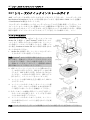
プロセッサの取り付け
このマザーボードは ZIF (ゼロインサーションフォース)
Socket 478 を提供して Intel® Pentium® 4 CPU をインスト
ールします。お買い上げになった CPU には、ヒートシン
クと冷却ファンのキットが付属しています。付属してい
ない場合、Pentium® 4 Socket 478 向けに特別に設計された
キットをお求めください。
1.
Socket 478 を設置します。ヒートシンクをマザーボー
ド上のサポート台に固定してください。
注意:Pentium® 4 向けに特別に設計されたシャーシをお
使いの場合、金属スタッドやスペーサがすでにインスト
ールされている場合、それらの場所に注意してくださ
い。金属スタッドやスペーサがプリント基板線や PCB の
部品に触れないように気をつけてください。
2.
CPU のソケットレバーをソケットから横方向に引い
て、90 度上に持ち上げます。CPU を正しい方向に挿
入します。CPU を挿入する際、余分な力を入れない
でください。1 方向にだけ適合します。CPU を下に
押しながら、ソケットレバーをクローズします。
3.
ヒートシンクの面が CPU を完全に覆うまで、CPU の
上に下ろします。
4.
ヒートシンクのサポートカバーをヒートシンクに置
きます。サポートカバーの各面の 4 本の留め金がす
べて固定穴に届いていることを確認してください。
5. サポートカバーの両側の支持クリップを下に押して、
サポート台と共に固定します。クリップを下に押す
ときに方向に注意してください。
6.
ヒートシンクのサポートカバーと台は、ヒートシン
クの内側でお互いにしっかりと固定されている必要
があります。
注意:プロセッサに対して、正しいバス周波数とマルチプルに設定することを忘れないでください。
User’s Manual
4
BE7 シリーズのクイックインストールガイド
マザーボードをシャーシに取り付ける
マザーボードにプロセッサを取り付けた後、シャーシにマザーボードを固定することができるよ
うになります。まず、シャーシにマザーボードを固定する必要があります。ほとんどのコンピュ
ータシャーシには、多くの取り付け穴の付いた台が付属しており、それを使用することでマザー
ボードをしっかり取り付けたり、同時にショートを避けることができます。シャーシに付属する
飾りボタンかスペーサーを使用してマザーボードを固定します。
システムメモリの取り付け
このマザーボードでは、3 つの 184 ピン DDR DIMM
スロットメモリ拡張を提供します。最小メモリは 64
MB で、最大メモリは 2GB DDR SDRAM です。
DDR DIMM を図に示すように拡張スロットに差し込
みます。モジュールがソケットにどのように固定され
ているか注意してください。これにより、DDR DIMM
モジュールに差し込む方法が 1 つしかないことを確認できます。DDR DIMM モジュールを DDR
DIMM ソケットにしっかりと押し込み、モジュールが DDR DIMM ソケットに完全に差し込まれ
ていることを確認します。
これらのモジュールに対して、DIMM1 から DIMM3 まで順に差し込むようにお勧めします。
次に、すべての必要なデバイスケーブルをマザーボードの関連ヘッダとコネクタに接続して、シ
ステムのハードウェア取付けを終了する必要があります。
コネクタ、ヘッダ、スイッチおよびアダプタ
コンピュータのケース内部には、複数のケーブルやプラグを接続できます。これらのケーブルや
プラグは、通常マザーボードにあるコネクタに 1 つずつ接続されます。ケーブルの接続方向には
十分な注意を払い、また必要に応じ、コネクタの第 1 ピンの位置にも注目する必要があります。
SCSI アダプタ、AGP アダプタのような特殊なニーズ向けには、それに対応したアダプタを取り
付けてください。アダプタをマザーボードのスロットに取り付けたら、ネジでシャーシの背面パ
ネルに固定してください。
詳細については、ユーザーズマニュアルの完全版を参照してください。
電源コネクタを J3/J5 コネクタに差し込む
電源装置から出ている電源ブロックコネクタをこの J3/J5 に接続します。コネクタが十分奥まで
装着されていることをご確認ください。
BIOS のセットアップ
ハードウェアの取り付けが完了したら、コンピュータの電源をオンにし、BIOS Setup アイテム
に移動して、プロセッサのパラメータをセットアップします。詳細については、ユーザーズマニ
ュアルの完全版を参照してください。
BE7 Series
BE7-Serie Schnellinstallationsanleitung
5
BE7-Serie Schnellinstallationsanleitung
Vielen Dank für Ihren Kauf der ABIT-Hauptplatine. Diese Hauptplatine wurde für Intel Socket 478
Pentium 4 Prozessore ausgelegt. Sie unterstützt die Intel Socket-478-Struktur und
DDR-Speichersteckplätze mit der Kapazität von bis zu 2 GB RAM.
Beziehen Sie sich bitte für detaillierte Informationen über diese Hauptplatine auf die vollständige Version
des Benutzerbuchs. Diese Schnellinstallationsanleitung ist für erfahrene Systemaufbauer gedacht. Ist es
Ihr erster Versuch ein Computersystem aufzubauen, dann empfehlen wir Ihnen zuerst das vollständige
Benutzerhandbuch zu lesen oder einen Techniker zum Aufbauen des Systems zu Hilfe zu holen.
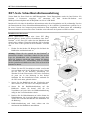
Installieren des Prozessors
Dieses Motherboard verfügt über einen ZIF (Zero
Insertion Force) Sockel 478 zur Installation eines Intel®
Pentium® 4 CPU. Ihre CPU sollte über ein Kühlblech und
einen Lüfter verfügen. Wenn dies nicht der Fall ist, kaufen
Sie bitte diese Teile speziell für den Pentium® 4 Sockel
478.
1.
Finden Sie den Socket 478. Bringen Sie die Basis des
Kühlblechs am Motherboard an.
Achtung: Wenn Sie ein speziell für den Pentium® 4
entworfenes Gehäuse verwenden, achten Sie bitte auf die
Lage der Metallbolzen oder Abstandhalter, falls diese
schon im Gehäuse angebracht sind. Achten Sie darauf,
diese Metallbolzen bzw. Abstandhalter nicht in Kontakt
mit den gedruckten Schaltkreisen oder Teile auf dem PCB
kommen zu lassen.
2.
Ziehen Sie den CPU-Sockelhebel seitlich vom Sockel
weg und dann nach im 90°-Winkel nach oben. Setzen
Sie die CPU in der korrekten Ausrichtung ein.
Wenden Sie beim Einsetzen der CPU keine Gewalt an;
sie passt nur in eine Richtung in den Sockel.
Schließen Sie den Sockelhebel wieder, während Sie
die CPU nach unten gedrückt halten.
3.
Setzen Sie das Kühlblech mit der Vorderseite nach
unten auf die CPU, bis es die CPU komplett abdeckt.
4.
Setzen Sie die Kühlblechabdeckung auf das
Kühlblech. Achten Sie darauf, dass die vier
Verschlüsse auf jeder Seite der Kühlblechabdeckung
völlig in den Verschlusslöchern sitzen.
5.
Drücken Sie die Halteklammern an beiden Seiten der
Halteklammern, bis sie mit der Basis verriegelt sind.
Achten Sie beim Herunterdrücken der Klammern auf
die Richtung.
6.
Kühlblechabdeckung und –basis sollten nun fest
miteinander das Kühlblech umschließen.
User’s Manual
6
BE7-Serie Schnellinstallationsanleitung
Achtung: Vergessen Sie nicht, die korrekte Busfrequenz und Multiplikator für Ihren Prozessor
einzustellen.
Installieren der Hauptplatine im Gehäuse
Nach der Installation des Prozessors können Sie anfangen die Hauptplatine im Computergehäuse zu
befestigen. Die meisten Gehäuse haben eine Bodenplatte, auf der sich eine Reihe von Befestigungslöcher
befinden, mit deren Hilfe Sie die Hauptplatine sicher verankern können und zugleich Kurzschlüsse
verhindern. Verwenden Sie entweder die Dübeln oder die Abstandhalter, um die Hauptplatine auf der
Bodenplatte des Gehäuses zu befestigen.
Installieren des Arbeitsspeichers
Diese Hauptplatine bietet 3 184-polige DDR DIMM-Steckplätze an. Sie können minimal 64 MB und
maximal 2 GB DDR SDRAM einbauen.
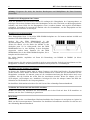
Stecken Sie das DDR DIMM-Modul in den
Speichersteckplatz ein, wie in der Abbildung dargestellt.
Achten Sie darauf, wie die Kerbe des Moduls in den
Steckplatz passt. So ist sichergestellt, dass das DDR
DIMM-Modul nur in eine Richtung in den Steckplatz
eingesteckt werden kann. Drücken Sie das DDR
DIMM-Modul fest in den DDR DIMM-Steckplatz, bis es
komplett und fest darin sitzt.
Für solche Module, empfehlen wir Ihnen die Bestückung von DIMM1 zu DIMM3 (in dieser
Reihenfolge).
Danach müssen Sie alle nötigen Gerätekabel mit den entsprechenden Sockeln und Anschlüssen auf der
Hauptplatine verbinden, um die Hardwareinstallation Ihres Systems zu vervollständigen.
Anschlüsse, Sockel, Schalter und Adapter
Im Inneren des Gehäuses findet man in jedem Computer viele Kabel und Stecker, die angeschlossen
werden müssen. Diese Kabel und Stecker werden normalerweise einzeln mit den Anschlüssen auf der
Hauptplatine verbunden. Sie müssen genau auf die Anschlussorientierung der Kabel achten und, wenn
vorhanden, sich die Position des ersten Pols des Anschlusses merken. Wenn Sie Adapter wie z.B.
SCSI-Adapter, AGP-Adapter usw. installieren, befestigen Sie bitte die Adapter immer mit Hilfe der
Schrauben auf die Rückseite des Computergehäuses.
Für detaillierte Informationen beziehen Sie sich bitte auf das vollständige Benutzerhandbuch.
Verbinden der Netzstecker mit dem J3/J5-Anschluss
Denken Sie daran, den Anschluss des ATX-Netzteils fest in das Ende mit dem J3/J5-Anschluss zu
drücken, um eine feste Verbindung zu garantieren.
BIOS-Setup
Schalten Sie nach der vervollständigten Hardwareinstallation den Computer ein und gehen zur Option im
BIOS, um die Prozessorparameter einzustellen. Für detaillierte Informationen beziehen Sie sich bitte auf
das vollständige Benutzerhandbuch.
BE7 Series
Série BE7 Guide d’Installation Rapide
7
Série BE7 Guide d’Installation Rapide
Merci d’avoir acheté la carte mère ABIT. Cette carte mère est conçue pour les processeurs Intel Pentium
4 Socket 478. Elle supporte la structure Socket-478, avec jusqu’à 2 GB de mémoire DDR.
Pour des informations relatives à cette carte mère plus détaillées, veuillez vous référer à notre version
complète du manuel utilisateur. Ce guide d’installation rapide est créé pour les assembleurs système
expérimentés. S’il s’agit de votre premier essai pour installer un ordinateur, nous vous suggérons de lire
d’abord le manuel en version complète ou de demander l’aide d’un technicien pour vous aider à
configurer le système ordinateur.
Installer le Processeur
Cette carte mère fournit un support ZIF (Zero Insertion
Force)
Socket
478
permettant
d'installer
le
Microprocesseur Intel® Pentium® 4. Le microprocesseur
que vous achetez doit être muni d'un système de
refroidissement avec dissipateur thermique et ventilateur.
Dans le cas contraire, veuillez en acheter un, conçu
spécialement pour les microprocesseurs Pentium® 4
Socket 478.
1.
Placez le Socket 478. Fixez la base support du
dissipateur thermique sur la carte mère.
Attention: Si vous utilisez un châssis conçu spécialement
pour Pentium® 4, veuillez faire attention à l'emplacement
des clous ou spacers métalliques si ceux-ci sont déjà
installés sur le châssis. Faites attention de ne pas laisser les
talons (studs) ou entretoises(spacers) métalliques en
contact avec des fils ou des parties de circuit imprimé se
trouvant sur le PCB.
2.
Tirez de côté le levier de l’emplacement du CPU et
tirez-le vers le haut à 90 degrés. Insérez le
Microprocesseur en respectant une bonne orientation.
Ne pas utiliser une force excessive en insérant le CPU;
il s’installe uniquement dans une position. Fermez le
levier
d'emplacement
en
maintenant
le
Microprocesseur en place.
3.
Mettez le dissipateur
microprocesseur jusqu'à
complètement.
4.
Mettez le couvercle support du dissipateur thermique
sur le dissipateur thermique. Assurez-vous que les
quatres verrous situés sur chaque côté du couvercle
support vont bien dans les trous de verrouillage.
5.
Poussez les attaches de mainteance se trouvant de
chaque côté du couvercle support pour le rendre
solidaire de la base support. Faites à la direction en
poussant les attaches.
thermique face au
ce qu'il le couvre
User’s Manual
8
Série BE7 Guide d’Installation Rapide
6.
Le couvercle support et la base du dissipateur thermique doivent maintenant être fermement fixés l'un
à l'autre fermement avec le dissipateur thermique à l'intérieur.
Attention: N'oubliez pas de régler une fréquence de
votre processeur.
Bus et un coefficient multiplicateur corrects pour
Installer la Carte Mre dans le Châssis
Une fois que vous aurez installé le processeur sur la carte mère, vous pourrez commencer à fixer la carte
mère sur le châssis. Tout d’abord, vous avez besoin de fixer la carte mère sur le châssis. La plupart des
châssis d’ordinateur possèdent une base sur laquelle il y a nombreux trous de montage permettant à la
carte mère d’être fixée fermement, et en même temps d’éviter les court-circuits. Utilisez les talons ou les
entretoises fixés sur le châssis pour fixer la carte mère.
Installer la Mémoire Système
Cette carte mère dispose de 3 emplacements DIMM DDR 184-broches pour les extensions mémoire. La
mémoire minimum est de 64 MB et la mémoire maximum est de 2 GB DDR SDRAM.
Insérez le module DDR DIMM dans l’emplacement
d’extension comme illustré dans le schéma. Notez
comment le module est verrouillé dans l’emplacement.
Ceci assure qu’il n’y qu’une manière d’insérer le module
DDR DIMM. Pressez fermement le module DDR DIMM
dans l’emplacement DDR DIMM; assurez-vous que le
module est installé complètement dans l’emplacement
DDR DIMM. Pour ces modules, nous vous suggérons de remplir de DIMM1 à DIMM3 en respectant
l’ordre.
Ensuite, vous aurez à connecter les câbles de tous les périphériques nécessaires dans les socles de
connexion et connecteurs correspondants se trouvant sur la carte mère pour terminer l’installation
matérielle de votre système.
Connecteurs, Socles de connexion, Interrupteurs et Adaptateurs
A l’intérieur du boîtier de n’importe quel ordinateur il y a plusieurs câbles et prises qui doivent être
connectés. Ces câbles et prises sont habituellement connectés les uns après les autres aux connecteurs
situés sur la carte mère. Vous avez besoin de faire attention au sens de connexion des câbles et, s’il y a
lieu, remarquez la position de la première broche du connecteur. Vous installerez certains adaptateurs
pour des besoins spéciaux, tels adaptateurs SCSI, adaptateurs AGP, etc. Lorsque vous les installez dans
les emplacements situés sur la carte mère, veuillez les fixer sur le panneau arrière du châssis à l'aide des
vis.
Pour les informations détaillées, veuillez vous référer au manuel utilisateur en version complète.
Brancher les connecteurs d'alimentation dans les connecteurs J3/J5
Souvenez-vous que vous devez pousser le connecteur de votre alimentation fermement dans le connecteur
J3/J5 pour assurer une bonne connexion.
Configuration du BIOS
Une fois le matériel installé complètement, démarrez l'ordinateur et allez sur l'item dans le BIOS pour
configurer les paramètres du processeur. Pour les informations détaillées, veuillez vous référer à la
version complète du manuel utilisateur.
BE7 Series
Краткое руководство по установке BE7 cерия
9
Краткое руководство по установке BE7 cерия
Благодарим вас за приобретение материнской платы производства ABIT. Эта материнская плата
предназначена для использования с процессорами Intel Socket 478. Она поддерживает структуру
Intel Socket 478, максимальный объем памяти DDR составляет 2 Гбайт.
Более подробные сведения о материнской плате приведены в руководстве пользователя. Краткое
руководство по установке предназначено для опытных специалистов. Если вы собираете
компьютер впервые, ознакомьтесь сперва с руководством пользователя или попросите техника
помочь в настройке компьютерной системы.
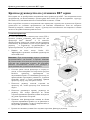
Установка процессора
На этой системной плате используется гнездо ZIP (с
нулевым усилием установки) типа 'Socket 478' для
процессора Intel® Pentium® 4. В комплект
приобретаемого процессора должны входить радиатор
и вентилятор. В противном случае следует приобрести
радиатор
и вентилятор, предназначенные для
процессора Pentium® 4 с разъемом 'Socket 478'.
1.
Найдите на плате гнездо 'Socket 478'.
Зафиксируйте крепежное основание радиатора на
системной плате.
Внимание: При использовании корпуса специально
предназначенного для Pentium® 4 обратите внимание
на расположение металлических вставок или распорок,
если они уже установлены в корпус. Не допускайте
контакта металлических вставок или распорок с
проводниками или деталями печатной платы.
2.
Сместите рычаг гнезда процессора в сторону от
гнезда, а затем поверните его вверх на 90 градусов.
Вставьте
процессор,
ориентировав
его
надлежащим образом. Устанавливая процессор, не
прикладывайте чрезмерных усилий. Его установка
возможна только в одном положении. Прижав
процессор сверху, опустите рычаг гнезда.
3.
Поместите радиатор плоской стороной на
процессор так, чтобы процессор был полностью
закрыт.
4.
Поместите прижимную крышку радиатора на
радиатор. Все четыре фиксатора по обеим
сторонам прижимной крышки должны находиться
на уровне крепежных отверстий.
5.
Прижмите вниз фиксирующие зажимы по обеим
сторонам прижимной крышки до их фиксации в
крепежном основании. Следите за направлением, в
котором Вы прижимаете зажимы.
6.
Крышка и основание должны быть надежно скреплены, фиксируя радиатор.
User’s Manual
10
Краткое руководство по установке BE7 cерия
Внимание: Не забудьте установить для процессора надлежащую частоту шины и множитель.
Установка материнской платы в корпус
После установки процессора на материнскую плату можно начинать установку материнской
платы в корпус. Большая часть корпусов оборудована основанием, в котором проделаны
монтажные отверстия, которые позволяют надежно закрепить материнскую плату и предотвратить
короткие замыкания. Для крепления материнской платы к основанию используются винты и
прокладки.
Установка модулей памяти
На плате имеется 3 184-контактных гнезда расширения DDR DIMM для памяти. Минимальный
объем памяти равен 64 Мбайт, максимальный объем равен 2 Гбайт DDR SDRAM.
Установите модуль памяти DDR DIMM в гнездо
расширения, как показано на рисунке. Обратите
внимание, что модуль фиксируется в гнезде. Таким
образом, гарантируется единственно возможный
способ установки модуля DDR DIMM. Вставьте
модуль DDR DIMM в гнездо DDR DIMM; и убедитесь,
что модуль надежно установлен в гнездо DDR DIMM.
Для этих модулей мы рекомендуем устанавливать
память начиная с DIMM1 и далее по DIMM3.
Подключите все необходимые кабели для подключения устройств к соответствующим разъемам
на материнской плате, чтобы завершить установку аппаратуры вашей системы.
Разъемы, переключатели и адаптеры
Внутри корпуса компьютера необходимо расположены несколько кабелей и вилок, которые
необходимо подключить. Обычно эти кабели подключаются к разъемам, расположенным на
материнской плате. При подключении любого кабеля необходимо обращать внимание на
расположение первого контакта разъема. Для особых целей могут потребоваться специальные
адаптеры, например, адаптер SCSI, адаптер AGP и т.п.. При установке адаптеров в гнезда
материнской платы закрепите их на задней панели с помощью винтов.
За более подробной информацией обращайтесь к полному руководству пользователя.
Подключение кабелей питания к разъемам J3/J5
Обратите внимание, разъем блока питания ATX необходимо вставить в разъем J3/J5 до упора,
чтобы обеспечить надежное соединение.
Настройка BIOS
По окончании установки аппаратуры включите питание и перейдите в меню BIOS Setup, чтобы
настроить параметры процессора. За более подробной информацией обращайтесь к руководству
пользователя.
BE7 Series
Guida all’installazione veloce Scheda madre serie BE7
11
Guida all’installazione veloce Scheda madre serie BE7
Complimenti per l’acquisto di una scheda madre ABIT. Questa scheda madre è progettata per processori
Intel Pentium 4. Supporta la struttura Socket 478 con fino a 2GB di memoria DDR.
Per maggiori e dettagliate informazioni su questa scheda madre si prega di fare riferimento alla versione
integrale del Manuale utente. Questa guida all’installazione veloce è intesa per costruttori esperi di
sistemi. Se questa è la prima volta che si cerca di installare un sistema, si consiglia di leggere, innanzi
tutto, la versione integrale del manuale oppure di chiedere aiuto ad un tecnico per l’installazione.
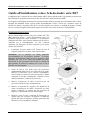
Installazione del processore
Questa scheda madre fornisce una presa “Socket 478” ZIF
(Zero Insertion Force – forza d’inserimento zero) per
installare il processore Intel® Pentium® 4. Il processore
acquistato dovrebbe essere fornito di dispersore di calore e
ventolina per il raffreddamento. In caso contrario
acquistare un dispersore di calore specifico per la presa
Socket 478 Pentium®.
1.
Localizzare la presa Socket 478. Fissare la base di
supporto dispersore di calore sulla scheda madre.
Attenzione: Se si impiega un telaio progettato
specificatamente per il processore Pentium® 4, prestare
attenzione all’ubicazione delle borchie in metallo o degli
spaziatori, nel caso in cui siano già installati sul telaio.
Assicurarsi di non permettere alle borchie in metallo od
agli spaziatori di entrare in contatto con il cavo o con le
parti del circuito stampato.
2.
Tirare di lato la leva della presa del processore
allontanandola dalla presa; poi sollevarla di 90 gradi.
Inserire il processore con il corretto orientamento.
Non sforzare per inserire il processore poiché si adatta
solamente in un dato orientamento. Chiudere la leva
della presa mentre si trattiene il processore.
3.
Mettere il dispersore di calore a faccia in giù sul
processore finché lo copre completamente.
4.
Mettere il coperchio di supporto del dispersore di
calore sul dispersore di calore. Assicurarsi che tutti
quattro i fermagli, su ciascun lato del coperchio di
supporto, si inseriscano nei fori di bloccaggio.
5.
Spingere verso il basso i fermagli di bloccaggio su
ciascun lato del coperchio di supporto in modo da
fissarlo alla base di supporto. Prestare attenzione alla
direzione in cui si spingono i fermagli.
User’s Manual
12
Guida all’installazione veloce Scheda madre serie BE7
6.
Il coperchio di supporto e la base del dispersore di calore dovrebbero ora essere fissate saldamente
l’uno all’altra, contenendo al loro interno il dispersore di calore.
Attenzione: Non dimenticare di impostare la corretta frequenza BUS e multiplier per il processore.
Installazione della scheda madre sul telaio
Dopo avere installato il processore sulla scheda madre si può iniziare a fissare la scheda madre sul telaio.
Innanzi tutto è necessario fissare la scheda madre al telaio. La maggior parte dei telai ha una base sulla
quale sono presenti diversi fori di montaggio che permettono di fissare in modo accurato la scheda madre
e, allo stesso tempo, di prevenire corto circuiti. Impiegare le borchie o gli spaziatori attaccati al telaio per
fissare la scheda madre.
Installazione della memoria di sistema
Questa scheda madre fornisce 3 slot d’espansione di memoria DDR DIMM da 184 pin. La memoria
minima è di 64 MB, quella massima è di 2 GB DDR SDRAM.
Inserire il modulo DDR DIMM nello slot d’espansione
come mostrato dell’illustrazione- Notare come il modulo è
imperniato nella presa. Ciò assicura che ci sia un unico
modo per collegare il modulo DDR DIMM. Premere con
fermezza il modulo DDR DIMM nello slot DDR DIMM,
assicurandosi che il modulo sia inserito completamente
nello slot DDR DIMM. Per questi moduli si suggerisce di
inserire con ordine i chip elettronici da DIMM1 a DIMM3.
Per completare l’installazione dell’hardware del sistema, bisogna collegare tutti i cavi delle attrezzature
necessarie ai relativi collettori e connettori sulla scheda madre.
Connettori, collettori, interruttori ed adattatori
All’interno della copertura di ogni computer ci sono diversi cavi e prese che devo essere collegati. Questi
cavi e prese sono solitamente collegati uno ad uno ai connettori situati sulla scheda madre. E’ necessario
prestare particolare attenzione a qualunque orientamento del collegamento che possono avere i cavi e, se
necessario, notare la posizione del primo pin del connettore. Si installeranno alcuni adattatori per
particolari necessità quali l’adattatore SCSI, AGP, eccetera. Quando si installano gli adattatori sugli slot
della scheda madre, si ricorda di fissarli con le viti anche sul pannello posteriore del telaio.
Per informazioni dettagliate si prega di fare riferimento alla versione integrale del Manuale utente.
Collegamento dei connettori d’alimentazione ai connettori J3/J5
Ricordarsi che è necessario spingere con fermezza fino in fondo il connettore della sorgente
d’alimentazione ATX al connettore J3/J5, assicurando così un buon collegamento.
Impostazione BIOS
Quando l’hardware è stato installato completamente, accendere il computer ed andare alla voce BIOS per
impostare i parametri del processore. Per informazioni dettagliate si prega di fare riferimento alla versione
integrale del Manuale utente.
BE7 Series
Introduction
1-1
Chapter 1. Introduction
1-1. Features & Specifications
1. CPU
Supports Intel® Pentium® 4 socket 478 processor with 400MHz/533MHz System Data Bus
Supports Intel® Hyper-Threading Technology
2. Chipset
Intel 82845PE (MCH) + 82801DB (ICH4)
Supports Hi-Speed Universal Serial Bus (USB 2.0)
Supports Ultra ATA/100/66/33 mode
3. Memory
Three 184-pin DIMM sockets (un-buffered Non-ECC DIMM)
Supports 3 DIMM DDR 200/266 (Max. 2GB)
Supports 2 DIMM DDR 333 (Max. 2GB)
4. LAN
Onboard Broadcom Gigabit PCI Ethernet Controller (For BE7-G)
Onboard 10/100M PCI Fast Ethernet Controller (For BE7-S, BE7-RAID, BE7-B, BE7)
5. Serial ATA 150 (For BE7-G & BE7-S)
Onboard Silicon Image Serial ATA PCI Controller
Support 2 ports SATA 150 (1.5G bps)
6. ATA133 RAID (For BE7-RAID)
HighPoint HPT372 IDE controller
Supports Ultra ATA 133MB/sec data transfer rate
Supports RAID 0 (Stripping mode for boosting performance) mode
Supports RAID 1 (Mirroring mode for data security) mode
Supports RAID 0+1 (Stripping and Mirroring) mode
7. Audio
Onboard RealTek ALC650 6-Channel AC 97 CODEC
Professional digital audio interface supports 24-bit S/PDIF Out
8. System BIOS
SoftMenu™ Technology to set CPU parameters
Supports Plug-and-Play (PNP)
Supports Advanced Configuration Power Interface (ACPI)
Supports Desktop Management Interface (DMI)
Write-Protect Anti-Virus function by AWARD BIOS
User’s Manual
1-2
Chapter 1
9. Internal I/O Connectors
1 x AGP slot
5 x PCI slots
1 x Floppy port supports up to 2.88MB
2 x Ultra ATA 33/66/100 connectors
2 x Ultra ATA 33/66/100/133 connectors (For BE7-RAID)
2 x Serial ATA 150 connectors (For BE7-G & BE7-S)
2 x USB headers
1 x CD-IN, 1 x AUX-IN header
1 x IrDA header
10. Back Panel I/O
1 x PS/2 Keyboard, 1 x PS/2 mouse
2 x Serial port connectors, 1 x Parallel port connector
1 x S/PDIF Out connector
AUDIO1 connector (Rear-Left / Rear-Right, Center/Subwoofer)
AUDIO2 connector (Mic-In, Line-In, Front-Left/Front-Right)
2 x USB, 1 x RJ-45 LAN Connector
11. Miscellaneous
ATX form factor
Hardware Monitoring – including Fan Speed, Voltages, CPU and system temperature and
one thermal header for other devices temperature monitoring
Supports Wake Up by LAN, Modem Ring, RTC Alarm, Keyboard and Mouse Power On
Supports STR (Suspend to RAM)
The Switching Power Supply must meet ATX 2.03 specification with ATX12V and AUX Power
connectors.
Specifications and information contained herein are subject to change without notice.
BE7 Series
Introduction
1-3
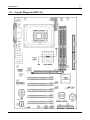
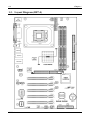
1-2. Layout Diagram (BE7-G)
User’s Manual
1-4
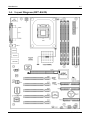
1-3. Layout Diagram (BE7-S)
BE7 Series
Chapter 1
Introduction
1-5
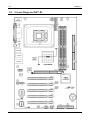
1-4. Layout Diagram (BE7-RAID)
User’s Manual
1-6
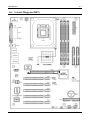
1-5. Layout Diagram (BE7-B)
BE7 Series
Chapter 1
Introduction
1-7
1-6. Layout Diagram (BE7)
User’s Manual
1-8
BE7 Series
Chapter 1
Hardware Setup
2-1
Chapter 2. Hardware Setup
It is required to adopt an ATX12V power supply to meet the power requirement of Pentium® 4
This motherboard provides all standard equipment for classic personal computers with great flexibility for
meeting future upgrade demands. This chapter will introduce step-by-step all of the standard equipment
and will also present, as completely as possible, future upgrade capabilities.
This chapter is organized with the following features:
2-1 Install The Motherboard
2-2 Install Pentium® 4 CPU and Heatsink Supporting-Base
2-3 Install System Memory
2-4 Connectors, Headers and Switches
Before Proceeding with the Installation: Please be reminded to turn the ATX12V power supply switch
off (fully turn the +5V standby power off), or disconnect the power cord before you install or unplug any
connectors or add-on cards. Failing to do so may cause the motherboard components or add-on cards to
malfunction or damaged.
2-1. Install The Motherboard
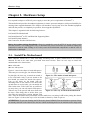
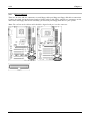
Most computer chassis have a base with many mounting holes to allow motherboard to be securely
attached on and at the same time, prevented from short circuits. There are two ways to attach the
motherboard to the chassis base:
use with studs
or use with spacers
Figure 2-1 shows the shape of studs and spacers.
There may be several types, but all look similar.
Figure 2-1. The outline of stud and spacer.
In principle, the best way to attach the board is
to use with studs. Only if you are unable to do
this should you attach the board with spacers.
Line up the holes on the board with the
mounting holes on the chassis. If the holes line
up and there are screw holes, you can attach the
board with studs. If the holes line up and there
are only slots, you can only attach with spacers.
Take the tip of the spacers and insert them into
Figure 2-2. The way we fixed the motherboard.
the slots. After doing this to all the slots, you
can slide the board into position aligned with
slots. After the board has been positioned, check to make sure everything is OK before putting the chassis
back on. Figure 2-2 shows the ways to fix the board to chassis by studs or spacers.
ATTENTION: To prevent shorting the PCB circuit, please REMOVE the metal studs or spacers if they
are already fastened on the chassis base and are without mounting-holes on the motherboard to align with.
User’s Manual
2-2
Chapter 2
2-2. Install Pentium® 4 CPU and Heatsink Supporting-Base
This motherboard provides a ZIF (Zero Insertion
Force) Socket 478 to install Intel® Pentium® 4 CPU.
The CPU you bought should have a kit of heatsink
and cooling fan along with. If that’s not the case, buy
one specially designed for Pentium® 4 Socket 478.
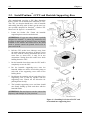
Please refer to figure 2-3 to install CPU.
1.
Locate the Socket 478. Fasten the heatsink
supporting-base onto the motherboard.
ATTENTION: If you are using chassis specially
designed for Pentium® 4, please pay attention to the
location of metal studs or spacers if they are already
installed on the chassis. Be careful not let the metal
studs or spacers contact the printed circuit wire or
parts on the PCB.
2.
Pull the CPU socket lever sideways away from
the socket and then upwards to 90 degree. Insert
the CPU with the correct orientation. Do not use
extra force to insert CPU; it only fit in one
orientation. Closing down the socket lever while
holding down the CPU.
3.
Put the heatsink faces down onto the CPU until it
completely covers the CPU.
4.
Put the heatsink supporting-cover onto the
heatsink. Make sure all the four locking clasp at
each side of the supporting cover reach in the
locking holes.
5.
Push down the retaining clip at both sides of the
supporting cover to lock up together with the
supporting base. Watch out the direction for
pushing down the clip.
6.
The heatsink supporting cover and base should
now firmly locking up with each other with the
heatsink inside.
ATTENTION: Do not forget to set the correct bus
frequency and multiple for your processor.
Figure 2-3. Installing P4 Socket 478 CPU and
its heatsink into supporting base.
BE7 Series
Hardware Setup
2-3
2-3. Install System Memory
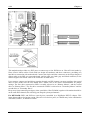
This motherboard provides three 184-pin DDR DIMM sites for memory expansion available from
minimum memory size of 64MB to maximum memory size of 2GB DDR SDRAM (DIMM2 & DIMM3
are sharing).
Table 2-1. Valid Memory Configurations
Bank
Memory Module
Total Memory
Bank 0, 1 (DIMM1)
64, 128, 256, 512MB, 1GB
64MB ~ 1GB
Bank 2, 3 (DIMM2)
64, 128, 256, 512MB, 1GB
64MB ~ 1GB
Bank 3, 2 (DIMM3)
64, 128, 256, 512MB, 1GB
64MB ~ 1GB
64MB ~ 2GB
Total System Memory
ATTENTION: Static electricity can damage the electronic components of the computer or optional
boards. Before starting these procedures, ensure that you are discharged of static electricity by touching a
grounded metal object briefly.
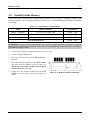
1.
Power off the computer and disconnect the AC power cord.
2.
Locate the DDR DIMM slot.
3.
Push both ejector tabs of the DDR DIMM slot
outward.
4.
Insert the memory module into the DDR DIMM
slot. Note how the module is keyed to the slot.
This insures the memory module will be plugged
into the slot in one way only.
5.
Firmly press the memory module into the DDR
DIMM slot until both ejector tabs snap into
places.
Figure 2-4. Memory module installation
User’s Manual
2-4
Chapter 2
2-4. Connectors, Headers and Switches
Inside the case of any computer there are several cables and plugs that have to be connected. These cables
and plugs are usually connected one-by-one to connectors located on the board. You have to pay attention
carefully to any connection orientation the cables may have and, if any, notice the position of the first pin.
Here we will show you all of the connectors, headers and switches, and how to connect them. Please read
the entire section for necessary information before attempting to finish all the hardware installation inside
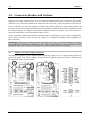
the computer chassis. A complete enlarged layout diagram is shown in Chapter 1 for all the position of
connectors and headers on the board that you may refer to.
All the connectors, headers and switches mentioned here are depending on your system configuration.
Some features you may (or may not) have to connect or to configure depending on the peripherals you
have connected.
WARNING: Always power off the computer and unplug the AC power cord before adding or removing
any peripheral or component. Failing to so may cause severe damage to your motherboard and/or
peripherals. Plug in the AC power cord only after you have carefully checked everything.
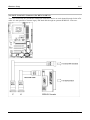
(1).
ATX12V: ATX Power Input Connectors
The Pentium 4 requires a power supplier different from the regular one. It’s a newly designed ATX12V
power with 300W, 20A +5VDC capacity at least for heavily loaded system, and 720mA +5VSB at least
for supporting Wake-On-LAN feature.
BE7 Series
Hardware Setup
(2).
2-5
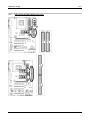
FAN Connectors:
FAN1: Power Fan
FAN2: Chassis Fan
FAN3: CPU Fan
FAN1: CPU Fan
FAN2: Chassis Fan
FAN3: Power Fan
User’s Manual
2-6
(3).
Chapter 2
CCMOS1: CMOS Memory Clearing Header
This header uses a jumper to clear the CMOS memory. Short pin 2 and pin 3 only when you want to clear
the CMOS memory. The default setting is pin 1 and pin 2 shorted for normal operation.
NOTE: Turn the power off first (including the +5V standby power) before clearing the CMOS memory.
Failing to do so may cause your system to work abnormally or malfunction.
BE7 Series
Hardware Setup
(4).
2-7
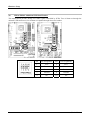
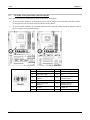
FPIO1/FPIO2: Additional USB Port Headers
This motherboard provides totally six USB 2.0 ports controlled by ICH4. Two of them are through the
onboard USB connectors; four of them are capable through these two headers.
Pin
Pin Assignment
Pin
Pin Assignment
1
VCC
2
VCC
3
Data0 -
4
Data1 -
5
Data0 +
6
Data1 +
7
Ground
8
Ground
9
NC
10
NC
User’s Manual
2-8
(5).
Chapter 2
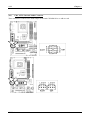
FPIO3: Infrared Device Header
This header connects to an optional IR device attached to chassis. This motherboard supports standard IR
transfer rates.
(6).
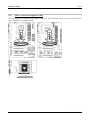
FPIO4 Headers
This header is used for connecting switches and LED indicators on the chassis front panel.
Watch the power LED pin position and orientation. The mark “+” align to the pin in the figure below
stands for positive polarity for the LED connection. Please pay attention to connect these headers. A
wrong orientation will only cause the LED not lighting, but a wrong connection of the switches could
cause system malfunction.
BE7 Series
Hardware Setup
•
Pin 1, 3: HDD-LED
Connects to the HDD LED cable of chassis front panel.
•
Pin 5, 7: RESET
Connects to the Reset Switch cable of chassis front panel.
•
Pin 15, 17, 19, 21: SPEAKER
Connects to the System Speaker cable of chassis.
•
Pin 2, 4: SP-LED
Connects to the Suspend LED cable (if there is one) of chassis front panel.
•
Pin 6, 8: PWR-ON
Connects to the Power Switch cable of chassis front panel.
•
Pin 16, 18, 20: PWR-LED
Connects to the Power LED cable of chassis front panel.
•
Pin 22, 24: KEYLOCK
Connects to the Keylock cable (if there is one) of chassis front panel.
2-9
User’s Manual
2-10
(7).
Chapter 2
FPAUD1: Front panel audio connection header
This header provides the connection to audio connector at front panel.
•
To use the audio connector at front panel, remove all the jumpers on this header, and then connect
to front panel by the extenson cable provided with the chassis.
•
To use the audio connector at rear panel, disconnect the extension cable, attach the jumpers back at
pin 5-6, and pin 9-10 (default setting).
Pin
1
3
5
7
9
11
13
BE7 Series
Pin Assignment
Audio Mic.
Audio Mic. Bias
Speaker Out Right
Channel
X
Speaker Out Left
Channel
Ground
VCC
Pin
2
4
6
8
10
12
14
Pin Assignment
Ground
VCC
Speaker Out Right
Channel Return
NC
Speaker Out Left
Channel Return
S/PDIF In
S/PDIF Out
Hardware Setup
(8).
2-11
SMB1: System Management Bus Headers
This header is reserved for system management bus (SM bus). The SM bus is a specific implementation
of an I2C bus. I2C is a multi-master bus, which means that multiple chips can be connected to the same
bus and each one can act as a master by initiating a data transfer. If more than one master simultaneously
tries to control the bus, an arbitration procedure decides which master gets priority.
(9).
JP1: Thermal Sensor Header
This connector is a thermal sensor connector used for detecting the system environmental temperature. It
may also be called a system temperature detector. You can attach one end of a two-threaded thermal cable
to this header, and attach the other end of the thermal cable onto any heat source, such as VGA chipset’s
heatsink, or Hard Disk Drive.
User’s Manual
2-12
(10).
Chapter 2
CD1, AUX1: Internal Audio Connector
These connectors connect to the audio output of internal CD-ROM drive or add-on card.
BE7 Series
Hardware Setup
(11).
2-13
AGP1: Accelerated Graphics Port Slot
This slot supports an optional AGP graphics card up to AGP 4X mode. Please refer to our Web site for
more information on graphics cards.
User’s Manual
2-14
(12).
Chapter 2
FDC1 Connector
There are 34 wires and two connectors on each floppy cable providing two floppy disk drives connection.
Connect the single end at the longer length of ribbon cable to this FDC1, and the two connectors on the
other end to the floppy disk drives. Generally you need only one floppy disk drive in your system.
Note: The red line on the ribbon cable should be aligned with pin 1 on this connector.
BE7 Series
Hardware Setup
(13).
2-15
IDE1/IDE2 and IDE3/IDE4 Connectors
User’s Manual
2-16
Chapter 2
This motherboard provides two IDE ports to connect up to four IDE drives at Ultra ATA/100 mode by
Ultra ATA/66 ribbon cables. Each cable has 40-pin 80-conductor and three connectors, providing two
hard drives connection with motherboard. Connect the single end (blue connector) at the longer length of
ribbon cable to the IDE port on motherboard, and the other two ends (gray and black connector) at the
shorter length of the ribbon cable to the connectors on hard drives.
If you want to connect two hard drives together through one IDE channel, you must configure the second
drive to Slave mode after the first Master drive. Please refer to the drives’ documentation for jumper
settings. The first drive connected to IDE1 is usually referred to as “Primary Master”, and the second
drive as “Primary Slave”. The first drive connected to IDE2 is referred to as “Secondary Master” and the
second drive as “Secondary Slave”.
Keep away from connecting one legacy slow speed drive, like CD-ROM, together with another hard drive
on the same IDE channel; this will drop your integral system performance.
For BE7-RAID: IDE3 and IDE4 are extra devices controlled by a HighPoint HPT372 chipset. This
bonus feature allows for having regular Ultra ATA/133 devices ports, or a RAID array in the combination
of RAID 0, RAID 1, or RAID 0+1 mode.
BE7 Series
Hardware Setup
2-17
(14). J6/J7: Serial ATA Connector (For BE7-G & BE7-S)
These two connectors are provided to attach one serial ATA device at each channel through Serial ATA
cable. It is also possible to connect legacy IDE hard disk through an optional SERILLEL Converter.
User’s Manual
2-18
(15).
Chapter 2
Back Panel Connectors
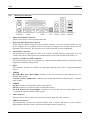
•
Mouse: PS/2 Mouse Connector
Attach a PS/2 mouse to this 6-pin Din-connector.
•
Keyboard: PS/2 Keyboard Connector
Attach a PS/2 keyboard connector to this 6-pin Din-connector. If you use an AT keyboard, you can
go to a computer store to purchase an AT to ATX converter adapter. You can then connect your AT
keyboard to this connector. We suggest you use a PS/2 keyboard for best compatibility.
•
Parallel Port Connector
This parallel port is also called an “LPT” port because it usually connects to the printer. You can
connect other devices that support this communication protocol, like an EPP/ECP scanner, etc.
•
Serial Port COM1 & COM2 Connector
This motherboard provides two COM ports to connect external modem, mouse or other devices that
support this communication protocol.
•
OPT1
This connector provides an S/PDIF out connection through optical fiber to digital multimedia
devices.
•
AUDIO1
R.L./R.R. (Rear Left / Rear Right): Connects to the rear left and rear right channel in the 5.1
channel audio system.
Cen./Sub. (Center / Subwoofer): Connects to the center and subwoofer channel in the 5.1 channel
audio system.
•
AUDIO2
Mic In: Connects to the plug from external microphone.
Line In: Connects to the line out from external audio sources.
F.L./F.R. (Front Left / Front Right): Connects to the front left and front right channel in the
5.1-channel or regular 2-channel audio system.
•
LAN Connector
You can connect your system to Local Area Network through this LAN connector.
•
USB Port Connectors
This motherboard provides two on-board USB2.0 ports to attach USB devices such as scanner,
digital speakers, monitor, mouse, keyboard, hub, digital camera, joystick etc.
BE7 Series
BIOS Setup
3-1
Chapter 3. BIOS Setup
The BIOS is a program located on a Flash Memory chip on the motherboard. This program will not be
lost when you turn the computer off. This program is also referred to as the boot program. It is the only
channel the hardware circuit has to communicate with the operating system. Its main function is to
manage the setup of the motherboard and interface card parameters, including simple parameters such as
time, date, hard disk drive, as well as more complex parameters such as hardware synchronization, device
operating mode, CPU SoftMenu™ III features and setup of CPU speed. The computer will operate
normally, or will operate at its best, only if all of these parameters are correctly configured through the
BIOS.
Don’t change the parameters inside the BIOS unless you fully understand their meanings and
consequences: The parameters inside the BIOS are used to setup the hardware synchronization or the
device-operating mode. If the parameters are not correct, they will produce errors, the computer will crash,
and sometimes you will not even be able to boot the computer after it has crashed. We recommend that
you do not change the parameters inside the BIOS unless you are very familiar with them. If you are not
able to boot your computer anymore, please refer to the section “Erase CMOS data” in Chapter 2.
When you start the computer, the BIOS program controls it. The BIOS first operates an auto-diagnostic
test called POST (Power On Self Test) for all of the necessary hardware. It then configures the parameters
of the hardware synchronization, and detects all of the hardware. Only when these tasks are completed
does it give up control of the computer to the next level, which is the operating system (OS). Since the
BIOS is the only channel for hardware and software to communicate, it is the key factor for system
stability, and in ensuring that your system performs at its best. After the BIOS has achieved the
auto-diagnostic and auto-detection operations, it will display the following message:
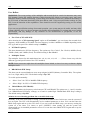
PRESS DEL TO ENTER SETUP
The message will be displayed for three to five seconds, if you press the <Del> key, you will access the
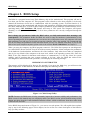
BIOS Setup menu. At that moment, the BIOS will display the following screen:
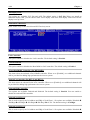
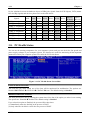
Figure 3-1. CMOS Setup Utility
NOTE: Because the BIOS menu is being constantly improved to increase stability and performance, the
BIOS screens in this manual may not completely match your BIOS version. All the default settings in this
chapter are taken from the Load Optimized Defaults settings, which are different from those taken from
Load Fail-Safe Defaults.
In the BIOS Setup main menu of Figure 3-1, you can see several options. We will explain these options
step by step in the following pages of this chapter, but let us first see a short description of the function
keys you may use here:
User’s Manual
3-2
Chapter 3
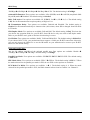
•
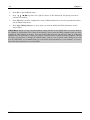
Press Esc to quit the BIOS Setup.
•
Press ↑ ↓ ← → (up, down, left, right) to choose, in the main menu, the option you want to
confirm or to modify.
•
Press F10 when you have completed the setup of BIOS parameters to save these parameters and to
exit the BIOS Setup menu.
•
Press Page Up/Page Down or +/- keys when you want to modify the BIOS parameters for the
active option.
CMOS Data: Maybe you have heard somebody saying that his or her CMOS DATA was lost. What is
the CMOS? Is it important? The CMOS is the memory used to store the BIOS parameters that you have
configured. This memory is passive. You can read its data, and you can also store data in it. But this
memory has to be powered by a battery in order to avoid any loss of its data when the computer is turned
off. Since you may have to change the CMOS battery when it is out of power, and if doing so you will
lose all CMOS data, we recommend that you write down all the parameters of your hardware, or to put a
label with these parameters on your hard disk.
BE7 Series
BIOS Setup
3-3
3-1. CPU Setup [SoftMenu™ III]
The CPU can be setup through a programmable switch (CPU SoftMenu™ III) that replaces the
traditional manual hardware configuration. This feature allows the user to more easily complete the
installation procedures. You can install the CPU without configuring any jumpers or switches. The CPU
must be setup according to its specifications.
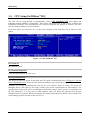
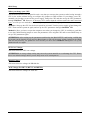
In the first option, you can press <F1> at any time to display all the items that can be chosen for that
option.
Figure 3-2. CPU SoftMenu™ III
CPU Name Is:
Intel Pentium (R) 4.
CPU Internal Frequency:
1.80GHz (depending on the CPU type).
CPU Operating Speed:
This option sets the CPU speed. In this field, the CPU speed is indicated like this: CPU Speed = External
Clock x Multiplier Factor. Select the CPU speed according the type and speed of your CPU.
Normally, we do not recommend that you use the “User Define” option to setup CPU speed and
multiplier factors. This option is for setup of future CPUs whose specifications are still unknown. The
specifications of all present CPUs are included in the default settings. Unless you are very familiar with
all CPU parameters, it is very easy to make mistakes when you define the external clock and the
multiplier factor by yourself. When you complete the setting in this option, the POST will not check if the
actual running speed is the same as the one you set.
User’s Manual
3-4
Chapter 3
User Define:
WARNING: The wrong settings of the multiplier and external clock in certain circumstances may cause
CPU damage. Setting the working frequency higher than the PCI chipset or processor specs, may cause
abnormal memory module functioning, system hangs, hard disk drive data lose, abnormal functioning of
the VGA card, or abnormal functioning with other add-on cards. Using non-specification settings for your
CPU is not the intention of this explanation. These should be used for engineering testing, not for normal
applications.
If you use non-specification settings for normal operation, your system may not be stable, and may affect
system reliability. Also, we do not guarantee the stability and compatibility for settings that are not within
specification, and any damage of any elements on the motherboard or peripherals, is not our
responsibility.
Ext. Clock (CPU/AGP/PCI):
After choosing the “CPU Operating Speed” option as “User Define”, you can choose the external clock
frequency from 100MHz to 250 MHz. The best frequency is either 100MHz or 133MHz depending on the
CPU type and its speed. The default setting is 100MHz.
PCI Bus Frequency:
This item determines the PCI bus frequency. The options are: Ext. Clock/3, Ext. Clock/4, 44MHz (fixed),
37MHz (fixed), and 33MHz (fixed). The default setting is Ext. Clock/3.
Multiplier Factor:
The multiplier factors for this motherboard are: x8, x9, x10, x11, x12 …… (These factors vary with the
different type and specification of the CPU installed)
NOTE: Some processors might have this multiplier factor locked, so there is no way to choose a higher
multiplier factor.
DRAM Ratio H/W Strap:
This item sets the external hardware reset strap assigned to MCH (Memory Controller Hub). The options
are: Low, High, and By CPU. The default setting is By CPU.
To set this option manually:
•
Select “Low” for CPU of 400MHz FSB frequency.
•
Select “High” for CPU of 533MHz FSB frequency.
DRAM Ratio (CPU:DRAM):
This item determines the frequency ratio between CPU and DRAM. The options are: 1:1 and 3:4 (under
Low “DRAM Ratio H/W Strap” settings), or 4:5 and 1:1 (under High “DRAM Ratio H/W Strap” settings).
The default setting is By SPD.
Solution in case of booting problem due to invalid clock setup:
Normally, if the CPU clock setup is wrong, you will not be able to boot. In this case, turn the system off
then on again. The CPU will automatically use its standard parameters to boot. You can then enter the
BIOS Setup again and set up the CPU clock. If you can’t enter the BIOS setup, you must try turning the
system on a few times (3~4 times) or press <INSERT> when turning on, and the system will
automatically use its standard parameters to boot. You can then enter BIOS SETUP again and set up the
new parameters.
BE7 Series
BIOS Setup
3-5
When you change your CPU:
This motherboard has been designed in such a way that you can turn the system on after having inserted a
CPU in the socket without having to configure any jumpers or DIP switches. If you change your CPU,
normally you just have to turn off the power supply, change the CPU and then set up the CPU parameters
through SoftMenu™ III. However, if the new CPU is slower than the old one (and is the same brand and
type), we offer you two methods to successfully complete the CPU change operation.
Method 1: Setup up the CPU for the lowest speed for its brand. Turn the power supply off and change the
CPU. Then turn the system on again, and set up the CPU parameters through SoftMenu™ III.
Method 2: Since you have to open the computer case when you change the CPU, it would be a good idea
to use the CMOS clearing jumper to erase the parameters of the original CPU and to enter BIOS Setup to
set up CPU parameters again.
ATTENTION: After setting up the parameters and leaving the BIOS SETUP, and having verified that
the system can be booted, do not press the Reset button or turn off the power supply. Otherwise the BIOS
will not read correctly, the parameters will fail and you must enter SoftMenu™ III again to set up the
parameters all over again.
CPU Core Voltage:
This item selects the CPU core voltage.
ATTENTION: A wrong voltage setting may cause the system unstable or even damage the CPU. Please
leave it to default settings unless you are fully aware of its consequences.
DRAM Voltage:
This item selects the voltage for DRAM slot.
AGP Voltage (For BE7-G, BE7-S, and BE7-B):
This item selects the voltage for AGP slot.
User’s Manual
3-6
Chapter 3
3-2. Standard CMOS Features Setup Menu
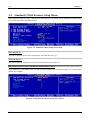
This section contains the basic configuration parameters of the BIOS. These parameters include date,
hour, VGA card, FDD and HDD settings.
Figure 3-3. Standard CMOS Setup Screen Shot
Date (mm:dd:yy):
You can set the date in this item: month (mm), date (dd) and year (yy).
Time (hh:mm:ss):
You can set the time in this item: hour (hh), minute (mm) and second (ss).
IDE Primary Master / Slave and IDE Secondary Master / Slave:
These items have a sub-menu to let you choose further options. You can refer to figure 3-4 to check what
options are available.
Figure 3-4. IDE Primary Master Setup Screen Shot
BE7 Series
BIOS Setup
3-7
IDE HDD Auto-Detection:
Press the <Enter> key for the BIOS to auto detect all detailed parameters of the hard disk drives (HDD).
If auto detection is successful, the correct values will be shown in the remaining items of this menu.
NOTE: A new IDE HDD must be first formatted, otherwise it can not read/write. The basic step in using
a HDD is to make a HDD low-level format, then run FDISK, and then FORMAT the drive. Most current
HDDs have already been subjected to low-level format at the factory, so you can probably skip this
operation. Remember though, the primary IDE HDD must have its partition set to active within the
FDISK procedure.
If you are using an old HDD that is already formatted, auto detection can not detect the correct parameters.
You may need to do a low-level format or set the parameters manually, and then check if the HDD is
working.
IDE Primary Master:
Three settings are available: Auto, Manual and None. If you choose Auto, the BIOS will automatically
check what kind of hard disk you are using. If you want to set the HDD parameters yourself, make sure
you fully understand the meaning of the parameters, and be sure to refer to the manual provided by the
HDD manufacturer to get the settings right.
Access Mode:
Since old operating systems were only able to support HDDs with capacities no bigger than 528MB, any
hard disk with more than 528MB was unusable. AWARD BIOS features a solution to this problem: you
can, according to your operating system, choose four operating modes: NORMAL LBA LARGE
Auto.
The HDD auto detection option in the sub-menu will automatically detect the parameters of your hard
disk and the mode supported.
Auto: Lets the BIOS detect your HDD access mode and make the decisions.
Normal mode: Standard normal mode supports hard disks of up to 528MB or less. This mode directly
uses positions indicated by Cylinders (CYLS), Heads, and Sectors to access data.
LBA (Logical Block Addressing) mode: The earlier LBA mode can support HDD capacities of up to
8.4GB, and this mode uses a different method to calculate the position of disk data to be accessed. It
translates Cylinders (CYLS), Heads and Sectors into a logical address where data is located. The
Cylinders, Heads, and Sectors displayed in this menu do not reflect the actual structure of the hard disk.
They are just reference values used to calculate actual positions. Currently, all high capacity hard disks
support this mode and that is why we recommend you use this mode. Currently, the BIOS can support
the INT 13h extension function, enabling the LBA mode to support hard disk drive capacities exceeding
8.4GB.
Large Mode: When the number of cylinders (CYLs) of the hard disk exceeds 1024 and DOS is not able
to support it, or if your operating system does not support LBA mode, you should select this mode.
Capacity:
This item auto displays your HDD size. Note that this size is usually slightly greater than the size given
by a disk checking program of a formatted disk.
NOTE: All the items below are available when you set the item “Primary IDE Master” to “Manual”.
User’s Manual
3-8
Chapter 3
Cylinder:
When disks are placed directly above one another along the shaft, the circular vertical “slice” consisting
of all the tracks located in a particular position is called a cylinder. You can set the number of cylinders
for a HDD. The minimum number you can enter is 0, the maximum number you can enter is 65536.
Head:
This is the tiny electromagnetic coil and metal pole used to create and read back the magnetic patterns on
the disk (also called the read/write head). You can configure the number of read/write heads. The
minimum number you can enter is 0, the maximum number you can enter is 255.
Precomp:
The minimum number you can enter is 0, the maximum number you can enter is 65536.
WARNING: Setting a value of 65536 means no hard disk exists.
Landing Zone:
This is a non-data area on the disk's inner cylinder where the heads can rest when the power is turned off.
The minimum number you can enter is 0, the maximum number you can enter is 65536.
Sector:
The minimum segment of track length that can be assigned to stored data. Sectors usually are grouped
into blocks or logical blocks that function as the smallest units of data permit. You can configure this item
to sectors per track. The minimum number you can enter is 0, the maximum number you can enter is 255.
Drive A & Drive B:
If you have installed the floppy disk drive here, then you can select the type of floppy drive it can support.
Six options are available: None 360K, 5.25in. 1.2M, 5.25in. 720K, 3.5in. 1.44M, 3.5in. 2.88M, 3.5in.
Floppy 3 Mode Support:
Four options are available: Disabled Driver A Driver B Both. The default setting is Disabled. 3
Mode floppy disk drives (FDD) are 3 1/2” drives used in Japanese computer systems. If you need to
access data stored in this kind of floppy, you must select this mode, and of course you must have a 3
Mode floppy drive.
Video:
You can select the VGA modes for your video adapter, four options are available: EGA/VGA CGA 40
CGA 80 MONO. The default setting is EGA/VGA.
Halt On:
You can select which type of error will cause the system to halt. Five options are available: All Errors No Errors All, But Keyboard All, But Diskette All, But Disk/Key.
You can see your system memory list in the lower left box, it shows the Base Memory, Extended Memory
and total Memory size configurations in your system. It is detected by the system during boot-up
procedure.
BE7 Series
BIOS Setup
3-9
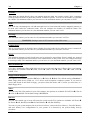
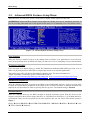
3-3. Advanced BIOS Features Setup Menu
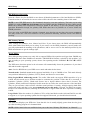
With each item, you can press <Enter> at any time to display all the options for that item.
ATTENTION: Advanced BIOS Features Setup Menu has already been set for maximum operation. If
you do not really understand each of the options in this menu, we recommend you use the default values.
Figure 3-5. Advanced BIOS Features Setup Screen
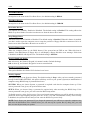
Virus Warning:
When this feature is enabled, if there is any attempt from a software or an application to access the boot
sector or the partition table, the BIOS will warn you that a boot virus is attempting to access the hard disk.
CPU Hyper-Threading
Leave this item to its default setting to enable the simultaneous multi-threaded (SMT) processor so as to
make one physical processor looks like two logical processors to the OS and applications.
This option is for CPU with Hyper-Threading Technology only. For more information on
“Hyper-Threading Technology”, please visit Intel Web site at
http://www.intel.com/homepage/land/hyperthreading.htm , http://www.intel.com/design/chipsets/ht/.
Quick Power On Self Test:
After the computer has been powered on, the BIOS of the motherboard will run a series of tests in order
to check the system and its peripherals. If the Quick Power on Self-Test feature is enabled, the BIOS will
simplify the test procedures in order to speed up the boot process. The default setting is Enabled.
First Boot Device:
When the computer boots up, the BIOS attempts to load the operating system from the devices in the
sequence selected in these items: floppy disk drive A, LS/ZIP devices, hard drive C, SCSI hard disk drive
or CD-ROM. There are eleven options for the boot sequence that you can choose (The default setting is
Floppy.):
Floppy LS120 HDD-0 SCSI CDROM HDD-1 HDD-2 HDD-3 ZIP100 LAN
ATA133RAID Disabled.
User’s Manual
3-10
Chapter 3
Second Boot Device:
Description is the same as the First Boot Device, the default setting is HDD-0.
Third Boot Device:
Description is the same as the First Boot Device, the default setting is CDROM.
Boot Other Device:
Two options are available: Enabled or Disabled. The default setting is Enabled. This setting allows the
BIOS to try three kinds of boot devices that are set from the above three items.
Swap Floppy Drive:
This item can be set as Enabled or Disabled. The default setting is Disabled. When this feature is enabled,
you don’t need to open the computer case to swap the position of floppy disk drive connectors. Drive A
can be set as drive B and drive B can be set as drive A.
Boot Up Floppy Seek:
When the computer boots up, the BIOS detects if the system has an FDD or not. When this item is
enabled, if the BIOS detect no floppy drive, it will display a floppy disk drive error message. If this item
is disabled, the BIOS will skip this test. The default setting is Disabled.
Boot Up NumLock Status:
On: At boot up, the Numeric Keypad is in numeric mode. (Default Settings)
Off: At boot up, the Numeric Keypad is in cursor control mode.
Disable Unused PCI Clock:
This option disables the clock of PCI slot that is not in use.
Security Option:
This option can be set to System or Setup. The default setting is Setup. After you have created a password
through PASSWORD SETTING, this option will deny access to your system (System) or modification of
computer setup (BIOS Setup) by unauthorized users.
SYSTEM: When you choose System, a password is required each time the computer boots up. If the
correct password is not given, the system will not start.
SETUP: When you choose Setup, a password is required only when accessing the BIOS Setup. If the
correct password is not given, you can’t enter the BIOS setup menu.
To disable security, select Set Supervisor Password at main menu and then you will be asked to enter the
password. Do not type anything and just press the <Enter> key and it will disable security. Once security
is disabled, the system will boot and you can enter the BIOS setup menu freely
NOTE: Don’t forget your password. If you forget the password, you will have to open the computer case
and clear all information in the CMOS before you can start up the system. But by doing this, you will
have to reset all previously set options.
BE7 Series
BIOS Setup
3-11
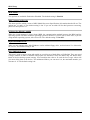
APIC Mode:
Two options are available: Enabled or Disabled. The default setting is Enabled.
MPS Version Ctrl For OS:
This item specifies which version of MPS (Multi-Processor Specification) this motherboard will use. The
options are 1.1 and 1.4. The default setting is 1.4. If you use an older OS for dual processor executing,
please set this option to 1.1.
OS Select For DRAM > 64MB:
When the system memory is bigger than 64MB, the communication method between the BIOS and the
operating system will differ from one operating system to another. If you use OS/2, select OS2; if you are
using another operating system, select Non-OS2. The default setting is Non-OS2.
Report No FDD For OS:
When you are running some older Windows version without floppy drive, set this item to Yes. Otherwise,
set it to No. The default setting is No.
Delay IDE Initial (Secs):
This item is used to support some old models or special types of hard disks or CD-ROMs. They may need
a longer amount of time to initialize and prepare for activation. Since the BIOS may not detect those
kinds of devices during system booting. You can adjust the value to fit such devices. Larger values will
give more delay time to the device. The minimum number you can enter is 0, the maximum number you
can enter is 15. The default setting is 0.
User’s Manual
3-12
Chapter 3
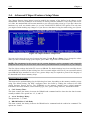
3-4. Advanced Chipset Features Setup Menu
The Chipset Features Setup Menu is used to modify the contents of the buffers in the chipset on the
motherboard. Since the parameters of the buffers are closely related to hardware, if the setup is not correct
or is false, the motherboard will become unstable or you will not be able to boot up. If you don’t know the
hardware very well, use default values (i.e. use the LOAD SETUP DEFAULTS option). The only time
you might consider making any changes is if you discover that data is being lost while using your system.
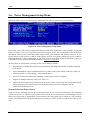
Figure 3-6. Chipset Features Setup Screen
You can use the arrow keys to move between the items. Use , and <Enter> key to change the values.
When you have finished setting up the chipset, press <Esc> to go back to the main menu.
NOTE: The parameters in this screen are for system designers, service personnel, and technically
competent users only. Do not reset these values unless you understand the consequences of your changes.
The first chipset settings deal with CPU access to DRAM. The default timings have been carefully chosen
and should only be altered if data is being lost. Such a scenario might well occur if your system has mixed
speed DRAM chips installed. In such a case, greater delays may be required to preserve the integrity of
the data held in the slower memory chips.
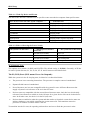
DRAM Timing Selectable:
This item sets the optimal timings for the following four items, depending on the memory module you are
using. The default setting “By SPD” configures these four items by reading the contents in the SPD
(Serial Presence Detect) device. The EEPROM on the memory module stores critical parameter
information about the module, such as memory type, size, speed, voltage interface, and module banks.
CAS Latency Time:
This item controls the latency between the DRAM read command and the time that the data becomes
actually available. The options are: 1.5, 2, and 2.5.
Act to Precharge Delay:
The options are: 7, 6, and 5.
DRAM RAS# to CAS# Delay
This item controls the latency between the DRAM active command and the read/write command. The
options are: 2 and 3.
BE7 Series
BIOS Setup
3-13
DRAM RAS# Precharge:
This item controls the idle clocks after issuing a precharge command to the DRAM.
System BIOS Cacheable:
You can select Enabled or Disabled. The default setting is Enabled. When you select Enabled allows
caching of the system BIOS ROM at F0000h-FFFFFh, resulting in better system performance. However,
if any program writes to this memory area, a system error may result.
Video BIOS Cacheable:
You can select Enabled or Disabled. The default setting is Enabled. Enabled allows caching of the video
BIOS, resulting in better system performance. However, if any program writes to this memory area, a
system error may result.
Video RAM Cacheable:
Two options are available: Enabled and Disabled. The default setting is Disabled. Enabled allows you to
get faster video RAM executing speed via the L2 cache. You must check your VGA adapter
documentation to see if any compatibility problem will occur.
Memory Hole At 15M-16M:
Two options are available: Enabled and Disabled. The default setting is Disabled. This option is used to
reserve the memory block 15M-16M for ISA adapter ROM. Some special peripherals need to use a
memory block located between 15M and 16M, and this memory block has a size of 1M. We recommend
that you disable this option.
Delayed Transaction:
Two options are available: Enabled and Disabled. The default setting is Disabled. Set the option to
enabled or disabled PCI 2.1 features including passive release and delayed transaction for the chipset.
This function is used to meet the latency of PCI cycles to or from the ISA bus. This option must be
enabled to provide PCI 2.1 compliance. If you have an ISA card compatibility problem, you can try to
enable or disable this option for optimal results.
Delay Prior to Thermal:
The options are: 4, 8, 16, and 32 Minutes. The default setting is 16 Min.
AGP Aperture Size:
The options are: 4, 8, 16, 32, 64, 128, and 256MB. The default setting is 64MB. This option specifies the
amount of system memory that can be used by the AGP device. The aperture is a portion of the PCI
memory address range dedicated for graphics memory address space. Host cycles that hit the aperture
range are forwarded to the AGP without any translation. See www.agpforum.org for AGP information.
AGP Data Transfer Rate:
You can select the AGP device data transfer rate capability. Two options are available: 2X Mode and 4X
Mode. The default setting is 4X Mode.
Differential Current:
This option allows you to select the current multiple of CPU clock. The options are: 4x, 6x, 5x, 7x, and
Default.
User’s Manual
3-14
Chapter 3
3-5. Integrated Peripherals
In this menu, you can change the onboard I/O device, I/O port address and other hardware settings.
Figure 3-7. Integrated Peripherals Menu Screen
OnChip IDE Device(s):
Press <Enter> key to enter the OnChip IDE Device(s) menu.
OnChip IDE-1 Controller:
The OnChip IDE 1 Controller can be set as Enabled or Disabled. The default setting is Enabled. The
integrated peripheral controller contains an IDE interface with support for two IDE channels. If you
choose Disabled, it will affect the settings of four items not available. For example, if you disabled the
OnChip IDE-1 Controller, you will also disable the Master/Slave Drive PIO Mode and Master/Slave
Drive Ultra DMA.
Master/Slave Drive PIO Mode
Six options are available: Auto Mode 0 Mode 1 Mode 2 Mode 3 Mode 4. The five IDE
PIO (Programmed Input/Output) items let you set a PIO mode (0-4) for each of the four IDE devices that
the onboard IDE interface supports. Modes 0 through 4 provide successively increased performance. In
Auto mode (default setting), the system automatically determines the best mode for each device.
BE7 Series
BIOS Setup
3-15
Master/Slave Drive Ultra DMA
Two options are available: Auto and Disabled. The default setting is Auto. Ultra DMA is a DMA data
transfer protocol that utilizes ATA commands and the ATA bus to allow DMA commands to transfer data
at a maximum burst rate of 100 MB/sec.
Ultra DMA/33 or Ultra DMA/66/100 implementation is possible only if your IDE hard drive supports it
and the operating environment includes a DMA driver (Windows® 95 OSR2 / 98 / ME / NT / 2000 or a
third-party IDE bus master driver).
Auto: If your hard drive and your system software both support Ultra DMA, select Auto to enable BIOS
support.
Disabled: If you encounter a problem in using Ultra DMA devices, you can try to disable this item.
OnChip IDE-2 Controller:
The description is same as the OnChip IDE-1 Controller.
OnChip PCI Device(s):
Press <Enter> key to enter the OnChip PCI Device(s) menu.
OnChip USB Controller:
Two options are available: Enabled and Disabled. The default setting is Enabled. This motherboard
provides two Universal Serial Bus (USB) ports, thus supporting USB devices. If you don't want to use
USB devices, set it to Disabled, then the item USB Keyboard Support & USB Mouse Support will also be
disabled.
USB Keyboard Support Via:
Two options are available: OS and BIOS. The default setting is OS. If you want to use USB keyboard in
DOS environment, please set it to BIOS.
USB Mouse Support Via:
Two options are available: OS and BIOS. The default setting is OS. If you want to use USB mouse in
DOS environment, please set it to BIOS.
OnChip Audio Controller:
This option enables or disables the audio controller. The default setting is Enabled.
User’s Manual
3-16
Chapter 3
Init Display First:
Two options are available: PCI Slot and AGP. The default setting is PCI Slot. When you install an
additional display card, you can choose either a PCI display card or an AGP display card to activate the
display boot-up screen.
Onboard PCI Device(s):
Press <Enter> key to enter the Onboard PCI Device(s) menu.
LAN Controller:
This option enables or disables the LAN controller. The default setting is Enabled.
LAN Boot ROM:
This option enables or disables the Boot ROM on LAN controller. The default setting is Enabled.
ATA133RAID IDE Controller (For BE7-RAID):
This item selects the onboard ATA133RAID controller. When set to [Enabled], two additional channels
will be provided for adding high performance devices to system.
Serial ATA Controller (For BE7-G and BE7-S):
This item selects the onboard Serial ATA controller. When set to [Enabled], two additional channels will
be provided for adding high performance devices to system.
Onboard FDD Controller:
Two options are available: Enabled and Disabled. The default setting is Enabled. You can enable or
disable the onboard FDD controller.
Onboard Serial Port 1:
This is used to specify the I/O address and IRQ of Serial Port 1. Six options are available: Disabled 3F8/IRQ4 2F8/IRQ3 3E8/IRQ4 2E8/IRQ3 AUTO. The default setting is 3F8/IRQ4.
Onboard Serial Port 2:
This is used to specify the I/O address and IRQ of Serial Port 2. Six options are available: Disabled BE7 Series
BIOS Setup
3-17
3F8/IRQ4 2F8/IRQ3 3E8/IRQ4 2E8/IRQ3 AUTO. The default setting is 2F8/IRQ3.
Onboard IR Function: Three options are available: IrDA (HPSIR) mode ASK IR (Amplitude Shift
Keyed IR) mode Disabled. The default setting is Disabled.
RxD , TxD Active: Four options are available: Hi, Hi Hi, Lo Lo, Hi Lo, Lo. The default setting
is Hi, Lo. Set IR transmission/reception polarity as High or Low.
IR Transmission Delay: Two options are available: Enabled and Disabled. The default setting is
Enabled. Set IR transmission delays 4 character-time (40 bit-time) when SIR is changed from RX mode
to TX mode.
UR2 Duplex Mode: Two options are available: Full and Half. The default setting is Half. This item lets
you choose the operation mode for your IR KIT. Some IR device only can work at half duplex mode.
Refer to your IR KIT user's guide to find out which setting is correct.
Use IR Pins: Two options are available: RxD2, TxD2 and IR-Rx2Tx2. The default setting is IR-Rx2Tx2.
If you choose RxD2, TxD2, your motherboard must support a COM port IR KIT connection. Otherwise,
you can only choose the IR-Rx2Tx2 to use the IR header on your motherboard to connect your IR KIT.
Please use the default setting.
Onboard Parallel Port:
Sets the I/O address and IRQ of the onboard parallel port. Four options are available: Disable 378/IRQ7 278/IRQ5 3BC/IRQ7. Default setting is 378/IRQ7.
Parallel Port Mode: Four options are available: SPP EPP ECP ECP+EPP. The default setting
is SPP mode.
EPP Mode Select: Two options are available: EPP1.7 EPP1.9. The default setting is EPP 1.7. When
the mode selected for the parallel port mode is EPP, the two EPP version options are available.
ECP Mode Use DMA: Two options are available: 1 3. The default setting is 3. When the mode
selected for the parallel port mode is ECP, the DMA channel selected can be Channel 1 or Channel 3.
User’s Manual
3-18
Chapter 3
3-6. Power Management Setup Menu
This menu allows you to set up the power management in order to reduce power consumption.
Figure 3-8. Power Management Setup Menu
If you want ACPI (Advanced Configuration and Power Interface) functions to work normally, you should
notice two things. One is your operating system must support ACPI. The second thing is that all devices
and add-on cards in your system must fully support ACPI, both hardware and software (drivers). If you
want to know if your devices or add-on cards support ACPI or not, please contact the device or add-on
card manufacturer for more information. If you want to know more about ACPI specifications, please go
to the address below for more detailed information: http://www.acpi.info/
ACPI requires an ACPI-aware operating system. ACPI features include:
•
Plug and Play (including bus and device enumeration) and APM functionality normally contained
in the BIOS.
•
Power management control of individual devices, add-in cards (some add-in cards may require an
ACPI-aware driver), video displays, and hard disk drives.
•
A Soft-off feature that enables the operating system to power off the computer.
•
Support for multiple wake-up events (see Table 3-1).
•
Support for a front panel power and sleep mode switch. Table 3-2 describes the system states based
on how long the power switch is pressed, depending on how ACPI is configured with an
ACPI-aware operating system.
System States and Power States:
Under ACPI, the operating system directs all system and device power state transitions. The operating
system puts devices in and out of low-power states based on user preferences and knowledge of how
devices are being used by applications. Devices that are not being used can be turned off. The operating
system uses information from applications and user settings to put the system as a whole into a low-power
state.
BE7 Series
BIOS Setup
3-19
Table 3-1: Wake Up Device and Events
The table below describes which devices or specific events can wake the computer from specific states.
These device/events can wake up the computer……
Power switch
RTC alarm
LAN
Modem
IR command
USB
PS/2 keyboard
PS/2 mouse
……from this state
Sleeping mode or power off mode
Sleeping mode or power off mode
Sleeping mode or power off mode
Sleeping mode or power off mode
Sleeping mode
Sleeping mode
Sleeping mode or power off mode
Sleeping mode or power off mode
Table 3-2: Effect of Pressing the Power Switch
If the system is in this state……
Off
On
On
Sleep
……and the power switch is
pressed for
Less than four seconds
More than four seconds
Less than four seconds
Less than four seconds
……the system enters this state
Power on
Fail safe power off
Soft off/Suspend
Wake up
ACPI Suspend Type:
Two options are available: S1(POS) and S3(STR). The default setting is S1(POS). Generally, ACPI has
six states: System S0 state, S1, S2, S3, S4, S5. S1 and S3 states are described below:
The S1 (POS) State (POS means Power On Suspend):
While the system is in the S1 sleeping state, its behavior is as described below:
•
The processor is not executing instructions. The processor’s complex context is maintained.
•
Dynamic RAM context is maintained.
•
Power Resources are in a state compatible with the system S1 state. All Power Resources that
supply a System Level reference of S0 are in the OFF state.
•
Devices states are compatible with the current Power Resource states. Only devices which solely
reference Power Resources which are in the ON state for a given device state can be in that device
state. In all other cases, the device is in the D3 (off) state.
•
Devices that are enabled to wake the system and that can do so from their current device state can
initiate a hardware event which transitions the system state to S0. This transition causes the
processor to continue execution where it left off.
To transition into the S1 state, the operating software does not have to flush the processor's cache.
User’s Manual
3-20
Chapter 3
The S3 (STR) State (STR means Suspend to RAM):
The S3 state is logically lower then the S2 state and is assumed to conserve more power. The behavior of
this state is defined as follows:
•
Processor is not executing instructions. The processor complex context is not maintained.
•
Dynamic RAM context is maintained.
•
Power Resources are in a state compatible with the system S3 state. All Power Resources that
supply a System Level reference of S0, S1, or S2 are in the OFF state.
•
Devices states are compatible with the current Power Resource states. Only devices which solely
reference Power Resources which are in the ON state for a given device state can be in that device
state. In all other cases, the device is in the D3 (off) state.
•
Devices that are enabled to wake the system and that can do so from their current device state can
initiate a hardware event which transitions the system state to S0. This transition causes the
processor to begin execution at its boot location. The BIOS performs initialization of core functions
as required to exit an S3 state and passes control to the firmware resume vector. Please see the
ACPI Specification Rev. 1.0 book section 9.3.2 for more details on BIOS initialization.
From the software point of view, this state is functionally the same as the S2 state. The operational
difference can be that some Power Resources that could be left ON in the S2 state might not be available
to the S3 state. As such, additional devices can be required to be in logically lower D0, D1, D2, or D3
state for S3 than S2. Similarly, some device wake events can function in S2 but not S3.
Because the processor context can be lost while in the S3 state, the transition to the S3 state requires that
the operating software flush all dirty cache to DRAM.
The information above for system S0 & S3 were referring to ACPI Specification.
Resume by USB From S3:
Two options are available: Enabled and Disabled. The default setting is Disabled.
Power Button Function:
Two options are available: Instant-off and Delay 4 Sec.. The default setting is Instant-off. Pressing the
power button for more than four seconds forces the system to enter the Soft-Off state when the system has
“hung”.
CPU THRM-Throttling
This option is used during Suspend To RAM (STR) mode. It controls the CPU speed as a percentage of
regular power. The options include 87.5%, 75.0%, 62.5%, 50.0%, 37.5%, 25.0%, and 12.5%. The default
setting is set at 62.5%.
WakeUp by PME# of PCI:
Two options are available: Enabled and Disabled. Default setting is Disabled. This item can let you
wake-up your computer by PCI devices. For instance, if you had installed a PCI LAN card with Wake-Up
on LAN capability, then you could wake-up your computer from another computer via a network by
sending a wake-up frame signal. This feature also allows the PCI card built-in hardware function to
support the wake up function without special cables connected to the motherboard.
BE7 Series
BIOS Setup
3-21
NOTE: This feature needs a specific network interface (optional). Also your ATX power supply +5V
standby power must be at least 720mA compatible.
WakeUp by Ring:
Two options are available: Enabled and Disabled. Default setting is Disabled. If you connect an external
modem to the onboard serial port, the system will be turned on when a telephone ring-up occurs.
WakeUp by Alarm:
Two options are available: Enabled and Disabled. Default setting is Disabled. The RTC alarm can turn on
the system. You can set Date (of month) and Time (hour, minute, and second) when you set this item to
Enabled.
POWER ON Function:
This item allows you to select by which way you want your system to power on. The options are:
Password Hot Key Mouse Left Mouse Right Any Key Button Only Keyboard 98. The
default setting is Button Only.
NOTE: The mouse wake up function can only be used with the PS/2 mouse, not with a mouse that uses
the COM port and USB connection. Mouse Left (Mouse Right) means you need to double click the mouse
left (right) button, for the computer to power on. You also need to note the compatibility issue with your
PS/2 mouse. Some PS/2 mice cannot wake up the system because of compatibility problems. Also, if the
specs of your keyboard are too old, it may fail to power on.
KB Power ON Password: This option allows you to set a password required in order to Power ON your
computer. You will be asked to enter your password and then to confirm it. Do not forget your password.
Should you forget your password, you will have to open your computer case, clear the CMOS and reset
all parameters again in order to be able to utilize this function.
Hot Key Power ON: There are twelve options are available, Ctrl-F1 to Ctrl-F12. You can select this item
and using the <Ctrl> plus the one of each function key (F1 to F12) to power on the computer. The default
setting is Ctrl-F1.
Restore On AC Power Loss:
This item allows you to select the system action after a power failure. The options are: Power Off Power On Last State. The default setting is Power Off.
User’s Manual
3-22
Chapter 3
3-7. PnP/PCI Configurations
This section describes configuring the PCI bus system. PCI, or Personal Computer Interconnect, is a
system which allows I/O devices to operate at speeds nearing the speed the CPU itself uses when
communicating with its own special components. This section covers some very technical items and it is
strongly recommended that only experienced users should make any changes to the default settings.
Figure 3-9. PnP/PCI Configurations Setup Screen Shot
Force Update ESCD:
If you want to clear ESCD data next time you boot up, and ask the BIOS to reset the settings for the Plug
& Play ISA Card and the PCI Card, select Enabled. But the next time you boot up, this option will
automatically be set as Disabled.
NOTE: The ESCD (Extended System Configuration Data) contains the IRQ, DMA, I/O port, memory
information of the system. This is a specification and a feature specific to the Plug & Play BIOS.
Resources Controlled By:
Two options are available: Auto(ESCD) and Manual. Default setting is Auto(ESCD). When the setting is
Auto(ESCD), the IRQ Resources and Memory Resources can not be changed. When resources are
controlled manually, the IRQ Resources and Memory Resources can then be changed.
PCI PnP devices compliant with the Plug and Play standard, whether designed for the PCI bus
architecture.
The Award Plug and Play BIOS has the capability to automatically configure all of the boot and Plug and
Play compatible devices. If you select Auto (ESCD), The IRQ Resources item will be disabled, as the
BIOS automatically assigns them. But if you have trouble in assigning the interrupt resources
automatically, you can select Manual to set which IRQ is assigned to PCI PnP cards.
Figure 3-10 shows you the screen of IRQ resources. Each item has two options: PCI Device and Reserved.
The default setting is PCI Device.
BE7 Series
BIOS Setup
3-23
Figure 3-10. IRQ Resources Setup Screen Shot
PCI/VGA Palette Snoop:
This option allows the BIOS to preview VGA Status, and to modify the information delivered from the
Feature Connector of the VGA card to the MPEG Card. This option can solve the display inversion to
black after you have used the MPEG card.
Allocate IRQ To Video:
Two options are available: Disabled or Enabled. The default setting is Enabled. Name the interrupt
request (IRQ) line assigned to the USB/VGA/ACPI (if any) on your system. Activity of the selected IRQ
always awakens the system.
You can assign an IRQ for the PCI VGA or Disabled.
Allocate IRQ To USB:
Two options are available: Disabled or Enabled. The default setting is Enabled. If you need another IRQ
to be freed up, you can choose to disable this item, and you can get an IRQ. But in some situations in
Windows® 95 it may cause the USB port to malfunction or have other problems!
PCI Latency Timer(CLK):
This option selects the controls for the amount of time that the ICH arbiter allows a PCI initiator to
perform multiple back-to-back transactions on the PCI bus. The options are: 32, 64, 96, 128, 160, 192,
224, and 248 PCI Clocks. The default setting is 32 PCI Clocks.
PIRQ_0 Use IRQ No. ~PIRQ_7 Use IRQ No. :
The options are: Auto, 3, 4, 5, 7, 9, 10, 11, 12, 14, and 15. The default setting is Auto.
This item allows the IRQ number for the device installed on PCI slots to be specified by the system
automatically or yiou can specify a fixed IRQ number. This is a useful function when you want to fix the
IRQ for a specific device. For example, if you want to move your hard disk to another computer and don’t
want to re-install Windows® NT, then you can specify the IRQ for the device installed on the new
computer to fit the original computer settings.
This feature is for the operating system that will record and fix the PCI configuration status, if you want
to change it.
User’s Manual
3-24
Chapter 3
For the relations between the hardware layout of PIRQ (the signals from the ICH chipset), INT# (means
PCI slot IRQ signals) and devices, please refer to the table below:
LAN
PCI-1
PIRQ_0 Assignment INT A
PIRQ_1 Assignment INT B
PIRQ_2 Assignment
PIRQ_3 Assignment
INT A
PIRQ_4 Assignment
PIRQ_5 Assignment
PIRQ_6 Assignment
PIRQ_7 Assignment
INT D
INT A
INT B
INT C
Signals
AGP
PCI-2
PCI-3
PCI-4
PCI-5
HPT372
SATA
(BE7-RAID) (BE7-G/S)
INT A
INT A
INT B
INT C
INT D
INT B
INT C
INT D
INT A
INT C
INT D
INT A
INT B
INT A
INT D
INT A
INT B
INT C
3-8. PC Health Status
You can set the warning temperature for your computer system, and you can check the fan speeds and
power supply voltages of your computer system. The features are useful for monitoring all the important
parameters within your computer system. We call it the PC Health Status.
Figure 3-11. PC Health Status Screen Shot
FAN Fail Alarm Selectable:
This item lets you select which one of the fans will be monitored for malfunction. The options are:
Disabled PWRFAN CPUFAN CHAFAN Auto. The default setting is Disabled.
Shutdown When CPU Fan Fail:
This item protects the CPU by shutting the system down if the fan of the option you select is not rotating.
The options are: Disabled Enabled. The default setting is Disabled.
If you select this option as Enabled, the system will be shut down:
(1) Immediately when the fan fails in the process of POST.
(2) Only when the fan fails in ACPI after the process of POST.
BE7 Series
BIOS Setup
3-25
CPU Shutdown Temperature:
Once the system or CPU temperature exceeds the temperature specified, the CPU will shutdown
automatically to avoid damaging. This function only works for an ACPI OS such as Windows 98/
Windows 2000 with ACPI activated. The options are Disabled, 60°C/140°F, 65°C/149°F, 70°C/158°F,
and 75°C/167°F. The default setting is Disabled.
CPU Warning Temperature:
This item lets you select the temperature at which you want the system to send out a warning message to
the PC speakers of when the temperature goes beyond either limit. You can select the temperatures you
want. The ranges are from 30°C/86°F to 120°C/248°F, default setting is 75°C/167°F。
All Voltages, Fans Speed and Thermal Monitoring:
These unchangeable items list the current status of the CPU and environment temperatures, fan speeds,
and system power voltage.
NOTE: The hardware monitoring features for temperatures, fans and voltages will occupy the I/O
address from 294H to 297H. If you have a network adapter, sound card or other add-on cards that might
use those I/O addresses, please adjust your add-on card I/O address to avoid using these addresses.
User’s Manual
3-26
Chapter 3
3-9. Load Fail-Safe Defaults
Figure 3-12. Load Fail-Safe Defaults Screen Shot
When you press <Enter> on this item you get a confirmation dialog box with a message similar to:
Load Fail-Safe Defaults (Y/N) ?
N
Pressing “Y” loads the BIOS default values for the most stable, minimal-performance system operations.
3-10. Load Optimized Defaults
Figure 3-13. Load Optimized Defaults Screen Shot
When you press <Enter> on this item you get a confirmation dialog box with a message similar to:
Load Optimized Defaults (Y/N) ?
N
Pressing “Y” loads the default values that are factory settings for optimal performance system operations.
BE7 Series
BIOS Setup
3-27
3-11. Set Password
Figure 3-14. Set Password Screen Shot
Set Password: You can enter but do not have the right to change the options of the setup menus. When
you select this function, the following message will appear at the center of the screen to
assist you in creating a password.
ENTER PASSWORD:
Type the password, up to eight characters in length, and press <Enter>. The password typed now will
clear any previously entered password from CMOS memory. You will be asked to confirm the password.
Type the password again and press <Enter>. You may also press <Esc> to abort the selection and not
enter a password.
To disable a password, just press <Enter> when you are prompted to enter the password. A message will
confirm the password will be disabled. Once the password is disabled, the system will boot and you can
enter Setup freely.
PASSWORD DISABLED.
When a password has been enabled, you will be prompted to enter it every time you try to enter Setup.
This prevents an unauthorized person from changing any part of your system configuration.
Additionally, when a password is enabled, you can also require the BIOS to request a password every
time your system is rebooted. This would prevent unauthorized use of your computer.
Figure 3-15. Password Disabled Screen Shot
You can determine when the password is required within the BIOS Features Setup Menu and its Security
option. If the Security option is set to “System”, the password will be required both at boot and at entry to
Setup. If it is set to “Setup”, the prompting only occurs when trying to enter Setup.
User’s Manual
3-28
Chapter 3
3-12. Save & Exit Setup
Figure 3-16. Save & Exit Setup Screen Shot
Pressing <Enter> on this item asks for confirmation:
Save to CMOS and EXIT (Y/N)?
Y
Pressing “Y” stores the selections made in the menus in CMOS - a special section of memory that stays
on after you turn your system off. The next time you boot your computer, the BIOS configures your
system according to the Setup selections stored in CMOS. After saving the values the system is restarted
again.
3-13. Exit Without Saving
Figure 3-17. Exit Without Saving Screen Shot
Pressing <Enter> on this item asks for confirmation:
Quit without saving (Y/N)?
Y
This allows you to exit Setup without storing in CMOS any change. The previous selections remain in
effect. This exits the Setup utility and restarts your computer.
BE7 Series
Intel Chipset Software Utility
A-1
Appendix A. Install Intel Chipset Software Utility
NOTE: Please install this Intel Chipset Driver before installing VGA and Audio driver.
The installation procedures and screen shots in
this section are based on Windows XP operating
system. For those of other OS, please follow its
on-screen instruction.
Insert the Driver & Utility CD into CD-ROM
drive, it should execute the installation program
automatically. If not, double-click the execution
file at the main directory of this CD to enter the
installation menu.
After entering the installation menu, move your
curser to [Driver] tab. Click [Intel Chipset
Software Utility]. The following screen appears.
1.
Click [Next].
2.
Click [Yes].
3.
Click [Next].
4. Choose [Yes, I want to restart my computer
now.], and click [Finish] to complete setup.
User’s Manual
A-2
BE7 Series
Appendix A
Install Intel Application Accelerator
B-1
Appendix B. Install Intel Application Accelerator
NOTE: Please make sure to install the “Intel Chipset Driver” first and to reboot the system before
installing this “Intel Application Accelerator”.
The installation procedures and screen shots in
this section are based on Windows XP operating
system. For those of other OS, please follow its
on-screen instruction.
Insert the Driver & Utility CD into CD-ROM
drive, it should execute the installation program
automatically. If not, double-click the execution
file at the main directory of this CD to enter the
installation menu.
After entering the installation menu, move your
curser to [Driver] tab. Click [Intel Application
Accelerator]. The following screen appears.
1.
2.
3.
Click [Next].
4.
Click [Next].
Click [Next].
Click [Yes].
User’s Manual
B-2
5. Choose [Yes, I want to restart my computer
now.], and click [Finish] to complete setup.
BE7 Series
Appendix B
Install Audio Driver
C-1
Appendix C. Install Audio Driver
The installation procedures and screen shots in
this section are based on Windows XP operating
system. For those of other OS, please follow its
on-screen instruction.
Insert the Driver & Utility CD into CD-ROM
drive, it should execute the installation program
automatically. If not, double-click the execution
file at the main directory of this CD to enter the
installation menu.
After entering the installation menu, move your
curser to [Driver] tab. Click [RealTek ALC650
Audio Driver]. The following screen appears.
3. Choose [Yes, I want to restart my computer
now.], and click [Finish] to complete setup.
1.
Click [Next].
2.
Click [Continue Anyway].
4. After the system restarted, a shortcut icon
appears at the right corner of Windows task bar.
5. In this Speaker Configuration tab, select [6
channels mode for 5.1 speakers output] to
enable 6-channel audio system.
User’s Manual
C-2
Note: To keep a normal operation of 5.1
speakers output, please do not change the
settings of “Line In” and “Mic In” in this menu.
BE7 Series
Appendix C
Install LAN Driver
D-1
Appendix D. Install LAN Driver
The installation procedures and screen shots in
this section are based on Windows XP operating
system. For those of other OS, please follow its
on-screen instruction.
For BE7-S and BE7-B:
After entering the installation menu, move your
curser to [Driver] tab. Click [Broadcom 10/100
LAN Driver]. The following screen appears.
Insert the Driver & Utility CD into CD-ROM
drive, it should execute the installation program
automatically. If not, double-click the execution
file at the main directory of this CD to enter the
installation menu.
For BE7 and BE7-RAID:
After entering the installation menu, move your
curser to [Driver] tab. Click [RealTek LAN
Driver]. The following screen appears.
1.
1.
Click [Next].
Click [Next].
2. Click [Yes] to accept the license agreement.
Reboot the system to make the driver effective.
2.
Click [Finish] to complete setup.
User’s Manual
D-2
Appendix D
Note: In order to enable the WOL (Wake-up On
LAN) function for BE7-S and BE7-B model in
Windows 2000 and Windows XP, it is
necessary to change the value of the “Wake Up
Capabilities” property into “Magic Frame”.
Please refer to the following two steps:
2. Select [Advanced] tab. Move your cursor to
select the [Wake Up Capabilities] property
option and then set the value option to [Magic
Frame]. Click [OK] and restart your computer
to complete setup.
1. After finished the driver installation, check
the [Network adapters] in the [Device Manager].
You will find the [Broadcom 440x 10/100
Integrated Controller] is successfully installed.
Select [Broadcom 440x 10/100 Integrated
Controller]. Right click your mouse to enter its
properties.
BE7 Series
Install LAN Driver
D-3
For BE7-G:
Note: There is no need to set up Gigabit LAN
driver for Windows XP. The following
installation procedures and screen shots in this
section are based on Windows 2000.
After entering the installation menu, move your
curser to [Driver] tab. Click [Broadcom Gigabit
LAN Driver]. The following screen appears.
1.
2.
3.
Click [Yes].
4.
Select Windows 2000. Click [Next].
Click [MAKEDISK UTILITY].
Click [Next].
5. Insert a blank floppy disk to [A] drive. You
may also create a new directory in your hard
disk by clicking [Browse]. Click [Next] to start
copying files.
User’s Manual
D-4
Appendix D
6. The setup wizard is copying files to floppy
disk.
9. Select [Driver] tab in the [Ethernet
Controller Properties]. Click [Update Driver].
7. The setup wizard finish copying files to
floppy disk. Click [OK] to exit.
10. The upgrade wizard appears. Click [Next]
to continue.
8. Check [Device Manager]. Click [Ethernet
Controller].
BE7 Series
Install LAN Driver
11. Select [Search for a suitable driver for my
device]. Click [Next].
D-5
14. Click [Finish].
12. Select [Floppy disk drives]. Click [Next].
15. Back to the [Ethernet Controller Properties].
Click [Close] to finish driver update.
13. Click [Next].
User’s Manual
D-6
16. Check [Device Manager] again. [Broadcom
NetXtreme Gigabit Ethernet] is successfully
upgraded.
BE7 Series
Appendix D
Install USB 2.0 Driver
E-1
Appendix E. Install USB 2.0 Driver
The installation procedures and screen shots in
this section are based on Windows XP operating
system. For those of other OS, please follow its
on-screen instruction.
Insert the Driver & Utility CD into CD-ROM
drive, it should execute the installation program
automatically. If not, double-click the execution
file at the main directory of this CD to enter the
installation menu.
After entering the installation menu, move your
curser to [Driver] tab. Click [USB 2.0 Driver].
The following screen appears.
3.
Click [Finish].
4.
Click [Next].
5.
Click [Finish].
1. Choose [Yes, I want to restart my computer
now], and click [Close] to reboot the system.
2.
Click [Next].
User’s Manual
E-2
BE7 Series
Appendix E
Install Serial ATA RAID Driver (For BE7-G & BE7-S)
F-1
Appendix F. Install Serial ATA RAID Driver (For
BE7-G & BE7-S)
The installation procedures and screen shots in
this section are based on Windows XP operating
system. For those of other OS, please follow its
on-screen instruction.
Insert the Driver & Utility CD into CD-ROM
drive, it should execute the installation program
automatically. If not, double-click the execution
file at the main directory of this CD to enter the
installation menu.
After entering the installation menu, move your
curser to [Driver] tab. Click [Serial ATA RAID
Driver]. The following screen appears.
3. Choose [Yes, I want to restart my computer
now.], and click [Finish] to complete setup.
1.
Click [Next].
2.
Click [Continue Anyway].
4. Check [Device Manager]. [Silicon Image
SiI 3112 SATARaid Controller] is successfully
installed.
User’s Manual
F-2
BE7 Series
Appendix F
HPT 372 Setup (For BE7-RAID)
G-1
Appendix G. HPT 372 Setup (For BE7-RAID)
Driver Installation
The installation procedures and screen shots in
this section are based on Windows XP operating
system. For those of other OS, please follow its
on-screen instruction.
Insert the Driver & Utility CD into CD-ROM
drive, it should execute the installation program
automatically. If not, double-click the execution
file at the main directory of this CD to enter the
installation menu.
After entering the installation menu, move your
curser to [Driver] tab. Click [HPT 372 Driver].
The following screen appears.
1.
2.
3.
Click [Finish].
4.
Click [Yes].
5.
Click [Next].
Click [Next].
Click [Continue Anyway] to continue.
User’s Manual
G-2
Appendix G
9. Click [Yes] if you want to add a shortcut to
startup folder.
6.
Click [Yes].
10. Click [Finish] to end the setup.
7.
Click [Next].
11. Choose [Yes, I want to restart my computer
now.], and click [Finish] to complete setup].
8.
Click [Next].
BE7 Series
HPT 372 Setup (For BE7-RAID)
G-3
BIOS Setup for RAID
For further information on RAID concept, you
can find it on the “Technological Terms” from
our WEB site, or you can search the related
information on the Internet.
12. Execute the [RAID Management Software]
by entering the Windows menu: [Start] [All
Programs] [HighPoint] [HighPoint ATA
RAID Management Software].
This motherboard supports the RAID operation
of “Striping (RAID 0)”, “Mirroring (RAID
1)”, or “Striping/Mirroring (RAID 0+1)”. For
the striping operation, the identical drives can
read and write data in parallel to increase
system performance. The Mirroring operation
creates a complete backup of your files. Striping
with Mirroring operation offers both read/write
performance and fault tolerance.
After completed the installation of HPT37X
driver, you have to enable the RAID function in
BIOS setup menu. Enter the “Advanced BIOS
Features” in the BIOS setup menu. Change the
settings of “First Boot Device”, “Second Boot
Device” and “Third Boot Device” to
“ATA133RAID”. See the figure below:
13. The [RAID Management Software] screen
pops up.
NOTE: The option of “SCSI” cannot be worked
as a booting device if this “ATA133RAID” had
been selected as booting device, and vice versa.
User’s Manual
G-4
Appendix G
Option 1
Create RAID
BIOS Setting Utility
Main Menu
This item allows you to create a RAID array.
Reboot your system. Press <CTRL> and <H>
key while booting up the system to enter the
BIOS setting menu. The main menu of BIOS
Setting Utility appears as shown below:
•
To select the option in this menu, you may:
Array Mode:
This item allows you to select the
appropriate RAID mode for the desired
array. There are four modes to choose.
NOTE: It is highly recommended to attach hard
disks with the same model in reaching the
RAID performance.
•
Press <F1> to view array status.
•
Press <↑↓> (up, down arrow) to choose
the option you want to confirm or to
modify.
Striping (RAID 0): This item is recommended
for high performance usage. Requires at least 2
disks.
•
Press <Enter> to confirm the selection.
•
Press <Esc> to return to top menu.
Mirror (RAID 1): This item is recommended
for data security usage. Requires at least 2
disks.
NOTE: If you want to create a RAID 0 (striping)
array or RAID 0+1 array, all the data stored in
the hard disks will first be erased! Please
backup the hard disk data before starting to
create these RAID arrays.
If you want to create a RAID 1 (mirroring) array,
please make sure which hard disk is the source
disk and which one is the destination disk. If
you make a mistake, you may copy the blank
data to the source disk, which will result in both
hard disks becoming blank!
BE7 Series
Striping and Mirror (RAID 0+1): This item is
recommended for data security and high
performance usage. Allows Mirroring with a
Strip Array. Require 4 disks.
Span (JBOD): This item is recommended for
high capacity without redundancy or
performance features usage. Requires at least 2
disks.
NOTE: When you choose to create RAID 1,
and your source disk is not empty, you have to
Duplicate Mirror Disk to copy data to
destination disk. Otherwise, it will only copy the
partition table to the destination disk, not the
physical date.
HPT 372 Setup (For BE7-RAID)
•
Select Disk Drives:
This item allows you to select the disk
drives to be used with the RAID array.
•
Stripe Size:
This item allows you to select the stripe
size of the RAID array. There are five
options: 4K, 8K, 16K, 32K, and 64K.
•
Start Creation Process:
After you have made your selection,
choose this item and press <Enter> to
start creation.
G-5
•
Select Source Disk:
This item selects the source disk. The size
of source disk must be smaller or equal to
the size of target disk.
•
Select Target Disk:
This item selects the target disk. The size
of target disk must be greater or equal to
the size of source disk.
•
Start Duplicating Process:
After you had selected this item, the BIOS
setting will take up to 30 minutes to run
the duplication. Please wait, or you may
press <Esc> to cancel.
Option 2
Delete RAID
Option 4
Add Spare Disk
This item allows you to remove a RAID Array
on this IDE RAID controller.
NOTE: After you have made and confirmed
this selection, all the data stored in the hard disk
will be lost. (The entire partition configuration
will be deleted too.)
To add the spare disk:
1.
Select “4. Add Spare Disk” in the Main
Menu, and press <Enter> to confirm.
2.
In menu zone of the pop up sub interface,
select “1. Select Mirror Array: None” and
press <Enter> to confirm.
3.
In the validated channel status zone, select
the mirror array and press <Enter> to
confirm.
Option 3
Rebuild Mirror Disk
This item allows you to select the disk you wish
to rebuild in preparation for a “Mirror Disk
Array”.
After you have selected the function you want
in the main menu, you may press <Enter> key
to enter the sub menu as shown below:
4. In the menu zone of the pop up subinterface,
select “2. Select Spare Drive: None” and
press <Enter> to confirm.
5.
In the validated channel status zone, select
the spare disk to be added and press
<Enter> to confirm.
User’s Manual
G-6
Appendix G
Option 5
Remove Spare Disk
To remove the spare disk:
1.
Select “5. Remove Spare Disk” in the Main
Menu, and press <Enter> to confirm.
2.
The item “1. Select Mirror Array: None”
appears in the menu zone of pop up sub
interface.
3.
In the validated channel status zone, select
the spare disk to be removed and press
<Enter> to confirm.
Option 7
Set Boot Disk
This item allows you to select boot disk among
hard disk(s).
To set disk mode:
1. Select “7. Set Boot Disk” in the Main Menu,
and press <Enter> to confirm.
2.
Option 6
Set Disk Mode
This item allows you to select transfer mode for
hard disk(s).
To set disk mode:
1.
Select “6. Set Disk Mode” in the Main
Menu, and press <Enter> to confirm.
2.
In the Channel Status, select the channel
you would like to set and press <Enter>, an
asterisk mark appears in the parentheses to
indicate that the channel has been selected.
3.
Choose the mode from the pop-up menu.
You can choose from PIO 0 ~ 4, MW DMA
0 ~ 2, and UDMA 0 ~ 5.
BE7 Series
In the Channel Status, select the channel
you would like to set as bootable disk and
presses <Enter>, an asterisk mark appears
in the parentheses to indicate that the
channel has been selected.
BIOS Update Guide
H-1
Appendix H. BIOS Update Guide
The procedure illustrated here is based on the model SE6 as an example; all other models follow the same
process.
1.
First, find out the model name and version number of this motherboard. You can find a sticker with
model name and version number on one slot or at the back of the motherboard.
2.
Find out the current BIOS ID.
For example, in this case, the current BIOS ID is “00”. If you already have the latest BIOS, no any update
action is necessary. If your BIOS is not the latest BIOS, go on to the next step.
User’s Manual
H-2
3.
Appendix H
Download the correct BIOS file from our Web site.
Go to our Web site and choose the correct BIOS file and download it.
4.
Double click the download file, it will self-extract to .bin file.
5.
Make a bootable floppy disk and copy the necessary files onto it.
You may make a floppy disk bootable either in Explorer or in the DOS prompt mode.
After formatting and transferring the system to the floppy disk, copy two files into it. One is the BIOS
flash utility “awdflash.exe” and the other is the decompressed BIOS binary file.
BE7 Series
BIOS Update Guide
6.
H-3
Boot off floppy disk.
Please set the first boot sequence as “floppy” in BIOS and boot off the floppy disk.
User’s Manual
H-4
7.
Appendix H
Flash the BIOS in pure DOS mode.
After successfully booting off of the floppy, execute the flash utility according to these instructions.
Note
•
We strongly recommend you use the above parameters following ‘awdflash’ to flash your BIOS.
DO NOT just type “awdflash se6_sw.bin” without the above parameters following the “.bin”
file.
•
The Award flash utility cannot be completed under the Windows environment. It must be done in
a pure DOS environment.
•
You should check which BIOS file is to be used with your motherboard, don't flash with the
wrong BIOS file. Otherwise, it may cause system malfunctions.
•
Please do not use the Award flash memory writer version earlier than Version 7.52C to flash the
BIOS. Otherwise, it may cause flash fail or un-anticipated problems.
•
During the updating, the progress will be measured by white blocks. The last four blue blocks of
the flash update process represent the “BIOS boot block”. The BIOS boot block is used to prevent
the BIOS from becoming corrupt during programming. It should not be programmed every time.
If this “BIOS boot block” remains intact when the BIOS becomes corrupt during programming,
then you can boot from a bootable floppy next time you boot your computer. This allows you to
flash your BIOS again without the need for technical support from the dealer.
BE7 Series
Hardware Monitoring (The Winbond Hardware Doctor Utility)
Appendix I.
I-1
Hardware Monitoring (The Winbond
Hardware Doctor Utility)
The Winbond Hardware Doctor is a self-diagnostic system for PCs used with Winbond W83627HF
chipset. It protects PC hardware by monitoring several critical items including power supply voltages,
CPU & system fan speeds and CPU and system temperatures. These items are important for the system
operation. Errors may result in permanent damage to the PC. Once any item is out of its normal range, a
warning message pops up reminding you to take proper measures.
The installation procedures and screen shots in
this section are based on Windows XP operating
system. For those of other OS, please follow its
on-screen instruction.
Insert the Driver & Utility CD into CD-ROM
drive, it should execute the installation program
automatically. If not, double-click the execution
file at the main directory of this CD to enter the
installation menu.
After entering the installation menu, move your
curser to [Hardware Doctor] tab. Click [Install
Hardware Doctor]. The following screen
appears.
1.
Click [Next].
2.
Click [Next].
3.
Click [Next].
4.
Click [Next].
User’s Manual
I-2
Appendix I
critical or over its limitation, the reading turns
red. Also, a pop-up window appears warning
you the system has a problem!
5. Choose [Yes, I want to restart my computer
now.] and click [Finish] to complete setup.
8.
This is the warning message window:
Ignore: You can ignore the warning message of
the item, but it will pop up again when an error
of the same item reoccurs.
Disable: The chosen item will be no longer
monitored thereafter, unless you activate it in
the “Configuration” page.
Shutdown: Choosing this button will shutdown
the computer.
6. Execute the Hardware Doctor by entering
the Windows Menu [Start] [Programs] [Winbond] [Hardware Doctor].
Help: You can read more information and
self-diagnose simple problems.
If the warning message pops up due to the
wrong warning limit, you can adjust it in the
“Configuration” option. For example, if you
set the temperature high limit to 40°C, you will
easily exceed the “proper” temperature.
Pay attention to two things when you want to
make any change to the “Configuration” option.
Firstly, you have to make sure your new setting
is in the proper range. Secondly, after you
finished the configuration, you have to save it.
Otherwise, the program will start with the
default value next time.
If you encounter any problem or have any
question about the software settings and
adjustments, please use the Winbond hardware
doctor on-line help. It should give you enough
information to answer your questions.
7. This screen appears. Hardware Doctor
shows you the status of Voltage, Fan Speed, and
Temperature readings as well. If any reading is
BE7 Series
Installation Guide for Suspend to RAM
J-1
Appendix J. Installation Guide for Suspend to RAM
Suspend To RAM (STR) is a cost-effective, optimal implementation of the ACPI 1.0 specification. The
ACPI specification defines the S3 sleep state, in which all system context is lost except system memory.
CPU, cache, and chip set context are lost in this state. Hardware maintains memory context and restores
some CPU and L2 configuration context.
The STR function enables a PC to achieve the S3 state during idle periods, then quick “wake up” and
retrieve the last “state” of the system before it went to sleep. When idle, STR-enabled systems consume
only a small fraction of the power used for full operation. Instead of shutting down the system to save
power when not in use and then having to reboot later, users can let the STR function take over and not
have to worry about using power to run all the electronics, fans and disks. When needed, a PC with STR
function can restore all applications and features to an operational state within a few seconds.
The following description will tell you how to install the STR function and to use it.
After the operating system had been installed successfully, reboot your computer, you can see these ACPI
items show up in the “Device Manager” menu by entering Start Settings Control Panel System
System Properties Hardware:
User’s Manual
J-2
Appendix J
How to use the STR function:
There are two ways to put your system into STR
mode:
Method 2: Define the chassis’s [Power] button
to initiate STR sleep Mode
Method 1: Select [Stand by] in the [Turn Off
Computer…] area.
1. Open [Control Panel], and then enter
[Power Options].
1. Click [Start] in the Windows Tools Bar,
and then select [Turn Off Computer…]
2.
Click [Stand by].
2. Select [Advanced] tab. Set the [Power
Buttons] option to [Stand by].
Restart your computer to put these settings into
effect. Now you will only need to press the
[Power] button on the front panel of the chassis
when you want to put your computer into STR
sleep mode.
BE7 Series
Troubleshooting (Need Assistance?)
K-1
Appendix K. Troubleshooting (Need Assistance?)
Motherboard Troubleshooting:
Q & A:
Q: Do I need to clear the CMOS before I use a new motherboard to assemble my new computer
system?
A: Yes, we highly recommend that you clear the CMOS before installing a new motherboard. Please
move the CMOS jumper from its default 1-2 position to 2-3 for a few seconds, and then back. When
you boot up your system for the first time, follow the instructions in the user's manual to load the
optimized defaults.
Q: If my systems hang when I update the BIOS or set the wrong CPU parameters, what should I
do?
A: Whenever you update the BIOS or if the system hangs due to wrong CPU parameters setting, always
clear CMOS jumper before booting up again.
Q: Why the system failed to boot up and nothing was displayed on the screen after I did some
over-clocking or non-standard settings inside the BIOS? Is the motherboard dead? Do I need to
return it to where I bought from or go through an RMA process?
A: It should not cause hardware or permanent damage to motherboard when BIOS settings were
changed from default to over-clocking or non-standard status.
We suggest the following three troubleshooting methods to discharge CMOS data, recover the
hardware default status, and then make the motherboard working again. No need to bother returning
the motherboard to where you bought from or go through an RMA process.
Step 1. Switch off the power supply unit and then switch it on again after one minute. If there is no
power switch on the power supply unit, disconnect its power cord for one minute and then
connect it back.
Press and hold the <Insert> key on the keyboard, press the power-on button to boot up
system. If it works, loose the <Insert> key and hit <Del> key to enter the BIOS setup page to
do the correct settings.
If the situation remains the same, repeat the procedures in Step 1 for three times, or try Step
2.
Step 2. Switch off the power supply unit or disconnect the power cord. Open the chassis cover.
Locate the CCMOS jumper near the button battery. Change the jumper position from default
1-2 to 2-3 for one minute to discharge the CMOS data, and then put it back to default 1-2
position.
Close the chassis and switch on the power supply unit or plug in the power cord. Press the
power-on button to boot up system. If it works, hit <Del> key to enter the BIOS setup page
to do the correct settings.
If the situation remains the same, try Step 3.
Step 3. The same procedure as Step 2, but in the meantime of discharging the CMOS data, pull out
ATX power connectors from motherboard and remove the button battery during CMOS
discharging.
User’s Manual
K-2
Appendix K
Q: How can I get a quick response to my request for technical support?
A: Be sure to follow the guidelines as stated in the “Technical Support Form” section of this manual.
If you have a problem during operation, in order to help our technical support personnel quickly
determine the problem with your motherboard and give you the answers you need, before filling in
the technical support form, eliminate any peripheral that is not related to the problem, and indicate it
on the form. Fax this form to your dealer or to the company where you bought the hardware in order
to benefit from our technical support. (You can refer to the examples given below)
Example 1:
With a system including: motherboard (with CPU, DRAM, COAST...) HDD, CD-ROM, FDD, VGA
CARD, MPEG CARD, SCSI CARD, SOUND CARD, etc. After the system is assembled, if you
cannot boot up, check the key components of the system using the procedure described below. First
remove all interface cards except the VGA card and try to reboot.
If you still cannot boot up: Try installing another brand/model VGA card and see if the system will
start. If it still does not start, note the VGA card model, motherboard model, Bios identification
number, CPU on the technical support form (refer to main instructions), and describe the problem in
the problem description space provided.
If you can boot up: Insert the interface cards you have removed back into the system, one by one
and try to start the system each time you insert a card, until the system will not start. Keep the VGA
card and the interface card that caused the problem inserted on the motherboard, remove any other
cards or peripheral, and start again. If you still cannot start, note the information related to both cards
in the add-on Card space provided, and don’t forget to indicate the motherboard model, version,
BIOS identification number, CPU (refer to main instructions), and give a description of the problem.
Example 2:
With a system including the motherboard (with CPU, DRAM, COAST...) HDD, CD-ROM, FDD,
VGA CARD, LAN CARD, MPEG CARD, SCSI CARD, SOUND CARD, after assembly and after
having installed the Sound Card Driver, when you restart the system, when it runs the Sound Card
Driver, it resets automatically. This problem may be due to the Sound Card Driver. During the
Starting DOS… procedure, press SHIFT (BY-PASS) key, to skip CONFIG.SYS and
AUTOEXEC.BAT; edit CONFIG.SYS with a text editor, and in function the line that loads the
Sound Card Driver, add a remark REM, in order to disable the Sound Card Driver. See the example
below.
CONFIG.SYS:
DEVICE=C:\DOS\HIMEM.SYS
DEVICE=C:\DOS\EMM386.EXE HIGHSCAN
DOS=HIGH, UMB
FILES=40
BUFFERS=36
REM DEVICEHIGH=C:\PLUGPLAY\DWCFGMG.SYS
LASTDRIVE=Z
Restart the system. If the system starts and does not reset, you can be sure that the problem is due to
the Sound Card Driver. Write down the Sound Card model, motherboard model, BIOS identification
number on the technical support file (refer to main instructions), and describe the problem in the
space provided.
We will show you how to fill the “Technical Support Form”.
BE7 Series
Troubleshooting (Need Assistance?)
K-3
Main instructions:
To fill in this “Technical Support Form”, refer to the step-by-step instructions given below:
1*. MODEL: Note the model number given in your user’s manual.
Example: BE7/BE7-RAID.
*
2 . Motherboard model number (REV): Note the motherboard model number labeled on the
motherboard as “REV:*.**”.
Example: REV: 1.01
*
3 . BIOS ID and Part Number: See the on screen message.
4.
DRIVER REV: Note the driver version number indicated on the DEVICE DRIVER disk (if any) as
“Release *.**”. For example:
5*. OS/APPLICATION: Indicate the operating system and applications you are running on the system.
Example: MS-DOS® 6.22, Windows® 98 SE, Windows® 2000, etc....
*
6 . CPU: Indicate the brand and the speed (MHz) of your CPU.
Example:(A) In the “Brand” space, write “Intel”; in the “Specifications” space, write “Pentium® 4
1.9GHz”.
7.
HDD: Indicate the brand and specifications of your HDD(s); specify if the HDD is using IDE1 or
IDE2. If you know the disk capacity, indicate it and check (“”) “ ”; in case you give no
indication, we will consider that your HDD is “IDE1” Master.
Example: In the “HDD” space, check the box; in the Brand space, write “Seagate”; in the
Specifications space, write “ST31621A (1.6GB)”.
8.
CD-ROM Drive: Indicate the brand and specifications of your CD-ROM drive. Specify if it uses IDE1 or IDE2, and check (“”) “ ”; in case you give no indication, we will consider that your
CD-ROM is “IDE2” Master.
Example: In the “CD-ROM drive” space, check the box, in the Brand space, write “Mitsumi”, in the
Specifications space, write “FX-400D”.
9.
System Memory (DDR SDRAM): Indicate the brand and specifications (DDR DIMM) of your
system memory. Such as Density, Description, Module Components, Module Part Number, CAS
Latency, and Speed (MHz).
For example: In the Brand space, write “Micron”; in the Specifications space, write: Density:
128MB, Description: SS 16 Megx72 2.5V ECC Gold, Module Components: (9) 16 Megx 8,
Module Part Number: MT9VDDT1672AG, CAS Latency: 2, Speed (MHz): 200 MHz.
User’s Manual
K-4
Appendix K
Please give us the detailed information of your DDR SDRAM module; it will help us to simulate the
problems you met.
10. ADD-ON CARD: Indicate which add-on cards you are absolutely sure are related to the problem.
If you cannot identify the problem’s origin, indicate all the add-on cards inserted into your system.
NOTE: Items between the “*” are absolutely necessary.
RAID Troubleshooting
Q & A:
Q: May I use hard drives with different capacity or transfer mode?
A: In order to get optimized performance, we suggest using hard drives with the same model.
Q: How to assign a booting device?
A: You may press <Ctrl> <H> to assign a booting device in RAID BIOS (See Appendix G for detailed
information).
Q: Why can’t I see correct capacity in FDISK utility?
A: It's a well-known issue of Windows® 95/98's FDISK utility. If an IBM 75GB hard disk DTLA
307075 only gets 7768MB in Windows® 95/98’s FDISK utility, please contact Microsoft® for a latest
version of FDISK utility or download IBM's Disk Manager DiskGo! 2.5 to fix it. For windows® 2000,
there is no such a 64GB issue.
http://www.storage.ibm.com/techsup/hddtech/welcome.htm
Q: How to create a striping and mirror array (RAID 0+1)?
A: You need four HDD drives, every two of them on the same channel/cable build a striping array. Then
create a mirror array by these two striping arrays (See Appendix G for detailed information).
1.
Press <Ctrl> <H> to setup configuration
2.
Choose item 1 to Create RAID.
3.
Choose item 1 to set Array Mode as Striping and Mirror (RAID 0+1).
4.
Choose item 2 to Select Disk Drives. There are two striping arrays built automatically and you
only have to enter twice.
5.
Choose item 4 to Start Creation Process.
6.
Press <Esc> to finish setting and leave RAID BIOS.
BE7 Series
Troubleshooting (Need Assistance?)
K-5
Q: How to rebuild a mirror array when one of the drives corrupts?
A: You need to delete previous array setting, duplicate the data, and then rebuild a new array setting
(See Appendix G for detailed information).
1.
Press <Ctrl> <H> to setup configuration
2.
Choose item 2 to Delete Array.
3.
Choose item 3 to Rebuild Mirror Array.
4.
Choose sub item 1 to Select Source Disk, the one with data on it.
5.
Choose sub item 2 to Select Target Disk, the brand new and empty one.
6.
Choose sub item 3 to Start Duplication Process.
7.
After duplication process completes, press <Esc> to leave RAID BIOS.
Q: Why I see “NO ROM BASIC SYSTEM HALTED” when booting?
A: There isn’t any activated primary partition in you system. Please use FDISK or any other utilities to
create/set one.
Do & Don’t:
1.
Do always use the same model drives to achieve best quality and performance. Different
firmware has different timing characteristic, thus may somewhat decrease the RAID
performance.
2.
If you have two drives, do connect them on two different channels as master drive please.
3.
When attach drives to the RAID card, do make sure the master/slave jumper settings are correct
please. If there is only one drive on one channel/cable, do set it as master or single drive.
4.
Do always use 80 conductor cables please.
5.
Don’t connect any ATAPI devices (CD-ROM, LS-120, MO, ZIP, removable HD etc.) on the
RAID card please.
6.
For the best performance result, please do use the Ultra DMA 66/100 Hard Disks.
User’s Manual
K-6
Appendix K
Technical Support Form
Company Name:
Phone Number:
Contact Person:
Fax Number:
E-mail Address:
Model
*
Motherboard Model No.
DRIVER REV
OS/Application
*
Hardware Name
Brand
CPU
HDD
CD-ROM-Drive
System Memory
ADD-ON CARD
Problem Description:
BE7 Series
*
IDE1
IDE2
IDE1
IDE2
BIOS ID #
Specifications
*
How to Get Technical Support
L-1
Appendix L. How to Get Technical Support
(From our website) http://www.abit.com.tw
(In North America) http://www.abit-usa.com
(In Europe) http://www.abit.nl
Thank you for choosing ABIT products. ABIT sells all our products through distributors,
resellers and system integrators; we have no direct sales to end-users. Before sending email
for tech support please check with your resellers or integrators if you need any services, they
are the ones who sold you your system and they should know best as to what can be done,
how they serve you is a good reference for future purchases.
We appreciate every customer and would like to provide the best service to you. Providing
fast service to our customers is our top priority. However we receive many phone calls and a
huge amount of email from all over the world. At the present time it is impossible for us to
respond to every single inquiry. Therefore it is quite possible that if you send an email to us
that you may not receive a response.
We have done many compatibility tests and reliability tests to make sure our products have
the best quality and compatibility. In case you need service or technical support, please
understand the constraint we have and always check with the reseller who sold the product
to you first.
To expedite service, we recommend that you follow the procedures outlined below before
contacting us. With your help, we can meet our commitment to provide the best service to the
greatest number of ABIT customers:
1. Check the Manual. It sounds simple but we have taken a lot of care in making a
well-written and thorough manual. It is full of information that doesn't only pertain to
motherboards. The CD-ROM included with your board will have the manual as well as
drivers. If you don't have either one, go to our Program Download Area of the Website or
FTP server.
2. Download latest BIOS, software or drivers. Please go to our Program Download area
on our Website to check to see if you have the latest BIOS. They are developed over
periods of time to fixes bugs or incompatibilities. Also please make sure you have the
latest drivers from your peripheral cards makers!
3. Check the ABIT Technical Terms Guide and FAQ on our Website. We are trying to
expand and make the FAQs more helpful and information rich. Let us know if you have
any suggestions. For hot topics check out our HOT FAQ!
User’s Manual
L-2
Appendix L
4. Internet Newsgroups. They are a great source of information and many people there can
offer help. ABIT's Internet News group, alt.comp.periphs.mainboard.abit, is an ideal
forum for the public to exchange information and discuss experiences they have had with
ABIT products. Many times you will see that your question has already been asked before.
This is a public Internet news group and it is reserved for free discussions. Here is a list of
some of the more popular ones:
alt.comp.periphs.mainboard.abit
comp.sys.ibm.pc.hardware.chips
alt.comp.hardware.overclocking
alt.comp.hardware.homebuilt
alt.comp.hardware.pc-homebuilt
5. Ask your reseller. Your ABIT authorized distributor should be able to provide the fastest
solution to your technical problem. We sell our products through distributors who sell to
resellers and stores. Your reseller should be very familiar with your system configuration
and should be able to solve your problem much more efficiently than we could. After all,
your reseller regards you as an important customer who may purchase more products and
who can urge your friends to buy from him or her as well. They integrated and sold the
system to you. They should know best what your system configuration is and your
problem. They should have reasonable return or refund policies. How they serve you is
also a good reference for your next purchase.
6. Contacting ABIT. If you feel that you need to contact ABIT directly you can send email
to the ABIT technical support department. First, please contact the support team for the
branch office closest to you. They will be more familiar with local conditions and
problems and will have better insight as to which resellers offer what products and
services. Due to the huge number of emails coming in every day and other reasons, such
as the time required for problem reproduction, we will not be able to reply to every email.
Please understand that we are selling through distribution channels and don't have the
resources to serve every end-user. However, we will try to do our best to help every
customer. Please also remember that for many of our technical support team English is a
second language, you will have a better chance of getting a helpful answer if your
question can be understood in the first place. Be sure to use very, simple, concise
language that clearly states the problem, avoid rambling or flowery language and always
list your system components. Here is the contact information for our branch offices:
BE7 Series
How to Get Technical Support
L-3
North America and South America:
ABIT Computer (U.S.A.) Corporation
45531 Northport Loop West,
Fremont, California 94538, U.S.A.
Tel: 1-510-623-0500
Fax: 1-510-623-1092
[email protected]
[email protected]
U.K. and Ireland:
ABIT Computer (U.K.) Corporation Ltd.
Unit 3, 24-26 Boulton Road,
Stevenage, Herts SG1 4QX, U.K.
Tel: 44-1438-228888
Fax: 44-1438-226333
[email protected]
[email protected]
Germany, Benelux (Belgium, Netherlands, Luxembourg), Denmark,
Norway, Sweden, Finland, and Switzerland:
AMOR Computer B.V. (ABIT’s European Office)
Van Coehoornstraat 7,
5916 PH Venlo, The Netherlands
Tel: 31-77-3204428
Fax: 31-77-3204420
[email protected]
[email protected]
Austria, Czech, Romania, Bulgaria, Yugoslavia, Slovakia, Slovenia,
Croatia, Bosnia and Serbia:
Asguard Computer Ges.m.b.H
Schmalbachstrasse 5,
A-2201 Gerasdorf/wien, Austria
Tel: 43-1-7346709
Fax: 43-1-7346713
[email protected]
User’s Manual
L-4
Appendix L
Japan:
ABIT Computer (Japan) Co. Ltd.
Fax: 81-3-5396-5110
http://www.abit4u.jp
Shanghai:
ABIT Computer (Shanghai) Co. Ltd.
Tel: 86-21-6235-1829
Fax: 86-21-6235-1832
http://www.abit.com.cn
Russia:
ABIT Computer (Russia) Corporation Ltd.
Fax: 7 (095) 937 8237
http://www.abit.ru
France:
ABIT Computer France SARL
4, Place La Defense,
92974 Paris La Defense cedex, France
Fax: 33-1-5858-0047
http://www.abit.com.tw
All other territories not covered above please contact
Taiwan Head Office:
When contacting our headquarters please Note we are located in Taiwan and we are 8+ GMT
time. In addition, we have holidays that may be different from those in your country.
ABIT Computer Corporation
No.323, YangGuang St., Neihu,
Taipei, 114, Taiwan
Tel: 886-2-8751-8888
Fax: 886-2-8751-3381
[email protected]
[email protected]
[email protected]
http://www.abit.com.tw
BE7 Series
How to Get Technical Support
L-5
7. RMA Service. If your system has been working but it just stopped, but you have not
installed any new software or hardware recently, it is likely that you have a defective
component. Please contact the reseller from whom you bought the product. You should be
able to get RMA service there.
8. Reporting Compatibility Problems to ABIT. Because of tremendous number of email
messages we receive every day, we are forced to give greater weight to certain types of
messages than to others. For this reason, any compatibility problem that is reported to us,
giving detailed system configuration information and error symptoms will receive the
highest priority. For the other questions, we regret that we may not be able to reply
directly. But your questions may be posted to the Internet news group in order that a
larger number of users can have the benefit of the information. Please check the news
group from time to time.
9. The information listed below are some chipset vendors’ WEB site addresses for your
reference:
ALi’s WEB site: http://www.ali.com.tw/
HighPoint Technology Inc.’s WEB site: http://www.highpoint-tech.com/
Intel’s WEB site: http://www.intel.com/
SiS’ WEB site: http://www.sis.com.tw/
VIA’s WEB site: http://www.via.com.tw/
User’s Manual
L-6
Appendix L
Thank You
ABIT Computer Corporation
http://www.abit.com.tw
BE7 Series