1
UX-465L/C
UX-485LU
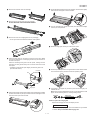
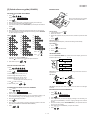
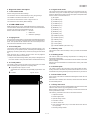
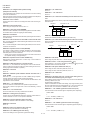
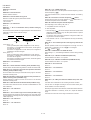
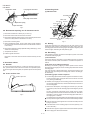
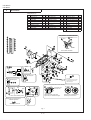
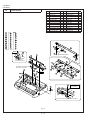
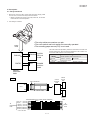
4 Remove the used film from the cartridge.
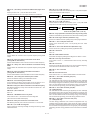
9 Cut the band that holds the two spools together. Unroll the film slightly
and insert the small gears into their holders.
5 Remove the four green gears from the used film.
DO NOT DISCARD THE FOUR GREEN GEARS!
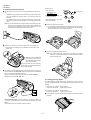
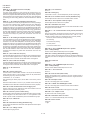
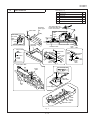
F Turn the cartridge over, grasp the handle, and insert the cartridge
into the print compartment.
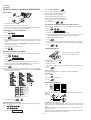
6 Remove the new roll of imaging film from its packaging.
• Do not yet remove the band that holds the rolls together.
G Rotate the large gear toward you until the film is taut.
7 Insert the large gear into the green end of the empty spool. Make
sure the two protrusions on the large gear fit firmly into the slots in
the end of the spool.
Insert the remaining three gears into the spools, making sure the
protrusion on each gear fits firmly into one of the slots in the end of
each spool.
• If needed, pull the spools apart slightly to allow the gears to fit
(the band will stretch).
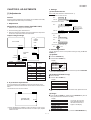
H Close the print compartment cover (press down on both sides to make
Protrusion
sure it clicks into place), and then close the operation panel.
Slot
Click!
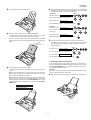
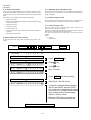
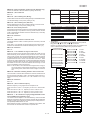
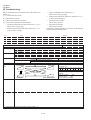
I Load paper in the paper tray and then press the following keys to
Large gear
initialize the film.
8 Insert the large gear into the large holder on the imaging film cartridge
Note: Paper must be loaded before the film can be initialized. To load
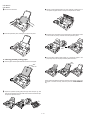
paper, see the following section, Loading Printing Paper.
(make sure it clicks into place), and then insert the small gear on the
other end of the spool into its holder.
FUNCTION
Display shows:
6
INITIALIZE FILM
START/MEMORY
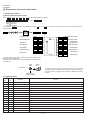
When to replace the imaging film
Replace the imaging film when the display shows:
FILM END
Use the following imaging film, which is available from your dealer
or retailer: Sharp UX-3CR/NX-3CR Imaging Film
1–5