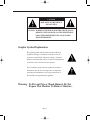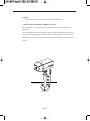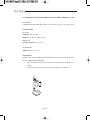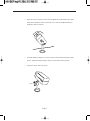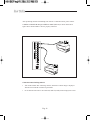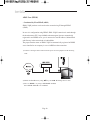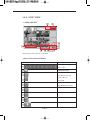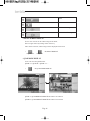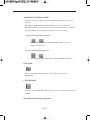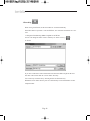
1
EZ View Kit:Remote Monitoring Video Surveillance SYSTEM SMO-151QN/XAAV User Guide IMPORTANT SAFETY INSTRUCTIONS 1. 2. 3. 4. 5. 6. 7. 8. 9. 10. 11. 12. 13. 14. Read these instructions. Keep these Instructions. Heed all warnings. Follow all instructions. Do not use this apparatus near water. Clean only with dry cloth. Do not block any ventilation openings. Install in accordance with the manufacturer’s instructions. Do not install near any heat sources such as radiators, heat registers, stoves, or other apparatus (including amplifiers) that produce heat. Do not defeat the safety purpose of the polarized or grounding-type plug. A polarized plug has two blades with one wider than the other. A grounding type plug has two blades and a third grounding prong. The wide blade or the third prong are provided for your safety. If the provided plug does not fit into your outlet consult an electrician for replacement of the obsolete outlet. Protect the power cord from being walked on or pinched particularly at plugs convenience receptacles and the point where they exit from the apparatus. Only use attachment/accessories specified by the manufacturer. Use only with the cart, stand, tripod, bracket, or table specified by the manufacturer or sold with the apparatus. When a cart is used, use caution when moving the cart/apparatus combination to avoid injury from tip-over. Unplug this apparatus during lightning storms or when unused for long periods of time. Refer all servicing to qualified service personnel. Servicing is required when the apparatus has been damaged in any way such as power-supply cord or plug is damaged liquid has been spilled or objects have fallen into the apparatus the apparatus has been exposed to rain or moisture does not operate normally or has been dropped. Eng-2 CAUTION RISK OF ELECTRIC SHOCK DO NOT OPEN CAUTION : TO REDUCE THE RISK OF ELECTRIC SHOCK, DO NOT REMOVE COVER (OR BACK). NO USER SERVICEABLE PARTS INSIDE. REFER SERVICING TO QUALIFIED SERVICE PERSONNEL. Graphic Symbol Explanation The lightning flash with arrowhead symbol within an equilateral triangle is intended to alert the user to the presence of uninsulated ‘dangerous voltage’ within the product’s enclosure that may be of sufficient magnitude to constitute a risk of electric shock to persons. The exclamation point within an equilateral triangle is intended to alert the user to the presence of important operating and maintenance (servicing) instructions in the literature accompanying the appliance. Warning - To Prevent Fire or Shock Hazard, Do Not Expose This Monitor To Rain or Moisture. Eng-3 IMPORTANT SAFEGUARDS Caution Power source is indicated on the rear of the set. It contains high-voltage parts. If you remove the cover, it may cause fire or electric shock. Do not remove the cover by yourself. (Control switches are at the front of the monitor.) 1. Read Instructions : All the safety and operating instructions should be read before the appliance is operated. 2. Retain Instructions : The safety and operating instructions should be retained for future reference. 3. Heed Warnings : All warnings on the monitor and in the operating instructions should be adhered to. 4. Follow Instructions : All operating and user instructions should be followed. 5. Cleaning : Unplug this monitor from the wall outlet before cleaning. Do not use liquid cleaners or aerosol cleaners. Use a damp cloth for cleaning. Exception. A monitor that is meant for uninterrupted service and that for some specific reason such as the possibility of the loss of an authorization code for a CATV converter is not intended to be unplugged by the user for cleaning or any other purpose may exclude the reference to unplugging the monitor in the cleaning description otherwise required in Item 5. 6. Attachments : Do not use attachments not recommended by Samsung as they may cause hazards. 7. Water and Moisture : Do not use this monitor near water for example near a bathtub wash bowl kitchen sink or laundry tub in a wet basement or near a swimming pool and the like wet basement or near a swimming pool and the like. Eng-4 8. Accessories : Do not place this monitor on an unstable cart, stand, tripod, bracket or table. The monitor may fall causing serious injury to a child or adult and serious damage to the appliance. Use only with a cart, stand, tripod. bracket or table recommended by Samsung or sold with the monitor. Any mounting of the monitor should follow Samsung’s instructions and should use a mounting accessory recommended by Samsung. 9. Ventilation : Slots and openings in the cabinet are provided for ventilation and to ensure reliable operation of the monitor and to protect it from overheating and these openings should never be blocked by placing the monitor on a bed, sofa, rug, or other similar surface. This monitor should never be placed near or over a radiator or heat register. This monitor should not be placed in a built-in installation such as a bookcase or rack unless proper ventilation is provided or Samsung’s instructions have been adhered to. 10. Power Sources : This monitor should be operated only from the type of power source indicated on the making label. If you are not sure of the type of power supply to your installation site consult your Samsung dealer or local power company. 11. Grounding or Polarization : For monitors equipped with a 3-wire grounding-type plug having a third(grounding) pin. This plug will only fit into a grounding type power outlet. This is a safety feature. If you are unable to insert the plug into the outlet contact your electrician to replace your obsolete outlet. Do not defeat the safety purpose of the grounding-type plug. 12. Power : Cord Protection-Power supply cords should be routed so that they are not likely to be walked on or pinched by items placed upon or against them paying particular attention to cords at plugs convenience receptacles and the point where they exit from the monitor. Eng-5 13. Lightning : For added protection for this monitor during a lightning storm or when it is left unattended and unused for long periods of time, unplug it from the wall outlet and disconnect the cable system. This will prevent damage to the monitor due to lightning and power-line surges. 14. Overloading : Do not overload wall outlets and extension cords as this can result in a risk of fire of electric shock. 15. Object and liquid Entry : Never push objects of any kind into this monitor through openings as they may touch dangerous voltage points or short-out parts that could result in a fire or electric shock. Never spill liquid of any kind on the monitor. 16. Servicing : Do not attempt to service this monitor yourself as opening or removing cover may expose you to dangerous voltage or other hazards. Refer all servicing to qualified service personnel. 17. Damage Requiring Service : Unplug this monitor from the wall outlet and refer servicing to qualified service personnel under the following conditions. a. When the power-supply cord or plug is damaged. b. If liquid has been spilled or objects have fallen into the monitor. c. If the monitor has been exposed to rain or water. d. If the monitor does not operate normally by following the operating instructions. Adjust only those controls that are covered by the operating instructions as an improper adjustment of other controls may result in damage and require extensive work by a qualified technician to restore the monitor to its normal operation. e. If the monitor has been dropped or the cabinet has been damaged. f. When the monitor exhibits a distinct change in performance-this indicates a need for service. Eng-6 18. Replacement Parts : When replacement parts are required be sure the service technician has used replacement parts specified by Samsung or have the same characteristics as the original parts. Unauthorized substitutions may result in fire electric shock or other hazards. 19. Safety Check : Upon completion of any service or repairs to this monitor ask the service technician to preform safety checks to determine that the monitor is in proper operating condition. FCC & ICES Information Warning This equipment has been tested and found to comply the limits for a class A digital device pursuant to part 15 of the FCC Rules and ICES-003 of Industry Canada. These limits are designed to provide reasonable protection against harmful interference when the equipment is operated in a commercial environment. This equipment generate uses and can radiate radio frequency energy and, if not installed and used in accordance with the instruction manual may cause harmful interference to radio communications. Operation of this equipment in a residential area is likely to cause harmful interference in which case the user will be required to correct the interference at his own expense. User-Installer Caution Your authority to operate this FCC verified equipment could be voided if you make changes or modifications not expressly approved by the party responsible for compliance to part 15 of the FCC Rules. Eng-7 Information to user Changes or modifications not expressly approved by the party responsible for compliance could void the user's authority to operate the equipment. NOTE: This equipment has been tested and found to comply with the limits for a Class A digital device pursuant to Part 15 of the FCC Rules. These limits are designed to provide reasonable protection against harmful interference when the equipment is operated in a commercial environment. This equipment generates uses and can radiate radio frequency energy and if not installed and used in accordance with the instruction manual may cause harmful interference to radio communications. Operation of this equipment in a residential area is likely to cause harmful interference in which case the user will be required to correct the interference at his own expense. This device complies with Part 15 of the FCC Rules. Operation is subject to the following two conditions: (1) this device may not cause harmful interference and (2) this device must accept any interference received including interference that may cause undesired operation. Changes or modifications not expressly approved by the party responsible for compliance could void the user's authority to operate the equipment. If necessary consult your dealer or an experienced radio/television technician for additional suggestions. You may find the booklet called How to Identify and Resolve Radio/TV Interference Problems helpful. This booklet was prepared by the Federal Communications Commission. It is available from the U.S. Government Printing Office Washington, DC 20402, Stock Number 004-000-00345-4. Eng-8 The party responsible for product compliance: SAMSUNG ELECTRONICS CO., LTD. America QA Lab of Samsung 3351 Michelson Drive, Suite #290, Irvine, CA92612 USA IC Compliance Notice This Class (A) digital apparatus meets all requirements of the Canadian Interference-Causing Equipment Regulations. Cet appareil numérique de la classe (A) respecte toutes les exigences du Règlement sur le matériel brouilleur du Canada. This Class A digital apparatus complies with Canadian ICES-003. Cet appareil numéique de la classe A est conforme à la norme NMB-003 du Canada. Warning This is a class A product. In a domestic environment this product may cause radio interference in which case the user may be required to take adequate measures. Eng-9 Contents IMPORTANT SAFETY INSTRUCTIONS .................................. 2 IMPORTANT SAFEGUARDS..................................................... 4 FCC & ICES Information.............................................................. 7 Chapter 1: System Components and Installation 1-1) Environmental requirements for installation and safety .......... 12 1-2) System Components............................................................. 13 1-3) STANDARD CAMERA composition and installation method ....................................................... 14 1-4) NIGHTVISION CAMERA (SOC-N120 INTRODUCTION) ............................................ 19 1-5) External terminal connecting method for CAMERA and MONITOR.................................................. 22 1-6) Whole System connection and configuration ...................... 23 Chapter 2: MONITOR FRONT PANEL KEY Function and Using Method 2-1) TALK KEY.......................................................................... 26 2-2) AUD/SP SEL KEY ...............................................................26 2-3) VOL+/VOL- KEY ............................................................... 26 2-4) SCREEN SAVE- KEY ........................................................ 27 2-5) ALARM RESET- KEY ........................................................27 2-6) QUAD/PAGE- KEY ............................................................ 27 2-7) LIVE/VCR- KEY..................................................................27 2-8) PIP- KEY ..............................................................................28 2-9) FREEZE- KEY .....................................................................28 2-10) SEQUENCE- KEY ............................................................ 28 2-11) ZOOM- KEY ..................................................................... 28 2-12) POWER- KEY ................................................................... 28 2-13) ENTER- KEY .................................................................... 28 2-14) UP/DOWN KEY............................................................... 29 2-15) LEFT/RIGHT KEY........................................................... 29 Eng-10 Chapter 3: Setting each item function at SETUP MENU 3-1) ADJUST MENU function and setting method .................... 30 3-2) DATE/TIME MENU Function setting ................................ 31 3-3) DWELL TIME MENU function setting .............................. 31 3-4) DISPLAY MENU function setting ..................................... 32 3-5) TITLE MENU Function setting............................................33 3-6) ALARM MENU Function setting........................................ 34 3-7) NETWORK SETUP function and setting method............... 35 3-8) MONITOR basic setting(SMO-151QN).............................. 43 3-8-1) “LIVE” MENU.............................................................. 45 3-8-2) System Configuration Menu.......................................... 58 3-8-3) Network Configuration Menu........................................ 66 3-8-4) Moniter Set up ............................................................... 75 3-8-5) Utilities .......................................................................... 76 3-9) VIEW EVENT LOG MENU function and setting method ...................................................................... 88 Chapter 4: DISPLAY MODE setting method 4-1) SINGLE SCREEN DISPLAY ............................................. 89 4-2) QUAD MODE DISPLAY ................................................... 90 4-3) AUTO SEQUENTIAL DISPLAY MODE .......................... 91 4-4) PIP MODE DISPLAY ......................................................... 92 4-5) ZOOM MODE DISPLAY ....................................................93 Chapter 5: Each Product feature Product Specification....................................................................94 SOC-C120 : Standard Camera................................................94 SOC-N120 : Night Vision Camera ........................................ 95 OBSERVATION MONITOR ..................................................... 96 NETWORK ................................................................................. 97 Appendix A) Software up data .................................................... 99 Appendix B) IP Router Setup Guide ......................................... 100 Step-by-step Examples of IP Router.................................. 101 Eng-11 Chapter 1: System Components and Installation 1-1) Environmental requirements for installation and safety This section describes the environmental requirements for safe installation and use. Install the product on a flat table or in a rack. It should be used only when level and should not be used when stood vertically or obliquely. The location in which the main system is installed and the configuration of the wiring room are very important for proper operation of the system. When the products are installed too closely together or the location is poorly ventilated, the system may not operate properly and maintenance of the system may be difficult. Sufficiently circulate the air within the system operating room and tightly fasten the cover of the main system to prevent malfunction and reduce system downs due to environmental causes. There are high voltage parts inside. Do not arbitrarily open the cover. Install the product in a place that meets the following environmental conditions. Be sure to maintain the system under the temperatures and humidity conditions given below: • Operating temperature: 0°C ~ 40°C • Storage temperature: -20°C ~ 60°C • Operating humidity: 20% ~ 85% RH • Storage humidity: 20% ~ 95 RH • Input voltage: AC 120V • Power usage: less than 110 Watts • Frequency: 60Hz Caution When operating the product, the fluctuation of input voltage must be within 10% of the rated voltage and the external power outlet must be grounded, otherwise, it may cause electric shock or malfunction of the product. Do not connect heat-generating appliances such as a hair dryer, iron or refrigerator to the same power outlet in which the product is plugged, otherwise it may cause a fire or malfunction of the product. The use of an Automatic Voltage Regulator (AVR) is highly recommended to ensure that stable power is supplied. Be sure to coil CORE-FERRITE on the connector to reduce electro-magnetic interference (EMI). Eng-12 1-2) System Components The system consists of the following: MONITOR CAMERA BRACKET STANDARD CAMERA (SOC-C120) POWER CODE & INSTALLATION MANUAL NIGHT VISION CAMERA (SOC-N120) CAMERA CABLE VCR CABLE SENSOR CONNECTOR ITEM MODEL DESCRIPTION Q’ty MONITOR SMO-151QN 15" FLAT CRT MONITOR 1 STANDARD CAMERA SOC-C120 NORMAL TYPE CAMERA 2 NIGHT VISION CAMERA SOC-N120 NORMAL TYPE CAMERA 2 CAMERA BRACKET SBR-110S STAND TYPE BRACKET 4 CAMERA CABLE MCB-60 6PIN SHIELD CABLE 4 INSTALLATION MANUAL - - 1 POWER CORD - - 1 VCR CABLE - - 1 SENSOR CONNECTOR - - 4 ETHERNET CABLE - - 1 NOTE Tapping Screw 6 60ft(1ft=0.3048m) • Check whether all the following devices and accessories are included with the main system. Eng-13 ETHERNET CABLE 1-3) STANDARD CAMERA composition and installation method 1) Standard Camera composition (SOC-C120) <BOTTOM> PIN NUMBER SPEC SPEAKER(HOT) VIDEO_OUT GND SPEAKER(COLD) AUDIO_OUT/ALARM_OUT 18V DC a. Lens It has a focal length of 3.8mm and makes it possible for you to observe a relatively wide area. b. Microphone Capable of picking up all sound in the vicinity of the camera location and transmitting to the monitor. c. Camera fitting groove Enables the camera to be fixed onto the bracket. You may install it either above or below the camera if necessary. d. 6-pin modular jack Used to connect the camera to the monitor. e. SENSOR jack Used to connect the sensor to the camera. Eng-14 f. Speaker It outputs the sound signal which was transfered from the monitor. 2) INSTALLING STANDARD CAMERA (SOC-C120) SOC-C120 camera can be attached to the wall, ceiling or shelf using the camera mount bracket (SBR-110S). Choose an installation site that can sufficiently support the weight of the equipments to be installed. Attach the camera mount bracket to the wall or ceiling using the supplied three screws (M4 X L15). Adjust the camera to target the video location and tighten the bracket handle on the camera mount bracket. 4x15 sized screws wall or ceiling Eng-15 3) CAMERA MOUNT BRACKET(SBR-110) & STANDARD CAMERA(SOC-C120) (1) Overview CAMERA MOUNT BRACKET (SBR-110S) is used to attach the camera to a wall, ceiling or shelf. (2) Specifications Use : Indoor Installation : Wall or Ceiling Dimensions : 57 (W) X 47.2(H) X 100.5(L) Weight : 150g Operating Temperature : -10°C ~ 50°C (3) Accessories SCREW (M4 X L15) : 3 pcs (4) Installation Explains the installation of CAMERA MOUNT BRACKET as wall as the installation of the camera onto the CAMERA MOUNT BRACKET. • Choose an installation site that can sufficiently support the weight of the equipments to be installed. • Attach the camera mount bracket to the wall using the supplied screws (M4 X L15). Eng-16 • Adjust the camera to target the video location and tighten the bracket handle on the camera mount bracket. Install the camera on to the male screw of the Camera Mount Bracket by rotating the camera in clockwise. • Loosen the handle by turning it in a counter clockwise direction and then adjust the camera position . Tighten the handle, turning it clockwise, and lock the camera in position. • Connect the camera cable to the camera. Handle Eng-17 After positioning monitor and installing four cameras to a desired location, please connect CAMERA to MONITOR through CAMERA CABLE (MCB-60) as shown in the below figure. Please check whether or not it is properly connected. Connection status checking method : • Turn on the monitor after connecting cameras, and check if camera image is displayed. The initial screen mode of monitor is quad mode. • In case monitor and camera is not connected, OSD ‘L’(LOSS) will be displayed on screen. Eng-18 1-4) NIGHT VISION CAMERA 1) Before Installation SOC-N120 INTRODUCTION SOC-N120 Nightvision camera is intended to be used exclusively with those sold by this company for DIY. With the built-in IR LED and light sensor in the camera, both day monitoring and night monitoring are possible. Also, since it is designed as water-proof daily product, it can be used not only indoors, but also outdoors. 2) Precautions for Installation and Operation Installing SOC-N120 * Make sure the installation location is a place where 5 times (about 1 kg) of the total weight of the cam-era can be tolerated before installing the camera. * When installing the camera, make sure the cable is not squeezed in an inappropriate place or the insu-lation plastic is removed (it will be a cause for malfunction or fire). * Keep personnel away from under the installation location because there is a risk of object falling during in stallation. Move precious items to a safe place as well before the installation. * Install SOC-N120 in a cool place where there is no direct sunlight. * Do not expose SOC-N120 to direct sunlight during operation or storage. * SOC-N120 should always be used in a place where certain temperature and humidity can be main-tained (as specified below). - Temperature: 14°F ~ 122°F - Humidity: Below 90% Eng-19 3) Installation 1. Make sure the installation location is a place where 5 times (about 2.2lbs) of the total weight of the camera can be tolerated before installing the camera. 2. Connect the cable below the camera after attaching the provided Mount Bracket to the desired place. 3. Use the handle on the Mount Bracket to adjust the direction you want to setup for monitoring. SOC-N120 Pin Configuration 1 2 3 4 5 6 SPVIDEO_OUT GND SP+ ALM/AUDIO VDD Eng-20 4) Nom des composantes a). Lens - It has a focal length of 3.8mm and makes it possiblefor you to observe a relatively wide area. b). Illumination Sensor - Detects incoming light to control the IR LED. c). IR LED - This is an infrared LED that is controlled by the illumination sensor. d). Camera fitting groove - Enables the camera to be fixed onto the bracket. You may install it either above or below the camera if necessary. e). Speaker - Used to connect the sensor to the camera. f). SENSOR jack - It outputs the sound signal which was transfered from alarm sensor. g). Microphone - Capable of picking up all sound in the vicinity of the camera location and transmitting to the monitor. h). 6-pin modular jack - Used to connect the camera to the monitor or DVR. Eng-21 1-5) External terminal connecting method for CAMERA and MONITOR 1) External terminal connecting method for CAMERA Camera alarm injack Sensor in put Sensor PIR Sensor • An additional PIR sensor or external sensor can also be connected. • The additional PIR sensor can be connected as shown in the above graphic. • Sensor’s trigger signal is NO (Normal Open). • Sensor is not supplied. (Sold separately) 2) VIDEO OUT BNC (1~4) terminals connecting method of monitor rear VIDEO OUT BNC1 ~ BNC4 terminals in the rear of the monitor are VIDEO terminals for outputting video images from OBSEVATION CAMERA to THROUGH OUT. BNC VIDEO output terminal can be used to connect to VCR (TIME LAPSE) or SLAVE MONITOR. 3) VCR or ALARM terminal connecting method TIME LAPSE VCR OR NORMAL VCR VIDEO IN VIDEO OUT AUDIO IN AUDIO OUT b d f NOT USED VIDEO OUT VIDEO IN AUDIO OUT AUDIO IN a c e a) Connect the VCR cable to the VCR terminal on the rear panel. b) Connect the VIDEO OUT plug to the VIDEO IN terminal of the VCR. c) Connect the VIDEO IN plug to the VIDEO OUT terminal of the VCR. d) Connect the AUDIO OUT plug to the AUDIO IN terminal of the VCR. e) Connect the AUDIO IN plug to the AUDIO OUT terminal of the VCR. Eng-22 f) Not Used g) Connect the A/O (HOT) terminal on the rear panel to the Alarm IN terminal of the VCR. h) Connect the A/O (COLD) terminal on the rear panel to the Ground terminal of the VCR. i) Connect the A/R terminal on the rear panel to the Alarm Reset terminal of the VCR. j) Connect the G (ground) terminal on the rear panel to the Ground terminal of the VCR. 1-6) Whole System connection and configuration VCR (Time Lapse)Rear Eng-23 Total System Configuration Eng-24 Local System Configuration 1. Connect LAN cable of Cable/ADSL modem or Direct Fixed/Static IP LAN Line to WAN port of IP Router. 2. Connect LAN ports of IP Router(1~4 or 1~8) to Ethernet port SMO-151QN to be set up and to Ethernet port of Local PC to use during setup. 3. Connect Video cable of Camera to MONITOR. 4. Turn on the MONITOR power. Notice If you have a Static (Fixed) IP line or Dynamic IP line (Cable Modem or ADSL Modem) with one IP address (whether its dynamic or fixed), but have more than one internet device to use (such as a PC and a SMO-151QN or several SMO-151QN); you must use an IP Router (different from a simple Network Hub); you must set up the Router to work with the SMO-151QN; and you must use a network capable PC within the local Router network to do the setup. If you are using an existing Router which is already set up, you may not need to redo the basic setup of the Router agian, but it is highly recommended that you at least read all the instructions below and go through the steps.Whether you are using an existing Router or a new Router, you must go through the Port Forwarding portion of the setup. Eng-25 Chapter 2: MONITOR FRONT PANEL KEY Function and Using Method Front Panel 2-1) TALK KEY TALK KEY allows users to transmit voice signal to intended camera by inputting voice with built-in MIC in the front of the monitor. For this function, select a target camera with the ▲/▼ key on the FRONT PANEL, and press AUD/SP SEL KEY. At this time, if a voice signal is generated through the MIC with the TALK KEY pressed, the signal will be transmitted to the camera. 2-2) AUD/SP SEL KEY AUD/SP SEL KEY allows users to select a camera to exchange voice signals with the monitor at QUAD DISPLAY MODE. At QUAD DISPLAY MODE, select target camera display by using ▲/▼ , and press AUD/SP SEL KEY. Then “S” OSD will be displayed on the selected screen. If you want to exchange voice signals with another camera, use▲/▼ key again to select the camera display, and press AUD/SEL KEY. Then, “S” OSD will be displayed and users can exchange voice signals with the monitor. 2-3) VOL+/VOL- KEY Allows users to decrease or increase voice signal generated from the monitor. VOL+ : Increase sound volume from the monitor. VOL- : Decrease sound volume from the monitor. Eng-26 2-4) SCREEN SAVE - KEY Allows users to set SCREEN SAVE MODE of monitor. PICTURE screen is off when the SCREEN SAVE KEY is pressed, Users can exit from SCREEN SAVE MODE by pressing SCREEN SAVE BUTTON again under picture “OFF” status. SCREEN SAVE MODE is automatically cancelled and picture is “ON” when an event such as an alarm or loss at SCREEN SAVE MODE occurs. 2-5) ALARM RESET- KEY Alarm function can be cancelled while the alarm is working. 2-6) QUAD/PAGE- KEY Allows users to display QUAD -A or QUAD - B at QUAD DISPLAY MODE. • QUAD - A: QUAD DISPLAY MODE from Camera 1 to Camera 4 • QUAD - B: QUAD DISPLAY MODE from Camera 5 to Camera 8 2-7) LIVE/VCR- KEY Allows users to switch LIVE MODE to VCR MODE or VCR MODE to LIVE MODE. If VCR MODE is cancelled, the QUAD picture of LIVE MODE will be automatically displayed. In case any event happens at VCR MODE such as ALARM, the MODE will be automatically switched to LIVE MODE, and the pre-set operation for the event will be carried out. If there is no external input at VCR MODE, the OSD “NO SIGNAL” will be displayed. • LIVE MODE: Image and voice signal from CAMERA is displayed. • VCR MODE: External image and voice signal from VCR terminal from the rear of the monitor is displayed. Eng-27 2-8) PIP- KEY Can be used to see the main screen while Single screen is displayed. The main screen can be changed and transfered to another channel while PIP is working. Please refer to "CHAPTER 4. DISPLAY MODE setting method(Eng-86)" for PIP function and details. 2-9) FREEZE- KEY This key allows users to see a target camera picture at PAUSE MODE. If users select the camera with the ▲/▼ KEY, and press the FREEZE BUTTON, the OSD “ I I ” will be displayed on pause picture from the camera. Other FRONT KEY input is ignored at FREEZE MODE, and other FRONT KEY inputs will be available only after the FREEZE MODE is cancelled. 2-10) SEQUENCE- KEY It makes a picture switch sequentially. This means that display the picture will be displayed during the DWELL TIME pre-set at the DWELL MENU of SETUP MENU, and switch the picture automatically as a pre-set sequence. Please refer to 3-3) DWELL TIME MENU function and setting (Eng-35) for details of DWELL TIME setting. 2-11) ZOOM- KEY It zooms a part of a picture doubling it in the display. If the ZOOM BUTTON is pressed, zoom area will be displayed. Users can move to a target area by using ▲/▼ KEY at this time. If ¥ENTER SWITCH is pressed at the target area, the area will be displayed with 2 times larger. 2-12) POWER- KEY It turns ON/OFF the power of the monitor and camera at the same time. In case the monitor power is ON, LED of monitor front is lit and the monitor is displayed in color bar pattern. For a while, the OSD “SYSTEM INITIALIZED...” will be displayed with blue pattern during twenty eight second - s or so. Eng-28 2-13) ENTER- KEY Enter key allows users to 1.Enter set up menu movement and setting mode 2.Display single camera picture 2-14) UP/DOWN KEY Allows users to 1.Change camera channel 2.Select set up menu movement and setting mode UP: Increase items DOWN: Decrease items 2-15) LEFT/RIGHT KEY Allows users to set date LEFT: Decrease Date RIGHT: Increase Date Eng-29 Chapter 3: Setting each item function at SETUP MENU Pressing the MENU BUTTON of the FRONT PANEL allows users to enter SETUP MENU and see the following menu OSD box. Setting method of each SETUP MENU function and operation is as follows. 06/01/03 SETUP 13:14:00 VE_1.07 MENU 1. ADJUST 2. DATE/TIME 3. DWELL TIME 4. DISPLAY 5. TITLE 6. ALARM 7. NETWORK SETUP 8. VIEW EVENT LOG 3-1) ADJUST MENU function and setting method • Function: Allows adjustment to the display status • Setting method: Move to #1. ADJUST MENU by using▲/▼ KEY and press the ENTER SWITCH to display the OSD as shown in the figure below. (The figure shows the initial setting status.) 06/01/03 ADJUST 13:14:00 SETTING CONTRAST BRIGHT COLOR SHARPNESS TINT 50 50 50 50 50 Move to a target item by using ▲/▼ KEY. Enter the item by pressing the ¥ENTER SWITCH. At this time, set a target value by using ▲/▼KEY. You can move to another item by using▲/▼ KEY after setting the target value. (1) CONTRAST : Adjusts light and shade of screen (2) BRIGHT : Adjusts lightness of entire screen (3) COLOR : Adjusts color density (4) TINT : Adjusts color sense (5) SHARPNESS : Adjusts contour of screen Eng-30 3-2) DATE/TIME MENU Function setting • Function: Sets the display date format and current time. • Setting method: Move to #2. DATE/TIME MENU by using ▲/▼ KEY at setup menu, then press the ENTER SWITCH to display the OSD as shown in the below figure. (The figure shows the initial setting status.) 06/01/03 DATE/TIME SETTING DATE TYPE DATE TIME [HH:MM:SS] • 13:14:00 MM/DD/YY 06 / 01 / 03 13 : 14 : 00 Setting method of date display format Move to the format item by using ▲/▼ KEY, and enter the mode for setting date format by pressing the ENTER SWITCH. At this time, select a target date format by using ¥/ KEY and then press the Enter key to confirm your setting. (“YY/MM/DD”, “MM/DD/YY”, “DD/MM/YY” are available for selectable data format.) • Date and current time setting method Repeat the above instruction for moving to each item (MONTH, DAY, YEAR, HOUR, MINUTE, SECOND) and entering the mode. Current date and time to display can be set. (It can be referred when ALARM or LOSS occurs.) * Press the ¥ key to return to the previous Menu. 3-3) DWELL TIME MENU function setting • Function: Displays each picture for pre-set time and automatically switches it to the next picture at SEQUENTIAL DISPLAY MODE. • Setting method: Move to #3. DWELL TIME menu by using ▲/▼ KEY at SETUP MENU, and press the ENTER SWITCH to display the following OSD as shown in the below figure. (The figure shows the initial setting status.) 06/01/03 DWELL TIME SETTING CAM1 CAM2 CAM3 CAM4 CAM5 CAM6 CAM7 CAM8 QUAD-A QUAD-B 13:14:00 03 SEC 03 SEC 03 SEC 03 SEC 03 SEC 03 SEC 03 SEC 03 SEC 03 SEC 03 SEC Eng-31 If the time is set for each camera channel by using ▲/▼ KEY, each camera picture will be displayed for the set time and switched to the next picture automatically. 3-4) DISPLAY MENU function setting • Function: Allows users to select the color and ON/OFF of borderline at QUAD DISPLAY. • Setting method: Move to #4. DISPLAY SETTING MENU by using▲/▼ KEY at SETUP MENU, then press the ENTER SWITCH to display the OSD as shown in the figure below. (The figure shows the initial setting status.) 06/01/03 DISPLAY 13:14:00 SETTING BORDER BORDER COLOR PIP POSITION ON GRAY B-RIGHT NETWORK STATUS ON/OFF Move to each item by using ▲/▼ KEY, and using ¥/ KEY set value. 1) BORDER item determines whether or not boarder line is displayed at QUAD DISPLAY MODE. (ON: Displays the boarder line, OFF: Does not display the boarder line) 2) BORDER COLOR item sets boarder line color among three colors: Black, White, Gray. 3) PIP POSITION item sets the location of sub picture at PIP DISPLAY. (T-LEFT: Upper part of left side, T-RIGHT: Upper part of right side, B-LEFT: Lower part of left side, B-RIGHT: Lower part of right side) 4) NETWORK STATUS determines the display of [S], [D], [P] displayed at the left of top on the screen according to status of NETWORK. Refer to 3-7) NETWORK SETTING function and setting method (Eng-35) for the respective detailed status. (ON: Displays the NETWORK STATUS, OFF: Does not display the NETWORK STATUS) Eng-32 3-5) TITLE MENU Function setting • Function: Set the title of each camera at your discretion. • Setting method: Move to #5. TITLE MENU by using ▲/▼ KEY at SETUP MENU, and press the ENTER SWITCH to display the OSD as shown in the figure below. (The figure shows the initial setting status.) 06/01/03 TITLE CAMERA1 CAMERA2 CAMERA3 CAMERA4 CAMERA5 CAMERA6 CAMERA7 CAMERA8 13:14:00 SETTING CAM1 CAM2 CAM3 CAM4 CAM5 CAM6 CAM7 CAM8 0 1 2 3 4 5 6 7 8 9 : = . ( ) A B C D E F G H I J K L M N O P Q R S T U V W X Y Z [ / ] _ ~ ← + − Move to a target camera channel by using▲/▼ KEY then press the ENTER KEY to display a cursor at the space of the first character of camera title. Move the cursor to a target character in OSD box of lower part by using ▲/▼ KEY, then press the ENTER KEY to set the character. The cursor automatically moves to the next space for a new character after one character is set. Set the title of camera by repeating the same method. (Only eight characters are available for a camera title.) Eng-33 3-6) ALARM MENU Function setting • Function: Allows users to set the ALARM MODE for each camera. • Setting method: Move to #6. ALARM MENU by using ▲/▼ KEY at SETUP MENU, and press the ENTER SWITCH to display the OSD as shown in the figure below. (The figure shows the initial setting status.) 06/01/03 ALARM 13:14:00 SETTING CAM1 CAM2 CAM3 CAM4 CAM5 CAM6 CAM7 CAM8 HOLD TIME ALARM ON TIME ALARM OFF TIME BUZZER ON ON ON ON ON ON ON ON 05SEC 00:00 00:00 ON (1) CAM1 to CAM8 item sets whether the alarm sensor connected to the camera is used or not. (ON: Alarm function setting, OFF: Alarm function canceling) (2) HOLD TIME item sets time to freeze alarm operation when alarm occuring. (HOLD TIME to be set: 05SEC ~ 1MIN ~ 30MIN) (3) ALARM ON/OFF TIME item sets beginning time (ON) and end time (OFF) that monitor recognizes alarm operation as alarm event. * Note :Even if CAMERA ALARM is set to ON, alarm operation is not carried at time band except pre-set ALARM ON/OFF TIME. (4) BUZZER item sets whether or not buzzer device set in monitor is used at an ALARM or LOSS occurring. (ON: Buzzer operation, OFF: Cancel) Eng-34 3-7) NETWORK SETTING function and setting method • Static • DHCP • ADSL (PPPoE) • Function: Allows users to select the STATIC (fixed) IP, DHCP, PPPoE of Setting. • Setting method: Move to #7, NETWORK SETUP MENU by using ▲/▼ KEY at SETUP MENU, then press the ENTER SWITCH to display the OSD as shown in the figure below. (The figure shows the initial setting status) 06/01/03 13:14:00 NETWORK SETTING 1. NETWORK ACCESS 2. HTTP PORT STATIC.../DHCP.../PPPoE... 00080 NETWORK STATUS IP ADDR GATEWAY SUBNETMASK DNS 1 DNS 2 MAC ADDR 192.168.1.200 192.168.1.65 255.255.255.0 168.126.63.001 168.126.63.002 00:30:6f:ff:00:00 MOVE TO EACH item by using ▲/▼ KEY, and using ¥/ KEY change the set value. Static IP User - Constituted by Static IP on the TCP/IP network 1) Move to ‘STATIC...’ by using ▲/▼ KEY at NETWORK ACCESS, then press ENTER SWITCH to set STATIC... (STATIC : Select in case the network configuration of monitor is fixed IP (Public or Private IP) 06/01/03 13:14:00 STATIC ACCESS IP ADDR GATEWAY SUBNETMASK DNS 1 DNS 2 192.168.1.200 192.168.1.65 255.255.255.0 168.126.63.001 168.126.63.002 2) Move to IP ADDR / GATEWAY / SUBNETMASK by using ▲/▼ KEY. 3) Press ENTER SWITCH and type in IP ADDR / GATEWAY / SUBNETMASK respectively. 4) DNS 1 and DNS 2 will be automatically set to DNS as shown above. Use ¥/ KEY to change it. Eng-35 5) After setting, move to the main screen by using the MENU BOTTOM. 6) Set values will be stored shown below. It takes 2 or 3 seconds. 06/01/03 13:14:00 [S] 06/01/01 13:14:00 NETWORK SETTING CAM1 On completion of setting to Static IP(Fixed IP)setup, the screen, [S] is displayed. If the network connection is cancelled or cut, [S] starts blinking. 7) Open your Internet Explorer web browser. Using a Static (fixed) IP, You may also connect remotely by typing in the IP address of the SMO-151QN, Such as http://192.168.1.200 * Note : HTTP Port Set the port to be used when connection to SMO-151QN in internet Explorer and receive Necessary files for the image transmission. The port setting is used for various network configuration or a particular port etc. CAUTION A port number is reserved for TCP port and HTTP port setting. Default values should not be changed. However, if the IP Router is used in a network environment, input proper values with reference to the IP Router manual. If the SMO-151QN is using a Router, you may also connect remotely by typing In the WAN IP Address of the Router and the HTTP port assigned to the SMO-151QN. (here you must type in the port address even if it is the default “80”), such as http://192.168.1.200:80 Eng-36 DHCP User - Constituted by Dynamic IP on the cable/xDSL modem network You can use the SMO-151QN products through the network using Dynamic IP on cable/xDSL modem. In this case, it should be connected with DDNS to support the Dynamic IP. In case of a configuration using DHCP, as the connection to SMO-151QN is made using domain names (EX : http://sff0000.websamsung.net) that are automatically registered in our DDNS server, IP address, Subnet Mask and Gateway that are in the network tab of Admin Mode are not necessarily to be inputted. The proper domain names of SMO-151QN are automatically registered to DDNS server installed in our company in case of modem connection. Beside, IP type of Admin Mode is made of “DHCP” in case of factory shipment, you may apply directly without a setting of Admin Mode, as IP type of Admin Mode for the factory shipment is of “DHCP”. 1) Connect as the figure below and turn on the power of each equipment in the following order. INTERNET Cable MODEM DHCP ISP Eng-37 2) Move to ‘DHCP...’ by using ▲/▼ KEY at NETWORK ACCESS, then press ENTER SWITCH to set to DHCP. 06/01/03 13:14:00 DHCP ACCESS DNS 1 DNS 2 168.126.63.001 168.126.63.002 3) DNS ¥ / and DNS 2 will be automatically set to DNS as shown above. Use KEY to change it. 4) After setting, move to the main screen by using the MENU button. 5) Set values will be stored as shown below. It takes 2 or 4 seconds. 06/01/03 13:14:00 [D] 13:14:00 NETWORK SETTING CAM1 On completion of setting to DHCP setup, the screen, [D] is displayed. If the network connection is cancelled or cut, [D] starts blinking. 6) You can view the video source of the SMO-151QN from a remote location PC. 7) Make sure the remote PC meets the minimum specification requirements described in Chapter 5. Each product feature (Eng-91) and make sure that the PC is internet capable and set up to be able to browse the internet. Eng-38 8) Open your Internet Explorer web browser, type in the following in the URL window and press Enter. http://sff0000.websamsung.net Where ff0000 is the MAC address of your SMO-151QN in this example. If your SMO-151QN’s MAC address is ff0001, then type in ff0001 instead of ff0000 * Note : MAC Address. Locate the MAC Address of the SMO-151QN (each SMO-151QN has its own unique MAC address) It can be checked in ‘7.NETWORK SETUP” of SETUP MENU’. It is the last 6 digits as shown below. 06/01/03 NETWORK ACCESS NETWORK STATUS IP ADDR GATEWAY SUBNETMASK DNS 1 DNS 2 MAC ADDR CURRENT MODE 13:14:00 OFF 192.168.1.200 192.168.1.65 255.255.255.0 168.126.63.001 168.126.63.002 00:30:6f:ff:00:00 STATIC CAUTION If you change the HTTP port number 80 to 82 then must type like below in address bar. http://sff0000.websamsung.net:82 At this time, you should add “s” in front of “mac address”. Eng-39 ADSL User (PPPoE) - Constituted by IP on PPPoE (ADSL) SMO-151QN products can be used on the network using IP through PPPoE (ADSL). In case of a configuration using PPPoE, SMO-151QN connection is made through the domain names (EX : http://sff0000.websamsung.net) that are automatically registered in our DDNS server, you do not need to enter IP address, Subnet Mask and Gateway in the network tab of Admin Mode. The proper domain names of SMO-151QN are automatically registered to DDNS server installed in our company in case of ADSL modem connection. 1) Connect as the figure below and turn on the power of each equipment in the following order. 2) MOVE TO EACH item by using ▲/▼ key, and ¥ / KEYchange the set value. 3) Move to ‘PPPoE...’ by using at NETWORK ACCESS. Press ENTER SWITCH to set to PPPoE. Eng-40 06/01/03 13:14:00 PPPoE... ACCESS DNS 1 DNS 2 USER ID USER PWD 168.126.63.001 168.126.63.002 ******** ******** 4) When the PPPoE (ADSL) type in the User Name and Password (and Confirm Password) given to you by the ADSL Service Provider. CAUTION In case of using ADSL (ISP-internet service provider) you must type correct User Name and Password by ISP to connect to SMO-151QN. If you type incorrect User Name or Password, you can not see the image transferred from SMO-151QN. ID and PASSWORD can be inputted to 40 characters in the maximum. 5) USER ID and PWD (Password) can be 40 digits maximum. Only the Arabic numerals,@ and small characters can be used. Please that capital letters are not supported when you get USER ID and PWD (Password) from ADSL Service Provider. 6) DNS 1 and DNS 2 will be automatically set to DNS as shown above. 7) Use ¥ / KEY to change it. 8) After setting, move to the main screen by using the MENU button. 9) Set values will be stored as shown below. It takes 2 or 3 seconds. 06/01/03 13:14:00 [P] 13:14:00 NETWORK SETTING CAM1 On completion of setting to PPPoE(ADSL)setup, the screen, [P] is displayed. If the network connection is cancelled or cut, [P] starts blinking. Eng-41 10) You can view the video source of the SMO-151QN from a remote location PC. 11) Make sure the remote PC meets the minimum specification requirements described in Chapter 5. Each product feature (Eng-91), and make sure that the PC is internet capable and set up to able to browse the internet. 12) Open your Internet Explorer web browser, type in the following in the URL window and press ENTER. http://sff0000.websamsung.net (Indicate all by URL picture) Where ff0000 is the MAC address of your SMO-151QN in this example. If your SMO-151QN’s MAC address is ff0001, then type in ff0001 instead of ff0000. * Note : MAC Address. Locate the MAC Address of the SMO-151QN (each SMO-151QN has its own unique MAC address) It can be checked in ‘7.NETWORK SETUP” of SETUP MENU’. It is the last 6 digits as shown below. At this time, you should add “s” in front of “mac address”. 06/01/03 NETWORK ACCESS NETWORK STATUS IP ADDR GATEWAY SUBNETMASK DNS 1 DNS 2 MAC ADDR 13:14:00 192.168.1.200 192.168.1.65 255.255.255.0 168.126.63.001 168.126.63.002 00:30:6f:ff00:00 CAUTION If you change the HTTP port number 80 to 82 then must type like below in address bar. http://sff0000.websamsung.net:82 CAUTION In cases where DNS server address of PC is not set and the connection using domain name is not available, Please consult with the network administrator and be sure to set DNS server address. Eng-42 CAUTION The connection to SMO-151QN is unavailable for about 2~5 minutes after ADSL Modem’s power ON. Since the connection would not be available, as IP is not received from ADSL communications, please reboot by turning off the power of ADSL Modem and SMO-151QN for more than 5 seconds and then try to connect again. 3-8) SMO-151QN basic setting 1) Open your Internet Explorer web browser, type in the following in the URL window and press ENTER. 2) When you choose the Admin menu, it asks you the Admin ID and password. 3) Type in root / root. On delivery, they are “root” (administrator’s ID) / “root” (administrator’s Password). The password can be changed on Admin Menu. 4) If this is the first time you run this procedure on this PC, then you will see the following “Active X controls and plug-ins to run” screen. 5) Click “YES”. This will automatically download the necessary Active X Controls to operate the Remote Viewer. It takes about 20 seconds at the first connection. Eng-43 6) When you enter properly, a window appears as shown below. Eng-44 3-8-1) “LIVE” MENU - CAMERA SELECT Initial display mode of monitor if QUAD A. - Remote Viewer Function Buttons KEY Type Function Choose a camera by channel Ch 1 ~ Ch 8 CHANNEL NEXT SINGLE MODE (ch1 Default selected) 320 X 240 Size 720 X 480 QUAD MODE (QUAD Default selected) SEQUENCE MODE SAVE CAPTURE REC Eng-45 PLAY STOP LIVE MODE change ADMIN MODE change - SINGLE SCREEN DISPLAY In case users want to see the camera image at full mode, Select a target camera by turning camera select key. After camera selection, camera image will be displayed at full screen. * AT SINGLE DISPLAY Original Size Large Size - QUAD MODE DISPLAY A user can select the QUAD mode. QUAD A -> QUAD B -> QUAD A -> ... • AT QUAD MODE DISPLAY œ √ QUAD A : QUAD DISPLAY MODE From Camera1 to Camera4 QUAD B : QUAD DISPLAY MODE From Camera5 to Camera8 Eng-46 - Auto SEQUENCY DISPLAY MODE Press the sequence key in the single mode or QUAD mode to display the screen in sequence. If the DWELL TIME SETTING of SETUP MENU is set to 3 seconds and the SEUQENCY KEY is pressed at this time, the operation will be carried out as follows. (NO signal channel will be skipped while single screen is auto-switching) * SINGLE MODE SEQUENCE DISPLAY -> Press SQUENCE KEY When SINGLE MODE (camera select key) is displayed at full screen. * QUAD MODE SEQUENCE DISPLAY -> Press SQUENCE KEY When QUAD A (QUAD B) MODE is displayed. - SAVE MODE Pressing on the SAVE KEY on the front, you can change the name of the DIRECTORY. - CAPTURE MODE Pressing on the CAPTURE KEY on the front, you can store each picture in the form of M-JPEG. - Motion Picture Recording and Playback Eng-47 1. Recording When saving with Viewer, the file and folder are created automatically. If the Mac address of product is "00-30-6F-FF-00”, the created file and folder are as follows. "C:\Program Files\Samsung \SMO-151QN\00-30-6F-FF-00" An user can change the name of file or folder by use of the save key ( ) of Viewer. If you have connected to and recorded from more than one SMO-151QN on the same PC, there will be more than one “Server Name” directory. You can always locate the file by choosing the Server Name directory. Within the Server Name directory, files are automatically saved with filenames in time stamped format. Eng-48 2. PLAY When you select on a play and press double click the file, that file will play back on the Remote Viewer as a motion clip. You can select several files simultaneously at once (up to 10) and the files will be played back in the order of the file name (by date and time). Eng-49 3. PLAYER - Player installation/execution/deletion - Installation Player will be installed together when it is connected to SMO-151QN. - Execution (Follow the instruction to execute it separately.) Click Start Program —> SSC WEB Control —> Player. (Fig. 3) FIG.3 - Deletion Click Start —> Program —> SSC WEB Control —> Uninstall. (Fig. 3) Eng-50 - Program screen configuration - How to play 1. Playback File - Open... Selecting this, you can choose one between fjp and jpg on a window as shown below. Eng-51 Having chosen and opened a file, you will see a picture as shown below. Reverse playback Enlarge Playback Reduce Pause Original size Stop Save the present frame as a PMPI image To the back frame Print Statis bar To the front frame Speed control Eng-52 Display the playback speed, magnification, and information on the storage. - Snap shot It is a function to save the present image as a form of a jpeg file. Select in the toolbar. The result will be as follows. Type in the file name and press ‘Save’ to store it as a jpeg file. - Print It is a function to print the present image. Select be as follows. Eng-53 in the toolbar. The result will Type in the phrase you added in ‘Description’. Then press the ‘OK’ button. Select Print and press ‘OK’. Eng-54 Admin Menu It is an administrator’s menu to set the general items on SMO-151QN Server. To use this menu, you need the administrator’s ID and Password. On delivery, they are “root” (administrator’s ID) / “root” (administrator’s Password). The password can be changed on Admin Menu. Admin Menu Entering 1) Click the Admin menu and a login window will appear. 2) When you connect to the SMO-151QN Server through Web browser, the initial screen will be as follows. Eng-55 3) Type in the administrator and password in the user’s name and password columns and press Enter key to execute the Admin Menu as shown below. 4) Screen configuration : General menus of Admin Menu. The menus related to SMO-151QN Server are divided into System, Network, Monitor Setup, and Utilities in the main. Each of them has several sub menus. : When you click one of the main menus (System Configuration, Network Configuration, Monitor Setup, Utilities), its sub menus and simplified explanation on them will appear. Eng-56 • Admin Menu Structure Category System Configuration Main Menu System Information Admin. Password Access Limitation User Registration Video Alarm Notification Network Configuration Network Configuration PPPoE (ADSL) Network Ports View Network Status Network Status Notification DDNS Configuration Monitor Setup Date & Time View Event Log Display Dwell Time Title Alarm Utilities Save Configuration Reboot System Update Eng-57 3-8-2) System Configuration Menu. 1. System Information In this menu, you can check the information on the system including the name of the SMO-151QN Server. Server name can be changed as a user wants. SMO-151QN SMO-151QN - Menu Configuration Server Name Type in the name of the SMO-151QN Server. * Server’s name should be composed of 19 or less numerals or English alphabets. It cannot start with a numeral and should start with an English alphabet. White characters including a space, tab, and a special letter cannot be used. Model Model name is SMO-151QN. * This part is only for reading, cannot be changed. Version SMO-151QN Server product’s version * This part is only for reading, cannot be changed. After completing setting, click Apply button. If you click the back button, initial values are typed in all fields. Eng-58 2. Admin Password In this menu, the password of the administrator (root) can be changed. - Menu Configuration Administrator’s ID Old Password Administrator’s ID is always “root”. The initial password is “root”. New Password Type the password you want to change into. * The password should be composed of 4-8 digit numerals or alphabets. Confirm Password Type again the password you want to change into. After completing setting, click Apply button. If you click the back button, initial values are typed in all fields.. After clicking the apply button, the new password will be applied. Then the connection of SMO-151QN Server, which was connected by using the existing password, the Web Page will be cut off because the new password is now applied. The user needs to log in again by using the new password. Eng-59 3. Access Configuration This menu is to set the targets the SMO-151QN Server can have an access to. - Menu Configuration Access Limitation Configuration This is to limit the maximum frame speed when the users, who are registered in the system, join and see the images. The users, who join in the system after this setting, will be connected at the limited speed. The access speed can be limited on the Local Network depending on the forwarding state of the network. (30/15/10/5/2/1 ips) After completing setting, click Apply button. If you click the back button, initial values are typed in all fields. Eng-60 4. User Registration This is a user control menu to register, change, or delete the users who can use the SMO-151QN Server. Eng-61 - Menu Configuration User ID Password Decide the ID you want to register. Decide the password you want to register. Confirm Type again the password you want to register. Password Full Name Type in the name you want to register. Add This is a menu to register a user. It is to fix the user’s ID, Password, name, and the authority of the user how far he/she can use the system. - Type in the user’s ID in the User ID column. - Type in a password in the Password and Confirm columns. The user’s ID and the password should be composed of 20 or less numerals or letters. - Type in the name of the user in Full Name column. Edit On this menu, you can change the existing password and name. The user’s ID cannot be changed. The configuration of the menu is same as Add, however you should select the user’s ID on this menu. - Choose Edit menu. - Click “Select User ID” in User ID and click the user’s ID you want to edit. - Modify the password and name and click Apply button to apply the modified items. Delete This menu is to delete the registered user. - Choose Delete menu. - Choose the user’s ID you want to delete in the box. - Click Delete button to delete the ID. After completing setting, click Apply button. If you click the back button, initial values are typed in all fields. Eng-62 5. Video Configuration This is to set the data to be added in the video data and set an environment for each channel. - Menu Configuration Image Size This is to choose the size of the image of video data. You can choose between 2 kinds of size (Small / large). Image Quality This is to choose the quality of the image. You can choose between 3 levels (High, Normal, Low). After completing setting, click Apply button. If you click the default button, initial values are typed in all fields. Eng-63 6. Alarm Notification This notifies the registered users of an alarm arising situation through e-mails. At this time, maximum 5 M-JPEG pictures, which were stored, can be sent together. - Menu Configuration Service SMTP server address Authentication Login User ID Password Sender (E-mail) E-mail address 1 ~4 Image count Choose enable if you want to send the ALARM notifying E-MAIL. SMTP server of the ISP that provides SMO-151QN with services. ISP’s confirmation required. Choose enable if you want to log in the SMTP of the ISP providing SMO-151QN with services. ID for the SMTP server of the ISP that provides SMO-151QN with services. Password for the SMTP server of the ISP that provides SMO-151QN with services. Register the E-mail of ADMINISTRATION of SMO-151QN. E-mail addresses you want to send the alarm notification to. M-JPEG images to send. Up to 5 pictures can be sent at 0.5-second intervals. * Some SMTP servers may not support M-JPEG forwarding. Set this function after checking the SMTP server. After completing setting, click Apply button. If you click the back button, initial values are typed in all fields. On this menu, you can fix the general environment related to the network of the SMO-151QN Server and check the present status of it. Eng-64 EX) When user who has an e-mail address ([email protected]) and password(123456) in YAHOO sets “Alarm Notification” in order to send a mail to [email protected]... After completing setting, click Apply button. If you click the back button, initial values are typed in all fields. The image transfer is not supported in all SMTP servers. Check the J-PEG image transfer in your mail account. In the event of Alarm, please use PLAYER to catch normal JPEG images. Otherwise, the image size will be reduced to a half JPEG size. Refer to Eng-46 “How to play” for the detailed usage of PLAYER . Eng-65 3-8-3) Network Configuration Menu. 1. Network Configuration On this menu, you can fix the general environment related to the network of the SMO-151QN Server and check the present status of it. - Menu Configuration Network Configuration PPPoE(ADSL) Set “Static IP” or “DHCP”. Set PPPoE (ADSL). Network Ports Set “Network Port”. View Network Status Modification of HTTP and other application network port numbers. Network Status Notify View of network status. DDNS Configuration DDNS Configure 1) Fix the IP address of the SMO-151QN Server, NetMask, GateWay, DNS1, DNS2, etc. 2) NetMask : This is a column of letters of only 0 or 1 to leave the address of the host computer alone among the IP Addresses. (Example : “255.255.255.0” is used for a C-Class serve net capable of maximum 255 host computers. In this line, “.0” clarify the address of a certain host computer.) 3) GateWay : This is a network point that plays a role as an entrance to other networks. 4) DNS (Domain Name Service) : A service to convert a Domain Name (ex. www.yahoo.com) into an IP address (ex. 216.109.127.28). The SMO-151QN Server uses this service to join the FTP server or other webs by the Domain Name. Eng-66 1-1. Network Configuration : Static IP / DHCP Client 1) If the IP of the SMO-151QN Server is Static : Choose “Static IP”. 2) Type in the IP Address you want to assign to the SMO-151QN Server, NetMask, GateWay, DNS1, and DNS2 addresses. 1-2. Network Configuration : Static IP / DHCP Client 1) If the IP of the SMO-151QN Server is DHCP : Choose “DHCP Client”. 2) Type in the addresses of DNS 1 and DNS 2. Eng-67 3) Click Apply button to apply the settings. If you click Reset button, the latest setting will be applied again. Click Back button if you don’t want to apply the setting. 4) If the mac address of an user is XX:XX:XX:FF:00:00, an user who uses DDNS but do not know IP can connect the Viewer by typing as follows in the URL. EX) http://sff0000.websamsung.net If the mac address of an user is XX:XX:XX:FF:00:01, connect to SFF0001. EX) http://sff0001.websamsung.net At this time, you should add “s” in front of “MAC address”. * Note : MAC Address. Locate the MAC Address of the SMO-151QN (each SMO-151QN has its own unique MAC address). It can be checked in “3-7) NETWORK SETUP function and setting method (Eng-30)” of SETUP MENU. It is the last 6 digits as shown below. 06/01/03 NETWORK ACCESS NETWORK STATUS IP ADDR GATEWAY SUBNETMASK DNS 1 DNS 2 MAC ADDR 13:14:00 192.168.1.200 192.168.1.65 255.255.255.0 168.126.63.001 168.126.63.002 00:30:6f:ff00:00 MENU -> SETUP MENU -> 7.NETWORK SETUP Eng-68 2. PPPoE (ADSL) for Eth0 1) Service : Decide if you want to try PPPoE Connection or not. 2) User ID : User’s ID that is registered in the ISP. 3) User Password : User’s password that is registered in the ISP. 4) Confirm Password : Confirm the password. 5) DNS (Domain Name Service) : Service to convert a Domain Name (ex. www.yahoo.com) into an IP address (ex. 216.109.127.28). The SMO-151QN Server uses this service to join the FTP server or other webs by the Domain Name. ADSL service supports only PPPoE (Point to Point over the Ethernet). DNS is a default value, so it does not need to change except a special case. * Note : When connecting ADSL, ID & PASSWORD shall be limited within 40 characters. Eng-69 3. Network Ports Configuration It sets the HTTP Port number to use when the SMO-151QN Server communicates with a Client PC. The present SMO-151QN Server uses HTTP Port (80). - HTTP Port 1) This is the port the Client PC uses to connect to the web page of the SMO-151QN Server. Depending on the environment of the network, its value can be varied. 2) The fault values is 80 and it can be assigned up to 65535 maximum. * If you change the value of the HTTP Port, you should type in the new one with the address of the SMO-151QN Server in the address window of the web browser. (Ex. If the IP address of the SMO-151QN Server is 192.168.1.100 and the HTTP Port : 8080, http://192.168.1.100:8080.) 3) Click Apply button to apply the present setting. CAUTION Set the port be used when connecting to SMO-151QN in internet Explorer. The port setting is used for various network configuration when avoiding the network where firewall constitutes or a particular port Etc. Eng-70 4. View Network Status This is a menu to see the general status of the network setting of the SMO-151QN Server. - Menu Configuration Common Status LAN Status It is to check the status of the Gateway, DNS 1, and DNS 2. It is to check the status of the STATIC IP Address, Netmask, and MAC Address. PPPoE Status If the connection status is on PPPoE service, Link is up. At this time, the service IP and NETMASK can be also checked. If the PPPoE service is not in the connection status, “Link is down”. The existing setting will be recalled if you press Reload button. 5. Network Status Notification When there is a change in the setting status of the SMO-151QN Server, it sends e-mails to the people who want it. Set Mail Notification to “Enable” to send the network setting status of the SMO-151QN Server to the specified e-mail addresses in the cases as follows. There are some conditions required for this setting. Eng-71 1) DHCP Client has been set in “Network Configuration” menu and an IP has been assigned from the actual DHCP Server to make communication possible. 2) PPP Client has been set in “PPPoE” menu and communication has become possible through the connection with ISP or PPP Server. - Menu Configuration Mail Notification E-mail forwarding or not. Enable : Forward E-mails. Disable : Doesn’t forward E-mails. SMTP Server Type in the address of the server that provides e-mail relay function. Authentication Login Shows if the ISP has an authentication for the use of SMTP. User ID ID for Authentication Login Password Password for Authentication Login Sender(Email Address) Type in the addresses of the sender. Recipient1’s Type in the addresses of the recipients. Email Address (3 addresses maximum.) Eng-72 Network Status Notify Configuration click “Network Status Notify” in the Network Configuration group. Choose to use the Mail Notification function or not. Choose “Enable” if you want to notify the network status of the SMO-151QN Server to the people who want through e-mails. Type the address of the SMTP Server. * SMTP Server plays a part as a relay that receives the mail of the user and delivers it to the receiver. Set “Authentication Login” to enable and type in the ID and password assigned from the SMTP server. Type the e-mail address of the person who receives the E-mail. Maximum 3 people can receive the mail. Type the message you want to add in “User Defined Message”. After completing setting, click Apply button. If you click the reset button, it will return to the latest setting. EX) When user who has an e-mail address ([email protected]) and password(123456) in YAHOO sets “Alarm Notification” in order to send a mail to [email protected]... SMO-151QN SMO-151QN Eng-73 6. DDNS Configuration - Menu Configuration Server DDNS Server Select Enable or Disable Websamsung.net Note The domain name of this system is sff0000.websamsung.net CAUTION In case of a configuration using DHCP, as the connection to SMO-151QN is made using domain names (EX : http://sff0000.websamsung.net) that are automatically registered in our DDNS server, IP address, Subnet Mask and Gateway that are in the network tab of Admin Mode are not necessarily to be inputted. The proper domain names of SMO-151QN are automatically registered to DDNS server installed in our company in case of DHCP cable modem connection. Eng-74 3-8-4) Monitor Set up - Menu Configuration Please refer to the CHAPTER3 of the user’s manual. Date & Time View Event Log Set the display data format and current time. Display the time and data of camera event and type of event Dwell Time Displays each picture for pre-set time and automatically Switches it to the next picture at SEQUENTIAL DISPLAY MODE. Display Allows users to select the color and ON/OFF of borderline at QUAD DISPLAY Title Set the title of each camera at your discretion Alarm Allows users to set the ALARM MODE for each camera Eng-75 3-8-5) Utilities This menu is for the flash memory’s update, rebooting, restoring to the basics, and system upgrade. - Menu Configuration Save Configuration Save Configuration is required to save all of new configuration in the system. Otherwise, no new configuration will be saved effective. Reboot System reboot is highly and strongly recommended to applied all new configurations properly to the SMO151QN system System Update System Update Eng-76 1. Save Configuration This menu is to save all of the present setting in the Flash Memory. If you changed any of the setting for the SMO-151QN, it is recommended that you save it in the Flash Memory in this menu. Eng-77 2. Reboot This menu is for the rebooting of the system. It is better to reboot the system if you change the setting and update the flash. 1. Click “Reboot” in the utilities group. 2. Click “Reboot!!!”. Eng-78 4. System Update This menu is to update the inner programs and data of the SMO-151QN Server. They are recorded in the Flash Memory and composed of 4 parts called Kernel Image, Ram disk Image, System Image, and Web Image respectively. Each image file should be stored in the user’s PC for update. Depending on the range you want to update, press the start button properly. Normal (System and Web) Update Update only the System Web. All (Kernel, RAM disk, System, Web) Update Update all 4 images of Kernel, RAM Disk, System, and Web. 4-1. Normal (System and Web) Update When you click the start button located in the bottom of Normal (System and Web) Update”, a window will appear to ask if you want to update. Click “Cancel” to stop updating. Click “OK” to proceed updating. Other processes are same as the process of “All Update”. (Excluding the update of Kernel and RAM disk) After completing the update, click the reboot button to reboot the system. Eng-79 3-2. All (kernel, RAM disk, System, Web) Update When you click the start button located, a window will appear to ask if you want to update. Click “Cancel” to stop updating. 1. “OK” to proceed updating. 2. A pop-up window will appear. Choose “Zimage” in the browse. Eng-80 3. Click “Next” button to move to the next stage. Click “Skip” button to move to the next stage without Kernel Image’s update. Click “Next” button and a window will appear to check the name and size of the file. Eng-81 Click “Previous button to go back to the previous stage. Click the next button to execute update of the program and move to the next stage. Click the cancel button to stop the update process. 4. In the next stage, a pop-up window will appear for the file searching for the RAM Disk Update. Choose “rfs.gz” in the browse. Eng-82 5. Click “Next” button to move to the next stage. Click “Skip” button to move to the next stage without Kernel Image’s update. Click “Next” button and a window will appear to check the name and size of the file. Click “Previous” button to go back to the previous stage. Click the next button to execute update of the program and move to the next stage. Click the cancel button to stop the update process. Eng-83 6. In the next stage, a pop-up window will appear for the file searching process for the System Image Update. Choose “Fw_2pq.tar.gz” in the browse. 7. Click “Next” button to move to the next stage. Eng-84 Click “Skip” button to move to the next stage without kernel Image’s update. Click “Next” button and a window will appear to check the name and size of the file. Click “Previous” button to go back to the previous stage. Click the next button to execute update of the program and move to the next stage. Click the cancel button to stop the update process. 8. In the next stage, a pop-up window will appear for the file searching process for the System Image Update. Choose “web.tar.gz” in the browse. Eng-85 9. Click “Next” button to move to the next stage. Click “Skip button to move to the next stage without Kernel Image’s update. Click “Next” button and a window will appear to check the name and size of the file. Click “Previous” button to go back to the previous stage. Click the next button to execute update of the program and move to the next stage. Click the cancel button to stop the update process. Eng-86 10. A window will appear for rebooting after completing all the update processes. Click the reboot button and press the confirmation button to reboot the system. 11. Close your web browser and wait for about a minute before you log in again Files relate to the update of SMO-151QN Kernel Image RAM Disk Image zimage-ve rfs-ve.gz System Image fw_2pq-ve.tar.gz Web page Image web-ve.tar.gz The window shown as above may not appear if there is a pop-up breaker installed in the user’s PC. If you update system on a web page, you should stop the pop-up breaker to proceed. * Note : Download a picture at http://www.securitysamsung.com Refer to Appendix A (page 95). Eng-87 3-9) VIEW EVENT LOG MENU function and setting method • Function: Displays the time and date of camera event and type of event. • Setting method:Move to #7. VIEW EVENT LOG MENU by using ¥ENTER SWITCH at SETUP MENU, then press the ENTER SWITCH to display the OSD as shown in the figure below. (The figure shows the initial setting status.) 06/01/03 Sequence of event happening Camera No. that event happened. 13:14:00 NO CH MM/DD/YY HH:MM:SS 01 02 03 04 05 06 07 08 07 01 01 02 01 01 01 01 02/10/03 02/11/03 06/01/03 06/01/03 --/--/---/--/---/--/---/--/-- 10:00:30 11:22:00 12:33:01 13:01:03 --:--:---:--:---:--:---:--:-- EVT A L - Type of event happening L : LOSS A : ALARM Time of event happening Date of event happening An event which occurred most recently is recorded with first priority, then users can move to the next page by using ¥ENTER SWITCH. A Total of 64 events can be listed. * Note : IF you press the FREEZE key and the SEQUENCE key at the same time, all event lists will be erased. Eng-88 Chapter 4: DISPLAY MODE setting method 4-1) SINGLE SCREEN DISPLAY Initial display mode of monitor is QUAD A. In case users want to see the camera image at full mode, select a target camera by using ▲/▼ KEY. After that, press the ENTER SWITCH and selected camera image will be displayed at full screen. If users press the ▲/▼ KEY SINGLE DISPLAY MODE at this time, they can see another camera image at full screen. For example, when users want to see CH1 at FULL MODE after SINGLE -displaying CH2 at QUAD A, please follow the instructions below. 06/01/03 13:14:00 CH1 CH2 CH3 CH4 06/01/03 ➯ 13:14:00 CH1 CH2 CH1 CH2 QUAD A QUAD A Select CH2 by using ▲/▼ KEY INITIAL DISPLAY STATUS ➯ Press ENTER SWITCH after selecting CH2 06/01/03 13:14:00 06/01/03 13:14:00 ➯ Display CH1 by using CH1 ▲/▼ KEY Press ENTER FULL SCREEN DISPLAY of CH1 CH2 FULL SCREEN DISPLAY of CH2 Eng-89 4-2) QUAD MODE DISPLAY Users can switch SINGLE DISPLAY MODE and SEQUENTIAL DISPLAY MODE to QUAD DISPLAY MODE, or QUAD - A (QUAD - B) to QUAD - B (QUAD - A), or PIP MODE to QUAD MODE, press the QUAD/PAGE KEY. * At QUAD MODE display from SINGLE MODE or SEQUENCE MODE, 06/01/03 13:14:00 06/01/03 ➯ CH1 CH2 CH3 CH4 Press QUAD/PAGE key CH3 CH3 DISPLAY 13:14:00 QUAD - A QUAD MODE DISPLAY of QUAD - A * At QUAD B(QUAD A) display from QUAD A(QUAD B), 06/01/03 13:14:00 CH1 CH2 CH3 CH4 QUAD - A 06/01/03 ➯ Press QUAD/PAGE key QUAD MODE DISPLAY of QUAD - A 13:14:00 CH5 CH6 CH7 CH8 QUAD - B QUAD MODE DISPLAY of QUAD - B * At QUAD - B(QUAD - A) display from PIP MODE, 06/01/03 13:14:00 06/01/03 ➯ CH 3 CH 1 Press QUAD/PAGE key PIP MODE DISPLAY 13:14:00 CH5 CH6 CH7 CH8 QUAD - A QUAD MODE DISPLAY of QUAD - A Eng-90 4-3) AUTO SEQUENTIAL DISPLAY MODE Pressing on the SEQUENCE KEY on the front allows screen to automatically switch to SINGLE MODE full screen or QUAD MODE. (‘no-signal’ channels will be skipped while single screen is auto-switching.) If the DWELL TIME SETTING of SETUP MENU is set to 3 seconds and the SEQUENCE KEY is pressed at this time, the operation will be carried out as follows. * SINGLE MODE SEQUENCE DISPLAY 06/01/03 13:14:00 06/01/03 13:14:00 ➯ In 3 seconds CH 2 CH 3 Press SEQUENCE KEY when CH2 is displayed at full screen Automatic sequential switching to CH3 ➯ In 3 seconds 06/01/03 13:14:00 06/01/03 13:14:00 ➯ In 3 seconds CH 1 CH 4 Automatic sequential switching to CH1 Automatic sequential switching to CH4 * QUAD MODE SEQUENCE DISPLAY 06/01/03 13:14:00 CH1 CH2 CH3 CH4 QUAD - A 06/01/03 ➯ 06/01/03 13:14:00 CH5 CH6 CH7 CH8 QUAD - B Eng-91 ➯ 13:14:00 CH1 CH2 CH3 CH4 QUAD - A 4-4) PIP MODE DISPLAY Can be used to see PIP screen in Single screen mode. If you press the ENTER on PIP screen ,the main screen will change. If you press the ▲/▼ KEY,the main screen can be transferred to another channel. Sub-screen location can be selected on DISPLAY MENU in SETUP MENU. 06/01/03 13:14:00 06/01/03 13:14:00 ➯ Press ENTER KEY CH1 CH3 CH3 Under PIP DISPLAY 06/01/03 CH1 Main and Sub screen is switched 13:14:00 06/01/03 13:14:00 ➯ Press CH1 CH3 ▲/▼ KEY and ENTER Under PIP DISPLAY 06/01/03 CH2 CH3 Main screen is switched 13:14:00 06/01/03 13:14:00 ➯ Press PIP KEY CH1 CH2 Under single screen display CH3 Main and Sub screen is displayed as set at the DISPLAY MENU of SETUP MENU Eng-92 4-5) ZOOM MODE DISPLAY When users want to see zoomed image of a specific area of the display, press the ZOOM KEY in the front to display zoom selection area. Select zoom target area by using ▲/▼ KEY, and press the ENTER SWITCH, then, the selected area will be displayed at full single mode with zoomed area doubled. At zoom function operation at SINGLE DISPLAY MODE (CH2), the operation will be carried out as shown in figure below. (Zoom selection areas at SINGLE DISPLAY MODE are nine.) 06/01/03 13:14:00 06/01/03 13:14:00 ➯ Press ZOOM KEY CH2 CH2 SINGLE DISPLAY CH2 ZOOM area is activated. ➯ 06/01/03 06/01/03 13:14:00 13:14:00 ➯ Press ENTER key CH2 Press▲/▼ KEY and move to desired location The selected area will be doubled and at FULL DISPLAY. Eng-93 Chapter 5 : Each product feature Product Specification SOC-C120 : Standard Camera Model Name SOC-C120 Broadcasting System NTSC STANDARD Imaging Device 1/4 ”SUPER HAD IT CCD Effective Pixels S 510(H) x 492(V) Synchronization Internal Resolution H :330 TV Lines, V: 350 TV Lines Signal Output VBS 1.0Vp-p(75ohms composite) S/N Ratio ≤ 48 dB Minimum Scene Illumination 2lux(F2.0, 50 IRE) Gamma Correction 0.45 Lens Focal Length (f) : 3.8mm, Aperture Ratio (F) : 2.0 Auto Exposure Electronic Shutter lris Audio -40dB Condenser Microphone Inclusion I/O Connectors Modular jack Operating Temperature +32°F ~ +104 °F Power Source DC 12V Power Consumption Approx. 2W Dimensions 2.25(W) x 1.86(H) x 3.95(L)inch Weight 0.29lbs Eng-94 SOC-N120 : Night Vision Camera Model Name SOC-N120 Product type IR LED Day &Night Vision Camera Power source Voltage DC 12V from Equipment(DIY Monitor or DVR ) Brodcast System NTSC Standard Color Camera Image Device 1/4 inch IT S-HAD CCD Effective Pixel 510 (H) x 492 (V) Scanning Method 525lines 2 : 1 Interlace Line Frequency Horizontal : 15,734Hz Vertical : 60Hz Weather Resist Grade IP43 Synchronization Method INT Resolution 330 TV lines S/N Ratio 48 dB Light Condition Light sensor Auto Switching IR LED Control 10pcs Minimum scene Illumination Normal : 2 Lux Night mode : IR LED ON Color Temperature ATW Elctronic shutter ELC Signal Output Composite Video out 1.0Vp-p 75 ohms RJ11 Lens Focal length : 3.8mm Aperture(F) : F2.0 Operating Temperature +14°F°...~ +122°F°... Operating Humidity ~90% Physical Size 2.51(W) X 2.44(H) X 4.92(L)inch Weight 0.33 lbs Eng-95 OBSERVATION MONITOR Video Input • CAMERA 8 Input: 1.0Vp-p(CVBS), 75Ω (vertical) • VCR 1 Input (to Video Out of VCR) : 1.0Vp-p, 75Ω (vertical) Video Output • BNC 4 Output: 1.0 Vp-p, 75Ω (vertical), S-Jack Type, CVBS • VCR 1 Output: 1.0 Vp-p, 75Ω (vertical), S-Jack Type, CVBS Audio Input • CAMERA 8 Input: • VCR 1 Input (to Audio Out of VCR) : S-Jack Type Audio Output • CAMERA 8 Input: • VCR 1 Output: S-Jack Type Alarm/Motion Features: A/O (HOT, COLD) : Relay Active Connected to Alarm A/R (Alarm Reset) : Open Collector “L” Level, Pulse Width =150ms or above Box/Camera Alarm Hold Time : Select 5 sec, 15 sec, 30 sec, 1 min, 3 min, 5 min, 10 min, 20 min, 30 min.. Sequence Select between 01 sec to 30 sec. Event List (max) 64 case Display mode Single mode, Quad A mode, Quad B mode, PIP, Sequence Freeze, Zoom(X2) Horizontal Resolution 350 TV Lines or more (Live Mode Full Screen) Operation Temperature 0 °C ~ 40 °C CRT 15" FLAT MONITOR Dimension (W x D x H (mm)) 15" - (MONITOR)365 x 390 x 341, (PACKING)472 x 482 x 588 Weight 15" - (MONITOR) 14.3Kg, (PACKING) 20Kg Power consumption 110W Video system NTSC VIDEO SYSTEM Operation Humidity Range 0~90% AC Input Ranges AC 120V, 60Hz Audio Output[watt] 1.5W Eng-96 NETWORK Hardware • 32bit Embedded Processor • Flash Memory : 8Mbytes • SDRAM : 32Mbytes Network Protocols • HTTP, TCP/IP, FTP, Telnet, ARP, PPP, DHCP, PPPoE Image Compression & Quality • Compression Algorithm : Real-time M-JPEG • Rate : 30 fps for each channel • Quality : 3 levels Video Format • NTSC Video Resolution • NTSC, 352x240, 704x240 Performance • Max 30 Frame Per Second (NTSC) Management • Configuration by serial port or web browser • Remote Flash memory update LAN Interface • 10/100 BaseT Fast Ethernet Security Function • Password protected server access PC Specification • CPU_Pentium IV 1GHz higher • RAM_256MB or higher • Video Memory_32MB or higher • Resolution_1024x768 or higher • OS_Windows 98/ME/2000/XP Service Pack • installation recommended • Web Brower_Internet Explorer 5.5 or later Eng-97 The system performance may decrease if the computer has lower specification than the recommecdations, is not installed with the latest service pack, or has an illegally installed operation system(OS). A unique MAC address is registered to this device. If the administrator setting and monitoring may not be available due to conflicting unregistered MAC addresses, please contact a local service center or head office. SMO-151QN/XAAV enables users to see up to four viewers on one computer. The system may malfunction if over five viewers with low performance computers are connected to the device. After reboot, if you reconnect Network Cable or Internet explorer, then the transmission of the Motion Images could be delayed with showing “Waiting” message or disconnected under the environment of WINDOWS 98 and Windows ME. Eng-98 Appendix A) Software up data The initial screen of Samsung Electronics’ web site is as follows. 1. http://www.securitysamsung.com http://www.samsung.com/Products/CCTV.htm 2. Network Security in Homepage 3. Download the following items from SMO-151QN. ! Owner’s manual - SMO-151QN Owner’s manual @ UP-GRADE S/W - kernel, RAM disk, System, Web Eng-99 Appendix B) IP Router Setup Guide List of Routers compatible with SMO-151QN. Refer to Router User’s Manual for the detailed router setup. 1. Total System Configuration 2. Local System Configuration 3. Step-by-Step Examples : Linksys (Model : WRT54G) Netgear (Model : WGR614v4) D-Link (Model : DI-624+) SMC (Model : 7004VBR) CAUTION Other routers may be incompatible with SMO-151QN. Eng-100 Step-by-Step Setup Example of IP Router Linksys model WRT54G SMO-151QN 1. Click the “Application and Gaming” tab. 2. Click “Port Range Forward”. 3. Port forwarding Row #1 : Application : Set this to “HTTP” Start and End : Set both to “From 10000 to 65535” Protocol : Select “TCP” IP Address : SETUP MENU -> 7. NETWORK SETUP -> Check IP from network status to apply it identically to Private IP after DHCP setup. (Eng-32 Setup) * It is not in use by any other device connected to the IP Router including the Local PC. Enable : Leave this “checked” 4. Click “Save Settings” 5. Close browser window. Eng-101 Step-by-Step Setup Example of IP Router Netgear model WGR614v4 SMO-151QN 10000 10000 192.168.0.101 1. Click the “Router Status” 2. Click the WAN and LAN Port information. Write down the WAN Port IP Subnet Mask number and the LAN Port IP Address number. You will need it later when setting up the SMO-151QN. 3. Click “Advanced” and “Port Forwarding” 4. Port forwarding (HTTP) Click “Add Custom Service” Service Name : Set this to “HTTP” Start Port and End Port : Set both to “From 10000 to 65535” Server IP Address : SETUP MENU -> 7. NETWORK SETUP -> Check IP from network status to apply it identically to Private IP after DHCP setup. (Eng-32 Setup) * It is not in use by any other device connected to the IP Router including the Local PC. Make sure “Enable” is checked. Click “Add” 5. Close browser window. Eng-102 Step-by-Step Setup Example of IP Router D-Link model DI-624+ SMO-151QN 1. Select “Virtual Server” and “Advanced” You need to create Virtual Servers (Port Forwarding) for HTTP, TCP and Upgrade separately. 2. Virtual Server (Port Forwarding) for HTTP Enabled : Leave this “checked” Name : Set this to “HTTP” Private IP : SETUP MENU -> 7. NETWORK SETUP -> Check IP from network status to apply it identically to Private IP after DHCP setup. (Eng-32 Setup) * That is not in use by any other device connected to the IP Router including the Local PC. Protocol Type : Select “TCP” Private Port and Public Port : Set both to “From 10000 to 65535” Schedule : Select “Always” Click “Apply” 3. Close browser window. Eng-103 Step-by-Step Setup Example of IP Router SMC model 7004VBR 1. Select “NAT” and “Virtual Server” You need to create Virtual Servers (Port Forwarding) for HTTP 2. Virtual Server (Port Forwarding) for HTTP : use the first empty ID row. IP Address : SETUP MENU -> 7. NETWORK SETUP -> Check IP from network status to apply it identically to Private IP after DHCP setup. (Eng-32 Setup) * That is not in use by any other device connected to the Router including the Local PC. Private Port and Public Port : Set both to “From 10000 to 65535” Data Type : Select “TCP” Enable : Leave this “checked” 3. Click “APPLY” 4. Close browser window. Eng-104 HEADQUARTERS 105 Challenger Road Ridgefield Park, NJ 07660-0511 TEL:1-800-SAMSUNG SERVICE DIVISION 400 Valley Road,Suite 201 Mount Arlington, NJ 07856 1-800-SAMSUNG(1-800-726-7864) www.samsung.com Part No.: AA68-03867E-00 Printed in China