1
Integrated
Effects Switching
System
Owner’s
Manual
1
Safety Information
WARNING FOR YOUR PROTECTION
READ THE FOLLOWING:
KEEP THESE INSTRUCTIONS
The symbols shown above are internationally accepted symbols that warn of
potential hazards with electrical products. The lightning flash with arrowpoint in
an equilateral triangle means that there are dangerous voltages present within
the unit. The exclamation point in an equilateral triangle indicates that it is
necessary for the user to refer to the owner’s manual.
These symbols warn that there are no user serviceable parts inside the unit.
Do not open the unit. Do not attempt to service the unit yourself. Refer all
servicing to qualified personnel. Opening the chassis for any reason will void
the manufacturer’s warranty. Do not get the unit wet. If liquid is spilled on the
unit, shut it off immediately and take it to a dealer for service. Disconnect the
unit during storms to prevent damage.
HEED ALL WARNINGS
FOLLOW ALL INSTRUCTIONS
The apparatus shall not be exposed to dripping or splashing liquid and no object filled with
liquid, such as vases, shall be placed on the apparatus
CLEAN ONLY WITH A DRY CLOTH.
DO NOT BLOCK ANY OF THE VENTILATION OPENINGS. INSTALL IN ACCORDANCE WITH THE MANUFACTURER’S
INSTRUCTIONS.
DO NOT INSTALL NEAR ANY HEAT SOURCES SUCH AS RADIATORS, HEAT REGISTERS, STOVES, OR OTHER
APPARATUS (INCLUDING AMPLIFIERS) THAT PRODUCE HEAT.
ONLY USE ATTACHMENTS/ACCESSORIES SPECIFIED BY THE MANUFACTURER.
ELECTROMAGNETIC
COMPATIBILITY
This device complies with part 15 of the FCC Rules and the Product
Specifications noted on the Declaration of Conformity. Operation is
subject to the following two conditions:
• this device may not cause harmful
interference, and
• this device must accept any interference received, including interference that may cause undesired operation.
Operation of this unit within significant
electromagnetic fields should be avoided.
UNPLUG THIS APPARATUS DURING LIGHTNING STORMS OR WHEN UNUSED FOR LONG PERIODS OF TIME.
Do not defeat the safety purpose of the polarized or grounding-type plug. A polarized plug has two blades with one
wider than the other. A grounding type plug has two blades and a third grounding prong. The wide blade or third prong
are provided for your safety. If the provided plug does not fit your outlet, consult an electrician for replacement of the
obsolete outlet.
Protect the power cord from being walked on or pinched particularly at plugs, convenience receptacles, and the point
where they exit from the apparatus.
Refer all servicing to to qualified service personnel. Servicing is required when the apparatus has been damaged in any
way, such as power-supply cord or plug is damaged, liquid has been spilled or objects have fallen into the apparatus, the
apparatus has been exposed to rain or moisture, does not operate normally, or has been dropped.
• use only shielded interconnecting cables.
If you want to dispose this product, do not mix it with general household waste. There is a
separate collection system for used electronic products in accordance with legislation that
requires proper treatment, recovery and recycling.
Private household in the 25 member states of the EU, in Switzerland and Norway may return their used
electronic products free of charge to designated collection facilities or to a retailer (if you purchase a similar
new one).
MAINS DISCONNECT: The plug shall remain readily operable. For rack-mount or installation where plug is not accessible,
an all-pole mains switch with a contact separation of at least 3 mm in each pole shall be incorporated into the electrical
installation of the rack or building.
For Countries not mentioned above, please contact your local authorities for a correct method of disposal.
By doing so you will ensure that your disposed product undergoes the necessary treatment, recovery and
recycling and thus prevent potential negative effects on the environment and human health.
DECLARATION OF CONFORMITY
Manufacturer’s Name:
Manufacturer’s Address:
DigiTech
8760 S. Sandy Parkway
Sandy, Utah 84070, USA
declares that the product:
Product name:
RP 500
Product option:
all (requires Class II power adapter that conforms
to the requirements of EN60065, EN60742, or equivalent.)
conforms to the following Product Specifications:
Safety:
IEC 60065 -01+Amd 1
EMC:
EN 55022:2006
EN 55024:1998
FCC Part 15
Supplementary Information:
The product herewith complies with the requirements of the:
Low Voltage Directive 2006/95/EC
EMC Directive 2004/108/EC.
RoHS Directive 2002/95/EC
WEEE Directive 2002/96/EC
With regard to Directive 2005/32/EC and EC Regulation 1275/2008 of 17 December 2008, this product is designed, produced,
and classified as Professional Audio Equipment and thus is exempt from this Directive.
With regard to Directive 2005/32/EC and EC Regulation 278/2009 of 6 April 2009, this regulation applies to Class A (single
output) external power supplies. The external power supply used with this product is a multi-output power supply and thus is exempt from this Directive.
Roger Johnsen
Vice-President of Engineering
8760 S. Sandy Parkway
Sandy, Utah 84070, USA
Date: January 12, 2011
European Contact:Your local DigiTech Sales and Service Office or
Harman Music Group
8760 South Sandy Parkway
Sandy, Utah
84070 USA
Ph: (801) 566-8800
Fax: (801) 568-7583
Table of Contents
Section One - Introduction
Getting Acquainted........................................................... 1
Included Items................................................................... 1
About the RP500.............................................................. 1
Pedalboard Mode........................................................... 1
Preset mode and Pedalboard Mode.......................... 1
Bypass Mode................................................................... 1 Amp/Cabinet Bypass Mode.......................................... 1
Tuner Mode...................................................................... 2
Tone Library (Knob 1).................................................. 2
Effects Library (Knob 2)............................................... 2
Effects Level (Knob 3)................................................... 2
Amp Gain/Effect Parameter (Knob 4)....................... 2
Amp Level/Effect Parameter (Knob 5)...................... 2
Master Level (Knob 6).................................................. 3
X-EditTM Editor/Librarian.............................................. 3
Presets.............................................................................. 3
Create Your Sound in Three Easy Steps...................... 3
A Guided Tour of the RP500......................................... 4
Front Panel...................................................................... 4
Rear Panel........................................................................ 7
Getting Started.................................................................. 8
Making Connections......................................................... 8
Amp/Cabinet Bypass........................................................ 8
Mono Operation - Amplifier....................................... 8
Stereo Operation........................................................... 8
Applying Power...............................................................10
Section Two - Editing Functions
Editing/Creating Presets................................................11
Storing/Copying/Naming a Preset...............................12
Section Three - Effects and Parameters
About the Effects............................................................13
Effects Definitions...........................................................13
Pickup................................................................................13
Wah....................................................................................13
Compressor.....................................................................14
Distortion.........................................................................14
Amplifier............................................................................15
Cabinet..............................................................................16
EQ.......................................................................................17
Noise Gate/Auto Swell..................................................17
Chorus/FX........................................................................18
Chorus............................................................................18
Flanger............................................................................18
Phaser.............................................................................19
Vibrato.............................................................................19
Rotary Speaker.............................................................19
VibroPan..........................................................................20
Unicord Uni-VibeTM.....................................................20
Tremolo/Panner.............................................................20
Envelope Filter..............................................................21
DOD FX25....................................................................21
AutoYaTM.........................................................................21
YaYa™..............................................................................21
SynthTalkTM.....................................................................22
Step Filter.......................................................................22
Sample Hold..................................................................22
DigiTech Whammy™...................................................23
Pitch Shift.......................................................................23
Detune............................................................................23
Harmony Pitch Shifting (HPS)...................................24
Boss® OC-2 Octaver...................................................24
Delay..................................................................................24
Reverb...............................................................................25
Section Four - Other Functions
CD/MP3 Input.................................................................26
Expression Pedal.............................................................26
LFOs...................................................................................26
Wah Min/Max..................................................................26
Expression Update..........................................................27
Factory Reset...................................................................27
Expression Pedal Calibration.......................................27
Section Five - Appendix
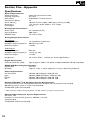
Specifications....................................................................28
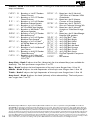
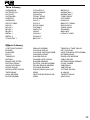
Tone Library.....................................................................29
Effects Library..................................................................29
Warranty
We at DigiTech® are very proud of our products and back up each one we sell with the following
warranty:
1. The warranty registration card must be mailed within ten days after purchase date to validate this
warranty.
2. DigiTech warrants this product, when used solely within the U.S., to be free from defects in materials and workmanship
under normal use and service.
3. DigiTech liability under this warranty is limited to repairing or replacing defective materials that show evidence of defect,
provided the product is returned to DigiTech WITH RETURN AUTHORIZATION, where all parts and labor will be
covered up to a period of one year. A Return Authorization number may be obtained from DigiTech by telephone. The
company shall not be liable for any consequential damage as a result of the product’s use in any circuit or assembly.
4. Proof-of-purchase is considered to be the burden of the consumer.
5. DigiTech reserves the right to make changes in design, or make additions to, or improvements upon this product without
incurring any obligation to install the same on products previously manufactured.
6. The consumer forfeits the benefits of this warranty if the product’s main assembly is opened and tampered with by anyone other than a certified DigiTech technician or, if the product is used with AC voltages outside of the range suggested
by the manufacturer.
7. The foregoing is in lieu of all other warranties, expressed or implied, and DigiTech neither assumes nor authorizes any
person to assume any obligation or liability in connection with the sale of this product. In no event shall DigiTech or
its dealers be liable for special or consequential damages or from any delay in the performance of this warranty due to
causes beyond their control.
NOTE: The information contained in this manual is subject to change at any time without notification. Some information
contained in this manual may also be inaccurate due to undocumented changes in the product or operating system since
this version of the manual was completed. The information contained in this version of the owner’s manual supersedes all
previous versions.
Section 1 - Introduction
Getting Acquainted
Congratulations on your purchase of the RP500. You now own a very powerful integrated
effects switching system allowing you extra control over stompboxes, effects, amplifiers and cabinets. The RP500 combines the simplicity of a stompbox with the control of an effects switching
system for control the way you want it. Armed with DigiTech®’s patented AudioDNA2® custom
audio DSP chip, the RP500 gives you a huge selection of tones and effects, right at your fingertips. Easily dial up a sound using the Tone and Effects Library knobs. You will appreciate the
tone and dynamic interaction of each of the amps, stompboxes, and effects with your system.
Add USB support for computer recording and you have the RP500: the key to unlock your creative potential.
Included Items
Before you get started, please make sure that the following items have been included:
• RP500
• Installer DVD: Cubase LE4 Recording Suite, X-EditTM Editor/Librarian Software, and RP500
Windows Drivers
• PS0913B Power Supply
• Warranty Card
The utmost care was taken while your RP500 was being manufactured. Everything should be
included and in perfect working order. If anything is missing, contact the factory at once. Please
help us become acquainted with you and your needs by sending us your completed warranty
card or registering online at www.digitech.com. It is your safeguard should a problem arise
with your RP500.
About the RP500
Pedalboard Mode
When you first apply power to the RP500, it powers up in Pedalboard mode. Pedalboard mode
provides access to all of the presets within the RP500 via the Up and Down Footswitches.
Knob 1 selects a tone from the Tone Library, Knob 2 selects an effects chain from the Effects
Library, Knob 3 adjusts the Effects Level, Knob 4 adjusts the Amp Gain, Knob 5 adjusts the
Amp Level, and Knob 6 adjusts the Master Level (volume).
Preset Mode and Pedalboard Mode
Since the RP500 has two different footswitch modes of operation (Preset Mode and Pedalboard
Mode), presets can be selected in two different ways:
Pedalboard Mode
Pedalboard mode is the default mode, where each numbered footswitch turns on and off
the effect labeled above it. Use the Up/Down Footswitches to select presets in Pedalboard mode. When the Pedalboard button is on (lit), Pedalboard mode is active.
Preset Mode
In Preset mode, the numbered footswitches recall presets in the active bank. Use the Up/
Down Footswitches to select preset banks in Preset mode. When the Pedalboard button
is off (not lit), Preset mode is active.
Bypass Mode
The RP500 presets can be bypassed via an analog bypass circuit for a clean, unprocessed guitar
signal. To bypass the RP500, press the Bypass Footswitch. The Display reads Bypass indicating the preset is bypassed. Press any Footswitch to exit Bypass and return the RP500 to the
last preset used.
Amp/Cabinet Bypass Mode
The RP500 has the unique feature of being able to turn off amp and cabinet modeling globally in
all presets. This is extremely useful when you just want to add effects processing to your own
core amplifier sound. The RP500 effectively becomes a straight multi-effects box at this point
where only Wah, Compressor, Distortion, Equalizer, Noise Gate, Chorus/FX, Delay, and Reverb
are being used.
To bypass amp/cabinet modeling in all presets, press the Amp/Cabinet Bypass button. When
1
it is lit, amp/cabinet modeling is globally bypassed in all presets.
Amp/Cabinet Bypass can be used in either Preset or Pedalboard modes.
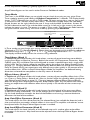
Tuner Mode
The Tuner in the RP500 allows you to quickly tune or check the tuning on your guitar. Enter
Tuner mode by pressing and holding the Bypass Footswitch for 2 seconds. The Display briefly
shows tuner indicating that you are in Tuner mode. To begin tuning, play a note on your guitar
(a harmonic at the 12th fret usually works best). The Numeric Display shows the note being
played. Arrows on the right indicate the note is sharp and should be tuned down. Arrows on
the left indicate the note is flat and should be tuned up. A left and a right arrow in the center
indicate the note is in tune. The output is muted in Tuner mode. The Expression Pedal controls
the guitar volume while tuning. Exit tuner mode by pressing any Footswitch.
Left and right arrows
in the center indicate
note is in tune
Note being played
A
In Tuner mode, you can change your tuning reference. The default factory setting is A=440 Hz
(displayed as A=440). Rotating Knob 1 selects alternate dropped tunings and tuning references.
Alternate tunings are A = A , A = G, A = G , and tuning references A=427 - A=453.
The display window briefly flashes the current tuning reference.
Tone Library (Knob 1)
In Pedalboard and Preset modes, this knob selects a variety of genre-based amp tone defaults
ranging from Blues to Metal to Country. Behind the scenes, the Compressor, Distortion, Amp/
Cabinet types, EQ, and Noise Gate are configured to create a specified tone with a single click
of this knob. You can further refine the sound by editing the preset (see Editing/Creating Presets
on page 11). Changing between different Tone Library defaults does not change the Chorus/FX,
Delay or Reverb, letting you experiment with different amp styles quickly in the context of the
current effect chain. When in Amp/Cabinet Bypass Mode, the amplifiers are defeated leaving
distortion and overdrive stompboxes as the only means of distortion.
Effects Library (Knob 2)
In Pedalboard and Preset modes, this knob selects a variety of post-amplifier effect chains (Chorus, Chorus + Delay, Delay + Reverb, etc.).You can further refine the sound by editing the preset
(see Editing/Creating Presets on page 11). Changing between different Effects Library defaults
does not change the Compressor, Distortion, Amp/Cabinet types, EQ, and Noise Gate settings,
letting you experiment with different effect chains quickly in the context of the current amp
tone.
Effects Level (Knob 3)
In Pedalboard and Preset modes, this knob changes the relative level of the post-amp effects
(Chorus/FX, Delay, and Reverb). This can be thought of as an effects mix control, where turning this knob clockwise increases the level of these effects and turning it counter-clockwise
decreases the level of these effects.
Amp Gain/Effect Parameter (Knob 4)
This knob adjusts the Gain (distortion) for the selected Amp (not available for Acoustic) and is
also used to adjust parameters of other effects in the matrix. The amplifier and cabinets cannot
be adjusted when the Amp/Cabinet Bypass button is enabled.
Amp Level/Effect Parameter (Knob 5)
This knob adjusts the Level (volume) of the selected amp and is used to adjust other effect
parameters in the matrix. Amp Level cannot be adjusted when the Amp/Cabinet Bypass button
is enabled.
2
Master Level (Knob 6)
This knob controls the overall output volume of all of the RP500’s presets and is used to adjust
other effect parameters in the matrix.
X-EditTM Editor/Librarian
You can edit your RP500 with your computer, using the X-EditTM Editor/Librarian, found on the
included DVD.
Presets
Presets are named and numbered locations of programmed sounds which reside in the RP500.
Presets are recalled with the Footswitches. The active effects in each preset are indicated by
lighted LEDs in the Effect Matrix. The RP500 comes with 100 User presets (1-00) and 100 Factory presets (F1-F00). The User presets are locations where your creations may be stored. The
Factory presets do not allow you to store any changes to them. From the factory, the 100 User
presets are exact duplicates of the 100 Factory presets. This allows you to create your own
presets without losing the sounds that came with the RP500.
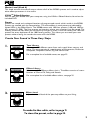
Create Your Sound in Three Easy Steps
1.
Tone Library
Select one of 40 different tones from rock, metal, blues, country, and
more. The tones consist of a combination of Compressor, Distortion
Stompbox, Amplifier/Cabinet, EQ, and Noise Gate.
For a complete list of available tones, see page 29.
2.
Effects Library
Select one of 40 diffferent effects chains. The effects consist of a combination of Chorus/FX, Delay, and Reverb.
For a complete list of available effects chains, see page 29.
3.
Effects Level
Adjust the overall level of the post-amp effects to your liking.
To make further edits, refer to page 11.
To store the preset, refer to page 12.
3
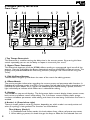
A Guided Tour of the RP500
Front Panel
1
2
34
5
6 7
8
9
10
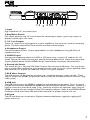
1.Tap Tempo Footswitch
This footswitch is used for setting the delay time in the current preset. By pressing this footswitch repeatedly you can set the delay to repeat in time with your music.
2. Bypass/Tuner Footswitch
This footswitch bypasses all of the RP500’s effects sending an unprocessed signal out all of the
outputs. Pressing and holding the Bypass footswitch accesses the RP500’s chromatic tuner. The
Displays will provide feedback for the tuning function (see page 2 for more info on using the
Tuner).
3. Edit Up/Down Buttons
These buttons navigate up and down the rows of the matrix for editing presets.
4. Effects Matrix
The matrix provides information regarding the current preset and parameter edit functions. In
Pedalboard and Preset modes, the LEDs running down the left side of the Matrix provide a visual
indication of which effects are in use for the selected preset. While editing a preset, the LEDs
light individually to indicate which Effect row is selected for editing.
5. Displays
The RP500 has two sets of displays. The 8 character alpha-numeric display shows preset names,
bank names, and effects names while editing. The 2 character numeric display shows preset
numbers and effects parameters while editing and shows the note being tuned when the Tuner is
enabled.
6. Knobs 1-6 (From left to right)
These six knobs perform various functions, depending on which mode is currently active and
what (if anything) is being edited. The functions are listed below:
Tone Library (Knob 1)
1. In Pedalboard and Preset modes, this knob selects from a library of preset amp tones.
2. When editing a preset, this knob changes the Amp or Effect for the selected row and
4
pressing the knob will turn the effect row on or off. When editing an Effect row, press
this knob to turn the effect on or off. When editing the Amp/Cabinet row, pressing this
knob will switch between editing the amp or the cabinet.
3. When the Expression row is selected, this knob selects the Expression, LFO 1, LFO 2,
and Wah parameter links, and pressing this knob has the same effect as turning it.
Effects Library (Knob 2)
1. In Pedalboard and Preset modes, this knob selects from a library of preset effect chains.
2. When editing a preset, this knob modifies the parameter listed in the column directly
above it for the selected Effect row.
3. When the Expression row is selected, this knob selects which parameter is assigned to
the Expression Pedal, LFO1or LFO2.
Effects Level (Knob 3)
1. In Pedalboard and Preset modes, this knob adjusts the overall level of post amp effects
(Chorus/FX, Delay, and Reverb).
2. When editing a preset, this knob modifies the parameter listed in the column directly
above it for the selected Effect row.
3. When the Expression row is selected, this knob selects the heel (minimum) value for the
parameter or Wah linked to the Expression Pedal.
Amp Gain (Knob 4)
1. In Pedalboard and Preset modes, this knob adjusts the Amp Gain (distortion) for the
selected Amp model.
2. When editing a preset, this knob modifies the parameter listed in the column directly
above it for the selected Effect row. This knob also is used to adjust the RP/USB mix
when the RP500 is connected to a computer and using recording software. Just select
the Wah row to adjust this parameter when USB is connected to the RP500.
3. When the Expression row is selected, this knob selects the toe (maximum) value for the
parameter or Wah linked to the Expression Pedal.
Amp Level (Knob 5)
1. In Pedalboard and Preset modes, this knob adjusts the Amp Level (volume) of the selected Amp model.
2. When editing a preset, this knob modifies the parameter listed in the column directly
above it for the selected Effect row. This knob is also used to adjust the USB Record
Level when the RP500 is connected to a computer and using recording software. Just
select the Wah row to adjust this parameter when USB is connected to the RP500.
3. When the Expression row is selected, this knob selects the LFO waveform. LFO 1or
LFO 2 must first be selected with Knob 1 for this parameter to be available.
Master Volume (Knob 6)
1. In Pedalboard and Preset modes, this knob adjusts the output level of the RP500.
2. When editing a preset, this knob modifies the parameter listed in the column directly
above it for the selected Effect row.
3. When the Expression row is selected, this knob sets the LFO speed. LFO 1 or LFO 2
must first be selected with Knob 1 for this parameter to be available.
7. System Buttons
There are three system buttons: AMP/CABINET BYPASS, PEDALBOARD, and STORE.
• AMP/CABINET BYPASS – When this button is lit, the internal amplifiers and cabinets are
bypassed in all RP500 presets
• PEDALBOARD – When this button is lit, the 5 numbered footswitches turn the effects
labeled above them on and off. When this button is not lit, these footswitches select the
five presets in the active bank.
• STORE – Press this button to begin the store/copy procedure.
5
8. Up/Down Footswitches
These Up/Down footswitches select preset banks or they select individual presets when Pedalboard mode is active.
9. Expression Pedal
The Expression Pedal provides real-time control of the RP500’s Volume, Wah, or any assigned effect parameter. Almost every parameter is available for Expression Pedal control. The Expression
Pedal also turns on and controls the Wah effect when you apply extra pressure to the toe.
10. 1-5 / Effects Footswitches
In Preset Mode, these 5 footswitches select between 5 different presets in the active bank. The
footswitch LED will light to indicate which preset is active. In Pedalboard mode, these footswitches are used to turn Compressor, Distortion, Chorus/FX, Delay, and Reverb effects on and
off. Effects that are on will have their footswitch LED lit.
6
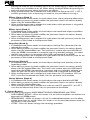
Rear Panel
1 2 3 4 56 7
89
1. Input
High impedance 1/4” instrument input.
2. Amp/Mixer Switch
This switch optimizes the 1/4” Line Outputs for connecting to either a guitar amp system or
directly into the inputs of a mixer.
3. 1/4” Line Outputs
These 1/4” outputs can be plugged into a guitar amplifier or into inputs of a mixer or recording
device. The front panel Master Level controls the level of these outputs.
4. Headphone Output
Connect headphones here. Output optimized for use with headphones having 60 Ohms of
impedance or less.
5. CD/MP3 Input
Connect the headphone output of an MP3 or CD player using a stereo 1/8” cable to this 1/8”
stereo TRS jack for rehearsing with your favorite pre-recorded material. Adjust the output level
of your playback device and the RP500’s Master Level knob for the proper volume balance.
6. Ground Lift Switch
This switch lifts pin 1 from the XLR Mixer Outputs from all ground references. This may be necessary to help solve troublesome ground loops that can cause hum in the system, especially when
both XLR and 1/4” outputs are used with a mixer and a guitar amplifier.
7. XLR Mixer Outputs
The XLR outputs are designed for connecting to a recording device or mixing console. These
outputs always have speaker compensation active as they are intended to be sent into full a range
audio system.
8. USB Jack
The USB jack connects the RP500 to a computer and provides two purposes. First it is used to
provide communication between the RP500 and the X-Edit editor librarian software. Second, it is
used to stream four channels of audio (2 up / 2 back) to and from the computer when using the
RP500 to record with the included Cubase LE4 recording software. Refer to the RP500 Software
Installation Guide and Cubase LE4 online documentation on proper setup for this use.
9. AC Jack
The AC Jack allows you to connect a Digitech recommended power supply for supplying AC
power to the unit.
7
Getting Started
Making Connections
There are several different connection options available with the RP500. Before connecting the
RP500, make sure that the power to your amplifier and the RP500 is turned off. There is no
power switch on the RP500. To turn the RP500 on or off, connect or disconnect the included
PS0913B power supply from the Power Input jack.
Amp/Cabinet Bypass
The RP500 lets you bypass its amp and cabinet tones so you can apply its effects to your own
amp/cabinet tone. To bypass the RP500 amp and cabinet tones in all presets, enable the Amp/
Cabinet Bypass button. To utilize the RP500 amp and cabinet tones, disable the Amp/Cabinet Bypass button.
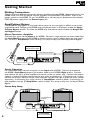
Mono Operation - Amplifier
Connect your guitar to the Input of the RP500. Connect a single mono instrument cable from
the Left (Mono) output of the RP500 to the instrument input or effect return on your amplifier. Set the ¼˝ Amp/Mixer switch to Amp. This setup usually uses the Amp/Cabinet Bypass.
¼” Amp/Mixer
switch set to “Amp”
¼” Left (Mono) Output
Input
Stereo Operation
For stereo operation connect the guitar to the Input of the RP500. Connect one cable to
the RP500’s Left (Mono) output, and another cable to the RP500’s Right output. Connect
one cable to the input of one amplifier, channel of a mixer, or power amp. Connect the second
cable to a second amplifier, second channel of a mixer, or power amp. If connecting to a mixing
console, set the pan controls of the mixer channels hard left and right in order to retain stereo
separation. If connecting to a mixer, set the ¼˝ Amp/Mixer switch to Mixer. If connecting to
two amplifiers, set the ¼˝ Amp/Mixer switch to Amp. This setup usually uses the Amp/Cabinet
Bypass.
Stereo Amp Setup
¼” Left (Mono)
Output
Input
¼” Right Output
8
¼” Amp/Mixer
switch set to “Amp”
Stereo Mixer Setup
4
6
4
2
6
4
8 2
0
0
6
-1
0
0 +1
-2
-4
Pan
+5
Pan
+5
Pan
+5
Pan
+5
Pan
+5
0 +1
-2
0 +1
-2
+2
+3 -3
+5
Pan
Aux 2 10
-1
+2
+4 -4
-5
6
8
0
+3 -3
+4 -4
-5
Aux 1 10
4
Aux 2 10
-1
+2
6
8
0
6
8 2
0
0 +1
-2
+3 -3
+4 -4
-5
4
Aux 1 10
4
Aux 2 10
-1
+2
6
8 2
0
6
8 2
0
0 +1
-2
+3 -3
+4 -4
-5
4
Aux 1 10
4
Aux 2 10
-1
+2
6
8 2
0
6
8 2
0
0 +1
-2
+3 -3
+4 -4
-5
4
Aux 1 10
4
Aux 2 10
-1
+2
6
8 2
0
6
8 2
0
0 +1
-2
+3 -3
+4 -4
-5
4
Aux 1 10
4
Aux 2 10
-1
+2
0
6
8 2
0
0 +1
-2
+3 -3
6
8 2
Aux 1 10
4
Aux 2 10
-1
+2
0
6
8 2
Aux 2 10
-3
4
8 2
Aux 1 10
4
8 2
0
6
8 2
Aux 1 10
4
2
+3
+4 -4
-5
+5
Pan
+4
-5
Mute
Mute
Mute
Mute
Mute
Mute
Mute
L/R
L/R
L/R
L/R
L/R
L/R
L/R
L/R
+10
+10
+5
+10
+5
0
+10
+5
0
+10
+5
0
+10
+5
0
+10
+5
0
+10
+5
0
+5
0
0
-5
-5
-5
-5
-5
-5
-5
-5
-10
-10
-10
-10
-10
-10
-10
-10
-20
-20
-20
-20
-20
-20
-20
-20
-30
-∞
-30
-∞
-30
-∞
-30
-∞
-30
-∞
-30
-∞
-30
-∞
-30
-∞
1
2
3
Input
4
5
+5
Pan
Mute
6
7
8
XLR Left Out
XLR Right Out
Computer Recording Setup
Studio Reference
Monitors
XLR Left Out
XLR Right Out
USB
USB Ports
Input
Power Amp/Mixer Setup
PA Speaker (Left)
PA Speaker (Right)
Stereo Power Amp
2- Speaker Cabs
1/4" Left and
Right Outputs
XLR Left and
Right Outputs
Mixer
4
6
4
6
Mute
Pan
Mute
6
4
4
Mute
L/R
4
8
L/R
+10
+10
+10
+10
+10
+5
+5
+5
+5
+5
+5
0
0
0
0
0
0
0
-5
-5
-10
-5
-10
-20
-10
-20
-30
-
3
-5
-10
-20
-30
-
2
-5
-10
-20
-30
-
-20
-30
-
4
-30
-
5
+5
L/R
+10
+5
1
Pan
Mute
+10
-5
+2
+3
0
-30
-
0 +1
+4
-5
+5
+5
-20
Aux 2 10
-1
-2
+3 -3
Pan
+10
-10
6
8
0
+2
+4 -4
-5
+5
Mute
L/R
6
Aux 1 10
4
8 2
0 +1
-2
+3 -3
Pan
0
6
Aux 2 10
-1
+2
+4 -4
-5
+5
0
0 +1
-2
+3 -3
Mute
6
Aux 1 10
4
Aux 2 10
-1
+2
Pan
8 2
6
8 2
0
0 +1
+4 -4
-5
+5
0
Aux 1 10
4
Aux 2 10
-1
-2
+3 -3
L/R
6
8 2
6
8 2
0
+2
Pan
0
Aux 1 10
4
8 2
0 +1
+4 -4
-5
+5
Mute
L/R
4
8 2
0
6
Aux 2 10
-1
-2
+3 -3
Pan
6
8 2
Aux 1 10
4
0
+2
+4 -4
-5
+5
Mute
L/R
L/R
4
8 2
0 +1
-2
+3 -3
+4 -4
-5
0
6
Aux 2 10
-1
+2
+3 -3
+5
0
0 +1
-2
+4 -4
Pan
Aux 1 10
4
Aux 2 10
-1
-3
8 2
6
8 2
0
0 +1
+2
0
Aux 1 10
4
8 2
Aux 2 10
-1
6
8 2
0
Aux 1 10
4
0
-2
-5
¼” Amp/Mixer
switch set to “Amp”
6
8 2
0
2
-4
Input
4
2
-5
-5
-10
-10
-20
-20
-30
-
-30
-
6
9
Applying Power
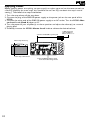
Before applying power to anything, set your amp(s) to a clean tone and set the tone controls to
a flat EQ response (on most amps, this should be set to 5 on EQ’s to obtain the amp’s natural
voicing.). Then follow the steps listed below.
1. Turn the amp volume all the way down.
2. Connect the plug of the PS0913B power supply to the power jack on the rear panel of the
RP500.
3. Connect the other end of the PS0913B power supply to an AC outlet. Turn the RP500’s Master Level knob (Knob 6) down to “0”.
4. Turn the power of your amplifier(s) to the on position and adjust the volume(s) to a normal
playing level.
5. Gradually increase the RP500’s Master Level knob to achieve the desired volume.
2. Connect PS0913B to power jack
4.Turn amp volume up
1.Turn amp volume down
5.Turn the RP500’s Master Level
to the desired listening volume
10
3. Connect PS0913B
to AC outlet and
turn the RP500’s
Master Level to “0”
Section Two - Editing Functions
Editing/Creating Presets
The RP500 is designed to make preset editing and creation easy and intuitive. When creating
your own sound, you must first start with an existing preset. Note that the preset you begin
with doesn’t have to be in the memory location you intend to have it reside, since you can
store it to any User preset location during the store procedure.
The easiest way to start is by using the Tone Library and Effects Library knobs. The Tone
Library knob will let you select from a variety of pre-programmed amp/distortion tones (see
page 29) based on different musical styles. The Effects Library knob will then let you select
from a palette of effects chains (see page 29), from simple delays to full multi-effect signals with
modulation, delay and reverb. Use the Effects Level Knob to increase or decrease the overall
Chorus/FX, Delay and Reverb levels if desired. Using these three controls should get you close
to a sound you are after. From there you can then use the Edit buttons to navigate through
the individual effects for some fine tune edits.
1. Select a tone
with the
Tone Library knob
2. Select an effect
3. Adjust the
or effects chain with the effects level with the
Effects Library knob
Effects Level knob
To edit and create a preset:
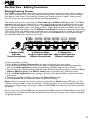
1. Use the Up and Down Footswitches to select the preset you wish to edit.
2. If you find a preset close to what you want, you can begin editing the effect parameters by
pressing the Edit Up/Down buttons and selecting the Effect row you want to edit.
3. If you are trying to find something different from the existing presets, begin by using the Tone
Library, Effects Library and Effects Level knobs to get close to a sound you want.
4. Press the Edit Up/Down buttons to begin selecting the individual Effects rows to edit their
parameters.
5. To bypass or enable an Effect row, press the Tone Library knob.
6. Use the Knobs 2-6 to modify the effects’ parameter settings.
Note: Anytime a stored value within a preset is changed, the Store button LED lights up. This
indicates that you need to store the changes. Changing presets, or turning the power off before
storing any changes, erases any changes made and the RP500 will revert to the stored values for
the preset.
Also, if you are using the RP500 with the Amp/Cabinet Bypass button enabled (effects only), Tone
Libraries that use amps only will not provide distortion or tone changes since amps and cabinets
are globally disabled.
11
Storing/Copying/Naming a Preset
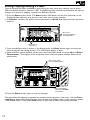
Once the preset has been modified to your liking, you may store your settings to any of the
100 User preset locations (presets 1-00). The following steps outline the procedure for storing
changes to a preset or copying a preset to a different location:
1. Press the Store button once. The Store button LED blinks and the first character in the
Display flashes, indicating that you can now name your custom creation.
2. Use Knob 1 to select the alpha-numeric character and Knob 2 to select the next character
location.
1. Press Store;
characters in Display
flash individually
2. Use Knobs to
name Preset
3. Once the desired name is shown in the display, press the Store button again to enter the
second stage of the storing process. The red Display begins to flash.
4. Select the User preset location where your new sound will reside using the Up and Down
Footswitches. The displays show the preset name and User preset number about to be
overwritten.
3. Press Store again;
Preset number flashes
4. Select destination
with UP and DOWN
Footswitches
5. Press the Store button again to save the changes.
The procedure for copying one preset to another preset location is the same. Use the Footswitches to select the preset that you want to copy, then follow steps 1-4 for storing a preset
as described above. Press either Edit button at any time to abort the Store procedure.
12
Section Three - Effects and Parameters
About the Effects
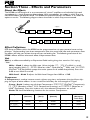
The RP500 can be thought of as an assortment of “virtual” amplifiers and individual, high-tech
stompboxes in a single programmable package. With stompboxes, the order in which they are
connected affects the overall sound. The RP500 has placed the Amps and Effects in an order for
optimum results. The following diagram shows the order in which they are connected.
Amp/Cabinet
Bypass
Wah
Compressor
Equalizer
Chorus/FX
(Pre)
Distortion
Volume
Pre
Chorus/FX
(Post)
Amp/Cabinet
Delay
Reverb
Noise
Gate
Volume
Post
Effect Definitions
Each Amp and Effect within the RP500 can be programmed to suit your personal taste and application. Understanding how these components alter the sound, and how each parameter alters
the effect, will help you achieve the sound you are looking for. The following overview of the
RP500’s effects outlines what each effect and parameter does.
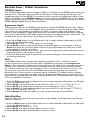
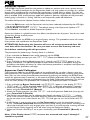
Wah
Wah is an effect controlled by an Expression Pedal making the guitar sound as if it’s saying
“Wah.”
Wahs - Knob 1 selects the Wah type. Values include: CRY wah (Cry Wah is a traditional sounding Wah), clydewah based on a Vox® Clyde McCoyTM Wah), and FULlRaNG
(DigiTech® Full Range Wah sweeps the entire spectrum of audible frequencies). Press this
knob to turn Wah on and off.
Wah Level - Knob 2 adjusts the Wah Level. Ranges from 0dB to +12dB.
Compressor
A Compressor is used to increase sustain, tighten up guitars, and prevent the signal from clipping the input of other effects. It sets a maximum boundary for the strength of a signal.
Comp - Knob 1 selects one of three Compressors: DIGiCoMP (DigiTech® Compressor),
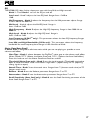
CS COMP (Based on a Boss® CS-2 Compressor/Sustainer), or DYNoCOMP (Based on an
MXR® Dynacomp). Press this knob to turn the selected Compressor on and off.
Knobs 2-6 have the following functions for the various Compressors:
Knob 2
(Sustain)
Knob 3
(Tone)
digicomp
Sustain
Tone
Attack
--
Level
cs comp
Sustain
--
Attack
--
Level
dynocomp
Sensitivity
--
--
--
Output
Compressor
Knob 4
(Attack)
Knob 5
Knob 6
(Compressor Level)
13
Distortion
The RP500 includes the tones of many popular distortion stompboxes, each of which can be
fully dialed in.
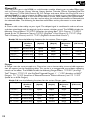
Distortion - Knob 1 selects a Distortion. Press this knob to turn the selected Distortion
on and off.
screamer - Based on an Ibanez® TS-9
808- Based on an Ibanez TS-808 Tube Screamer
Sparkdrv- Based on a Voodoo Lab Sparkle Drive
guy odrv - Based on a Guyatone® Overdrive OD-2
dod 250 - Based on a DOD® 250
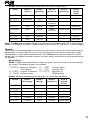
Overdrive/Preamp
redline - DigiTech® Redline Overdrive
rodent - Based on a Pro Co RATTM
mx dist - Based on an MXR® Distortion +
DS Dist - Based on a Boss® DS-1TM
Distortion
grunge - DigiTech® Grunge®
zone - Based on a Boss MT-2 Metal Zone®
death
- DigiTech Death MetalTM
gonkultr - Based on a DOD Gonkulator 8tavia - Based on a Roger Mayer OctaviaTM
fuzzlatr - Based on a Demeter Fuzzulator
clascfuz - Based on a DOD Classic Fuzz
fuzzYFAC - Based on an Arbiter® Fuzz FaceTM
big pi- Based on an Electro-Harmonix® Big Muff Pi®
Knobs 2-6 have the following functions for the various Distortions:
Distortion
Knob 2
(Gain)
Knob 3
(Param. 1)
Knob 4
(Param. 2)
Knob 5
(Param. 3)
Knob 6
(Distortion Level)
P7
(X-EditTM
only)
ScreamER
Drive
Tone
--
--
Level
--
Overdrive
Tone
--
--
Level
--
SPARKDRV
Gain
Tone
Clean
--
Volume
--
GUY ODRV
Drive
--
--
--
Level
--
DOD 250
Gain
--
--
--
Level
--
Redline
Gain
Low
High
--
Level
--
rodent
Distortion
Filter
--
--
Level
--
mx dist
Distortion
--
--
--
Output
--
ds dist
Gain
Tone
--
--
Level
--
Grunge
Grunge
Butt
Face
--
Loud
--
Gain
Low
Mid
High
Level
Mid Freq
808
zone
--
Low
Mid
High
Level
--
gonkUltR
Gunk
Smear
Suck
--
Heave
--
8tavia
Drive
--
--
--
Volume
--
fuzZlAtr
Fuzz
Tone
Loose/Tight
--
Volume
--
clasCfUz
Fuzz
Tone
--
--
Volume
--
Fuzz
--
--
--
Volume
--
Sustain
Tone
--
--
Volume
--
death
fuzzYFAC
big pi
14
Disclaimer: DigiTech®, RP500™, DigiTech Whammy®, MultiChorus®, AutoYa™,YaYa™, SynthTalk™, Grunge®, DOD®, Lexicon®, and
AudioDNA® are trademarks of Harman International Industries, Incorporated. Ibanez Tube Screamer,Voodoo Labs Sparkle Drive, Guyatone
Overdrive, ProCo Rat, MXR, Boss Metal Zone, Roger Mayer Octavia, Demeter Fuzzulator, Arbiter Fuzz Face, EH Big Muff Pi, Dunlop Cry Baby,
Vox, Clyde McCoy Wah, MXR DynaComp, TC Electronic, EH Electric Mistress, EH Small Stone, Boss Octaver, Unicord Univibe, Fender Opto
Tremolo,Vox Bias Tremolo, Maestro Echoplex, Fender Twin Reverb, EMT, Fender Tweed Deluxe, Fender Bassman, Fender Blackface, Twin Reverb,
Marshall Super Lead, Mesa/Boogie, Hiwatt, Fender Tweed Champ, Soldano, Jensen Blue Backs, Celestion, Johnson Amplification,VHT Amplification, Sunn, Orange, Gibson, Laney, Roland, Peavey, 5150, and Randall are trademarks of their respective companies and are not associated or affiliated with DigiTech or Harman International Industries, Incorporated. These trademarks of other manufacturers are used to identify products
whose sounds were reviewed in the making of this product. ©2008 Harman International Industries, Inc. All Rights Reserved.
Amplifier
The amplifiers are an assortment of popular vintage and modern amp tones. The amplifiers
also include acoustic guitar simulations.
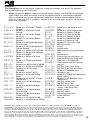
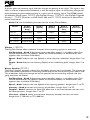
Amp - By default, Knob 1 selects one of the classic, modern, and DigiTech custom Amp
types. Note that when you select an Amp, the default cabinet is automatically selected.
You can, however, change the cabinet after selecting an Amp to achieve different tones.
Press this knob and turn it to select a cabinet. Press this knob again to return to the Amp
types and parameters.
sldno100 57 champ Based on a ‘57 Fender® Tweed
Champ®
supergrp 57deluxe Based on a ‘57 Fender Tweed
ga-40 Deluxe
59BassMN Based on a ‘59 Fender Tweed or-120 Bassman®
PV 5150 62BAssmn Based on a ‘62 Fender Brown
RG100 Bassman
jazz 120 65 twin Based on a ‘65 Fender Blackface solar100 Twin Reverb®
dig solo 65dluxrv Based on a ‘65 Fender Blackface digmetal digbrght Deluxe Reverb®
45 jtm Based on a ‘65 Marshall® JTM-45 digchunk 68 plexi Based on a ‘68 Marshall 100 Watt digclean Super Lead (plexi)
dig gain jumppanl Based on a ‘68 Marshall Jump digblues
Panel
mastrvol Based on a ‘77 Marshall Master dig fuzz
digspank
Volume
800 jcm Based on an ‘83 Marshall JCM800
900 jcm
Based on a ‘93 Marshall JCM900 2101 Cln 2101 saT
2000 jcm Based on an ‘01 Marshall digcrnch
JCM2000
digmnstr
ac15 Based on a ‘62 Vox® AC15
digtweed
AC30 tb Based on a ‘63 Vox AC30 Top
Boost
hiwattag Based on a ‘69 Hiwatt® Custom digblack
100 DR103
digstonr
mark iic Based on an ‘81 Mesa Boogie®
digdkmtl
Mark II C
digtrans
mark iv Based on a ‘94 Mesa Boogie®
Mark IV
digbrown dualrect Based on an ‘01 Mesa Boogie dig mosh
Dual Rectifier
dread AC
triprect Based on an ‘04 Mesa Boogie jumbo ac
Triple Rectifier
direct 99legacy Based on a 99 Legacy VL-100
matchc30 Based on a ‘96 MatchlessTM HC30
Based on an ‘88 Soldano SLO100
Based on a Laney Supergroup.
Based on a Gibson® GA-40
Based on an Orange OJ120.
Based on a Peavey® 5150 II®
Based on a Randall RG100
Based on a Roland JC120
Based on a Sunn Solar 100S
80s shred guitar.
Heavy.
Sparkle clean.
Beefy high gain with tight bottom end.
Sparkle clean.
Punchy high gain that cleans up.
Tube combo at the sweet spot.
Fuzz Face + Orange Amp
Cool rhythm tone with spanky
top end.
DigiTech 2101 Clean Tube
DigiTech 2101 Saturated Tube
Based on a modified Plexi.
Maxed out gain.
Based on a Tweed front Blackface
power hybrid.
Based on a ‘65 Blackface into a
‘58 Bassman.
DigiTech stoner rock.
DigiTech dark metal.
Based on a transistor amp “Deacy” from Brian May.
Brown sound.
DigiTech mosh.
Dreadnaught acoustic
Jumbo acoustic
No amp
Disclaimer: DigiTech®, RP500™, DigiTech Whammy®, MultiChorus®, AutoYa™,YaYa™, SynthTalk™, Grunge®, DOD®, Lexicon®, and
AudioDNA® are trademarks of Harman International Industries, Incorporated. Ibanez Tube Screamer,Voodoo Labs Sparkle Drive, Guyatone
Overdrive, ProCo Rat, MXR, Boss Metal Zone, Roger Mayer Octavia, Demeter Fuzzulator, Arbiter Fuzz Face, EH Big Muff Pi, Dunlop Cry Baby,
Vox, Clyde McCoy Wah, MXR DynaComp, TC Electronic, EH Electric Mistress, EH Small Stone, Boss Octaver, Unicord Univibe, Fender Opto
Tremolo,Vox Bias Tremolo, Maestro Echoplex, Fender Twin Reverb, EMT, Fender Tweed Deluxe, Fender Bassman, Fender Blackface, Twin Reverb,
Marshall Super Lead, Mesa/Boogie, Hiwatt, Fender Tweed Champ, Soldano, Jensen Blue Backs, Celestion, Johnson Amplification,VHT Amplification, Sunn, Orange, Gibson, Laney, Roland, Peavey, 5150, and Randall are trademarks of their respective companies and are not associated or affiliated with DigiTech or Harman International Industries, Incorporated. These trademarks of other manufacturers are used to identify products
whose sounds were reviewed in the making of this product. ©2008 Harman International Industries, Inc. All Rights Reserved.
15
Cabinet - Knob 1 also selects cabinets. Pressing this knob alternates between selecting
amps and cabinets
champ1x8- Based on a 1x8 ‘57 Fender®
Tweed Champ®
dlux1x12 - Based on a 1x12 ‘57 Fender Tweed Deluxe®
dxrv1x12 - Based on a 1x12 ‘65 Fender Blackface Deluxe Reverb
brit1x12 - Based on a 1x12 ‘62 Vox®
AC15 w/20W Vox Speaker
gbsn1x12 - Based on a ‘60 Gibson® GA40 Jensen Speaker
bman2x12 - Based on a 2x12 ‘57 Fender Blonde Bassman®
twin2x12 - Based on a 2x12 ‘65 Fender Blackface Twin Reverb®
brit2x12 - Based on a 2x12 ‘63 Vox®
AC30 Top Boost w/ Jensen®
Blue Backs
jazz2x12 - Based on a 2x12 ‘84 Roland®
Jazz Chorus
bman4x10 - Based on a 4x10 ‘59 Fender Tweed Bassman®
clas4x12 - Based on a 4x12 Marshall®
1969 Straight w/ Celestion®
G12-T70
GRen4x12 - Based on a 4x12 Marshall
1969 Slant w/ Celestion 25W
Greenbacks
fane4x12 - Based on a 4x12 Hiwatt®
Custom w/ Fane Speakers
botq4x12 - Based on a 4x12 ‘96 VHT®
Slant w/ Celestion Vintage 30’s
vntg4x12 - Based on a 4x12 Johnson® Straight w/ Celestion Vintage
30’s
rect4x12 - Based on a 4x12 Mesa/Boogie
Rectifier V30 speakers
solo4x12 - 4x12 DigiTech® Solo
brgt2x12 - 2x12 DigiTech Bright
metl4x12 - 4x12 DigiTech Metal
rock4x12 - 4x12 DigiTech Rock
altr4x12 - 4x12 DigiTech Alt Rock
dvtg4x12 - 4x12 DigiTech Vintage
chnk4x12 - 4x12 DigiTech Chunk
spnk4x12 - 4x12 DigiTech Spank
digispkr - DigiTech Speaker Compensation
direct - No cabinet
Amp Gain - Knob 2 adjusts the Gain (distortion) for the selected Amp (not available for
Acoustic). The Gain parameter ranges from 0 to 99.
Bass - Knob 3 adjusts the low frequencies of the amp’s tone. Ranges from 1.0 to 10.
Middle - Knob 4 adjusts the mid frequencies of the amp’s tone. Ranges from 1.0 to 10.
Treble - Knob 5 adjusts the high frequencies of the amp’s tone. Ranges from 1.0 to 10.
Amp Level - Knob 6 adjusts the Level (volume) of the selected Amp. The Level parameter ranges from 0 to 99.
16
Disclaimer: DigiTech®, RP500™, DigiTech Whammy®, MultiChorus®, AutoYa™,YaYa™, SynthTalk™, Grunge®, DOD®, Lexicon®, and
AudioDNA® are trademarks of Harman International Industries, Incorporated. Ibanez Tube Screamer,Voodoo Labs Sparkle Drive, Guyatone
Overdrive, ProCo Rat, MXR, Boss Metal Zone, Roger Mayer Octavia, Demeter Fuzzulator, Arbiter Fuzz Face, EH Big Muff Pi, Dunlop Cry Baby,
Vox, Clyde McCoy Wah, MXR DynaComp, TC Electronic, EH Electric Mistress, EH Small Stone, Boss Octaver, Unicord Univibe, Fender Opto
Tremolo,Vox Bias Tremolo, Maestro Echoplex, Fender Twin Reverb, EMT, Fender Tweed Deluxe, Fender Bassman, Fender Blackface, Twin Reverb,
Marshall Super Lead, Mesa/Boogie, Hiwatt, Fender Tweed Champ, Soldano, Jensen Blue Backs, Celestion, Johnson Amplification,VHT Amplification, Sunn, Orange, Gibson, Laney, Roland, Peavey, 5150, and Randall are trademarks of their respective companies and are not associated or affiliated with DigiTech or Harman International Industries, Incorporated. These trademarks of other manufacturers are used to identify products
whose sounds were reviewed in the making of this product. ©2008 Harman International Industries, Inc. All Rights Reserved.
EQ
The RP500’s EQ helps further shape your tone with Low, Mid, and High controls.
Knob 1 - Press Knob 1 to turn the EQ on and off.
Low Level - Knob 2 adjusts the Low EQ level. Ranges from -12dB to
12dB.
Mid Frequency - Knob 3 selects the frequency that the Mid parameter adjusts. Range
Is from 300 Hz to 4000 Hz.
Mid Level - Knob 4 adjusts the Mid EQ level. Range is
from -12dB to 12dB.
High Frequency - Knob 5 adjusts the High EQ frequency. Range is from 2000 Hz to
8000 Hz
High Level - Knob 6 adjusts the High EQ level. Range is
from -12dB to 12dB.
Low Frequency (X-EditTM only) - This parameter selects the Low EQ frequency. Ranges
from 60 Hz to 500 Hz.
Low, Mid, and High Bandwidth (X-Edit only) - This parameter selects the frequency
bandwidth for each frequency band. Range is from Narrow to Wide.
Noise Gate/Auto Swell
A Noise Gate is designed to eliminate noise while you are not playing, or provide an auto
volume swell effect.
Gate Type - Knob 1 selects between the DigiTech® noise gate or the volume swell effect.
Values include: gate (Selects the Noise Gate) and swEll (Selects the Auto Swell effect.)
Press this knob to turn the Noise Gate/Auto Swell on and off.
Threshold (Noise Gate only) - Knob 2 sets the signal strength (Threshold) required to
open or close the Noise Gate. Parameters range from 0 (opens easily) to 99 (requiring
strong signals to open).
Attack Time - Knob 3 sets the attack time. Ranges from 0 (shorter attack time) to 99
(longer attack time).
Release - Knob 4 sets the Release parameter. Ranges from 0 to 99.
Attenuation - Knob 5 sets the Attenuation parameter. Ranges from 0 to 99.
Swell Sensitivity (Auto Swell only) - Knob 6 sets the Swell Sensitivity parameter of the
Auto Swell. Ranges from 0 to 99.
17
Chorus/FX
The Chorus/FX row in the RP500 is a multi-function module, allowing you to select Effect types
such as Chorus, Flanger, Phaser, Vibrato, Rotary Speaker, Tremolo, Panner, Envelope Filter, Detune, Whammy™, Pitch Shift, Detune, IPS, OC Octaver and more. When the Chorus/FX row is
selected, Knob 1 is used to choose the Effect type. Press this knob to turn these Effects on and
off. Only one of the effects in this row can be used at a time. After selecting the type of effect
in this module, Knobs 2-6 can then be used to adjust the individual parameters associated with
the selected effect. The following list describes each Effect and its parameters in more detail:
Chorus
A Chorus adds a short delay to your signal. The delayed signal is modulated in and out of tune
and then mixed back with the original signal to create a thicker sound. The RP500 includes the
following Chorus Effects: CECHoruS (based on the classic Boss® CE-2 Chorus), tcchoruS
(based on the TC Electronic Chorus), CHORUS (DigiTech®’s Dual Chorus), glischrs (DigiTech’s Glistening Chorus) and MultCHRS (DigiTech’s famous Multi Chorus®).
Knobs 2-6 have the following functions for the various Chorus types:
Knob 2
(Pre/Post
Amp)
Knob 3
(Speed)
CECHoruS
Pre/Post Amp
TCCHorus
Pre/Post Amp
Chorus
Knob 4
(Depth)
Knob 5
(Regeneration)
Knob 6
(FX Level)
Speed
Depth
--
--
Speed
Width
--
Intensity
chorus
Pre/Post Amp
Speed
Depth
Waveform
Level
glischrs
Pre/Post Amp
Speed
Depth
--
Level
Multchrs
Pre/Post Amp
Speed
Depth
Waveform
Level
Flanger
A Flanger uses the same principle as a Chorus but uses a shorter delay time and adds regeneration (or repeats) to the modulating delay. This results in an exaggerated up and down sweeping
motion to the effect. The RP500 includes the following Flanger Effects: fLanger (the DigiTech® Flanger), trigfLnG (the DigiTech Triggered Flanger), mx FLngr (based on an MXR®
Flanger), eh FLngr (based on an Electro-Harmonix® Electric Mistress), and ad FLngr
(based on an A/DA Flanger).
Knobs 2-6 have the following functions for the various Flanger types:
Knob 2
(Pre/Post
Amp)
Knob 3
(Speed)
Knob 4
(Depth)
Knob 5
(Regeneration)
Knob 6
(FX Level)
flanger
Pre/Post Amp
Speed
Depth
Regen
Level
trigflng
Pre/Post Amp
Speed
Sensitivity
LFO Start
Level
mx flngr
Pre/Post Amp
Speed
Width
Regen
Manual
EH flngr
Pre/Post Amp
Rate
Range
Color
--
AD flngr
Pre/Post Amp
Speed
Enhance
Range
Manual
Flanger
18
Phaser
A phaser splits the incoming signal, and then changes the phasing of the signal. This signal is then
taken in and out of phase and mixed back in with the original signal. As the phasing changes, different frequencies get canceled resulting in a warm sort of twisting sound. The RP500 includes
the following Phaser types: phaser (the DigiTech Phaser), trigphas (the DigiTech Triggered
Phaser), mx phasr (based on an MXR Phase 100), and eh phasr (based on an Electro-Harmonix Small Stone).
Knobs 2-6 have the following functions for the various Phaser Effects:
Knob 2
(Pre/Post
Amp)
Knob 3
(Speed)
Knob 4
(Depth)
Knob 5
(Regeneration)
Knob 6
(FX Level)
Phaser
Pre/Post Amp
Speed
Depth
Regen
Level
trigphas
Pre/Post Amp
Speed
Sensitivity
LFO Start
Level
mx phasr
Pre/Post Amp
Speed
Intensity
--
--
eh phasr
Pre/Post Amp
Rate
--
Color
--
Phaser
Vibrato (viBRaTo)
The DigiTech Vibrato effect modulates the pitch of the incoming signal at an even rate.
Pre/Post Amp - Knob 2 determines where the effect appears in the effects chain. Turn
counter-clockwise for Pre (appears before the Distortion effect), or clockwise for Post
(appears after the Noise Gate effect).
Speed - Knob 3 adjusts the rate (Speed) at which the pitch modulates. Ranges from 0 to
99.
Depth - Knob 4 adjusts the intensity (Depth) of the modulating pitch. Ranges from 0 to
99.
Rotary Speaker (ROTARY)
The Rotary Speaker emulates a device that included a spinning horn and woofer. The rotation of
these two speakers produced an interesting combination of the sound panning from side to side.
This produced a slight pitch change due to the speed of the sound coming towards, and then
going away from the listener.
Pre/Post Amp - Knob 2 determines where the effect appears in the effects chain. Turn
counter-clockwise for Pre (appears before the Distortion effect), or clockwise for Post
(appears after the Noise Gate effect).
Speed - Knob 3 adjusts the rate (Speed) of the spinning speakers. Ranges from 0 to 99.
Intensity - Knob 4 controls the intensity of the effect. Ranges from 0 to 99.
Doppler - Knob 5 controls the Pitch Shift effect that is the ratio between the horn and
the rotor positions. Ranges from 0 to 99.
Crossover - Knob 6 selects the crossover frequency between the horn and rotor.
Ranges from 0 (200 Hz) to 99 (1600 Hz).
19
VibroPan (vibropan)
A vibrato is an effect that modulates the pitch of the incoming signal. This will take the whole
signal slightly in and out of tune at a steady pace. The DigiTech® VibroPan also incorporates an
automatic panner with the vibrato effect that creates a lush chorus-like sound.
Pre/Post Amp - Knob 2 determines where the effect appears in the effects chain. Turn
counter-clockwise for Pre (appears before the Distortion effect), or clockwise for Post
(appears after the Noise Gate effect).
Speed - Knob 3 adjusts how fast the signal is being modulated.
Depth - Knob 4 adjusts the amount of pitch change.
Vibrato/Pan- Knob 5 adjusts the amount of panning incorporated with the vibrato effect.
When set at 0, this effect is a standard vibrato. As the parameter is turned up, the phase
difference of the vibrato signal sent to the two channels is changed until a full stereo image
is obtained at 99.
Waveform - Knob 6 selects a waveform: triangle, Sine, or Square.
Unicord Uni-VibeTM (unovibe)
Based on the Unicord® Uni-VibeTM pedal, Uni-Vibe adds a lush chorus or rotary speaker (vibrato) effect to your tone.
Pre/Post Amp - Knob 2 determines where the effect appears in the effects chain. Turn
counter-clockwise for Pre (appears before the Distortion effect), or clockwise for Post
(appears after the Noise Gate effect).
Speed - Knob 3 adjusts the rate (Speed) of the chorus modulation or spinning speaker
(vibrato) effect. Ranges from 0 to 99.
Intensity - Knob 4 controls the intensity of the effect. Ranges from 0 to 99.
Chorus/Vibrato - Knob 5 selects either the chorus or vibrato effect. Turn counterclockwise for Chorus, or clockwise for Vibrato.
Volume - Knob 6 adjusts the volume of the effect.
Tremolo/Panner
A Tremolo effect modulates the volume of the signal at an even rate. The RP500 includes the
following Tremolo types: tremolo (the DigiTech® Tremolo), sctrtrem (DigiTech Scattertrem
(dual asynchronized tremolos)), optotrem (based on the Fender® Opto Tremolo), biastrem
(based on the Vox® Bias Tremolo), and panner (the DigiTech Panner).
Pre/Post Amp - Knob 2 determines where the effect appears in the effects chain. Turn
counter-clockwise for Pre (appears before the Distortion effect), or clockwise for Post
(appears after the Noise Gate effect).
Speed - Knob 3 adjusts the rate (Speed) at which the volume modulates. Ranges from 0
to 99
Depth - Knob 4 adjusts the intensity (Depth) of the modulating volume. Ranges from 0
to 99.
Waveform (DigiTech Tremolo and Panner only) - Knob 5 selects a waveform:
triangle, Sine, or Square.
20
Envelope Filter (eNvfiltr)
The DigiTech Envelope Filter is a dynamic Wah effect that alters your sound based upon how
hard you play.
Pre/Post Amp - Knob 2 determines where the effect appears in the effects chain. Turn
counter-clockwise for Pre (appears before the Distortion effect), or clockwise for Post
(appears after the Noise Gate effect).
Sensitivity - Knob 3 adjusts the sensitivity or the input signal required to trigger the
Wah effect. Ranges from 0 to 99.
Range - Knob 4 controls the range of the Envelope effect. Ranges from 0 to 99.
DOD FX25 (fx25 env)
This envelope filter is based on the DOD FX25.
Pre/Post Amp - Knob 2 determines where the effect appears in the effects chain. Turn
counter-clockwise for Pre (appears before the Distortion effect), or clockwise for Post
(appears after the Noise Gate effect).
Blend - Knob 3 adjusts the balance between effect signal and dry signal.
Sensitivity - Knob 4 adjusts the sensitivity or the input signal required to trigger the
Wah effect. Ranges from 0 to 99.
Range - Knob 5 controls the range of the envelope effect. Ranges from 0 to 99.
AutoYa™ (AUTO YA)
An AutoYaTM combines the characteristics of a Wah and a Flanger together creating an almost
human vowel characteristic as if the guitar were saying “Yah.” The AutoYa automatically provides
this animation to the sound at an even rate.
Pre/Post Amp - Knob 2 determines where the effect appears in the effects chain. Turn
counter-clockwise for Pre (appears before the Distortion effect), or clockwise for Post
(appears after the Noise Gate effect).
Speed - Knob 3 adjusts the speed of the AutoYa sweep. Ranges from 0 to 99.
Intensity - Knob 4 adjusts the intensity of the AutoYa effect. Ranges from 0 to 99.
Range - Knob 5 adjusts the throaty quality of the AutoYa effect. Ranges from 0 to 49.
YaYa™ (ya ya)
The YaYaTM is another effect exclusive to DigiTech products. Like the AutoYa, it combines the
characteristics of a wah and a flanger together providing a unique talk box type of effect, but is
controlled by the Expression Pedal.
Pre/Post Amp - Knob 2 determines where the effect appears in the effects chain. Turn
counter-clockwise for Pre (appears before the Distortion effect), or clockwise for Post
(appears after the Noise Gate effect).
Pedal - Knob 3 adjusts the Ya pedal position. Ranges from 0 to 99.
Intensity - Knob 4 adjusts the intensity of the YaYa effect. Ranges from 0 to 99.
Range - Knob 5 adjusts the throaty quality of the YaYa effect. Ranges from 0 to 49.
21
SynthTalkTM (synthtlk)
SynthTalkTM is another effect exclusive to DigiTech®. It makes your guitar appear to speak based
upon the dynamics of your playing style.
Pre/Post Amp - Knob 2 determines where the effect appears in the effects chain. Turn
counter-clockwise for Pre (appears before the Distortion effect), or clockwise for Post
(appears after the Noise Gate effect).
Attack - Knob 3 adjusts the attack of the synthesized voice. Ranges from 0 to 99.
Release - Knob 4 adjusts the release of the synthesized voice. Ranges 0 to 99, and oo
(infinity).
Vox - Knob 5 changes the characteristics of the various synth voices. Ranges from 0 to 99.
Sensitivity - Knob 6 adjusts the sensitivity of the input signal required to trigger the
SynthTalk effect. Ranges from 0 to 99.
Balance (X-EditTM only) - adjusts the left to right balance of the wet signal, Ranges from
left 99 to right 99.
Step Filter (stepfltr)
The DigiTech Step Filter is like an automatic “random wah” with a square waveform.
Pre/Post Amp - Knob 2 determines where the effect appears in the effects chain. Turn
counter-clockwise for Pre (appears before the Distortion effect), or clockwise for Post
(appears after the Noise Gate effect).
Speed - Knob 3 adjusts the speed of the Wah effect. Ranges from 0 to 99.
Intensity - Knob 4 controls the intensity of the Wah effect. Ranges from 0 to 99.
Sample Hold (smplhold)
The DigiTech Sample Hold randomly shifts the pitch of the note you’re playing, creating an “electronic” or “robotic” sound.
Pre/Post Amp - Knob 2 determines where the effect appears in the effects chain. Turn
counter-clockwise for Pre (appears before the Distortion effect), or clockwise for Post
(appears after the Noise Gate effect).
Speed - Knob 3 adjusts the speed of the Sample Hold effect. Ranges from 0 to 99.
Intensity - Knob 4 controls the intensity of the Sample Hold effect. Ranges from 0 to
99.
22
DigiTech Whammy® (wHammy)
The DigiTech Whammy® is an effect that uses an Expression Pedal to bend the pitch of the
incoming signal, or add a bendable harmony with the original signal. As the Pedal is moved, the
note bends either up or down. When DigiTech Whammy is selected, it is automatically placed
before the internal amplifiers as shown in the block diagram on page 13.
Pre/Post Amp - Knob 2 determines where the effect appears in the effects chain. Turn
counter-clockwise for Pre (appears before the Distortion effect), or clockwise for Post
(appears after the Noise Gate effect).
Shift Amount - Knob 3 selects the interval and direction of the pitch bend. Choices are
as follows:
WhammyTM (no Dry Signal)
1 oct up (1 octave above)
2 oct up (2 octaves above)
2nd down (a second below)
rev 2nd (a second below reversed pedal action)
4th down (a fourth below)
1 oct dn (an octave below)
2 oct dn (2 octaves below)
DIVeBoMb (Dive Bomb)
Harmony Bends (Dry Signal Added)
mn3>Maj3 (a minor third to a Major third)
2nd>maj3 (a second above to a Major third
above)
3rd->4th (a third above to a fourth above)
4th->5th (a fourth above to a fifth above)
5thoctup (a fifth above to an octave above)
h oct up (one octave above)
h oct dn (one octave down)
octup>dn (octave up/down)
Pedal Position - Knob 5 provides a manual control of the Whammy pedal position.
Ranges from 0 to 99.
Mix - Knob 6 adjusts the Whammy mix. Ranges from 0 to 99.
Pitch Shift (PitCH)
A Pitch Shifter copies the incoming signal, then shifts the pitch of the copy to a different note.
The shifted note is then mixed back with the original signal, sounding as if two guitars were playing different notes.
Pre/Post Amp - Knob 2 determines where the effect appears in the effects chain. Turn
counter-clockwise for Pre (appears before the Distortion effect), or clockwise for Post
(appears after the Noise Gate effect).
Shift Amount - Knob 3 selects the interval of the shifted pitch. Ranges from -24 (2
octaves below) to 24 (2 octaves above).
Mix - Knob 6 controls the mix level of the shifted pitch. Ranges from 0 to 99.
Detune (DetUNe)
A Detuner makes a copy of your incoming signal, takes the copied signal slightly out of tune from
the original, then mixes the two signals together. The result is a doubling type of effect as if two
guitars were playing the same part together.
Pre/Post Amp - Knob 2 determines where the effect appears in the effects chain. Turn
counter-clockwise for Pre (appears before the Distortion effect), or clockwise for Post
(appears after the Noise Gate effect).
Shift Amount - Knob 3 adjusts the amount of detune shift. Ranges from -24 to 24
cents.
Level - Knob 6 controls the mix of the detuned note. Ranges from 0 to 99.
23
Harmony Pitch Shifting (harmony)
Harmony Pitch Shifting makes a copy of the incoming signal, and then changes the pitch of the
copied note to a diatonically correct interval specified by the Amount parameter. A Harmony
Pitch Shifter sharpens or flattens the shifted pitch in order to keep the specified interval within
the selected key and scale creating a true harmony.
Pre/Post Amp - Knob 2 determines where the effect appears in the effects chain. Turn
counter-clockwise for Pre (appears before the Distortion effect), or clockwise for Post
(appears after the Noise Gate effect).
Shift Amount - Knob 3 selects the amount or harmony interval for the Harmony Pitch
Shifter. Interval choices include:
OCT Dn (octave down)
2ND UP (a second above)
7TH Dn (a seventh below)
3RD UP (a third above)
6tH Dn (a sixth below)
4TH UP (a fourth above)
5tH Dn (a fifth below)
5TH UP (a fifth above)
4tH Dn (a fourth below)
6TH UP (a sixth above)
3RD Dn (a third below)
7TH UP (a seventh above)
2ND Dn (a second below)
OCT UP (an octave above)
Key - Knob 4 selects the musical key that the HPS uses. Key choices range from the Key
of E (KEY E) through the Key of Eb (KEY E ).
Scale - Knob 5 selects the scale the HPS will use. Scale choices include: Major (MAJOR),
Minor (MINOR), Dorian (DORIAN), Mixolydian (MIXOLYdn), Lydian (LYDIAN), and Harmonic Minor (HarmMINr).
Level - Knob 6 adjusts the HPS Level of all the pitch-altering effects in this module.
Ranges from 0 to 99.
Boss® OC-2 OctaverTM (octaver)
Based on the Boss® OC-2 OctaverTM, this adds two signals to your original guitar signal. The first
is one octave below your guitar, and the second is two octaves below your guitar. Each additional
signal has its own volume control.
Pre/Post Amp - Knob 2 determines where the effect appears in the effects chain. Turn
counter-clockwise for Pre (appears before the Distortion effect), or clockwise for Post
(appears after the Noise Gate effect).
Octave 1- Knob 3 adjusts the the volume of the signal 1 octave below the input signal.
Ranges from 0 to 99.
Octave 2 - Knob 4 controls the volume of the signal 2 octaves below the input signal.
Ranges 0 to 99.
Dry Level - Knob 6 controls the volume of the dry signal. Ranges from 0 to 99.
Delay
Delay is an effect that records a portion of the incoming signal, and then plays it back a short
time later. The recording can repeat just once or several times.
Delay - Knob 1 selects one of the 7 different Delay types. Values include: analog
(DigiTech® Analog Delay), dm delay (Based on the Boss DM-2 Analog Delay), digital
(DigiTech Digital Delay), modulate (DigiTech Modulated Delay), pingpong (DigiTech
Pong Delay), tape (DigiTech Tape Delay), echoplex (Based on the MaestroTM EP-2
Echoplex® Tape Echo), and reverse (DigiTech Reverse Delay). Press this knob to turn the
Delays on and off.
24
Knobs 2-6 have the following functions for the various Delay Effects:
Knob 2
(Time)
Knob 3
(Repeats)
Knob 4
(Param. 1)
Knob 5
(Param. 2)
Knob 6
(Delay
Level)
Time
Repeats
--
--
Delay Level
dm delay
Repeat Rate
Echo
Intensity
--
--
digital
Time
Repeats
Ducker
Threshold
Ducker Level
Delay Level
modulate
Time
Repeats
Depth
--
Delay Level
pingpong
Time
Repeats
Ducker
Threshold
Ducker Level
Delay Level
tape
Time
Repeats
Wow
Flutter
Delay Level
echoplex
Time
Repeats
--
--
Volume
reverse
Time
Repeats
--
--
Delay Mix
Delay
analog
Note: The Repeats parameter (Knob 3) ranges from 0 to Repeat Hold (Hold) for all delays
except the Echoplex® and DM-2. Repeat Hold is one click past 99, and acts as an infinite repeat.
Reverb
Using reverb in recorded program material gives the listener a sense that the material is being
performed in an actual room or hall. It is this similarity to actual acoustic spaces that makes
reverberation a useful tool in recorded music. The RP500 features genuine Lexicon® reverbs,
whose rich, lush effects have been heard in countless songs, soundtracks, and live performances
for decades.
Reverb Types
Knob 1 selects the Reverb Effect or acoustic space. Press this knob to turn the Reverb
on and off. The following types are available:
twnsprng - Based on a Fender® Twin Reverb
lexambnc - Lexicon® Ambience
lexstudo - Lexicon Studio
lex room
lex hall
emtplate
- Lexicon Room
- Lexicon Hall
- Based on an EMT240 Plate
Knobs 2-6 have the following functions for the various Reverb Effects:
Knob 2
(Pre Delay)
Knob 3
(Decay)
Knob 4
(Liveliness)
Knob 6
(Reverb
Level)
twnsprng
--
--
--
Reverb
lexambnc
Pre Delay
Decay
Liveliness
Reverb Level
Reverb
lexstudo
Pre Delay
Decay
Liveliness
Reverb Level
lex room
Pre Delay
Decay
Liveliness
Reverb Level
lex hall
Pre Delay
Decay
Liveliness
Reverb Level
emtplate
Pre Delay
Decay
Liveliness
Reverb Level
25
Section Four - Other Functions
CD/MP3 Input
The CD/MP3 Input allows you to connect an MP3 or CD player to the RP500 and jam with your
favorite artists. The signal from your MP3 or CD player is output through the left, right, and
headphone outputs of the RP500. To use the Aux Input, connect the headphone output of your
MP3 or CD player to the CD/MP3 Input on the rear panel of the RP500 using an 1/8" stereo
cable, and press play on your MP3 or CD player. Use the playing device’s volume control and the
RP500’s Master Level knob to balance the levels.
Expression Pedal
The Expression Pedal on the RP500 can be linked to control the RP500’s Volume, Wah, Whammy™,YaYa™, or almost any of the RP500’s other parameters in real time with your foot. When
a parameter has been linked to the Expression Pedal, a minimum (heel) and maximum (toe)
value can also be specified. Apply extra pressure to the toe of the Expression Pedal to activate
the V-switch, and the Expression Pedal switches between the linked parameter and the Wah. The
procedure for linking a parameter to the Expression Pedal is as follows:
1. Press either Edit button until the Expression row has been selected (indicated by the LED
lighting on the Expression row).
2.Rotate Knob 1 until EXP PeDL appears in the Display.
3. Rotate Knob 2 until the desired parameter to be linked appears in the Display. 4. Rotate
Knob 3 to select the minimum (heel) value the assigned parameter will reach with the Expression Pedal in the toe up position.
5. Rotate Knob 4 to select the maximum (toe) value the assigned parameter will reach with the
Expression Pedal in the toe down position.
6. Store your Expression Pedal assignment to your preset. See page 12 for more information on
the storing procedure.
LFOs
The RP500 includes two assignable low frequency oscillators (LFO 1 and LFO 2) which
can be assigned to any of the same parameters available for assignment to the Expression
Pedal. A low frequency oscillator will automatically vary the value of the assigned parameter at
a steady rate. A minimum and maximum value each LFO will reach may be also be assigned.
For instance, if the Amp Gain was assigned to LFO 1, and the minimum value was set at 1 and
the maximum value was set at 99, the RP500 would automatically sweep the amount of
distortion from a clean sound to a distorted sound. Individual LFO speeds are also available
for assignment. In the previous example, the LFO speed would determine the length of time it
took the LFO to sweep from the clean to the distorted sound. The procedure for assigning the
LFOs in the RP500 is as follows:
1. Press the Edit button until the Expression row has been selected (indicated by the LED lighting on the Expression row).
2.Rotate Knob 1 to select one of the two LFO links, LFO 1 (LFO 1) or LFO 2 (LFO 2).
3.Rotate Knob 2 to select the parameter you want linked to the LFO 1 or LFO 2.
4.Rotate Knob 5 to select which waveform you want the LFO to use, Triangle (TRIanGle),
Sine (SINE), or Square (SQUARE).
5.Rotate Knob 6 to select the speed you want the parameter to be controlled at.
Wah Min/Max
The Wah effect’s minimum and maximum values can be edited via the Expression row. The procedure is as follows:
1. Press the Edit button until the Expression row has been selected (indicated by the LED lighting on the Expression row).
2.Rotate Knob 1 to select wah pedl.
3.Rotate Knob 3 to adjust the Wah effect’s minimum value.
4.Rotate Knob 4 to adjust the Wah effect’s maximum value.
26
Expression Update
The RP500’s Expression pedal has the option to update its position each time a preset change
is made. The default behavior for the Expression pedal is to only update its position on a preset
change when the Volume Pre or Volume Post parameter is linked within a preset. This lets the
Expression pedal behave like a real volume pedal between preset changes. When Expression Update is enabled (ON), the Expression pedal will update its position regardless of the parameter
linked, giving it more of an “analog” feel like a real expression pedal would behave.
To enable the Expression Update function, follow these steps:
1. Press the Edit button until the Expression row has been selected (indicated by the LED lighting on the Expression row).
2. Rotate Knob 1 to select EXPUPDAT. The default setting is for Expression Update is OF.
3. Press Knob 1 to enable or disable Expression Update.
Expression Update is a global function that affects the behavior for all presets. You do not need
to save this change to each preset.
Factory Reset
This function resets the RP500 to its original factory settings. This procedure erases all custom
User presets, and recalibrates the Expression Pedal.
ATTENTION: Performing this function will erase all user-programmed data. All
such data will be lost forever! Be sure you want to erase the memory and start
fresh before continuing with this procedure.
The procedure for performing a Factory Reset is as follows:
1. Press and hold the Store button while powering up the RP500.
2. When the display prompts you with FACt RST, release the Store button, which is now
flashing.
3. Press and hold the flashing Store button for 3 seconds until ReSTOReD appears in the
display and release. The Restore procedure takes several seconds to complete; during the
procedure, the display will count up. After the Restore procedure is complete, the Expression
Pedal calibration procedure will begin.
Expression Pedal Calibration
The Expression Pedal on the RP500 needs to be recalibrated for use after a factory reset has
been performed. This calibration procedure is automatically entered after a factory reset procedure. (You can also initiate the calibration procedure by pressing and holding the BYPASS footswitch for approximately 5 seconds.) In the event the Pedal’s calibration fails, or if the Pedal does
not function properly, it can be re-calibrated using the Pedal Calibration procedure. This will not
erase the User presets. The procedure for Calibrating the Expression Pedal is as follows:
1. Press and hold the Bypass Footswitch until PEDALCAL appears in the display (BYPASS,
TUNER, and EXIT will be displayed before PEDALCAL is accessed, after about 5 seconds.)
2. When the Display prompts you with TOE DowN, rock the Expression Pedal forward (toe
down) and press Footswitch 5 (Reverb).
3. When the Display prompts you with TOE UP, rock the Expression Pedal back (toe up) and
press Footswitch 5 (Reverb).
4. The Display now prompts you to calibrate the V-Switch sensitivity (VSWitchxxx), where
XXX is the current V-Switch threshold. Rock the Expression Pedal forward and press firmly
on the toe once to turn the V-Switch on (WAH ON), and again to turn the V-Switch off (WAH
OFF).
5. If the V-Switch is too sensitive, press the Up Footswitch to raise the threshold (range is
0-199). The Down Footswitch decreases sensitivity. Keep testing the V-Switch sensitivity and
adjust the threshold until it only engages when you want it to (too sensitive a setting will lead
to the V-Switch falsely triggering on or off when using the Expression Pedal).
6. When the V-Switch sensitivity is set to your satisfaction, press Footswitch 5 (Reverb) to
exit.
Note: If the Display shows error, an error has occurred and steps 2 through 5
should be repeated.
27
Section Five - Appendix
Specifications
General Specifications
A/D/A Converter: Sampling Frequency: DSP Section: Simultaneous Effects: Preset Memory: Dimensions: Unit Weight: 24-bit high performance audio
44.1 kHz
AudioDNA2™ DSP Processor
10
100 User Presets (1-00) / 100 Factory Presets (F1-F00)
19.5˝ Length x 8.625˝ Width x 2.75˝ Height
6.6 lbs.
Analog Input Connections:
Guitar Input: 1/4˝ Unbalanced (TS)
Input Impedance: 500k Ohms
CD/MP3 Input: 1/8˝ Stereo (TRS)
Analog Output Connections:
1/4˝ Outputs
Left/Right Outputs: 1/4˝ Impedance Unbalanced
Left/Right Output Impedance: 500 Ohms per side
Maximum Output: +10 dBu
XLR Outputs
Left/Right Outputs: Balanced
Left/Right Output Impedance: 1 kohm per side
Maximum Output: +16 dBu
Headphones: 1/8˝ Stereo (TRS) – 13.6mW per channel @ 50 Ohms
Digital Connections:
Universal Serial Bus (USB): Type B, supports USB1.1 Full Speed (12 Mbps Bandwidth USB 2.0 compatible)
RP500 USB Recording Specifications:
Sample Rate: 44.1 kHz
Bit depth: supports 16-bit or 24-bit (depends on setup in Recording Software)
Power Requirements:
US and Canada: Japan: Europe: UK: 120 VAC, 60 Hz Adapter: PS0913B-120
100 VAC, 50/60 Hz Adapter: PS0913B -100
230 VAC, 50 Hz Adapter: PS0913B -230
240 VAC, 50 Hz Adapter: PS0913B -240
Minimum Windows® PC Computer System Requirements:
Vista Home/Premium, XP Home/Professional (SP 2 installed, .NET Framework 2.0* installed)
800 MHz processor speed (1.2 GHz recommended)
512MB RAM (1GB recommended)
* .NET 2.0 will be installed during installation of X-Edit software if required on XP systems
Minimum Mac Computer System Requirements:
OS 10.4.x, 10.5
PowerPC or Intel® G4, G5 processor 800 MHz (1.2 GHz
recommended)
512MB RAM (1GB recommended)
28
Tone Library
OVERDRIVE
DISTORTION
HOT RAT
SUSTAINER
FUZZOH
OVEREASY
DIRTY TUBES
ROCK 1
ROCK 2
BLUES 1
BLUES 2
METAL 1
METAL 2
COUNTRY 1
COUNTRY 2
WARM DRIVE
CRUNCH
TEXAS TONE
ROCKABILLY
SOLO 1
SOLO 2
ROCK WAH
CHUNKY
SMOOTH
HEAVY
CLEAN 1
CLEAN 2
BRITISH 1
BRITISH 2
AMERICAN 1
AMERICAN 2
TUBE DRIVE
SCOOPED
PUNCHY
BRIGHT CLEAN
BIG PUNCH
SUPER GAIN
GRINDER
BAD BOY
LEGACY LEAD
SPRING REVERB
CHORUS-DELAY
CHORUS-DLEAY-REVERB
FLANGER-DELAY
PHASER-DELAY
PHASER-MOD DELAY
PHASER-REVERB
DIGITAL DELAY-REVERB
DELAY-SPRING REVERB
CHORUS-REVERB
PONG DELAY-HALL REVERB
TAPE DELAY-SPRING REVERB
TREMOLO-TAPE DELAY
PITCH-DELAY
MOD DELAY-PLATE REVERB
ROTARY-DELAY
ENVELOPE-REVERB
VIBRO-DELAY
ROTARY-DELAY-SPRING
SLOW SWEEP
VIBROPAN
VIBE-DELAY
OCTAVE ROOM
A MAJOR
TRIPLET DELAY
SPACIOUS
Effects Library
CUSTOM/CHORUS
PHASER
FLANGER
PITCH
TREMOLO
ROTARY
ENVELOPE FILTER
DIGITAL DELAY
ANALOG DELAY
PONG DELAY
MODULATED DELAY
TAPE DELAY
HALL REVERB
PLATE REVERB
29
30
31
DigiTech®
8760 South Sandy Parkway
Sandy, Utah 84070
PH (801) 566-8800
FAX (801) 566-7005
http://www.digitech.com
DigiTech® is a registered trademark
of Harman
Copyright - Harman
Printed in China
RP500 Owner’s Manual 18-0710-B
Disclaimer: DigiTech®, RP500™, DigiTech Whammy®, MultiChorus®, AutoYa™, YaYa™, SynthTalk™, Grunge®, DOD®,
Lexicon®, and AudioDNA® are trademarks of Harman. Ibanez Tube Screamer, Voodoo Labs Sparkle Drive, Guyatone Overdrive, ProCo Rat, MXR, Boss Metal Zone, Roger Mayer Octavia, Demeter Fuzzulator, Arbiter Fuzz Face, EH Big Muff Pi, Dunlop Cry Baby, Vox, Clyde McCoy Wah, MXR DynaComp, TC Electronic, EH Electric Mistress, EH Small Stone, Boss Octaver,
Unicord Univibe, Fender Opto Tremolo,Vox Bias Tremolo, Maestro Echoplex, Fender Twin Reverb, EMT, Fender Tweed Deluxe,
Fender Bassman, Fender Blackface, Twin Reverb, Marshall Super Lead, Mesa/Boogie, Hiwatt, Fender Tweed Champ, Soldano,
Jensen Blue Backs, Celestion, Johnson Amplification,VHT Amplification, Sunn, Orange, Gibson, Laney, Roland, Peavey, 5150, and
Randall are trademarks of their respective companies and are not associated or affiliated with DigiTech or Harman International Industries, Incorporated. These trademarks of other manufacturers are used to identify products whose sounds were
reviewed in the making of this product. Copyright - Harman. All rights reserved.
32