1
Motherboard
MAXIMUS VI
GENE
E8458
Revised Edition V2
June 2013
Copyright © 2013 ASUSTeK COMPUTER INC. All Rights Reserved.
No part of this manual, including the products and software described in it, may be reproduced,
transmitted, transcribed, stored in a retrieval system, or translated into any language in any form or by any
means, except documentation kept by the purchaser for backup purposes, without the express written
permission of ASUSTeK COMPUTER INC. (“ASUS”).
Product warranty or service will not be extended if: (1) the product is repaired, modified or altered, unless
such repair, modification of alteration is authorized in writing by ASUS; or (2) the serial number of the
product is defaced or missing.
ASUS PROVIDES THIS MANUAL “AS IS” WITHOUT WARRANTY OF ANY KIND, EITHER EXPRESS
OR IMPLIED, INCLUDING BUT NOT LIMITED TO THE IMPLIED WARRANTIES OR CONDITIONS OF
MERCHANTABILITY OR FITNESS FOR A PARTICULAR PURPOSE. IN NO EVENT SHALL ASUS, ITS
DIRECTORS, OFFICERS, EMPLOYEES OR AGENTS BE LIABLE FOR ANY INDIRECT, SPECIAL,
INCIDENTAL, OR CONSEQUENTIAL DAMAGES (INCLUDING DAMAGES FOR LOSS OF PROFITS,
LOSS OF BUSINESS, LOSS OF USE OR DATA, INTERRUPTION OF BUSINESS AND THE LIKE),
EVEN IF ASUS HAS BEEN ADVISED OF THE POSSIBILITY OF SUCH DAMAGES ARISING FROM ANY
DEFECT OR ERROR IN THIS MANUAL OR PRODUCT.
SPECIFICATIONS AND INFORMATION CONTAINED IN THIS MANUAL ARE FURNISHED FOR
INFORMATIONAL USE ONLY, AND ARE SUBJECT TO CHANGE AT ANY TIME WITHOUT NOTICE,
AND SHOULD NOT BE CONSTRUED AS A COMMITMENT BY ASUS. ASUS ASSUMES NO
RESPONSIBILITY OR LIABILITY FOR ANY ERRORS OR INACCURACIES THAT MAY APPEAR IN THIS
MANUAL, INCLUDING THE PRODUCTS AND SOFTWARE DESCRIBED IN IT.
Products and corporate names appearing in this manual may or may not be registered trademarks or
copyrights of their respective companies, and are used only for identification or explanation and to the
owners’ benefit, without intent to infringe.
Offer to Provide Source Code of Certain Software
This product contains copyrighted software that is licensed under the General Public License (“GPL”),
under the Lesser General Public License Version (“LGPL”) and/or other Free Open Source Software
Licenses. Such software in this product is distributed without any warranty to the extent permitted by the
applicable law. Copies of these licenses are included in this product.
Where the applicable license entitles you to the source code of such software and/or other additional data,
you may obtain it for a period of three years after our last shipment of the product, either
(1) for free by downloading it from http://support.asus.com/download
or
(2) for the cost of reproduction and shipment, which is dependent on the preferred carrier and the location
where you want to have it shipped to, by sending a request to:
ASUSTeK Computer Inc.
Legal Compliance Dept.
15 Li Te Rd.,
Beitou, Taipei 112
Taiwan
In your request please provide the name, model number and version, as stated in the About Box of the
product for which you wish to obtain the corresponding source code and your contact details so that we
can coordinate the terms and cost of shipment with you.
The source code will be distributed WITHOUT ANY WARRANTY and licensed under the same license as
the corresponding binary/object code.
This offer is valid to anyone in receipt of this information.
ASUSTeK is eager to duly provide complete source code as required under various Free Open Source
Software licenses. If however you encounter any problems in obtaining the full corresponding source
code we would be much obliged if you give us a notification to the email address [email protected], stating
the product and describing the problem (please DO NOT send large attachments such as source code
archives, etc. to this email address).
ii
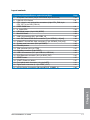
Contents
Safety information....................................................................................................... vi
About this guide......................................................................................................... vii
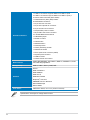
MAXIMUS VI GENE specifications summary............................................................ ix
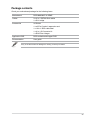
Package contents...................................................................................................... xiii
Installation tools and components.......................................................................... xiv
Chapter 1:
1.1
1.1.1
Product highlights........................................................................ 1-1
1.1.3
ROG exclusive features............................................................... 1-3
1.1.2
1.1.4
1.2
1.1.5
ROG Gaming Features................................................................ 1-2
ASUS special features................................................................. 1-4
ROG rich bundled software.......................................................... 1-4
Motherboard overview................................................................................ 1-5
1.2.1
Before you proceed...................................................................... 1-5
1.2.3
Central Processing Unit (CPU).................................................... 1-8
1.2.2
1.2.4
1.2.5
1.2.6
1.2.7
1.2.8
1.2.9
1.2.10
Chapter 2:
2.1
Product Introduction
Special features.......................................................................................... 1-1
Motherboard layout...................................................................... 1-6
System memory........................................................................... 1-9
Expansion slots.......................................................................... 1-25
Onboard buttons........................................................................ 1-27
Jumpers..................................................................................... 1-29
Onboard LEDs........................................................................... 1-30
Internal connectors.................................................................... 1-39
ProbeIt....................................................................................... 1-48
Basic Installation
2-1
Building your PC system........................................................................... 2-1
2.1.1
Motherboard installation............................................................... 2-1
2.1.3
CPU heatsink and fan assembly installation................................ 2-4
2.1.2
2.1.4
2.1.5
2.1.6
2.1.7
2.1.8
2.1.9
CPU installation........................................................................... 2-3
DIMM installation......................................................................... 2-6
ATX Power connection................................................................. 2-7
SATA device connection............................................................... 2-8
Front I/O Connector..................................................................... 2-9
Expansion Card installation....................................................... 2-10
mPCIe Combo II installation...................................................... 2-11
iii
2.2
2.3
2.4
2.5 BIOS update utility.................................................................................... 2-17
Motherboard rear and audio connections.............................................. 2-18
2.3.1
2.3.2
3.2
3.3
3.4
3.5
3.6
Turning off the computer.......................................................................... 2-23
BIOS setup program................................................................................... 3-2
3.2.1
3.2.2
Main menu................................................................................................. 3-26
Advanced menu........................................................................................ 3-28
3.6.1
CPU Configuration..................................................................... 3-29
3.6.3
SATA Configuration.................................................................... 3-33
3.6.6
3.6.7
3.6.8
3.6.9
3.6.10
USB Configuration..................................................................... 3-36
Platform Misc Configuration....................................................... 3-37
Onboard Devices Configuration................................................. 3-38
APM........................................................................................... 3-40
Network Stack............................................................................ 3-41
ROG Effects............................................................................... 3-41
Tools menu................................................................................................ 3-50
3.9.1
ASUS EZ Flash 2 Utility............................................................. 3-50
3.9.3
ASUS O.C. Profile...................................................................... 3-52
3.9.4
ROG Secure Erase.................................................................... 3-50
ASUS SPD Information.............................................................. 3-53
ROG OC Panel H-Key Configure............................................... 3-53
Exit menu................................................................................................... 3-55
Updating BIOS........................................................................................... 3-56
3.11.1
EZ Update.................................................................................. 3-56
3.11.3
ASUS CrashFree BIOS 3........................................................... 3-58
3.11.2
3.11.4
iv
System Agent Configuration...................................................... 3-34
Boot menu................................................................................................. 3-45
3.9.3
3.11
PCH Configuration..................................................................... 3-31
Monitor menu............................................................................................ 3-42
3.9.2
3.10
Advanced Mode........................................................................... 3-4
Extreme Tweaker menu.............................................................................. 3-7
3.6.5
3.9
EZ Mode...................................................................................... 3-3
My Favorites................................................................................................ 3-6
3.6.4
3.8
BIOS setup
Knowing BIOS............................................................................................. 3-1
3.6.2
3.7
Audio I/O connections................................................................ 2-19
Starting up for the first time..................................................................... 2-23
Chapter 3:
3.1
Rear I/O connection................................................................... 2-18
ASUS EZ Flash 2....................................................................... 3-57
ASUS BIOS Updater.................................................................. 3-59
Chapter 4:
4.1
4.2
4.3
4.4
Support DVD information........................................................................... 4-1
4.2.1
4.2.2
AI Suite 3...................................................................................................... 4-3
Dual Intelligent Processors 4 with 4-Way Optimization................ 4-6
4.4.3
USB 3.0 Boost........................................................................... 4-14
4.4.5
4.4.6
4.4.7
4.7
4.7
4.4.8
USB BIOS Flashback................................................................. 4-17
Ai Charger+................................................................................ 4-19
USB Charger+............................................................................ 4-20
Audio configurations.................................................................. 4-21
RAMDisk.................................................................................................... 4-26
Sonic Radar............................................................................................... 4-29
4.7.1
Main menu ................................................................................ 4-29
4.7.3
Advanced Settings .................................................................... 4-32
Game presets and Radar Selection . ........................................ 4-31
Perfect Voice.............................................................................................. 4-34
RAID support
RAID configurations................................................................................... 5-1
5.1.1
RAID definitions........................................................................... 5-1
5.1.3
Setting the RAID item in BIOS..................................................... 5-2
5.1.2
5.2
System Information.................................................................... 4-15
MemTweakIt............................................................................................... 4-24
Chapter 5:
5.1
EZ Update.................................................................................. 4-13
ROG Connect............................................................................................ 4-22
4.7.2
4.8
Obtaining the software manuals.................................................. 4-2
4.4.1
4.4.4
4.6
Running the support DVD............................................................ 4-1
Software information.................................................................................. 4-3
4.4.2
4.5
Software support
Installing an operating system.................................................................. 4-1
5.1.4
Installing Serial ATA hard disks.................................................... 5-2
Intel® Rapid Storage Technology Option ROM utility................... 5-3
Creating a RAID driver disk....................................................................... 5-7
5.2.1
Creating a RAID driver disk without entering the OS................... 5-7
5.2.3
Installing the RAID driver during Windows® OS installation......... 5-8
5.2.2
Creating a RAID driver disk in Windows®.................................... 5-8
Appendices
Notices..................................................................................................................... A-1
ASUS contact information....................................................................................... A-4
Safety information
Electrical safety
•
•
•
•
•
•
To prevent electrical shock hazard, disconnect the power cable from the electrical outlet
before relocating the system.
When adding or removing devices to or from the system, ensure that the power cables
for the devices are unplugged before the signal cables are connected. If possible,
disconnect all power cables from the existing system before you add a device.
Before connecting or removing signal cables from the motherboard, ensure that all
power cables are unplugged.
Seek professional assistance before using an adapter or extension cord. These devices
could interrupt the grounding circuit.
Ensure that your power supply is set to the correct voltage in your area. If you are not
sure about the voltage of the electrical outlet you are using, contact your local power
company.
If the power supply is broken, do not try to fix it by yourself. Contact a qualified service
technician or your retailer.
Operation safety
•
•
•
•
•
•
vi
Before installing the motherboard and adding devices on it, carefully read all the manuals
that came with the package.
Before using the product, ensure all cables are correctly connected and the power
cables are not damaged. If you detect any damage, contact your dealer immediately.
To avoid short circuits, keep paper clips, screws, and staples away from connectors,
slots, sockets and circuitry.
Avoid dust, humidity, and temperature extremes. Do not place the product in any area
where it may become wet.
Place the product on a stable surface.
If you encounter technical problems with the product, contact a qualified service
technician or your retailer.
About this guide
This user guide contains the information you need when installing and configuring the
motherboard.
How this guide is organized
This guide contains the following parts:
•
•
•
•
•
Chapter 1: Product introduction
This chapter describes the features of the motherboard and the new technology it
supports. It includes description of the switches, jumpers, and connectors on the
motherboard.
Chapter 2: Basic Installation
This chapter lists the hardware setup procedures that you have to perform when
installing system components.
Chapter 3: BIOS setup
This chapter tells how to change system settings through the BIOS Setup menus.
Detailed descriptions of the BIOS parameters are also provided.
Chapter 4: Software support
This chapter describes the contents of the support DVD that comes with the
motherboard package and the software.
Chapter 5: RAID support
This chapter describes the RAID configurations.
Where to find more information
Refer to the following sources for additional information and for product and software
updates.
1.
2.
ASUS website
The ASUS website (www.asus.com) provides updated information on ASUS hardware
and software products.
Optional documentation
Your product package may include optional documentation, such as warranty flyers,
that may have been added by your dealer. These documents are not part of the
standard package.
vii
Conventions used in this guide
To ensure that you perform certain tasks properly, take note of the following symbols used
throughout this manual.
DANGER/WARNING: Information to prevent injury to yourself when trying to
complete a task.
CAUTION: Information to prevent damage to the components when trying to
complete a task
IMPORTANT: Instructions that you MUST follow to complete a task..
NOTE: Tips and additional information to help you complete a task.
Typography
Bold text
Indicates a menu or an item to select.
Italics
Used to emphasize a word or a phrase.
<Key>
Keys enclosed in the less-than and greater-than sign
means that you must press the enclosed key.
Example: <Enter> means that you must press the Enter or
Return key.
<Key1> + <Key2> + <Key3>
viii
If you must press two or more keys simultaneously, the key
names are linked with a plus sign (+).
MAXIMUS VI GENE specifications summary
LGA1150 socket for the 4th Generation Intel® Core™ i7/Intel®
Core™i5/Intel® Core™ i3, Pentium®, and Celeron® processors
Supports 22nm CPU
CPU
Supports Intel® Turbo Boost Technology 2.0*
* The Intel® Turbo Boost Technology 2.0 support depends on the CPU
types.
**Refer to www.asus.com for Intel CPU support list
Chipset
Intel® Z87 Express Chipset
Dual channel memory architecture
Memory
4 x DIMM, max. 32GB, DDR3
��������������������������������������
3000 (O.C.) /��������������������
2800 (O.C.) / 2666
(O.C.) / 2600 (O.C.) / 2500 (O.C.) / 2400 (O.C.) / 2200 (O.C.) / 2133
(O.C.) / 2000 (O.C.) / 1866 (O.C.) / 1800 (O.C.) / 1600 / 1333 MHz,
non-ECC, un-buffered memory
Supports Intel® Extreme Memory Profile (XMP)
* Hyper DIMM support is subject to the physical characteristics of
individual CPUs.
** Please refer to Memory QVL (Qualified Vendors List) for details.
2 x PCI Express 3.0*/2.0 x16 slots (single at native x16, dual at
x8/x8)
Expansion slots
1 x PCI Express 2.0 x4 slot
1 x mini-PCI Express 2.0 x1 slot on mPCIe Combo II expansion
card
* PCIe 3.0 speed is supported by Intel® 4th
���������������������
generation Core™
������ �����������
Processors.
Integrated Intel® HD Graphics Processor
VGA
HDMI with max. resolution of 4096 x 2160 @ 24Hz / 2560 x 1600
@ 60Hz
Multi-GPU support
Support NVIDIA® SLI® Technology / AMD CrossFireX™ Technology
Intel® InTru™ 3D, Intel® Quick Sync Video, Intel® Clear Video HD
Technology, and Intel® Insider™
Intel® Z87 Express Chipset:
6 x SATA 6 Gb/s ports*
- Intel® Rapid Storage Technology 12 supports RAID 0, 1, 5, and
10
- Intel® Smart Response Technology, Intel® Rapid Start
Technology, and Intel® Smart Connect Technology**
Storage
1 x M.2 (NGFF) Socket 2 on mPCIe Combo II expansion card
- Supports PCI Express 2.0 x1 and SATA 6Gb/s standard
- Supports M.2 (NGFF) Type 2242 (22mm x 42mm) SSD card
ASMedia® SATA 6Gb/s controller:
2 x SATA 6 Gb/s ports ***
* SATA 6Gb/s port 5 will be disabled when M.2 (NGFF) slot on mPCIe
Combo II is in use.
** The supported functions depend on the CPU installed.
*** These SATA ports are for data hard drives only. ATAPI devices are not
supported.
(continued on the next page)
ix
LAN
1 x Intel® I217-V Gigabit LAN Controller
ROG SupremeFX Audio 8-Channel High Definition
Audio
Audio
- SupremeFX Shielding Technology
- ELNA® Premium Audio Capacitors
- Front DAC playback Signal-to-Noise Ratio (A-weighted,
Differential output): 115 dB
- ADC recording Signal-to-Noise Ratio (A-weighted): 104 dB
- Content Protection for Full Rate lossless DVD Audio, Blu-ray
DVD, and HD-DVD audio content playback
- Jack-detection, Multi-streaming, Front Panel Jack-retasking
- Optical S/PDIF out port at back panel
Audio Feature:
- Sonic Radar
- DTS Connect
Intel® Z87 Express Chipset
4 x USB 3.0 ports (2 ports at back panel [blue], 2 ports at mid-board
[red]*)
8 x USB 2.0 ports (4 ports at back panel, 1 in front of for ROG
Connect; 4 ports at mid-board**)
USB
ASMedia® USB 3.0 SuperSpeed USB HUB controller
4 x USB 3.0 ports (4 ports at back panel [blue])
* Supports ASUS USB3.0 Boost, UASP standard on the Intel® native USB
3.0 is only supported under Windows® 8.
** 2 x USB2.0 ports at mid-board shares with ROG extension (ROG_EXT)
port.
1 x Clear CMOS button
1 x ROG Connect button
4 x USB 2.0 ports (1 port can be switched to ROG Connect)
Back I/O Ports
6 x USB 3.0 ports [blue]
1 x LAN (RJ45) port
1 x Optical S/PDIF out
1 x HDMI port
6 x Audio jacks
(continued on the next page)
mPCIe Combo II (mPCIe/M.2 combo card)
Extreme Engine Digi+ III
- Full digital 8+2 phase CPU/DRAM power
- NexFETTM Power Block MOSFET
- 60A BlackWing Chokes
- 10K Black Metallic Capacitors
ROG GameFirst II
ROG RAMDisk
CPU Level Up
ROG Exclusive Features
ROG Connect*
- RC Diagram
- RC Remote
- RC Poster
UEFI BIOS features
- Extreme Tweaker
- Tweaker’s Paradise
- ROG SSD Secure Erase
- BIOS Print
- GPU.DIMM Post
- O.C. Profile
- ROG Pulse
Probelt
* The dedicated ROG Connect cable is purchased separately.
ASUS Dual Intelligent Processors 4
- 4-way Optimization Tuning Key����������������������
, consolidating DIGI+ ������
Power
Control, TPU, EPU, and Fan Xpert 2
ASUS Exclusive Features
- AI Suite 3
- USB 3.0 Boost
- AI Charger+
- USB Charger+
- Disk Unlocker
Special Features
ASUS EZ DIY
- USB BIOS Flashback
- ASUS CrashFree BIOS 3
- ASUS EZ Flash 2
- ASUS C.P.R. (CPU Parameter Recall)
ASUS Q-Design
- ASUS Q-Code
- ASUS Q-Shield
- ASUS Q-Connector
- ASUS Q-LED (CPU, DRAM, VGA, Boot Device LED)
- ASUS Q-Slot
- ASUS Q-DIMM
(continued on the next page)
xi
1 x USB 3.0 connector supports additional 2 USB 3.0 ports
2 x USB 2.0 connectors support additional 4 USB 2.0 ports (1
connector shares with ROG_EXT header)
1 x ROG Extension (ROG_EXT) header
8 x SATA 6Gb/s connectors
1 x 4-pin CPU fan connector
1 x 4-pin CPU optional fan connector
3 x 4-pin Chassis fan connectors
1 x 24-pin EATX power connector
1 x 8-pin EATX 12V Power connector
Internal Connectors
10 x ProbeIt Measurement Points
1 x LN2 Mode jumper
1 x Power-on button
1 x Reset button
1 x MemOK! button
1 x Directkey button
1 x DRCT (DirectKey) header
1 x S/PDIF out header
1 x Front panel audio connector (AAFP)
1 x System panel connector
1 x TPM connector
1 x mPCIe Combo II connector
BIOS Features
64 Mb UEFI AMI BIOS, PnP, DMI 2.0, WfM 2.0, SM BIOS 2.5, ACPI
2.0a, Multi-language BIOS
Manageability
WfM2.0, DMI2.0, WOL by PME, PXE
Drivers
ROG GameFirst II
ROG RAMDisk
ROG CPU-Z
Software
ROG Mem TweakIt
Kaspersky® Anti-Virus
DAEMON Tools Pro Standard
ASUS WebStorage
ASUS Utilities
Form Factor
mATX Form Factor, 9.6” x 9.6” (24.4cm x 24.4cm)
Specifications are subject to change without notice.
xii
Package contents
Check your motherboard package for the following items.
Motherboard
ROG MAXIMUS VI GENE
Cables
3 x 2-in-1 SATA 6 Gb/s cables
Accessories
I/O Shield
1 x SLI® bridge
1 x mPCIe Combo II expansion card
1 x 12-in-1 ROG cable label
1 x 2-in-1 Q-Connector kit
1 x ROG Door Hanger
Application DVD
ROG motherboard support DVD
Documentation
User guide
If any of the above items is damaged or missing, contact your retailer.
xiii
Installation tools and components
1 bag of screws
Philips (cross) screwdriver
PC chassis
Power supply unit
Intel LGA 1150 CPU
Intel LGA 1150 compatible CPU Fan
DDR3 DIMM
SATA hard disk drive
SATA optical disc drive (optional)
Graphics card (optional)
The tools and components in the table above are not included in the motherboard package.
xiv
Chapter 1:
Product Introduction
Product introduction
1.1
Special features
1.1.1
Product highlights
1
Republic of Gamers
The Republic of Gamers offers you the best of the best. We offer the best hardware
engineering, the fastest performance, the most innovative ideas, and we welcome the best
gamers to join in. In the Republic of Gamers, mercy rules are only for the weak, and bragging
rights means everything. We believe in making statements and we excel in competitions.
If your character matches our trait, then join the elite Republic of Gamers and make your
presence felt.
LGA1150 socket for 4th Generation Intel® Core™ i7 / Intel® Core™ i5 /
Intel® Core™ i3, Pentium® and Celeron® Processors
This motherboard supports 4th generation Intel® Core™ i7/ Intel® Core™ i5/ Intel® Core™
i3, Pentium® and Celeron® processors in the LGA1150 package. It provides great graphics
and system performance with its GPU, dual-channel DDR3 memory slots, and PCI Express
2.0/3.0 expansion slots.
Intel® Z87 Express Chipset
Intel® Z87 Express Chipset is a single-chipset that supports the LGA1150 socket 4th
generation Intel® Core™ i7/ Intel® Core™ i5/ Intel® Core™ i3, Pentium® and Celeron®
processors. It utilizes the serial point-to-point links, which increases bandwidth and enhances
the system’s performance. It natively supports up to six USB 3.0 ports for up to ten times
faster transfer rate than USB 2.0, and enables the iGPU function for Intel® integrated graphics
performance.
PCI Express® 3.0
PCI Express® 3.0 (PCIe 3.0) is the PCI Express bus standard that provides twice the
performance and speed of PCIe 2.0. It provides an optimal graphics performance,
unprecedented data speed, and seamless transition with its complete backward compatibility
to PCIe 1.0/2.0 devices.
SLI®/CrossFire™ On-Demand
ASUS MAXIMUS VI GENE
Chapter 1
This motherboard features a unique PCIe 3.0 bridge chip to support multi-GPU SLI®/
CrossFireX™ graphics cards for an unrivaled gaming performance. With the Intel® Z87
platform to optimize the PCIe allocation of multiple GPUs, it supports up to 4-WAY GPU SLI®
or CrossFireX™ configuration.
1-1
1.1.2
ROG Gaming Features
SupremeFX
The re-engineered ROG-exclusive SupremeFX audio technology features an onboard
8-channel high-definition sound of true audophile-grade performance that is equal in power,
clarity, and range to dedicated sound cards. Its unique Red Line Shielding and special
metallic cover provides pristine sound and a highly attractive look for the motherboard
that is in keeping with the ROG style. The Japan-made premium ELNA capacitor ensures
warm natural sound with exceptional clarity for all your gaming and multimedia activities.
SupremeFX revolutionizes the way you hear games, movies, music, and even other people
via chat - letting you rule and discover a totally whole new dimension of superior audio.
Sonic Radar
Sonic Radar, an audio software designed for First Person Shooting (FPS) games, shows the
precise direction and intensity of where a sound is coming from. In-game sound including
gunshots, footprints, voice call-outs, or even a ticking bomb, is visualized as radar signals
on the Sonic Radar display, providing you the advantage to know potential threats and avoid
sneaky surprises.
GameFirst II
ASUS GameFirst II, with cFOS Traffic Shaping technology, provides a powerful and userfriendly network control to easily frag your gaming system. Featuring the EZ Mode for
beginners’ setup and Advanced Mode for professionals’ tweaking, your frags comes first.
Intel Gigabit LAN
The LAN solution from Intel has been long known to have a better throughput, lower CPU
utilization as well as better stability. With the Intel Gigabit LAN solutions onboard, the
ultimate network experience can therefore be delivered to its users like never before.
Chapter 1
1-2
Chapter 1: Product introduction
1.1.3
ROG exclusive features
mPCIe Combo II
The next evolution of the mPCIe Combo card gives you even better expandability with the
latest standards in connectivity. You get mini PCI Express 2.0 plus USB 2.0, which is perfect
for connecting Wi-Fi and Bluetooth modules to give your desktop instant wireless.
The compact but versatile card further future-proofs your build with M.2 (NGFF) connectivity
for SSDs. M.2 is a fast and power-efficient standard that aims to replace mPCIe and mSATA,
designed to optimize SSD performance. mPCIe Combo II works with your high speed M.2
SSDs and makes the most of their potential, helping you reduce load times to make your OS
and games even faster.
Extreme Engine Digi+ III
Extreme Engine Digi+ III offers you a hardcore power delivery for a challenging and extreme
gaming enjoyment. It utilizes the best components such as NexFET™ Power Block
MOSFETs, BlackWing chokes with special fin design, and super-premium 10K black metallic
solid state capacitors. The NexFET™ Power Block MOSFETs combine great durability and
up to 90% efficiency under normal operation. BlackWing chokes can handle as much as
60A of power, which is twice that of generic chokes. The special fin design, with its highly
conductive and efficient gold-treated coating, results in 3-5oC lower choke temperatures for
added stability and ensures minimal-loss power delivery. Super-premium 10K Black Metallic
solid state capacitors are forged for overclocking and the most extreme demands, lasting up
to five times longer than generic capacitors with 20% wider temperature tolerance.
RAMDisk
RAMDisk is an innovative program that reserves a part of your system’s memory and turns
it into a high-speed virtual drive where you can store cache files and game apps for instant
access. By optimizing your SSD, RAMDisk allows you to automatically backup, update, and
restore files.
NOTE: RAMDisk only supports 64-bit operating systems.
CPU Level Up
With ROG’s CPU Level Up, overclocking has never been so easy, or cost-free. Simply select
the processor that you want to overclock to, and the motherboard will do the rest.
ROG Connect
Chapter 1
ROG Connect allows you to monitor the status of your desktop PC and tweak its parameters
in real-time via a notebook. ROG Connect links your main system to a notebook through a
USB cable, allowing you to view real-time POST code and hardware status readouts on your
notebook, as well as make on-the-fly parameter adjustments at a purely hardware level.
The The dedicated ROG Connect cable is purchased separately.
ASUS MAXIMUS VI GENE
1-3
1.1.4
ASUS special features
AI Suite 3
With its user-friendly interface, ASUS AI Suite 3 consolidates all the exclusive ASUS
features into one simple-to-use software package. It allows you to supervise fan speed
control, voltage and sensor readings. This all-in-one software offers diverse and ease to use
functions, with no need to switch back and forth between different utilities.
USB BIOS FlashBack
USB BIOS Flashback offers a hassle-free updating solution for your ultimate convenience.
Simply install a USB storage device containing the BIOS file, press the BIOS Flashback
button for three seconds, and the UEFI BIOS is automatically updated even without entering
the existing the BIOS or operating system. It also allows you to regularly check for UEFI
BIOS updates, and download the latest BIOS automatically.
1.1.5
ROG rich bundled software
Kaspersky Anti-Virus
®
Kaspersky® Anti-Virus Personal offers premium antivirus protection for individual users and
home offices. It is based on advanced antivirus technologies. The product incorporates the
Kaspersky® Anti-Virus engine, which is renowned for malicious program detection rates that
are among the industry’s highest.
DAEMON Tools Pro Standard
DAEMON Tools Pro offers essential functionality to backup CD, DVD and Blu-ray discs. It
converts optical media into virtual discs and emulates devices to work with the virtual copies.
DAEMON Tools Pro organizes data, music, video, and photo collections on a PC, notebook,
or netbook.
ROG CPU-Z
ROG CPU-Z is a customized ROG version utitity authorized by Intel’s CPU Indentification
(CPUID) that allows you to gather information of the main devices of your system. It
gives you the information and status of your CPU, motherboard, memory, and the whole
component. Use the ROG look of reporting your system’s current information with ROG
CPU-Z.
MemTweakIt
MemTweakIt is a DRAM efficiency tool that allows you to read DRAM timings and allows you
to post and share your DRAM configuration scores to the ROG website.
DTS Connect
Chapter 1
To get the most out of your audio entertainment across all formats and quality levels, DTS
Connect combines two enabling technologies, DTS Neo:PC™ upmixes stereo sources (CDs,
MP3s, WMAs, internet radio) into as many as 7.1 channels of incredible surround sound.
Consumers can connect their PC to a home theater system. DTS Interactive is capable of
performing mult-channel encoding of DTS bitstreams on personal computers, and sending
encoded bitstreams out of a digital audio connection (such as S/PDIF or HDMI) designed to
deliver audio to an external decoder.
1-4
Chapter 1: Product introduction
1.2
Motherboard overview
1.2.1
Before you proceed
Take note of the following precautions before you install motherboard components or change
any motherboard settings.
•
Unplug the power cord from the wall socket before touching any component.
•����������������������������������������������������������������������������������
Before handling components, use a grounded wrist strap or touch a safely grounded
object or a metal object, such as the power supply case, to avoid damaging them due
to static electricity.
•���������������������������������������������������������������
Hold components by the edges to avoid touching the ICs on them.
Whenever you uninstall any component, place it on a grounded antistatic pad or in the
bag that came with the component.
•
Before you install or remove any component, ensure that the ATX power supply is
switched off or the power cord is detached from the power supply. Failure to do so
may cause severe damage to the motherboard, peripherals, or components.
Chapter 1
•
ASUS MAXIMUS VI GENE
1-5
1.2.2
Motherboard layout
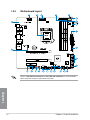
Refer to 1.2.9 Internal connectors and 2.3.1 Rear I/O connection for more information
about rear panel connectors and internal connectors.
Chapter 1
1-6
Chapter 1: Product introduction
Layout contents
Page
1-44
1-8
1-43
1-9
1-32
1-29
1-28
1-40
1-39
1-40
1-45
1-45
1-47
1-46
1-42
1-47
1-27
1-27
1-41
1-41
1-46
Chapter 1
Connectors/Jumpers/Buttons and switches/Slots
1. ATX power connectors (24-pin EATXPWR; 8-pin EATX12V)
2. LGA1150 CPU Socket
3. CPU, chassis, and optional fan connectors (4-pin CPU_FAN; 4-pin CPU_OPT; 4-pin CHA_FAN1-3)
4. DDR3 DIMM slots
5. Q_Code LEDs
6. LN2 Mode jumper (3-pin LN2_MODE)
7. MemOK! button
8. USB 3.0 connectors (20-1 pin USB3_12)
9. Intel® Z87 Serial ATA 6 Gb/s connectors (7-pin SATA6G_1-6 [red])
10. ASMedia® Serial ATA 6 Gb/s connectors (7-pin SATA6G_E1/2 [red])
11. System panel connector (20-8 pin PANEL)
12. DirectKey button
13. TPM connector (20-1 pin TPM)
14. DirectKey connector (2-pin DRCT)
15. USB 2.0 connectors (10-1 pin USB1112; USB1314)
16. ROG Extension connector (18-1 pin ROG_EXT)
17. RESET button
18. START (Power-on) button
19. Front panel audio connector (10-1 pin AAFP)
20. Digital audio connector (4-1 pin SPDIF_OUT)
21. mPCIe Combo II connector (36-2-pin MPCIE_COMBO_II)
ASUS MAXIMUS VI GENE
1-7
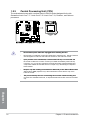
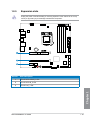
1.2.3
Central Processing Unit (CPU)
The motherboard comes with a surface mount LGA1150 socket designed for the 4th
Generation Intel® Core™ i7 / Intel® Core™ i5 / Intel® Core™ i3, Pentium®, and Celeron®
processors.
•���������������������������������������������������������������������
Ensure that all power cables are unplugged before installing the CPU.
•
Ensure that you install the correct CPU designed for LGA1150 only. DO NOT install a
CPU designed for LGA1155 and LGA1156 sockets on the LGA1150 socket.
•�������������������������������������������������������������������������������
Upon purchase of the motherboard, ensure that the PnP cap is on the socket and
the socket contacts are not bent. Contact your retailer immediately if the PnP cap
is missing, or if you see any damage to the PnP cap/socket contacts/motherboard
components. ASUS will shoulder the cost of repair only if the damage is shipment/
transit-related.
•������������������������������������������������������������������������������������
Keep the cap after installing the motherboard. ASUS will process Return Merchandise
Authorization (RMA) requests only if the motherboard comes with the cap on the
LGA1150 socket.
•���������������������������������������������������������������������������������
The product warranty does not cover damage to the socket contacts resulting from
incorrect CPU installation/removal, or misplacement/loss/incorrect removal of the PnP
cap.
Chapter 1
1-8
Chapter 1: Product introduction
1.2.4
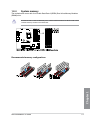
System memory
The motherboard comes with four Double Data Rate 3 (DDR3) Dual Inline Memory Modules
(DIMM) slots.
A DDR3 module is notched differently from a DDR or DDR2 module. DO NOT install a DDR
or DDR2 memory module to the DDR3 slot.
Chapter 1
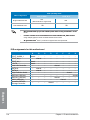
Recommended memory configurations
ASUS MAXIMUS VI GENE
1-9
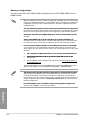
Memory configurations
You may install 1GB, 2GB, 4GB and 8GB unbuffered and non‑ECC DDR3 DIMMs into the
DIMM sockets.
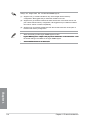
•
Memory module with memory frequency higher than 2133 MHz and its corresponding
timing or the loaded XMP profile is not the JEDEC memory standard. The stability and
compatibility of these memory modules depend on the CPU’s capabilities and other
installed devices.
•���������������������������������������������������������������������������������
You may install varying memory sizes in Channel A and Channel B. The system maps
the total size of the lower-sized channel for the dual-channel configuration. Any excess
memory from the higher-sized channel is then mapped for single-channel operation.
•��������������������������������������������������������������������������������
According to Intel CPU spec, DIMM voltage below 1.65V is recommended to protect
the CPU.
•������������������������������������������������������������������������������
Always install DIMMs with the same CAS latency. For optimal compatibility, we
recommend that you install memory modules of the same version or date code (D/C)
from the same vendor. Check with the retailer to get the correct memory modules.
•��������������������������������������������������������������������������������
Due to the memory address limitation on 32-bit Windows OS, when you install 4GB
or more memory on the motherboard, the actual usable memory for the OS can be
about 3GB or less. For effective use of memory, we recommend that you do any of the
following:
a)������������������������������������������������������������������������
Use a maximum of 3GB system memory if you are using a 32-bit Windows OS.
b)������������������������������������������������������������������������
I�����������������������������������������������������������������������
nstall a 64-bit Windows OS when you want to install 4GB or more on the
motherboard.
c)
•
For more details, refer to the Microsoft® support site at http://support.microsoft.
com/kb/929605/en-us.
This motherboard does not support DIMMs made up of 512Mb (64MB) chips or less
(Memory chip capacity counts in Megabit, 8 Megabit/Mb = 1 Megabyte/MB).
•����������������������������������������������������������������������������������
The default memory operation frequency is dependent on its Serial Presence Detect
(SPD), which is the standard way of accessing information from a memory module.
Under the default state, some memory modules for overclocking may operate at a
lower frequency than the vendor-marked value. To operate at the vendor-marked or at
a higher frequency, refer to section 3.4 Extreme Tweaker menu for manual memory
frequency adjustment.
•�����������������������������������������������������������������������������������
For system stability, use a more efficient memory cooling system to support a full
memory load (4 DIMMs) or overclocking condition.
Chapter 1
1-10
Chapter 1: Product introduction
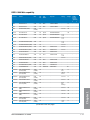
MAXIMUS VI GENE Motherboard Qualified Vendors Lists (QVL)
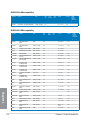
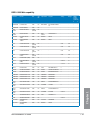
DDR3 3000 MHz capability
Vendors
Part No.
Size
SS/
DS
Chip
Brand
Chip
NO.
Timing
Voltage
DIMM
socket
support
(Optional)
2
4
G.SKILL
F3-3000C12Q-16GTXDG
16GB ( 4x 4GB )
SS
-
-
12-14-14-35
1.65
•
•
CORSAIR
CML8GX3M2A3000C12R
8GB (2 x 4B )
SS
12-14-14-36
1.65
•
•
DDR3 2800 MHz capability
Vendors
Part No.
Size
SS/
DS
Chip
Brand
Chip
NO.
Timing
Voltage
DIMM
socket
support
(Optional)
2
4
AVEXIR
AVD3U28001204G-4CI
16GB ( 4x 4GB )
DS
-
-
12-14-14-35
1.65V
•
•
CORSAIR
CMD16GX3M4A2800C11
16GB ( 4x 4GB )
DS
-
-
11-14-14-35
1.65V
•
•
CORSAIR
CMD16GX3M4A2800C12
16GB ( 4x 4GB )
DS
-
-
12-14-14-36
1.65V
•
•
G.SKILL
F3-2800C11D-8GTXD
8GB ( 2x 4GB )
DS
-
-
11-13-13-35
1.65V
•
•
G.SKILL
F3-2800C11Q-16GTXD
16GB ( 4x 4GB )
DS
-
-
11-13-13-35
1.65V
•
•
G.SKILL
F3-2800C11D-8GTXDG
8GB ( 2x 4GB )
DS
-
-
11-14-14-35
1.65V
•
•
G.SKILL
F3-2800C11Q-16GTXDG
16GB ( 4x 4GB )
DS
-
-
11-13-13-35
1.65V
•
•
G.SKILL
F3-2800C12Q-32GTXG
32GB (4 x 8GB )
DS
-
-
12-13-13-35
1.65V
•
•
G.SKILL
F3-2800C10D-8GBTXD
8GB ( 2x 4GB )
DS
-
-
10-13-13-35
1.65V
•
•
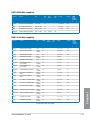
DDR3 2666 MHz capability
Part No.
Size
SS/
DS
Chip
Brand
Chip
NO.
Timing
Voltage
DIMM
socket
support
(Optional)
2
4
Apacer
78.BAGFF.AFC0C(XMP)
8GB ( 2x 4GB )
DS
-
-
12-13-13-35
-
•
•
Apacer
78.BAGFR.AFD0C(XMP)
8GB ( 2x 4GB )
DS
-
-
12-13-13-35
-
•
•
Apacer
78.CAGFF.AFD0C(XMP)
16GB ( 2x 8GB )
DS
-
-
12-13-13-35
-
•
•
G.SKILL
F3-2666C11Q-32GTXD(XMP)
32GB ( 4x 8GB )
DS
-
-
-
1.65
•
•
G.SKILL
F3-2666CL10Q-16GBZHD(XMP)
16GB ( 4x 4GB )
DS
-
-
10-12-12-31
1.65
•
GEIL
GOC332GB2666C11QC(XMP)
32GB ( 4x 8GB )
DS
-
-
11-13-13-32
1.65
•
•
Team
TXD34G2666HC11CBK(XMP)
8GB ( 2x 4GB )
SS
-
-
11-13-13-35
1.65
•
•
Team
TXD38G2666HC11CBK(XMP)
16GB ( 2x 8GB )
DS
-
-
11-13-13-35
1.65
•
DIMM
socket
support
(Optional)
Chapter 1
Vendors
DDR3 2600 MHz capability
Vendors
Part No.
Size
SS/
DS
Chip
Brand
Chip
NO.
Timing
Voltage
A-DATA
AX3U2600GW8G11(XMP)
16GB ( 2x 8GB )
DS
-
-
11-13-13-35
1.65
ASUS MAXIMUS VI GENE
2
4
•
•
1-11
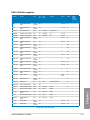
DDR3 2500 MHz capability
Vendors
Part No.
Size
SS/
DS
Chip
Brand
Chip
NO.
Timing
Voltage
G.SKILL
F3-20000CL10Q-16GBZHD(XMP)
16GB ( 4x 4GB )
DS
-
-
10-11-11-31
1.65
DIMM
socket
support
(Optional)
2
4
•
•
DDR3 2400 MHz capability
Chapter 1
1-12
Vendors
Part No.
Size
SS/
DS
Chip
Brand
Chip
NO.
Timing
Voltage
DIMM
socket
support
(Optional)
2
4
A-DATA
AX3U2400GC4G10
(XMP)
4GB
DS
-
-
10-12-12-31
1.65
•
•
A-DATA
AX3U2400GW8G11
(XMP)
16GB ( 2x 8GB )
DS
-
-
11-13-13-35
1.65
•
•
Apacer
78.BAGFL.AFD0C (XMP)
8GB ( 2x 4GB )
DS
-
-
11-12-12-30
-
•
•
Apacer
783BAGF3.AFD0C (XMP)
8GB ( 2x 4GB )
DS
-
-
11-11-11-30
-
•
•
CORSAIR
CMGTX8(XMP)
8GB ( 4x 2GB )
SS
-
-
10-12-10-30
1.65
•
•
CORSAIR
CMZ16GX3M2A2400C10
(Ver4.21)
16GB ( 2x 8GB )
DS
-
-
10-12-12-31
1.65
•
•
CORSAIR
CMZ16GX3M4A2400C9R
(Ver4.13)(XMP)
16GB ( 4x 4GB )
DS
-
-
2400 9-11-11-31
1.65
•
G.SKILL
F3-19200CL10Q32GBZHD (XMP)
32GB ( 4x 8GB )
DS
-
-
10-12-12-31
1.65
•
G.SKILL
F3-19200CL11Q16GBZHD (XMP)
16GB ( 4x 4GB )
DS
-
-
11-11-11-31
1.65
•
G.SKILL
F3-19200CL11Q16GBZHD (XMP)
16GB ( 4x 4GB )
DS
-
-
11-11-11-31
1.65
•
G.SKILL
F3-19200CL9D-4GBPIS
(XMP)
4G ( 2x 2G )
DS
-
-
9-11-9-28
1.65
•
G.SKILL
F3-19200CL9Q16GBZMD (XMP)
16GB ( 4x 4GB )
DS
-
-
9-11-11-31
1.65
•
•
GEIL
GOC316GB2400C10QC
(XMP)
16GB ( 4x 4GB )
DS
-
-
10-11-11-30
1.65
•
•
GEIL
GOC316GB2400C11QC
(XMP)
16GB ( 4x 4GB )
DS
-
-
11-11-11-30
1.65
•
•
Kingston
KHX2400C11D3K4/8GX
(XMP)
8GB ( 4x 2GB )
SS
-
-
11-13-11-30
1.65
•
•
KINGSTON
KHX24C11K4/16X (XMP)
16GB ( 4x 4GB )
DS
-
-
11-13-13-30
1.65
•
•
KINGSTON
KHX24C11T2K2/8X
(XMP)
8GB ( 2x 4GB )
DS
-
-
-
1.65
•
•
KINGSTON
KHX24C11T3K4/32X
(XMP)
32GB ( 4x 8GB )
DS
-
-
9-9-9-24
1.65
•
Patriot
PVV34G2400C9K (XMP)
4GB ( 2x 2GB )
DS
-
-
9-11-9-27
1.66
•
Patriot
PXD38G2400C11K
(XMP)
8GB ( 2x 4GB )
DS
-
-
11-11-11-30
1.65
•
Patriot
PXD38G2400C11K
(XMP)
8GB ( 2x 4GB )
DS
-
-
2400 11-1111-30
1.65
•
Team
TXD38G2400HC10QBK
(XMP)
8GB
DS
-
-
10-12-12-31
1.65
•
•
•
•
Chapter 1: Product introduction
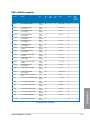
DDR3 2200 MHz capability
Vendors
Part No.
Size
SS/
DS
Chip
Brand
Chip
NO.
Timing
Voltage
DIMM
socket
support
(Optional)
G.SKILL
F3-17600CL7D-4GBFLS(XMP)
4G ( 2x 2G )
DS
-
-
7-10-10-28
1.65
•
GEIL
GET34GB2200C9DC(XMP)
4GB ( 2x 2GB )
DS
-
-
9-10-9-28
1.65
•
GEIL
GET38GB2200C9ADC(XMP)
8GB ( 2x 4GB )
SS
-
-
9-11-9-28
1.65
•
KINGMAX
FLKE85F-B8KJAA-FEIS(XMP)
4GB ( 2x 2GB )
DS
Kingmax
N/A
-
-
•
2
4
•
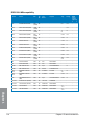
DDR3 2133 MHz capability
Part No.
Size
SS/DS
Chip
Brand
Chip
NO.
Timing
Voltage
DIMM
socket
support
(Optional)
2
4
A-DATA
AX3U2133XC4G10(XMP)
4GB
DS
-
-
10-11-11-30
1.65
•
•
A-DATA
AX3U2133XW8G10(XMP)
16GB
(2x8GB)
DS
-
-
10-11-11-30
1.65
•
•
A-DATA
AX3U2133XW8G10(XMP)
8GB
DS
-
-
10-11-11-30
1.65
•
•
Apacer
78.BAGE4.AFD0C(XMP)
8GB
(2x4GB)
DS
-
-
9-9-9-24
-
•
•
Apacer
AHU04GFB33CAQ3R(XMP)
4GB
DS
-
-
11-13-13-31
-
•
•
CORSAIR
CMD8GX3M2A2133C9
(Ver1.5)(XMP)
8GB
(2x4GB)
DS
-
-
9-11-10-27
1.5
•
CORSAIR
CMT4GX3M2B2133C9
(Ver7.1)(XMP)
4GB
(2x2GB)
DS
-
-
9-10-9-27
1.5
•
•
CORSAIR
CMT4GX3M2B2133C9 (XMP)
4GB
(2x2GB)
DS
-
-
9-10-9-27
1.5
•
•
G.SKILL
F3-17000CL11Q2-64GBZLD
(XMP)
64GB
(8x8GB)
DS
-
-
11-11-11-30
1.5
•
•
G.SKILL
F3-17000CL9Q-16GBXLD
(XMP)
16GB
(4x4GB)
DS
-
-
9-11-9-28
1.65
•
•
G.SKILL
F3-17000CL9Q-16GBZH (XMP)
16GB
(4x4GB)
DS
-
-
9-11-10-28
1.65
•
•
G.SKILL
F3-17066CL9D-8GBPID (XMP)
8GB
(2x4GB)
DS
-
-
9-9-9-24
1.65
•
•
G.SKILL
F3-2133C11Q-32GZL (XMP)
32GB
(4x8GB)
DS
-
-
11-11-11-31
1.5
•
•
KINGSTON
KHX2133C11D3K4/16GX (XMP)
16GB
(4x4GB)
DS
-
-
11-12-11-30
1.65
•
•
KINGSTON
KHX21C11T3FK8/64X (XMP)
64GB
(8x8GB)
DS
-
-
9-9-9-24
1.5
•
•
Patriot
PV316G213C1K (XMP)
16GB
(2x8GB)
DS
-
-
11-11-11-30
1.5
•
•
Patriot
PVV34G2133C9K (XMP)
4GB
(2x2GB)
DS
-
-
9-11-9-27
1.66
•
•
Chapter 1
Vendors
(continued on the next page)
ASUS MAXIMUS VI GENE
1-13
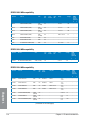
DDR3 2133 MHz capability
Vendors
Part No.
Size
SS/DS
Chip
Brand
Chip
NO.
Timing
Voltage
DIMM
socket
support
(Optional)
Patriot
PXD38G2133C11K(XMP)
8GB
(2x4GB)
DS
-
-
9-9-9-24
1.65
Patriot
PXD38G2133C11K (XMP)
8GB
(2x4GB)
DS
-
-
2133 11-11-11-27
1.5
Team
TLD38G2133HC11ABK (XMP)
8GB
DS
-
-
11-11-11-31
1.65
•
•
Team
TXD34096M2133HC11A-V
(XMP)
4GB
DS
-
-
11-11-11-31
1.65
•
•
DIMM
socket
support
(Optional)
2
4
•
•
DDR3 2000 MHz capability
Vendors
Part No.
Size
SS/
DS
Chip
Brand
Chip NO.
Timing
Voltage
AEXEA
AXA3ES2G2000LG28V
(XMP)
2GB
DS
-
-
-
1.65
•
AEXEA
AXA3ES4GK2000LG28V
(XMP)
4GB
(2x2GB)
DS
-
-
-
1.65
•
Apacer
78.AAGD5.9KD (XMP)
6GB
(3x2GB)
DS
-
-
9-9-9-27
-
•
Asint
SLA302G08-ML2HB
(XMP)
4GB
DS
Hynix
H5TQ2G83BFRH9C
9-9-9-27
-
•
G.SKILL
F3-16000CL9D-4GBRH
(XMP)
4GB
(2x2GB)
DS
-
-
9-9-9-24
1.65
•
G.SKILL
F3-16000CL9D-4GBTD
(XMP)
4GB
(2x2GB)
DS
-
-
9-9-9-24
1.65
•
GEIL
GUP34GB2000C9DC
(XMP)
4GB
(2x2GB)
DS
-
-
9-9-9-28
1.65
•
•
Patriot
PV736G2000ELK (XMP)
6GB
(3x2GB)
DS
-
-
7-7-7-20
1.65
•
•
Patriot
PX7312G2000ELK
(XMP)
12GB
(3x4GB)
DS
-
-
9-11-9-27
1.65
•
•
Silicon Power
SP002GBLYU200S02
(XMP)
2GB
DS
-
-
-
-
•
•
Team
TXD32048M2000C9-L
(XMP)
2GB
DS
Team
T3D1288LT-20
9-9-9-24
1.5
•
•
Team
TXD32048M2000C9-L
(XMP)
2GB
DS
Team
T3D1288RT-20
9-9-9-24
1.6
•
2
4
•
•
Chapter 1
1-14
Chapter 1: Product introduction
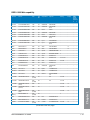
DDR3 1866 MHz capability
Vendors
Part No.
Size
SS/
DS
Chip
Brand
Chip
NO.
Timing
Voltage
DIMM
socket
support
(Optional)
2
4
A-DATA
AX3U1866XW8G10(XMP)
16GB
(2x8GB)
DS
-
-
10-11-10-30
1.5
•
•
CORSAIR
CMD16GX3M2A1866C9
(Ver5.29)(XMP)
16GB
(2x8GB)
DS
-
-
1866 9-9-9-27
1.5
•
CORSAIR
CMD16GX3M4A1866C9
(Ver4.13)(XMP)
16GB
(4x4GB)
DS
-
-
9-10-9-27
1.5
•
•
CORSAIR
CMD16GX3M4A1866C9
(Ver8.16)(XMP)
16GB
(4x4GB)
DS
-
-
9-10-9-27
1.5
•
•
CORSAIR
CMD8GX3M2A1866C9
(Ver4.13)(XMP)
8GB
(2x4GB)
DS
-
-
-
1.5
•
•
CORSAIR
CMD8GX3M2A1866C9
(Ver5.12)(XMP)
8GB
(2x4GB)
DS
-
-
9-10-9-27
1.5
•
CORSAIR
CMD8GX3M2A1866C9
(Ver8.16)(XMP)
8GB
(2x4GB)
DS
-
-
9-10-9-27
1.5
•
CORSAIR
CMT32GX3M4X1866C9(Ver3.
23)(XMP)
32GB
(4x8GB)
DS
-
-
9-10-9-27
1.5
•
CORSAIR
CMZ16GX3M4X1866C9R
(Ver8.16)(XMP)
16GB
(4x4GB)
DS
-
-
9-10-9-27
1.5
•
CORSAIR
CMZ16GX3M4X1866C9R(Ver
8.16)(XMP)
16GB
(4x4GB)
DS
-
-
9-10-9-27
1.5
•
•
CORSAIR
CMZ32GX3M4X1866C10
(Ver3.23)(XMP)
32GB
(4x8GB)
DS
-
-
10-11-10-27
1.5
•
•
CORSAIR
CMZ32GX3M4X1866C10(Ver3.
23)(XMP)
32GB
(4x8GB)
DS
-
-
10-11-10-27
1.5
•
•
CORSAIR
CMZ8GX3M2A1866C9
(Ver8.16)(XMP)
8GB
(2x4GB)
DS
-
-
9-10-9-27
1.5
•
•
CORSAIR
CMZ8GX3M2A1866C9(XMP)
8GB
(2x4GB)
DS
-
-
9-10-9-27
1.5
•
CORSAIR
CMZ8GX3M2A1866C9G
(Ver5.12)(XMP)
8GB
(2x4GB)
DS
-
-
1866 9-10-9-27
1.5
•
•
Crucial
BLE4G3D1869DE1XT0.16FMD
(XMP)
4GB
DS
-
-
9-9-9-27
1.5
•
•
G.SKILL
F3-14900CL10Q2-64GBZLD (XMP)
64GB
(8x8GB)
DS
-
-
10-11-10-30
1.5
•
•
G.SKILL
F3-14900CL9D-8GBSR (XMP)
8GB
(2x4GB)
DS
-
-
9-10-9-28
1.5
•
•
G.SKILL
F3-14900CL9Q-16GBXL (XMP)
16GB
(4x4GB)
DS
-
-
9-10-9-28
1.5
•
•
G.SKILL
F3-14900CL9Q-16GBZL (XMP)
16GB
(4x4GB)
DS
-
-
9-10-9-28
1.5
•
•
G.SKILL
F3-14900CL9Q-8GBFLD (XMP)
8GB
(2x4GB)
DS
-
-
9-9-9-24
1.6
•
•
G.SKILL
F3-1866C9Q-32GXM (XMP)
32GB
(4x8GB)
DS
-
-
9-10-9-28
1.5
•
•
KINGSTON
KHX1866C9D3K2/8GX (XMP)
8GB
(2x4GB)
DS
-
-
-
1.65
•
•
Chapter 1
•
(continued on the next page)
ASUS MAXIMUS VI GENE
1-15
DDR3 1866 MHz capability
Vendors
Part No.
Size
SS/
DS
Chip
Brand
Chip
NO.
Timing
Voltage
DIMM
socket
support
(Optional)
Patriot
PXD34G1866ELK (XMP)
4GB
(2x2GB)
SS
-
-
9-9-9-24
1.65
•
Patriot
PXD38G1866ELK (XMP)
8GB
(2x4GB)
DS
-
-
9-11-9-27
1.65
•
•
Patriot
PXD38G1866ELK (XMP)
8GB
(2x4GB)
DS
-
-
9-11-9-27
1.65
•
•
Patriot
PXD38G1866ELK (XMP)
8GB
(2x4GB)
DS
-
-
1866 9-10-9-27
1.5
•
•
Team
TED34G1866HC13BK
4GB
SS
-
-
-
-
•
•
Team
TED38G1866HC-13BK
8GB
DS
-
-
-
-
•
•
Team
TLD38G1866HC10SBK (XMP)
8GB
DS
-
-
10-11-10-30
1.5
•
•
2
4
DDR3 1800 MHz capability
Vendors
Part No.
Size
SS/
DS
Chip
Brand
Chip
NO.
Timing
Voltage
G.SKILL
F3-14400CL9D-4GBRL(XMP)
4GB ( 2x 2GB )
DS
-
-
9-9-9-24
1.65
DIMM
socket
support
(Optional)
2
4
•
DDR3 1600 MHz capability
Chapter 1
Vendors
Part No.
Size
SS/
DS
Chip
Brand
Chip NO.
Timing
Voltage
DIMM
socket
support
(Optional)
2
4
A-DATA
AD3U1600C2G11
2GB
SS
MICRON
D9PFJ
11-1111-28
-
•
•
A-DATA
AD3U1600C4G11
4GB
DS
MICRON
D9PFJ
11-1111-28
-
•
•
A-DATA
AD3U1600W4G11
4GB
SS
A-DATA
3WCD-1211A
11-1111-28
-
•
•
A-DATA
AD3U1600W8G11
8GB
DS
A-DATA
3WCD-1211A
11-1111-28
-
•
•
A-DATA
AX3U1600GW8G9 (XMP)
16GB
(2x8GB)
DS
-
-
9-9-9-24
1.5
•
•
A-DATA
AX3U1600W8G11
16GB
(2x8GB)
DS
-
-
9-119-27
1.5
•
•
A-DATA
AXDU1600GW8G9B (XMP)
16GB
(2x8GB)
DS
-
-
9-119-27
1.65
•
•
(continued on the next page)
1-16
Chapter 1: Product introduction
DDR3 1600 MHz capability
Part No.
Size
SS/
DS
Chip
Brand
Chip NO.
Timing
Voltage
DIMM
socket
support
(Optional)
2
4
AMD
AE32G1609U1-U
2GB
SS
AMD
23EY4587MB6H
-
1.5
•
•
AMD
AE34G1609U2-U
4GB
DS
AMD
23EY4587MB6H
-
1.5
•
•
AMD
AP38G1608U2K (XMP)
8GB
(2x4GB)
DS
-
-
9-9-9-28
1.65
•
•
Apacer
78.B1GE3.9L10C
4GB
DS
Apacer
AM5D5908DEQSCK
-
1.65
•
•
Apacer
78.B1GET.9K00C
4GB
SS
Apacer
AM5D6008BQQSCK
11-1111-28
-
•
•
Apacer
78.C1GET.9K10C
8GB
DS
Apacer
AM5D6008BQQSCK
11-1111-31
-
•
•
Apacer
AHU04GFA60C9Q3R (XMP)
4GB
DS
-
-
11-1111-28
-
•
•
Apacer
AHU08GFA60CBT3R (XMP)
8GB
DS
-
-
9-9-9-24
-
•
•
Asint
SLA302G08-EGG1C (XMP)
4GB
DS
Asint
302G08-GG1C
9-9-9-27
-
•
•
Asint
SLA302G08-EGJ1C (XMP)
4GB
DS
Asint
302G08-GJ1C
9-9-9-27
-
•
Asint
SLA302G08-EGN1C
4GB
DS
ASint
302G08-GN1C
-
-
•
•
Asint
SLA304G08-ENG1B
4GB
SS
Asint
304G08-GN1B
9-1111-28
-
•
•
Asint
SLB304G08-EGJ1B (XMP)
8GB
DS
-
-
9-9-9-27
-
•
•
Asint
SLB304G08-EGN1B
8GB
DS
ASint
304G08-GN1B
-
-
•
•
Asint
SLZ302G08-EGN1C
2GB
SS
ASint
302G08-GN1C
-
-
•
•
Asint
SLZ3128M8-EGJ1D (XMP)
2GB
DS
Asint
3128M8-GJ1D
-
-
•
•
ATP
AQ12M64B8BKK0S
4GB
DS
SAMSUNG
K4B2G08460
-
NO
•
•
CORSAIR
CMD16GX3M2A1600C9
(Ver8.21)(XMP)
16GB
(2x8GB)
DS
-
-
9-99-24
1.5
•
CORSAIR
CMD8GX3M2A1600C8
(Ver5.12)(XMP)
8GB
(2x4GB)
DS
-
-
1600 88-8-24
1.5
•
•
CORSAIR
CMD8GX3M2A1600C9
(Ver2.12)(XMP)
8GB
(2x4GB)
DS
-
-
9-9-9-24
1.5
•
•
CORSAIR
CMG4GX3M2A1600C6
4GB
(2x2GB)
DS
-
-
6-6-6-18
1.65
•
•
CORSAIR
CML16GX3M4X1600C8
(Ver 2.12)(XMP)
16GB
(4x4GB)
DS
-
-
HeatSink
Package
1.5
•
•
CORSAIR
CMP6GX3M3A1600C8
(XMP)
6GB
(3x2GB)
DS
-
-
8-8-8-24
1.65
•
•
CORSAIR
CMP6GX3M3A1600C8
(XMP)
6GB
(3x2GB)
DS
-
-
8-8-8-24
1.65
•
•
CORSAIR
CMX6GX3M3C1600C7
(XMP)
6GB
(3x2GB)
DS
-
-
7-8-7-20
1.65
•
•
CORSAIR
CMX8GX3M2A1600C9
(Ver3.19)(XMP)
8GB
(2x4GB)
SS
-
-
9-9-9-24
1.65
•
•
CORSAIR
CMZ16GX3M2A1600C10
(Ver.3.24)(XMP)
16GB
(2x8GB)
DS
-
-
10-1010-27
1.5
•
•
Chapter 1
Vendors
(continued on the next page)
ASUS MAXIMUS VI GENE
1-17
DDR3 1600 MHz capability
Vendors
Part No.
Size
SS/
DS
Chip
Brand
Chip NO.
Timing
Voltage
DIMM
socket
support
(Optional)
2
4
CORSAIR
CMZ16GX3M4A1600C9
(XMP)
16GB
(4x4GB)
DS
-
-
9-9-9-24
1.5
•
•
CORSAIR
CMZ32GX3M4X1600C10
(Ver2.2)(XMP)
32GB
(4x8GB)
DS
-
-
10-1010-27
1.5
•
•
CORSAIR
CMZ8GX3M2A1600C8
(XMP)
8GB
(2x4GB)
DS
-
-
8-8-8-24
1.5
•
•
CORSAIR
CMZ8GX3M4X1600C9
(Ver 2.12)(XMP)
8GB
(4x2GB)
SS
-
-
9-9-9-24
1.5
•
•
CORSAIR
HX3X12G1600C9 (XMP)
12GB
(6x2GB)
DS
-
-
9-9-9-24
1.6
•
•
Crucial
BL12864BN1608.8FF
(XMP)
2GB
(2x1GB)
SS
-
-
8-8-8-24
1.65
•
•
Crucial
BLT4G3D1608DT1TX0.16
FM(XMP)
4GB
DS
-
-
8-8-8-24
1.5
•
•
EK Memory
EKM324L28BP8I16(XMP)
4GB
(2x2GB)
DS
-
-
9
-
•
•
EK Memory
EKM324L28BP8I16(XMP)
4GB
(2x2GB)
DS
-
-
9
-
•
•
Elixir
M2X2G64CB88G7NDG(XMP)
2GB
SS
Elixir
N2CB2G80GN-DG
9-9-9-28
-
•
•
Elixir
M2X4G64CB8HG5NDG(XMP)
4GB
DS
Elixir
N2CB2G80GN-DG
9-9-9-28
-
•
•
Elixir
M2X8G64CB8HB5NDG(XMP)
8GB
DS
Elixir
N2CB4G80BN-DG
9-9-9-28
1.5
•
•
G.SKILL
F3-12800CL7D8GBRH(XMP)
8GB
(2x4GB)
DS
-
-
7-8-7-24
1.6
•
•
G.SKILL
F3-12800CL7Q-16GBXH
(XMP)
16GB
(4x4GB)
DS
-
-
7-8-7-24
1.6
•
•
G.SKILL
F3-12800CL8D-8GBECO
(XMP)
8GB
(2x4GB)
DS
-
-
8-8-8-24
1.35
•
•
G.SKILL
F3-12800CL9D-8GBRL
(XMP)
8GB
(2x4GB)
DS
-
-
9-9-9-24
1.5
•
•
G.SKILL
F3-12800CL9D-8GBSR2
(XMP)
8GB
(2x4GB)
DS
-
-
9-9-9-24
1.25
•
•
G.SKILL
F3-12800CL9Q-16GBXL
(XMP)
16GB
(4x4GB)
DS
-
-
9-9-9-24
1.5
•
•
G.Skill
F3-12800CL9Q16GBZL(XMP)
16GB
(4x4GB)
DS
-
-
9-9-9-24
1.5
•
•
G.SKILL
F3-1600C9Q-32GXM
(XMP)
32GB
(4x8GB)
DS
-
-
-
1.5
•
•
Chapter 1
(continued on the next page)
1-18
Chapter 1: Product introduction
DDR3 1600 MHz capability
Vendors
Part No.
Size
SS/
DS
Chip
Brand
Chip NO.
Timing
Voltage
DIMM
socket
support
(Optional)
GEIL
GET316GB1600C9QC
(XMP)
16GB
(4x4GB)
DS
-
-
9-9-9-28
1.6
•
GEIL
GUP34GB1600C7DC
(XMP)
4GB
(2x2GB)
DS
-
-
7-7-7-24
1.6
•
•
GoodRam
GR1600D364L9/2G
2GB
DS
GoodRam
GF1008KC-JN
-
-
•
•
KINGMAX
FLGE85F-C8KL9A (XMP)
2GB
SS
KINGMAX
N/A
9-9-9-28
-
•
•
KINGMAX
FLGF65F-C8KL9A (XMP)
4GB
DS
KINGMAX
N/A
9-9-9-28
-
•
•
KINGSTON
KHX16009CD3K2/8GX
(XMP)
8GB
(2x4GB)
DS
-
-
9-9-9-27
1.65
•
•
KINGSTON
KHX1600C9D3B1/4G
(XMP)
4GB
SS
-
-
9-9-9-27
1.65
•
•
KINGSTON
KHX1600C9D3K3/12GX
(XMP)
12GB
(3x4GB)
DS
-
-
9
1.65
•
KINGSTON
KHX1600C9D3K3/6GX
(XMP)
6GB
(3x2GB)
DS
-
-
9
1.65
•
•
KINGSTON
KHX1600C9D3K3/6GX
(XMP)
6GB
(3x2GB)
DS
-
-
9
1.65
•
•
KINGSTON
KHX1600C9D3K4/16GX
(XMP)
16GB
(4x4GB)
DS
-
-
9-9-9-24
1.65
•
•
KINGSTON
KHX1600C9D3K6/24GX
(XMP)
24GB
(6x4GB)
DS
-
-
9
1.65
•
•
KINGSTON
KHX1600C9D3K8/32GX
(XMP)
32GB
(8x4GB)
DS
-
-
9-9-9-27
1.65
•
•
KINGSTON
KHX1600C9D3LK2/8GX
(XMP)
8GB
(2x4GB)
DS
-
-
9-9-9-24
1.35
•
•
KINGSTON
KHX1600C9D3P1K2/8G
8GB
(2x4GB)
DS
-
-
9
1.5
•
•
KINGSTON
KHX16C10B1K2/16X
(XMP)
16GB
(2x8GB)
DS
-
-
-
1.5
•
•
KINGSTON
KHX16C9K2/16
16GB (
2x 8GB)
DS
-
-
1333-99-9-24
1.5
•
•
KINGSTON
KHX16C9P1K2/16
16GB
(2x8GB)
DS
-
-
-
1.5
•
•
KINGSTON
KVR16N11/4
4G
DS
Hynix
H5TQ2G83CFRPBC
-
1.5
•
•
KINGTIGER
KTG2G1600PG3(XMP)
2GB
DS
-
-
-
-
•
•
MICRON
MT16JTF1G64AZ-1G6D1
8GB
DS
MICRON
D9PBC
-
1.5
•
•
Micron
MT16JTF1G64AZ-1G6E1
8GB
DS
Micron
D9QBJ
-
-
•
•
MICRON
MT16KTF51264AZ1G6M1
4GB
DS
MICRON
D9PFJ
-
-
•
•
Micron
MT8JTF51264AZ-1G6E1
4GB
SS
Micron
D9QBJ
-
-
•
•
MICRON
MT8KTF25664AZ1G6M1
2GB
SS
MICRON
D9PFJ
-
-
•
•
Mushkin
996805(XMP)
4GB
(2x2GB)
DS
-
-
6-8-6-24
1.65
•
Mushkin
998805(XMP)
6GB
(3x2GB)
DS
-
-
6-8-6-24
1.65
•
4
Chapter 1
2
•
(continued on the next page)
ASUS MAXIMUS VI GENE
1-19
DDR3 1600 MHz capability
Vendors
Part No.
Size
SS/
DS
Chip
Brand
Chip NO.
Timing
Voltage
DIMM
socket
support
(Optional)
OCZ
OCZ3BE1600C8LV4GK
4GB
(2x2GB)
DS
-
-
8-8-8
1.65
•
Patriot
PGD316G1600ELK(XMP)
16GB
(2x8GB)
DS
-
-
-
1.65
•
Patriot
PGD316G1600ELK(XMP)
16GB
(2x8GB)
DS
-
-
9-99-24
1.5
•
Patriot
PGD38G1600ELK(XMP)
8GB
(2x4GB)
DS
-
-
9-9-9-24
1.65
•
Patriot
PGD38G1600ELK(XMP)
8GB
(2x4GB)
DS
-
-
9-9-9-24
1.5
•
Patriot
PGS34G1600LLKA
4GB
(2x2GB)
DS
-
-
7-7-7-20
1.7
•
•
Patriot
PGS34G1600LLKA2
4GB
(2x2GB)
DS
-
-
8-8-8-24
1.7
•
•
Patriot
PV38G160C9KRD(XMP)
8GB
(2x4GB)
DS
-
-
9-9-9-24
1.5
•
•
Patriot
PVV38G1600LLK(XMP)
8GB
(2x4GB)
DS
-
-
8-9-8-24
1.65
•
•
Patriot
PX7312G1600LLK (XMP)
12GB
(3x4GB)
DS
-
-
8-9-8-24
1.65
•
•
Patriot
PXD38G1600LLK(XMP)
8GB
(2x4GB)
DS
-
-
1600 89-8-24
1.65
•
•
PSC
AL9F8L93B-GN2E
4GB
SS
PSC
A3P4GF3BLF
-
-
•
•
PSC
ALAF8L93B-GN2E
8GB
DS
PSC
A3P4GF3BLF
-
-
•
•
SanMax
SMD-4G68HP-16KZ
4GB
DS
Hynix
H5TQ2G83BFRPBC
-
1.5
•
•
SanMax
SMD-4G68NG-16KK
4GB
DS
ELPIDA
J2108BDBG-GN-F
-
-
•
•
Silicon
Power
SP002GBLTU160V02
(XMP)
2GB
SS
S-POWER
20YT5NG
9-1111-28
1.5
•
•
Silicon
Power
SP004GBLTU160V02
(XMP)
4GB
DS
S-POWER
20YT5NG
9-9-9-24
1.5
•
•
Team
TXD34096M1600HC9-D
(XMP)
4GB
DS
Hynix
H5TC2G83BFRH9A
9-9-9-24
1.5
•
•
Transcend
JM1600KLH-8G (626633)
8GB
DS
Transcend
TK963EBF3
-
-
•
•
Transcend
TS1GLK64V6H (620945)
8GB
DS
SAMSUNG
K4B4G0846B
-
-
•
•
Transcend
TS1GLK64W6H
8GB
DS
SAMSUNG
K4B4G0846B
11-1111-28-1
-
•
•
Transcend
TS512MLK64W6H
4GB
SS
SAMSUNG
K4B4G0846B
11-1111-28-2
-
•
•
2
4
•
•
Chapter 1
1-20
Chapter 1: Product introduction
DDR3 1333 MHz capability
Part No.
Size
SS/
DS
Chip Brand
Chip NO.
Timing
Voltage
DIMM
socket
support
(Optional)
2
4
ACTICA
ACT1GHU64B8F1333S
1GB
SS
SAMSUNG
K4B1G0846F
-
-
•
•
ACTICA
ACT1GHU72C8G1333S
1GB
SS
SAMSUNG
K4B1G0846F
(ECC)
-
-
•
•
ACTICA
ACT2GHU64B8G1333M
2GB
DS
Micron
D9KPT
-
-
•
•
ACTICA
ACT2GHU64B8G1333S
2GB
DS
SAMSUNG
K4B1G0846F
-
-
•
ACTICA
ACT2GHU72D8G1333M
2GB
DS
Micron
D9KPT (ECC)
-
-
•
ACTICA
ACT2GHU72D8G1333S
2GB
DS
SAMSUNG
K4B1G0846F
(ECC)
-
-
•
•
ACTICA
ACT4GHU64B8H1333H
4GB
DS
Hynix
H5TQ2G83AFR
-
-
•
•
ACTICA
ACT4GHU72D8H1333H
4GB
DS
Hynix
H5TQ2G83AFR
(ECC)
-
-
•
•
AMD
AE32G1339U1-U
2GB
SS
AMD
23EY4587MB3H
-
1.5
•
•
AMD
AE34G1339U2-U
4GB
DS
AMD
23EY4587MB3H
-
1.5
•
•
Apacer
78.A1GC6.9L1
2GB
DS
Apacer
AM5D5808FEQSBG
9
-
•
•
Apacer
78.B1GDE.9L10C
4GB
DS
Apacer
AM5D5908CEHSBG
9
-
•
•
Asint
SLA302G08-EDJ1C
2GB
SS
ASint
302G08-DJ1C
-
-
•
•
Asint
SLA304G08-EDJ1B
4GB
SS
Asint
304G08-DJ1B
9-10-10-26
-
•
•
Asint
SLB304G08-EDJ1B
8GB
DS
Asint
304G08-DJ1B
9-9-9-24
-
•
•
Asint
SLZ302G08-EDJ1C
4GB
DS
ASint
302G08-DJ1C
-
-
•
•
ATP
AQ12M72E8BKH9S
4GB
DS
SAMSUNG
K4B2G0846C
(ECC)
-
-
•
•
BUFFALO
D3U1333-1G
1GB
SS
Elpida
J1108BFBG-DJ-F
-
-
•
•
BUFFALO
D3U1333-2G
2GB
DS
Elpida
J1108BFBG-DJ-F
-
•
•
BUFFALO
D3U1333-4G
4GB
DS
NANYA
NT5CB256M8BNCG
-
•
•
CORSAIR
CMV4GX3M2A1333C9
4GB
(2x2GB)
SS
-
N/A
9-9-9-24
-
•
•
CORSAIR
CMV8GX3M2A1333C9
8GB
(2x4GB)
DS
-
N/A
9-9-9-24
-
•
•
CORSAIR
CMX8GX3M1A1333C9
(Ver2.2)
8GB
DS
-
-
9-9-9-24
1.5
•
CORSAIR
CMX8GX3M1A1333C9
(Ver3.23)
8GB
DS
-
-
9-9-9-24
1.5
•
CORSAIR
CMX8GX3M2A1333C9
(XMP)
8GB
(2x4GB)
DS
-
-
9-9-9-24
1.5
•
•
EK
Memory
EKM324L28BP8-I13
4GB
(2x2GB)
DS
-
-
9
-
•
•
Elixir
M2F2G64CB88G7N-CG
2GB
SS
Elxir
N2CB2G80GN-CG
-
-
•
ELPIDA
EBJ41UF8BCF0-DJ-F
4GB
DS
ELPIDA
J2108BCSE-DJ-F
-
-
•
G.SKILL
F3-10600CL9D-4GBNT
4GB
(2x2GB)
DS
G.SKILL
D3 128M8CE9 2GB
9-9-9-24
1.5
•
Chapter 1
Vendors
•
(continued on the next page)
ASUS MAXIMUS VI GENE
1-21
DDR3 1333 MHz capability
Vendors
Part No.
Size
SS/
DS
Chip Brand
Chip NO.
Timing
Voltage
DIMM
socket
support
(Optional)
G.SKILL
F3-10666CL7D8GBRH (XMP)
8GB
(2x4GB)
DS
-
-
7-7-7-21
1.5
•
G.SKILL
F3-10666CL8D4GBHK (XMP)
4GB
(2x2GB
)
DS
-
-
8-8-8-21
1.5
•
G.SKILL
F3-10666CL9D8GBRL
8GB
(2x4GB)
DS
-
-
9-9-9-24
1.5
•
•
G.SKILL
F3-10666CL9D8GBRL
8GB
(2x4GB)
DS
-
-
9-9-9-24
1.5
•
•
G.SKILL
F3-10666CL9D8GBXL
8GB
(2x4GB)
DS
-
-
9-9-9-24
1.5
•
•
GEIL
GB34GB1333C7DC
4GB
(2x2GB)
DS
GEIL
GL1L128M88BA15FW
7-7-7-24
1.5
•
GEIL
GET316GB1333C9QC
16GB
(4x4GB)
DS
-
-
9-9-9-24
1.5
•
•
GEIL
GG34GB1333C9DC
4GB
(2x2GB)
DS
GEIL
GL1L128M88BA115FW
9-9-9-24
1.3
•
•
GEIL
GG34GB1333C9DC
4GB
(2x2GB)
DS
GEIL
GL1L128M88BA15B
9-9-9-24
1.3
•
•
GEIL
GVP34GB1333C9DC
4GB
(2x2GB)
DS
-
-
9-9-9-24
1.5
•
•
GEIL
GVP38GB1333C9DC
8GB
(2x4GB)
DS
-
-
9-9-9-24
1.5
•
•
GoodRam
GR1333D364L9/2G
2GB
DS
Qimonda
IDSH1G-03A1F1C13H
-
-
•
•
Hynix
HMT125U6TFR8A-H9
2GB
DS
Hynix
H5TC1G83TFR
-
-
•
•
Hynix
HMT325U6BFR8CH9
2GB
SS
Hynix
H5TQ2G83BFR
-
-
•
INNODISK
M3UN-2GHJBC09
2GB
SS
Hynix
H5TQ2G83CFRH9C
9-9-9-24
-
•
•
INNODISK
M3UN-4GHJAC09
4GB
DS
Hynix
H5TQ2G83CFRH9C
9-9-9-24
-
•
•
KINGMAX
FLFD45F-B8KL9
1GB
SS
KINGMAX
KFB8FNLXF-BNF-15A
-
-
•
KINGMAX
FLFE85F-B8KL9
2GB
DS
KINGMAX
KFB8FNLXL-BNF-15A
-
-
•
KINGMAX
FLFE85F-C8KL9
2GB
SS
KINGMAX
KFC8FNLBF-GXX-12A
-
-
•
•
KINGMAX
FLFE85F-C8KL9
2GB
SS
KINGMAX
KFC8FNLXF-DXX-15A
-
-
•
•
KINGMAX
FLFE85F-C8KM9
2GB
SS
Kingmax
KFC8FNMXFBXX-15A
-
-
•
•
KINGMAX
FLFF65F-C8KL9
4GB
DS
KINGMAX
KFC8FNLBF-GXX-12A
-
-
•
KINGMAX
FLFF65F-C8KL9
4GB
DS
KINGMAX
KFC8FNLXF-DXX-15A
-
-
•
•
KINGMAX
FLFF65F-C8KM9
4GB
DS
Kingmax
KFC8FNMXFBXX-15A
-
-
•
•
KINGSTON
KVR1333D3E9S/4G
4GB
DS
Elpida
J2108ECSE-DJ-F
9
1.5
•
•
KINGSTON
KVR1333D3N9H/4G
4GB
DS
ELPIDA
J2108BDBG-GN-F
-
1.5
•
•
KINGSTON
KVR1333D3N9H/8G
8GB
DS
ELPIDA
J4208EASE-DJ-F
9-9-9-24
1.5
•
•
KINGSTON
KVR13N9S8H/4
4GB
SS
ELPIDA
J4208BBBG-GN-F
-
1.5
•
•
2
4
Chapter 1
(continued on the next page)
1-22
Chapter 1: Product introduction
DDR3 1333 MHz capability
Vendors
Part No.
Size
SS/
DS
Chip Brand
Chip NO.
Timing
Voltage
2
4
KINGTIGER
F10DA2T1680
2GB
DS
KINGTIGER
KTG1333PS1208NSTC9
-
-
•
•
KINGTIGER
KTG2G1333PG3
2GB
DS
-
-
-
-
•
•
Mach
Xtreme
MXD3U133316GQ
16GB
(4x4GB)
DS
-
-
-
-
•
•
Mach
Xtreme
MXD3V13332GS
2GB
SS
Mach
Xtreme
C2S46D30-D313
-
-
•
•
MICRON
MT16JTF1G64AZ1G4D1
8GB
DS
MICRON
D9PCP
-
-
•
MICRON
MT8JTF25664AZ1G4M1
2GB
SS
MICRON
D9PFJ
-
-
•
OCZ
OCZ3G1333LV4GK
4GB
(2x2GB)
DS
-
-
9-9-9
1.65
•
OCZ
OCZ3G1333LV8GK
8GB
(2x4GB)
DS
-
-
9-9-9
1.65
•
OCZ
OCZ3G1333LV8GK
8GB
(2x4GB
)
DS
-
-
9-9-9
1.65
•
OCZ
OCZ3RPR1333C9
LV8GK
8GB
(2x4GB)
DS
-
-
9-9-9
1.65
•
Patriot
PG38G1333EL (XMP)
8GB
DS
-
-
-
1.5
•
•
Patriot
PGD316G1333ELK
(XMP)
16GB
(2x8GB)
DS
-
-
9-9-9-24
1.5
•
•
Patriot
PGS34G1333LLKA
4GB
(2x2GB)
DS
-
-
7-7-7-20
1.7
•
Patriot
PSD32G13332
2GB
DS
Prtriot
PM128M8D3BU-15
9
-
•
•
RiDATA
C304627CB1AG22Fe
2GB
DS
RiDATA
C304627CB1AG22Fe
9
-
•
•
RiDATA
E304459CB1AG32Cf
4GB
DS
RiDATA
E304459CB1AG32Cf
9
-
•
•
SAMSUNG
M378B5273CH0-CH9
4GB
DS
SAMSUNG
K4B2G0846C
-
-
•
•
SAMSUNG
M378B5273DH0-CH9
4GB
DS
SAMSUNG
K4B2G08460
-
-
•
SAMSUNG
M378B5773DH0-CH9
2GB
SS
SAMSUNG
K4B2G08460
-
-
•
Silicon
Power
SP001GBLTE133S01
1GB
SS
NANYA
NT5CB128M8AN-CG
-
-
•
•
Silicon
Power
SP001GBLTU133S02
1GB
SS
S-POWER
10YT3E5
9
-
•
•
Silicon
Power
SP002GBLTE133S01
2GB
DS
NANYA
NT5CB128M8AN-CG
-
-
•
Silicon
Power
SP002GBLTU133V02
2GB
SS
S-POWER
20YT3NG
9-9-9-24
-
•
•
Team
TED34096M1333HC9
4GB
DS
Team
T3D2568LT-13
-
-
•
•
Team
TED38G1333HC9BK
8GB
DS
-
-
9-9-9-24
-
•
Transcend
JM1333KLH-8G
(623654)
8GB
DS
Transcend
TK963EBF3
-
-
•
•
Transcend
TS1GLK64V3H
(620053)
8GB
DS
MICRON
D9QBJ
-
-
•
•
ASUS MAXIMUS VI GENE
DIMM
socket
support
(Optional)
Chapter 1
•
1-23
Side(s): SS - Single-sided DS - Double-sided DIMM support:
(1) Supports one (1) module inserted into any slot as Single-channel memory
configuration. We suggest that you install the module into A1 slot.
(2) Supports two (2) modules inserted into either the red slots or the black slots as one
pair of Dual-channel memory configuration. We suggest that you install the modules
into slots A1 and B1 for better compatibility.
(4) Supports four (4) modules inserted into both the red and black slots as two pairs of
Dual-channel memory configuration.
•
ASUS exclusively provides hyper DIMM support function.
•���������������������������������������������������������������������������������������
Hyper DIMM support is subject to the physical characteristics of individual CPUs. Load
the X.M.P. settings in the BIOS for the hyper DIMM support.
•������������������������������������������
Visit the ASUS website for the latest QVL.
Chapter 1
1-24
Chapter 1: Product introduction
1.2.5
Expansion slots
Unplug the power cord before adding or removing expansion cards. Failure to do so may
cause you physical injury and damage motherboard components.
Slot No.
Slot Description
PCIe 3.0/2.0 x16/x8_1 slot
2
PCIe 3.0/2.0 x8_2 slot
3
PCIe 2.0 x4_1 slot
Chapter 1
1
ASUS MAXIMUS VI GENE
1-25
PCIe operating mode
VGA Configuration
Single VGA/PCIe card
PCIE_X16/X8_1
PCIE_X8_2
X16
N/A
(Recommend for single VGA)
X8
Dual VGA/PCIe card
X8
•������������������������������������������������������������������������
We recommend that you provide sufficient power when running CrossFireX™ or
������
SLI®
mode.
•���������������������������������������������������������������������������
Connect a chassis fan to the motherboard connector labeled CHA_FAN1-3 when
using multiple graphics cards for better thermal environment.
•��������������������
4th generation Intel® Core™ processors support PCIe 3.0 speed rate.
IRQ assignments for this motherboard
A
PCIE_X16/X8_1
PCIE_X8_2
PCIE_X4_1
I.G.F.X.
Intel LAN Controller
SATA #0
SATA #1
High Definition Audio
EHCI# 0 (USB 2.0)
EHCI# 1 (USB 2.0)
XHCI (USB 3.0)
Asmedia SATA 6G
Storage Controller
B
C
D
E
F
G
H
shared
–
–
–
–
–
–
–
–
shared
–
–
–
–
–
–
–
–
–
shared
–
–
–
–
shared
–
shared
–
–
–
–
shared
–
shared
–
–
–
–
–
–
–
–
–
–
–
–
–
–
–
–
–
–
–
–
–
–
–
–
–
–
–
–
–
–
–
–
–
shared
–
–
–
–
–
–
–
–
–
–
–
–
–
shared
–
–
–
–
shared
shared
–
–
–
–
shared
–
–
Chapter 1
1-26
Chapter 1: Product introduction
1.2.6
Onboard buttons
Onboard buttons allow you to fine-tune performance when working on a bare or opencase system. This is ideal for overclockers and gamers who continually change settings to
enhance system performance.
1.
Reset button
Press the reset button to reboot the system.
Chapter 1
2.
Power-on button
The motherboard comes with a power-on button that allows you to power up or wake
up the system. The button also lights up when the system is plugged to a power source
indicating that you should shut down the system and unplug the power cable before
removing or installing any motherboard component.
ASUS MAXIMUS VI GENE
1-27
3.
Chapter 1
1-28
MemOK! button
Installing DIMMs that are not compatible with the motherboard may cause system
boot failure, and the DRAM_LED near the MemOK! button lights continuously. Press
the MemOK! button until the MEMOK_LED memory compatibility tuning for successful
boot.
•
Refer to section 1.2.8 Onboard LEDs for the exact location of the MEMOK_LED.
•
The DRAM_LED also lights up when the DIMM is not properly installed. Turn off the
system and reinstall the DIMM before using the MemOK! function.
•
The MemOK! button does not function under Windows® OS environment.
•
During the tuning process, the system loads and tests failsafe memory settings. It
takes about 30 seconds for the system to test one set of failsafe settings. If the test
fails, the system reboots and test the next set of failsafe settings. The blinking speed
of the MEMOK_LED increases, indicating different test processes.
•
Due to memory tuning requirement, the system automatically reboots when each
timing set is tested. If the installed DIMMs still fail to boot after the whole tuning
process, the DRAM_LED lights continuously. Replace the DIMMs with ones
recommended in the Memory QVL (Qualified Vendors Lists) in this user manual or on
the ASUS website at www.asus.com.
•
If you turn off the computer and replace DIMMs during the tuning process, the system
continues memory tuning after turning on the computer. To stop memory tuning, turn
off the computer and unplug the power cord for about 5–10 seconds.
•
If your system fails to boot up due to BIOS overclocking, press the MemOK! button
to boot and load the BIOS default settings. A message will appear during POST
reminding you that the BIOS has been restored to its default settings.
•
We recommend that you download and update to the latest BIOS version from the
ASUS website at www.asus.com after using the MemOK! function.
Chapter 1: Product introduction
4.
DirectKey button
This feature allows your system to go to the BIOS Setup program with the press of
a button. With DirectKey, you can enter the BIOS anytime without having to press
the <Del> key during POST. It also allows you to turn on or turn off your system and
conveniently enter the BIOS during boot-up.
Ensure to save your data before using the DirectKey button.
1.2.7
When the system is on and you press the DirectKey button, your system will shut
down. Press the DirectKey button again or the Power-on button to reboot and enter
the BIOS directly.
•
Turn off your system using the power-on button to allow your system to go through
POST (without entering the BIOS) when you reboot your system.
•
Refer to section 3.8 Boot Menu for details about setting the DirectKey default
function.
Jumpers
LN2 Mode jumper (3-pin LN2_MODE)
When enabled, the LN2 Mode jumper allows your system to eliminate the cold bugs
in the processor during POST. It allows the processor to run at an extremely low
temperature.
Chapter 1
1.
•
ASUS MAXIMUS VI GENE
1-29
1.2.8
1.
2.
Onboard LEDs
Hard Disk LED
The hard disk LED is designed to indicate the hard disk activity. It blinks when data
is being written into or read from the hard disk drive. The LED does not light up when
there is no hard disk drive connected to the motherboard or when the hard disk drive
does not function.
MemOK! LED
Blinking: Indicates that MemOK! is enabled before POST.
Chapter 1
1-30
Chapter 1: Product introduction
3.
Q LEDs check key components (CPU, DRAM, VGA card, and booting devices) in
sequence during motherboard booting process. If an error is found, the corresponding
LED flashes until the problem is solved. This user-friendly design provides an intuitive
way to locate the root problem within seconds.
Power LED
The motherboard comes with a power-on button that lights up to indicate that the
system is ON, in sleep mode, or in soft‑off mode. This is a reminder that you should
shut down the system and unplug the power cable before removing or plugging in any
motherboard component. The illustration below shows the location of the onboard
power-on button.
Chapter 1
4.
Q LED
ASUS MAXIMUS VI GENE
1-31
5.������������������
BIOS Flashback LED
6.
This LED flashes when the BIOS is updating and turns off after the BIOS update.
Q-Code LEDs
The Q-Code LED design provides you with a 2-digit error code that displays the system
status. Refer to the Q-Code table on the next page for details.
Chapter 1
1-32
Chapter 1: Product introduction
Q-Code table
Code
Description
00
Not used
01
Power on. Reset type detection (soft/hard).
02
AP initialization before microcode loading
03
System Agent initialization before microcode loading
04
PCH initialization before microcode loading
06
Microcode loading
07
AP initialization after microcode loading
08
System Agent initialization after microcode loading
09
PCH initialization after microcode loading
0B
Cache initialization
0C – 0D
Reserved for future AMI SEC error codes
0E
Microcode not found
0F
Microcode not loaded
10
PEI Core is started
11 – 14
Pre-memory CPU initialization is started
15 – 18
Pre-memory System Agent initialization is started
19 – 1C
Pre-memory PCH initialization is started
2B – 2F
Memory initialization
30
Reserved for ASL (see ASL Status Codes section below)
31
Memory Installed
32 – 36
CPU post-memory initialization
37 – 3A
Post-Memory System Agent initialization is started
3B – 3E
Post-Memory PCH initialization is started
4F
DXE IPL is started
Chapter 1
(continued on the next page)
ASUS MAXIMUS VI GENE
1-33
Q-Code table
Chapter 1
Code
Description
50 – 53
Memory initialization error. Invalid memory type or incompatible memory
speed
54
Unspecified memory initialization error
55
Memory not installed
56
Invalid CPU type or Speed
57
CPU mismatch
58
CPU self test failed or possible CPU cache error
59
CPU micro-code is not found or micro-code update is failed
00
Not used
01
Power on. Reset type detection (soft/hard).
02
AP initialization before microcode loading
03
System Agent initialization before microcode loading
04
PCH initialization before microcode loading
06
Microcode loading
07
AP initialization after microcode loading
08
System Agent initialization after microcode loading
09
PCH initialization after microcode loading
0B
Cache initialization
0C – 0D
Reserved for future AMI SEC error codes
0E
Microcode not found
0F
Microcode not loaded
10
PEI Core is started
11 – 14
Pre-memory CPU initialization is started
15 – 18
Pre-memory System Agent initialization is started
19 – 1C
Pre-memory PCH initialization is started
2B – 2F
Memory initialization
30
Reserved for ASL (see ASL Status Codes section below)
31
Memory Installed
32 – 36
CPU post-memory initialization
37 – 3A
Post-Memory System Agent initialization is started
(continued on the next page)
1-34
Chapter 1: Product introduction
Code
Description
3B – 3E
Post-Memory PCH initialization is started
4F
DXE IPL is started
50 – 53
Memory initialization error. Invalid memory type or incompatible memory
speed
54
Unspecified memory initialization error
55
Memory not installed
56
Invalid CPU type or Speed
57
CPU mismatch
58
CPU self test failed or possible CPU cache error
59
CPU micro-code is not found or micro-code update is failed
5A
Internal CPU error
5B
Reset PPI is not available
5C – 5F
Reserved for future AMI error codes
E0
S3 Resume is stared (S3 Resume PPI is called by the DXE IPL)
E1
S3 Boot Script execution
E2
Video repost
E3
OS S3 wake vector call
E4 – E7
Reserved for future AMI progress codes
E8
S3 Resume Failed
E9
S3 Resume PPI not Found
EA
S3 Resume Boot Script Error
EB
S3 OS Wake Error
EC – EF
Reserved for future AMI error codes
F0
Recovery condition triggered by firmware (Auto recovery)
F1
Recovery condition triggered by user (Forced recovery)
F2
Recovery process started
F3
Recovery firmware image is found
F4
Recovery firmware image is loaded
F5 – F7
Reserved for future AMI progress codes
F8
Recovery PPI is not available
Chapter 1
Q-Code table
(continued on the next page)
ASUS MAXIMUS VI GENE
1-35
Q-Code table
Chapter 1
Code
Description
F9
Recovery capsule is not found
FA
Invalid recovery capsule
FB – FF
Reserved for future AMI error codes
60
DXE Core is started
61
NVRAM initialization
62
Installation of the PCH Runtime Services
63 – 67
CPU DXE initialization is started
68
PCI host bridge initialization
69
System Agent DXE initialization is started
6A
System Agent DXE SMM initialization is started
6B – 6F
System Agent DXE initialization (System Agent module specific)
70
PCH DXE initialization is started
71
PCH DXE SMM initialization is started
72
PCH devices initialization
73 – 77
PCH DXE Initialization (PCH module specific)
78
ACPI module initialization
79
CSM initialization
7A – 7F
Reserved for future AMI DXE codes
90
Boot Device Selection (BDS) phase is started
91
Driver connecting is started
92
PCI Bus initialization is started
93
PCI Bus Hot Plug Controller Initialization
94
PCI Bus Enumeration
95
PCI Bus Request Resources
96
PCI Bus Assign Resources
97
Console Output devices connect
98
Console input devices connect
99
Super IO Initialization
9A
USB initialization is started
9B
USB Reset
(continued on the next page)
1-36
Chapter 1: Product introduction
Code
Description
9C
USB Detect
9D
USB Enable
9E – 9F
Reserved for future AMI codes
A0
IDE initialization is started
A1
IDE Reset
A2
IDE Detect
A3
IDE Enable
A4
SCSI initialization is started
A5
SCSI Reset
A6
SCSI Detect
A7
SCSI Enable
A8
Setup Verifying Password
A9
Start of Setup
AA
Reserved for ASL (see ASL Status Codes section below)
AB
Setup Input Wait
AC
Reserved for ASL (see ASL Status Codes section below)
AD
Ready To Boot event
AE
Legacy Boot event
AF
Exit Boot Services event
B0
Runtime Set Virtual Address MAP Begin
B1
Runtime Set Virtual Address MAP End
B2
Legacy Option ROM Initialization
B3
System Reset
B4
USB hot plug
B5
PCI bus hot plug
B6
Clean-up of NVRAM
B7
Configuration Reset (reset of NVRAM settings)
B8– BF
Reserved for future AMI codes
D0
CPU initialization error
D1
System Agent initialization error
Chapter 1
Q-Code table
(continued on the next page)
ASUS MAXIMUS VI GENE
1-37
Q-Code table
Code
Description
D2
PCH initialization error
D3
Some of the Architectural Protocols are not available
D4
PCI resource allocation error. Out of Resources
D5
No Space for Legacy Option ROM
D6
No Console Output Devices are found
D7
No Console Input Devices are found
D8
Invalid password
D9
Error loading Boot Option (LoadImage returned error)
DA
Boot Option is failed (StartImage returned error)
DB
Flash update is failed
DC
Reset protocol is not available
ACPI/ASL Checkpoints
Code
Description
0x01
System is entering S1 sleep state
0x02
System is entering S2 sleep state
0x03
System is entering S3 sleep state
0x04
System is entering S4 sleep state
0x05
System is entering S5 sleep state
0x10
System is waking up from the S1 sleep state
0x20
System is waking up from the S2 sleep state
0x30
System is waking up from the S3 sleep state
0x40
System is waking up from the S4 sleep state
0xAC
System has transitioned into ACPI mode. Interrupt controller is in PIC mode.
0xAA
System has transitioned into ACPI mode. Interrupt controller is in APIC mode.
Chapter 1
1-38
Chapter 1: Product introduction
1.2.9
1.
Internal connectors
Intel Z87 Serial ATA 6 Gb/s connectors (7-pin SATA6G_1-6 [red])
®
These connectors connect to Serial ATA 6 Gb/s hard disk drives via Serial ATA 6 Gb/s
signal cables.
If you installed Serial ATA hard disk drives, you can create a RAID 0, 1, 5, and 10
configuration with the Intel® Rapid Storage Technology through the onboard Intel® Z87
chipset.
•�����������������������������
These connectors are set to [AHCI Mode] by default. If you intend to create a Serial
ATA RAID set using these connectors, set the SATA Mode item in the BIOS to [RAID
Mode]. Refer to section 3.6.3 SATA Configuration for details.
•���������������������������������������������
Before creating a RAID set, refer to section 5.1 RAID configurations or the manual
bundled in the motherboard support DVD.
Chapter 1
•��������������������������������������������������
When using NCQ, set the SATA Mode in the BIOS to [AHCI Mode]. Refer to section
3.6.3 SATA Configuration for details.
SATA 6 Gb/s port 5 will be disabled when M.2 slot on mPCIe Combo II is in use.
ASUS MAXIMUS VI GENE
1-39
2.
3.
Chapter 1
1-40
ASMedia® Serial ATA 6 Gb/s connectors (7-pin SATA6G_E1/2 [red])
These connectors connect to Serial ATA 6 Gb/s hard disk drives via Serial ATA 6 Gb/s
signal cables.
USB 3.0 connector (20-1 pin USB3_12)
This connector allows you to connect a USB 3.0 module for additional USB 3.0 front
or rear panel ports. With an installed USB 3.0 module, you can enjoy all the benefits of
USB 3.0 including faster data transfer speeds of up to 5Gbps, faster charging time for
USB-chargeable devices, optimized power efficiency, and backward compatibility with
USB 2.0.
•
The USB 3.0 module is purchased separately.
•
These connectors are based on xHCI specification. We recommend you to install the
related driver to fully use the USB 3.0 ports under Windows® 7.
Chapter 1: Product introduction
4.
Digital audio connector (4-1 pin SPDIF_OUT)
This connector is for an additional Sony/Philips Digital Interface (S/PDIF) port. Connect
the S/PDIF Out module cable to this connector, then install the module to a slot
opening at the back of the system chassis.
The S/PDIF module is purchased separately.
Front panel audio connector (10-1 pin AAFP)
This connector is for a chassis-mounted front panel audio I/O module that supports
either HD Audio or legacy AC`97 audio standard. Connect one end of the front panel
audio I/O module cable to this connector.
•
We recommend that you connect a high-definition front panel audio module to this
connector to avail of the motherboard’s high-definition audio capability.
•
If you want to connect a high-definition or an AC’97 front panel audio module to this
connector, set the Front Panel Type item in the BIOS setup to [HD] or [AC97].
ASUS MAXIMUS VI GENE
Chapter 1
5.
1-41
6.
USB 2.0 connectors (10-1 pin USB1112; USB1314)
These connectors are for USB 2.0 ports. Connect the USB module cable to any of
these connectors, then install the module to a slot opening at the back of the system
chassis. These USB connectors comply with USB 2.0 specification that supports up to
480 MBps connection speed.
Never connect a 1394 cable to the USB connectors. Doing so will damage the
motherboard!
You can connect the front panel USB cable to the ASUS Q-Connector (USB) first, and then
install the Q-Connector (USB) to the USB connector onboard if your chassis supports front
panel USB ports.
2 x USB2.0 ports (USB1314) at mid-board shares with ROG extension (ROG_EXT) port.
Chapter 1
1-42
Chapter 1: Product introduction
7.
CPU, chassis, and optional fan connectors
(4-pin CPU_FAN; 4-pin CPU_OPT; 4-pin CHA_FAN1-3)
Connect the fan cables to the fan connectors on the motherboard, ensuring that the
black wire of each cable matches the ground pin of the connector.
•
DO NOT forget to connect the fan cables to the fan connectors. Insufficient air flow
inside the system may damage the motherboard components. These are not jumpers!
Do not place jumper caps on the fan connectors!
•
Ensure to fully insert the 4-pin CPU fan cable to the CPU fan connector.
Chapter 1
The CPU_FAN connector supports the CPU fan of maximum 1A (12 W) fan power.
ASUS MAXIMUS VI GENE
1-43
8.
ATX power connectors (24-pin EATXPWR; 8-pin EATX12V)
These connectors are for ATX power supply plugs. The power supply plugs are
designed to fit these connectors in only one orientation. Find the proper orientation and
push down firmly until the connectors completely fit.
•�����������������������������������������������������������������������������
For a fully configured system, we recommend that you use a power supply unit
(PSU) that complies with ATX 12 V Specification 2.0 (or later version) and provides a
minimum power of 350 W.
•������������������������������������������������������������������������������������
Do not forget to connect the 4-pin/8-pin EATX12 V power plug. Otherwise, the system
will not boot.
•������������������������������������������������������������������������������
We recommend that you use a PSU with a higher power output when configuring a
system with more power-consuming devices. The system may become unstable or
may not boot up if the power is inadequate.
•������������������������������������������������������������������������������
If you want to use two or more high-end PCI Express x16 cards, use a PSU with
1000W power or above to ensure the system stability.
•���������������������������������������������������������������������������������
If you are uncertain about the minimum power supply requirement for your system,
refer to the Recommended Power Supply Wattage Calculator at http://support.asus.
com/PowerSupplyCalculator/PSCalculator.aspx?SLanguage=en-us for details.
Chapter 1
1-44
Chapter 1: Product introduction
9.
•
•
•
•
This connector supports several chassis-mounted functions.
System power LED (2-pin PLED)
This 2-pin connector is for the system power LED. Connect the chassis power LED
cable to this connector. The system power LED lights up when you turn on the system
power, and blinks when the system is in sleep mode.
Hard disk drive activity LED (2-pin HDD_LED)
This 2-pin connector is for the HDD Activity LED. Connect the HDD Activity LED cable
to this connector. The HDD LED lights up or flashes when data is read from or written
to the HDD.
System warning speaker (4-pin SPEAKER)
This 4-pin connector is for the chassis-mounted system warning speaker. The speaker
allows you to hear system beeps and warnings.
ATX power button/soft-off button (2-pin PWRSW)
This connector is for the system power button. Pressing the power button turns
the system on or puts the system in sleep or soft-off mode depending on the BIOS
settings. Pressing the power button for more than four seconds while the system is ON
turns the system OFF.
Reset button (2-pin RESET)
This 2-pin connector is for the chassis-mounted reset button for system reboot without
turning off the system power.
Chapter 1
•
System panel connector (20-8 pin PANEL)
ASUS MAXIMUS VI GENE
1-45
10. DirectKey connector (2-pin DRCT)
This connector is for the chassis-mounted button that supports the DirectKey function.
Connect the button cable that supports DirectKey, from the chassis to this connector on
the motherboard.
Ensure that your chassis comes with the extra button cable that supports the DirectKey
feature. Refer to the technical documentation that came with the chassis for details.
11
mPCIe Combo II connector (36-2-pin MPCIE_COMBO_II)
This connector is for the mPCIE Combo II card offers expandability solutions that also
features the M.2 (NGFF) slot for M.2 SSD support.
Chapter 1
1-46
Chapter 1: Product introduction
12����������������������������������������������������
ROG Extension - ROG_EXT connector (18-1 pin ROG_EXT)
This connector is for the OC Panel and the other ROG device.
•
The OC Panel is purchased separately.
•
The OC Panel allows you to perform overclocking without going to the BIOS settings,
loading the OS, or using overclocking software utilities.
13. TPM connector (20-1 pin TPM)
Chapter 1
This connector supports a Trusted Platform Module (TPM) system, which securely
store keys, digital certificates, passwords and data. A TPM system also helps enhance
the network security, protects digital identities, and ensures platform integrity.
ASUS MAXIMUS VI GENE
1-47
1.2.10
ProbeIt
The ROG ProbeIt allows you to detect your system’s current voltage and OC settings. Use a
multimeter to measure the ProbeIt points even during overclocking.
See the illustration below to locate the respective ProbeIt points.
Using ProbeIt
You may connect the multitester to the motherboard as shown on the following figure.
The photos above are for reference only, the actual motherboard layout and measure
points location may differ by models.
Chapter 1
1-48
Chapter 1: Product introduction
Chapter 2:
Basic Installation
Basic Installation
2.1
Building your PC system
2.1.1
Motherboard installation
2
The diagrams in this section are for reference only. The motherboard layout may vary with
models, but the installation steps are the same for all models.
Install the ASUS Q-Shield to the chassis rear I/O panel.
2.
Place the motherboard into the chassis, ensuring that its rear I/O ports are aligned to
the chassis’ rear I/O panel.
Chapter 2
1.
ASUS MAXIMUS VI GENE
2-1
3.
Place nine screws into the holes indicated by circles to secure the motherboard to the
chassis.
Chapter 2
DO NOT overtighten the screws! Doing so can damage the motherboard.
2-2
Chapter 2: Basic Installation
2.1.2
CPU installation
Ensure that you install the correct CPU designed for LGA1150 socket only. DO NOT install a
CPU designed for LGA1155 and LGA1156 sockets on the LGA1150 socket.
1
A
B
2
3
4
5
C
Chapter 2
A
B
ASUS MAXIMUS VI GENE
2-3
2.1.3
CPU heatsink and fan assembly installation
Apply the Thermal Interface Material to the
CPU heatsink and CPU before you install
the heatsink and fan if necessary.
To install the CPU heatsink and fan assembly
Chapter 2
2-4
Chapter 2: Basic Installation
Chapter 2
To uninstall the CPU heatsink and fan assembly
ASUS MAXIMUS VI GENE
2-5
2.1.4
DIMM installation
1
2
3
To remove a DIMM
B
Chapter 2
A
2-6
Chapter 2: Basic Installation
2.1.5
ATX Power connection
1
2
OR
Chapter 2
OR
ASUS MAXIMUS VI GENE
2-7
2.1.6
SATA device connection
1
OR
2
Chapter 2
2-8
Chapter 2: Basic Installation
2.1.7
Front I/O Connector
To install ASUS Q-Connector
2
1
To install USB 2.0 connector
To install front panel audio connector
AAFP
USB 2.0
Chapter 2
To install USB 3.0 connector
USB 3.0
ASUS MAXIMUS VI GENE
2-9
2.1.8
Expansion Card installation
To install PCIe x16 cards
Chapter 2
2-10
Chapter 2: Basic Installation
2.1.9
mPCIe Combo II installation
ROG mPCIe Combo II offers expandability solutions with the latest connectivity standards via
the proprietary connector onboard. It provides mini PCI Epxress 2.0 plus USB 2.0 which is useful
for connecting mPCIe and M.2 (NGFF) SSD module into your motherboard.
•
The mPCIe Combo II card supports 26.8mm x 30mm half-sized
�������������������������������
mPCIe module on one
side and ��������������������������������������������������������������
M.2 (NGFF) type
���������������������������������������������������
2242
����������������������������������������������
SSD card (22mm x 42mm) on the other side.
•
The M.2 (NGFF) SDD, Wi-Fi, and Bluetoorh modules are purchased separately.
Installing the mPCIe Wi-Fi module
To install the mPCIe Wi-Fi module:
1.
Remove the two short screws at the
back of the mPCIe Combo II card metal
cover.
2.
Remove the long screw at the front, then
remove the metal cover.
3. Set aside the plastic washers and
remove the cap screws.
ASUS MAXIMUS VI GENE
Chapter 2
The Wi-Fi module is purchased separately.
2-11
4.
Align and insert the mPCIe Wi-Fi module
into the mPCIe slot.
5. Press down the Wi-Fi module matching its
screw holes with the screw holes on the
mPCIe Combo II card.
The mPCIe Wi-Fi module fits in one orientation only. If it does not fit, try reversing it.
6.
Secure the mPCIe Wi-Fi module with the
cap screws that you removed in step 3.
Do not overtighten the screws to prevent
damage to the mPCIe Wi-Fi module or
mPCIe Combo II card.
7.
Connect the Wi-Fi antenna connector to
the connectors on the Wi-Fi module.
The antenna connector is purchased
separately.
8.
Replace the metal cover and secure the
back of metal cover with the two short
screws that you removed in step 1.
Chapter 2
2-12
Chapter 2: Basic Installation
9.
Secure the front of the metal cover with
the long screw that you removed in step
2.
Installing the M.2 (NGFF) SSD module
1.
Remove the two short screws at the back
of the mPCIe Combo II card metal cover.
2.
Remove the long screw at the front, then
remove the metal cover.
3.
Align and insert the M.2 (NGFF) SSD
module into the M.2 slot.
Chapter 2
To install M.2 (NGFF) SSD module:
The M.2 (NGFF) SSD module fits in one orientation only. If it does not fit, try reversing it.
ASUS MAXIMUS VI GENE
2-13
4.
Replace the metal cover and secure
the back of the metal cover with the
two short screws that you removed in
step 1.
5.
Secure the front of the metal cover with
the long screw that you removed in step
2.
Installing the mPCIe Combo II card
To install the mPCIe Combo II card to your motherboard:
1.
Remove the black screw near the 36-2
pin connector.
2.
Locate the MPCIE_COMBO_II
connector on the motherboard then
align and insert the mPCIe Combo
II card to the MPCIE_COMBO_II
connector.
Chapter 2
The mPCIe Combo II fits in one orientation only.
Insert the mPCIe Combo II carefully to prevent damage to the card, connector pins, or to
the motherboard.
2-14
Chapter 2: Basic Installation
3. Secure the mPCIe Combo II card either to the motherboard or the rear I/O shield using
the black screw that you removed in step 1.
Chapter 2
OR
ASUS MAXIMUS VI GENE
2-15
Installing the Wi-Fi antenna connector
If you installed a Wi-Fi module on the mPCIe Combo II, you would need to install the Wi-Fi
antenna connector.
The Wi-Fi antenna and its cables are purchased separately.
To install the Wi-Fi antenna connector:
1.
Remove the bolt from the Wi-Fi antenna
connector but leave the washer on the
connector.
washer
bolt
bolt
washer
2.
Insert the connector into the I/O shield’s Wi-Fi port hole.
3.
Replace the bolt on the connector to secure the antenna connector and the I/O shield in
place.
Chapter 2
2-16
Chapter 2: Basic Installation
2.2
BIOS update utility
USB BIOS Flashback
USB BIOS Flashback allows you to easily update the BIOS without entering the existing
BIOS or operating system. Simply insert a USB storage device to the USB port, press the
USB BIOS Flashback button for three seconds, and the BIOS is updated automatically.
To use USB BIOS Flashback:
1. ���������������������������������������������������
Download the latest BIOS file from the ASUS website
2.
Extract and rename the BIOS image file to M6G.CAP.
3.
Copy M6G.CAP to the root directory of the USB flash disk drive.
4.
Turn off the system and insert the USB storage device to the ROG Connect port.
5.
Press the ROG Connect button and release when a flashing light appears, which
indicates that the BIOS Flashback function is enabled.
6.
Wait until the light goes out, indicating that the BIOS updating process is completed.
ROG Connect
button
USB BIOS Flashback port
For more BIOS update utilities in BIOS setup, refer to the section Updating BIOS in
Chapter 3.
•
DO NOT unplug portable disk, power system, or press the CLR_CMOS button while
BIOS update is ongoing, otherwise update will be interrupted. In case of interruption,
please follow the steps again.
ASUS MAXIMUS VI GENE
Chapter 2
•��������������������������������������������������������������������������������
Updating BIOS may have risks. If the BIOS program is damaged during the process
and results to the system’s failure to boot up, please contact your local ASUS Service
Center.
2-17
2.3
Motherboard rear and audio connections
2.3.1
Rear I/O connection
Rear panel connectors
1. Clear CMOS
2. �������������������������
ASMedia USB 3.0 port E1-4
3. Optical
�����������������������
S/PDIF OUT port
4. LAN
�����������������
(RJ-45) port*
5. ROG
������������������
Connect button
6. Intel
���������������������������������������������������������������������������������
USB 2.0 port 7-10. The ROG Connect port is the port on button. It supports USB BIOS Flashback and USB Charger+
Chapter 2
7. HDMI port
8. Intel
��������������������������
USB 3.0 port 5 and 6
9. Audio I/O ports**
* and ** : Refer to the tables on the next page for LAN port LEDs, and audio port definitions.
2-18
Chapter 2: Basic Installation
•
Due to USB 3.0 controller limitation, USB 3.0 devices can only be used under
Windows® OS environment and after the USB 3.0 driver installation.
•
USB 3.0 devices can only be used as data storage only.
•
We strongly recommend that you connect USB 3.0 devices to USB 3.0 ports for faster
and better performance for your USB 3.0 devices.
•
Due to the design of the Intel® 8 series chipset, all USB devices connected to the
USB 2.0 and USB 3.0 ports are controlled by the xHCI controller. Some legacy USB
devices must update their firmware for better compatibility.
* LAN ports LED indications
Activity Link LED
Speed LED
OFF
No link
OFF
BLINKING
Data activity
Status
ORANGE
Description
Linked
ACT/LINK SPEED
LED
LED
Status
Description
ORANGE
100 Mbps connection
GREEN
10 Mbps connection
LAN port
1 Gbps connection
** Audio 2.1, 4.1, 5.1 or 7.1-channel configuration
Port
Light Blue
Lime
Pink
Orange
Black
Gray
2.3.2
Headset
2.1-channel
Line In
Line Out
Mic In
–
–
–
4.1-channel
5.1-channel
7.1-channel
Line In
Front Speaker Out
Mic In
–
Rear Speaker Out
–
Line In
Front Speaker Out
Mic In
Center/Subwoofer
Rear Speaker Out
–
Line In
Front Speaker Out
Mic In
Center/Subwoofer
Rear Speaker Out
Side Speaker Out
Audio I/O connections
Chapter 2
Audio I/O ports
ASUS MAXIMUS VI GENE
2-19
Connect to Headphone and Mic
Connect to Stereo Speakers
Connect to 2.1 channel Speakers
Chapter 2
2-20
Chapter 2: Basic Installation
Connect to 4.1 channel Speakers
Chapter 2
Connect to 5.1 channel Speakers
ASUS MAXIMUS VI GENE
2-21
Connect to 7.1 channel Speakers
Chapter 2
2-22
Chapter 2: Basic Installation
2.4
Starting up for the first time
1.
After making all the connections, replace the system case cover.
2.
Ensure that all switches are off.
3.
Connect the power cord to the power connector at the back of the system chassis.
4.
Connect the power cord to a power outlet that is equipped with a surge protector.
5.
Turn on the devices in the following order:
a.
Monitor
b.
External SCSI devices (starting with the last device on the chain)
c.
System power
6.
After applying power, the system power LED on the system front panel case lights up.
For systems with ATX power supplies, the system LED lights up when you press the
ATX power button. If your monitor complies with the “green” standards or if it has a
“power standby” feature, the monitor LED may light up or change from orange to green
after the system LED turns on.
The system then runs the power-on self tests (POST). While the tests are running, the
BIOS beeps (refer to the BIOS beep codes table) or additional messages appear on
the screen. If you do not see anything within 30 seconds from the time you turned on
the power, the system may have failed a power-on test. Check the jumper settings and
connections or call your retailer for assistance.
Description
One short beep
VGA detected
Quick boot set to disabled
No keyboard detected
One continuous beep followed by two
short beeps then a pause (repeated)
No memory detected
One continuous beep followed by three
short beeps
No VGA detected
One continuous beep followed by four
short beeps
Hardware component failure
At power on, hold down the <Delete> key to enter the BIOS Setup. Follow the
instructions in Chapter 3.
2.5 Chapter 2
7.
BIOS Beep
Turning off the computer
While the system is ON, press the power button for less than four seconds to put the system
on sleep mode or soft-off mode, depending on the BIOS setting. Press the power button
for more than four seconds to let the system enter the soft-off mode regardless of the BIOS
setting.
ASUS MAXIMUS VI GENE
2-23
Chapter 2
2-24
Chapter 2: Basic Installation
Chapter 3:
BIOS setup
BIOS setup
3.1
Knowing BIOS
3
The new ASUS UEFI BIOS is a Unified Extensible Interface that complies with UEFI
architecture, offering a user-friendly interface that goes beyond the traditional keyboardonly BIOS controls to enable a more flexible and convenient mouse input. You can easily
navigate the new UEFI BIOS with the same smoothness as your operating system. The
term “BIOS” in this user manual refers to “UEFI BIOS” unless otherwise specified.
BIOS (Basic Input and Output System) stores system hardware settings such as storage
device configuration, overclocking settings, advanced power management, and boot
device configuration that are needed for system startup in the motherboard CMOS. In
normal circumstances, the default BIOS settings apply to most conditions to ensure
optimal performance. DO NOT change the default BIOS settings except in the following
circumstances:
circumstances:
q
An error message appears on the screen during the system bootup and requests you
to run the BIOS Setup.
q
You have installed a new system component that requires further BIOS settings or
update.
Inappropriate BIOS settings may result to instability or boot failure. We strongly
recommend that you change the BIOS settings only with the help of a trained service
personnel.
Chapter 3
When downloading or updating the BIOS file, rename it as M6G.CAP for this motherboard.
ASUS MAXIMUS VI GENE
3-1
3.2
BIOS setup program
Use the BIOS Setup to update the BIOS or configure its parameters. The BIOS screen
include navigation keys and brief onscreen help to guide you in using the BIOS Setup
program.
Entering BIOS at startup
To enter BIOS Setup at startup, press <Delete> during the Power-On Self Test (POST). If you
do not press <Delete>, POST continues with its routines.
Entering BIOS Setup after POST
To enter BIOS Setup after POST:
q
Press <Ctrl>+<Alt>+<Delete> simultaneously.
q
Press the reset button on the system chassis.
q
Press the power button to turn the system off then back on. Do this option only if you
failed to enter BIOS Setup using the first two options.
•
The BIOS setup screens shown in this section are for reference purposes only, and
may not exactly match what you see on your screen.
•
Ensure that a USB mouse is connected to your motherboard if you want to use the
mouse to control the BIOS setup program.
•
If the system becomes unstable after changing any BIOS setting, load the default
settings to ensure system compatibility and stability. Select the Load Optimized
Defaults item under the Exit menu or press hotkey <F5>. See section 3.9 Exit Menu
for details.
•
If the system fails to boot after changing any BIOS setting, try to clear the CMOS and
reset the motherboard to the default value. See section 1.2.6 Onboard buttons for
information on how to erase the RTC RAM via the Clear CMOS button.
•
The BIOS setup program does not support the bluetooth devices.
BIOS menu screen
The BIOS Setup program can be used under two modes: EZ Mode and Advanced Mode.
You can change modes from the Exit menu or from the Exit/Advanced Mode screen.
Chapter 3
3-2
Chapter 3: BIOS setup
3.2.1
EZ Mode
The EZ Mode provides you an overview of the basic system information, and allows you to
select the display language, system performance mode and boot device priority. To access
the Advanced Mode, click Exit/Advanced Mode, then select Advanced Mode or press <F7>
hot key for the advanced BIOS settings.
The default screen for entering the BIOS setup program can be changed. Refer to the
Setup Mode item in section 3.7 Boot menu for details.
Selects the display language of the
BIOS setup program
Exits the BIOS setup program without saving
the changes, saves the changes and resets the
system, or enters the Advanced Mode
Displays the selected
Normal mode ASUS Optimal
shortcut items
mode
Displays the Advanced
mode menus
Selects the boot device priority
Power Saving mode
•
Boot Menu
Loads optimized default
settings
Displays the system properties of the
selected mode on the right hand side
Chapter 3
Displays the CPU/motherboard temperature,
CPU/5V/3.3V/12V voltage output, CPU/chassis/
power fan speed
Click to display all fan
speeds if available
The boot device options vary depending on the devices you installed to the system.
•����
The Boot Menu (F8) button is available only when the boot device is installed to the
system.
ASUS MAXIMUS VI GENE
3-3
3.2.2
Advanced Mode
The Advanced Mode provides advanced options for experienced end-users to configure
the BIOS settings. The figure below shows an example of the Advanced Mode. Refer to the
following sections for the detailed configurations.
To access the Advanced Mode, click Exit, then select Advanced Mode or press F7 hotkey.
Menu items
Submenu item
Menu bar
Configuration fields
Pop-up window
Scroll bar
General help
Navigation keys
Menu bar
The menu bar on top of the screen has the following main items:
My Favorites
Extreme Tweaker
For saving the frequently-used system settings and configuration.
For changing the overclocking settings
Advanced
For changing the advanced system settings
Chapter 3
Main
Monitor
For displaying the system temperature, power status, and changing
the fan settings.
Boot
For changing the system boot configuration
Tool
Exit
3-4
For changing the basic system configuration
For configuring options for special functions
For selecting the exit options and loading default settings
Chapter 3: BIOS setup
Menu items
The highlighted item on the menu bar displays the specific items for that menu. For example,
selecting Main shows the Main menu items.
The other items (My Favorites, Ai Tweaker, Advanced, Monitor, Boot, Tool, and Exit) on the
menu bar have their respective menu items.
Back button
This button appears when entering a submenu. Press <Esc> or use the USB mouse to click
this button to return to the previous menu screen.
Submenu items
A greater than sign (>) before each item on any menu screen means that the item has a
submenu. To display the submenu, select the item and press <Enter>.
Pop-up window
Select a menu item and press <Enter> to display a pop-up window with the configuration
options for that item.
Scroll bar
A scroll bar appears on the right side of a menu screen when there are items that do not fit on
the screen. Press the Up/Down arrow keys or <Page Up> / <Page Down> keys to display the
other items on the screen.
Navigation keys
At the bottom right corner of the menu screen are the navigation keys for the BIOS setup
program. Use the navigation keys to select items in the menu and change the settings.
If you delete all shortcut items from the F3: Shortcut list, the default shortcut items will
reappear after your next startup.
General help
At the top right corner of the menu screen is a brief description of the selected item. Use
<F12> key to capture the BIOS screen and save it to the removable storage device.
Configuration fields
These fields show the values for the menu items. If an item is user-configurable, you can
change the value of the field opposite the item. You cannot select an item that is not user-configurable.
A configurable field is highlighted when selected. To change the value of a field, select it and
press <Enter> to display a list of options.
Chapter 3
Quick Note button
This button allows you to enter notes of the activities that you have done in BIOS.
•
The Quick Note function does not support the following keyboard functions: delete,
cut, copy and paste.
•
You can only use the alphanumeric characters to enter your notes.
ASUS MAXIMUS VI GENE
3-5
Last Modified button
This button shows the items that you last modified and saved in BIOS Setup.
3.3
My Favorites
MyFavorites is your personal space where you can easily save and access your favorite
BIOS items.
Adding items to My Favorites
To add frequently-used BIOS items to My Favorites:
1.
Use the arrow keys to select an item that you want to add. When using a mouse, hover
the pointer to the item.
2.
Press <F4> on your keyboard or right-click on your mouse to add the item to My
Favorites page.
Chapter 3
You cannot add the following items to My Favorites:
3-6
•
Items with submenu options
•
User-configurable items such as language and boot device order
•
Configuration items such as Memory SPD Information, system time and date
Chapter 3: BIOS setup
3.4
Extreme Tweaker menu
The Extreme Tweaker menu items allow you to configure overclocking-related items.
Be cautious when changing the settings of the Extreme Tweaker menu items. Incorrect field
values can cause the system to malfunction
The configuration options for this section vary depending on the CPU and DIMM model you
installed on the motherboard.
Chapter 3
Scroll down to display other BIOS items.
ASUS MAXIMUS VI GENE
3-7
Ai Overclock Tuner [Auto]
Allows you to select the CPU overclocking options to achieve the desired CPU internal
frequency. Select any of these preset overclocking configuration options:
[Auto]
Loads the optimal settings for the system.
[X.M.P.]
If you install memory modules supporting the eXtreme Memory Profile
(X.M.P.) Technology, choose this item to set the profiles supported by your
memory modules for optimizing the system performance.
[Manual]
Allows you to individually set overclocking parameters.
The [X.M.P.] configuration option appears only when you install memory modules
supporting the eXtreme Memory Profile(X.M.P.) Technology.
ASUS MultiCore Enhancement [Enabled]
[Enabled]
[Disabled]
Default is set to [Enabled] for maximum performance under XMP/Manual/
User-defined memory frequency mode.
Allows you to set to default core ratio settings.
CPU Core Ratio [Auto]
Allows you to set the CPU ratio and sync automatically, per core or all cores.
Configuration options: [Auto] [Sync All Cores] [Per Core]
When the CPU Core Ratio is set to [Auto], the following item appears:
Min CPU Cache Ratio [Auto]
Allows you to set the minimum possible ratio on the Uncore part of the processor. Use the
<+> or <-> keys to adjust the value. The values depend on the CPU installed.
Max CPU Cache Ratio [Auto]
Allows you to set the maximum possible ratio on the Uncore part of the processor. Use the
<+> or <-> keys to adjust the value. The values depend on the CPU installed.
When the CPU Core Ratio is set to [Synch All Cores], the following item appears.
1-Core Ratio Limit [Auto]
Select [Auto] to apply the CPU default Turbo Ratio setting or manually
assign a 1-Core Limit value that must be higher than or equal to the 2-Core
Ratio Limit.
Chapter 3
3-8
Chapter 3: BIOS setup
When the CPU Core Ratio is set to [Per Core], the following item appears:
1-Core Ratio Limit [Auto]
Select [Auto] to apply the CPU default Turbo Ratio setting or manually
assign a 1-Core Limit value that must be higher than or equal to the 2-Core
Ratio Limit.
2-Core Ratio Limit [Auto]
Select [Auto] to apply the CPU default Turbo Ratio setting or manually
assign a 2-Core Limit value that must be higher than or equal to the 3-Core
Ratio Limit.
If you assign a value for 2-Core Ratio Limit, do not set the 1-Core Ratio Limit to [Auto].
Internal PLL Overvoltage [Auto]
Allows you to enable the internal PLL voltage for K-SKU CPUs to get the extreme
overclocking capability.
Configuration options: [Auto] [Enabled] [Disabled]
CPU bus speed : DRAM speed ratio mode [Auto]
Allows you to set the CPU bus speed to DRAM speed ratio mode.
[Auto]
The DRAM speed is set to its optimized settings.
[100:133]
The CPU bus speed to DRAM speed ratio is set to 100:133.
[100:100]
The CPU bus speed to DRAM speed ratio is set to 100:100.
Memory Frequency [Auto]
Chapter 3
Allows you to set the memory operating frequency. The configuration options vary with the
BCLK / CPU StrapFrequency item settings.
ASUS MAXIMUS VI GENE
3-9
Xtreme Tweaking [Disabled]
This item may help improve some benchmarks performance.
Configuration options: [Enabled] [Disabled]
CPU Graphics Max. Ratio [Auto]
Allows you to automatically optimize the CPU Graphics Ratio or manually set a value for an
optimal CPU Graphics Ratio. Use the <+> or <-> keys to adjust the CPU graphics ratio. The
minimum value depends on the installed CPU.
CPU Level Up [Auto]
Allows you to select a CPU level, and the related parameters will be automatically adjusted
according to the selected CPU level.
Configuration options: [Auto] [4.600G]������������������
[4.400G] [4.200G]
EPU Power Saving Mode [Disabled]
Allows you to enable or disable the EPU power saving function.
Configuration options: [Disabled] [Enabled]
DRAM Timing Control
The subitems in this menu allow you to set the DRAM timing control features. Use the <+>
and <-> keys to adjust the value. To restore the default setting, type [auto] using the keyboard
and press the <Enter> key.
Memory Presets
This item allows you to load the timing profiles for the memory modules. The loadable
timing presets include the number of modules, the voltage
Load 2x2GB Elpida Hyper 1.8V 2133
Load timing profile for 2x2GB Elpida Hyper 1.8V 2133 chipset
Load 2x2GB PSC 1.65V 2400
Load timing profile for 2x2GB PSC 1.65V 2400 chipset
Load 2x2GB 1T PSC 1.85V 2400
Load timing profile for 2x2GB 1T PSC 1.85V 2400 chipset
Load 2x2GB PSC 1.85V 2600
Load timing profile for 2x2GB 1T PSC 1.85V 2400 chipset
Load 2x2GB LN2 PSC 1.85V 2600
Load timing profile for 2x2GB LN2 PSC 1.85V 2600 chipset
Load 4x2GB PSC 1.65V 2400
Load timing profile for 4x2GB PSC 1.65V 24000 chipset
Chapter 3
Load 4x2GB PSC 1.85V 2400
Load timing profile for 4x2GB PSC 1.85V 2400 chipset
Load 2x2GB BBSE 1.65V 2200
Load timing profile for 2x2GB BBSE 1.65V 2200 chipset
Load 2x2GB BBSE 1.85V 2400
Load timing profile for Load 2x2GB BBSE 1.85V 2400 chipset
Load 2x2GB LN2 BBSE 2.0V 2600
Load timing profile for 2x2GB LN2 BBSE 2.0V 2600 chipset
3-10
Chapter 3: BIOS setup
Load 4x2GB BBSE 1.65V 2200
Load timing profile for 4x2GB BBSE 1.65V 2200 chipset
Load 2x4GB Samsung 1.65V 2666
Load timing profile for 2x4GB Samsung 1.65V 2666 chipset
Load 2x4GB Samsung 1.85V 2666
Load timing profile for 2x4GB Samsung 1.85V 2666 chipset
Load 2x4GB Samsung 1.85V 2800
Load timing profile for 2x4GB Samsung 1.85V 2800 chipset
Load 4x4GB Samsung 1.65V 2666
Load timing profile for 4x4GB Samsung 1.65V 2666 chipset
Load 4x4GB Samsung 1.85V 2666
Load timing profile for 4x4GB Samsung 1.85V 2666 chipset
Load 2x4GB Hynix 1.65V 2600
Load timing profile for 2x4GB Hynix 1.65V 2600 chipset
Load 2x4GB Hynix 1.85V 2600
Load timing profile for 2x4GB Hynix 1.85V 2600 chipset
Load 2x4GB Hynix 1.85V 2750
Load timing profile for 2x4GB Hynix 1.85V 2750 chipset
Load 2x4GB LN2 Hynix 2.0V 2800
Load timing profile for Load 2x4GB LN2 Hynix 2.0V 2800 chipset
Load 2x4GB Hynix 1.65V 2666
Load timing profile for Load 2x4GB Hynix 1.65V 2666 chipset
Load 2x4GB Hynix 1.85V 2666
Load timing profile for Load 2x4GB Hynix 1.85V 2666 chipset
Load 2x4GB Hynix Single-sided 1.65V 2400
Load timing profile for 2x4GB Hynix Single-sided 1.65V 2400 chipset
Load 2x4GB Hynix Single-sided 1.85V 2400
Load timing profile for 2x4GB Hynix Single-sided 1.85V 2400 chipset
Load 2x4GB New Single-sided 1.85V 3000
Load timing profile for 2x4GB New Single-sided 1.85V 3000 chipset
Load 4x4GB New Single-sided 1.85V 2933
Load timing profile for 4x4GB New Single-sided 1.85V 2933 chipset
Load 2x8GB Samsung 1.65V 2400
Load timing profile for Load 2x8GB Samsung 1.65V 2400 chipset
Load 2x8GB Samsung 1.85V 2600
Load timing profile for Load 2x8GB Samsung 1.85V 2600 chipset
Load 4x8GB Samsung 1.65V 2400
Load timing profile for Load 4x8GB Samsung 1.65V 2400 chipset
Chapter 3
Load 4x8GB Samsung 1.65V 2600
Load timing profile for Load 4x8GB Samsung 1.65V 2600 chipset
Load 2x8GB Hynix 1.85V 2600
Load timing profile for 2x8GB Hynix 1.85V 2600 chipset
Load 4x8GB Hynix 1.65V 2600
Load timing profile for 4x8GB Hynix 1.65V 2600 chipset
ASUS MAXIMUS VI GENE
3-11
Load 2x8GB New Hynix 1.80V 2933
Load timing profile for 2x8GB New Hynix 1.80V 2933 chipset
Load 4x8GB New Hynix 1.80V 2933
Load timing profile for 4x8GB New Hynix 1.80V 2933 chipset
Load 2GB RAW MHz
Load timing profile for 2GB RAW MHz chipset
Load 4GB/8GB RAW MHz
Load timing profile for 4GB/8GB RAW MHz chipset
Maximus Tweak [Auto]
[Auto] [Mode 1] [Mode 2]
Automatically selects the mode.
Memory compatibility.
Overclocking and performance.
Changing the values in this menu may cause the system to become unstable! If this
happens, revert to the default settings.
Primary Timings
DRAM CAS# Latency [Auto]
Configuration options: [Auto] [1] – [31]
DRAM RAS# to CAS# Delay [Auto]
Configuration options: [Auto] [1] – [31]
DRAM RAS# PRE Time [Auto]
Configuration options: [Auto] [1] – [31]
DRAM RAS# ACT Time [Auto]
Configuration options: [Auto] [1] – [63]
DRAM COMMAND Mode [Auto]
Configuration options: [Auto] [1] – [3]
Latency Boundary A [Auto]
Configuration options: [Auto] [1] – [27]
Latency Boundary B [Auto]
Configuration options: [Auto] [1] – [14]
Chapter 3
3-12
Chapter 3: BIOS setup
Secondary Timings
DRAM RAS# to RAS# Delay [Auto]
Configuration options: [Auto] [1] – [15]
DRAM REF Cycle Time [Auto]
Configuration options: [Auto] [1] – [511]
DRAM Refresh Interval [Auto]
Configuration options: [Auto] [1] – [65535]
DRAM WRITE Recovery Time [Auto]
Configuration options: [Auto] [1] – [16]
DRAM READ to PRE Time [Auto]
Configuration options: [Auto] [1] – [15]
DRAM FOUR ACT WIN Time [Auto]
Configuration options: [Auto] [1] – [255]
DRAM WRITE to READ Delay [Auto]
Configuration options: [Auto] [1] – [15]
DRAM CKE Minimum pulse width [Auto]
Configuration options: [Auto] [1] – [15]
DRAM CAS# Write Latency [Auto]
Configuration options: [Auto] [1] – [31]
RTL IOL control
DRAM RTL Initial Value [Auto]
Configuration options: [Auto] [1] - [63]
DRAM RTL (CHA_R0D0) [Auto]
Configuration options: [Auto] [1] - [63]
DRAM RTL (CHA_R0D1) [Auto]
Configuration options: [Auto] [1] - [63]
DRAM RTL (CHA_R1D0) [Auto]
Configuration options: [Auto] [1] - [63]
DRAM RTL (CHA_R1D1) [Auto]
Configuration options: [Auto] [1] - [63]
DRAM RTL (CHB_R0D0) [Auto]
Configuration options: [Auto] [1] - [63]
Chapter 3
DRAM RTL (CHB_R0D1) [Auto]
Configuration options: [Auto] [1] - [63]
DRAM RTL (CHB_R1D0) [Auto]
Configuration options: [Auto] [1] - [63]
ASUS MAXIMUS VI GENE
3-13
DRAM RTL (CHB_R1D1) [Auto]
Configuration options: [Auto] [1] - [63]
DRAM IO-L (CHA_R0D0) [Auto]
Configuration options: [Auto] [1] - [15]
DRAM IO-L (CHA_R0D1) [Auto]
Configuration options: [Auto] [1] - [15]
DRAM IO-L (CHA_R1D0) [Auto]
Configuration options: [Auto] [1] - [15]
DRAM IO-L (CHA_R1D1) [Auto]
Configuration options: [Auto] [1] - [15]
DRAM IO-L (CHB_R0D0) [Auto]
Configuration options: [Auto] [1] - [15]
DRAM IO-L (CHB_R0D1) [Auto]
Configuration options: [Auto] [1] - [15]
DRAM IO-L (CHB_R1D0) [Auto]
Configuration options: [Auto] [1] - [15]
DRAM IO-L (CHB_R1D1) [Auto]
Configuration options: [Auto] [1] - [15]
Third Timings
tRDRD [Auto]
Configuration options: [Auto] [1] – [7]
tRDRD_dr [Auto]
Configuration options: [Auto] [1] – [15]
tRDRD_dd [Auto]
Configuration options: [Auto] [1] – [15]
tWRRD [Auto]
Configuration options: [Auto] [1] – [63]
tWRRD_dr [Auto]
Configuration options: [Auto] [1] – [15]
tWRRD_dd [Auto]
Configuration options: [Auto] [1] – [15]
tWRWR [Auto]
Configuration options: [Auto] [1] – [7]
Chapter 3
tWRWR_dr [Auto]
Configuration options: [Auto] [1] – [15]
tWRWR_dd [Auto]
Configuration options: [Auto] [1] – [15]
Dec_WRD
Configuration options: [Auto] [0] – [1]
3-14
Chapter 3: BIOS setup
tRDWR [Auto]
Configuration options: [Auto] [1] – [31]
tRDWR_dr [Auto]
Configuration options: [Auto] [1] – [31]
tRDWR_dd [Auto]
Configuration options: [Auto] [1] – [31]
MISC
MRC Fast Boot [Auto]
Allows you to enable, disable or automatically set the MRC fast boot.
Configuration options: [Auto] [Enabled] [Disabled]
DRAM CLK Period [Auto]
Configuration options: [Auto] [1] – [14]
Channel A DIMM Control [Enable Bot...]
Allows you to enable or disable the Channel A DIMM slots with the following
configuration options: [Enable Both DIMMS] [Disable DIMM0] [Disable DIMM1]
[Disable Both DIMMS]
Channel B DIMM Control [Enable Bot...]
Allows you to enable or disable the Channel B DIMM slots with the following
configuration options: [Enable Both DIMMS] [Disable DIMM0] [Disable DIMM1]
[Disable Both DIMMS]
Scrambler Setting [Optimized ...]
Set this item to [Optimized (ASUS)] to enhance system stability.
Configuration options: [Optimized (ASUS)] [Default (MRC)]
DQ Sense Amplifier [Auto]
Reducing usually helps overclocking and over-voltage.
Configuration options: [Auto] [+16] – [-16]
DQS Sense Amplifier [Auto]
Reducing usually helps overclocking and over-voltage.
Configuration options: [Auto] [+16] – [-16]
CMD Sense Amplifier [Auto]
Reducing usually helps overclocking and over-voltage.
Configuration options: [Auto] [+16] – [-16]
Chapter 3
DRAM Swizzling Bit 0 [Auto]
Enabling usually helps overclocking. Configuration options: [Auto] [Enabled] [Disabled]
DRAM Swizzling Bit 1 [Auto]
Enabling usually helps overclocking. Configuration options: [Auto] [Trained] [Enabled]
[Disabled]
ASUS MAXIMUS VI GENE
3-15
DRAM Swizzling Bit 2 [Auto]
Enabling usually helps overclocking. Configuration options: [Auto] [Trained] [Enabled]
[Disabled]
DRAM Swizzling Bit 3 [Auto]
Enabling usually helps overclocking. Configuration options: [Auto] [Trained] [Enabled]
[Disabled]
RAW MHz Aid [Auto]
Enabling usually helps overclocking at the expense of performance. Configuration
options: [Auto] [Enabled] [Disabled]
IC Optimizer [Auto]
Enabling may help overclocking when using Samsung IC DIMMs. Configuration
options: [Auto] [4G Samsung] [4G New Hynix] [4G OLD Hynix]
GPU.DIMM Post
Automatically detects and displays the information about the devices or memory installed on
the PCIe and DIMM slots. The field shows N/A if there are no devices installed on the slots.
Chapter 3
3-16
Chapter 3: BIOS setup
DIGI+ Power Control
CPU Load-Line Calibration [Auto]
Load-line is defined by Intel® VRM specification and affects CPU power voltage. The
CPU working voltage will decrease proportionally to CPU loading. Higher load-line
calibration could get higher voltage and good overclocking performance but increases
the CPU and VRM thermal conditions.
Select from Level 1 to Level 8 to adjust CPU power voltage from 0% to 100%.
•
The actual performance boost may vary depending on your CPU specification.
•
DO NOT remove the thermal module. The thermal conditions must be monitored.
CPU Voltage Frequency [Auto]
Switching frequency affects the VRM transient response and the thermal component
conditions. Higher frequency gets quicker transient response.
Configuration options: [Auto] [Manual]
DO NOT remove the thermal module when setting this item to [Manual]. The thermal
conditions should be monitored.
The following items appear only when you set the CPU Voltage Frequency to [Auto].
VRM Spread Spectrum [Disabled]
Enable the VRM Spread Spectrum to enhance system stability.
Configuration options: [Disabled] [Enabled]
Active Frequency Mode [Disabled]
Enable the Active Frequency Mode for an enhanced power saving
condition.
Configuration options: [Disabled] [Enabled]
The following item appears only when you set the CPU Voltage Frequency to [Manual].
CPU Fixed Frequency [XXX]
This item allows you to set a fixed CPU frequency. Use the <+> or <-> keys
to adjust the valinterval.
VCCIN MOS Volt Control [Auto]
ASUS MAXIMUS VI GENE
Chapter 3
This is the driving voltage for the MOSFET on the VCCIN Rail.
Configuration options: [Auto] [Manual] [Active VGD]
3-17
CPU Power Phase Control [Auto]
Allows you to set the power phase control of the CPU.
[Standard]
Set the phase control based on the CPU command.
[Optimized]
Set the ASUS optimized phase tuning profile.
[Extreme]
Set the full phase mode
[Manual
Adjustment]
Set manually to a faster phase response to increase system
performance or to slower phase response to increase DRAM power
efficiency.
DO NOT remove the thermal module when setting this item to [Extreme] and [Manual
Adjustment]. The thermal conditions should be monitored.
The following item appears only when you set the CPU Power Phase Control to [Manual
Adjustment].
Manual Adjustment [Fast]
Allows you to set a response for the CPU power phase control.
Configuration options: [Ultra Fast] [Fast] [Medium] [Regular]
CPU Power Duty Control [T.Probe]
DIGI + VRM Duty Control adjusts the current of every VRM phase and the thermal
conditions of every phase component.
[T. Probe]
Select to maintain the VRM thermal balance.
[Extreme]
Select to maintain the current VRM balance.
DO NOT remove the thermal module. The thermal conditions should be monitored.
CPU Current Capability [Auto]
DIGI + VRM CPU Current Capability provides wider total power range for overclocking.
A higher value setting gets higher VRM power consumption delivery and extends the
overclocking frequency range simultaneously.
Configuration options: [Auto] [100%] [110%] [120%] [130%] [140%]
Choose a higher value when overclocking or under a high CPU loading for extra power
support.
Chapter 3
3-18
Chapter 3: BIOS setup
CPU Power Thermal Control [130]
A higher temperature brings a wider CPU power thermal range and extends the
overclocking tolerance to enlarge the O.C. potential. Use the <+> and <-> keys to
adjust the value. The values range from 130 to 151.
DO NOT remove the thermal module. The thermal conditions should be monitored.
CPU Input Boot Voltage [Auto]
VCCIN for the CPU right at boot. Configuration options: [Auto] [0.800] – [2.440V]
DRAM Current Capability [100%]
A higher value brings a wider total power range and extends the overclocking range
simultaneously.
Configuration options: [100%] [110%] [120%] [130%]
DRAM Voltage Frequency [Auto]
Allows you to adjust the DRAM switching frequency. Assign a fixed high DRAM
frequency to increase the overclocking range or a low DRAM frequency for a better
system stability.
Configuration options: [Auto] [Manual]
The following item appears only when you set set the DRAM Frequency Mode item to
[Manual].
DRAM Fixed Frequency Mode [300]
Allows you to set a fixed DRAM frequency. Use the <+> or <-> keys to
adjust the value. The values range from 300kHz to 500kHz with a 10kHz
interval.
DRAM Power Phase Control [Auto]
Chapter 3
Allows you to set the power phase control of the DRAM.
[Auto]
Allows you to set the Auto mode.
[Optimized]
Allows you to set the ASUS optimized phase tuning profile.
[Extreme]
Allows you to set the full phase mode.
ASUS MAXIMUS VI GENE
3-19
Tweakers’ Paradise
The subitems in this menu allow you to set the CPU ratio and features.
BCLK Tuning
VCCIN Shadow Voltage [Auto]
Pseudo Voltage for VCCIN. Configuration options: [Auto] [0.800] – [2.440V]
Termination Anti-Aliasing [Auto]
Termination Anti-Aliasing can be enabled to smooth out the change of the PLL
Termination Voltage, which may sometimes help to yield a better O.C. result.
Configuration options: [Auto] [Disabled] [Enabled]
Initial PLL Termination Voltage [Auto]
Initial Voltage at which CPU BCLKs are terminated. Maintaining a level close to CPU
Input Voltage will help BCLK Overclock.
Configuration options: [Auto] [0.0000] - [3.0000]
PLL Termination Reset Voltage [Auto]
PLL Termination Reset Voltage. Configuration options: [Auto] [0.0000] - [3.0000]
Eventual PLL Termination Voltage [Auto]
Eventual PLL Termination Voltage. Configuration options: ��������������������������
[Auto] [0.0000] - [3.0000]
PCH ICC Voltage [Auto]
Power Supply for the Integrated Clock Controller. Lower may be better. Configuration
options: [Auto] [0.6000] -[2.2000]
ICC Ringback Canceller [Auto]
ICC Ringback Canceller can be used to control the noise level at the Integrated Clock
Controller.
[Enable] to allow better High DMI Frequency O.C.
[Disable] to allow better Low DMI Frequency O.C.
Clock Crossing VBoot [Auto]
The instantaneous voltage value when the rising edge of BCLK DN is equal to the
falling edge of the BCLK DP. Configuration options: [Auto] [0.1000] - [1.9000]
Clock Crossing Reset Voltage [Auto]
The instantaneous voltage value when the rising edge of BCLK DN is equal to the
falling edge of the BCLK DP. Configuration options: [Auto] [0.1000] - [1.9000]
Clock Crossing Voltage [Auto]
Chapter 3
The instantaneous voltage value when the rising edge of BCLK DN is equal to the
falling edge of the BCLK DP. Configuration options: [Auto] [0.1000] - [1.9000]
BCLK Amplitude [Auto]
Allows you to adjust the magnitude of the BCLK.
Configuration options: [Auto] [+5] - [-5]
3-20
Chapter 3: BIOS setup
DMI Gen 2 [Auto]
Allows you to enable or disable DMI Gen 2. Auto means Enabled. Configuration
options: [Auto] [Enabled] [Disabled]
DMI De-emphasis Control [-6 dB]
Configure De-emphasis control on DMI. Configuration options: [-6 dB] [-3.5 db]
SATA Drive Strength [Auto]
SATA Drive Strength. Configuration options: [Auto] [+10] - [-10]
PCIE Tuning
Internal Graphics [Auto]
Keep IGD enabled based on setup options.
Configuration options: [Auto] [Disabled] [Enabled]
CPU Power Management
The subitems in this menu allow you to set the CPU ratio and features.
Enhanced Intel SpeedStep Technology [Enabled]
Allows the operating system to dynamically adjust the processor voltage and cores
frequency to decrease the average power consumption and decrease average heat
production.
Configuration options: [Enabled] [Disabled]
Turbo Mode [Enabled]
Allows you to enable your processor cores to run faster than the base operating
frequency when it is below power, current and specification limit.
Configuration options: [Disabled] [Enabled]
The following items appear only when you set the Turbo Mode to [Enabled].
Turbo Mode Parameters
Long Duration Package Power Limit [Auto]
Allows you to limit the Turbo Ratio’s time duration thay exceeds the TDP
(Thermal Design Power) for maximum performance. Use the <+> and <->
keys to adjust the value. The values range from 1W to 4096W.
Package Power Time Window [Auto]
Also known as Power Limit 1, and allows you to maintain the time window
for Turbo Ratio over TDP (Thermal Design Power). Use the <+> and <->
keys to adjust the value. The values range from 1 second to 127 seconds.
Chapter 3
Short Duration Package Power Limit [Auto]
Also known as Power Limit 2, and allows you to provide rapid protection
when the package power exceeds the Power Limit 1. Use the <+> and <->
keys to adjust the value. The values range from 1W to 4096W.
CPU Integrated VR Current Limit [Auto]*
Allows you to set a higher current limit to prevent frequency and power
throttling when overclocking. Use the <+> and <-> keys to adjust the value.
The values range from 0.125 to 1023.875 with a 0.125 interval.
ASUS MAXIMUS VI GENE
3-21
CPU Internal Power Switching Frequency
Frequency Tuning Mode [Auto]
Allows you to increase or decrease the switching frequency of the internal
regulator. Decrease to help consume less power or increase to help voltage
stability. When this item is set to [+] or [-], the Frequency Tuning Offset
appears and allows you to set its value from 0% to 6%.
* Appear only when you set the Turbo Mode to [Disabled].
CPU Internal Power Fault Control
Thermal Feedback [Auto]
Allows the CPU to take precautionary actions when the thermal conditions
of the external regulator exceeds the threshold.
Configuration options: [Auto] [Disabled] [Enabled]
CPU Integrated VR Fault Management [Auto]
Allows you to prevent tripping the Fully Integrated Voltage Regulator when
doing over-voltage. Configuration options: [Auto] [Disabled] [Enabled]
We recommend to set this item to [Disable] when overclocking.
CPU Internal Power Configuration
CPU Integrated VR Efficiency Management [Auto]
Allows you to improve power saving when the processor is in low power
state. Disable this item to make the Fully Integrated Voltage Regulator work
in high performance at all times.
Configuration options: [Auto] [High Performance] [Balanced]
Power Decay Mode [Auto]
Allows you to enable this item to improve the power saving on the Fully
Integrated Voltage Regulator as the processor goes into low current state.
Configuration options: [Auto] [Disabled] [Enabled]
Idle Power-in Response [Auto]
Allows you to set the slew rate for the Fully Integrated Voltage Regulator as
it enters manual override mode.
Configuration options: [Auto] [Regular] [Fast]
Idle Power-out Response [Auto]
Allows you to set the slew rate for the Fully Integrated Voltage Regulator as
it exits manual override mode.
Configuration options: [Auto] [Regular] [Fast]
Chapter 3
Power Current Slope [Auto]
Allows you to adjust the gradient of the high-speed active phase current
balance during load transients to eliminate current imbalance, resulting
from a load current oscillating near the switching frequency.
Configuration options: [Auto] [LEVEL -4] - [LEVEL 4]
3-22
Chapter 3: BIOS setup
Power Current Offset [Auto]
Allows you to increase or decrease the output current sensed by the CPU.
It finds the balance between optimal regulating while staying below the
current threshold.
Configuration options: [Auto] [100%] [87.5%] [75.0%] [62.5%] [50.0%]
[37.5%] [25.0%] [12.5%] [0%] [-12.5%] [-25.0%] [-37.5%] [-50.0%] [-62.5%]
[-75.0%] [-87.5%] [-100%]
Power Fast Ramp Response [Auto]
Allows you to increase to enhance the response of the voltage regulator
during the load transient.
Configuration options: [Auto] [0.00] - [1.50]
CPU Internal Power Saving Control
Power Saving Level 1 Threshold [Auto]
Lower value provides sufficient overclocking tolerance to enlarge the
overclocking potential. Higher value provides better power-saving condition.
Use <+> or <-> key to adjust the value. The values range from 0A to 80A at
1Amp increment.
Power Saving Level 2 Threshold [Auto]
Lower value provides sufficient overclocking tolerance to enlarge the
overclocking potential. Higher value provides better power-saving condition.
Use <+> or <-> key to adjust the value. The values range from 0A to 50A at
1Amp increment.
Power Saving Level 3 Threshold [Auto]
Lower value provides sufficient overclocking tolerance to enlarge the
overclocking potential. Higher value provides better power-saving condition.
Use <+> or <-> key to adjust the value. The values range from 0A to 30A at
1Amp increment.
Fully Manual Mode [Enabled]
Allows you to enable or disable the support for voltage control via ROG Connect or OC
Panel. Configuration options: [Enabled] [Disabled]
Max Vcore [Disabled]
When Enabled, you can set the CPU Core Voltage to a value almost as high as the CPU
Input Voltage. Configuration options: [Enabled] [Disabled]
This allows you to set a very high CPU Core Voltage.
CPU Core Voltage [Auto]
ASUS MAXIMUS VI GENE
Chapter 3
Configures the amount of Voltage fed to the Cores of the processor. Increase when
increasing Core Frequency. Use <+> or <-> key to adjust the value. The values range from
1.050000V to 2.200000V at 0.003125V increment. Confifuration options: [Auto]
[Manual Mode] [Offset Mode] [Adaptive Mode]
3-23
Max Cache Voltage [Disabled]
When Enabled, you can set the CPU Core Voltage to a value almost as high as the CPU
Input Voltage. Confifuration options: [Auto] [Manual Mode] [Offset Mode] [Adaptive Mode]
This allows you to set a very high CPU Core Voltage.
CPU Cache Voltage [Auto]
Configures the amount of Voltage fed to the UNCore of the processor including it is cache.
Increase when increasing CPU Cache Frequency. Use <+> or <-> key to adjust the value.
The values range from 1.050000V to 2.200000V at 0.003125V increment.
CPU Graphics Voltage [Auto]
Configures the amount of Voltage fed to the onboard graphics unit on the processor. Increase
when increasing IGPU Frequency. Use <+> or <-> key to adjust the value. The values range
from 0.800000V to 1.920000V at 0.001000V increment.
CPU System Agent Voltage [Auto]
Configures the amount of Voltage fed to the System Agent of the processor including it
is PCIE Controller and Power Control Unit. Increase when increasing DRAM Frequency.
Use <+> or <-> key to adjust the value. The values range from 0.850000V to 2.200000V at
0.003125V increment.
CPU Analog I/O Voltage [Auto]
Configures the amount of Voltage fed for the Analog portion of the I/O on the processor.
Increase when increasing DRAM Frequency. Use <+> or <-> key to adjust the value. The
values range from 1.050000V to 2.200000V at 0.003125V increment.
CPU Digital I/O Voltage [Auto]
Configures the amount of Voltage fed for the Digital portion of the I/O on the processor.
Increase when increasing DRAM Frequency. Use <+> or <-> key to adjust the value. The
values range from 1.000000V to 2.200000V at 0.003125V increment.
CPU Interfacing Voltage [Auto]
A reference voltage for transmission on the DMI path. Use <+> or <-> key to adjust the value.
The values range from 1.000000V to 1.600000V at 0.003125V increment.
SVID Support [Auto]
Chapter 3
Disabling SVID Support stops the processor from communicating with the external Voltage
Regulator. Recommend disabling when overclocking. Configuration options: [Auto] [Enabled]
[Disabled]
Initial CPU Input Voltage [Auto]
Allows you to set the CPU Input Voltage. Use <+> or <-> key to adjust the value. The values
range from 0.800V to 2.440V at 0.010V increment.
Eventual CPU Input Voltage [Auto]
Allows you to set the Eventual CPU Input Voltage. Use <+> or <-> key to adjust the value.
The values range from 0.800V to 2.440V at 0.010V increment.
3-24
Chapter 3: BIOS setup
DRAM Voltage [Auto]
Allows you to set the voltage for the system memory. Use <+> or <-> key to adjust the value.
The values range from 1.20V to 2.40V at 0.005V increment.
PCH VLX Voltage [Auto]
Allows you to set the PCH VLX voltage. Use <+> or <-> key to adjust the value. The values
range from 0.8000V to 2.0000V at 0.00625V increment.
PCH Voltage [Auto]
Allows you to set the PCH voltage. Use <+> or <-> key to adjust the value. The values range
from 0.7000V to 1.8000V at 0.00625V increment.
VTTDDR Voltage [Auto]
Allows you to set the VTTDDR voltage. Use <+> or <-> key to adjust the value. The values
range from 0.6000V to 1.4000V at 0.00625V increment.
DRAM CTRL REF Voltage [Auto]
Allows you to set the fraction of DRAM voltage given as reference on the Control lines. Use
<+> or <-> key to adjust the value. The values range from 0.3950x to 0.6300 at 0.0050x
increment.
DRAM DATA REF Voltage on CHA [Auto]
Allows you to set the fraction of DRAM voltage given as reference on the data lines of
Channel A. Use <+> or <-> key to adjust the value. The values range from 0.3950x to 0.6300
at 0.0050x
DRAM DATA REF Voltage on CHB [Auto]
Allows you to set the fraction of DRAM voltage given as reference on the data lines of
Channel B. Use the <+> or <-> keys to adjust the value.
CPU Spread Spectrum [Auto]
Allows you to enable, disable or set to automatic, the BCLK overclocking ability.
Configuration options: [Auto] [Enabled] [Disabled]
BCLK Recovery [Enabled]
Allows you to enable or disable the BCLK recovery feature.
Chapter 3
Configuration options: [Enabled] [Disabled] [Ignore]
ASUS MAXIMUS VI GENE
3-25
3.5
Main menu
The Main menu screen appears when you enter the Advanced Mode of the BIOS Setup
program. The Main menu provides you an overview of the basic system information, and
allows you to set the system date, time, language, and security settings.
Security
The Security menu items allow you to change the system security settings.
Chapter 3
•
If you have forgotten your BIOS password, erase the CMOS Real Time Clock (RTC)
RAM to clear the BIOS password. See section 1.2.6 Onboard buttons and switches
for information on how to erase the RTC RAM via the Clear CMOS button.
•������������������������������������������������������������������������������������
The Administrator or User Password items on top of the screen show the default [Not
Installed]. After you set a password, these items show [Installed].
3-26
Chapter 3: BIOS setup
Administrator Password
If you have set an administrator password, we recommend that you enter the administrator
password for accessing the system. Otherwise, you might be able to see or change only
selected fields in the BIOS setup program.
To set an administrator password:
1.
Select the Administrator Password item and press <Enter>.
2.
From the Create New Password box, key in a password, then press <Enter>.
3.
Confirm the password when prompted.
To change an administrator password:
1.
Select the Administrator Password item and press <Enter>.
2.
From the Enter Current Password box, key in the current password, then press
<Enter>.
3.
From the Create New Password box, key in a new password, then press <Enter>.
4.
Confirm the password when prompted.
To clear the administrator password, follow the same steps as in changing an administrator
password, but press <Enter> when prompted to create/confirm the password. After you clear
the password, the Administrator Password item on top of the screen shows Not Installed.
User Password
If you have set a user password, you must enter the user password for accessing the system.
The User Password item on top of the screen shows the default Not Installed. After you set a
password, this item shows Installed.
To set a user password:
Select the User Password item and press <Enter>.
2.
From the Create New Password box, key in a password, then press <Enter>.
3.
Confirm the password when prompted.
Chapter 3
1.
ASUS MAXIMUS VI GENE
3-27
To change a user password:
1.
Select the User Password item and press <Enter>.
2.
From the Enter Current Password box, key in the current password, then press
<Enter>.
3.
From the Create New Password box, key in a new password, then press <Enter>.
4.
Confirm the password when prompted.
To clear the user password, follow the same steps as in changing a user password, but press
<Enter> when prompted to create/confirm the password. After you clear the password, the
User Password item on top of the screen shows Not Installed.
3.6
Advanced menu
The Advanced menu items allow you to change the settings for the CPU and other system
devices.
Be cautious when changing the settings of the Advanced menu items. Incorrect field values
can cause the system to malfunction.
Chapter 3
3-28
Chapter 3: BIOS setup
3.6.1
CPU Configuration
The items in this menu show the CPU-related information that the BIOS automatically
detects.
The items in this menu may vary based on the CPU installed.
Intel Adaptive Thermal Monitor [Enabled]
[Enabled]
[Disabled]
Enables the overheated CPU to throttle its clock speed to cool down.
Disables the CPU thermal monitor function.
Hyper-threading [Enabled]
Allows a hyper-threading processor to appear as two logical processors, allowing the
operating system to schedule two threads or processes simultaneously.
[Enabled]
[Disabled]
Two threads per activated core.
One thread per activated core.
Chapter 3
Active Processor Cores [All]
Allows you to choose the number of CPU cores to activate in each processor package.
Configuration options: [All] [1] [2] [3]
Limit CPUID Maximum [Disabled]
[Enabled]
[Disabled]
Allows legacy operating systems to boot even without support for CPUs
with extended CPUID functions.
Disables this function.
ASUS MAXIMUS VI GENE
3-29
Execute Disable Bit [Enabled]
[Enabled]
Enables the No-Execution Page Protection Technology.
[Disabled]
Forces the XD feature flag to always return to zero (0).
Intel® Virtualization Technology [Disabled]
[Enabled]
Allows a hardware platform to run multiple operating systems separately
and simultaneously, enabling one system to virtually function as several
systems.
[Disabled]
Disables this function.
Hardware Prefetcher [Enabled]
[Enabled]
Allows a hardware platform to automatically analyze the requirements and
prefetch data and codes for the CPU.
[Disabled]
Disables this function.
Adjacent Cache Line Prefetch [Enabled]
[Enabled]
Allows a hardware platform to perform adjacent cache line prefetching.
[Disabled]
Disables this function.
Boot Performance Mode [Max Non-Tu...]
Allows you to select the performance state that the BIOS will set before OS handoff.
Configuration options: [Max Non-Turbo Performance] [Max Battery] [Turbo Performance]
Dynamic Storage Accelerator [Disabled]
Allows you to enable or disable the Dynamic Storage Accelerator for C state configuration.
Configuration options: [Enabled] [Disabled]
CPU Power Management Configuration
The subitems in this menu allows you to manage and configure the CPU’s power.
Enhanced Intel SpeedStep Technology [Enabled]
Allows you to enable or disable the Enhanced Intel® SpeedStep Technology (EIST).
[Disabled]
The CPU runs at its default speed.
[Enabled}
The operating system controls the CPU speed.
Turbo Mode [Enabled]
Allows you to set the processor cores to run faster than the marked frequency in a
specific condition. Configuration options: [Enabled] [Disabled]
CPU C States [Auto]
Chapter 3
Allows you to enable or disable the CPU C states.
Configuration options: [Auto] [Enabled] [Disabled]
The following items appear only when you set the CPU C States to [Enabled].
3-30
Chapter 3: BIOS setup
Enhanced C1 state [Enabled]
Allows your processor to reduce power when the system is in idle mode.
Configuration options: [Enabled] [Disabled]
CPU C3 Report [Enabled]
Allows you to disable or enable the CPU C3 report to the operating system.
Configuration options: [Enabled] [Disabled]
CPU C6 Report [Enabled]
Allows you to disable or enable the CPU C6 report to the operating system.
Configuration options: [Enabled] [Disabled]
C6 Latency [Short]
Allows you to set the duration of C6 latency for C6 state.
Configuration options: [Short] [Long]
CPU C7 Report [CPU C7s]
Allows you to disable or enable the CPU C7 report to the operating system.
Configuration options: [Disabled] [CPU C7] [CPU C7s]
C7 Latency [Long]
Allows you to set the duration of C7 latency for C7 state.
Configuration options: [Short] [Long]
Package C State Support [Auto]
Allows you to set the a C-state according to the following configuration
options: [Auto] [Enabled] [C0/C1] [C2] [C3] [C6] [CPU C7] [CPU C7s]
3.6.2
PCH Configuration
Chapter 3
PCI Express Configuration
Allows you to configure the PCI Express slots.
DMI Link ASPM Control [Auto]
Allows you to control the ASPM (Active State Power Management) on both Northbridge
side and Southbridge side of the DMI Link.
Configuration options: []Auto] [Disabled] [Enabled]
ASUS MAXIMUS VI GENE
3-31
ASPM Support [Disabled]
Allows you to set the ASPM level.
Configuration options: [Disabled] [Auto] [L0s] [L1] [L0sL1]
PCIe Speed [Auto]
Allows you to select the PCI Express port speed.
Configuration options: [Auto] [Gen1] [Gen2]
Intel (R) Rapid Start Technology [Disabled]
Allows you to enable or disable Intel Rapid Start Technology.
Configuration options: [Enabled] [Disabled]
The following items appear only when you set the Intel® Rapid Start Technology to
[Enabled].
Entry on S3 RTC Wake [Enabled]
The system automatically wakes up and set to Rapid Start Technology S4 mode.
Configuration options: [Enabled] [Disabled
Entry After [0]
This item appears only when you set the Entry on S3 RTC Wake to
[Enabled]. This item allows you to enable the RTC wake timer at S3 entry.
The value ranges from 0 (Immediately) to 120 minutes
Active Page Threshold Support [Enabled]
Allows you to enable or disable the IRST with additional partition size.
Configuration options: [Enabled] [Disabled]
Ensure that the caching partition size is larger than the total memory size.
Active Memory Threshold [0]
This item appears only when you set the Active Page Threshold Support
to [Enabled].This item allows you to allocate a partition size for Active
Page Threshold.
Hybrid Hard Disk Support [Disabled]
Allows you to enable or disable Hybrid Hard Disk support.
Configuration options: [Enabled] [Disabled]
Intel (R) Smart Connect Technology
ISCT Support [Disabled]
Chapter 3
Allow you to enable or disable the Intel® Smart Connect Technology.
Configuration options: [Enabled] [Disabled]
3-32
Chapter 3: BIOS setup
3.6.3
SATA Configuration
While entering Setup, the BIOS automatically detects the presence of SATA devices. The
SATA Port items show Empty if no SATA device is installed to the corresponding SATA port.
Scroll down to display the other BIOS items.
SATA Mode Selection [AHCI]
Allows you to set the SATA configuration.
[IDE]
[AHCI]
[RAID]
Disables the SATA function.
Set to [IDE] when you want to use the Serial ATA hard disk drives as
Parallel ATA physical storage devices.
Set to [AHCI] when you want the SATA hard disk drives to use the AHCI
(Advanced Host Controller Interface). The AHCI allows the onboard storage
driver to enable advanced Serial ATA features that increases storage
performance on random workloads by allowing the drive to internally
optimize the order of commands.
Chapter 3
[Disabled]
Set to [RAID] when you want to create a RAID configuration from the SATA
hard disk drives.
Aggressive LPM Support [Auto]
Allows you to enable the PCH to aggressively enter link power state.
Configuration options: [Auto] [Disabled] [Enabled]
ASUS MAXIMUS VI GENE
3-33
S.M.A.R.T. Status Check [Enabled]
S.M.A.R.T. (Self-Monitoring, Analysis and Reporting Technology) is a monitor system. When
read/write of your hard disk errors occur, this feature allows the hard disk to report warning
messages during the POST. Configuration options: [Enabled] [Disabled]
Hot Plug [Disabled] (SATA6G_1 - SATA6G_6 [Red])
These items appear only when you set the SATA Mode Selection item to [AHCI] or [RAID],
and allow you to enable/disable SATA Hot Plug Support.
Configuration options: [Disabled] [Enabled]
3.6.4
System Agent Configuration
CPU Audio Devices [Enabled]
Allows you to enable or disable CPU SA Audio devices.
Configuration options: [Enabled] [Disabled]
Graphics Configuration
Allows you to select a primary display from iGPU, and PCIe graphical devices.
Primary Display [Auto]
Allows you to select the primary display from iGPU, PCIE and PCI Graphics devices.
Configuration options: [Auto] [iGPU] [PCIE]
iGPU Multi-Monitor [Disabled]
Allows you to enable the iGPU Multi-Monitor. The iGPU shared system memory size
will be fixed at 64MB.
Configuration options: [Disabled] [Enabled]
Chapter 3
NB PCIe Configuration
Allows you to configure the NB PCI Express settings.
PCIEx16_1/2 Link Speed [Auto]
Allows you to configure the PCIEx16 speed for slots 1 and 2.
Configuration options: [Auto] [Gen1] [Gen2] [Gen3]
3-34
Chapter 3: BIOS setup
DMI Link ASPM Control [Auto]
Allows you to enable or disable the control of Active State Power Management on SA
side of the DMI Link.
Configuration options: [Auto] [Disabled] [L0s] [L1] [L0sL1]
PEG - ASPM [Disabled]
Allows you to control ASPM support for the PEG device.
Configuration options: [Disabled] [Auto] [ASPM L0s] [ASPM L1] [ASPM L0sL1]
Memory Configuration
Allows you to configure the memory configuration parameters.
Memory Scrambler [Enabled]
Allows you to enable or disable the Memory Scrambler support.
Configuration options: [Enabled] [Disabled]
Memory Remap [Enabled]
Chapter 3
Allows you to enable remapping the memory above 4GB.
Configuration options: [Enabled] [Disabled]
ASUS MAXIMUS VI GENE
3-35
3.6.5
USB Configuration
The items in this menu allow you to change the USB-related features.
The USB Devices item shows the auto-detected values. If no USB device is detected, the
item shows None.
Legacy USB Support [Enabled]
[Enabled]
[Disabled]
[Auto]
Enables the support for USB devices on legacy operating systems (OS).
The USB devices can be used only for the BIOS setup program. It cannot
be recognized in boot devices list.
Allows the system to detect the presence of USB devices at startup. If
detected, the USB controller legacy mode is enabled. If no USB device is
detected, the legacy USB support is disabled.
Intel xHCI Mode [Smart Auto]
[Auto]
Keeps the last operation of xHCI controller in OS during bootup.
[Enabled]
Enables the xHCI controller.
[Smart Auto]
[Disabled]
Enables the operation of xHCI controller.
Disables the xHCI controller.
EHCI Hand-off [Disabled]
[Enabled]
Chapter 3
[Disabled]
Enables the support for operating systems without an EHCI hand‑off
feature.
Disables the EHCI Hand-off support.
USB Single Port Control
Allows you to enable or disable the individual USB port.
Refer to section 1.2.2 Motherboard layout for the location of the USB ports.
3-36
Chapter 3: BIOS setup
3.6.6
Platform Misc Configuration
The items in this menu allow you to configure the platform-related features.
PCI Express Native Power Management [Disabled]
Allows you to enhance the power saving feature of PCI Express and perform ASPM
operations in the operating system.
Configuration options: [Disabled] [Enabled]
The following item appears only when you set the PCI Express Native Power Management
to [Enabled].
Native ASPM [Disabled]
[Enabled]
Vista controls the ASPM support for the device.
BIOS controls the ASPM support for the device.
Chapter 3
[Disabled]
ASUS MAXIMUS VI GENE
3-37
3.6.7
Onboard Devices Configuration
Scroll down to view the other BIOS items.
HD Audio Controller [Enabled]
[Enabled]
Enables the High Definition Audio Controller.
[Disabled]
Disables the controller.
The following items appear only when you set the HD Audio Controller to [Enabled].
Front Panel Type [HD]
Allows you to set the front panel audio connector (AAFP) mode to legacy AC’97 or
high-definition audio depending on the audio standard that the front panel audio
module supports.
[HD]
Sets the front panel audio connector (AAFP) mode to high definition
audio.
Chapter 3
[AC97]
Sets the front panel audio connector (AAFP) mode to legacy AC’97
SPDIF Out Type [SPDIF]
[SPDIF]
[HDMI]
3-38
Sets to an SPDIF audio output.
Sets to an HDMI audio output.
Chapter 3: BIOS setup
ASM1061 Storage Controller (SATA6G_E12) [Enabled]
Allows you to select the ASM1061 storage controller operating mode.
[Disabled]
[Enabled]
Disables the ASM1061 storage controller.
Enables the ASM1061 storage controller.
Hot-plug [Disabled]
Allows you to set the Hot Plug support.
Configuration options: [Disabled] [Enabled]
Intel LAN Controller [Enabled]
[Enabled]
[Disabled]
Enables the Intel® LAN controller.
Disables the Intel® LAN controller.
The following item appears only when you set the Intel LAN Controller to [Enabled].
Intel PXE OPROM [Disabled]
Chapter 3
This item appears only when you set the previous item to [Enabled] and allows you to
enable or disable the PXE OptionRom of the Intel® LAN controller.
Configuration options: [Enabled] [Disabled]
ASUS MAXIMUS VI GENE
3-39
3.6.8
APM
ErP Ready [Disabled]
Allows you to switch off some power at S4+S5 or S5 to get the system ready for ErP
requirement. When set to [Enabled], all other PME options will be switched off.
Configuration options: [Disabled] [Enabled (S4+S5] [Enabled (S5)]
Restore AC Power Loss [Power Off]
[Power On]
The system goes into ON state after an AC power loss.
[Last State]
The system goes into either OFF or ON state, whatever the system state
was before the AC power loss.
[Power Off]
The system goes into OFF state after an AC power loss.
Power On By PCIE/PCI [Disabled]
[Disabled] Disables the PCIE/PCI devices to generate a wake-on-LAN feature of the
[Enabled] Enables the PCIE/PCI devices to generate a wake-on-LAN feature of the
PCIE LAN devices.
Intel®/Realtek LAN device or other installed PCIE LAN devices.
Power On By RTC [Disabled]
[Disabled]
[Enabled]
Disables RTC to generate a wake event.
When set to [Enabled], the items RTC Alarm Date (Days) and Hour/
Minute/Second will become user-configurable with set values.
Chapter 3
3-40
Chapter 3: BIOS setup
3.6.9
Network Stack
Network Stack [Disabled]
This item allows you to disable or enable the UEFI network stack.
Configuration options: [Disabled] [Enable]
The following items appear only when you set the Network Stack to [Enabled].
Ipv4/Ipv6 PXE Support [Enabled]
Allows you to enable or disable the Ipv4/Ipv6 PXE boot option.
Configuration options: [Disabled] [Enabled]
3.6.10
ROG Effects
ROG Pulse [Enabled]
Chapter 3
This item allows you to enable the ROG Logo animation on the upper left corner of the main
menu. Configuration options: [Disabled] [Enabled]
Onboard LED [Enabled]
This item allows you to enable all the onboard LEDs. Configuration options: [Enabled]
[Disabled]
SupremeFX Lighting LED [Enabled]
This item allows both Red line LED and SupremeFX logo LED turn on or off at the same time
by your setting. Configuration options: [Enabled] [Disabled]
ASUS MAXIMUS VI GENE
3-41
3.7
Monitor menu
The Monitor menu displays the system temperature/power status, and allows you to change
the fan settings.
Anti Surge Support [Enabled]
This item allows you to enable or disable the Anti Surge function.
Configuration options: [Disabled] [Enabled]
Voltage Monitor
CPU Core 0-3 Voltage; CPU Cache Voltage; CPU System Agent Voltage; CPU
Analog I/O Voltage; CPU Digital I/O Voltage; CPU Input Voltage; DRAM Voltage;
PCH Voltage; 3.3V Voltage; 5V Voltage; 12V Voltage
The onboard hardware monitor automatically detects the voltage output through the
onboard voltage regulators. ��������������������������������������������������������
Press <Enter> and select [Ignore] if you do not wish to
display the detected temperatures.
Temperature Monitor
CPU Temperature; MB Temperature [xxxºC/xxxºF]
The onboard hardware monitor automatically detects and displays the CPU, and
motherboard. Press <Enter> and select [Ignore] if you do not wish to display the
detected temperatures.
Fan Speed Monitor
CPU FAN Speed; CPU OPT Speed; Chassis FAN1/2/3 Speed [xxxxRPM] or
[Ignored] / [N/A]
Chapter 3
The onboard hardware monitor automatically detects and displays the CPU fan,
chassis fan, and optional fan speed in rotations per minute (RPM). If any of the fans
is not connected to the motherboard, the field shows [N/A]. These items are not
user‑configurable. Press <Enter> and select [Ignore] if you do not wish to display the
detected temperatures.
3-42
Chapter 3: BIOS setup
Fan Speed Control
CPU Q-Fan Control [Auto]
[Disabled]
Disables the Q-Fan control.
[Auto]
Enables the CPU Q-Fan control for 4-pin CPU fan. Select this mode for the PWM mode Q-Fan control.
[Advance Mode] When a 3-pin CPU fan is installed, select this mode for the DC mode
Q-Fan control.
The following items appear only when you set the CPU Q-Fan Control to [Advance Mode]
and [Auto].
CPU Fan Speed Low Limit [600 RPM]
Allows you to disable or set the CPU fan warning speed.
Configuration options: [Ignore] [200 RPM] [300 RPM] [400 RPM] [500 RPM] [600 RPM]
CPU Fan Profile [Standard]
Allows you to set the appropriate performance level of the CPU fan.
[Standard]
Set to make the CPU fan adjust automatically depending on the CPU
temperature.
[Silent]
Set to minimize the fan speed for quiet CPU fan operation.
[Manual]
Set to assign the detailed fan speed control parameters.
[Turbo]
Set to achieve maximum CPU fan speed.
The following items appear only when you set the CPU Fan Profile to [Manual].
CPU Upper Temperature [70]
The upper temperature range is 20 to 75 degree at 1 degree increment.
CPU Fan Max. Duty Cycle(%) [100]
The maximums duty cycle range is 40 to 100% at 1% increment.
CPU Lower Temperature [20]
The lower temperature range is 20 to 75 degree at 1 degree increment.
Chapter 3
CPU Fan Min. Duty Cycle(%) [40]
The minimums duty cycle range is 40% to 100% at 1% increment.
ASUS MAXIMUS VI GENE
3-43
Chassis1/Chassis2/Chassis3 Q-Fan Control [Enabled]
[Disabled]
Disables the Chassis Q-Fan control feature.
[Enabled]
Enables the Chassis Q-Fan control feature.
Chassis1/Chassis2/Chassis3 Fan Speed Low Limit [600 RPM]
This item appears only when you enable the Chassis Q-Fan Control feature and allows you
to disable or set the chassis fan warning speed.
Configuration options: [Ignore] [200 RPM] [300 RPM] [400 RPM] [500 RPM] [600 RPM]
The following items appears only when you set the Chassis1/Chassis2/Chassis3 Q-Fan
Control feature to [Enabled].
Chassis1/Chassis2/Chassis3 Fan Profile [Standard]
This item allows you to set the appropriate performance level of the chassis fan.
[Standard]
Sets to [Standard] to make the chassis fan automatically adjust
depending on the chassis temperature.
[Silent]
[Turbo]
[Manual]
Sets to [Silent] to minimize the fan speed for quiet chassis fan
operation.
Sets to [Turbo] to achieve maximum chassis fan speed.
Sets to [Manual] to assign detailed fan speed control parameters.
The following four items appear only when you set Chassis1/Chassis2/Chassis3 Fan
Profile to [Manual].
Chassis1/Chassis2/Chassis3 Upper Temperature [70]
Use the <+> and <-> keys to adjust the upper limit of the chassis
temperature. The values range from 40ºC to 75ºC.
Chassis1/Chassis2/Chassis3 Fan Max. Duty Cycle(%) [100]
Use the <+> and <-> keys to adjust the maximum chassis fan duty cycle.
The values range from 60% to 100%. When the chassis temperature
reaches the upper limit, the chassis fan will operate at the maximum duty
cycle.
Chassis1/Chassis2/Chassis3 Lower Temperature [40]
Displays the lower limit of the chassis temperature.
Chassis1/Chassis2/Chassis3 Fan Min. Duty Cycle(%) [60]
Use the <+> and <-> keys to adjust the minimum chassis fan duty cycle.
The values range from 60% to 100%. When the chassis temperature is
under 40ºC, the chassis fan will operate at the minimum duty cycle.
Chapter 3
3-44
Chapter 3: BIOS setup
3.8
Boot menu
The Boot menu items allow you to change the system boot options.
Scroll down to display the other BIOS items.
Boot Configuration
Fast Boot [Enabled]
[Disabled]
Allows your system to go back to its normal boot speed.
[Enabled]
Allows your system to accelerate the boot speed.
The following items appear only when you set the Fast Boot to [Enabled].
USB Support [Partial In...]
[Disabled]
All USB devices will not be available until OS boot up for a
fastest POST time.
[Full Initialization]
All USB devices will be available during POST. This process will
extend the POST time.
[Partial
Initialization]
For a faster POST time, only USB ports with keyboard and
mouse connections will be detected.
[Disabled]
Select to skip the network stack driver from loading during POST.
[Enabled]
Select to load the network stack driver during POST.
Chapter 3
Network Stack Driver Support [Disabled]
Next Boot after AC Power Loss [Normal Boot]
[Normal Boot] Returns to normal boot on the next boot after an AC power loss.
[Fast Boot]
Accelerates the boot speed on the next boot after an AC power loss.
ASUS MAXIMUS VI GENE
3-45
HW Fast Boot [Disabled]
Allows the system to enable or disable the HW Fast Boot.
Configuration options: [Disabled] [Enabled]
DirectKey Enable [Go to BIOS...]
[Disabled]
[Go to BIOS Setup]
Disables the DirectKey button. The system will only power on or off when you press the DirectKey button.
Allows the system to power on and go to the BIOS Setup directly when you press the DirectKey button.
Boot Logo Display [Auto]
[Auto]
Auto adjustments for Windows requirements.
[Disabled]
Hid the logo during POST.
[Full Screen]
Maximize the boot logo size.
The following items appears only when you set the Boot Logo Display item to [Disabled].
Post Report [5 sec]
This item allows you to select the desired Post Report waiting time. The values range
from 0 to 10 seconds or until the <Esc> button is pressed.
The following items appears only when you set the Boot Logo Display item to [Auto] or
[Full Screen].
Post Delay Time [3 sec]
This item allows you to select a desired additional POST waiting time to easily enter
the BIOS Setup. You can only execute the POST delay time during normal boot. The
values range from 0 to 10 seconds.
This feature will only work when set under normal boot.
Bootup NumLock State [On]
[On]
[Off]
Set the power-on state of the NumLock to [On].
Set the power-on state of the NumLock to [Off].
Wait For ‘F1’ If Error [Enabled]
[Disabled]
Chapter 3
[Enabled]
3-46
Disables the function.
The system waits for the <F1> key to be pressed when error occurs.
Chapter 3: BIOS setup
Option ROM Messages [Force BIOS]
[Force BIOS]
[Keep Current]
The third-party ROM messages will be forced to display during the boot
sequence.
The third-party ROM messages will be displayed only if the third-party
manufacturer had set the add-on device to do so.
Interrupt 19 Capture [Disabled]
When set to [Enabled], allows the option ROMs to trap Interrupt 19.
Configuration options: [Enabled] [Disabled]
Setup Mode [Advanced Mode]
[Advanced Mode]
Sets Advanced Mode as the default screen for entering the BIOS setup program.
[EZ Mode]
Sets EZ Mode as the default screen for entering the BIOS setup program.
CSM (Compatibility Support Module)
Allows you to configure the CSM (Compatibility Support Module) items to fully support the
various VGA, bootable devices and add-on devices for better compatibility.
Launch CSM [Enabled]
[Auto]
[Enabled]
[Disabled]
The system automatically detects the bootable devices and the addon devices.
For better compatibility, enable the CSM to fully support the non-UEFI
driver add-on devices or the Windows® UEFI mode.
Disable the CSM to fully support the non-UEFI driver add-on devices
or the Windows® UEFI mode.
The following items appear when you set the Launch CSM to [Enabled].
Boot Device Control [UEFI and Legacy OpROM]
Allows you to select the type of devices that you want to boot.
Configuration options: [UEFI and Legacy OpROM] [Legacy OpROM only]
[UEFI only]
Boot from Network Devices [Legacy OpROM first]
Allows you to select the type of network devices that you want to launch.
Configuration options: [Legacy OpROM first] [UEFI driver first] [Ignore]
Chapter 3
Boot from Storage Devices [Legacy OpROM first]
Allows you to select the type of storage devices that you want to launch.
Configuration options: [Both, Legacy OpROM first] [Both, UEFI first]
[Legacy OpROM first] [UEFI driver first] [Ignore]
Boot from PCIe/PCI Expansion Devices [Legacy OpROM first]
Allows you to select the type of PCIe/PCI expansion devices that you want
to launch.
Configuration options: [Legacy OpROM first] [UEFI driver first]
ASUS MAXIMUS VI GENE
3-47
Secure Boot
Allows you to configure the Windows® Secure Boot settings and manage its keys to protect
the system from unauthorized access and malwares during POST.
OS Type [Windows UE..]
[Windows UEFI
Mode]
Allows you to select your installed operating system. Execute
the Microsoft® Secure Boot check. Only select this option when
booting on Windows® UEFI mode or other Microsoft® Secure
Boot compliant OS.
[Other OS]
Get the optimized function when booting on Windows® nonUEFI mode. Microsoft® Secure Boot only supports Windows®
UEFI mode.
The following item appears only when you set the OS Type to [Windows UEFI mode].
Key Management
This item appears only when you set OS Type to [Windows UEFI Mode]. It allows you
to manage the Secure Boot keys.
Clear Secure Boot keys
This item appears only when you load the default Secure Boot keys. This
item allows you to clear all default Secure Boot keys.
Save Secure Boot Keys
Allows you to save the PK (Platform Keys) to a USB storage device.
PK Management
The Platform Key (PK) locks and secures the firmware from any permissible changes.
The system verifies the PK before your system enters the OS.
Delete PK
Allows you to delete the PK from your system. Once the PK is deleted, all
the system’s Secure Boot keys will not be active.
Configuration options: [Yes] [No]
Load PK from File
Allows you to load the downloaded PK from a USB storage device.
The PK file must be formatted as a UEFI variable structure with time-based authenticated
variable.
KEK Management
Chapter 3
The KEK (Key-exchange Key or Key Enrollment Key) manages the Signature database
(db) and Revoked Signature database (dbx).
3-48
Chapter 3: BIOS setup
Key-exchange Key (KEK) refers to Microsoft® Secure Boot Key-Enrollment Key (KEK).
Delete the KEK
Allows you to delete the KEK from your system.
Configuration options: [Yes] [No]
Load KEK from File
Allows you to load the downloaded KEK from a USB storage device.
Append KEK from File
Allows you to load the additional KEK from a storage device for an
additional db and dbx loaded management.
The KEK file must be formatted as a UEFI variable structure with time-based authenticated
variable.
DB Management
The db (Authorized Signature database) lists the signers or images of UEFI
applications, operating system loaders, and UEFI drivers that you can load on the
single computer.
Delete the db
Allows you to delete the db file from your system.
Configuration options: [Yes] [No]
Load db from File
Allows you to load the downloaded db from a USB storage device.
Append db from File
Allows you to load the additional db from a storage device so that more
images can be loaded securely.
The db file must be formatted as a UEFI variable structure with time-based authenticated
variable.
DBX Management
The dbx (Revoked Signature database) lists the forbidden images of db items that are
no longer trusted and cannot be loaded.
Delete the dbx
Allows you to delete the dbx file from your system.
Chapter 3
Load dbx from File
Allows you to load the downloaded dbx from a USB storage device.
Configuration options: [Yes] [No]
Append dbx from File
Allows you to load the additional dbx from a storage device so that more
db’s images cannot be loaded.
The dbx file must be formatted as a UEFI variable structure with time-based authenticated
variable.
ASUS MAXIMUS VI GENE
3-49
3.9
Tools menu
3.9.1
ASUS EZ Flash 2 Utility
The Tools menu items allow you to configure options for special functions. Select an item
then press <Enter> to display the submenu.
Allows you to run ASUS EZ Flash 2. When you press <Enter>, a confirmation message
appears. Use the left/right arrow key to select between [Yes] or [No], then press <Enter> to
confirm your choice.
For more details, refer to section 3.11.2 ASUS EZ Flash 2 utility.
3.9.2
ROG Secure Erase
SSD speeds may lower over time as with any storage medium due to data processing.
Secure Erase completely and safely cleans your SSD, restoring it to factory performance
performance levels.
Secure Erase is only available in AHCI mode. Ensure to set the SATA mode to AHCI. Click
Advanced > SATA Configuration > AHCI.
To launch ROG SSD Secure Erase, click Tool > ROG SSD Secure Erase on the Advanced
mode menu.
Check the ASUS support site for a full list of SSDs tested with Secure Erase. The drive may
become unstable if you run Secure Erase on an incompatible SSD.
Chapter 3
3-50
•
The time to erase the contents of your SSD may take a while depending on its size. Do not turn off the system during the process.
•
Secure Erase is only supported on Intel SATA port. For more information about Intel
SATA ports, refer to section 1.2.2 of this manual.
Chapter 3: BIOS setup
Displays the
available
SSDs
Click to start
the SSD Secure
Erase
Status definition:
The frozen state is the result of a BIOS protective measure. The BIOS guards drives that do not have password protection by freezing them prior to booting. If the drive is frozen, a power off or hard reset of your PC must be performed to proceed with the Secure Erase.
Locked
SSDs might be locked if the Secure Erase process is either incomplete or was stopped. This may be due to a third party software that uses a different password
defined by ASUS. You have to unlock the SSD in the software before proceeding with Secure Erase.
Chapter 3
Frozen
ASUS MAXIMUS VI GENE
3-51
3.9.3
ASUS O.C. Profile
This item allows you to store or load multiple BIOS settings.
The O.C. Profile Configuration items show Not Installed if no profile is created.
Add your CMOS Profile
Label
Allows you to input the label of the setup profiles.
Save to Profile
Allows you to save the current BIOS settings to the BIOS Flash, and create a profile.
Key in a profile number from one to eight, press <Enter>, and then select Yes.
Load CMOS Profile
Load from Profile
Allows you to load the previous BIOS settings saved in the BIOS Flash. Key in the
profile number that saved your BIOS settings, press <Enter>, and then select Yes.
•
DO NOT shut down or reset the system while updating the BIOS to prevent the
system boot failure!
Chapter 3
•����������������������������������������������������������������������������
We recommend that you update the BIOS file only coming from the same memory/
CPU configuration and BIOS version.
Load/Save CMOS Profile From/To USB drive
This item allows you to load or save CMOS profiles from or to the USB drive when clicked or
selected.
3-52
Chapter 3: BIOS setup
3.9.3
ASUS SPD Information
3.9.4
ROG OC Panel H-Key Configure
Allows you to view the DRAM SPD information.
Chapter 3
The ROG OC Panel H-Key Configure allows you to input and save values on the CPU core
voltage, CPU input voltage, BCLK Frequency, and CPU ratio in the UEFI BIOS. The saved
values can be synchronized to a compatible OC Panel device and these values can be
tweaked or configured using the OC Panel without going to the BIOS menu.
ASUS MAXIMUS VI GENE
3-53
CPU Core Voltage [Auto]
������
This item allows you to configure the amount of Voltage fed to the cores of the processor.
You can use <+> or <-> key to raise or reduce the voltage by an increment of 0.003125V. The
minimum voltage is 1.05000V and the maximum voltage is 2.20000V.
CPU Input Voltage [Auto]
This item allows you to configure the input voltage to the cores of the processor. You can
use <+> or <-> key to raise the voltage by an increment of 0.010V. The minimum voltage is
0.800V and the maximum voltage is 3.040V.
BCLK Frequency [Auto]
This item allows you to input values to the Base Clock (BCLK) Frequency that ranges from
60 MHz to 300 MHz.
CPU Ratio [Auto]
This item allows you to the adjust the CPU ratio. The CPU ratio may vary according to the
model of the processor.
Load Default
This item allows you to load the default values of the CPU Core Voltage, CPU Input Voltage,
BCLK Frequency, and CPU Ratio. The Load Default resets all values to [Auto].
Save Above Settings
This item allows you to save the new values of the CPU Core Voltage, CPU Input Voltage,
BCLK Frequency, and CPU Ratio.
Load from profile
This item allows you to load the previous values of the CPU Core Voltage, CPU Input
Voltage, BCLK Frequency, and CPU Ratio.
Chapter 3
3-54
Chapter 3: BIOS setup
3.10
Exit menu
The Exit menu items allow you to load the optimal default values for the BIOS items, and
save or discard your changes to the BIOS items. You can access the EZ Mode from the Exit
menu.
Load Optimized Defaults
This option allows you to load the default values for each of the parameters on the Setup
menus. When you select this option or if you press <F5>, a confirmation window appears.
Select Yes to load the default values.
Save Changes & Reset
Once you are finished making your selections, choose this option from the Exit menu to
ensure the values you selected are saved. When you select this option or if you press <F10>,
a confirmation window appears. Select Yes to save changes and exit.
Discard Changes & Exit
This option allows you to exit the Setup program without saving your changes. When you
select this option or if you press <Esc>, a confirmation window appears. Select Yes to
discard changes and exit.
ASUS EZ Mode
This option allows you to enter the EZ Mode screen.
Chapter 3
Launch EFI Shell from filesystem device
This option allows you to attempt to launch the EFI Shell application (shellx64.efi) from one of
the available filesystem devices.
ASUS MAXIMUS VI GENE
3-55
3.11
Updating BIOS
The ASUS website publishes the latest BIOS versions to provide enhancements on system
stability, compatibility, or performance. However, BIOS updating is potentially risky. If there
is no problem using the current version of BIOS, DO NOT manually update the BIOS.
Inappropriate BIOS updating may result in the system’s failure to boot. Carefully follow the
instructions of this chapter to update your BIOS if necessary.
Visit the ASUS website at www.asus.com to download the latest BIOS file for this
motherboard.
The following utilities allow you to manage and update the motherboard BIOS setup program.
1.
EZ Update: Updates the BIOS in Windows® environment.
2.
ASUS EZ Flash 2: Updates the BIOS using a USB flash drive.
3.
ASUS CrashFree BIOS 3: Restores the BIOS using the motherboard support DVD or a
USB flash drive when the BIOS file fails or gets corrupted.
4.
ASUS BIOS Updater: Updates and back ups the BIOS in DOS environment using the
motherboard support DVD and a USB flash disk drive.
3.11.1
EZ Update
The EZ Update is a utility that allows you to update the motherboard BIOS in Windows®
environment.
•�����������������������������������������������������������������������������
EZ Update requires an Internet connection either through a network or an ISP
(Internet Service Provider).
•�������������������������������������������������������������������������������������
This utility is available in the support DVD that comes with the motherboard package.
Chapter 3
3-56
Chapter 3: BIOS setup
3.11.2
ASUS EZ Flash 2
ASUS EZ Flash 2 allows you to update the BIOS without having to use a bootable floppy disk
or an OS‑based utility.
Before you start using this utility, download the latest BIOS from the ASUS website
at www.asus.com.
1.
Insert the USB flash disk that contains the latest BIOS file to the USB port.
2.
Enter the Advanced Mode of the BIOS setup program. Go to the Tool menu to select
ASUS EZ Flash Utility and press <Enter> to enable it.
3.
Press <Tab> to switch to the Drive field.
4.
Press the Up/Down arrow keys to find the USB flash disk that contains the latest BIOS,
and then press <Enter>.
5.
Press <Tab> to switch to the Folder Info field.
6.
Press the Up/Down arrow keys to find the BIOS file, and then press <Enter> to perform
the BIOS update process. Reboot the system when the update process is done.
ASUS MAXIMUS VI GENE
Chapter 3
To update the BIOS using EZ Flash 2:
3-57
•�������������������������������������������������������������������������������������
This function can support devices such as a USB flash disk with FAT 32/16 format and
single partition only.
•�������������������������������������������������������������������������������
DO NOT shut down or reset the system while updating the BIOS to prevent system
boot failure!
Ensure to load the BIOS default settings to ensure system compatibility and stability. Select
the Load Optimized Defaults item under the Exit menu. See section 3.9 Exit Menu for
details.
3.11.3
ASUS CrashFree BIOS 3
The ASUS CrashFree BIOS 3 utility is an auto recovery tool that allows you to restore the
BIOS file when it fails or gets corrupted during the updating process. You can restore a
corrupted BIOS file using the motherboard support DVD or a USB flash drive that contains
the BIOS file.
The BIOS file in the motherboard support DVD may be older than the BIOS file published
on the ASUS official website. If you want to use the newer BIOS file, download the file at
support.asus.com and save it to a USB flash drive.
Recovering the BIOS
To recover the BIOS:
1.
Turn on the system.
2.
Insert the motherboard support DVD to the optical drive, or the USB flash drive
containing the BIOS file to the USB port.
3.
The utility automatically checks the devices for the BIOS file. When found, the utility
reads the BIOS file and enters ASUS EZ Flash 2 automatically.
4.
The system requires you to enter BIOS Setup to recover the BIOS setting. To ensure
system compatibility and stability, we recommend that you press <F5> to load default
BIOS values.
DO NOT shut down or reset the system while updating the BIOS! Doing so can cause
system boot failure!
Chapter 3
3-58
Chapter 3: BIOS setup
3.11.4
ASUS BIOS Updater
The ASUS BIOS Updater allows you to update the BIOS in DOS environment. This utility also
allows you to copy the current BIOS file that you can use as a backup when the BIOS fails or
gets corrupted during the updating process.
The succeeding utility screens are for reference only. The actual utility screen displays may
not be same as shown.
Before updating BIOS
1.
Prepare the motherboard support DVD and a USB flash drive in FAT32/16 format and
single partition.
2.
Download the latest BIOS file and BIOS Updater from the ASUS website at
http://support.asus.com and save them on the USB flash drive.
3.
•
NTFS is not supported under DOS environment. Do not save the BIOS file and BIOS
Updater to a hard disk drive or USB flash drive in NTFS format.
•
Do not save the BIOS file to a floppy disk due to low disk capacity.
Turn off the computer and disconnect all SATA hard disk drives (optional).
Booting the system in DOS environment
1.
Insert the USB flash drive with the latest BIOS file and BIOS Updater to the USB port.
2.
Boot your computer. When the ASUS Logo appears, press <F8> to show the BIOS
Boot Device Select Menu. Insert the support DVD into the optical drive and select the
optical drive as the boot device.
Please select boot device:
SATA: XXXXXXXXXXXXXXXX
USB XXXXXXXXXXXXXXXXX
UEFI: XXXXXXXXXXXXXXXX
Enter Setup
↑ and ↓ to move selection
ENTER to select boot device
ESC to boot using defaults
Chapter 3
ASUS MAXIMUS VI GENE
3-59
3. When the Make Disk menu appears, select the FreeDOS command prompt item by
pressing the item number.
4.
At the FreeDOS prompt, type d: and press <Enter> to switch the disk from Drive C
(optical drive) to Drive D (USB flash drive).
Welcome to FreeDOS (http://www.freedos.org)!
C:\>d:
D:\>
Updating the BIOS file
To update the BIOS file using BIOS Updater:
1.
At the FreeDOS prompt, type bupdater /pc /g and press <Enter>.
D:\>bupdater /pc /g
2.
The BIOS Updater screen appears as below.
ASUSTek BIOS Updater for DOS V1.30 [2012/05/22]
FLASH TYPE: MX1C 25L1065A
Current ROM
Update ROM
BOARD:MAXIMUS VI GENE
BOARD: UNKNOWN
VER: 0204
VER: UNKNOWN
DATE: 01/01/2012
DATE: UNKNOWN
PATH: A:\
A:
M6E.CAP
2097152 2013-03-20 17:30:48
Note
[Enter] Select or Load
[Up/Down/Home/End] Move
3.
[Tab] Switch
[B] Backup
[V] Drive Info
[Esc] Exit
Press <Tab> to switch between screen fields and use the <Up/Down/Home/End> keys
to select the BIOS file and press <Enter>. BIOS Updater checks the selected BIOS file
and prompts you to confirm BIOS update.
Chapter 3
Are you sure to update BIOS?
Yes
3-60
No
Chapter 3: BIOS setup
4.
Select Yes and press <Enter>. When BIOS update is done, press <ESC> to exit BIOS
Updater. Restart your computer.
DO NOT shut down or reset the system while updating the BIOS to prevent system boot
failure!
•�����������������������������������������������������������������������������������
For BIOS Updater version 1.04 or later, the utility automatically exits to the DOS
prompt after updating BIOS.
•���������������������������������������������������������������������������������������
Ensure to load the BIOS default settings to ensure system compatibility and stability.
Select the Load Optimized Defaults item under the Exit BIOS menu. See Chaper 3
of your motherboard user manual for details.
Chapter 3
•�������������������������������������������������������������������������������������
Ensure to connect all SATA hard disk drives after updating the BIOS file if you have
disconnected them.
ASUS MAXIMUS VI GENE
3-61
Chapter 3
3-62
Chapter 3: BIOS setup
Chapter 4:
Software support
Software support
4.1
Installing an operating system
•
4
This motherboard supports Windows® 8 32/64-bit and Windows® 7 32/64-bit operating
systems (OS).
•�����������������������������������������������������������������������������������
Motherboard settings and hardware options vary. Use the setup procedures presented
in this chapter for reference only. Refer to your OS documentation for detailed
information.
4.2
Support DVD information
The contents of the support DVD are subject to change at any time without notice. Visit the
ASUS website at www.asus.com for updates.
4.2.1
Running the support DVD
Ensure that you have an Administrator account before running the support DVD in
Windows® 7 or Windows® 8 OS.
1.
Place the Support DVD into the optical drive.
2. In the AutoPlay dialog box, click Run ASSETUP.exe.
Chapter 4
To run the support DVD:
If the AutoPlay dialog box does not appear, browse the contents of the support DVD and
double-click or tap \\bin\ASSETUP.EXE to launch the ASUS motherboard support
DVD main menu.
ASUS MAXIMUS VI GENE
4-1
Support DVD main menu
The Drivers menu shows the available
device drivers if the system detects
installed devices. Install the necessary
drivers to use the devices.
The Manual menu contains the list
of supplementary user manuals.
Click an item to open the folder of
the user manual.
The Utilities
menu shows
the applications
and other
software that
the motherboard
supports.
The Video menu contains
ROG related videos.
Click the
Contact tab
to display the
ASUS contact
information.
Click an icon
to display DVD/
motherboard
information
Click an item
to install
4.2.2
Obtaining the software manuals
The software manuals are included in the support DVD. Follow the instructions below to get
the necessary software manuals.
The software manual files are in Portable Document Format (PDF). Install the Adobe®
Acrobat® Reader from the Utilities tab before opening the files.
To read about your motherboard’s utility guide:
Chapter 4
4-2
1.
Click Manual tab > ASUS
Motherboard Utility Guide.
2.
From the Manual folder, open the
folder of the software manual that
you wish to read.
Chapter 4: Software support
3.
Some software manuals are
provided in different languages.
Open the language’s folder to view
the software manual.
The screenshots in this section are for reference only. The actual software manuals
containing in the support DVD vary by models.
4.3
Software information
4.4
AI Suite 3
Most of the applications in the support DVD have wizards that will conveniently guide you
through the installation. View the online help or readme file that came with the software
application for more information.
AI Suite 3 is an all-in-one interface that integrates several ASUS utilities and allows you to
launch and operate these utilities simultaneously.
Installing AI Suite 3
Ensure that you have an Administrator account before installing AI Suite 3 in Windows® 7
OS or Windows® 8 OS.
To install AI Suite 3 on your computer:
Windows® 7 OS
Place the Support DVD into the optical drive.
2. In the AutoPlay dialog box, click Run ASSETUP.exe then select the Utilities tab
3. From the Utilities tab, click AI Suite 3 then follow the succeeding onscreen
instructions.
Chapter 4
1.
ASUS MAXIMUS VI GENE
4-3
Windows® 8 OS
1.
Place the Support DVD into the optical drive then follow onscreen instructions.
2.
From the ASUS motherboard support DVD main menu, select the Utilities tab and
click AI Suite 3.
3. Follow the succeeding onscreen instructions.
If the ASUS motherboard support DVD main menu did not appear, try the following
steps:
a.
Go to the Start Screen then click or tap the Desktop app.
b.
On the lower left corner of the Desktop, click or tap File Explorer
select your DVD drive and tap or double-click the Setup application.
then
Launching AI Suite 3
Windows® 7 OS
From the Desktop, click Start > All Programs > ASUS > AI Suite 3 > AI Suite 3.
You can also launch AI Suite 3 in Windows® 7 by clicking
on the Notification area.
Windows® 8 OS
To launch AI Suite 3 in Windows® 8, tap the AI Suite 3 app on the Start
Screen (or if you’re using a mouse, click the AI Suite 3 app on the Start
screen).
Chapter 4
4-4
Chapter 4: Software support
AI Suite 3 Main menu
The AI Suite 3 main menu gives you easy-access controls and insight to what’s going on
with your computer - allowing you to optimize performance settings while at the same time
ensuring system stability.
The AI Suite main menu includes is a quick-access menu bar that allows you to swiftly launch
any of the integrated ASUS utilities. Click or tap
on the top-right corner of the menu to
launch the menu bar.
The AI Suite 3 screenshots in this section are for reference only and can vary depending on
motherboard model..
Click to launch AI
Suite 3 menu bar
AI Suite 3 main menu bar
Ai Charger+
USB 3.0 Boost
EZ Update
System
Information
USB BIOS
Flashback
USB Charger+
•
Some functions in the AI Suite 3 main menu in this user manual may vary depending
on the motherboard model.
•
Refer to the software manual in the support DVD or visit the ASUS website at
www.asus.com for detailed software configuration.
ASUS MAXIMUS VI GENE
Chapter 4
4-Way Optimization
4-5
4.4.1
Dual Intelligent Processors 4 with 4-Way Optimization
Dual Intelligent Processors 4 with 4-Way Optimization comes with these five utilities in one
interface: 4-Way Optimization, TurboV Processing Unit (TPU), Energy Processing Unit (EPU),
DIGI+ Power Control, and Fan Xpert 2.
4-Way Optimization
The 4-Way Optimization utility allows you to automatically tweak the TPU, EPU, DIGI +
Power Control and Fan Xpert 2 to their optimal settings.
Click or tap to enable or disable
the Configured Max CPU Power
Click or tap to enable or disable
the SATA ports’ power
Select an
advanced
power saving
mode
Click to auto-detect the best
settings based on actual usage
Click or tap to view the 4-Way
Optimization report
DO NOT remove your fan during the tuning process.
Chapter 4
4-6
Chapter 4: Software support
TurboV Processing Unit (TPU)
TPU allows you to manually adjust the CPU frequency, CPU cache, core frequencies, DRAM
frequency, and related voltages for an enhanced system stability and a performance boost.
Refer to the CPU documentation before adjusting CPU voltage settings. Setting a high
voltage may damage the CPU permanently, and setting a low voltage may lead to an
unstable system.
For system stability, the TPU settings are not saved in the BIOS and are not loaded during
system bootup. Save your overclocking settings as a TPU profile and manually load this
profile after system bootup.
Using TPU
CPU Frequency
Click or
to adjust the
Base Clock
Frequency,
CPU Ratio,
and CPU Ring
Ratio
Click or
to select the
number of
cores to adjust
Click to
apply the
adjustments
Click to load
the saved
profile
Click to save the
adjustment into a
profile
Tick to enable
Group Tuning
Click to undo the
adjustments
Set the CPU Ratio Setting item in BIOS to [Auto] before using the CPU Frequency in
TPU. Refer to the BIOS chapter of your motherboard user manual for details.
•
The CPU Frequency bars show the status of the CPU cores, which vary with your
CPU model.
Chapter 4
•
ASUS MAXIMUS VI GENE
4-7
Voltage
Drag the slider to adjust CPU
Core, CPU Cache, CPU Analog
I/O, PCH Interfacing, VTTDDR,
and PCHVLX voltages.
Drag the slider to adjust
DRAM, CPU System Agent,
CPU Digital I/O, PCH, CPU
Input, and PLL Termination
voltages.
Drag the slider to adjust PCH
ICC Voltage
Click to apply the
adjustments
Click to load
the saved
profile
Click to save the
adjustment into a
profile
Click to undo the
adjustments
Drag the slider to adjust the
Clock Crossing Voltage
GPU Boost
Use the to
adjust the iGPU
Max Voltage
Click or tap
or to
adjust the CPU
VCCSA voltage
Click or tap to load
the saved profile
Click or tap to save the
adjustment into a profile
Click or tap to enable
the default settings
Click or tap
to apply the
adjustments
Click or tap
to undo the
adjustments
Chapter 4
4-8
Chapter 4: Software support
Energy Processing Unit (EPU)
EPU is an energy-processing utility that allows you to adjust the CPU, GPU, and Fan Control
settings to their power-saving conditions.
Using EPU
Click to configure the
settings in Auto mode
Click to configure the settings
in High Performance mode
Click to configure the settings
in Max Power Saving mode
Click to configure the
settings in Away mode
Tick to select
a setting
for Voltage
Decrement
Click or
to adjust the
configured Max
CPU Power
Click to
select a fan
profile
Tick to select
a setting for
Add-on USB
ports power
Click to enable the
default settings
Click to undo the
adjustments
Click to
apply the
adjustments
When you enable Configured Max CPU Power for advanced energy saving condition,
the CPU frequency may display 800 MHz in the Windows® OS information of your
computer. However, the true CPU frequency varies depending on the wattage that you
manually set. You can adjust the CPU wattage from the lowest base to your preferred
default value.
•
Configured Max CPU Power may decrease the total power delivery to the CPU and
affects the CPU performance under system heavy load. To restore your system to its
default settings, reboot your computer.
Chapter 4
•
ASUS MAXIMUS VI GENE
4-9
DIGI+ Power Control
DIGI+ Power Control allows you to adjust the VRM voltage and frequency for optimal system
efficiency, overall system stability and performance.
CPU Power
You can configure the following CPU Power items:
•
CPU Power Duty Control
CPU Power Duty Control adjusts the current of every VRM phase and the thermal
conditions of every phase component.
•
•
•
•
CPU Load-line Calibration
CPU Load-line Calibration adjusts the voltage range and controls the system
temperature. Higher load-line calibration could get higher voltage and good
overclocking performance but increases the CPU and VRM thermal conditions.
CPU Current Capability
CPU Current Capability provides wider total power range for overclocking. A higher
value setting gets higher VRM power consumption delivery.
CPU Power Thermal Control
A higher temperature brings a wider CPU power thermal range, and extends the
overclocking tolerance to enlarge overclocking potential.
CPU Power Phase Control
CPU Power Phase Control allows you to get more transient and better thermal
performance by increasing the phase number under heavy system loading. To increase
VRM efficiency, reduce the phase number under light system loading.
* The system automatically sets the default to [Extreme] when using the Intel® iGPU.
•
CPU Voltage Frequency
CPU Voltage Frequency affects the VRM transient response and thermal components.
Higher VRM frequency gets quicker transient response.
DRAM Power
You can configure the following DRAM items:
•
DRAM Power Phase Control
Select Extreme for full phase mode to increase system performance or select
Optimized for ASUS optimized phase tuning profile to increase DRAM power efficiency.
•
Chapter 4
•
4-10
DRAM Current Capability
A higher value brings a wider total power range and extends the overclocking
frequency range simultaneously.
DRAM Voltage Frequency
Allows you to adjust the DRAM switching frequency for system stability or to increase
OC Range.
•
The actual performance boost may vary depending on your CPU specification.
•
Do not remove the thermal module. The thermal conditions must be monitored.
Chapter 4: Software support
Fan Xpert 2
Fan Xpert 2 automatically detects and tweaks the fan speeds, and provides you with
optimized fan settings based on the fans’ specifications and positions.
Using Fan Xpert 2
Click a screen
to select the
type of fan
that you want
to customize
Click to set the
fan’s speed to
silent mode
Click to
maximize the
fan speed
Click to set the balanced
configuration between the
fan’s noise level and speed
Click to switch between CPU
and chassis fan screens
Click to increase the fan’s
speed for a high cooling
capability
DO NOT remove your fan during the Fan Auto Tuning process.
Customizing the fan settings
Smart Mode
Smart Mode allows you to customize the fans’ rotation speeds and responses based on your
system’s temperature.
Click and drag
the sliders to
adjust the fan’s
response
Click or tap
to go back to
the previous
screen
ASUS MAXIMUS VI GENE
Chapter 4
Click and drag
to set the fan’s
rotation speed
Click or tap
to undo the
changes
Click or tap to switch
between the CPU and
chassis fan screens
Click or tap
to apply the
changes
4-11
RPM Mode
RPM Mode allows you to set the fan speed when the CPU temperature is below 75oC.
Click and drag
to adjust the
fan’s speed
Click to go back
to the previous
screen
Click to switch between the
CPU and chassis fan screens
•
When the CPU temperature reaches 75o C, the fan will automatically run at full speed
to protect the CPU.
•
For motherboard models without the CPU fan detection latch, only 4-pin CPU fans are
controllable in Fan Xpert 2.
•
The Fan Xpert 2 may not be able to detect the fan speed if your fan is installed with an
external control kit for rotation speed.
•
Fan Xpert 2 does not support 2-pin fans. If you install a 2-pin fan, it can only run at its
full speed.
•
If the CPU or chassis fans have been changed, the Fan Auto Tuning process should
be repeated.
DO NOT remove your fan during the Fan Auto Tuning process.
Chapter 4
4-12
Chapter 4: Software support
4.4.2
EZ Update
EZ Update is a utility that allows you to automatically update your motherboard’s softwares,
drivers and the BIOS version easily.
With this utlity, you can also manually update the BIOS and select the boot logo that will
display during POST.
Launching EZ Update
To launch EZ Update, click
AI Suite 3 main menu bar.
on the top edge of the screen, then click EZ Update on the
EZ Update screen
Click to automatically update your
motherboard’s driver, software and firmware
Click to select a
boot logo
Click to update
the BIOS
Chapter 4
Click to search and
select the BIOS file
ASUS MAXIMUS VI GENE
4-13
4.4.3
USB 3.0 Boost
USB 3.0 Boost technology supports UASP (USB Attached SCSI Protocol) that automatically
speeds up the transfer rates of your USB storage devices.
Launching USB 3.0 Boost
To launch USB 3.0 Boost, click or tap
menu, then select USB 3.0 Boost.
on the top-right corner of the AI Suite 3 main
Using the USB 3.0 Boost
Click to enable the USB
device’s normal data
transfer rate
Click to select a USB device
Click to enable UASP or
Turbo Mode to the USB
device for a faster data
transfer rate
Ensure to connect your USB 3.0 device to the USB 3.0 ports that support USB 3.0 Boost.
Refer to section 2.3.1 Rear I/O connection of your user manual for more details.
•
USB 3.0 Boost automatically detects the USB 3.0 devices that support UASP. For a
list of UASP-supported USB 3.0 devices, visit the ASUS website at www.asus.com.
•
The data transfer speed varies with USB devices. For a higher data transfer
performance, use a USB 3.0 device.
Chapter 4
4-14
Chapter 4: Software support
4.4.4
System Information
This utility allows you get the detailed information of the motherboard, CPU, and memory
settings.
Launching the System Information
To launch System Information, click or tap
menu, then select System Information.
on the top-right corner of the AI Suite 3 main
Viewing the motherboard information
Click or tap the MB tab to view the motherboard’s information.
Viewing the CPU information
Chapter 4
Click or tap the CPU tab to view the processor’s information.
ASUS MAXIMUS VI GENE
4-15
Viewing the SPD information
Click or tap the SPD tab to view the memory’s information.
Chapter 4
4-16
Chapter 4: Software support
4.4.5
USB BIOS Flashback
USB BIOS Flashback allows you to check and save the latest BIOS version to a USB
storage device. Use this utility to quickly check for the latest available BIOS and set the BIOS
download schedule.
Launching USB BIOS Flashback
To launch USB BIOS Flashback, click or tap
main menu, then select USB BIOS Flashback.
on the top-right corner of the AI Suite 3
USB BIOS Flashback is available only in selected motherboard models.
Using USB BIOS Flashback
Set a schedule for
the BIOS Update
download
Click to check
for a new BIOS
update available
for download
Click or tap
to cancel the
download
schedule setting
Click or tap
to apply the
download
schedule setting
Scheduling the BIOS download
In the Download Setting field, tick Schedule (days) then select the number of days for
the BIOS download schedule.
2.
Click or tap Apply to save the BIOS download schedule. Click or tap Cancel to cancel
the download schedule.
Chapter 4
1.
ASUS MAXIMUS VI GENE
4-17
Downloading the latest BIOS
Before you start downloading, ensure that you have installed the USB storage device to
your computer’s USB port that supports USB BIOS Flashback. Refer to section 2.3.1 Rear
I/O connection of your user manual for more details.
To download the updated BIOS:
1.
From the USB BIOS Flashback screen,
click or tap Check for New BIOS
Update.
Wait for the system to check the latest
BIOS version.
2.
After the utility detects a new BIOS,
click or tap
from the Save to: field,
select the USB flash drive, then click or
tap Download.
3.
After the download is complete, click or
tap OK.
Chapter 4
4-18
Chapter 4: Software support
4.4.6
Ai Charger+
Ai Charger+ allows you to fast-charge your portable BC 1.1* mobile devices on your
computer’s USB port three times faster than the standard USB devices.**
Launching Ai Charger+
To launch Ai Charger+, click
the AI Suite 3 main menu bar.
on the top edge of the screen, then click Ai Charger+ on
Ai Charger+ screen
Tick to enable or
disable Ai Charger+
Tick to apply the
selection
•������������������������������������������������������������������������������������
* Check the manufacturer if your USB device is a Battery Charging Specification 1.1
(BC 1.1) compliant or compatible device.
** Actual charging speeds may vary depending on the charging rate and specifications
of your USB device.
•
To ensure normal charging function, disconnect and reconnect your USB device every
time you enable or disable Ai Charger+.
•
The Ai Charger+ does not support USB hubs, USB extension cables, and generic
USB cables.
Chapter 4
•
ASUS MAXIMUS VI GENE
4-19
4.4.7
USB Charger+
USB Charger+ allows you to quick-charge your portable USB devices even if your computer
is off, in sleep mode or hibernate mode.
Before using USB Charger+, ensure to disable the ErP Ready item in the BIOS. To do
this, go to Advanced > APM > ErP Ready in the Advanced mode then set this item to
[Disabled].
USB Charger+ is available only in selected motherboard models.
Launching USB Charger+
To launch USB Charger+, click or tap
menu, then select USB Charger+.
on the top-right corner of the AI Suite 3 main
Using USB Charger+
Click or tap to detect the connected USB device
Click or tap to
fast-charge your
USB device
Click or tap to stop
charging your USB
device
Click or tap
to apply the
settings
Indicates that the
connected USB
device is in charging
mode
Click or tap to select the type of USB device
that you wish to charge when the system is off
Click or tap to
disregard the
settings
Ensure to connect your USB device into the USB port that supports this utility. Refer to
section 2.3.1 Rear I/O connection of your user manual for more details.
Chapter 4
4-20
•
USB Charger+ does not support USB hubs, USB extension cables, and generic USB
cables.
•
USB Charger+ may not recognize some ASUS devices due to varying design.
Chapter 4: Software support
4.4.8
Audio configurations
The Realtek audio CODEC provides 8-channel audio capability to deliver the ultimate audio
experience on your computer. The software provides Jack-Sensing function, S/PDIF Out
support, and interrupt capability. The CODEC also includes the Realtek® proprietary UAJ®
(Universal Audio Jack) technology for all audio ports, eliminating cable connection errors, and
giving users plug and play convenience.
®
Follow the installation wizard to install the Realtek® Audio Driver from the support DVD that
came with the motherboard package.
If the Realtek® audio software is correctly installed, you will find the
Realtek® HD Audio Manager icon on the taskbar. Double-click on
the icon to display the Realtek® HD Audio Manager.
Realtek® HD Audio Manager
Realtek® HD Audio Manager for Windows® 8 / Windows® 7
Configuration option tabs (vary with the audio devices connected)
Advanced
settings
Set default
device
Chapter 4
Control
settings panel
Analog and digital connector status
ASUS MAXIMUS VI GENE
4-21
4.5
ROG Connect
ROG Connect allows you to monitor and adjust the local PC through your remote PC.
Setting up USB connection between your local and remote PC
•
Install ROG Connect on the remote PC from the provided Support DVD before using
ROG Connect.
•
ROG Connect must work with ROG Connect Software to avail full function. Ensure
that you install ROG Connect Plus on your local PC from the provided Support DVD
before using ROG Connect.
•
The dedicated ROG Connector cable is purchased separately.
1.
Connect the provided ROG
Connect cable to the local PC
and the remote PC.
2.
Press the ROG Connect Button
and it will light up into a stable
glow.
3.
Double-click the RC TweakIt shortcut on the remote PC to activate the function
Using RC TweakIt
To use the RC TweakIt
1.
Use the sliders and buttons to monitor or adjust the settings in your local PC.
Chapter 4
4-22
Chapter 4: Software support
2.
Click Function to display more options.
RC Poster
RC Poster shows the status of the local system
during the POST. You can switch the display
mode between String and Code.
RC Remote
RC Remote allows you to operate your local
system through the ROG Connect cable.
RC Diagram
Chapter 4
RC Diagram allows you to monitor and record
your local system status.
ASUS MAXIMUS VI GENE
4-23
4.6
MemTweakIt
MemTweakIt is a software that you can use to view all levels of memory timings. You can
validate your MemTweakIt settings to generate a memory efficiency score that you can share
and compare with other users on the ROG website.
To use MemTweakIt, double-click
on the desktop.
Click About tab and click REPUBLIC
OF GAMERS to access ROG official
Chapter 4
4-24
Chapter 4: Software support
Validating and saving your MemTweakIt settings
To validate and save your configuration online:
1.
Launch MemTweakIt and click Validate.
2.
In Online Mode, key in your ASUS account ID and password, and click Submit.
Your configuration will be displayed in MemTweakIt webpage.
1.
Launch MemTweakIt and click
Validate.
2.
In Manual Mode, click Save
Configuration File.
3.
Key in a file name for your configuration file and click Save.
4.
Click validation webpage.
5.
In MemTweakIt - Validation File
Upload window, key in your ASUS
account ID and password.
6.
Click Browse, locate the saved .cvf
file, and click Open.
7.
Click Submit.
Chapter 4
To validate and save your configuration manually:
Your configuration will be displayed in MemTweakIt webpage.
ASUS MAXIMUS VI GENE
4-25
4.7
RAMDisk
RAMDisk is a data-storage software that reserves a part of your system’s memory and turns
it into a high-speed virtual drive where you can store cache files and game apps for instant
access.
The following folders are not suitable for RAMDisk optimization. Moving them into the
RAMDisk might negatively affectm the performance of your system.
•
Swap file/Page file: The swap file is a permanent storage space used as the virtual
memory expansion of the system memory. Moving the swap file into the RAM
Disk simply defects the whole purpose of having it and may affect your system’s
performance.
•
Startup folders: Since RAMDisk loads during boot up together with the contents of
the Junction folders, changing the location of the startup folders may cause system
error and disable loading your RAMDisk.
RAMDisk supports only 64 bot OS.
To launch RAMDisk, click
.
Creating/Deleting a RAMDisk drive
Your RAMDisk drive allows you to place your favorite applications and files into RAM so you
can utilize your RAM speed for better read/write performance. The files that are stored inside
the RAMDisk are automatically backed up every time your PC is turned off.
The startup time may take a while, depending on the size of your RAMDisk drive.
To create RAMDisk drives:
Click to create
RAMDisk drives
Chapter 4
Click the drop-down
arrow to choose a
drive name for your
RAMDIsk
4-26
Move the slider to the
right to set the size
allocation
Click Add to finish
creaing the RAMDIsk
drive
Chapter 4: Software support
To delete an existing RAMDisk drive:
Click to delete the
existing RAMDisk
Creating/Deleting a Junction Point
A junction point creates a link that remaps the original contents into the RAMDisk, enabling
access to the desired application or data to be done purely within the original file location.
Select the Junction
tab to create your
junction point
Click the drop-down
arrow to select your
RAMDisk drive and
its available storage
Click Add to finish
adding the new
Chapter 4
Click to delete the
existing junction
Click Browse to
select where to create
ASUS MAXIMUS VI GENE
4-27
Synchronizing backup files
After creating a junction point, RAMDisk automatically creates a backup folder in the file’s
original location. Use RAMDisk to manually synchronize updates with these backup files.
Click Synchronize to
update your files
Chapter 4
4-28
Chapter 4: Software support
4.7
Sonic Radar
Sonic Radar is a head-up display (HUD) designed for First Person Shooting (FPS) games,
that shows the precise direction and intensity of where a sound is coming from. In-game
sound including gunshots, footprints, voice call-outs, or even a ticking bomb, is visualized as
radar signals on the Sonic Radar display - this provides you the advantage to know potential
threats and act accordingly.
Sonic Radar also features a sound enhancer that amplifies a desired frequency band and
minimizes ambient noise to help make the sound more clear.
4.7.1
Main menu
To launch Sonic Radar, go to the Desktop then click Start > All Programs > Sonic Radar >
Sonic Radar or go to the taskbar then double-click
.
Sonic Radar is automatically installed when you install the Realtek Audio drivers for your
ROG motherboard with SupremeFX.
Click to exit
Click to minimize window
Click to show software
information
Sonic Radar display
Shows the intensity and direction
of where a sound is coming from.
An identical display can be seen
on your in-game screen.
Game Detection
Click to enable or disable
automatic loading of
optimum game preset
depending on detected type
of game launched.
Advance Settings
Click to configure the
smoothness, opacity and
position of Sonic Radar
Display. Also, click if you
wish to configure the
shortcut keys.
Game Presets
Chapter 4
Click to select optimal
preset for your FPS
game.
Radar Selection
Click items to select which
type of threat to show on the
Sonic Radar Display
Click to show or hide
the Game presets
ASUS MAXIMUS VI GENE
4-29
Sonic Radar in-game
* Battlefield 3. All rights reserved.
Sonic Radar display
Radar signals indicate where sound is coming from
•
The screen shot is for reference only and can vary depending on the game you are
playing.
•
All rights of the FPS game Battlefield 3 is reserved to EA Digital Illusions CE AB and
Electronic Arts.
Chapter 4
4-30
Chapter 4: Software support
4.7.2
Game presets and Radar Selection
The optimized game presets and radar selection sound enhancers provide the most
conducive settings that enhances your point of view while playing FPS games.
Click to select a
game preset.
Click to select the
threat to enhance.
The Radar Selection
options vary per
Game Preset
selected.
Radar Selection options
Icon
Type of threat and description
Enhance sound coming from all potential threats.
Enhance sound coming from footsteps.
Enhance sound from voice call-outs.
Enhance sound from gunshots.
Enhance sound from ticking bomb.
Chapter 4
Full range setting.
Bass range setting.
Mid range setting.
High range setting.
ASUS MAXIMUS VI GENE
4-31
4.7.3
Click
Advanced Settings
from the Sonic Radar main menu to show the Advanced Settings panel.
Smoothness and opacity
Allows you to adjust the texture and transparency of the Sonic Radar display.
Move the respective sliders
to adjust the smoothness and
opacity.
Radar position
Allows you to set a convenient position for the Sonic Radar display, anywhere on your ingame screen.
Click to position the Sonic Radar
display.
Chapter 4
4-32
Chapter 4: Software support
Shortcut keys
Your gaming experience is further enhanced with a set of default shortcut keys that allows
you to perform tasks faster and easier without exiting the game.
Click to configure shortcut key
tasks and key combinations.
Move scroll bar to show more
items and options.
Click Ok to implement settings or
Cancel to disregard changes.
Function and description
<Right Ctrl> + Numeric Pad <0>
Hide/show the Sonic Radar display.
<Left Ctrl> + <Left Alt> + <+>
Decrease Sonic Radar display opacity.
<Left Ctrl> + <Left Alt> + <->
Increase Sonic Radar display opacity.
<Left Ctrl> + <Left Alt> + <Q>
Move Sonic Radar to any of nine (9) available
positions on your in-game screen.
<Left Ctrl> + <Left Alt> + <S>
Adjust the Sonic Radar display size.
<Left Ctrl> + <Left Alt> + <D>
Set available Radar Selection depending on your
game preset.
<Left Ctrl> + <Left Alt> + <F>
Enables or disables the sound enhancer.
ASUS MAXIMUS VI GENE
Chapter 4
Default shortcut key
4-33
4.8
Perfect Voice
Sonic Radar comes with the Perfect voice, a single microphone noise reduction solution
initially designed for Voice-Over-IP (VOIP) software. With Perfect voice, you can deliver
perfectly enunciated voice call-outs.
Perfect voice works via two major features: Noise Gate and Noise Reduction.
Noise Gate
Noise gate cuts the ambient noise in pauses or periods of silence in-between words or
sentences.
Noise Reduction
Analyzes, estimates then minimizes the amount of ambient noise within words and
sentences.
You can configure the Noise Gate and Noise Reduction settings via the Realtek HD Audio
Manager.
To launch the Realtek HD Audio Manager, go to the Desktop then from the taskbar
double-click
.
Before configuring any of the settings, ensure that you have a headset connected to the
audio ports.
Realtek HD Audio Manager main menu
From the Realtek HD Audio Manager main menu, select Microphone then Microphone
Effects. Refer to the screen below for a sample setting:
Noise Gate
Chapter 4
Tick to enable/disable
feature. Move the slider to
adjust the desired effectivity
level.
Noise Reduction
Tick to enable/disable
feature. Move the slider to
adjust the desired noise
reduction level.
4-34
Chapter 4: Software support
Chapter 5:
RAID support
RAID support
5.1
RAID configurations
5
The motherboard comes with the Intel® Rapid Storage Technology that supports RAID 0,
RAID 1, RAID 10 and RAID 5 configuration.
If you want to install a Windows® operating system to a hard disk drive included in a RAID
set, you have to create a RAID driver disk and load the RAID driver during OS installation.
Refer to section 5.2 Creating a RAID driver disk for details.
5.1.1
RAID definitions
RAID 0 (Data striping) optimizes two identical hard disk drives to read and write data in
parallel, interleaved stacks. Two hard disks perform the same work as a single drive but at a
sustained data transfer rate, double that of a single disk alone, thus improving data access
and storage. Use of two new identical hard disk drives is required for this setup.
RAID 1 (Data mirroring) copies and maintains an identical image of data from one drive to
a second drive. If one drive fails, the disk array management software directs all applications
to the surviving drive as it contains a complete copy of the data in the other drive. This RAID
configuration provides data protection and increases fault tolerance to the entire system. Use
two new drives or use an existing drive and a new drive for this setup. The new drive must be
of the same size or larger than the existing drive.
RAID 5 stripes both data and parity information across three or more hard disk drives. Among
the advantages of RAID 5 configuration include better HDD performance, fault tolerance, and
higher storage capacity. The RAID 5 configuration is best suited for transaction processing,
relational database applications, enterprise resource planning, and other business systems.
Use a minimum of three identical hard disk drives for this setup.
Chapter 5
RAID 10 is data striping and data mirroring combined without parity (redundancy data) having
to be calculated and written. With the RAID 10 configuration you get all the benefits of both
RAID 0 and RAID 1 configurations. Use four new hard disk drives or use an existing drive
and three new drives for this setup.
ASUS MAXIMUS VI GENE
5-1
5.1.2
Installing Serial ATA hard disks
The motherboard supports Serial ATA hard disk drives. For optimal performance, install
identical drives of the same model and capacity when creating a disk array.
To install the SATA hard disks for a RAID configuration:
1.
Install the SATA hard disks into the drive bays.
2.
Connect the SATA signal cables.
3.
Connect a SATA power cable to the power connector on each drive.
5.1.3
Setting the RAID item in BIOS
You must enable the RAID function in the BIOS Setup before creating RAID sets using SATA
HDDs. To do this:
1.
Enter the BIOS Setup during POST.
2.
Go to the Advanced menu > SATA Configuration, and then press <Enter>.
3.
Set the SATA Mode item to [RAID Mode].
4.
Save your changes, and then exit the BIOS Setup.
Refer to Chapter 3 for details on entering and navigating through the BIOS Setup
Due to chipset limitation, when SATA ports are set to RAID mode, all SATA ports run at
RAID mode together.
Chapter 5
5-2
Chapter 5: RAID support
5.1.4
Intel® Rapid Storage Technology Option ROM utility
To enter the Intel® Rapid Storage Technology Option ROM utility:
1.
Turn on the system.
2.
During POST, press <Ctrl> + <I> to display the utility main menu.
Intel(R) Rapid Storage Technology - Option ROM - v10.5.1.1070
Copyright(C) 2003-10 Intel Corporation. All Rights Reserved.
[ MAIN
1. Create RAID Volume
2. Delete RAID Volume
3. Reset Disks to Non-RAID
MENU ]
4. Recovery Volume Options
5. Acceleration Options
6. Exit
[ DISK/VOLUME INFORMATION ]
RAID Volumes:
None defined.
Physical Devices:
Port Device Model
0
ST3160812AS
1
ST3160812AS
2
ST3160812AS
3
ST3160812AS
[↑↓]-Select
Serial #
9LS0HJA4
9LS0F4HL
3LS0JYL8
9LS0BJ5H
Size
149.0GB
149.0GB
149.0GB
149.0GB
[ESC]-Exit
Type/Status(Vol ID)
Non-RAID Disk
Non-RAID Disk
Non-RAID Disk
Non-RAID Disk
[ENTER]-Select Menu
The navigation keys at the bottom of the screen allow you to move through the menus
and select the menu options.
The RAID BIOS setup screens shown in this section are for reference only and may not
exactly match the items on your screen.
Chapter 5
The utility supports maximum four hard disk drives for RAID configuration.
ASUS MAXIMUS VI GENE
5-3
Creating a RAID set
To create a RAID set:
1.
From the utility main menu, select 1. Create RAID Volume and press <Enter>. The
following screen appears:
Intel(R) Rapid Storage Technology - Option ROM - v10.5.1.1070
Copyright(C) 2003-10 Intel Corporation. All Rights Reserved.
[ CREATE VOLUME MENU ]
Name: Volume0
RAID Level:
Disks:
Strip Size:
Capacity:
Sync:
Create volume
[ HELP ]
Enter a unique volume name that has no special characters and is
16 characters or less.
[↑↓]-Select
[ESC]-Exit
[ENTER]-Select Menu
2.
Enter a name for the RAID set and press <Enter>.
3.
When the RAID Level item is selected, press the up/down arrow key to select a RAID
level to create, and then press <Enter>.
4.
When the Disks item is selected, press <Enter> to select the hard disk drives you want
to include in the RAID set. The SELECT DISKS screen appears:
[ SELECT DISKS ]
Port
0
1
2
3
Drive Model
ST3160812AS
ST3160812AS
ST3160812AS
ST3160812AS
Serial #
9LS0HJA4
9LS0F4HL
3LS0JYL8
9LS0BJ5H
Size Status
149.0GB Non-RAID Disk
149.0GB Non-RAID Disk
149.0GB Non-RAID Disk
149.0GB Non-RAID Disk
Select 2 to 6 disks to use in creating the volume.
[↑↓]-Prev/Next [SPACE]-SelectDisk [ENTER]-Done
Chapter 5
5-4
Chapter 5: RAID support
5.
Use the up/down arrow key to select a drive, and then press <Space> to select. A small
triangle marks the selected drive. Press <Enter> after completing your selection.
6.
Use the up/down arrow key to select the stripe size for the RAID array (for RAID 0, 10
and 5 only),and then press <Enter>. The available stripe size values range from 4KB
to 128KB. The following are typical values:
•
RAID 0: 128KB
•�������������
RAID 10: 64KB
•������������
RAID 5: 64KB
We recommend a lower stripe size for server systems, and a higher stripe size for
multimedia computer systems used mainly for audio and video editing.
7.
When the Capacity item is selected, enter the RAID volume capacity that you want
and press <Enter>. The default value indicates the maximum allowed capacity.
8.
When the Create Volume item is selected, press <Enter>. The following warning
message appears:
WARNING: ALL DATA ON SELECTED DISKS WILL BE LOST.
Are you sure you want to create this volume? (Y/N):
Press <Y> to create the RAID volume and return to the main menu, or <N> to go back
to the CREATE VOLUME menu.
Chapter 5
9.
ASUS MAXIMUS VI GENE
5-5
Deleting a RAID set
Be cautious when deleting a RAID set. You will lose all data on the hard disk drives when
you delete a RAID set.
To delete a RAID set:
1.
From the utility main menu, select 2. Delete RAID Volume and press <Enter>. The
following screen appears:
[ DELETE VOLUME MENU ]
Name
Volume0
Level
Drives
RAID0(Stripe)
2
Capacity
298.0GB
Status
Normal
Bootable
Yes
[ HELP ]
Deleting a volume will reset the disks to non-RAID.
WARNING: ALL DISK DATA WILL BE DELETED.
(This does not apply to Recovery volumes)
[↑↓]-Select
2.
[ESC]-Previous Menu
[DEL]-Delete Volume
Use the up/down arrow key to select the RAID set you want to delete, and then press
<Del>. The following warning message appears:
[ DELETE VOLUME VERIFICATION ]
ALL DATA IN THE VOLUME WILL BE LOST!
(This does not apply to Recovery volumes)
Are you sure you want to delete volume “Volume0”? (Y/N):
3.
Press <Y> to delete the RAID set and return to the utility main menu, or press <N> to
return to the DELETE VOLUME menu.
Chapter 5
5-6
Chapter 5: RAID support
Exiting the Intel® Rapid Storage Technology Option ROM utility
To exit the utility:
1.
From the utility main menu, select 5. Exit, and then press <Enter>. The following
warning message appears:
[ CONFIRM EXIT ]
Are you sure you want to exit? (Y/N):
5.2
Creating a RAID driver disk
A floppy disk with the RAID driver is required when installing a Windows® operating system
on a hard disk drive that is included in a RAID set.
The motherboard does not provide a floppy drive connector. You have to use a USB floppy
disk drive when creating a SATA RAID driver disk.
5.2.1
Creating a RAID driver disk without entering the OS
To create a RAID driver disk without entering the OS:
Boot your computer.
2.
Press <Del> during POST to enter the BIOS setup utility.
3. Set the optical drive as the primary boot device.
4. Insert the support DVD into the optical drive.
5.
Save changes and exit BIOS.
6. When the Make Disk menu appears, press <1> to create a RAID driver disk.
7. Insert a formatted floppy disk into the USB floppy disk drive, then press <Enter>.
8. Follow the succeeding screen instructions to complete the process.
Chapter 5
1.
ASUS MAXIMUS VI GENE
5-7
5.2.2
Creating a RAID driver disk in Windows®
To create a RAID driver disk in Windows®:
1.
Start Windows®.
2. Plug the USB floppy disk drive and insert a floppy disk.
3. Place the motherboard support DVD into the optical drive.
4. Go to the Make Disk menu, and then click Intel AHCI/RAID Driver Disk to create a
RAID driver disk.
5. Select USB floppy disk drive as the destination disk.
6. Follow the succeeding screen instructions to complete the process.
Write-protect the floppy disk to avoid a computer virus infection.
5.2.3
Installing the RAID driver during Windows® OS
installation
To install the RAID driver for Windows® 7 or later OS:
1.
During the OS installation, click Load Driver to allow you to select the installation
media containing the RAID driver.
2. Insert the USB flash drive with RAID driver into the USB port or the support DVD into
the optical drive, and then click Browse.
3. Click the name of the device you’ve inserted, go to Drivers > RAID, and then select
the RAID driver for the corresponding OS version. Click OK.
4. Follow the succeeding screen instructions to complete the installation.
Before loading the RAID driver from a USB flash drive, you have to use another computer
to copy the RAID driver from the support DVD to the USB flash drive.
Chapter 5
5-8
Chapter 5: RAID support
Appendices
Appendices
Notices
Federal Communications Commission Statement
This device complies with Part 15 of the FCC Rules. Operation is subject to the following two
conditions:
•
•
This device may not cause harmful interference.
This device must accept any interference received including interference that may cause
undesired operation.
This equipment has been tested and found to comply with the limits for a Class B digital
device, pursuant to Part 15 of the FCC Rules. These limits are designed to provide
reasonable protection against harmful interference in a residential installation. This
equipment generates, uses and can radiate radio frequency energy and, if not installed
and used in accordance with manufacturer’s instructions, may cause harmful interference
to radio communications. However, there is no guarantee that interference will not occur
in a particular installation. If this equipment does cause harmful interference to radio or
television reception, which can be determined by turning the equipment off and on, the user
is encouraged to try to correct the interference by one or more of the following measures:
•
Reorient or relocate the receiving antenna.
•
Connect the equipment to an outlet on a circuit different from that to which the receiver is
connected.
•
•
Increase the separation between the equipment and receiver.
Consult the dealer or an experienced radio/TV technician for help.
Appendices
The use of shielded cables for connection of the monitor to the graphics card is required
to assure compliance with FCC regulations. Changes or modifications to this unit not
expressly approved by the party responsible for compliance could void the user’s authority
to operate this equipment.
ASUS MAXIMUS VI GENE
A-1
IC: Canadian Compliance Statement
Complies with the Canadian ICES-003 Class B specifications. This device complies with RSS
210 of Industry Canada. This Class B device meets all the requirements of the Canadian
interference-causing equipment regulations.
This device complies with Industry Canada license exempt RSS standard(s). Operation is
subject to the following two conditions: (1) this device may not cause interference, and (2)
this device must accept any interference, including interference that may cause undesired
operation of the device.
Cut appareil numérique de la Classe B est conforme à la norme NMB-003 du Canada.
Cet appareil numérique de la Classe B respecte toutes les exigences du Règlement sur le
matériel brouilleur du Canada.
Cet appareil est conforme aux normes CNR exemptes de licence d’Industrie Canada. Le
fonctionnement est soumis aux deux conditions suivantes :
(1) cet appareil ne doit pas provoquer d’interférences et
(2) cet appareil doit accepter toute interférence, y compris celles susceptibles de provoquer
un fonctionnement non souhaité de l’appareil.
Canadian Department of Communications Statement
This digital apparatus does not exceed the Class B limits for radio noise emissions from
digital apparatus set out in the Radio Interference Regulations of the Canadian Department
of Communications.
This class B digital apparatus complies with Canadian ICES-003.
VCCI: Japan Compliance Statement
VCCI Class B Statement
KC: Korea Warning Statement
Appendices
A-2
Appendices
REACH
Complying with the REACH (Registration, Evaluation, Authorisation, and Restriction of
Chemicals) regulatory framework, we published the chemical substances in our products at
ASUS REACH website at http://csr.asus.com/english/REACH.htm.
DO NOT throw the motherboard in municipal waste. This product has been designed to
enable proper reuse of parts and recycling. This symbol of the crossed out wheeled bin
indicates that the product (electrical and electronic equipment) should not be placed in
municipal waste. Check local regulations for disposal of electronic products.
DO NOT throw the mercury-containing button cell battery in municipal waste. This symbol
of the crossed out wheeled bin indicates that the battery should not be placed in municipal
waste.
ASUS Recycling/Takeback Services
Appendices
ASUS recycling and takeback programs come from our commitment to the highest standards
for protecting our environment. We believe in providing solutions for you to be able to
responsibly recycle our products, batteries, other components as well as the packaging
materials. Please go to http://csr.asus.com/english/Takeback.htm for detailed recycling
information in different regions.
ASUS MAXIMUS VI GENE
A-3
ASUS contact information
ASUSTeK COMPUTER INC.
Address
Telephone Fax E-mail
Web site
Technical Support
Telephone Online support
15 Li-Te Road, Peitou, Taipei, Taiwan 11259
+886-2-2894-3447
+886-2-2890-7798
[email protected]
www.asus.com.tw
+86-21-38429911
support.asus.com
ASUS COMPUTER INTERNATIONAL (America)
Address
Telephone
Fax
Web site
Technical Support
Telephone Support fax
Online support
800 Corporate Way, Fremont, CA 94539, USA
+1-510-739-3777
+1-510-608-4555
usa.asus.com
+1-812-282-2787
+1-812-284-0883
support.asus.com
ASUS COMPUTER GmbH (Germany and Austria)
Address
Fax
Web site
Online contact
Technical Support
Telephone
Support Fax
Online support
Harkort Str. 21-23, D-40880 Ratingen, Germany
+49-2102-959911
www.asus.de
www.asus.de/sales
+49-1805-010923*
+49-2102-9599-11
support.asus.com
* EUR 0.14/minute from a German fixed landline; EUR 0.42/minute from a mobile phone.
Appendices
A-4
Appendices
ASUS MAXIMUS VI GENE
A-5
Manufacturer:
TAIWAN
ASUS COMPUTER GmbH
HARKORT STR. 21-23, 40880 RATINGEN
GERMANY
Country:
Authorized representative in Europe:
Address, City:
Country:
Model name :
Appendices
Year to begin affixing CE marking:2013
Declaration Date: 19/04/2013
CE marking
2011/65/EU-RoHS Directive
Regulation (EC) No. 642/2009
Regulation (EC) No. 1275/2008
2009/125/EC-ErP Directive
EN 60950-1 / A12:2011
2006/95/EC-LVD Directive
EN 300 328 V1.7.1(2006-10)
EN 300 440-1 V1.6.1(2010-08)
EN 300 440-2 V1.4.1(2010-08)
EN 301 511 V9.0.2(2003-03)
EN 301 908-1 V5.2.1(2011-05)
EN 301 908-2 V5.2.1(2011-07)
EN 301 893 V1.6.1(2011-11)
EN 302 544-2 V1.1.1(2009-01)
EN 302 623 V1.1.1(2009-01)
EN 50360:2001
EN 62479:2010
EN 50385:2002
EN 62311:2008
1999/5/EC-R &TTE Directive
EN 55022:2010
EN 61000-3-2:2006+A2:2009
EN 55013:2001+A1:2003+A2:2006
2004/108/EC-EMC Directive
Signature : __________
Position : CEO
Name :
Jerry Shen
(EC conformity marking)
Regulation (EC) No. 278/2009
EN 60065:2002 / A12:2011
EN 301 489-1 V1.9.2(2011-09)
EN 301 489-3 V1.4.1(2002-08)
EN 301 489-4 V1.4.1(2009-05)
EN 301 489-7 V1.3.1(2005-11)
EN 301 489-9 V1.4.1(2007-11)
EN 301 489-17 V2.1.1(2009-05)
EN 301 489-24 V1.5.1(2010-09)
EN 302 326-2 V1.2.2(2007-06)
EN 302 326-3 V1.3.1(2007-09)
EN 301 357-2 V1.4.1(2008-11)
EN 302 291-1 V1.1.1(2005-07)
EN 302 291-2 V1.1.1(2005-07)
EN 55024:2010
EN 61000-3-3:2008
EN 55020:2007+A11:2011
conform with the essential requirements of the following directives:
Motherboard
Maximus VI GENE
Product name :
declare the following apparatus:
4F, No. 150, LI-TE Rd., PEITOU, TAIPEI 112, TAIWAN
Address, City:
ASUSTeK COMPUTER INC.
EC Declaration of Conformity
We, the undersigned,
Ver. 130208
(510)739-3777/(510)608-4555
800 Corporate Way, Fremont, CA 94539.
Asus Computer International
Date :
Signature :
Representative Person’s Name :
Apr. 19, 2013
Steve Chang / President
This device complies with part 15 of the FCC Rules. Operation is subject to
the following two conditions: (1) This device may not cause harmful
interference, and (2) this device must accept any interference received,
including interference that may cause undesired operation.
Supplementary Information:
FCC Part 15, Subpart B, Unintentional Radiators
Conforms to the following specifications:
Model Number : Maximus VI GENE
Product Name : Motherboard
hereby declares that the product
Phone/Fax No:
Address:
Responsible Party Name:
Per FCC Part 2 Section 2. 1077(a)
DECLARATION OF CONFORMITY
Ver. 120601
Appendices
A-6
Appendices