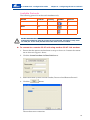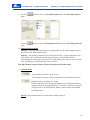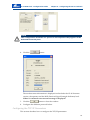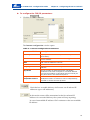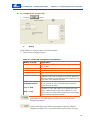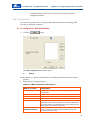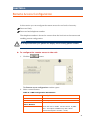
1
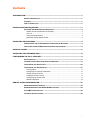
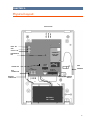
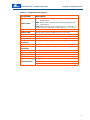
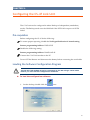
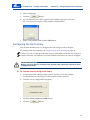
CopyrightCrow Engineering Ltd. 2008 The copyright of this document is owned by Crow Engineering Ltd., its agents and/or professional advisors. No part of parts hereof may be reproduced, distributed, republished, displayed, broadcast, hyperlinked or transmitted in any manner or by any means or stored in an information retrieval system without the prior written permission of Crow Engineering Ltd. or the copyright owner provided that permission is granted to download and print the materials in this document for personal, non-commercial use only provided you do not modify the materials and that you retain all copyright and other proprietary notices contained in the materials. This permission terminates automatically if you breach any of these terms or conditions. Upon termination, you will immediately destroy any downloaded and printed materials. Trademarks The trade marks, service marks, and logos (the "Trade Marks") used and displayed in this document are registered and unregistered Trade Marks of Crow Engineering Ltd. and others. Nothing in this document should be construed as granting, by implication, estoppel, or otherwise, any license or right to use any Trade Mark displayed in this document, without the written permission of Crow Engineering Ltd. or other Trade Mark owners. The name of Crow Engineering Ltd. or the Crow Engineering Ltd. logo may not be used in any way, including in advertising or publicity pertaining to distribution of materials in this document, without prior written permission. Disclaimer The information in this manual was accurate and reliable at the time of its release. However, we reserve the right to change the specifications of the product described in this manual without notice at any time. Print Version 02 SEPTEMBER 2010 i Contents INTRODUCTION ...................................................................................................................... 1 PRODUCT DESCRIPTION ....................................................................................... 1 FEATURES .......................................................................................................... 1 HOW TO CONTACT US .......................................................................................... 1 INSTALLATION PRE-REQUISITES........................................................................................... 2 SOFTWARE AND HARDWARE PRE-REQUISITES.......................................................... 2 Cellular Account (GSM Service Provider) ................................................................. 2 TCP / IP ..................................................................................................................... 2 Computer Requirements ........................................................................................... 2 Operating System Requirements .............................................................................. 2 INSTALLING THE SOFTWARE ................................................................................................. 3 DOWNLOADING THE CS-47 GSM LINK CONFIGURATION SOFTWARE ........................... 3 INSTALLING THE CS-47 GSM LINK CONFIGURATION SOFTWARE ................................ 5 PHYSICAL LAYOUT.................................................................................................................. 6 INSTALLING THE HARDWARE UNIT ....................................................................................... 8 CONFIGURING THE CS-47 LINK UNIT .................................................................................... 9 PRE-REQUISITES ................................................................................................. 9 LOADING THE SOFTWARE CONFIGURATION PROGRAM ............................................... 9 CONFIGURING THE UNIT LOCALLY ........................................................................ 10 CONFIGURING THE UNIT REMOTELY ..................................................................... 11 Pre-requisites........................................................................................................... 11 Configuring the TCP/IP Parameters ........................................................................ 14 Saving an Event List File ......................................................................................... 17 Loading an Event List File ....................................................................................... 17 Configuring the Contact IDs .................................................................................... 17 SMS Configuration................................................................................................... 19 REMOTE ACCESS CONFIGURATION ...................................................................................... 21 ENABLING PASSWORD CONTROL .......................................................................... 23 ENABLING PASSWORD AND PHONE NUMBER CONTROL ............................................ 23 FAST SMS CONFIGURATION................................................................................ 24 TECHNICAL SPECIFICATIONS ............................................................................... 25 i CHAPTER 1. Introduction Congratulations on buying the CS‐47 GSM link. Product Description The CS‐47 Link is a GSM add‐on modem operating on a cellular phone network that connects to the Runner bus and can function as a dialer or backup dialer to the PSTN (Public Switched Telephone Network) one already installed in the Runner control panel. The reason this system is so popular is because when an event or alarm occurs the unit can report to a central station and send an SMS message to a cellular phone. The following reporting media can be used simultaneously: Transport Mode Format GPRS TCP/IP GSM CID GSM SMS Features Full event reporting ‐ for all Runner C.P. events. Multiple formats – TCP/IP, CID and SMS reporting formats. Reporting up to 4 subscriber phones in CID/SMS format. Reporting up to 4 IP Addresses in TCP/IP format GSM/GPRS communication ‐ via GSM Quad Band 900 / 1800 MHz or 850 / 1900 MHz modem based on Cinterion TC63i engine. Backup battery ‐ rechargeable lead acid battery12 V/1.3 Ah. Tamper alarms ‐ triggered if cover is opened or the unit is tears from the wall. Programming the unit ‐ using a PC via USB Port and via GPRS. Two operating modes – Backup or Primary (TCP/IP only) SMS commands from a mobile feature for remote control Remote control from another CS47 link feature How to Contact Us See back cover for details. 1 Installation Pre-Requisites Software and Hardware Pre-Requisites These are the pre‐requisites for installing the CS‐47 configuration program: You must have an open cellular account SIM card must be unlocked and activated for GPRS data services Cellular Account (GSM Service Provider) You need to open a cellular account with your cellular service provider to: Enable the cellular gateway module on your unit Disable Call Waiting (recommended) Disable all roaming features (recommended) On opening the account you should receive a: Cellular phone number GSM/GPRS SIM card SIM Card When ordering the GSM/GPRS SIM card, be sure to specify to the cellular service provider that the SIM card MUST be activated for GPRS data services (unlocked). In some locations you might receive a password for this, and possibly even a different number. TCP / IP For TCP/IP connection you need: APN (Access Point Name) ‐ APN is the name of a GPRS access point. It identifies an external network accessible from a terminal. An APN has several attributes associated with it that define how you can access the external network at that point. Speak to your local service provider to get the ATN of your network IP address ‐ of target receiver Computer Requirements Any later model computer or laptop with an available USB port Operating System Requirements Windows XP , VISTA , Windows 7 2 CHAPTER 2. Installing the Software The software must be downloaded from the crow website. It is assumed that this is the first time you are using the site. If not, please skip any irrelevant steps listed below. IMPORTANT NOTE In order to download files from the Crow website you must get a valid user name and password from your local Crow representative or directly from Crow support. Downloading the CS-47 GSM Link Configuration Software To download the CS-47 GSM link configuration software: 1. Open the following link in your browser: http://www.thecrowgroup.com/support-download.asp 2. Select the category CS Series – GSM Backup Systems. 3. Select CS‐47 Link PC Application zip file. 4. Select the Remember my password checkbox if you want Windows to remember your user name and password. 5. Enter the user name and password you received from your local Crow representative or directly from Crow support. The first time you download software from the site it may be automatically saved on your desktop in zipped format. Usually, when you click the OK button after entering your user name and password the message shown below is displayed. 3 CS-47 GSM Link - Configuration Guide Chapter 2 - Installing the Software 6. Click the OK button. button. 7. When the above message is shown, click the 8. Save the file on your desktop. The CS‐47 link zip file is placed on your desktop. button opens the downloaded zip file. This is Clicking the described in detail in the section below. 4 CS-47 GSM Link - Configuration Guide Chapter 2 - Installing the Software Installing the CS-47 GSM link Configuration Software To install the CS-47 GSM link configuration software: 1. When the software is downloaded, click the zipped file. You can also double‐click the file. button to open the You require zip software to open the zipped file. 2. From inside the zip folder, double‐click the Setup.exe file. button and the follow the on‐screen prompts to install the 3. Click the software. When the software is successfully installed the CS‐47 Configuration icon is placed on the desktop, 5 CHAPTER 3. Physical Layout STATUS LEDS FAIL LED BUS LED NET LED INPUT 1&2 GND OUTPUT 1&2 CINTERION TC63i GSM MODEM GSM SERVICE LED CONFIG PORT 1 POWER LED BUS CONNECTOR BUS CONNECTOR GSM ANTENNA PROGRAM CONNECTOR TAMPER SWITCH POS NEG CLK DATA BATTERY CONNECTOR SIM HOLDER BATTERY 12V / 1.3Ah 6 CS-47 GSM Link - Configuration Guide Chapter 3 - Physical Layout Table 1: Component Description Component Description NET: Turns green when there is communication with the TCP/IP server. Status LEDs BUS: Blinks yellow when the bus is communicationg with the control panel. FAIL: Blinks or solid red on network error. For example, a problem with the SIM card or GSM network , open tamper Power LED Turns red when power is applied to the unit. Modem LED Blinks yellow when the GSM service is connected. SIM Card Holder SIM card used for the GSM modem. Antenna Cellular phone antenna connector. Tamper Switch Activates alarm if cover is removed. Program Connector Connector for connecting the inputs and outputs. CONFIG PORT Serial port that connects to a PC or laptop. Battery Connector Backup rechargeable battery 12 V/1.3 Ah lead acid. Bus Connector For communication with the control panel. Power LED Red when power good. GSM Modem Siemens TC63 based GSM modem GSM Service LED Blinks yellow when GSM service is connected. Output 1&2 Terminal Block Gnd Input 1&2 7 CS-47 GSM Link - Configuration Guide Chapter 4 - Installing the Hardware Unit CHAPTER 4. Installing the Hardware Unit IMPORTANT NOTES If the GSM unit is being installed as a backup module, it should NOT be installed too close to the panel. It is recommended to configure the unit at the lab before installing it at the customer’s premises. To install the hardware unit containing the CS-47 GSM link: 1. Choose a suitable location within the secured area for the unit within 1 to 20 meters from the Runner. 2. Using the paper template drill 4 holes in the wall to mount the unit. 3. Using four screws and rawl‐plugs (wall plugs), fix the unit to the wall or any other firm flat surface. 4. Power OFF the Runner and disconnect the backup battery. 5. Connect the unit to the Runner bus. The bus consists of four wires: Pos (+12V), Neg (‐12V), Clk and Data. See Page 6 6. If the CS‐47 link is going to use an external 12V power supply the GND wire from the power supply MUST be connected to the GND Bus (Neg) terminal. 7. Insert the SIM card into the SIM card holder. If you haven’t cancelled call waiting and all roaming options it is recommended to do so by contacting your ISP (Internet Service Provider). 8. Ensure that the antenna is properly connected. 9. Power ON the Runner. 10. Connect the backup battery. 8 CHAPTER 5. Configuring the CS-47 Link Unit The CS‐47 unit can be configured in either Backup or Independent (standalone) modes. The Backup mode uses the GSM link if the PSTN fail or report via PSTN failed. Pre-requisites Before configuring the CS‐47 do the following: To ensure proper reporting, disable the No Keypad Indication if Armed setting Runner programming Address: P25E13E 5E Disable the following setting: Runner programming Address: P168E1‐16E 4E Connect the CS‐47 Link modem to the PC Power OFF the Runner and disconnect the battery before connecting the serial cable Loading the Software Configuration Program IMPORTANT NOTE The CS-47 Link modem must be connected to the PC using a serial cable before you can run the configuration software. To load the configuration software: 1. On the desktop, double‐click the icon. 9 CS-47 GSM Link - Configuration Guide Chapter 5 - Configuring the CS-47 Link Unit 2. Select a language. 3. Click the button. 4. If your SIM card does NOT require a PIN number ignore the next step. If you do however require a PIN number continue below. 5. Enter a PIN number and click the OK button. Configuring the Unit Locally This section describes how to configure the unit using a local COM port. To configure the unit remotely see Configuring the Unit Remotely on page 11. Connect your PC or laptop to the unit using a serial cable connected via COM port Connect remotely via another CS‐47 link modem to the one you want to configure IMPORTANT NOTE Before you are able to configure the system unit remotely it must be first configured locally. To connect locally using serial cable: 1. Connect the serial cable between your PC and the CS‐47 link modem configuration port. See Page 6 for the location of the connector. 2. Load the CS‐47 configuration program. 3. Click the Local control via COM button. 4. Click the button. 10 CS-47 GSM Link - Configuration Guide Chapter 5 - Configuring the CS-47 Link Unit Configuring the Unit Remotely This section describes how to use your PC or laptop to configure the unit remotely using another CS‐47 link modem. IMPORTANT NOTES Before you are able to configure the system unit remotely it must be first configured locally. Pre-requisites The remote CS‐47 link modem must be a standalone unit and NOT be connected to a Runner keypad bus. You need the phone number and password of the remote system you want to contact and configure. Make sure that both Units registered to Network. Remote Site Configuration Setup Figure 1: Remote Configuration Setup 11 CS-47 GSM Link - Configuration Guide Chapter 5 - Configuring the CS-47 Link Unit Available Protocols The following protocols can be used simultaneously: Media Format Priority Symbol Section GPRS TCP/IP 1 0 GSM CID 2 0 GSM SMS 3 0 IMPORTANT NOTES If both the GSM and TCP/IP protocols are selected, the data is only sent via TCP/IP. If the TCP/IP fails then the data is sent via GSM. To connect to a remote CS-47 unit using another CS-47 Link modem: 1. Ensure that the remote site hardware is setup as shown in Connect the remote site as shown in Figure 1 above.. 2. Click the Control modem via Data Link button. 3. Enter the remote system’s Phone number, Password and Remote Protocol. 4. Click the button. The modem starts connection. 12 CS-47 GSM Link - Configuration Guide 5. Use the pane. Chapter 5 - Configuring the CS-47 Link Unit button to move an Available protocols to the Selected protocols Use the pane. button to move Selected protocols back to the Available protocols 5.1 Communication Mode: Backup – CS47 link transmit the events sequentially via all selected protocols for any new events from control panel Primary – this mode is relevant for TCP/IP protocol only. At this mode the CS‐47 Link report via TCP/IP and Runner doesnʹt report via the PSTN unless an acknowledge for the report from the CS‐47 Link didnʹt sent to Bus in 10 sec. In this case the Runner will transmit the event via PSTN . The SMS Remote control feature will not be operational in this mode. 5.2 And/Or mode: ‐ check the box to define ʺAndʺ mode In this mode all events will be transmitted to all selected protocols ‐ uncheck the box to define ʺOrʺ mode In this mode all events will be transmitted via TCP/IP protocol first priority. While a successful delivery of TCP/IP, CS47 link will ignore CID protocol. If TCP/IP delivery failed, events will be transmitted via CID protocol NOTE: The And/OR mode is not relevant for SMS protocol 13 CS-47 GSM Link - Configuration Guide Chapter 5 - Configuring the CS-47 Link Unit NOTE The configuration windows are opened in the sequence they appear in the Selected Protocols pane. 6. Click the button. The modem status information is displayed and includes the CS‐47 firmware version, the operator and the RSSI (Received Signal Strength Indicator) level. If there is a network error an error message is displayed. 7. Click the button to close the window. 8. Configure the different protocols below. Configuring the TCP/IP Parameters This section describes how to configure the TCP/IP parameters. 14 CS-47 GSM Link - Configuration Guide Chapter 5 - Configuring the CS-47 Link Unit To configure the TCP/IP parameters: 1. Click the button. The Internet configuration window opens. Table 2: Internet Configuration Parameters Button or Field Description Access point name Displays the internet service provider APN (Access Point Name). Event’s Filter Displays the available events that can trigger the CS47 Link modem. Add Add a new IP address to the list. Remove Removes the selected IP address. Property Enables you to edit the existing account and IP Address. Up/Down The top number is dialed first and if unavailable continues to the next in sequence. Use these buttons to move the numbers up and down the list so that you can place them in the desired sequence. Only while PSTN Fail/Dialer Failure Enables the selected protocol ONLY when a PSTN/Dialer failure is detected. Can be independently selected or cleared for each protocol. Check the box to enable delivery of all events via all selected IP addresses (up to 4 IP addresses) In this mode events will be transmitted to the first selected IP Address. On successful delivery the system will stop reporting. In case of unavailable IP address CS47 continues to the next available IP address. 15 CS-47 GSM Link - Configuration Guide 2. Click the Chapter 5 - Configuring the CS-47 Link Unit button to add a new IP address. 3. In the Account field, enter a 4 digit CS‐47 ID number. 4. In the Add Domain Name or IP address filed, enter a domain name or a static IP address. button. 5. Click the The new Domain or static IP address is added to the list. 6. Add the APN (Access point Name) for your ISP (Internet Service Provider). 7. Click the button to add events to trigger a transmission. The Simple mode is shown by default. This mode only shows the basic or most popular trigger events. 8. To change to Advanced mode, click the button. 16 CS-47 GSM Link - Configuration Guide Chapter 5 - Configuring the CS-47 Link Unit The Advanced mode shows ALL the available trigger events. To change to the Simple mode, click the button. 9. Double‐click an event from the Available events list OR Select an event and then click the button. Multiple events are now shown in the field Events to send. Any one of these events causes the CS‐47 Link modem (if enabled) to transmit the event information. Saving an Event List File To save an event list file: 1. Click the button. 2. Give a descriptive name. 3. Click the button. Loading an Event List File To load an event list file: 1. Click the button. 2. Select the file you want to load, using the descriptive name. 3. Click the button. Configuring the Contact IDs This section describes how to configure the contact ID. The contact ID contains the required contact information to send a message to 17 CS-47 GSM Link - Configuration Guide Chapter 5 - Configuring the CS-47 Link Unit To configure the contact ID: button. 1. Click the The Contact ID Configuration window opens. 2. Using Table 4 below as a guide, add Contact ID numbers. 3. Select Events to trigger Input 1. Table 3: Contact ID Configuration Parameters Button or Field Description Event’s Filter Displays the available events that can trigger the CS-47 Link modem. Add Add a new Contact ID number to the list. Remove Removes the selected Contact ID number. Property Enables you to edit the existing Control ID information. Up/Down The top number is dialed first and if unavailable continues to the next in sequence. Use these buttons to move the numbers up and down the list so that you can place them in the desired sequence. Only while PSTN Fail/Dialer Failure Enables the selected protocol ONLY when a PSTN/Dialer failure is detected. Can be independently selected or cleared for each protocol. Loop-> Next CS47 link will sequentially dial 4 times to the first selected Tel. num. and if there is no answer the CS47 will try 4 times as well to the next selected Tel. num. Next-> Loop This is a loop of 4 times that the CS47 dials sequentially to each selected telephone number Check the box to enable delivery of all events via all selected Telephone numbers. In this mode all events will be transmitted to the first selected telephone number. On a successful delivery the system will stop 18 CS-47 GSM Link - Configuration Guide Chapter 5 - Configuring the CS-47 Link Unit transmit, otherwise the CS47 continues to the next available telephone number SMS Configuration This section describes how to configure the SMS parameters for sending SMS message to multiple recipients. To configure the SMS parameters: 1. Click the button. The SMS configuration window opens. 2. Using Table 4 above as a guide; add numbers for sending an SMS to selected cellular phones. 3. Select Events to trigger Input 1. Table 4: SMS Configuration Parameters Button or Field Description Event’s filter Displays the available events that can trigger the CS-47 Link modem. Add Add a new cellular phone number to the list. Remove Removes the selected cellular phone number. Property Enables you to edit an existing SMS entry. Up/Down The top number is dialed first and if unavailable continues to the next in sequence. Use these buttons to move the numbers up and down the list so that you can place them in the desired sequence. Only while PSTN Fail/Dialer Failure Enables the selected protocol ONLY when a PSTN/Dialer failure is detected. Can be independently selected or cleared for each protocol. 19 CS-47 GSM Link - Configuration Guide Chapter 5 - Configuring the CS-47 Link Unit Check the box to enable delivery of all events via all selected Mobile numbers In this mode events will be transmitted to the first selected Mobile number. On a successful delivery the system will stop Transmit, otherwise the CS47 continues to the next available Mobile number. 20 CHAPTER 6. Remote Access Configuration In this section you can configure the remote access for two levels of security. Password Only Password and telephone number. The telephone number is be used to connect from the local unit to the remote unit enabling remote configuration. NOTE It is important that your phone can display the incoming phone number. To configure the remote access to the unit: 1. Click the button. The Remote access configuration window opens. 2. Select a control button. Table 5: SMS Configuration Parameters Button Description Remote Acess Disable Disables remote access. Check Password Enables password control ONLY. Check Password And Phone Number Enables both password and phone number control. Enable SMS control Check the box to enable remote control by SMS Note : this option available only with "check password and phone number " mode, 21 CS-47 GSM Link - Configuration Guide Chapter 6 - Remote Access Configuration Table 6: SMS Commands used for Remote Control # Command SMS text to be send via Mobile Example of text to be The returned SMS send message from unit 1 ARM ARMarea user password ARMA1234 ARM Command error: Area A already armed ARM Command Area 1 Arm 2 DISARM DISARM area password DISARMA1234 1.DISARM Command error: Area A already Disarmed 2.DISARM Command: Area 1 Disarmed 3 OUTPUT ON control OUTON number OUTON 4 1.OUTPUT ON Command Error: ARMED mode 2.OUTPUT ON Command: Output 4 is ON 3.OUTPUT ON Command Error: Output 4 already is ON 4 OUTPUT OFF OUTOFF number control OUTOFF 4 1.OUTPUT OFF Command Error: ARMED mode 2.OUTPUT OFF Command: Output 4 is OFF 3.OUTPUT ON Command Error: Output 4 already is ON 5 Control Panel status STATUS STATUS ARMED STAY: A, B ARMED: A, B ARMING STAY: A, B ARMING : A, B OUTPUT ON: 1, 3, 7 6 GSM/GPRS RSSI status STATUSGSM Returned SMS with the provider name RSSI (signal measurement) and GPRS status STATUSGSM 7 BALNACE BALANCE BALANCE 8 COMMAND COMMAND user password COMMAND 1234 User Command is OK NOTE: when using remote control feature the number of CS47 link under remote number should be insert with the country code (Note: check with your cellular provider ) 22 CS-47 GSM Link - Configuration Guide Chapter 6 - Remote Access Configuration Enabling Password Control To enable password control: 1. Click the button. If this is the first time you are entering a password, the Old password field does not appear. 2. Enter your old password (if required). 3. Enter your new password twice (up to 10 alpha‐numeric characters). 4. Click the button. Enabling Password and Phone Number Control To enable both password and telephone number control: 1. Click the button. 2. Enter your old password (if required) 3. Enter your new password twice (up to 10 alpha‐numeric characters). 4. Enter a telephone number. 5. Click the button. You are returned to the Configuration window. 23 CS-47 GSM Link - Configuration Guide Chapter 6 - Remote Access Configuration Fast SMS Configuration When Input 1 is shorted to ground (pulse), a custom SMS is sent to all the phone numbers selected in the SMS configuration window. If the SMS protocol is not selected (Selected protocols) then NO SMS CAN be sent. At the same time that an SMS message is sent to the selected recipients a General Alarm event is also sent to CID (Contact ID number) 140. For the CID event to be sent you must ensure that the CID protocol is one of the elected protocols. This event will be sent to the phone numbers entered in the contact ID configuration window. If there is a kiss‐off for this event, the reporting stops. If NO kiss‐off is detected for this event, the event will be reported to the next phone number (if present). If these fields are left blank, then no SMS or CID will be sent. To configure fast SMS: 1. Click the button. The Fast SMS window opens. 2. Enter an SMS message to be sent to ALL recipients selected in the SMS configuration window. 3. The above Fast SMS will be sent whenever input 1 will be triggered 4. Send Tamper Event if – check the box to activate the report back to the control panel trouble message option, in case of GSM error or/and TCP/IP error 5. USSD‐string – this feature is only applicable if the cs47 link use a prepaid SIM card. Insert the USSD‐string (provided by cellular provider ), use the SMS balance command (SMS remote control must be Enable) to check the SIM card balance (see table no. 6 ) 6. Click the button. 24 CS-47 GSM Link - Configuration Guide Chapter 7 - Remote Access Configuration CHAPTER 7. Technical Specifications Item Specification Radio Frequency Operating frequency Output power GPRS multi-slot class Modem Type Internal Antenna 850 MHz, 900 MHz, 1800 MHz, 1900 MHz Class Class Class Class 4 4 1 1 EGSM850: 2 W EGSM900: 2 W EGSM1800: 1 W EGSM1900: 1 W 12 GSM Quad-Band Tri-Band Communication Services TCP/IP Internet services GSM Report Modes Stack access via AT commands TCP, UDP, HTTP, FTP, SMTP, POP3 TCP/IP over GPRS CID over GSM SMS over GSM Interfaces Antenna connector SIM card Bus U.FL-R-SMT 3 V, 1.8 V Runner Power Power supply – External Adaptor (Optional) Battery Current consumption Battery charging control 14.2V ±0.2V V DC 12 V 1.3 Ah Lead Acid Standby: 100 mA Max. 200 mA Current limited 260 mA@short 1.6 A fuse protected Input 1 Reprogrammed SMS Input 2 Not In USE Output 1 Active Low during network error (GSM fail, low RSSI) Environmental Operation temperature -10 to +50 °C Storage temperature -20 to +60 °C Humidity (EN60721) < 85 % r.h., non condensing Approvals R&TTE, FCC, UL, IC, GCF, PTCRB, CE, Local approvals and network operator certifications 25