1
Station User Guide
August 2008 - Issue 2.1
P/N: 3551-00
“WARNING: Handling the cord on this product will expose you to lead, a
chemical known to the State of California to cause [cancer, and] birth
defects or other reproductive harm. Wash hands after handling.”
Vertical Communications, Inc. reserves the right to revise this publication
and to make changes in content without notice.
© 2005 Vertical Communications, Inc. All rights reserved.
This publication contains proprietary and confidential information of
Vertical Communications, Inc. The contents of this document may not be
disclosed, copied or translated by third parties, in any form, or by any
means known, or not now known or conceived, without prior explicit
written permission from Vertical Communications, Inc.
LIMIT OF LIABILITY/DISCLAIMER OF WARRANTY
Vertical Communications, Inc. makes no representation or warranties with
respect to the accuracy or completeness of the content of this publication
and specifically disclaims any implied warranty of merchantability or
fitness for any particular purpose, and shall not be liable for any loss of
profit or any other commercial damage, including but not limited to,
special, incidental, or consequential.
TRADEMARKS
Vertical Communications and the Vertical Communications logo and
combinations thereof and STSe are trademarks of Vertical
Communications, Inc. All other brand and product names are used for
identification only and are the property of their respective holders.
mlj/2008
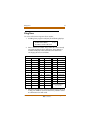
Station User - QUICK REFERENCE
STSe Key Telephone Systems
FI XED FE AT URE B U T TO NS
•
•
•
•
•
•
•
CAMP ON -- enables you to alert a busy party
that an outside line is on hold for them.
CONF (CONFERENCE) -- used to establish
and build conference calls.
FLASH -- lets you terminate an outside call
and restore dial tone without having to hang
up the handset. It is also used to transfer calls
behind a PBX or Centrex within those systems.
FWD (FORWARD) -- allows you to forward
your calls to another station or location.
HOLD -- enables you to place an outside caller
on hold.
H-T-P -- allows you to select the ICM signaling
mode: Handsfree, Tone, or Privacy.
MSG (MESSAGE WAIT) -- allows you to
initiate a message waiting indication at a
station(s) that is: Busy, Unattended, or in Do
Not Disturb.
•
•
•
•
•
A Message Waiting Callback request that is
left at your station is indicated by a flashing
MSG WAIT LED.
MUTE -- allows you to switch the built-in
microphone on or off when using the
speakerphone, or the handset microphone
when using the handset.
ON/OFF -- enables you to make a call without
lifting the handset. It also turns the telephone
on and off when using the speakerphone.
SPEED -- provides you with access to speed
dialing, save number redial and last number
redial. This button is also used to access
flexible button programming.
TRANS (TRANSFER) -- lets you transfer an
outside call from one station to another.
VOLUME BAR -- allows you to adjust the
volume for your speakerphone, handset,
ringing volume, and display contrast.
CALL FORWARDING
UNSCREENED TRANSFER
1. Press the FWD button or dial [640].
2. Dial the desired Call Forward code:
[6] = All Calls
[7] = No Answer
[8] = Busy
[9] = Busy/No Answer
3. Dial the station number where calls are to be
forwarded. Confirmation tone sounds.
4. Replace the handset or press ON/OFF button.
1. Press TRANS button and dial station number.
2. When the called extension begins to signal,
hang up to transfer the call.
3. Replace the handset or press ON/OFF button.
ESTABLISHING A CONFERENCE
>> Only those stations that have Conference
enabled will be allowed to initiate a Conference call.
1. Lift the handset.
2. Select intercom station or dial desired outside
party. When called party answers, press CONF.
3. Add the next conference party by selecting
another outside line or intercom station.
4. Press CONF button again and repeat previous
step in a cycle, until all parties are contacted.
5. When the last party answers, press the CONF
button twice. All parties will be connected.
TERMINATING A CONFERENCE
To end a Supervised Conference, the conference
initiator replaces the handset or presses ON/OFF.
To end an Unsupervised Conference, press the
flashing CONF button while on-hook.
SCREENED TRANSFER
While connected to an outside line:
1. Press the station button where the call is to be
transferred (if programmed on your telephone),
-orPress TRANS and dial desired station number.
(The called extension is signaled according to
their intercom signal switch position.)
2. When extension answers, announce transfer.
3. Hang up to complete the transfer.
LEAVING A MSG WAITING INDICATION
If you dial a station that is busy, unattended, or in
Do Not Disturb, you can leave a message waiting
indication.
1. Press the ON/OFF button.
2. Dial the desired intercom station. A busy tone
or DND tone is heard.
3. Press the MSG button. The called party’s MSG
button LED will flash slowly.
4. Press the ON/Off button to end the call.
STSe Key Telephone Systems
PLACING AN OUTSIDE LINE ON HOLD
•
•
If your system is programmed for System Hold
Preference, press the HOLD button once for
System Hold or twice for Exclusive Hold.
If your system is programmed for Exclusive
Hold Preference, press the HOLD button once
for Exclusive Hold or twice for System Hold.
STORING SPEED NUMBERS
1. Press the SPEED button twice.
2. Dial the speed bin location.
• 9000 to 9019 = Station speed numbers
• 9020 to 9099 = System speed numbers
3. Dial the desired telephone number.
4. Press the SPEED button.
5. Press ON/OFF to end programming.
To clear an existing speed bin:
1. Press the SPEED button twice.
2. Dial the speed bin location.
3. Press SPEED again. Confirmation tone sounds.
DIALING A SPEED NUMBER
1. Press SPEED and dial the speed bin location,
-orPress the preprogrammed speed bin button.
• 9000 to 9019 = Station speed numbers
• 9020 to 9099 = System speed numbers
2. When the called party answers, pick up the
handset or use the speakerphone.
DIRECTORY DIALING
Users with display telephones may view a list of
individuals on the telephone system and have
the system automatically dial that person.
Directory Dialing may also be used to transfer a
call from one station to another.
1. Dial the Directory List dial code [680],
-orPress the DIRECTORY DIAL flexible button.
2. Press a button on the keypad once, twice, or
three times, that represents the letter of the
alphabet, to begin viewing the list of names.
3. Scroll through the Directory List to select a
name; press [ ] to display the next entry and
[#] for the previous entry.
4. Press the SPEED button at the desired name
to automatically dial the destination station or
outside phone number (via Speed Dial).
Station User - QUICK REFERENCE
To transfer a call using directory dialing:
1. Press the TRANS button.
2. Dial the Directory Dial Code [680],
-orPress the DIRECTORY DIAL flexible button.
3. Press the digit associated with the person’s
name. When the name displays, press SPEED
button to automatically dial the station.
4. Press ON/OFF button to complete transfer.
> > Calls can only be transferred to internal stations.
PROGRAMMING FLEXIBLE BUTTONS
1. Press the SPEED button twice.
2. Press the flexible button to be programmed.
3. Dial the desired code from the following
chart. Confirmation tone sounds.
4. Press the ON/OFF button.
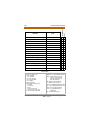
All Call Page (Internal & External) 700
Background Music
632
Call Back
622
Call Park Location (System)
424-437
Call Park Location (Station)
439+[XXX]
Call (Park) Pickup
#6+[XXX]
Caller ID Review (Answered)
659
Caller ID Review (Unanswered) 635
Directory Dial
680
Do Not Disturb
631
Extension Numbers
100-149
External Page Zone
761
Last Number Redial
[SPEED]+[#]
Line Queue
621
Personal Park
438
Speed Dial Access
[SPEED]+[YYYY]
Save Number Redial
[SPEED]+[ ]
VM Group Pilot Numbers
44 [V]
_______________________________________
V = Voice Mail Group Number (0-7)
XXX = Station Extension Numbers
YYYY = Speed Dial Bin Numbers
( Station=9000-9019 / System=9020-9099 )
To erase a flexible button:
1. Press the SPEED button twice.
2. Press the flexible button to be erased.
3. Press FLASH . Confirmation tone sounds.
4. Press the ON/OFF button.
i
Contents
Contents
911 Alert........................................................................................................... 2
Account Codes .............................................................................................. 3
Using Account Codes ......................................................................... 3
Verified Account Codes ..................................................................... 3
Account Codes - Traveling COS (Verified)................................... 4
Answering Machine Emulation ............................................................... 5
Notification Methods ......................................................................... 5
Attendant Features...................................................................................... 6
Attendant Clear Alarm ....................................................................... 6
Attendant CO Line External (Off-Net) Forward ......................... 7
Attendant Custom Message ............................................................ 7
Attendant Day/Night/Special.......................................................... 8
Attendant Directory List Programming....................................... 9
Attendant Disable Outgoing CO Line .......................................... 12
Attendant Override............................................................................. 13
Attendant Setting Time and Date.................................................. 13
Attendant Speed Dial - System Storing ....................................... 14
Attendant Unavailable....................................................................... 15
Attendant Voice Mail Alarm Clear.................................................. 15
Background Music (Optional) .................................................................. 16
Back Light Display ........................................................................................ 17
Call Back........................................................................................................... 17
Call Coverage ................................................................................................. 19
Call Forward.................................................................................................... 21
Call Forward - External (Off-Net) .................................................... 22
Call Forward - Follow Me................................................................... 23
Call Park............................................................................................................ 25
Call Park - Personal .............................................................................. 25
Call Park - Station ................................................................................. 26
Call Park - System................................................................................. 27
Call Pickup....................................................................................................... 28
Directed Call Pickup............................................................................ 28
Group Call Pickup ................................................................................ 29
Call Transfer .................................................................................................... 30
Executive/Secretary Transfer ........................................................... 30
PBX/Centrex Transfer ......................................................................... 30
Screened Transfer................................................................................ 31
Transfer Search ..................................................................................... 31
Unanswered CO Call Transfer.......................................................... 32
ii
Contents
Unscreened Transfer........................................................................... 32
Trunk-To-Trunk Transfer.................................................................... 32
Caller ID Display ............................................................................................ 33
Caller ID Display (Answered Calls) ................................................. 33
Caller ID Display (Unanswered Calls) ............................................ 34
Caller ID Name/Number ............................................................................ 35
Calling Forward Override........................................................................... 35
Calling Station Handsfree Mode Override........................................... 36
Calling Station Tone Mode Override ..................................................... 36
Camp On.......................................................................................................... 37
CO Line - Access ............................................................................................ 38
CO Line Queue............................................................................................... 39
Conference...................................................................................................... 40
Conference Combinations ............................................................... 40
Conference Procedures ..................................................................... 40
Dial-By-Name ................................................................................................. 44
Directory Dial ................................................................................................. 45
Do Not Disturb / Page Block ..................................................................... 47
Door Opener .................................................................................................. 49
Executive Override....................................................................................... 49
Flash .................................................................................................................. 50
Flash Key on Intercom........................................................................ 50
Flexible Button Programming ................................................................. 50
Group Listening ............................................................................................ 51
Headset Mode ............................................................................................... 52
In and Out Button......................................................................................... 53
Intercom .......................................................................................................... 53
Using an Intercom Button ............................................................... 53
Intercom Calls ....................................................................................... 54
Intercom Transfer ................................................................................ 56
Keyset Mode................................................................................................... 57
Last Number Redial...................................................................................... 58
LCR Operation................................................................................................ 59
Loop Key .......................................................................................................... 60
Mailbox Buttons............................................................................................ 60
Message Wait ................................................................................................. 61
Modem ............................................................................................................. 62
Voice Mail Modem Access ................................................................ 62
Telephone System Modem Access................................................ 62
Contents
iii
Mute .................................................................................................................. 63
Name In Display ............................................................................................ 63
Night Service .................................................................................................. 64
Off-Hook Voice Over (OHVO) ................................................................... 65
Outside Calls................................................................................................... 67
Placing an Outside Line on Hold.................................................... 67
Answering a Recall .............................................................................. 67
Answering an Outside Call ............................................................... 67
Placing an Outside Call ...................................................................... 67
Paging............................................................................................................... 68
Paging - Meet Me................................................................................. 69
Personalized Messages............................................................................... 69
Pre-assigned Messages...................................................................... 69
Custom Messages................................................................................ 70
Date and Time Entry Messages....................................................... 71
Scrollable Canned Messages ........................................................... 73
Personal Messages Flexible Button............................................... 74
PBX/Centrex Codes on a Flex Button .................................................... 75
Release Button............................................................................................... 75
Redial ................................................................................................................ 75
Last Number Redial............................................................................. 75
Save Number For Redial .................................................................... 76
Redial a Saved Number...................................................................... 76
Repeat Redial ........................................................................................ 76
Ring Down / Hot Line / Off-Hook Preference ..................................... 77
Ring Tone ........................................................................................................ 79
School Zone.................................................................................................... 80
Speakerphone ............................................................................................... 82
Speed Dial ....................................................................................................... 82
System Speed Dial Access ................................................................ 84
Station/Port Fixed Number....................................................................... 84
Station Relocate ............................................................................................ 85
Text Messaging (Silent Response).......................................................... 85
Trouble Notification .................................................................................... 87
Uniform Call Distribution........................................................................... 89
UCD Calls In Queue Display ............................................................. 89
UCD Available/Unavailable Mode ................................................. 90
UCD Overflow Station Forward ...................................................... 90
UCD Wrapup End................................................................................. 91
Universal Day/Night Answer .................................................................... 91
iv
Contents
Voice Mail ........................................................................................................ 92
Call Forwarding to Voice Mail Groups.......................................... 92
Retrieving Voice Messages............................................................... 92
Voice Mail Transfer with ID Digits .................................................. 93
Voice Mailbox Button ......................................................................... 93
Voice Mail Group Button................................................................... 93
Voice Mail Group Access ................................................................... 94
Voice Mail One-Touch Recording .................................................. 94
Voice Mail (Flash-Based) Quick Reference .................................. 96
Voice Mail (Flash-Based) Quick Start............................................. 97
Voice Mail (Hard Drive-Based) Quick Reference ....................... 98
Voice Mail (Hard Drive-Based) Quick Start.................................. 99
Volume Control ............................................................................................. 100
Worksheets ..................................................................................................... 102
Default Numbering Plan ............................................................................ 103
Contents
v
» » » » » » » » NOTES » » » » » » »
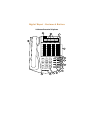
Digital Keyset - Features & Buttons
24-Button Executive Telephone
2
20
1
19
3
9
ABC
DEF
1
2
3
GHI
JKL
MNO
4
5
6
PRS
TUV
WXY
7
8
9
OPER
*
0
8
FLASH
TRANS
SPEED
CONF
MSG
FWD
MUTE
CAMP ON
ON/OFF
HOLD
6
7
5
4
#
10
11
12
VOLUME
13
15
14
18
17
16
vii
Contents
NUMBER
FEATURE
DESCRIPTION
1
LCD Display
Shows information about telephone status,
dialing directories, and text messages.
2
Message Indicator
Programmable indication for Ring Line, Voice
Mail, Message Wait, or handset operation.
3
Flexible Buttons
To access outside lines and handling calls.
4
MSG Button
For Auto-CallBack to a phone that left a text
message or to access voice messages.
5
FWD Button
To forward your calls to another station or voice
mail.
6
SPEED Button
To access speed dialing, save number redial, and
last number redial. Button is also used to access
flexible button programming.
7
CONF Button
To establish conference calls.
8
TRANS Button
To transfer an outside call from one station to
another.
9
FLASH Button
To end an outside call and to restore dial tone
without hanging up receiver.
10
CAMP ON Button
To alert a busy station that an outside line is on
hold and waiting for them.
11
MUTE Button
To activate/deactivate MUTE function. When
pressed, party on other end cannot hear you.
12
HOLD Button
To hold calls or to retrieve held calls.
13
ON/OFF Button
To make a call without lifting the handset.
14
VOLUME Button
To adjust level of tones, background music,
ringing, receiver volume, and display contrast.
15
Speaker
Outputs tones and voice at your extension.
16
Microphone
To talk with other party without using the
handset.
17
H P T Switch
To select mode of operation: Handsfree, Privacy,
or Tone.
18
Dial Pad Keys
To place internal & external calls, and to enter
programming & feature codes. KEYS: 0 -9, , #
19
Headset Jack
2.5 mm Headset Jack is located on the left
side of the telephone.
20
Interactive Soft
Keys
To work in conjunction with fixed and flexible
features.
viii
Contents
» » » » » » » » NOTES » » » » » » »
1
ABOUT THIS USER GUIDE
The features described in this User Guide apply to the
VODAVI STSe Digital and Single Line Telephone Systems.
GUIDELINES
Flexible Buttons -- Most system features can be set up on a flexible
button for easy one-button access. (For more details, refer to
“Flexible Button Programming” on page 50)
This “Flex Btn” symbol indicates those features that
need a preprogrammed button to function properly.
- EXCEPTION When the “Soft Key” symbol is also present, using a
preprogrammed button or a Soft Key is permitted.
Soft Key
Flexible Numbering -- This feature will allow you to modify the
system numbering plan, as well as, the length of the feature access
codes (2-4 digits).
For consistency, the following programming and operating
procedures refer to “3-digit” default codes.
To verify the numbering plan for your system, consult
with your System Administrator.
Single Line Telephones -- A “telephone” symbol appears
when the Single Line Telephone (SLT) operation differs
from a Digital Telephone.
SLT
If your single line telephone does not have a FLASH key,
quickly press and release the hookswitch when instructed to
press the FLASH key.
STSe Station User Guide
August 2008
2
911 Alert
911 Alert
Any station user or Attendant who programs a flexible button for
911 ALERT (feature code 608) will be alerted of internal stations
placing 911 calls. The system can store the 16 most recent 911 calls.
Calling information includes the time/date of the call and the
station number from which the call was placed.
Initial 911 Alert indications include the following:
» Audible ringing tone
» Green flashing 911 ALERT flexible button LED
» Automatic LCD display of 911 call information
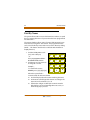
E 91 1 C A L L
MM/DD/Y Y
XX:
STA XXXX
HH:MM
XX = Index number (01-16)
Station users and Attendants can press the flexible button as
necessary to view additional 911 call information in the stored
list. Once a station user or Attendant views the information for
all 911 calls in the system list:
» LEDs at all stations will change to a solid red indication.
» Audible ringing tone at all stations ceases.
» LCDs at all stations will revert to a normal display.
The list remains available for review by pressing the 911
ALERT flexible button until all messages are deleted.
A preprogrammed 608 button is a dual function
button. It provides call information for either
E911 calls or for Trouble Notification. The LCD
displays which condition is the trigger.
STSe Station User Guide
August 2008
Account Codes
3
To delete logged 911 Alert messages:
An Attendant must use the following steps to delete the
messages on a system-wide basis.
1. Press the 911 ALERT flexible button to display the 911 call
information for deletion.
2. Press FLASH to delete that message.
Dialing 911 from any station overrides
previously enabled features such as Do Not
Disturb.
Account Codes
You can enter an account code that contains up to 12 digits. If fewer
than 12 digits are entered, you will need to press the [ ] key to
return to the call.
Using Account Codes
Prior to placing, or during, an outside line call:
1.
2.
Press the preprogrammed ACCOUNT CODE button (627).
Dial the account code. (The other party does not hear the
digits being dialed).
» If account codes are forced, the account code must be
entered prior to dialing the outside number.
3.
4.
Dial [9] or CO Access code. A dial tone will sound.
Dial the desired number.
Verified Account Codes
Prior to placing an outside line call:
1.
2.
Press the preprogrammed ACCOUNT CODE button (627).
Dial the account code.
STSe Station User Guide
August 2008
4
Account Codes
SINGLE LINE TELEPHONE
To enter an Account Code before a call:
1.
2.
3.
4.
Lift the handset and dial [627].
Dial the account code.
Dial [9] or the CO Access code. A dial tone will sound.
Dial the desired number.
To enter an Account Code during a call:
1.
2.
Press the FLASH button. Call is placed on executive hold
while you enter your account code.
Dial [627], then dial the account code.
Account Codes - Traveling COS (Verified)
To use Verified Account Codes:
1.
2.
3.
Press the preprogrammed ACCOUNT CODE button (627)
before accessing a CO line.
Dial the account code. If the account code matches a verified
account code, an intercom dial tone is returned. Otherwise
an error tone is presented.
Access an outside CO line, or dial the LCR code, then dial the
desired number.
SMDR must be enabled for the Account Code
feature to operate, and become part of the
SMDR record.
SINGLE LINE TELEPHONE
To enter an Account Code before a call:
1.
2.
Lift the handset and dial [627].
Dial the account code (up to 12 digits).
(If less than 12 digits, press [ ] to return to intercom dial tone.)
3.
4.
Dial [9] or the CO Access code. A dial tone will sound.
Dial the desired number.
STSe Station User Guide
August 2008
Answering Machine Emulation
5
Answering Machine Emulation
When a call is sent to your voice mailbox, you can press a
preprogrammed flexible button to listen to the caller leaving the
voice mail message. If you decide to speak with the caller, you can
press the preprogrammed button to be connected to the caller.
Notification Methods
There are two methods of notification, a Ring Mode or a Speaker
Mode. These methods are controlled by the type of flexible button
assigned on the telephone. The preprogrammed button type
(654+0=Ring Mode, 654+1=Spkr Mode) defines the operation
mode. An incoming CO call rings at a station and forwards (except
busy type) to station’s VM mailbox.
Ring Mode
The preprogrammed flexible button flashes red while the caller is
in your mailbox. You can press the flashing button and the audio
is broadcast over the speaker of the keyset. The MUTE key is also
enabled and the LED lights solid green. When the call is ringing
the station in the ring mode, the display shows:
S C RE E NI N G R IN G
MM M DD Y Y
H H :MM am
Speaker Mode
The VM message is broadcast over the speaker. The MUTE key is
enabled and the LED lights solid green. When the station is
monitoring the caller in VM, the display shows.
S C RE E NI N G
MM M DD Y Y
STSe Station User Guide
H H :MM am
August 2008
6
Attendant Features
Mailbox Options
The Mailbox Owner can select from the following options when a
call is sent to their voice mailbox.
To leave caller in VM and turn off speaker:
Press the ON/OFF button and continue to listen to message
being left without taking action at the keyset.
After the VM message is left, the preprogrammed button will
be solid red and the keyset will return to idle.
To talk to party leaving the message:
Press the MUTE key. The station is still in CONF and the caller
can hear VM and you.
To pick up call:
Press the flexible button. When the call is picked up, the
voice mail system will disconnect from the call.
Attendant Features
If your station is designated as the Attendant station, the following
features are available to assist you in operating your telephone.
Attendant Clear Alarm
The Attendant can dial feature code [606] to clear any T-1 alarm.
This function does not clear the condition, only the display.
STSe Station User Guide
August 2008
Attendant Features
7
Attendant CO Line External (Off-Net) Forward
To activate off-net forwarding:
1.
2.
Dial [603] on the dial pad, or press the preprogrammed CO
OFF-NET FORWARD button.
Dial the CO group access code of group to be forwarded:
[801-823] = CO Group 1-23
[824] = All CO Groups
3.
Dial the speed bin number that contains the number where
calls are to forward. A confirmation tone will sound.
To cancel off-net forwarding:
1.
2.
3.
Dial [603] on the dial pad, or press the preprogrammed CO
OFF-NET FORWARD button.
Dial the CO group access code.
Dial [#] on the dial pad. A confirmation tone will sound.
Attendant Custom Message
Program the ten custom messages for system-wide use at the first
Attendant station as follows:
1.
Dial the Custom Message program code [694] on the dial
pad. The following message displays:
EN TE R M SG NO
MM M DD Y Y
2.
H H :MM a m
Enter a valid message bin number [21–30]. The following
message displays after the bin number has been selected.
mmmmmmmmmm...
E NT ER M S G:
STSe Station User Guide
August 2008
8
Attendant Features
3.
Enter the letters for the custom message using the dial pad
keys as shown:
1
A - 21
B - 22
C - 23
D - 31
E - 32
F - 33
G - 41
H - 42
I - 43
J - 51
K - 52
L - 53
M - 61
N - 62
O - 63
P - 71
R - 72
S - 73
Q - 74
T - 81
U - 82
V - 83
W - 91
X - 92
Y - 93
Z - 94
0PER
*
4.
0
Other Codes
1 = 1#
8 = 8#
“ = 01
* = *#
2 = 2#
9 = 9#
, = 02
( = #1
3 = 3#
0 = 0#
? = 03
) = #2
4 = 4#
Space = 11 / = 04
+ = #3
5 = 5#
: = 12
! = *1
= = #4
6 = 6#
- = 13
$ = *2
# = ##
7 = 7#
‘ = 14
& = *4
. = 24
#
Up to 24 alphanumeric characters may be used
(represents 48 digits). Characters display when entered.
An Attendant must go idle after programming a
message before another message may be programmed.
Press HOLD to enter message; confirmation tone will sound.
Attendant Day/Night/Special
OR
The system’s Automatic Night Mode Feature can be overridden by
the Attendant station. Any Attendant station user can press their
DND button or a Soft Key to place the system into Night Mode.
The Night Service feature provides a means to put the
system in night mode or remove the system from night
mode from any keyset, providing the system was put in
night mode by the night service feature flexible button
[604].
If the system was placed in night mode by the Attendant
using the DND button or if the system was placed in
night mode by the automatic schedule, the Night
Service flexible button cannot remove the system from
night mode.
STSe Station User Guide
August 2008
Attendant Features
9
To use the Attendant Day/Night/Special feature:
1.
2.
Press the preprogrammed NIGHT SERVICE button (631, DND
by default) once to activate the Night mode or use the Soft
Key’s DND option when in an idle condition (LED is lit solid).
Press the DND button or Soft Key again to activate the
Special mode (LED flashes).
The DND button (by default) or Soft Key acts as a rotary
in this manner, starting in the Day mode, Night mode,
and Special mode.
When one Attendant activates this mode, other
Attendant stations’ DND buttons are lit accordingly.
Attendant Directory List Programming
The Attendant can program up to 200 names in the directory list.
When the directory list is accessed by any display telephone user,
the system displays the name associated with a speed dial number
so when the desired name is shown, the user may then have the
system dial the number.
To access Directory List Programming:
Dial the Directory List program code [693].
The HOLD button will illuminate and the first entry (000) in
the Directory List will display:
D I R L S T AA A B I N/ ICM : XXXX
n nnnnnnnn nnnnnnn nnnnnnn
AAA = Directory List entry number (000-199)
XXXX = One of the following:
» 3- or 4-digit station number (100-8999)
» 3-digit local number/name translation table number
(600-799 minus station numbers that would overlap)
» 4-digit system speed bin number (9020-9099)
nnn = Programmed Name (blank, if none)
STSe Station User Guide
August 2008
10
Attendant Features
Directory List
The following procedure is used to enter, edit, and erase names in
the Directory List for stations or speed dial numbers.
To modify the Directory List:
1.
Enter desired three-digit Directory List number (000-199),
-orScroll through the Directory List using [ ] to view the next
entry, and [#] to view the previous entry.
» If changing a name that is already associated with an
existing station, skip to Step 4.
2.
3.
4.
Press TRANS, then dial 3- or 4-digit station intercom number.
Press MUTE.
Enter the name (up to 24 characters) using the dial pad keys.
The display updates as the name is entered.
1
A - 21
B - 22
C - 23
D - 31
E - 32
F - 33
G - 41
H - 42
I - 43
J - 51
K - 52
L - 53
M - 61
N - 62
O - 63
P - 71
R - 72
S - 73
Q - 74
T - 81
U - 82
V - 83
W - 91
X - 92
Y - 93
Z - 94
Other Codes
1 = 1# 8 = 8#
“ = 01
* = *#
2 = 2# 9 = 9#
, = 02
( = #1
3 = 3# 0 = 0#
? = 03
) = #2
4 = 4# Space = 11
/ = 04
+ = #3
5 = 5# : = 12
! = *1
= = #4
6 = 6# - = 13
$ = *2
# = ##
7 = 7# ‘ = 14
& = *4
. = 24
0PER
*
5.
6.
0
#
Press SPEED when finished. A confirmation tone sounds and
the display shows the new or changed name.
Press HOLD, then use the [ ] or [#] key to view other entries.
-orHang up to end programming.
STSe Station User Guide
August 2008
Attendant Features
11
To clear an entry:
1.
2.
3.
Select the desired entry.
Press TRANS, then press FLASH.
Press SPEED, a confirmation tone sounds and entry is erased.
Local Translation Table
The following procedure is used to associate names to the Local
Number/Name Translation Table number only.
To add names to Local Translation number:
1.
Enter desired three-digit Directory List number (000-199),
-orScroll through the Directory List using [ ] to view the next
entry, and [#] to view the previous entry.
» If changing a name that is already associated with an
existing Table entry, skip to Step 4.
2.
3.
4.
5.
Press TRANS.
Dial the three-digit Local Number/Name Translation Table
number (600-799) that represents the telephone number.
Press MUTE.
Use the dial pad keys to enter the name (up to 24 characters).
The display updates as the name is entered.
If an error is made during keystroke entry, press
FLASH to clear the current name.
6.
7.
Press SPEED when finished. A confirmation tone sounds and
the display shows the new or changed name.
Press HOLD, then use the [ ] or [#] key to view other entries.
-orHang up to end programming.
STSe Station User Guide
August 2008
12
Attendant Features
Speed Dial Bin
The following procedure is used to associate names to a system
speed dial bin only.
To add names to a System Speed Bin:
1.
Enter desired three-digit Directory List number (000-199),
-orScroll through the Directory List using [ ] to view the next
entry, and [#] to view the previous entry.
(If changing a name that is already associated with an
existing System Speed Dial Bin entry, skip to Step 4.)
2.
3.
4.
5.
6.
7.
Press TRANS.
Dial the system speed dial bin location (9020-9099).
Press MUTE.
Use the dial pad keys to enter the name (up to 24 characters).
The display updates as the name is entered.
Press SPEED when finished. A confirmation tone sounds and
the display updates.
Press HOLD, then use the [ ] or [#] key to view other entries.
-orHang up to end programming.
Attendant Disable Outgoing CO Line
The first Attendant can disable CO lines to prevent outgoing access
to those lines.
To disable a CO Line:
1.
2.
3.
Lift the handset, or press the ON/OFF button.
Dial [602] on the dial pad. A confirmation tone will sound.
Press the line button of the CO Line to disable. The CO Line
button LED flashes; a confirmation tone sounds.
To reactivate the CO Line(s):
Repeat Steps 1-3 to disable this feature.
STSe Station User Guide
August 2008
Attendant Features
13
Attendant Override
When Attendant Override is enabled, Attendant stations may
override or call stations that are busy or in Do Not Disturb.
To call a station busy on a CO call:
Press the preprogrammed ATTN OVERRIDE button [601].
Three short tone bursts are presented to the called party.
After five seconds, the station’s CO line is automatically
placed on hold and the Attendant is cut-through.
To call a station in Do Not Disturb mode:
Press the preprogrammed ATTN OVERRIDE button. The
station is signaled with a Camp On tone.
Attendant Setting Time and Date
System Time/Date must be set by the first programmed Attendant
via admin programming or using feature code 692.
To set using the feature code:
1.
2.
Dial [692] on the dial pad. A confirmation tone will sound.
Enter date and time as follows: YYMMDDHHMM
YY
MM
DD
3.
=
=
=
Year (00-99)
Month (01-12)
Day (01-31)
HH
MM
=
=
Hour (00-23)
Minute (00-59)
When the correct number of digits are entered, a
confirmation tone will sound.
Press the ON/OFF button to OFF to update the display.
STSe Station User Guide
August 2008
14
Attendant Features
Attendant Speed Dial - System Storing
System Speed numbers must be entered by the first programmed
Attendant. If an Attendant is not specified, enter at Station 100.
1.
2.
3.
Press SPEED, then press the desired outside line key,
-orPress SPEED + SPEED to select an outside line automatically.
Dial the System Speed bin location (9020-9099).
Dial telephone number, press SPEED, then hang up.
Speed Dial Options
To use the following speed dial options, enter as shown:
Initiate a Pulse-To-Tone
Switchover
Insert a Pause
Insert a Flash into Speed Number
Insert a Non-Display Character
Press TRANS during number entry.
Press HOLD during number entry.
Press FLASH.
Press TRANS as first entry in speed bin.
This causes the numbers stored in the
bin not to display on the Digital
Telephones when the bin is accessed.
NOTE … Speed Bin numbers 9060-9099 are not monitored by Toll Restriction.
STSe Station User Guide
August 2008
Attendant Features
15
Attendant Unavailable
The Attendant Unavailable feature lets Attendant stations have a
button that places their station in an Unavailable Mode. When the
station is in the Unavailable Mode, the next Attendant station
receives dial “0” calls and recalls.
To activate Unavailable Mode:
As the (first programmed) Attendant …
Press the preprogrammed UNAVAILABLE flexible button,
-orDial the Attendant Unavailable code [607] on the dial pad,
and the following results occur:
The flexible button LED lights solid, if programmed.
Recalls and dial “0” calls ring at 2nd Attendant’s station.
If the 2nd Attendant places their phone in unavailable,
the 3rd Attendant will receive recalls and dial “0” calls,
and so forth through the sixth Attendant.
To deactivate Unavailable Mode:
As the (first programmed) Attendant …
Repeat activation process shown above (press Unavailable
button or dial code 607), the following results will occur:
The flexible button LED, if programmed, will extinguish.
The first Attendant will resume normal operation.
The second through sixth Attendants will not receive
recalls or dial “0” calls.
Attendant Voice Mail Alarm Clear
The Attendant display shows an alarm condition when the system
detects that the digital voice mail is out of service.
Dial feature code [656] to clear any alarm from the display.
This function does not clear the condition, only the display.
STSe Station User Guide
August 2008
16
Background Music (Optional)
Background Music (Optional)
To activate Background Music, either:
1.
Dial [632] or press the preprogrammed BGM flexible button,
then enter [1] on the keypad.
-orUse the Soft Key’s BGM option as a toggle.
0:OFF
1 : CH - 1
MM M DD Y Y
HH :M M am
A confirmation tone will sound, and the music is audible
through the speaker.
2.
Press Volume Bar to change the volume. The LCD displays:
SPE A K ER B GM [ #########]
MM M DD Y Y
H H :MM am
To deactivate Background Music:
1.
Dial [632] again or press BGM flexible button, then enter [0].
-orUse the Soft Key’s BGM option as a toggle.
2.
A confirmation tone will sound; the music will discontinue.
SINGLE LINE TELEPHONE
The Background Music feature is not compatible with Single
Line Telephones.
STSe Station User Guide
August 2008
Back Light Display
17
Back Light Display
This feature allows a station user to illuminate the background field
of their LCD. The three options for Back Light Display are:
Off (LED off )
Always on (LED on)
On, only when in use (LED flashing)
To select a different option:
1.
2.
Preprogram a Back Light Display flexible button, using
feature code 637.
Press the Back Light Display flexible button to rotary through
the options.
Call Back
A station can initiate a call back request to another busy station.
Once that station becomes idle, the station that left the call back
request is signaled.
To leave a Call Back request when a number is busy:
1.
2.
3.
Press the preprogrammed CALL BACK flexible button or use
the Soft Key’s CALL-BK option.
Replace the handset, or press the ON/OFF button. When the
busy station hangs up, you will be signaled.
Answer the call; the station you called will then be signaled.
(If your station is busy when signaled, an automatic MSG will
be placed at your phone.) Only one Call Back request can be
left at a station; the second request will leave a message wait
callback request.
STSe Station User Guide
August 2008
18
Call Back
When the Automatic Call Back Timer is enabled,
a call back request is automatically invoked
anytime you listen to a busy intercom tone for a
preset period of time (default = 10 seconds).
SINGLE LINE TELEPHONE
To leave a Call Back request when a number is busy:
1.
2.
Press the FLASH button.
Dial [622], then replace the handset.
Only one Call Back request can be left at a
station; the second request will convert to a
message waiting request.
STSe Station User Guide
August 2008
Call Coverage
19
Call Coverage
The Call Coverage feature provides the functionality for stations to
answer calls for other stations by utilizing call coverage buttons.
Visual and Audible status of ringing stations to an assigned
coverage station are provided. Multiple coverage stations can have
the same remote ringing station(s) programmed on their stations.
Once a coverage station answers the call, other stations attempting
to answer the call receive a busy tone and the call coverage button
extinguishes on all appearances of that button.
The Call Coverage button also functions as a DSS/BLF button for
the covered station; therefore, when the Call Coverage button is
pressed, the covered station is called. Also, when the covered
station goes off hook, the Call Coverage button’s BLF is lit.
Direct CO calls have ring and LCD priority over call coverage calls.
The coverage station must have a direct CO appearance or Loop
button in order to pick up an external call. If the coverage station is
in DND, no audible ringing occurs, however visual and LCD
information is presented.
To assign a Call Coverage Button:
1.
2.
3.
Press SPEED + SPEED.
Then press the desired flexible button.
Dial [647] for Non-Ringing or [646] for Ringing, followed by
the station number to cover. A confirmation tone will sound.
After button is assigned, and that station receives a call:
1.
After a programmable period of time, you will receive an
audible and/or visual indications: an internal ring tone, and/
or the same flash rate as the incoming CO line ringing rate.
STSe Station User Guide
August 2008
20
Call Coverage
RINGING Option = ringing, flashing Call Coverage LED, LCD
display as in following illustration:
C A L L F O R S TA XXXX
MM M DD Y Y
HH :M M am
NON-RINGING Option = flashing Call Coverage LED only (no
ringing or change to LCD)
2.
Then press the flashing COVERAGE flexible button, or press
the ON/OFF button (only if the ringing option is selected).
The call is answered and will cease to ring at any other
stations that may have the same coverage appearance. The
following message displays after the call is answered.
C A L L F O R S TA XXXX
FROM STA Y Y Y Y
HH:MM am
3.
If the caller wants to be transferred to the covered station’s
voice mail:
a. Press the TRANS button.
b. Press the Voice Mail button.
c. Press the COVERAGE flexible button.
d. Hang up.
SINGLE LINE TELEPHONE
This feature can cover SLT extensions, however an SLT cannot
perform the call coverage function. The SLT extension need
not be physically installed, but the SLT card must be installed.
STSe Station User Guide
August 2008
Call Forward
21
Call Forward
The Call Forward feature allows a station the ability to have calls
(internal or external) forwarded to a designated station, a UCD
group pilot number, Voice Mail group number, or Hunt group. This
feature must be enabled in admin programming.
To activate Call Forwarding:
1.
2.
Lift the handset, or press the ON/OFF button.
Press the FWD button or dial [640], then dial the appropriate
forwarding condition code.
[6] = All Calls
[8] = Busy
[7] = No Answer
[9] = Busy/No Answer
-orUse the applicable Soft Key’s ALL-FWD, N/A-FWD, BSY-FWD,
or B/NA-FWD option.
3.
Press the DSS button of the desired station,
-orDial the desired extension number where to forward calls,
including UCD, Voice Mail, Hunt Group pilot numbers and
Speed Dial bins for off-net forwarding.
4.
Replace the handset, or press the ON/OFF button.
To remove Call Forwarding:
1.
2.
Lift the handset, or press the ON/OFF button.
Either press the FWD button, dial [640] or [662], or use the
Soft Key’s CLR-FWD option. A confirmation tone sounds and
the FWD LED extinguishes.
STSe Station User Guide
August 2008
22
Call Forward
SINGLE LINE TELEPHONE
The SLT operation uses the same procedures as the Digital
Telephone, except there is no FWD button or Soft Keys. You
must use feature codes 640 and 662.
Call Forward - External (Off-Net)
Stations are allowed to forward intercom and transferred CO line
calls to an off-net location. The Call Forward Off-Net feature allows
a station to reroute calls that would normally be lost. Calls can be
forwarded to home or another off-net site. Initially ringing CO calls
cannot be forwarded with this feature.
To activate Off-Net Call Forwarding:
1.
2.
3.
4.
Lift the handset, or press the ON/OFF button.
Press the FWD button, or dial [640].
Dial [ ] on the dial pad, then enter the speed bin number
(9000-9019 or 9020-9099) that contains the number where
calls are to be forwarded. A confirmation tone will sound,
and the FWD button LED is flashing.
Replace the handset, or press the ON/OFF button.
To remove Off-Net Call Forwarding:
1.
2.
Lift the handset, or press the ON/OFF button.
Press the FWD button or dial either [640] or [662]. A
confirmation tone sounds and the FWD LED extinguishes.
SINGLE LINE TELEPHONE
The SLT operation uses the same procedures as the Digital
Telephone, except there is no FWD button. The user must
enter the 640 feature code to activate and 662 to clear.
STSe Station User Guide
August 2008
Call Forward
23
Call Forward - Follow Me
The Follow Me feature allows a user who is away from their station,
to activate/deactivate call forwarding from another station in the
system. This lets the user forward their calls to their current location
or into Voice Mail, UCD, Hunt Groups, any other station in the
system, or to an off-net location. When this call forward is activated,
all calls presented to the forwarded station will immediately
forward to the destination station.
To activate Follow Me Call Forwarding:
1.
2.
3.
4.
5.
6.
Lift the handset, or press the ON/OFF button.
Dial the Follow Me Forward code [642] on the dial pad.
Dial the station number where forwarding is desired.
Dial the appropriate forwarding condition code.
[6] = All Calls
[8] = Busy
[7] = No Answer
[9] = Busy/No Answer
[ ] = Off-Net
Dial the three- or four-digit destination number where calls
are to be forwarded. (Station, Voice Mail, UCD, Hunt Group, or
speed bin (only for off-net)).
Replace the handset, or press the ON/OFF button.
To remove Follow Me Call Forwarding:
1.
2.
3.
4.
5.
Lift the handset, or press the ON/OFF button.
Dial the Follow Me Forward code [642] on the dial pad.
Dial the station number where forwarding is to be cancelled.
Dial [6], regardless of the forward condition.
Redial the same station number. A confirmation tone sounds
and FWD LED extinguishes.
STSe Station User Guide
August 2008
24
Call Forward
To establish Follow Me Call Forwarding (off-site location):
1.
2.
3.
4.
5.
Dial into the system on a DISA or TIE trunk. Enter the DISA
access code, if applicable.
Dial the Follow Me Forward code [642] on the dial pad.
Dial the station number where forwarding is desired.
Dial the appropriate forwarding condition code.
[6] = All Calls
[8] = Busy
[7] = No Answer
[9] = Busy/No Answer
[ ] = Off-Net
Dial the three- or four-digit destination number where calls
are to be forwarded (System Speed Bin (off-net only), Station,
Voice Mail, UCD, or Hunt Groups). A confirmation tone
sounds; five seconds later a dial tone is received.
To remove Follow Me Call Forwarding (off-site location):
1.
2.
3.
4.
5.
Dial into the system on a DISA or TIE trunk. Enter the DISA
access code, if applicable.
Dial the Follow Me Forward code [642] on the dial pad.
Dial the station number where forwarding is to be cancelled.
Dial [6], regardless of the forward condition.
Redial the same station number. A confirmation tone sounds;
five seconds later a dial tone is heard.
STSe Station User Guide
August 2008
Call Park
25
Call Park
Call Park - Personal
Each digital telephone in the system can place a call into a personal
park location and then later retrieve that call from the originating
station. Internal calls and external calls can be placed into the
stations’ personal park location. Calls parked in a personal park
location are subject to the system call park recall timer.
To park a call:
1.
2.
Press TRANS, the caller is put on Exclusive Hold.
Dial the Personal Park location code [438] on the dial pad,
-orPress the preprogrammed PERSONAL PARK button. A dial
tone will sound.
To retrieve a parked call:
Dial Personal Call Park location code [438] on the dial pad,
-orPress the preprogrammed PERSONAL PARK button. A talk
path will be established between the two parties.
SINGLE LINE TELEPHONE
To park a call:
1. Press FLASH, a dial tone will sound.
2. Dial [438]. The call is placed in personal park.
To retrieve a parked call:
Dial [438]. The call is returned.
Conditions
»
If the Call Park user receives or makes a second call while the
first call is parked, the user can alternately connect to the two
calls by pressing the preprogrammed PERSONAL PARK button
or by dialing [438].
STSe Station User Guide
August 2008
26
Call Park
Call Park - Station
Call park (by station number) allows external calls to be parked at a
station other than your own.
To park a call:
1.
2.
-or1.
2.
Press TRANS, the call is put on Exclusive Hold.
Dial [439], then dial the station number.
Press TRANS, the call is put on Exclusive Hold.
Press the preprogrammed CALL PARK (Station) button, then
dial the station number.
To retrieve a parked call:
Dial [# 6] + [the station number used to park the call] from
any telephone in the system, including the initiator’s.
-orDial [438] from the initiator’s station.
To create a CALL PARK (Station) button:
1.
2.
3.
Press SPEED + SPEED.
Press the desired flexible button.
Dial [439] + [#]. A confirmation tone will sound.
SINGLE LINE TELEPHONE
The SLT user cannot park a call using the Call Park - Station
feature, but can retrieve a Call Park - Station call by using the
[#6] procedure as shown in the digital keyset section above.
STSe Station User Guide
August 2008
Call Park
27
Call Park - System
An external call can be placed into one of eight parking locations,
and can be retrieved by any station that has a direct line
appearance or an available Loop button. Parked calls have their
own recall timer that recalls the originating station, and if still
unanswered, an Attendant.
To park a call:
1.
2.
3.
Press TRANS, the caller will be put on hold.
Dial parking location (424-437). A confirmation tone will
sound.
If a busy tone is received, press TRANS + TRANS and dial
another park location, or press the CALL PARK flexible button
for a different parking location.
-or1. Press the CALL PARK flexible button. The caller will be parked
at the location programmed on the button.
2. If a busy tone is received, press TRANS + TRANS and dial
another park location, or press the CALL PARK flexible button
for a different parking location.
To retrieve a parked call:
1.
2.
Lift the handset or press the ON/OFF button, then press [#].
Dial parking location (424-437) where call was parked, or
press preprogrammed PARKED CALL PICKUP flexible button.
-orUse the Soft Key’s P-PKP 1 option when in an idle condition
(to pickup from park location 1 only).
To create a PARKED CALL PICKUP button:
1.
2.
Press SPEED + SPEED, then press the desired flexible button.
Dial [#] + the desired parking location (424-437).
STSe Station User Guide
August 2008
28
Call Pickup
SINGLE LINE TELEPHONE
To park a call:
1.
2.
3.
Press FLASH, the caller is put on Exclusive Hold.
Dial parking location (424-437); confirmation will sound.
If busy, press FLASH + FLASH and dial another park
location.
To retrieve a parked call:
1.
2.
Lift the handset and press the [#] button.
Dial parking location (424-437) where call was parked.
Call Pickup
A station can pickup a call ringing to any specific unattended
station by using the Directed Call Pickup procedure.
A station can pickup a call ringing to an unattended station within
the same UCD group by using the Group Call Pickup Procedure.
Directed Call Pickup
To create a Pickup Button:
1.
2.
Press SPEED + SPEED.
Press the desired flexible button, then dial #0.
To use Directed Call Pickup:
1.
2.
Dial the station number of the known ringing telephone.
Receive ringback tone or call announce tone depending on
the intercom selector switch setting.
Press the preprogrammed PICKUP button to answer the call.
STSe Station User Guide
August 2008
Call Pickup
29
SINGLE LINE TELEPHONE
To use Directed Call Pickup:
1.
2.
Lift the handset and dial [#1].
Dial the station number of the ringing telephone.
You MUST have access to the specific
outside line or a LOOP button to do a
directed call pickup.
Group Call Pickup
To create a Pickup Button:
1.
2.
Press SPEED + SPEED.
Press the desired flexible button, then dial #0.
To use Group Call Pickup:
1.
2.
Lift the handset, or press the ON/OFF button.
Dial [#0] on the dial pad, or press a preprogrammed PICKUP
button to connect to the calling party.
SINGLE LINE TELEPHONE
To use Group Call Pickup:
Lift the handset and dial [#0]. You will be connected to
the incoming intercom or outside line call.
You must be in the same Pickup group as
the ringing telephone to pickup the call.
You MUST have access to the specific
outside line or LOOP button to use Group
Call Pickup.
STSe Station User Guide
August 2008
30
Call Transfer
Call Transfer
An outside line can be transferred from one phone to another
within the system. The transfer can be screened (announced) or
unscreened to an idle or busy station, or to a UCD or Hunt Group.
Outside line calls can also be transferred to another outside
destination by using a trunk-to-trunk transfer.
Executive/Secretary Transfer
If you are the designated Executive station, and your phone is
busy or in DND, all calls will be routed to the Secretary station.
If you are the designated Secretary station, you can signal the
Executive that is busy or in DND by using the Camp On feature.
PBX/Centrex Transfer
While connected to an outside line (PBX/Centrex):
1.
2.
Press FLASH, the transfer dial tone will be heard.
Dial the PBX/Centrex station number, then hang up to
complete the transfer.
SINGLE LINE TELEPHONE
To make a PBX/Centrex Transfer:
1.
2.
3.
Press the FLASH button. An intercom dial tone will
sound.
Dial [660]. A Flash command is presented to the PBX or
Centrex CO Line (a stutter tone will sound).
Dial the desired telephone number, then replace the
handset to complete the transfer.
STSe Station User Guide
August 2008
Call Transfer
31
Screened Transfer
To conduct the transfer, while connected to an outside line:
1.
2.
3.
Press the station button where the call is to be transferred
(if programmed on your telephone), or press TRANS and dial
the station number. The called extension signals according
to the intercom signal switch position.
When that extension answers, announce the transfer.
Hang up to complete the transfer.
To answer the Screened Transfer:
Your intercom will be signaling according to the intercom signal
switch position.
1. Answer the intercom and receive the transfer notice.
2. Press the OUTSIDE LINE, or the flashing LOOP button on hold.
If the Direct Transfer feature is enabled, the
screened transfer will go directly to the
handset. You do not have to press a LINE or
LOOP button to answer.
Transfer Search
When attempting to locate a party:
1.
2.
3.
Press a station DSS button to signal the station,
-orPress TRANS and dial the desired station.
If the station is unavailable, press another station DSS button
to enter a new station number
-orPress TRANS + TRANS and dial the station number.
When the station answers, hang up to complete transfer.
STSe Station User Guide
August 2008
32
Call Transfer
Unanswered CO Call Transfer
While idle or on an internal/external call and an incoming or
transferred CO call is ringing at your station:
1.
2.
3.
4.
If on another call, place the current call on hold, and replace
the handset or press the ON/OFF button.
Dial the INC CO XSFR code [639], or press the preprogrammed
INC CO XSFR flexible button.
Press a DSS, Group button, or dial a station or group number.
The call automatically transfers to that destination.
You can then return to the call placed on hold.
Unscreened Transfer
1.
2.
3.
Press TRANS.
When the called extension begins to signal, hang up to
transfer the call (the Recall Timer start).
Replace the handset, or press the ON/OFF button.
Trunk-To-Trunk Transfer
While connected to an outside line (PBX/Centrex):
1.
2.
Press TRANS. The transfer dial tone sounds.
Press a CO line / Loop flexible button.
-orDial [9].
-orDial a CO line/group access code.
3.
4.
Dial the desired outside line destination number.
Hang up to complete the transfer.
E911 feature enabled precludes dial 9 access.
LCR feature enabled precludes Loop button
access.
STSe Station User Guide
August 2008
Caller ID Display
33
SINGLE LINE TELEPHONE
While connected to an outside line (PBX/Centrex):
1.
2.
Press the FLASH button. A dial tone will sound.
Dial [9].
-orDial a CO line/group access code.
3.
4.
Dial the desired outside line destination number.
Hang up to complete the transfer.
E911 feature enabled precludes dial 9 access.
Caller ID Display
Caller ID Display (Answered Calls)
The Answered Caller ID Table feature can store up to 100 systemwide entries of the most recently answered calls with caller ID. A
station may dial a unique access code to view the entries, scroll
through the entries, and dial a desired entry back. The table
displays the caller ID number and the identity of the station that
answered the call.
This table may be accessed from any user station display phone.
Any Attendant station can delete a table entry, one entry at a time.
To start the review process at the beginning of the table:
Dial [659].
STSe Station User Guide
August 2008
34
Caller ID Display
Caller ID Display (Unanswered Calls)
An Unanswered Call Management Table with 100 system-wide
entry capacity is maintained in the system. The calling number/
name information pertaining to any unanswered call is placed in
this table when the system determines the call was abandoned.
This table may be accessed from any display telephone to review
unanswered calls. Only an Attendant station(s) can delete an entry
from this table.
To start the review process at the beginning of the table:
Dial [635].
Keypad Functions
The following functions apply to both Answered and Unanswered
Call Management Tables:
Function
Button
Review next item in table entry
MUTE
Step to next/previous table entry
Volume Up/Down
Delete table entry (Attendant only)
FLASH
Exit table review function
ON/OFF
Call Back
SPEED
STSe Station User Guide
August 2008
Caller ID Name/Number
35
Caller ID Name/Number
This feature allows you to program a flexible button [653] to view
both the number and name on the LCD when receiving a Caller ID
CO call. When the feature is enabled, the flexible button LED is lit
solid and the name and number is displayed.
During the call:
Press the flexible button to toggle between the normal call
information display and the name/number display.
The top line of the LCD displays the number of the caller and
the bottom line of the LCD displays the name.
Calling Forward Override
The Call Forward Override feature allows a user to reach a busy
station that is call forwarded. This allows the calling station to
override the forwarding which allows the user to use Off Hook
Voice Over (OHVO), Executive Override, Monitor, Message Wait
Indication, Camp On, or Call Back Request at that station rather
than forwarding to another destination.
To reach a busy station that is call forwarded:
1.
2.
Dial [5#] followed by the desired station extension.
Press the appropriate preprogrammed button.
Call Back = [622]
Camp On = [620]
Executive Override = [625]
Message Wait = [623]
OHVO = [628]
STSe Station User Guide
August 2008
36
Calling Station Handsfree Mode Override
Calling Station Handsfree Mode Override
This feature enables a calling station to override a called station’s T
intercom setting.
When placing a call to a station and handsfree is desired:
1.
2.
Dial [7#] on the dial pad.
Dial the extension number,
-orPress the DSS button of the desired station (the call connects
to the station in a handsfree mode).
Calling Station Tone Mode Override
This feature enables a calling station to override a called station’s H
or P intercom settings.
When placing a call to a station and tone ringing is desired:
1.
2.
Dial [6#] on the dial pad.
Dial the extension number,
-orPress the DSS button of the desired station (a call tone rings
the station).
STSe Station User Guide
August 2008
Camp On
Camp On
37
OR
A station may alert a busy party that an outside line is on hold and
waiting for them by using the CAMP ON button.
To camp on a call, press the TRANS button to transfer the call to the
desired busy station, then press the CAMP ON button.
The busy party will receive a muted ring over the keyset speaker,
and a visual flashing CAMP ON LED. By pressing the CAMP ON
button, the person called places their existing outside call on hold
and is connected to the person placing the Camp On. They can
then pick up the call on the appropriate line.
To alert a busy station of your call:
1.
2.
Press the CAMP ON button or use the Soft Key’s CAMP-ON
option. The called station will receive one burst of ringing.
When the called party answers, consult with them or hang
up to transfer call.
If a station is in DND, only the Attendant can
Camp On using the Attendant override feature.
Camp On or Override drops any internal callers
to which that station is talking.
To answer a call that is waiting:
1.
2.
Press your flashing CAMP ON button when you hear one
burst of muted ringing. Any outside line you are connected
to will be placed on hold.
Converse with the station placing the call,
-orIf the call is being transferred, press the flashing OUTSIDE
LINE button.
STSe Station User Guide
August 2008
38
CO Line - Access
SINGLE LINE TELEPHONE
To alert a busy station of your call:
1.
2.
Press the FLASH button.
Dial [620]. When the called line is alerted, they can
choose to pick up your call or remain on original call.
To answer a call that is waiting (while on a CO line call):
1.
2.
Receive Camp On warning tone through the handset.
Choose the desired call (hang up on present call and
take new call, or ignore Camp On signal).
CO Line - Access
To access an outside line:
1.
Press an idle CO line button or a POOL button,
-orDial a CO line group access code or an LCR code: 9, 801-823,
88+LLL (LLL = CO Line number).
2.
3.
Dial the desired number for the outside call.
Lift the handset to converse, or use the speakerphone.
SINGLE LINE TELEPHONE
To access an outside line:
1.
2.
3.
Lift the handset.
Dial access code: 9, 801-823, 88+LLL (LLL = CO line number).
Dial telephone number.
STSe Station User Guide
August 2008
CO Line Queue
39
CO Line Queue
If you wish to be placed on a waiting list for an outside line to
become available:
1.
2.
3.
Press the desired busy OUTSIDE LINE button, or press the
POOL button. (A busy tone will sound.)
Press the preprogrammed CO LINE QUEUE button (621).
Replace the handset, or press the ON/OFF button.
To answer a queue:
If you hear ringing and an outside line of the line group or a LOOP
button you queued onto is rapidly flashing:
1. Lift the handset, or press the ON/OFF button.
2. Press the flashing OUTSIDE LINE button, or LOOP button.
To cancel a call back request:
1.
2.
Dial the CO Line Queue Cancel code [626] on the dial pad.
Replace the handset, or press the ON/OFF button.
SINGLE LINE TELEPHONE
1.
2.
3.
Dial an outside line access code, a busy tone will sound.
Press the FLASH button.
Dial [621]. A confirmation tone will sound.
STSe Station User Guide
August 2008
40
Conference
Conference
Conference Combinations
Only stations with conference enabled can institute a conference.
ADD-ON Conference -- Up to eight internal parties can engage in a
conference, or seven internal parties with one external party. A
maximum of five 8-party conferences (five external parties
maximum) can be established.
MULTI-LINE Conference -- One internal station can engage in a
conference with up to four outside parties.
A maximum of eight parties can be included in a
conference.
Conference Procedures
To establish a Conference:
1.
2.
3.
4.
5.
6.
Lift the handset.
Select an intercom station or dial the desired outside party.
When called party answers, press the CONF button.
Add the next party by selecting another outside line or
intercom station, or by using the Soft Key’s ADD MEM option.
If the next party is an outside line and a busy or wrong
number is encountered, press one of the conference parties
on hold. This drops the busy or wrong number party. Press
the conference button again and repeat step 4.
When the last party answers, press CONF + CONF. (All parties
will be connected.)
STSe Station User Guide
August 2008
Conference
41
To exit a Conference (controller only):
For a Single-line conference …
1. Press the ON/OFF button to ON.
2. Press the MUTE button, then replace the handset to monitor
the conference.
For a Multi-line conference …
1. Press HOLD button to place outside parties on hold. The
Hold Timer starts. If one of the two parties is internal, that
party is dropped.
2. Either … press CONF and hang up or press ON/OFF button or
use the Soft Key’s EXIT option to leave the other conference
parties still connected in an unsupervised conference.
The CONF button flashes and the timer starts. There is a
warning tone before other parties are dropped.
To re-enter a Conference:
When the controller re-enters the conference, the disconnect
timer is reset.
1. Lift the handset to re-enter a monitored conference.
2. To re-enter a conference placed on hold, repeat steps for
establishing a conference.
3. To re-enter an unsupervised conference, lift the handset and
press the flashing CONF button or use the Soft Key’s REENTER option. The CONF button will light steady and a
confirmation tone will sound.
To terminate a Conference, the conference initiator who is
actively in the conference must:
Replace the handset, or press the ON/OFF button to OFF.
To terminate an Unsupervised Conference:
Press the flashing CONF button or use the Soft Key’s END
option while on-hook, all parties will be dropped.
STSe Station User Guide
August 2008
42
Conference
To terminate a party during a Conference call:
1.
2.
3.
4.
Press the line button of the party you wish to drop.
Replace the handset, or press the ON/OFF button.
Lift the handset, or press the ON/OFF button.
Press the flashing CONF button.
SINGLE LINE TELEPHONE
To set up a Conference with up to eight parties (limit of 2
external), first set up a 3-party Conference, using one of the
following procedures:
1.
2.
3.
While connected to an internal party, press the FLASH
button. The intercom dial tone sounds.
Dial number of the internal station you wish to add.
When the internal party answers, press the FLASH button
again. The three parties are connected.
-or1.
2.
3.
While connected to an internal station, press the FLASH
button. The intercom dial tone sounds.
Dial an external number.
When the external party answers, press the FLASH button
again. The three parties are connected.
-or1.
2.
3.
While connected to an external party, press the FLASH
button. The intercom dial tone sounds.
Dial number of the internal station you wish to add.
When the internal party answers, press the FLASH button
again. The three parties are connected.
-or1.
2.
3.
4.
While connected to an external party, press the FLASH
button. The intercom dial tone sounds.
Dial [438]. The first call is placed in personal park.
Dial the desired external number for the second party.
Press the FLASH button. The Intercom dial tone sounds.
STSe Station User Guide
August 2008
Conference
43
5. Dial [664]. The three parties are connected.
To add additional stations after setting up a 3-party conference:
1.
2.
3.
4.
Press the FLASH button to put the conference on hold.
Dial number of the internal station you wish to add.
Repeat steps 1 & 2 to add additional stations.
When the last internal party answers, press the FLASH button
again. All parties are connected.
An attempt to add a ninth party after setting up an
8-party conference will result in the ninth party
being dropped and the 8-party conference will be
reconnected.
An attempt to add a third external partyanytime
after setting up a 3-party conference will result in
the CO call being dropped and the 3-party
conference will be reconnected.
STSe Station User Guide
August 2008
44
Dial-By-Name
Dial-By-Name
The system allows station users to dial extension numbers, or speed
bins, by entering the name of a person that has been programmed
for that station.
The system database allows entry of a name (alphanumeric) up to
24 characters in length for each station. The programmed name
can be used for dial-by-name station users and in directory dialing.
(NOTE … This feature should not be confused with the Name In
Display function.)
1.
2.
Dial the Dial-By-Name code
[6 ] on the dial pad,
-orPress preprogrammed DIALBY-NAME flexible button.
Dial the person’s last name on
the keypad as shown.
Example …
To search for the name
BROWN, press [2] [7] [6] [9] [6].
1
A-2
B-2
C-2
D-3
E-3
F-3
G-4
H-4
I-4
J-5
K-5
L-5
M-6
N-6
O-6
P-7
R-7
S-7
Q-7
T-8
U-8
V-8
W-9
X-9
Y-9
Z-9
*
OPER
0
#
When the system finds a
numeric match for the name dialed:
A call will be placed to the station matching the name.
An intercom call will signal the station according to the
intercom mode selected: H, T, or P.
If fewer than 8 digits are dialed, the numeric match is
dialed after a 10-second interdigit time-out occurs, or
when the [#] key is pressed.
STSe Station User Guide
August 2008
Directory Dial
45
Directory Dial
Display telephone users may view a list of up to 200 names from
the System Directory on the station’s LCD display. You can dial the
station or speed dial bin by pressing a single button.
Names placed in the Directory List may be associated to intercom
numbers, System Speed dial bins, or entries in the Local Number/
Name Translation Table. You may view the Directory List
beginning with any letter of the alphabet, then scroll through the
list either forward or backwards.
Directory Dialing may also be used to transfer a call from one
station to another.
To view the Directory List:
1.
2.
Dial the Directory List dial code [680] on the dial pad,
-orPress flexible button programmed as directory dialing
button,
-orUse the Soft Key’s DIR-DIAL option when in an idle condition.
Press a button on the keypad that represents the letter of the
alphabet, to begin viewing the list of names.
For example … pressing 2 once will produce names starting
with A. When 2 is pressed a second time, names that start
with B will display. Pressing 2 a third time will display names
that start with C.
STSe Station User Guide
August 2008
46
3.
Directory Dial
The alphabet is represented on the keypad as shown:
A=2
B = 22
C = 222
ABC
DEF
1
2
3
GHI
JKL
MNO
4
5
6
PQRS
TUV
WXYZ
7
8
9
*
OPER
0
#
Names starting with the letter chosen will show on the LCD
display.
If there are no names in the Directory List
beginning with the desired letter, a name with
the next higher letter displays on the LCD
display.
Letters “Q” and “Z” are not marked on many
telephone keypads; however, the illustration
above shows the correct keys used to access
these letters.
4.
Dial [ ] to scroll up (next entry) through the list,
-orDial [#] to scroll down (previous entry) through the list,
-orPress another key to view the list for a different letter of the
alphabet.
5.
When the desired name displays on the LCD, press SPEED to
automatically dial the destination station or outside phone
number (via speed dial).
STSe Station User Guide
August 2008
Do Not Disturb / Page Block
47
To transfer a call using Directory Dialing while on a call:
1.
2.
Press TRANS.
Dial the Directory Dial Code [680] on the dial pad,
-orPress the flexible button programmed for directory dialing.
3.
4.
Press the digit associated with the person’s name. When it
displays, press SPEED to automatically dial the destination
station.
Hang up to complete the transfer.
Calls may be transferred to internal stations
only. An attempt to transfer a call off-net (via a
speed dial bin) results in the call recalling upon
going on-hook.
SINGLE LINE TELEPHONE
Not applicable
Do Not Disturb / Page Block
To activate Do Not Disturb:
Press the preprogrammed DND button once (DND button
lights steady). The DND button can be pressed while the
phone is ringing to stop the ringing.
-orUse the Soft Key’s DND option when in an idle condition.
STSe Station User Guide
August 2008
48
Do Not Disturb / Page Block
To activate Page Blocking:
Press the preprogrammed DND button a second time (DND
button flashes).
-orUse the Soft Key’s DND option a second time when in an idle
condition.
To remove Do Not Disturb:
Press the preprogrammed DND button a third time, use the
Soft Key’s DND option a third time, or dial either [631] or
[662]. The button LED extinguishes and DND cancels.
To activate One-time Do Not Disturb:
Press the preprogrammed DND button while you are off-hook and
connected to a CO line or intercom call. The DND button LED will
light, and off-hook tones at your station are cancelled.
To cancel One-time Do Not Disturb:
Replace the handset. The DND button LED will extinguish
and DND will be cancelled.
SINGLE LINE TELEPHONE
To activate Do Not Disturb:
1.
2.
Lift the handset.
Dial [631], then replace the handset.
To remove Do Not Disturb:
1.
2.
Lift the handset.
Dial [631] or [662], then replace the handset.
STSe Station User Guide
August 2008
Door Opener
49
Door Opener
When the system’s administrative programming is set to use the
relay contact as a door opener, the relay is activated by either
dialing flexible feature code 665 or by pressing a preprogrammed
flexible button that has code 665 assigned. When the relay is open,
the flexible button LED lights steady; when the relay is closed, the
LED is off.
Executive Override
Use of this feature when the executive override warning
tone is disabled may be a violation of Federal, State or
Local Laws, and an invasion of privacy. Check applicable
laws in your area before using this feature.
Executive Override allows stations designated as “Executive” the
ability to override and “barge in” on other keysets engaged in CO
Line conversations. A change in volume may occur on the CO Line
or intercom call after the barge-in occurs.
If you call a busy station:
1.
2.
Press the preprogrammed EXECUTIVE OVERRIDE button
(625). The Executive station is bridged onto the CO line
conversation in progress at the called station. An optional
warning tone is presented to all parties prior to cut-thru.
Replace the Executive station handset to terminate override.
STSe Station User Guide
August 2008
50
Flash
Flash
When connected to an outside line:
Press FLASH to disconnect the outside line and reseize an
outside line dial tone.
Flash Key on Intercom
When connected to a page zone or another internal party:
Press FLASH to disconnect page or intercom call. An
intercom dial tone will sound.
Flexible Button Programming
To program a flexible button (to use feature codes):
1.
2.
3.
4.
Press SPEED + SPEED.
Press the button to be programmed (must be programmed
in database as a flexible button).
Dial the desired code. A confirmation tone will sound. (Refer
to the “Default Numbering Plan” on page 103, and the feature’s
description for any additional digits to enter).
Press the ON/OFF button.
To program a flexible button (to use speed bin dialing):
1.
2.
3.
4.
5.
Press SPEED + SPEED.
Press the button to be programmed (must be programmed
in database as a flexible button).
Press SPEED.
Dial the speed bin number. A confirmation tone will sound.
Press the ON/OFF button.
STSe Station User Guide
August 2008
Group Listening
51
To erase a flexible button:
1.
2.
3.
4.
Press SPEED + SPEED.
Press the flexible button to be erased.
Press FLASH, a confirmation tone will sound.
Press the ON/OFF button.
To check flexible button programming:
1.
2.
3.
4.
5.
6.
Lift the handset.
Press SPEED.
Dial [7] + [#].
Then dial [2] to select the KEYBTN option.
Press the desired flexible button(s) to display programming
for the button(s) on the LCD.
When finished, replace the handset.
Group Listening
All digital key stations have a built-in speakerphone. You can use
the speaker to monitor a call while using the handset to consult
with the outside party. This enables other people in the room to
listen to both parties in the conversation.
To activate Group Listening:
While conversing on the handset, press the ON/OFF button.
Both parties of the conversation can then be heard on the
digital station's speaker. The speakerphone microphone is
muted while the handset is off-hook.
To deactivate Group Listening:
While off-hook, press the ON/OFF button.
Group Listening is NOT available when the
station is in the Headset Mode.
STSe Station User Guide
August 2008
52
Headset Mode
Headset Mode
A modular headset may be used by connecting the headset to the
handset jack on the telephone (leaving the handset in place). The
ON/OFF button on the Digital Telephone is used to initiate and end
calls while using the headset.
To activate Headset Mode:
Dial [634] on the dial pad,
-orPress the preprogrammed HEADSET MODE button.
-orUse the Soft Key’s HEADSET option when in an idle condition.
The LED will light steady.
While Headset mode is active, the ON/OFF button
activates the headset and disables speakerphone
and intercom call announce operation at your
station.
To install the headset, see the Installation Manual.
To deactivate Headset Mode:
Dial [634] on the dial pad,
-orPress the preprogrammed HEADSET MODE button.
-orUse the Soft Key’s HEADSET option when in an idle condition.
The LED will extinguish.
Station must be programmed in database
programming for headset operation before the
flexible button can be programmed.
STSe Station User Guide
August 2008
In and Out Button
53
SINGLE LINE TELEPHONE
Not applicable
In and Out Button
An In and Out Button will toggle a station from an in status to an
out status and from an out status to an in status. When in an out
status, the LCD will display “STA IN OUT OF OFFICE” and all
incoming calls will forward to the Preset Internal Busy Forward
destination (Flash 50/51, Page C, Button #2). If no forwarding
destination is programmed in Flash 50/51, the call will be presented
without forwarding. Attendant stations and SLT stations do not
have the In and Out feature capability.
To change In and Out status:
Press the preprogrammed In and Out Button (feature code
644) or dial 644.
Intercom
Using an Intercom Button
To program a Flexible Button as an Intercom Button:
1.
2.
3.
Press SPEED + SPEED.
Press the desired flexible button to program.
Dial [645] on the dial pad. A confirmation tone will sound. If
an error was made during entry, an error tone will sound.
STSe Station User Guide
August 2008
54
Intercom
When an intercom call rings a busy station (w/intercom btn):
»
»
»
The CALLING station receives a ringback tone instead of a
busy signal. The “called” station hears a muted or reminder
ring and their intercom button LED flashes at the incoming
CO line rate. (This indicates an incoming intercom call.)
The CALLED station can place the current CO call on hold by
pressing the HOLD button,
-orThey can place the current intercom call on hold by pressing
the HOLD button. The intercom call is placed on hold on the
available intercom button.
The CALLED station then presses the flashing intercom
button to answer incoming intercom call. When answered,
the following message displays on the called station LCD:
C A L L F R O M STA XXX
MM M DD Y Y
HH :M M am
Sta XXX can be a programmed station name.
SINGLE LINE TELEPHONE
Not applicable
Intercom Calls
To place an Intercom Call:
1.
Press the pre-programmed DSS button of the party to be
called, or dial the extension number.
Dialing a number in the numbering plan
activates the telephone automatically.
(You will hear ringing if the called station is in the T mode; or
three bursts of tone if called station is in H or P mode.)
2.
3.
Lift the handset, or use speakerphone after tone bursts stop.
Hang up to end the call.
STSe Station User Guide
August 2008
Intercom
55
To answer an Intercom Call:
In the T mode … you will hear repeated bursts of intercom tone
ringing and the HOLD button flashes slowly.
Lift the handset or press the ON/OFF button to answer,
-orPosition the H-T-P switch to the H mode to reply.
In the P mode … you will hear three bursts of tone and one-way
announcement. calling party cannot hear other conversations.
Lift the handset or press the ON/OFF button to answer,
-orPosition the H-T-P switch to the H mode to reply.
In the H mode … you will hear three bursts of tone and an
announcement.
Reply handsfree or lift the handset for privacy.
SINGLE LINE TELEPHONE
To place an intercom call:
1.
2.
Lift the handset and dial the intercom number. You will
hear ringing if called station is in “T” answering mode or
two bursts of tone if called station is in “H” or “P” mode.
Hang up to end the call.
To answer an intercom call:
Lift the handset,
-orIf your SLT is equipped with a speakerphone, press the
Speaker button to converse in a handsfree mode.
STSe Station User Guide
August 2008
56
Intercom
Intercom Transfer
To use Intercom Transfer without DSS Buttons:
1.
2.
3.
4.
5.
Receive or make an intercom call.
Press TRANS, an intercom dial tone will sound.
Dial the desired station number.
When the second station answers, you are in a supervised
transfer mode (first station is staged for transfer).
Hang up (stations 1 and 2 will be connected).
To use Intercom Transfer with DSS Buttons:
1.
2.
3.
4.
Receive or make an intercom call using a DSS button.
Press TRANS, an intercom dial tone will sound.
Press the DSS button where to transfer the call.
Hang up (stations 1 and 2 will be connected).
STSe Station User Guide
August 2008
Keyset Mode
57
Keyset Mode
This feature allows you to determine the mode and baud rate of the
optional CTI Module connected to your phone. This setting is
stored in back-up memory in the case of a power outage or system
reset. When telephone is set to AT command mode, these AT
commands are supported.
Mode
Description
Inactive
No CTI information is sent/received by the telephone.
ATD
Modem Dialing Command -- The telephone will recognize
the ATD and accept digits after the command.
ATH or
Modem On-Hook/Off-Hook Command -- ATH or ATH0 will
ATHX
force the telephone to go to the on-hook state from its
(X= 0 or 1) current state. ATH1 will force the telephone to go to the offhook state from it’s current state.
CKTU
Command used with Wanderer (a cordless key telephone
unit). The baud rate is not used in this mode; no change is
necessary.
PC Phone
CTI information used with Discovery Desktop and Discovery
PCPhone software must be set to 4800 baud rate.
SPI
Service Provider Interface -- Command used with TAPI
applications such as Discovery Link
STSe Station User Guide
August 2008
58
Last Number Redial
At an idle station:
1.
Dial the Keyset Mode code [648] on the dial pad,
-orPress the preprogrammed KEYSET MODE button, the
following message displays:
I NACTI VE
2400
MO DE = S AV E = H O L D B AU D= #
2.
3.
4.
Press [ ] to scroll through the keyset modes.
Press [#] to scroll through the baud rates.
Press HOLD to save the desired entries.
SINGLE LINE TELEPHONE
Not applicable
Last Number Redial
The Last Number Redial (LNR) feature permits the automatic
redialing of the last telephone number dialed on an outside line. Up
to 24-digits can be stored. Outside line selection of the same line
used is automatic.
To use Last Number Redial, either:
Press the preprogrammed LAST NUMBER REDIAL button
(code 650).
-orPress SPEED, then press [#].
-orUse the Soft Key’s LNR option when in an idle condition.
STSe Station User Guide
August 2008
LCR Operation
59
The system automatically selects the original line used to place
the call and redials the last number dialed.
If that line is busy, the system will select another line
from the same group and redial the number.
If no lines are available in the same group, you will
receive a busy tone and can queue for a line.
If you preselect a line before activating LNR, the
preselection will override the line used originally.
SINGLE LINE TELEPHONE
Not applicable
LCR Operation
To place an outside call when LCR is enabled in the system:
1.
2.
3.
Dial [9] on the dial pad or press preprogrammed LCR button.
Dial the desired telephone number.
Wait for an answer. Then lift the handset or use the
speakerphone to converse.
If all available lines are busy, remain off-hook for four seconds
to automatically be queued onto LCR for an available line,
then hang up.
To answer an LCR Queue Call Back:
1.
2.
When your telephone is signaled, answer the call.
The telephone number will be automatically redialed.
Only one LCR Queue Call Back request may be
initiated by a station. When a second request is
made, the first request is cancelled.
If the 911 feature is enabled, the LCR access code
is 800 instead of 9.
STSe Station User Guide
August 2008
60
Loop Key
To cancel a CO Line Queue Call Back Request:
1.
2.
Dial the CO Line Queue Cancel code [626] on the dial pad.
Replace the handset, or press the ON/OFF button.
Loop Key
A station not having a direct appearance for a CO line will receive
incoming CO calls and transferred CO calls under the LOOP button.
Only one call at a time can be connected to a keyset on the LOOP
button.
To make a Loop button (if allowed in admin programming):
1.
2.
3.
Press SPEED + SPEED.
Press the desired flexible button.
Dial [89], then press HOLD.
Mailbox Buttons
To program a station’s mailbox on a flexible button:
1.
2.
3.
4.
Press SPEED + SPEED.
Press the desired flexible button to be programmed.
Dial the mailbox feature access code (460-467 = VM Grp 1-8).
Dial the VMID number. A confirmation tone will sound. If an
error is made during entry, an error tone will sound.
Example … 4606037 represents a voice mail button
(group 1) for VMID 6037 that is in the system with the
centralized voice mail installed.
To use a mailbox button:
The called station presses the MAILBOX flexible button and
goes on-hook. The internal or external call is then transferred
to the VM port by the telephone system.
STSe Station User Guide
August 2008
Message Wait
Message Wait
61
OR
Stations that are busy, unattended and ringing, or in DND can be
left a message indication by other stations in the system. Up to five
messages can be left at one keyset. Upon return to the station, the
user can answer the message waiting indication of each party in
sequential order.
To leave a message waiting indication:
1.
2.
3.
4.
Lift the handset, or press the ON/OFF button.
Dial the desired intercom station.
Press the MSG button or use the Soft Key’s MSG option. A
confirmation tone will sound. The called party's MSG button
will flash slowly.
Replace the handset or press ON/OFF button to end the call.
To answer a message waiting indication:
If your MSG button is lit and/or you have an LCD display of
“MSG: XXXX”, you have a message waiting for you. The first
message left is the first one called.
1. Press the MSG button or dial [663]. The station that left
message will be signaled with tone ringing.
2. If the called station does not answer, press the MSG button
once if you want to leave that station a message waiting
indication.
SINGLE LINE TELEPHONE
To leave a message waiting indication:
1.
2.
3.
4.
Lift the handset and dial the desired intercom station.
If you do not receive an answer, or a DND tone sounds,
press FLASH.
Dial [623].
Hang up.
STSe Station User Guide
August 2008
62
Modem
To answer a message waiting indication:
You have a message waiting when your message waiting lamp is
flashing, or an interrupted dial tone when lifting the handset.
1. Lift the handset.
2. Dial [663]. The station that left message will ring.
Modem
Voice Mail Modem Access
You can program Vodavi voice mail systems using the telephone
system modem.
To access the voice mail system, you can either:
Dial [498], ring directly to 498, be transferred to 498.
Telephone System Modem Access
Feature code 499 is used for access to the telephone system
modem. This modem allows remote telephone system
programming via an SLT or externally by having a call transferred to
extension 499. COs and DIDs (if applicable) can also be
programmed to ring directly to extension 499.
STSe Station User Guide
August 2008
Mute
63
Mute
Pressing the MUTE button while in the speakerphone mode or
using the handset disables the microphone but does not affect the
speech coming over the speaker or handset. Pressing the
illuminated MUTE button again reactivates the microphone.
To disable the microphone:
1.
2.
Press MUTE while off-hook on speakerphone or handset to
activate.
Press MUTE again to deactivate. Mute automatically
deactivates upon call termination.
Name In Display
Every extension (Key or SLT) has the capability to program your
name so that people using display telephones will see your name
instead of your station number.
To create your name:
1.
2.
Dial [690] on the dial pad.
Use dial pad keys to enter your name (up to 7 characters).
1
A - 21
B - 22
C - 23
D - 31
E - 32
F - 33
G - 41
H - 42
I - 43
J - 51
K - 52
L - 53
M - 61
N - 62
O - 63
P - 71
R - 72
S - 73
Q - 74
T - 81
U - 82
V - 83
W - 91
X - 92
Y - 93
Z - 94
0PER
*
0
STSe Station User Guide
#
Other Codes
1 = 1#
8 = 8#
“ = 01
* = *#
2 = 2#
9 = 9#
, = 02
( = #1
3 = 3#
0 = 0#
? = 03
) = #2
4 = 4#
Space = 11
/ = 04
+ = #3
5 = 5#
: = 12
! = *1
= = #4
6 = 6#
- = 13
$ = *2
# = ##
7 = 7#
‘ = 14
& = *4
. = 24
August 2008
64
3.
Night Service
Press SPEED to complete programming process.
To erase your name:
1.
2.
Dial [690] on the dial pad.
Press SPEED to complete the erasing process.
SINGLE LINE TELEPHONE
To create your name:
1.
2.
3.
Dial [690] on the dial pad.
Enter the name (up to 7 characters) using dial pad keys.
Press the FLASH button to complete the programming
process.
To erase your name:
1.
2.
Dial [690] on the dial pad.
Press the FLASH button to erase.
Night Service
To enter Night Service Mode, from an idle station:
Press the preprogrammed NIGHT SERVICE flexible button
[604]. The system is now in the Night Service Mode.
To remove Night Service Mode:
Press the preprogrammed NIGHT SERVICE flexible button
[604] again. System is removed from the Night Service Mode.
STSe Station User Guide
August 2008
Off-Hook Voice Over (OHVO)
Off-Hook Voice Over (OHVO)
65
OR
While off-hook on a call (CO or Intercom), this feature allows you to
receive a voice announcement through the handset receiver
without interrupting the existing call. You may then respond to the
calling party using CAMP ON procedures to talk to the calling party
or use Silent Text Messaging to respond to the calling party via LCD
Displays.
The calling station is placed in a one-time DND mode upon
initiating the voice-over. One-Time DND cannot be toggled during
the OHVO call. The station receiving the OHVO call must be offhook and in the “H” mode.
To place an Off-hook Voice Over call:
When an OHVO station calls a busy OHVO station and a busy tone
is received, the calling OHVO station must:
Press preprogrammed OHVO button [628] or use Soft Key
OHVO to initiate OHVO announcement, the following occurs:
The HOLD button LED flashes at called OHVO station.
The OHVO receiving station receives a one-beep
warning tone. The station receiving the OHVO call must
be off-hook and in H or P mode, then the calling OHVO
party may begin the voice announcement to the called
OHVO party. The called OHVO station’s existing
conversation is uninterrupted and the voice over
announcement does not drown out the existing
conversation. If the receiving station is call forwarded,
use [5#] to override forwarding.
The calling OHVO station is not connected or able to
hear the called station’s conversation (connection only
allows calling station to transmit to the called station).
STSe Station User Guide
August 2008
66
Off-Hook Voice Over (OHVO)
The calling station is placed in a one-time DND mode
upon initiating the Voice Over. One-Time DND cannot
be toggled during the OHVO call. The station receiving
the OHVO call must be off-hook and in H mode.
To respond to an Off-hook Voice Over:
After receiving an OHVO announcement, three options are
available to respond to the caller:
Option 1 -- allows the receiving station to respond to an OHVO
announcement using the MUTE feature button. This button is
pressed to carry on a two-way conversation with the OHVO
initiator while still listening to the original call.
Option 2 -- allows the OHVO receiving station to respond to the
calling station by using Silent Text Messaging (only available to
digital telephones, and the calling station must have a digital
display). The OHVO receiving station can press a preprogrammed
Message button to respond to the voice over announcement
without being released from the current call (e.g., by pressing a
flexible button preprogrammed for the message IN MEETING, the
calling station receives this message on the LCD display).
Option 3 -- allows the OHVO receiving station to respond to the
calling OHVO station by using the Camp On feature. The OHVO
receiving station presses the flashing HOLD button to consult
with the calling station. The existing call (CO line) goes on
Exclusive Hold automatically. This method then follows the Camp
On procedures.
SINGLE LINE TELEPHONE
Not applicable
STSe Station User Guide
August 2008
Outside Calls
67
Outside Calls
Placing an Outside Line on Hold
If Exclusive Hold Preference is programmed, press HOLD for
Exclusive Hold, or HOLD + HOLD for System Hold.
-orIf System Hold Preference is programmed, press HOLD for
System Hold, or HOLD + HOLD for Exclusive Hold.
Answering a Recall
When an outside line has remained on hold for an extended period
of time, you are reminded with a recalling ring. (If Preferred Line
Answer is enabled, skip step 1.)
1.
2.
Press the OUTSIDE LINE, LOOP, or POOL button (flashes at a
very fast rate).
Lift the handset or press ON/OFF to converse with the party.
Answering an Outside Call
1.
2.
Lift the handset, or press the ON/OFF button.
Press slow flashing OUTSIDE LINE button or LOOP button.
» If Preferred Line Answer is programmed, you may answer
an outside line by lifting the handset, or pressing the ON/OFF
button.
Placing an Outside Call
To access an outside line for dialing out:
1. Press idle CO line button, POOL button,
-orDial access code: 9, 801-823, 88+LLL. (LLL = CO Line Number)
2.
3.
Dial number for outside call.
Lift the handset, or use speakerphone to converse with party.
STSe Station User Guide
August 2008
68
Paging
Paging
If you are given the ability to make page announcements:
1.
2.
3.
Lift the handset, or press the ON/OFF button.
Dial a three-digit paging code,
-orPress the preprogrammed PAGING flexible button.
-orUse the Soft Key’s ALLPG IN or ALLPG EX options (versus
codes 721 or 761) when in an idle condition.
Code
700
Zone
Int/Ext All Call
701-720 Internal Zone 1-20
4.
721
Internal All Call
761
External Page Zone
Speak in a normal tone of voice to deliver the message.
Stations receiving a page Announcement can press the
Volume Bar to change Paging Volume. The display shows:
S PE A KE R PAGE [#########]
MM M DD Y Y
H H :MM am
5.
Replace the handset to terminate the page announcement.
Stations off-hook or in DND will not hear the
page announcement.
STSe Station User Guide
August 2008
Personalized Messages
69
Paging - Meet Me
To request another party meet you on a page:
1.
2.
3.
Dial the desired three-digit paging code.
Request the party to meet you on the page.
Do not hang up; wait for the requested party to answer.
To answer a Meet Me Page:
1.
2.
Go to the nearest phone.
Dial [770] or press the preprogrammed MEET ME flexible
button. You will be connected to party that paged you.
Personalized Messages
Pre-assigned Messages
Each station can select a pre-assigned message to display on the
LCD of any key telephone calling that station. There are ten
messages available.
This feature is unavailable at Attendant stations.
Stations cannot be call forwarded or in DND and have
this feature active.
STSe Station User Guide
August 2008
70
Personalized Messages
To select a pre-assigned message:
1.
Dial [633] on the dial pad,
-orPress the preprogrammed PERSONAL MESSAGES button.
2.
Dial the 2-digit code for the message that displays. A
confirmation tone will sound; DND button LED will flash.
00 = (clears msgs)
04 = Return Tomorrow
08 = At Home
01 = On Vacation
05 = Return Next Week
09 = On Break
02 = Return AM
06 = On Trip
10 = At Lunch
03 = Return PM
07 = In Meeting
To cancel a pre-assigned message:
1.
2.
Either dial the Personal Messages code [633] + [00], dial
[662], or press the DND button.
Replace the handset. The DND button LED will extinguish.
Custom Messages
Each station can select from ten possible custom messages to
display on the LCD of a key telephone calling that station. These
messages are programmed from the first Attendant station for
system-wide use.
Each station can also program three unique custom messages.
The Custom Messages feature is not available for use
by Attendant stations.
To select a custom message:
1.
2.
Dial [633] on the dial pad, or press the preprogrammed
PERSONAL MESSAGES button.
Dial a valid message number (21-30) for the desired custom
message.
The 1st Attendant should provide a list of messages to each
station user.
STSe Station User Guide
August 2008
Personalized Messages
71
To program a unique custom message:
1.
2.
3.
4.
Dial [633] on the dial pad.
Dial a valid message number (18-20) for the desired custom
message.
Enter a custom message, up to eight characters.
Press HOLD to save the message.
To use a unique custom message:
1.
2.
Dial [633] on the dial pad, or press the preprogrammed
PERSONAL MESSAGES button.
Dial a valid message number (18-20) for the desired custom
message.
To cancel a custom message:
1.
2.
Either dial the Personal Messages code [633] + [00], dial
[662], or press the DND button.
Replace the handset. DND button LED extinguishes.
SINGLE LINE TELEPHONE
SLT users can use custom messages (21-30) as described
above. Unique custom messages (18-20) are not applicable.
SLT users cancel the use of a custom message by using
feature code 662.
Date and Time Entry Messages
Station users can activate certain messages that let users enter a
specific time or return date. These messages appear on the calling
station’s display to alert them of the desired party’s return time or
date.
To activate a message with a custom return time or date:
1.
2.
Dial the Message Access code [633] on the dial pad.
Then dial the desired message number [11-17].
STSe Station User Guide
August 2008
72
Personalized Messages
Users may activate the following messages and be prompted
to enter a return time or date:
[11] = Vacation Until: MM/DD
[15] = At Home Until: HH:MM xm
[12] = Return: HH:MM xm or MM/DD
[16] = On Break Until: HH:MM xm
[13] = On Trip Until: MM/DD
[17] = At Lunch Until: HH:MM xm
[14] = Meeting Until: HH:MM xm
3.
Enter the date/time on the dial pad as shown:
Other Codes
1
A - 21
B - 22
C - 23
D - 31
E - 32
F - 33
G - 41
H - 42
I - 43
J - 51
K - 52
L - 53
M - 61
N - 62
O - 63
P - 71
R - 72
S - 73
Q - 74
T - 81
U - 82
V - 83
W - 91
X - 92
Y - 93
Z - 94
0PER
*
4.
0
#
1 = 1#
8 = 8#
“ = 01
* = *#
2 = 2#
9 = 9#
, = 02
( = #1
3 = 3#
0 = 0#
? = 03
) = #2
4 = 4#
Space = 11
/ = 04
+ = #3
5 = 5#
: = 12
! = *1
= = #4
6 = 6#
- = 13
$ = *2
# = ##
7 = 7#
‘ = 14
& = *4
. = 24
Press HOLD to enter the message. A confirmation tone will
sound and the DND button LED will flash.
To cancel the message:
1.
2.
Either dial the Personal Messages code [633] + [00], dial
[662], or press the DND button.
Replace the handset. The DND button LED will extinguish.
SINGLE LINE TELEPHONE
Not applicable
STSe Station User Guide
August 2008
Personalized Messages
73
Scrollable Canned Messages
The Scrollable Canned Message feature allows you to use a single
digit [#] or [ ] to scroll through the canned messages and select
one. When the desired message is displayed, pressing the hold
button places that message on the station LCD. This feature
operates when the phone is in the idle mode only. This feature
cannot be activated if the station is in the Call Forward or DND
mode(s). This feature is not available to Attendant stations.
To select a Scrollable Canned Message:
1.
Dial [633]+[#] on the dial pad,
-orUse the Soft Key’s PERS-MSG option.
-orPress the PERSONAL MESSAGES button. Clear Messages is
always first. The following message displays:
C LE A R M ES S AG E S
NE X T= # P RE V =* S AV E = H O L D
2.
3.
Press [#] to scroll through the messages or press [ ] to scroll
backward through the list.
Scroll forward through the messages in the following order.
The scroll is a rolodex-type scroll.
1
2
3
4
5
6
4.
-
(Clear Messages)
At Home
At Lunch
In Meeting
On Break
On Trip
7
8
9
10
11
-
On Vacation
Return AM
Return PM
Return Next Week
Return Tomorrow
When the desired message displays on the LCD, press HOLD
to activate that message on your station. A confirmation
tone will sound, and the DND button LED will flash.
STSe Station User Guide
August 2008
74
Personalized Messages
To cancel the message:
1.
2.
Either dial the Personal Messages code [633] + [00], dial
[662], or press the DND button.
Replace the handset. The DND button LED will extinguish.
SINGLE LINE TELEPHONE
Not applicable
Personal Messages Flexible Button
You can program the code [633] onto a flexible button to speed
access to select and use messages.
To program the Personal Messages Flexible Button:
1.
2.
3.
Press SPEED + SPEED.
Press the desired flexible button. The LED will flash.
Dial [633]+[#] on the dial pad; confirmation tone will sound.
To use the flexible button, press that flexible button, then:
Dial the 2-digit message number (00-10 or 18-30) to activate
the message. A confirmation tone sounds and DND button
LED flashes.
-orPress [#] or [ ] to scroll through the list.
When the desired message is shown on the LCD, press HOLD
to activate that message on your station. A confirmation
tone will sound; the DND button LED will flash.
SINGLE LINE TELEPHONE
Not applicable
STSe Station User Guide
August 2008
PBX/Centrex Codes on a Flex Button
75
PBX/Centrex Codes on a Flex Button
For one-button access to Centrex or PBX features:
1.
2.
Program Centrex or PBX code into a Station or System Speed
Dial bin, including hook-flash (FLASH key), [ ], and [#]
commands (refer to “Speed Dial” on page 82).
Program that speed bin onto a flexible button (refer to
“Flexible Button Programming” on page 50).
Release Button
The Release Button feature allows the station user to speed up call
handling time by disconnecting calls while being off-hook.
Using the handset, while off-hook (not the speakerphone):
Press the preprogrammed RELEASE button [641] to terminate
an intercom call, transfer sequence, page announcement, or
CO call.
Redial
Last Number Redial
To use Last Number Redial, either:
1.
2.
Press SPEED.
Press the pound [#] key. The last number dialed over an
outside line will be automatically redialed.
-orUse the Soft Key’s LNR option when in an idle condition.
-orPress the preprogrammed flex button (650).
STSe Station User Guide
August 2008
76
Redial
Save Number For Redial
If you wish to save the last number you dialed, either:
1.
2.
After placing an outside call, keep the handset off-hook.
Press SPEED + SPEED,
-orUse the Soft Key’s STORE NO option.
Redial a Saved Number
To dial a number that was saved for redial, either:
Press SPEED, then press the [ ] key.
-orUse the Soft Key’s SNR option when in an idle condition.
The saved number is automatically dialed.
-orPress the preprogrammed flex button (SPEED+[ ])
Repeat Redial
When you place a CO call and a Busy or No Answer is received:
1.
Press the preprogrammed RPT REDIAL flexible button [643].
You will receive an LCD prompt for a timer value.
E NT ER RP T R ED I A L T IM E R:
XXX
006-999
2.
Enter a valid number (006-999 seconds) for the Repeat Redial
Timer. The default value is 060 (one minute). A confirmation
tone will sound when you go on-hook. The flexible button
LED will be lit steady.
STSe Station User Guide
August 2008
Ring Down / Hot Line / Off-Hook Preference
77
When the timer expires, you will receive a signal via a CO line
queue indication on the RPT REDIAL flexible button (LED
Flashes green). During the Queue Call Back, the LCD display
will indicate that this is a Redial Call Back. Once the line
queue is answered, the LCD will indicate an outgoing CO line.
To activate a redial:
Press the preprogrammed REDIAL flexible button,
-orPress the ON/OFF button,
-orLift the handset, the line will be seized and the number is
dialed. If you receive a busy/no answer, you may repeat the
step to activate another redial.
To cancel the operation:
Press the preprogrammed REDIAL flexible button. A
confirmation tone will sound and Auto Redial is cancelled.
SINGLE LINE TELEPHONE
Not applicable
Ring Down / Hot Line / Off-Hook
Preference
If your phone has been programmed for Off-Hook Preference, you
can access an outside line, or a feature by going off-hook or
pressing the ON/OFF button. It simulates the depression of a
specific button and can be programed by a station user or a
database administration programmer using code [691] + the
button number.
STSe Station User Guide
August 2008
78
Ring Down / Hot Line / Off-Hook Preference
While Off-Hook Preference is enabled, you may access internal
intercom dial tone as follows:
1.
Press the preprogrammed ICM button,
-orDial your intercom number. (Do not lift the handset or press
the ON/OFF button before dialing intercom number.) The
LED will light steady and an intercom dial tone will sound.
2.
Dial an internal station or feature access code.
Off-Hook Preference Programming (Via a Station)
If your phone is programmed for Off-Hook Preference and you
have the ability to enable or change the Prime Flexible Button:
Dial [691] on the dial pad, then dial the desired button
number. Refer to the following chart:
01
02
03
04
05
06
07
08
09
10
11
12
13
14
15
16
17
18
19
20
21
22
23
24
To disable Off-Hook Preference:
Dial [691] on the dial pad, then dial [00].
SINGLE LINE TELEPHONES
Single line telephones can bypass Off-hook Preference by
pressing the FLASH button and then dialing their extension
number.
STSe Station User Guide
August 2008
Ring Tone
79
Ring Tone
To select a distinctive ring tone for a station:
1.
Dial Ring Tone program code [695]. The following displays:
E NT ER RI N G TONE S
00-36
XX PR E SS S P EE D TO S AV E
2.
Enter a valid tone number. The speaker will sound a steady
tone that correlates to the 2-digit entry. The 2-digit tone
number will display in the lower left corner of the LCD.
The ringing choices are as follows:
CO RING TONE*/FREQUENCY
Tone (#)
3.
Freq
Tone (#)
Freq
Tone (#)
Freq
00
697/770
13
770/1633
26
1209/1336
01
697/852
14
770/0
27
1209/1477
02
697/941
15
852/941
28
1209/1633
03
697/1209
16
852/1209
29
1209/0
04
697/1336
17
852/1336
30
1336/1477
05
697/1477
18
852/1477
31
1336/1633
06
697/1633
19
852/1633
32
1336/0
07
697/0
20
852/0
33
1477/1633
08
770/852
21
941/1209
34
1477/0
09
770/941
22
941/1336
35
1633/0
10
770/1209
23
941/1477
36
OFF
11
770/1336
24
941/1633
12
770/1477
25
941/0
Tone Duration* =
50 ms/50 ms
When the desired tone is selected (default ringing code is set
to 00), press SPEED to save it as the tone to present to callers.
A confirmation tone will sound.
STSe Station User Guide
August 2008
80
School Zone
School Zone
Description
The School Zone feature allows a person at a station(s) specified as
an Administrator to control incoming calls for all stations specified
as a Classroom. The Administrator controls the type of call
forwarding and the call forwarding destination. Call forwarding
types include All Call Forward, No Answer Call Forward, Busy Call
Forward, and Busy / No Answer Call Forward. Valid call forwarding
destinations include station numbers, hunt groups, UCD groups,
and Voice Mail groups.
Stations to be included as part of the School Zone feature must be
assigned in Admin programming as either an Administrator station
or as a Classroom station. After these assignments have been
established, the Administrator can easily control call forwarding for
the specified Classroom stations by using feature code 630.
Operation
To control School Zone call forwarding (at an Administrator
station):
1.
Dial [630] + a call forward condition code (0 or 6-9) + a valid
destination number.
Call Forward Condition Codes:
0 = Disabled
6 = All Call Forward
7 = No Answer Call Forward
8 = Busy Call Forward
9 = Busy / No Answer Call Fwd
2.
Valid Destinations:
Station Numbers
Hunt Groups
UCD Groups
Voice Mail Groups
Press [HOLD], a confirmation tone will sound.
STSe Station User Guide
August 2008
School Zone
81
To view call forwarding status of Classroom telephones:
1.
The Administrator uses a station assigned as an
Administrator station and dials feature code [630] + [#].
A confirmation tone sounds and the LCD updates to show
one of the following displays:
2.
C L A S SR O O M S TATU S
BSY FW D TO XXXX
C L A S S R O O M S TAT U S
B /N A F W D TO XXXX
C L A S SR O O M S TATU S
N A F W D TO XXXX
C L A S S R O O M S TAT U S
F W D TO XXXX
Press the ON/OFF button to return to an idle status.
Conditions
»
»
»
»
»
A station can be assigned as an Administrator or as a
Classroom, but not as both.
A call from an Administrator station to a Classroom station
overrides any School Zone call forward settings and the call
rings at the Classroom station.
School Zone call forwarding overrides station user call
forwarding and DND.
If an E-911 button is programmed, both audible and visual
alert indications will be provided, regardless of School Zone
call forward settings.
The School Zone call forwarding feature does not apply to a
Classroom station that is in a hunt group or a UCD group.
STSe Station User Guide
August 2008
82
Speakerphone
Speakerphone
1.
2.
3.
Press ON/OFF button to ON; an intercom dial tone will sound.
Press the DSS key of the desired party or press an available
OUTSIDE LINE button and dial the number. The
speakerphone will be activated.
Press the ON/OFF button to end the call.
Speed Dial
A keyset user can associate up to 20 frequently dialed numbers as
Station Speed Numbers (9000-9019). Telephone numbers can be up
to 24 digits including pauses, flash commands, pulse-to-tone
switchover, and non-display characters. A pause is automatically
inserted after a flash.
To use speed dial:
1.
2.
If an outside line was not specified in programming, one can
be selected now or the system will assign the line.
Press SPEED and dial the speed bin location,
-orPress the preprogrammed speed bin button,
-orUse the Soft Key’s SPD option and then dial a speed bin
location when in an idle condition.
To store speed dial numbers:
1.
2.
Press SPEED.
Press an OUTSIDE LINE button or the POOL button.
-orPress SPEED again to allow the system to select an idle
outside line.
STSe Station User Guide
August 2008
Speed Dial
3.
4.
5.
83
Dial the speed bin location.
Dial the telephone number and include these special codes:
TRANS
Initiates a Pulse-To-Tone switchover
HOLD
FLASH
When used as the first entry in the speed bin, this
inserts a non-display character causing numbers
stored in the bin not to appear on the digital
telephone’s display when bin is accessed.
Inserts a Pause
Inserts a Flash into the speed number
Press SPEED, then replace the handset to end speed bin
programming.
To program multiple speed numbers:
1.
2.
Press SPEED + SPEED to conclude programming a number.
Enter the next speed number bin to program.
If the station has no line appearance for the line
programmed into the speed bin, that line comes up under
the LOOP button or POOL button when accessed.
To erase an existing speed bin:
1.
2.
3.
Press SPEED + SPEED.
Dial the speed bin location.
Then press SPEED again. A confirmation tone will sound.
SINGLE LINE TELEPHONE
To use speed dial:
1.
2.
3.
Lift the handset and dial [668] on the dial pad.
Dial a station or system speed bin number (9000-9099).
Replace the handset to end the call.
To store speed dial numbers:
1.
2.
3.
Lift the handset and dial [661] on the dial pad.
Dial the desired station speed number (9000-9019).
Dial the telephone number to store.
STSe Station User Guide
August 2008
84
Station/Port Fixed Number
4.
Press the FLASH button. A confirmation tone will sound.
Line Group 1 is programmed along with SLT
speed numbers, and thus Line Group 1 is
used when activating station speed dial
from an SLT.
System Speed Dial Access
Stations can be individually allowed or denied the ability to use
system speed dial (9020-9099) numbers. (System speed numbers
9060-9099 are not monitored by toll restriction.) Stations cannot be
prevented from using station speed dial.
The first programmed Attendant must enter the System Speed
numbers (9020-9099). If an Attendant was not specified, system
speed numbers are entered at Station 100.
Station/Port Fixed Number
When a station dials the feature code 611 on a display telephone, it
will display the Fixed Station/Port Number for that telephone.
For example … when using flexible numbering some
programming steps require the “FIXED” code.
This code will allow you to dial 611 and quickly determine the
fixed port.
S TATI O N POR T:
XXX
SINGLE LINE TELEPHONE
Not applicable
STSe Station User Guide
August 2008
Station Relocate
85
Station Relocate
The Station Relocation Feature allows you to dial a code followed
by the old station number to bring all the station attributes
including extension number, button mapping, speed dial, and class
of service to the new location.
1.
2.
A station can be relocated by unplugging it, then plugging it
into a new location.
Dial [636], then dial the extension number of the station
being relocated. Once this is done, all station attributes are
copied to the current station.
If a station is assigned to a specific port and that
station user unplugs their station and plugs it in
at another location, the database
administration programming is updated to
reflect the new port change. Station lock will
prevent this feature from working correctly.
SINGLE LINE TELEPHONE
Not applicable
Text Messaging (Silent Response)
The Text Messaging feature allows you to use text messages to
respond to a caller that has either Camped On or has used the offhook voice over (OHVO) feature to alert a busy station of a waiting
call or message. The Camped On station may respond to the caller
via the canned, custom, and silent response text (LCD) messages.
Text messages appear on the calling party LCD display. The calling
(originating) station and receiving station MUST be digital
telephones. The receiving station MUST also be programmed to
allow OHVO calls.
STSe Station User Guide
August 2008
86
Text Messaging (Silent Response)
While receiving a Camp On or OHVO call:
The called party may press a preprogrammed Text Message
button with a specific message [633+XX].
For example … [633] + [38] means a telephone calling the station
receives the message WHO IS IT ?
Code
31
Text Message
Code
Text Message
I Will Take Call
42
Is It Important?
32
Take Message
43
Is It Urgent?
33
Transfer To Secretary
44
Send Call To Voice Mail
34
Put Call On Hold
45
Park Call
35
Call Back
46
Out Of Office
36
One Moment Please
47
Put Call Through
37
I Will Call Back
48
I Am Busy
38
Who Is It?
49
O.K.
39
Is It Long Distance?
50
No
40
Is It Personal?
51
Yes
41
Is It An Emergency?
SINGLE LINE TELEPHONE
Not applicable
STSe Station User Guide
August 2008
Trouble Notification
87
Trouble Notification
This feature allows a station user to be notified of another station in
the system that remains off-hook in an idle status for a
predetermined period of time.
Notification includes ringing and station name or number
display on the LCD of a station or stations that have
preprogrammed a flexible feature button with flexible feature
code of 608. The 608 button will flash upon notification.
The predetermined period of time consists of the Dial Tone
Timer value, that is fixed at 30 seconds, and an Off-Hook Timer
value, that is variable up to 200 seconds.
Examples:
Dial Tone Timer = 30 seconds
Off-Hook Timeout Timer = 15 seconds
Notification occurs at 45 seconds
A user can also go off hook and use the bypass code (default bypass
feature code is ###) to bypass the timers and provide immediate
Trouble Notification.
For the station(s) that receive the notification:
1.
2.
Press the preprogrammed [608] button to go off-hook
Then press the FLASH button to clear the notification
indications.
O F F- H OO K
M M/ DD / Y Y
XX :
STA XXXX
HH:MM
XX = Index number (01-16)
STA XXXX = Location of either station number or
station name that triggered Trouble Notification
HH:MM = Time that Trouble Notification occurred
STSe Station User Guide
August 2008
88
Trouble Notification
A preprogrammed 608 button is a dual function
button. It provides call information for either E911
calls or for Trouble Notification. The LCD displays
which condition is the trigger.
conditions
»
»
»
»
Trouble Notification does not trigger a call to 911.
Trouble notification will not occur until the expiration of the
Dial Tone Timer value and the Off-Hook Timer value.
The name or number display option applies only to telephones
with the 24-character display. Telephones with a 16-character
display will only display a station number.
The Trouble Notification feature applies to digital and SLT
phones that are off-hook. IP Phones that are off-hook are
currently not supported by this feature.
STSe Station User Guide
August 2008
Uniform Call Distribution
89
Uniform Call Distribution
The Uniform Call Distribution (UCD) features are described in the
following sections.
UCD Calls In Queue Display
From an idle display key telephone:
1.
Dial [567] followed by the UCD group number (55X),
-orPress the preprogrammed flexible button. The ON/OFF
button LED lights steady.
2.
This idle display prompts a Supervisor that a group is
having problems answering their calls.
The display tells the agent and their supervisor how
many calls are in queue.
The agent automatically receives the calls in queue
display whenever there is a call in queue.
Replace the handset or press the ON/OFF button to
terminate the display.
This feature cannot be used with a call in
progress. The station is considered busy for
incoming calls during this operation.
STSe Station User Guide
August 2008
90
Uniform Call Distribution
UCD Available/Unavailable Mode
If you are a UCD Agent, you can place your station in the Available
mode to receive UCD type calls or in the Unavailable mode to block
UCD calls from ringing to your station.
To enter Available Mode:
Dial [566] on the dial pad to start receiving UCD calls,
-orPress the preprogrammed AVAILABLE/UNAVAILABLE button.
To enter Unavailable Mode:
Dial [566] on the dial pad to block incoming UCD calls,
-orPress the preprogrammed AVAILABLE/UNAVAILABLE button.
UCD Overflow Station Forward
This feature allows UCD calls reaching the Overflow Station to call
forward to another station:
1.
2.
3.
4.
5.
Lift the handset, or press the ON/OFF button.
Press the FWD button or dial [640].
Dial the desired code:
[6] = All Calls
[8] = Busy
[7] = No Answer
[9] = Busy/No Answer
Dial the 3- or 4-digit destination number where calls are to
be forwarded (Station, Voice Mail, UCD groups, Hunt group).
A confirmation tone will sound.
Replace the handset, or press the ON/OFF button.
To remove call forwarding:
1.
2.
Lift the handset, or press the ON/OFF button.
Press the FWD button. A confirmation tone will sound and
the FWD LED will extinguish.
STSe Station User Guide
August 2008
Universal Day/Night Answer
91
UCD Wrapup End
An agent that wants to override the Wrapup Timer and
immediately go back into an available UCD status can use a
preprogrammed WRAPUP END flexible button.
To override the Wrapup Timer:
1.
2.
Preprogram a WRAPUP END flexible button using feature
code 584.
Press the preprogrammed WRAPUP END flexible button.
Universal Day/Night Answer
Incoming CO lines can be programmed for Universal Day Answer
(UDA) or Universal Night Answer (UNA). UDA/UNA assigned CO
lines can also signal over the external page port(s). If External Day
programming is enabled and the system is in the day mode, the
assigned external page port(s) present a ringing signal. UDA/UNA is
established on a per CO line basis in admin programming.
When the system is in Day or Night mode and an outside line
rings at another station, and you wish to answer it:
Dial [#5] or use the Soft Key’s UDA/UNA option. The
connected outside line can be transferred or disconnected.
Each telephone using UDA/UNA must have a
loop button appearance if the ringing outside
line does not display at their phone.
STSe Station User Guide
August 2008
92
Voice Mail
Voice Mail
Call Forwarding to Voice Mail Groups
Callers may be routed directly to your mailbox by forwarding your
phone to a voice mail group.
1.
2.
3.
Lift the handset, or press the ON/OFF button.
Press FWD, or dial [640].
Dial the desired code:
[6] = All Calls
[7] = No Answer
4.
5.
[8] = Busy
[9] = Busy/No Answer
Dial the 3-digit Voice Mail group pilot number where calls are
to be forwarded (440-447 = voice mail groups 1-8). A
confirmation tone will sound.
Replace the handset, or press the ON/OFF button.
Retrieving Voice Messages
To enter the Voice Mail system to check for mail:
Dial the Voice Mail group number or press the
preprogrammed VM GROUP flexible button,
-orPress flashing MESSAGE WAIT button
-orUse the Soft Key’s VM1 option (group 440 only).
(You will be prompted to enter your mailbox password.)
STSe Station User Guide
August 2008
Voice Mail
93
Voice Mail Transfer with ID Digits
While on a call and the caller on the other end wishes to leave a
Voice Message for another VM user:
1.
2.
3.
At the initiating station, press TRANS.
Dial the Voice Mail Group number or press preprogrammed
VM GROUP flexible button.
Dial VMID (mailbox location) of desired party and go on-hook.
Voice Mailbox Button
To program a Mailbox flexible button:
1.
2.
3.
Press SPEED + SPEED, then press the desired flexible button
to be programmed.
Dial the Mailbox feature code (460-467 = VM locations 1-8).
Dial the VMID number.
SINGLE LINE TELEPHONE
Not applicable
Voice Mail Group Button
To program a VM GROUP flexible button:
1.
2.
Press SPEED + SPEED, then press the desired flexible button
to be programmed.
Dial a VM Group number (440-447=VM groups 1-8).
STSe Station User Guide
August 2008
94
Voice Mail
Voice Mail Group Access
To access a VM Group:
Dial VM Group number (440-447), or press preprogrammed
VM Group flexible button,
-orUse the Soft Key’s VM1 option when in an idle condition (to
access group 440 only).
Voice Mail One-Touch Recording
OR
This “digital“ voice mail feature allows a station user, while on an
external call, to press a preprogrammed flexible button or Soft Key
and have the system record a conversation in their mailbox.
Use of this feature when the One-Touch Recording
Warning Tone is disabled may be interpreted as a
violation of federal, state or local laws, and an invasion
of privacy. Check applicable laws in your area before
recording calls using this feature.
To make a VM RECORD flexible button:
1.
2.
Press SPEED + SPEED, then press the desired flexible button
to be programmed.
Dial feature code [649] + [VVV]. ( VVV = VM group 440-447).
STSe Station User Guide
August 2008
Voice Mail
95
While on an internal or external call:
1.
Press the preprogrammed VM RECORD button or use the Soft
Key’s REC option (for VM Group 440 only). The LED will flutter
red during the setup and the following message will display:
RE CO RD I NG SET U P
MMM D D Y Y
2.
Once the system makes the connection, your mailbox and
the flexible button LED will light solid green. The LCD will
display the following message:
RE CO RD I NG
MMM D D Y Y
3.
00:00 am
00:00 am
When you finish recording, press the preprogrammed VM
RECORD button or the Soft Key’s STOP option. The LED will
extinguish and the normal LCD call information will display.
SINGLE LINE TELEPHONE
Not applicable
STSe Station User Guide
August 2008
96
Voice Mail
Voice Mail (Flash-Based) Quick Reference
------------------------- M A I N M E N U --------------------------Review
Messages
Send a
Message
Mailbox
Options
Confirm
1
ABC
2
DEF
3
#
While
Playing Messages ...
[1] Rewind
[6] Pause
[7] Rewind (5 sec)
[9] Fast Fwd (5 sec)
[#] Skip to next msg
[ ] Cancel play
of message
[2] Record Msg
[#] End Msg
[1] Review
[2] Re-record
[3] Append
[ ] Cancel
[#] Accept Msg
1
*
Mailbox Greeting
[1] Review
[2] Record
[3] Delete
[1] Name
[2] MB Greeting
[3] Temp Greeting
[#] End Recording
2
After
Listening...
[1] Replay
[2] Save
[3] Delete
[4] Forward
[5] Reply
[8] More Info
[#] Confirm Delete
Cancel
Password
Enter New Password
Outcall (Pager)
Enter Mailbox
Number
3
[ ] Wrong
number entry
[#] Send Msg
[1] Activate/
Deactivate
[4] Enter Outcall #
[1] Review
[2] Change
[3] Delete
4
Direct Transfer
[1] Extension
[2] Mailbox
STSe Station User Guide
August 2008
Voice Mail
97
Voice Mail (Flash-Based) Quick Start
The following is a quick start procedure for first-time users:
1. Obtain System Administrator information:
»
»
»
Voice mail system access number
Your mailbox number
Your temporary password
2. Dial voice mail system access number,
-orCall into the Auto Attendant, then
press # and enter your mailbox number.
3. After prompt, enter temporary password.
4. Press 3 to access Mailbox Options.
5. Press 2 to access Passwords.
6. After prompt, enter new password.
7. Press 1 to access Greeting Options.
8. Press 2 to select the Record option.
9. Press 1 to record your Name.
10. Press 2 to record your Greeting, then
press # to end recording.
STSe Station User Guide
August 2008
98
Voice Mail
Voice Mail (Hard Drive-Based) Quick Reference
------------------------- M A I N M E N U --------------------------Listen to
Messages
Send a
Message
Extended Personal Transfer to
Options
Options Mbx or Ext
ABC
MNO
TUV
OPER
1
2
6
8
0
While Playing
Messages …
Record Message
When finished,
press any key.
[6+1] Skip to
Saved Messages
[6+2] Pause
[6+3] Skip
[6+8] Vol Down
[6+9] Vol Up
[7] Rewind
[8] Fast Fwd
[1]
[2]
[3]
[4]
[5]
Message OK
Listen
Cancel
Append
Re-Record
See
Auto
Attendant
[1]
[2]
[3]
[4]
[8]
Enter Mailbox
Number
-or-
After Listening
to Messages …
[1]
[2]
[3]
[4]
[5]
[8]
Replay
Save
Delete
Forward
Replay
Date & Time
STSe Station User Guide
Greeting
Password
Name
Delete Sent Msg
Other
[1] Standard
[2] Temporary
[8] Other
SEND OPTIONS
[ + ]
[ +4]
[ +5]
[ +7]
[#]
[#]
[ ]
[3]
[6]
Spell Name
Guest Mbx
System List
Dist. List
Go Back
Send As Is
Re-Enter Dest.
Cancel
Send Options
[1] Internal (future)
[2] Busy
[3] Time Sensitive
[1]
[2]
[3]
[4]
Notification Settings
Mailbox State
Distribution List
Guest Mailbox
August 2008
Voice Mail
99
Voice Mail (Hard Drive-Based) Quick Start
The following procedure will assist first-time users:
1.
Obtain System Administrator information:
»
»
»
Voice mail system access number
Your mailbox number
Your temporary password
2.
Dial voice mail system access number.
3.
Once connected, enter your mailbox number.
4.
After prompt, enter temporary password and press # .
5.
Press 8 to access Personal Options.
6.
Press 2 for Edit Password menu.
7.
After prompt, enter new password; press # twice.
8.
Press 3 for Edit Name menu.
9.
Press 2 to record your name; press # when
finished.
10.
Press 1 for Record Greeting menu.
11.
Press 1 again for Standard Greeting options.
12.
Press 2 to record your greeting; press # to end
recording.
STSe Station User Guide
August 2008
100
Volume Control
Volume Control
The volume control on the Digital Key Telephone controls ringing,
handset and speakerphone volumes, and display contrast. It also
affects the receive volume of the “Wanderer” cordless unit.
Display Messages -- While using these function/features, Digital Key
Telephones display the following messages:
Using the speakerphone
on an Intercom call …
S P EA KE R C AL L
MM M DD Y Y
[#########]
H H:M M am
Using the handset on an
Intercom call …
H AN D S ET I CM
MM M DD Y Y
[#########]
H H:M M am
Using the speakerphone
on a CO call …
S P EA KE R C AL L
MM M DD Y Y
[#########]
H H:M M am
Using the handset on a
CO call …
H AN D S ET CO
MM M DD Y Y
[#########]
H H:M M am
Receiving a page
announcement …
SPEA KER PAGE
MM M DD Y Y
H H:M M am
Receiving an incoming
tone ringing Intercom or
CO call …
S P EA KE R R I NG
MM M DD Y Y
[#########]
H H:M M am
STSe Station User Guide
August 2008
Volume Control
101
SINGLE LINE TELEPHONE
The volume control on the Single Line Telephone is located
on the right side of the telephone. The slider switch options
are HI for loud volume, LO for low volume, and OFF to turn
the ringer off. Two-line models have a volume switch for each
line. Certain models do not have an OFF option.
Speakerphone models have a sliding volume switch to
adjust speakerphone volume. Slide the switch toward you for
lower volume or away from you for increased speakerphone
volume.
Each model has a volume button that can be pressed to
increase or decrease the handset volume.
The B/Z ringer switch is located on the bottom of the
telephone near the line jacks. This switch should be set to the
Z mode for business/hospitality applications and to the B
mode for residential applications.
The MSG light and the Line In Use (LIU) LEDs will
not operate when set in the B ringer mode.
For single line telephones that are not equipped with a
volume control slider switch or to increase the volume
greater than that allowed by the slider switch, use the
following steps.
While on a CO line call or an intercom call:
1.
2.
3.
Press the FLASH button.
Dial [638].
Dial a valid number (0-9) to select a volume level.
-orUse [ ] or [#] to scroll to increase or decrease volume level.
4.
Press the FLASH button to return to the call.
STSe Station User Guide
August 2008
102
Worksheets
Worksheets
24 Flexible Button Programming Worksheet
1
2
3
4
5
6
7
8
9
10
11
12
13
14
15
16
17
18
19
20
21
22
23
24
Speed Dial Bin Programming Worksheet
BIN 9000
BIN 9001
BIN 9002
BIN 9003
BIN 9004
BIN 9005
BIN 9006
BIN 9007
BIN 9008
BIN 9009
STSe Station User Guide
BIN 9010
BIN 9011
BIN 9012
BIN 9013
BIN 9014
BIN 9015
BIN 9016
BIN 9017
BIN 9018
BIN 9019
August 2008
Default Numbering Plan
103
Function
Digital
Attendant
SLT
Default Numbering Plan
Code
911 Alert / Trouble Notification View/ 608/608 + FLASH
Delete (reqs btn)
l
Account Code (reqs btn)
Answering Machine Ring
Answering Machine Speaker
Attnd
Attnd Clear Alarm (T-1)
Attnd CO Line Ext (Off-Net) Fwd
Attnd Custom Message
Attnd Day/Night/Special (reqs btn)
Attnd Directory List Programming
Attnd Disable Outgoing CO Line
Attnd Override (reqs btn)
Attnd Setting Time and Date
Attnd Unavailable
Attnd Voice Mail Alarm Clear
Background Music
Back Light Display
Call Back
627
654 + [0]
654 + [1]
0
606
603 + [NNN] + [YYYY]
694 + [XX] + message
631 (DND key)
693
602 + press CO line btn
601
692 + date & time
607
656
632 + [0] or [1] (off/on)
637
622
l
l
l
l
l
l
l
l
647 + [XXX]
646 + [XXX]
640 + [C]
[640] + [ ] + [YYYY]
642 + [XXX] + [C] + dest
430-437 & 424-429
l
l
l
l
l
l
l
l
l
l
l
l
l
l
l
l
Call Coverage - Non-Ring (reqs btn)
Call Coverage - Ringing (reqs btn)
Call Forward
Call Forward - External (Off-Net)
Call Forward - Follow Me
Call Park (location 1-8 & 9-14)
STSe Station User Guide
l
l
l
l
l
l
l
l
l
l
l
l
l
l
l
l
l
l
l
August 2008
Default Numbering Plan
Function
Code
Digital
Attendant
SLT
104
Call Park - Personal
Call Park - Station
438
439 + [XXX]
l
l
l
l
Call Park Pickup - Station
Call Park Pickup - System
(location 1-8 & 9-14)
Call Pickup (reqs btn)
Caller ID Display (Answered Calls)
Caller ID Display (Unans Calls)
Caller ID Name/Number (reqs btn)
Calling Forward Override
Calling Sta Handsfree Mode Override
Calling Sta Tone Mode Override
Clear Call Fwd, DND, Personal Msg
CO Line (Idle) Direct Access
CO Line Grp Access Code (grp 1-23)
CO Line Grp Access Code (all grps)
CO Line Queue
CO Line Queue Cancel
Dial-By-Name
Directory Dial
Do Not Disturb
Door Opener
DTMF Receiver Test
Executive Override
Flash (Centrex)
Headset Mode
Hunt Group (group 1-8)
In and Out Button (reqs btn)
#6 + [XXX]
#430-#437 &
#424-#429
#0
659
635
653
5# + [XXX] + press[B]
7# + [XXX]
6# + [XXX]
662
88 + [LLL]
801-823
824
621
626
6
680
631
665
657
625
660
634
450-457
644
l
l
l
l
l
l
l
l
l
l
l
l
l
l
l
l
l
l
l
l
l
l
l
l
l
l
l
l
l
l
l
l
l
l
l
l
l
l
l
l
l
l
l
l
l
l
STSe Station User Guide
l
l
l
l
l
l
l
l
l
l
l
l
l
l
l
l
l
l
l
August 2008
Function
105
Code
Digital
Attendant
SLT
Default Numbering Plan
Intercom Button (reqs btn)
Keyset Mode
645
648 + [#, ]
l
l
l
l
Last Number Redial
LCR (E911 active on CO Line)
LCR (if active) or CO Line Group 1
Loop Key (reqs btn)
Message Wait Answer
Modem
Modem - Voice Mail Access
Name in Display
Night Service (reqs btn)
Off Hook Voice Over (reqs btn)
Page - All Call
Page - Ext Zone
Page - Internal Zones 1-20, All
Page - Meet Me (Answer)
Personal Messages
Release Button (reqs btn)
Repeat Redial
Ring Down / Hot Line / Off-Hook Pref
Ring Tone
Save Number Redial
School Zone
SLT Conference Park
SLT Directed Call Pickup
SLT Message Wait
SLT Speed Dial
650
800
9
89
663
499
498
690
604
628
700
761
701-720, 721
770
633 + [ZZ]
641
643
691+ [BB]
695 + [RR]
SPEED + [ ]
630
664
#1
623
668 + [YYYY]
l
l
l
l
l
l
l
l
l
l
l
l
STSe Station User Guide
l
l
l
l
l
l
l
l
l
l
l
l
l
l
l
l
l
l
l
l
l
l
l
l
l
l
l
l
l
l
l
l
l
l
l
l
l
l
l
l
l
August 2008
Default Numbering Plan
Function
Code
SLT Speed Programming
SLT Volume
661 + [YYYY]
638 + [V]
Speed Dial
Station Numbers (Fixed)
Station/Port Fixed Number
Station Relocate
Stop Trace
UCD Avail/Unavail
UCD CIQ Sta Display (any grp)
UCD Group (grp 1-16)
UCD Wrap-up End (reqs btn)
Unanswered CO Call Transfer
Universal Day/Night Answer
Voice Mail Group (grp 1-8)
Voice Mailbox Btn (reqs btn)
VM One Touch Record (reqs btn)
SPEED + [YYYY]
100-149
611
636 + [XXX]
658
566
567+ [UUU]
550-565
584
639
#5
440-447
460-467+ [VMID]
649 + [VVV]
Digital
Attendant
SLT
106
l
l
l
l
l
l
l
l
l
l
l
l
l
l
l
l
l
l
l
l
l
l
l
l
l
l
l
l
l
l
l
l
l
l
l
TABLE LEGENDS
B = Button w/ feature code:
622 = Call Back
620 = Camp On
625 = Exec Override
623 = Message Wait
628 = OHVO
BB = Button Number
C = Call Forward Condition Code
6 = All Calls
7 = No Answer
8 = Busy
9 = Busy / No Answer)
= Off-Net (for Follow Me only)
LLL = CO Line Number (001-028)
STSe Station User Guide
MMMM = 2- to 4-digit Mailbox Number
NNN = CO Line Group Access Code
of group to be forwarded
801- 823 = CO Group 1-23
824 = All CO Groups
RR = Ring Tone Number (00-36)
V = Volume Control Level (0-9)
VVV = Voice Mail Grp Number (440-447)
XX = Custom Message Number (21-30)
XXX = Intercom Station Numbers
YYYY = Speed Dial Bin Numbers
(9000-9099)
ZZ = Personalized Messages
August 2008