1
MULTI-TASKER™
MANUAL PART NUMBER: 400-0351-003
MT107-100
64X64 MATRIX SWITCHER
FOR MULTI-TASKER™
USER’S GUIDE
MULTI-TASKER™
TABLE OF CONTENTS
Page
PRECAUTIONS / SAFETY WARNINGS .............. 2
GENERAL....................................................................2
INSTALLATION ...........................................................2
CLEANING ..................................................................2
FCC / CE NOTICE .......................................................2
ABOUT YOUR MT107-100 ................................... 3
TECHNICAL SPECIFICATIONS ........................... 3
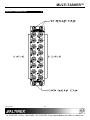
PRODUCT DESCRIPTION ................................... 4
APPLICATION DIAGRAM ..................................... 5
DIAGRAM 1: TYPICAL CONFIGURATION .................5
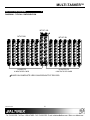
DIAGRAM 2: OUTPUT CARD SWITCHES .................6
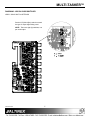
DIAGRAM 3: ADD ON CARD SWITCHES ..................7
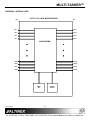
DIAGRAM 4: INTERNAL VIEW ..................................8
INSTALLING YOUR MULTI-TASKER™ ............... 9
OPERATION .......................................................... 9
RS-232 CONTROL ......................................................9
DESCRIPTION OF COMMANDS ................................9
SUMMARY OF COMMANDS ....................................23
MENU MODE.............................................................23
TROUBLESHOOTING GUIDE ............................ 27
LED IS NOT LIT .........................................................27
LED IS BLINKING RED..............................................27
NO DISPLAY .............................................................28
ALTINEX POLICY................................................ 28
LIMITED WARRANTY/RETURN POLICY.................28
CONTACT INFORMATION .......................................28
400-0351-003
1
MULTI-TASKER™
PRECAUTIONS / SAFETY WARNINGS
•
1
Please read this manual carefully before using your
MT107-100. Keep this manual handy for future
reference. These safety instructions are to ensure
the long life of your MT107-100 and to prevent fire
and shock hazard. Please read them carefully and
heed all warnings.
1.1 GENERAL
•
Qualified ALTINEX service personnel, or their
authorized representatives must perform all
service.
1.2 INSTALLATION
•
To prevent fire or shock, do not expose this unit
to rain or moisture. Do not place the MT107-100
in direct sunlight, near heaters or heat radiating
appliances, or near any liquid. Exposure to
direct sunlight, smoke, or steam can harm
internal components.
• Handle the MT107-100 carefully. Dropping or
jarring can damage the card.
• Do not pull the cables that are attached to the
MT107-100.
• Insert the card carefully into the slots of the
Multi-Tasker™ without bending any edges.
1.3 CLEANING
•
•
Clean only the connector area with a dry cloth.
Never use strong detergents or solvents, such
as alcohol or thinner. Do not use a wet cloth or
water to clean the card. Do not clean or touch
any component or PCB.
1.4 FCC / CE NOTICE
•
This device complies with part 15 of the FCC
Rules. Operation is subject to the following two
conditions: (1) This device may not cause
harmful interference, and (2) this device must
accept any interference received, including
interference that may cause undesired
operation.
400-0351-003
2
This equipment has been tested and found to
comply with the limits for a Class A digital
device, pursuant to Part 15 of the FCC Rules.
These limits are designed to provide reasonable
protection against harmful interference when the
equipment is operated in a commercial
environment. This equipment generates, uses,
and can radiate radio frequency energy and, if
not installed and used in accordance with the
instruction manual, may cause harmful
interference to radio communications. Operation
of this equipment in a residential area is likely to
cause harmful interference in which case the
user will be required to correct the interference
at their expense.
Any changes or modifications to the unit not
expressly approved by ALTINEX, Inc. could void
the user’s authority to operate the equipment.
MULTI-TASKER™
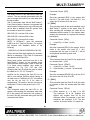
ABOUT YOUR MT107-100
2
TECHNICAL SPECIFICATIONS
MT107–100
FEATURES/
DESCRIPTION
GENERAL
Inputs
Input Connectors
Outputs
Output Connector
Compatibility
64 X 64 Matrix Engine
The MT107-100 is a modular, matrix engine
configurable to switch video and audio signals from
8x8 to 64x64 inputs and outputs. The MT107
engine's basic configuration provides 8 video inputs
and 8 video outputs. Additional inputs and outputs
may be added by connecting expansion input and
output cards to the engine with special ribbon
cables. Input and output connector cards are
available for video and audio with BNC or terminal
blocks. Video input signals are buffered to the
matrix system through individual Differential
Receiver Amplifiers. The video amplifier can be
used for either analog or sync video signals.
Signal types
Signal resolution
MT107-100
8
8 BNC Female
8 BNC Female
RGBHV,RGBS,RGsB,
Composite Video, Sync
VGA through UXGA
Table 1. MT107-100 General
MECHANICAL
Enclosure Slots Required
Base Configuration
Enclosure Slots Required
Add On Cards
Weight
Connector Panel
T° Operating
T° Maximum
Humidity
MTBF (calc.)
All functions of the Matrix Engine are controlled
with the Multi-Tasker™ RS-232 control language
and maintained through the Multi-Tasker™
enclosure. The engine may be controlled using the
RS-232 bus, or by preprogramming the
Multi-Tasker™ enclosure.
Programming the
enclosure eliminates the need for an external
computer to control the Matrix Engine.
MT107-100
2 Slots
1 Slot per Card
1.1 lb (0.5 kg)
Black Anodized
10°C-50°C
75°C
90% non-condensing
50,000 hrs
Table 2. MT107-100 Mechanical
A signal detection circuit is present for control
purposes and allows feedback about signal
availability to external control systems. Vertical
Interval Switching assures smooth switching
between different video channels. The MT107-100
matrix engine can be configured easily before
shipping or on site to meet customer specifications.
ELECTRICAL
Video Input Signals
Impedance Analog
Analog Signal Level
Sync Input Signals
Impedance
Signal Level
Output Video Signals
Impedance Analog
Gain
Output Sync Signals
Impedance
Signal Level
The basic matrix configuration of 8x8 inputs and
outputs can easily be increased in steps of eight
due to the modular design of the matrix engine and
expansion cards. Although the outputs are parallel
wired, each output is individually controlled and
may be placed into a high-impedance state. The
high-impedance state allows the individual outputs
to share common signal paths without loss of
signal integrity or loading of the output circuitry.
Table 3. MT107-100 Electrical
The video output option is the default configuration
for analog or digital video, but with simple switching
the Sync option may be employed.
400-0351-003
3
3
MT107-100
R,G,B
75 Ohms
1.5V p-p max.
H,V
10 kOhm
3 - 5 Volts TTL
75 Ohms
1.05
75 Ohms
4.5 Volts TTL
MULTI-TASKER™
PRODUCT DESCRIPTION
400-0351-003
4
4
MULTI-TASKER™
APPLICATION DIAGRAM
5
DIAGRAM 1: TYPICAL CONFIGURATION
MT107-100
MT107-201
MT107-301
64 INPUTS
64 OUTPUTS
8 INPUTS PER CARD
8 OUTPUTS PER CARD
-BASED ON COMPOSITE VIDEO SOURCES/OUTPUT DEVICES.
400-0351-003
5
MULTI-TASKER™
DIAGRAM 2: OUTPUT CARD SWITCHES
VIDEO / SYNC SWITCH SETTINGS
Set the VIDEO/SYNC switch to match the
type of output signal being used.
NOTE: There are eight (8) switches, one
per output.
400-0351-003
6
MULTI-TASKER™
DIAGRAM 3: ADD ON CARD SWITCHES
VIDEO / SYNC SWITCH SETTINGS
Set the V/S (Video/Sync) switch to match
the type of output signal being used.
NOTE: There are eight (8) switches, one
per each output.
400-0351-003
7
MULTI-TASKER™
DIAGRAM 4: INTERNAL VIEW
MT107-100, 64X64 MATRIX ENGINE
IDC
IDC
IN1
OUT1
IN2
OUT2
IN3
OUT3
IN4
OUT4
64X64 MATRIX
IN61
OUT61
IN62
OUT62
IN63
OUT63
IN64
OUT64
MAIN
MP
400-0351-003
POWER
SUPPLY
8
MULTI-TASKER™
INSTALLING YOUR MULTI-TASKER™
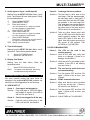
7.1.1 RS-232 INTERFACE
6
Step 1. Decide what type of output signal is
required for each output. (Video or Sync)
The RS-232 commands, for the MT107-100, are
in a simple ASCII character format.
Step 2. Set the jumpers on the output card(s) as
necessary. See DIAGRAM 2 and
DIAGRAM 3 for switch locations.
1.
Square brackets “[
command.
2.
Use uppercase letters for all commands.
Step 3. Determine the number of slots required
for the MT107-100, including the add-on
cards. The base MT107-100 requires two
slots, and a fully loaded 64X64 Matrix
engine requires 16 slots.
Commands that end in "S" will be saved into
memory. Commands not ending in "S" will be
executed but not restored when the system is
reset or powered off and then power on.
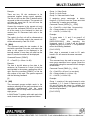
7.2 DESCRIPTION OF COMMANDS
Step 4. Carefully, slide the MT107-100 into
available slots in the Multi-Tasker™
Enclosure in order to connect to the bus.
Make sure that the MT107-100 cards fits
into place.
Each command consists of
Function, Card ID, and Unit ID.
parts:
Example: [VERC3U2]
VER = Function
C3
= Card ID or Group ID
U2
= Unit ID
For Function, see a detailed explanation under
each command description.
Step 7. Connect a cable from the video source to
one of the input connectors on the
MT107-100 and one of the output
connectors to a display device through a
cable.
The Card ID is an assigned value. It is equal to
the enclosure slot number in which the card is
installed. The value can range from 1 to 4 up to
1 to 20 depending on the enclosure.
Step 8. Starting from the left, identify the slot
number where the MT107-100 INPUT
CONNECTOR CARD is plugged into the
Enclosure (left slot of the Engine). Make
note of the slot number. It is required for
RS-232 control.
Card ID 0 (C0) is used for the controller. See
the MT100-100 User’s Guide for details.
The Group ID is a number representing a group
of cards defined with the [WR] command. When
using the Group ID, all cards in the group will
perform the given instruction.
7
7.1 RS-232 CONTROL
Changing the position of a card will significantly
affect the commands recorded on software
definitions or third party control systems.
The MT107-100 has many advanced remote
control capabilities, which are accessible
through standard RS-232 communication. The
actual controlling can be accomplished through
a computer control system or any other device
capable of sending RS-232 commands.
400-0351-003
three
[ Function , Card ID , Unit ID ]
Step 6. Secure the cards to the Multi-Tasker™ by
tightening the retainer screws located on
the top and bottom of each card.
OPERATION
]” are part of the
The Unit ID has a value from 0 to 9. Unit ID 0
should be used for single unit operation. If the
Unit ID is set to zero, each command may be
used without Ui. Use the command [SETU0],
as explained in the MT100-100 User’s Guide.
9
MULTI-TASKER™
Example:
Description of Feedback:
[VERC3]: For Unit ID Zero
[VERC3Ui]: For Unit ID other than Zero
[VERC3]: Equivalent to [VERC3U0]
The first line shows Vertical Interval Switching is
off. The second show the matrix in non-blocking
mode. The next line lists the matrix number, 1 to
9. The next five lines describe the properties of
the matrix. The remaining lines are channel
specific.
FEEDBACK:
Depending on the firmware revision in your front
panel, commands that are accepted will return
the following feedback:
Matrix 1 is the active matrix. Matrix 1 is a 64X64
matrix with no input offset and no output offset.
The channel width is one and the channel
spacing is zero. All 64 channels are ON and
each input is connected to its corresponding
output.
[]
If there is a problem with the command, the
feedback will be as follows:
[ERR001]
2. [CLR]
If the command issued is designed to provide
feedback, then only the requested feedback will
be returned, not the [ ]’s. For example, the
status command [Cn] will provide feedback of
the card settings and not return the [ ]’s.
This command resets the MT107-100 to the last
saved matrix configuration. It does not affect the
blocking mode or VIS settings.
Command Format: [CLRCnUi]
Cn = Card ID (n = slot # from 1 to max slots)
1. [C]
This command displays the active matrix
configuration settings.
Ui = Unit ID (i = # from 0 to 9)
Command Format: [CnUi]
Clear the MT107-100 with Engine Card in slot
#5. To do this, send the command [CLRC5].
Example:
Cn = Card ID (n = slot # from 1 to max slots)
3. [TEST]
Ui = unit ID (i = # from 0 to 9)
This command performs a series of internal
tests on the matrix engine memory.
Example:
There is an MT107-100 in slot #5 of Unit ID 3.
Command Format: [TESTCnUi]
Sending the command [C5U3], will return
feedback similar to the following:
Cn = Card ID (n = slot # from 1 to max slots)
Ui = Unit ID (i = # from 0 to 9)
VIS:OFF
Matrix mode:non-blocking
Matrix number:1
Matrix size:64X64
Input offset:0
Output offset:0
Channel width:1
Channel space:0
Ch1 In1 Out1 ON
Ch1 In1 Out2 ON
…
Ch1 In64 Out64 ON
400-0351-003
Upon completion, the system will display the
results. This feedback will be similar to the
following, otherwise failures will be indicated.
MEMORY IC TEST RESULTS:
MEMORY IC PASS
4. [VER]
This command displays the firmware version
and model number for the MT107-100 card.
10
MULTI-TASKER™
Command Format: [VERCnUi]
Matrix Configuration Definitions:
Cn = Card ID (n = slot # from 1 to max slots)
1.
Matrix ID: A total of 9 matrix configurations
may be defined in a single engine. Once
saved, the configuration may be recalled by
number without having to redefine the
settings.
2.
Number of Inputs: The number of inputs in
the configuration, or eight times the number
of input cards installed is the maximum.
Ui = Unit ID (i = # from 0 to 9)
Example:
There is an MT107-100 card is in slot #5. Send
the command [VERC5] and the Multi-Tasker™
will return feedback as:
[ MT107-100 690-0159-004 C05]
MT107-100 = the card model
690-0159-004 = the software version
C05
= card ID number
5. [MAT]
If the channel width and spacing are
different, then the number of inputs will be
lower. For example, in a 32X32 matrix with
a width of 4 and a spacing of 7, the number
of inputs would be 8. See Example 1 in this
section for specifics.
This command sets the matrix configuration for
the matrix engine.
3.
Number of Outputs: Same as for Inputs.
Command Format:
4.
Input Offset: The offset defines where Input
#1 will be in reference to Input #1 on the
Input Connector Card. Typically, Input #1
would be Input #1 of the base card.
However, an offset of 8 will make Input #1
start at the actual Input #9.
5.
Output Offset: Same as for Input Offset.
6.
Channel Width: The number of signals per
channel. The default width is one.
7.
Channel Spacing: The default spacing is
zero. When dealing with multi-cabled
signals, the spacing is typically one less
than the number of inputs on a single card.
[MATj;mm;ww;xx;yy;kk;ll;CnUiS]
j
= Matrix ID (j = # from 1 to 9)
The following properties MUST be entered in
two (2) digit format.
mm = Inputs (2 digit # from 01-64)
zz = Outputs (2 digit # from 01-64)
xx = Input Offset (2 digit # from 00-99)
yy = Output Offset (2 digit # from 00-99
kk = Channel Width (2 digit # from 01-32)
ll
= Channel Spacing (2 digit # from 00-31)
Cn = Engine Card Slot Number
(The slot number of the LEFT card of the
engine is the Engine Card Slot number.)
Ui = Unit ID (i = # from 0 to 9)
S = Save
This property saves the configuration to
Matrix ID memory and will allow the
configuration to be recalled any time,
even after power up or reset.
Adding the 'S' to the command will also
make the matrix configuration the default
at power up. The last configuration ID
created and saved will be the default at
power up.
In order to change the power up default
without having to redefine the settings,
see the command [MjCnS].
400-0351-003
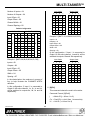
Matrix Assembly Layout:
Input cards count from the
Connector Card, RIGHT to LEFT.
main
Input
Output cards count from the main Output
Connector Card, LEFT to RIGHT.
The following table illustrates the card and
channel numbering. The channel numbering is
based upon the default configuration. The
default configuration is configured as a 64X64
Matrix with the following settings:
11
MULTI-TASKER™
Input Cards
Number of Inputs = 64
Number of Outputs = 64
Input Offset = 00
Output Offset = 00
Output Cards
4
3
2
1
1
2
3
4
1d
1c
1b
1a
1a
1b
1c
1d
2d
2c
2b
2a
2a
2b
2c
2d
3d
3c
3b
3a
3a
3b
3c
3d
Channel Width = 01
4d
4c
4b
4a
4a
4b
4c
4d
Channel Spacing = 00
5d
5c
5b
5a
5a
5b
5c
5d
6d
6c
6b
6a
6a
6b
6c
6d
7d
7c
7b
7a
7a
7b
7c
7d
8d
8c
8b
8a
8a
8b
8c
8d
Default Configuration
INPUT CARDS
8
…
Add
On
3
2
OUTPUT CARDS
1
1
2
3
Add Add Base Base Add Add
On On Unit Unit On On
57
17 9
58
18 10
ç
59
19 11
60
20 12
61
21 13
62
22 14
63
23 15
64
24 16
1
2
3
4
5
6
7
8
1
2
3
4
5
6
7
8
9
10
11
12
13
14
15
16
…
8
Add
On
Example 2: [MAT1;16;16;00;00;02;00;C5S]
17
57
18
58
19 è 59
20
60
21
61
22
62
23
63
24
64
Inputs = 16
Outputs = 16
Input Offset = 00
Output Offset = 00
Width = 02
Spacing = 00
In this configuration, if Input 1 is connected to
Output 16, the entire channel, 1a and 1b, will be
switched to outputs 16a and 16b respectively.
Example 1: [MAT1;08;08;00;00;04;07;C5S]
Input Cards
Inputs = 08
Outputs = 08
Input Offset = 00
Output Cards
4
3
2
1
1
2
3
4
13a
9a
5a
1a
1a
5a
9a
13a
13b
9b
5b
1b
1b
5b
9b
13b
14a 10a
6a
2a
2a
6a
10a 14a
Output Offset = 00
14b 10b
6b
2b
2b
6b
10b 14b
Width = 04
15a 11a
7a
3a
3a
7a
11a 15a
Spacing = 07
15b 11b
7b
3b
3b
7b
11b 15b
16a 12a
8a
4a
4a
8a
12a 16a
16b 12b
8b
4b
4b
8b
12b 16b
In the charts below, the cards are in groups of
four to help illustrate the CHANNEL WIDTH
definition.
In this configuration, if Input 1 is connected to
Output 8, the entire channel, 1a, 1b, 1c and 1d,
will be switched to outputs 8a, 8b, 8c and 8d
respectively.
6. [MjCn]
This command selects the matrix to be active.
Command Format: [MjCnUi]
j
= Matrix ID (j = # from 1 to 9)
Cn = Card ID (n = slot # from 1 to max slots)
Ui = Unit ID (i = # from 0 to 9)
400-0351-003
12
MULTI-TASKER™
Example:
Command Format: [OFFmmCnUi]
There is a matrix engine in slot #5. Send the
command [M1C5] to recall matrix configuration
#1 of card 5.
mm = Output Number (mm = # from 01 to 64)
Cn = Card ID (n = slot # from 1 to max slots)
Ui = Unit ID (i = # from 0 to 9)
RECALL MATRIX ON POWER UP
Example:
In order to make configuration #1 of card 5 the
default configuration when power is turned on,
send the [M1C5S]. The feedback will be:
There is an MT107-100 in slot #5. Turn OFF
only output number 01 by sending the command
[OFF01C5].
[SAVEDC05]
10. [OFFCn]
7. [ONmmCn]
This command turns off all outputs for the
current matrix.
This command turns on a single output for the
current matrix.
Command Format: [OFFCnUi]
Command Format: [ONmmCnUi]
Cn = Card ID (n = slot # from 1 to max slots)
mm = Output Number (mm = # from 01 to 64)
Ui = Unit ID (i = # from 0 to 9)
Cn = Card ID (n = slot # from 1 to max slots)
Example:
Ui = Unit ID (i = # from 0 to 9)
There is an MT107-100 in slot #5. Turn OFF
ALL outputs by sending the command
[OFFC5].
Example:
There is an MT107-100 in slot #5. Turn ON
output number 64 by sending the command
[ON64C5].
11. [ImmOxxCn]
This command connects a single input to a
single output in the current matrix configuration.
8. [ONCn]
This command turns on all outputs for the
current matrix.
Command Format: [ImmOxxCnUi]
mm = Input (2 digit # from 01 to 64)
xx = Output (2 digit # from 01 to 64)
Cn = Card ID (n = slot # from 1 to max slots)
Ui = Unit ID (i = # from 0 to 9)
Command Format: [ONCnUi]
Cn = Card ID (n = slot # from 1 to max slots)
Ui = Unit ID (i = # from 0 to 9)
Example:
Example:
Connect Input 22 to Output 32 of the engine in
slot #5. Send the command [I22O32C5] and
Input 22 will be connected to Output 32.
There is an MT107-100 in slot #5. Turn ON ALL
outputs by sending the command [ONC5].
9. [OFFmmCn]
12. [ImmOÜCn]
This command turns off a single output for the
current matrix.
This command connects a single input to all the
outputs in the current matrix configuration.
Command Format: [ImmOÜCnUi]
mm = Input (2 digit # from 01 to 64)
Cn = Card ID (n = slot # from 1 to max slots)
Ui = Unit ID (i = # from 0 to 9)
400-0351-003
13
MULTI-TASKER™
Example:
Command Format: [OUTmmSCnUi]
Connect Input 07 of the engine in slot #5 to all
the outputs for that engine in its current matrix
configuration. To do this, send the command
[I07OÜC5].
mm = Output Number (mm = # from 01 to 64)
Cn = Card ID (n = slot # from 1 to max slots)
Ui = Unit ID (i = # from 0 to 9)
Example 1:
13. [INmmSCn]
There is an MT107-100 in slot #5. Input 1 is
connected to all outputs. Send the command
[OUT01SC5] and receive the following
feedback:
This command returns all the output numbers
that are connected to an input and enabled.
Command Format: [INmmSCnUi]
mm = Input Number (mm = # from 01 to 64)
[1C05]
Cn = Card ID (n = slot # from 1 to max slots)
Example 2:
Ui = Unit ID (i = # from 0 to 9)
There is an MT107-100 in slot #5. Input 64 is
connected to Output 64, but Output 64 is
disabled. Send the command [OUT64SC5] and
receive the following feedback:
Example 1:
There is an MT107-100 in slot #5. Input 1 is
connected to Output 1. Send the command
[IN01SC5] and receive the following feedback:
[0C05]
[1C05]
15. […P] – Path
Example 2:
This command will set the path for the output,
but it is not active until the switch command,
[SW], is executed. Commands ending in "P" are
not executed immediately. The path for multiple
cards or the same card can be preset.
There is an MT107-100 in slot #5. Input 1 is
connected to all outputs and all outputs are
enabled. Send the command [IN01SC5] and
receive the following feedback:
Example 1:
[1,2,3,4,5,6,7,8,9,10,11,12,13…,64C05]
Example 3:
An engine is in slot #5. Enable outputs 1 and 2
simultaneously, with the following commands:
There is an MT107-100 in slot #5. Input 1 is
connected to all outputs, but only outputs 1-10
are enabled. Send the command [IN01SC5] and
receive the following feedback:
[ON1C5P]
[ON2C5P]
[SW]
Example 2:
[1,2,3,4,5,6,7,8,9,10C05]
An engine is in slot #5 and a regular video
switcher is in slot #1. Connect the engine’s
Input 1 to Output 64 while simultaneously
disabling the card in slot #1. In order to
accomplish this, send the following commands:
14. [OUTmmSCn]
This command returns the input number that is
connected to an output if the output is enabled.
[IN1O64C5P]
[OFFC1P]
[SW]
400-0351-003
14
MULTI-TASKER™
Command Format, One Output: [SDOmmCnUi]
Command Format, All Outputs: [SDOCnUi]
16. [SW] – Switch
The switch command immediately connects
inputs and outputs, which were previously set
with the PATH command on this card or any
other cards in the Multi-Tasker™ enclosure.
See the PATH command for examples.
mm = Output (2 digit # from 01 to 64)
Cn = Card ID (n = slot # from 1 to max slots)
Ui = Unit ID (i = # from 0 to 9)
Feedback Format: [OxxSyCn]
21. [SDI]
xx = Input Number ( 2 digits, 01-99 )
y = Signal Present (1=signal, 0=no signal)
Cn = Card ID (n = slot # from 1 to max slots)
Example 1:
This command is used to detect if there is a
signal present on one input or all inputs.
Command Format, One Input:
Command Format, All Inputs:
[SDImmCnUi]
[SDICnUi]
Check for a signal on Output 1 of the engine in
slot #5 by sending the command [SDO01C5]. If
a signal present on Output 1, the following
feedback will be returned:
mm = Input (2 digit # from 01 to 64)
Cn = Card ID (n = slot # from 1 to max slots)
Ui = Unit ID (i = # from 0 to 9)
[O01S1C05]
Feedback Format: [IxxSyCn]
Example 2:
xx = Input Number ( 2 digits, 01-99 )
y = Signal Present (1=signal, 0=no signal)
Cn = Card ID (n = slot # from 1 to max slots)
Check for a signal on all outputs of the engine in
slot #5 by sending the command [SDOC5]. In
this case, there is a signal present on Output 1,
but the rest have no signals. The system will
return the following feedback:
Example 1:
Check for a signal on Input 1 of the engine in
slot #5 by sending the command [SDI01C5]. If
there is a signal present on Input 1, the system
will return the following feedback:
[O01S1C05] [O02S0C05] [O03S0C05] [O04S0C05]
[O05S0C05] [O06S0C05] [O07S0C05] [O08S0C05]
… [O63S0C05] [O64S0C05]
23. [VIS]
[I01S1C05]
Vertical Interleave Switching (VIS) - This
command activates and deactivates the VIS
feature.
Example 2:
Check for a signal on all inputs of the engine in
slot #5 by sending the command [SDIC5]. In this
case, there is a signal on Input 1, but the rest
have no signals. The system will return the
following feedback:
If the VIS feature is active, and no switching
pulse is present within 20mS, switching will be
performed on a regular basis.
Command Format: [VIS=pCnUi]
[I01S1C05] [I02S0C05] [I03S0C05] [I04S0C05]
[I05S0C05] [I06S0C05] [I07S0C05] [I08S0C05]
… [I63S0C05] [I64S0C05]
p
0 = VIS is turned OFF
1 = VIS is turned ON
22. [SDO]
Cn = Card ID (n = slot # from 1 to max slots)
Ui = Unit ID (i = # from 0 to 9)
This command is used to detect if there is a
signal present on one output or all outputs. The
system will return feedback along the following:
400-0351-003
= Variable for activation/deactivation of VIS
Example:
Turn OFF the VIS for the engine card in
slot #5. Send the command [VIS=0C5]. Then
check the status of the VIS circuit with the next
command, [TVIS].
15
MULTI-TASKER™
Connecting a single output will result in the
output being switched and enabled. For
example, with blocking on, sending the
command [I22O22C5] will result in Input 22
being connected to Output 22 and Output 22 will
be enabled.
24. [TVIS]
This command is used to test if the VIS circuit is
ON or OFF.
Command Format: [TVISCnUi]
Cn = Card ID (n = slot # from 1 to max slots)
Ui = Unit ID (i = # from 0 to 9)
26. [HELP]
Feedback Format: [VISxSyCn]
x
y
This command displays information available for
the Multi-Tasker interface commands.
= VIS on/off (1=ON, 0=OFF)
= Signal Present (1=signal, 0=no signal)
Command Format: [HELPCnUi]
Example:
Cn = Card ID (n = slot # from 1 to max slots)
Test the VIS circuit for the engine in
slot #5. Send the command [TVISC5] and the
system will return the following feedback if VIS
is on and a signal is detected:
Ui = Unit ID (i = # from 0 to 9)
Example:
In order to display the RS-232 commands
available for the MT107-100 in slot #5, send the
command [HELPC5]. The commands along with
a brief description will be displayed.
[VIS1S1C05]
25. [MODE]
This command sets the matrix switch mode to
Blocking or Non-Blocking. See the following
examples for command functionality.
27. […S] – Save
This command will save the configuration
command being sent in memory. Send the
command [I1O8C5S] to the engine. After reset
or power up, Input 1 will be connected to
Output 8 of the engine card slot #5.
Command Format: [MODEmCnUi]
m
= 1 = ON, 0 = OFF
Cn = Card ID (n = slot # from 1 to max slots)
28. [?Ui]
Ui = Unit ID (i = # from 0 to 9)
This command will return general information
about the Multi-Tasker™ and cards installed in
the unit.
Example: NON-BLOCKING
Send the command [MODE0C5] to turn off
matrix switch blocking for the engine in slot #5.
Next, send the command [I1O*C5] to connect
input 1 to all outputs. In non-blocking mode, the
inputs will be switched and the outputs will be
enabled.
Command Format: [?Ui]
Ui = Unit ID (i = from 0 to 9)
Example:
A Multi-Tasker™ with Unit ID #1 has a
panel with part number MT101-101
contains an MT103-122, MT103-123
MT107-100. Send the command [?U1]
receive the following feedback:
Example: BLOCKING ON
Send the command [I1O*C5] to connect input 1
to all outputs. With blocking on, input 1 will be
connected to all outputs, but only output 1 will
be enabled. The remaining outputs will need to
be enabled using the [ON] command.
400-0351-003
16
front
and
and
and
MULTI-TASKER™
[(MT101-101U1)(MT103-122C01)
(MT103-123C02)(MT107-100C03)]
FEEDBACK DESCRIPTION
See Figure 1 for details on Matrix Configuration,
Connections and Input Volume.
MT101-101U1 = Panel Number and Unit ID
MT103-122C1 = An MT103-122 is in slot 1
MT103-123C2 = An MT103-123 is in slot 2
MT107-100C3 = An MT107-100 is in slot 3
[
= Begin Feedback
(MT107-100C05)
= Model Number
(VR690-0159-004C05)
= Firmware Version
(ME1646400000100C05) = Configuration
29. [?CnUi]
(MA010101…C05)
= Connections 01-16
This command will return general information
about the card and its status. It is a function of
both the card and the front panel and is only
available with Multi-Tasker™ Front Panel
systems that have the following firmware:
(MB010101…C05)
= Connections 17-32
(MC010101…C05)
= Connections 33-48
(MD010101…C05)
= Connections 49-64
(ON111100…C05)
= Output Status 01-32
690-0122-015
= Version 015 or later.
(OL000000…C05)
= Output Status 33-64
690-0123-004
= Version 004 or later.
(VV0C05)
= VIS (1=On, 0=Off)
690-0124-018
= Version 018 or later.
(MM0C05)
= Blocking (1=On, 0=Off)
NOTE: In MTSetup™, send the command
[VER] from the Terminal Window. The system
will respond with feedback similar to the
following:
(VA323232…32C05)
= Input Volume 01-16
(VB323232…32C05 )
= Input Volume 17-32
(VC323232…32C05 )
= Input Volume 33-48
[690-0122-015 690-0123-004 690-0124-018]
(VD323232…32C05 )
= Input Volume 49-64
]
= End Feedback
Check the last three digits against the numbers
above to determine if the option is available.
NOTE: The Input Volume settings apply to
audio cards only.
Command Format: [?CnUi]
Cn = Card ID (n = # from 1 to max slots)
Ui = Unit ID (i = from 0 to 9)
30. [STA1]
This command enables automatic feedback
from the card and front panel. The command
affects any card with auto-feedback capability,
not just the MT107-100. The default at power on
or reset is STA0, OFF. The feedback is initiated
by a change in the card’s status or settings. This
type of feedback is an unsolicited response and
the feedback is enclosed in parentheses, “( )”.
Example:
The MT107-100 in slot #5 has Input 1
connected to all outputs. Outputs 1-4 are on
and 5-64 are off. Send the command [?C5] to
receive the feedback status.
The feedback is enclosed in brackets and each
data field begins with a '+' and ends with the slot
number (ex: C05).
400-0351-003
Command Format: [STA1]
17
MULTI-TASKER™
Feedback Prefix Definitions:
31. [STA0]
MT
=
Model Number
VR
=
Firmware Version
ME
=
Input Selected
MA
=
Output Connections 01-16
This command disables automatic feedback
from the card and front panel. The command
affects any card with auto-feedback capability,
not just the MT107-100 The default at power on
or reset is STA0, OFF.
MB
=
Output Connections 17-32
Command Format: [STA0]
MC
=
Output Connections 33-48
MD
=
Output Connections 49-64
ON
=
Output Status 01-32
OL
=
Output Status 33-64
VV
=
VIS On/OFF
MM
=
Blocking ON/OFF
VA
=
Input Volume 01-16
VB
=
Input Volume 17-32
VC
=
Input Volume 33-48
This command turns the feedback delay on or
off. It is necessary when installing some newer
cards in older systems. If the system does not
receive all of the feedback from the card, the
card may be communicating too fast. This
command will slow down the card's
communication rate.
VD
=
Input Volume 49-64
Command Format: [FBDmCnUi]
The Input Volume settings apply to
audio cards only.
m
NOTE:
32. […F] – FEEDBACK
After processing a command, an OK or
[ERR001] will be returned as feedback if "F" is
included at the end of a command string.
33. [FBD]
Cn = Card ID (n = # from 1 to max slots)
Example 1:
Command = [ON1C5]
Feedback = (ON11110000…C05)
ON
= Output Status
11110000 = Output ON/OFF
Outputs 1-4 are on, 5-8 are off
and 9-16 are not shown.
C05
= Card slot number
Ui = Unit ID (i = from 0 to 9)
Example:
The command [HELPC5] is sent to the card in
slot #5. Some of the HELP file is displayed on
the screen, but most is missing. Send the
command [FBD1C5] to slow down the rate at
which the card sends feedback to the system.
Example 2:
Command =
Feedback =
400-0351-003
= Delay (0= no delay, 1= delay 100mS)
[MODE=0C5]
(MM0C05)
MM = Blocking Mode
0
= Non-Blocking
C05 = Card slot number
18
MULTI-TASKER™
SAMPLE FEEDBACK
MATRIX CONFIGURATION
[(MT107-104C05)(VR690-0159-004C05)
(ME1646400000100C05)
(MA01010101010101010101010101010101C05)
(MB01010101010101010101010101010101C05)
(MC01010101010101010101010101010101C05)
(MD01010101010101010101010101010101C05)
(ON11110000000000000000000000000000C05)
(OL00000000000000000000000000000000C05)
(VV0C05)(MM0C05)
(VA32323232323232323232323232323232C05)
(VB32323232323232323232323232323232C05)
(VC32323232323232323232323232323232C05)
(VD32323232323232323232323232323232C05)]
Matrix Number
Inputs
Outputs
Input Offset
Output Offset
Channel Width
Channel Spacing
+ME1 646400000100 C05
MATRIX CONNECTIONS
INPUT VOLUME SETTINGS
Output 1 to Input 1
Output 2 to Input 1
Output 3 to Input 1
Output 4 to Input 1
...
Output 16 to Input 1
Input 1 Volume
Input 2 Volume
Input 3 Volume
Input 4 Volume
...
Input 16 Volume
MA 01010101...01 C05
VA 32323232...32 C05
Output 17 to Input 1
Output 18 to Input 1
Output 19 to Input 1
Output 20 to Input 1
...
Output 32 to Input 1
Input 17 Volume
Input 18 Volume
Input 19 Volume
Input 20 Volume
...
Input 32 Volume
MB 01010101...01 C05
VB 32323232...32 C05
Output 33 to Input 1
Output 34 to Input 1
Output 35 to Input 1
Output 36 to Input 1
...
Output 48 to Input 1
Input 33 Volume
Input 34 Volume
Input 35 Volume
Input 36 Volume
...
Input 48 Volume
MC 01010101...01 C05
VC 32323232...32 C05
Output 49 to Input 1
Output 50 to Input 1
Output 51 to Input 1
Output 52 to Input 1
...
Output 64 to Input 1
Input 49 Volume
Input 50 Volume
Input 51 Volume
Input 52 Volume
...
Input 64 Volume
MD 01010101...01 C05
VD 32323232...32 C05
OUTPUT STATUS
Output 1 ON
Output 2 ON
Output 3 ON
Output 4 ON
...
Output 32 OFF
Output 33 OFF
Output 34 OFF
Output 35 OFF
Output 36 OFF
...
Output 64 OFF
ON 111100000 ... 0C05
OL 000000000 ...0 C05
Figure 1
400-0351-003
19
MULTI-TASKER™
Command Format: [RSI]
CARD ID COMMANDS
The default Card ID is the same as the card slot
number. The next several commands allow the
user to change the Card ID to a value other than
the slot number.
Example:
Send the command [RSI] to the system with
Unit ID 0. The card in slot 1 will have ID 1, the
card in slot 2 will have ID 2 and so on.
The ID commands work with all Multi-Tasker™
Front Panel systems. However, front panels that
have firmware releases prior to the following will
not be able to address Card ID's greater than
the number of slots in the system:
35. [SIDn]
690-0123-005 = Version 005 or later.
This command sets all the cards installed in the
Multi-Tasker™ system to the same Card ID.
After sending this command, all cards will be
addressed with the same ID. Use caution when
sending this command to a system with multiple
board types.
690-0124-019 = Version 019 or later.
Command Format: [SIDn]
NOTE: In MTSetup™, send the command
[VER] from the Terminal Window. The system
will respond with feedback similar to the
following:
n
690-0122-019 = Version 019 or later.
Example:
Send the command [SID1] to the system. All the
cards in the system now have ID 1. Any
commands that are sent to Card ID 1 will be
received and executed by each card.
[690-0122-015 690-0123-005 690-0124-019]
Check the last three digits against the numbers
above to determine if the Card ID commands
can address all 99 Card ID's.
36. [SIDnCi]
This command sets the Card ID of a single card
to a number from 1 to 99.
Some cards require more than one slot in the
Multi-Tasker™ system. As an example, some
matrix switcher cards require 4 slots. If there are
5 of these cards installed, they would be
numbered C4, C8, C12, C16 and C20.
Changing the Card ID allows the user to define
the cards as C1, C2, C3, C4 and C5.
Command Format: [SIDnCi]
n = Card ID (n = # from 1 to 99)
Ci = Slot Number (i = # from 1 to max slots)
Example:
Send the command [SID50C10] to set the ID of
the card in slot #10 to an ID of 50.
Another use for changing the Card ID is to be
able to use multiple systems without having to
set each unit to a different Unit ID. All systems
may be left as Unit ID 0 for ease of
programming. The cards in the first unit may be
numbered 1-10 and in the second unit 11-20.
37. [SID+]
This command sets the Card ID of all the cards
in a system to their slot number plus the offset
value.
34. [RSI]
Command Format: [SID+n]
This command resets the card ID's in the
system. After sending this command, each card
ID in the system will match the slot number of
the card. Use this command along with the SID
commands that follow.
400-0351-003
= Card ID (n = # from 1 to 99)
n = Offset amount (n = # from 0 to 99)
The maximum ID is 99. Subtract the
highest slot number from 99 for the
maximum offset. For example, in an 8 slot
enclosure, the maximum is 91. The slot
number, 8, plus the offset, 91, equals 99.
20
MULTI-TASKER™
Example:
Group 1 = Video Cards
Group 2 = Audio Cards
Group 3 = Video and Audio Cards
There are two, 20 slot enclosures to be
connected together during normal operation.
The first unit will use the Card ID defaults which
are equal to their slot numbers. The second unit
will have the same Unit ID, but will have the
card ID's offset by 20.
If assigning group commands to button
functions, it is best to use the "Press and Hold
on Power Up" to make group settings.
Command Format: [WRCn1Cn2…GkUi]
Connect the computer to the second unit only
and send the command [SID+20] to set the ID
of all the cards in the enclosure to their slot
number plus 20. Reconnect both units to the
computer.
Cn = Card ID (n = slot # from 1 to max slots)
Gk = Group number (k = # from 1-8)
Ui = Unit ID (i = # from 0-9)
Example:
To group cards 1, 2, and 3 as group 5 of
Unit ID 1,
send
the
command
[WRC1C2C3G5U1].
After
executing
this
command, cards 1, 2 and 3 will be grouped
together as group 5 of Unit ID 1. The system will
return the following feedback:
The cards in the first unit will be referenced as
Card ID's 1-20 and the cards in the second unit
will be referenced by Card ID's 21-40.
38. [RSN]
This command reads the slot number of the
card with a specified ID number, and returns the
value to the system to be displayed in the
terminal window. If more than one card has the
same ID, each slot number will be displayed.
[G1=C1C2C3]
Now, when a command is sent to G1, each
board in G1 will execute the same command.
40. [RMC]
Command Format: [RSNCi]
This command may be used to remove one or
more group members from a group. Reset the
system after using this command for all changes
to take effect.
Ci = Card ID (i = # from 1 to 99)
Example:
The card in slot #4 takes up four slots in the
enclosure. Its ID was set to 1 since it is the first
card installed in the system, reading from left to
right. Send the command [RSNC1] to find the
slot number of this card. The system responds
with the following feedback:
Command Format: [RMCn1Cn2…GkUi]
Cn = Card ID (n= # from 1 to max slots)
Gk = Group number (k = # from 1-8)
Ui = Unit ID (i = # from 0-9)
Example:
[4]
Group 1 consists of the cards located in slots
numbered 1, 2, 3, 4 and 5. Remove just cards
#4 and #5 from the group by sending the
command [RMC4C5G1]. The system will return
the following feedback:
39. [WR]
This command groups multiple cards in the
enclosure allowing all the group members to be
controlled simultaneously with the same
command. Each unit may define a maximum of
eight groups.
[G1=C1C2C3]
In Multi-Tasker™ systems with audio and video
cards, boards are typically grouped as follows:
400-0351-003
21
MULTI-TASKER™
Example:
41. [RMG]
The cards in slots 1, 2 and 19 are part of
group 5. Read the member data for group 5, by
sending the command [RDG5]. The system will
return feedback as follows:
This command may be used to delete an entire
group, or all groups.
REMOVE A GROUP
Remove all the members from the group,
effectively deleting the group.
[G1=C1C2C19]
Command Format: [RMGkUi]
The feedback shows G1 (Group 1) and then the
cards that make up Group 1. In this case,
Group 1 includes C1, C2 and C19.
Gk = Group number (k = # from 1-8)
43. [CLRG]
Ui = Unit ID (i = # from 0-9)
This command clears the members for a single
group or for all groups. The clear command
restores the cards to default settings and is the
equivalent to sending the [CLR] command to
each individual card.
Example:
Group 1 consists of the cards located in slots
number 1, 2 and 3. Remove all cards from the
group by sending the command [RMG1]. The
system will return the following feedback:
NOTE:
[G1=0]
REMOVE ALL GROUPS
Since this command is sending the [CLR]
command to its group members, each card
will display its own reset message, if any.
Remove all the members from every group,
effectively deleting all groups.
Command Format: [CLRGkUi]
Command Format: [RMGÜUi]
Ui = Unit ID (i = # from 0-9)
Ui = Unit ID (i = # from 0-9)
Example:
Example:
1)
To clear group 1 of Unit ID 0, send the
[CLRG1] command. This command clears
the members for the specified group only.
2)
To clear all groups of Unit ID 1, send the
[CLRGÜU1] command.
Gk = Group ID (k = # from 1-8, or Ü for all)
Group 1 consists of cards 1 and 2. Group 2
consists of cards 1, 2, 3, 4 and 5. Delete all the
groups by sending the command [RMGÜ]. The
system will return the following feedback:
G1-G8:EMPTY
44. [CLM]
42. [RD]
This command removes the members in a
group and leaves the group empty. It is
equivalent to sending the [RMGkUi] command
without card references.
This command reads and then displays the
members in each group.
Command Format: [RDGkUi]
Command Format: [CLMGkUi]
Gk = Group number (k = # from 1-8)
Gk = Group number (k = # from 1-8)
Ui = Unit ID (i = # from 0-9)
400-0351-003
Ui = Unit ID (i = # from 0-9)
22
MULTI-TASKER™
Example:
24) [TVIS]
Test VIS circuit
Group 5 of Unit ID 1 contains the cards in slots
1, 2 and 19. Read the member data for group 5
of Unit ID 1. Send the command [RDG5U1] and
receive the following feedback:
25) [MODE]
Turn blocking on/off
26) [HELP]
Display help file
27) […S]
Save command setting
G1=C1C2C19
28) [?]
Show system cards
Now, clear group 5 by sending the command
[CLMG5U1]. Reread the member data as above
and note the following feedback:
29) [?C]
Show card information
30) [STA1]
Enable auto feedback
[G1=0]
31) [STA0]
Disable auto feedback
32) […F]
Show command feedback
33) [FBD]
Feedback delay on/off
Card Commands
34) [RSI]
Reset Card ID’s
1)
[C]
Receives status of the card
35) [SIDn]
Set all Card ID’s
2)
[CLR]
Reset card to default values
36) [SIDnCi] Set one Card ID
3)
[TEST]
Test internal memory IC's
37) [SID+n]
Set Card ID offset
4)
[VER]
Receives software version
38) [RSN]
Read Card slot number
5)
[MAT]
Matrix Configuration
Group Commands
6)
[MjCn]
Matrix Configuration
39) [WR]
7)
[ONmm] Turns on one output
40) [RMC] Remove members from group
8)
[ON]
41) [RMG] Delete group
9)
[OFFmm] Turns off one output
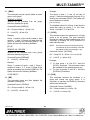
7.3 SUMMARY OF COMMANDS
Turns on all outputs
10) [OFF]
Turns off all outputs
11) [ImmO]
Connect
output
one
12) [ImmO*] Connect
outputs
one
input
input
42) [RD]
Displays group members
43) [CLRG] Clears group members
to
to
one
Show outputs connected to
input
14) [OUT]
Show input
output
15) […P]
Sets the path, preload for [SW]
16) [SW]
Switch preloaded output buffer
21) [SDI]
Input signal detect
22) [SDO]
Output signal detect
23) [VIS]
Vertical Interval Switching (VIS)
connected
44) [CLM]
Delete group
7.4 MENU MODE
all
13) [IN]
400-0351-003
Groups multiple cards
MENU MODE commands are RS-232 commands
that allow virtually the same functionality as
programming commands. Unlike the programming
commands in the previous sections, 7.2 and 7.3,
MENU commands prompt the user to select from a
list of available options. The system then responds
based upon selections made by the user.
to
MENU commands may be issued in response to
prompts from within MTSetup™ or other RS-232
communication software.
23
MULTI-TASKER™
The MENU driven commands are only available
with Multi-Tasker™ Front Panel systems that have
the following firmware:
690-0122-015 = Version 015 or later.
690-0123-004 = Version 004 or later.
690-0124-018 = Version 018 or later.
3.
Reset the system or power the system OFF
and then ON.
4.
In MTSetup™, click the cursor in the
Terminal Window and press the ENTER
key.
5.
The system will interrogate the enclosure
and return a list of cards installed and their
slot locations.
NOTE: In MTSetup™, send the command [VER]
from the Terminal Window. The system will
respond with feedback similar to the following:
Example: 08: MT107-100
[690-0122-015 690-0123-004 690-0124-018]
NOTE: Only cards supporting the MENU
feature will be displayed.
Check the last three digits against the numbers
above to determine if the MENU MODE option is
available.
5.
Find the two digit number representing the
card whose setup requires changing. It will
be the first two characters in the line.
6.
Press the number or letter associated with
the card, and a menu with options available
for that card will appear on the screen. In
the example above, press "08".
7.4.1 MENU COMMAND DEFINITIONS
Refer to section 7.2 for details on card functions
and examples. Following is a cross-reference of
menu mode sections versus programming
commands.
MENU
Matrix Setup
Select Matrix
Out On/Off
Connect
Signal Detect
Version
Status
HELP
Save Settings
WARNING: Do NOT enter any characters
except the ones relating to the desired
menu. Pressing ENTER or RETURN after
"08" will force the system back to the
original prompt.
COMMAND
[MATj;mm;tt;xx;yy;kk;ll;Cn]
[MjCn]
[ONCn], [OFFCn]
[ImmOxxCn], [ImmO*Cn],
[SW]
[SDImmCn], [SDOmmCn]
[VER]
[Cn]
[HELP]
[CnS], [..S]
7.4.2 USING MENU MODE
In order to enter MENU mode, the system
needs to be connected to a computer
running MTSetup™ or other RS-232 control
software.
2.
Insert the card into an empty slot and push
in all the way for a secure fit.
400-0351-003
After selecting the MT107-100 as described
above, the system will prompt for selections
specific to that card.
8.
Read each menu carefully, and continue
selecting keys as prompted for further
functions. (Example prompt: "Key= ")
7.4.3 MENU TYPES
SUGGESTION: Before using the menu mode, it
is best to disable the automatic feedback
feature. The values and current settings will be
displayed in the menu mode, but the automatic
feature will display after each setting change
making the menus difficult to read.
1.
7.
1.
MAIN MENU
The first menu displayed after selecting the
card is the Main Menu. This menu provides
access to the main functions related to the
card. Press the key representing the menu
item for access. A sub menu will appear
next.
24
MULTI-TASKER™
2.
2: SET NUMBER OF INPUTS (04)
SET NUMBER OF INPUTS (01-64)
ESC: GO BACK
KEY=
3: SET NUMBER OF OUTPUTS (04)
SET NUMBER OF OUTPUTS (01-64)
ESC: GO BACK
KEY=
4: SET INPUT OFFSET (00)
SET INPUT OFFSET (00-63)
ESC: GO BACK
KEY=
5: SET OUTPUT OFFSET (00)
SET OUTPUT OFFSET (00-63)
ESC: GO BACK
KEY=
6: SET CHANNEL WIDTH (01)
SET CHANNEL WIDTH (01-32)
ESC: GO BACK
KEY=
7: SET CHANNEL SPACING (00)
SET CHANNEL SPACING (00-31)
ESC: GO BACK
KEY=
8: SAVE CONFIGURATION
ARE YOU SURE?
1: YES
2: NO
ESC: GO BACK
KEY=
2: SELECT MATRIX (1)
1: SELECT MATRIX 1
2: SELECT MATRIX 2
3: SELECT MATRIX 3
4: SELECT MATRIX 4
5: SELECT MATRIX 5
6: SELECT MATRIX 6
7: SELECT MATRIX 7
8: SELECT MATRIX 8
9: SELECT MATRIX 9
ESC: GO BACK
KEY=
SUB MENUS
Each sub menu will display either another
menu (sub menu) or a list of available
options or settings. Press the key
corresponding to the menu choice to
change a setting or select the next menu.
NOTE: Pressing the ESCAPE (ESC) key in
most menus will take you up to the previous
menu without making changes in the
current menu.
7.4.4 MT107-100 MENUS
Following are the menus available to the
MT107-100. The first menu is the Main Menu
only. The second listing is an expansion of all
the menu items available.
The expanded menu contains values that
indicate the current setting or value of a
parameter. The value is usually in parentheses,
or otherwise indicated at the top of a sub menu.
In some areas, additional comments are
provided for clarification and are not part of the
menu feedback.
System prompts requiring specific values are
not shown. See the examples following the
menus for details.
MT107-100 MAIN MENU
1: MATRIX SETUP
2: SELECT MATRIX (1)
3: OUT ON/OFF
4: CONNECT (IN?? OUT??)
5: SIGNAL DETECT
6: VERSION
7: STATUS
8: HELP
9: SAVE CURRENT SETTINGS
ESC: GO BACK
KEY=
MT107-100 EXPANDED MENUS
1: MATRIX SETUP
1: SET MATRIX NUMBER (1)
SET MATRIX NUMBER (1-9)
ESC: GO BACK
KEY=
400-0351-003
25
MULTI-TASKER™
3: OUT ON/OFF
1: ALL OUTPUTS ON
2: ALL OUTPUTS OFF
ESC: GO BACK
KEY=
4: CONNECT (IN?? OUT??)
1: SELECT INPUT ??
INPUT NUMBER (01-64)
ESC: GO BACK
KEY=
2: SELECT OUTPUT ??
OUTPUT NUMBER (01-64)
ESC: GO BACK
KEY=
3: SWITCH
4: SWITCH INPUT TO ALL OUTPUTS
ESC: GO BACK
KEY=
7.4.5 MENU MODE EXAMPLES
All MENU MODE examples assume an MT107100 is installed in slot #5. Start by clicking the
mouse in the Terminal window. Press ENTER
and a list of available cards will be displayed.
1. Define Matrix 1
Starting at the root menu, or list of cards, follow
the keystrokes below to define and select
Matrix 1 as a 64x64 matrix.
Enter
05
1
1
1
2
64
3
64
4
00
5
00
6
01
7
00
8
1
ESC
5: SIGNAL DETECT
1: SELECT INPUT (IN??)
INPUT NUMBER (01-64)
ESC: GO BACK
KEY=
2: SELECT OUTPUT (OUT??)
OUTPUT NUMBER (01-64)
ESC: GO BACK
KEY=
3: CHECK SIGNAL
ESC: GO BACK
KEY=
2. Connect Input 1 to Output 1
Starting from the MT107-100 Main Menu,
connect Input 1 to Output 1. Follow the
keystrokes below.
6: VERSION
Displays the model number and firmware
revision and then redisplays the Main Menu.
7: STATUS
Displays the card status and then redisplays the
Main Menu.
8: HELP
Displays the card HELP file and then redisplays
the Main Menu.
9: SAVE CURRENT SETTINGS
Saves the card’s current settings and then
redisplays the Main Menu.
400-0351-003
List available cards
Select MT107-100 in slot #5
Select MATRIX SETUP
Select SET MATRIX NUMBER
Set matrix number to 1
Select SET NUMBER OF INPUTS
Set 64 inputs
Select SET NUMBER OF OUTPUTS
Set 64 outputs
Select SET INPUT OFFSET
Set no input offset
Select SET OUTPUT OFFSET
Set no output offset
Select SET CHANNEL WIDTH
Set channel width to 1
Select SET CHANNEL SPACING
Set channel spacing to 0
Select SAVE CONFIGURATION
Select YES
Return to previous menu
4
1
01
2
01
3
26
Select the CONNECT menu
Select SELECT INPUT
Set input 01
Select SELECT OUTPUT
Set output 01
Select SWITCH to make connection
MULTI-TASKER™
3. Verify signal on Input 1 and Output 64
Cause 3:
Solution 1: Test the card in other slots of the
card cage. If the slot was damaged,
the card may work in other slots. If
other slots work and the LED lights,
the problem is the card cage slot.
The card cage may require service.
Call ALTINEX at (714) 990-2300. If
the other slots do not work and the
LED is still not lit, see Solution 2.
Starting from the MT107-100 Main Menu, verify
Input 1 and Output 64 have valid signals. Follow
the keystrokes below.
5
1
01
Select SIGNAL DETECT
Select SELECT INPUT
Enter input number 1
The card will check for a signal and update
the value displayed in parentheses.
2
64
Select SELECT OUTPUT
Enter output number 64
Solution 2: Take any other known good card
with an LED and verify that the slot
used is good by seeing if the other
card’s LED lights in that slot. If it
lights, then the original card may be
the source of the problem. Call
ALTINEX at (714) 990-2300.
The card will check for a signal and update
the value displayed in parentheses.
3
Select CHECK SIGNAL
Each time 3 is pressed, the card will check for
the signals and redisplay the status.
ESC Return to previous menu
4. Turn off all outputs.
8.2 LED IS BLINKING RED
Starting from the MT107-100 Main Menu, set all
outputs off. Follow the keystrokes below.
3
2
Cause 1:
Select OUT ON/OFF menu
Select ALL OUTPUTS OFF
Solution 2: Verify that all IC’s are seated in their
sockets. If the LED is still blinking
red, see Cause 2.
Starting from the Main Menu, follow the
keystrokes below.
Select STATUS from the menu.
NOTE:
Cause 2:
The status will be displayed, followed by
the Main Menu being redisplayed.
TROUBLESHOOTING GUIDE
8
Cause 3:
Card cage is not plugged in.
Solution:
Plug card cage in. If the LED lights,
the problem is solved. If the LED is
still not ON, see Cause 2.
Cause 2:
Card is not plugged in all the way.
Solution:
Push the card in all the way. If the
LED is still not ON, see Cause 3.
RS485 communication error
Solution 1: Make sure that the card is pushed
all the way into the slot. If there is
still an error, see Solution 2.
8.1 LED IS NOT LIT
Cause 1:
The card and its serial device are
not communicating.
Solution 1: Turn the system OFF and then ON
again. If there is still an error, see
Cause 3.
We have carefully tested and have found no
problems in the supplied MT107-100. However, we
would like to offer suggestions for the following:
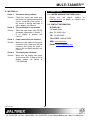
400-0351-003
The CPU on the card is not
working properly.
Solution 1: Look at the card and verify that
there is no damage. If there is no
damage, see Solution 2.
5. Display Card Status
7
Card cage slot has a problem.
Solution 2: Turn the system OFF and then ON
again. If there is still an error, see
Solution 3.
Solution 3: Call ALTINEX at (714) 990-2300.
27
MULTI-TASKER™
8.3 NO DISPLAY
Cause 1:
The source has a problem.
Solution:
Check the source and make sure
that there is a signal present and all
source connections are correct. If
the source is working and there is
still no display, see Cause 2.
ALTINEX POLICY
9.1 LIMITED WARRANTY/RETURN POLICY
Please
see
the
Altinex
website
at
www.altinex.com for details on warranty and
return policy.
9.2 CONTACT INFORMATION
Cause 2:
The card output is not selected.
ALTINEX, INC
Solution:
Select the card output. See RS-232
accessible commands in Section 7.
If no display is present, see
Cause 3.
592 Apollo Street
Cause 3:
Cable connections are incorrect.
TOLL FREE: 1-800-ALTINEX
Solution:
Make sure that cables are properly
connected. Also, make sure that the
continuity and wiring are good. If
there is still no display present, see
Cause 4.
WEB: www.altinex.com
Cause 4:
The display has a problem.
Solution:
Make sure the display has power
and is turned ON. If there is still no
display, please call Altinex at
(714) 990-2300.
400-0351-003
9
Brea, CA 92821 USA
TEL: 714 990-2300
E-MAIL: [email protected]
28