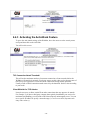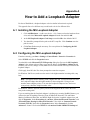
1
WebMux™
Model 481SD/592SGQ
User Guide
Version 9.0.x
Copyright© 1997-2012 CAI Networks, Inc.
The information contained in this document is the property of CAI Networks, Inc. Neither receipt nor
possession hereof confers or transfers any right to reproduce or disclose any part of the contents
hereof, without the prior written consent of CAI Networks, Inc. No patent liability is assumed,
however, with respect to the use of the information contained herein.
Revision History
03/15/2012 revision 9000.
Trademarks
WebMux is a trademark of CAI Networks, Inc.
All other product names and logos are trade or service marks of their respective companies.
Disclaimer
The instructions and descriptions contained in this manual were accurate at the time of printing.
However, succeeding products and manuals are subject to change without notice. Therefore, CAI
Networks, Inc. assumes no liability for damages incurred directly or indirectly from errors, omissions,
or discrepancies between the product and this manual.
CAI Networks, Inc.
1715 Wilshire Ave., Suite 719
Santa Ana, CA 92705
www.cainetworks.com
Table of Contents
Packing List ......................................................................................................................................iv Section 1 Main Components.................................................................................................................. 5 1.1 Front View .................................................................................................................................. 5 1.1.1 Toggle Power Switch ........................................................................................................ 5 1.1.2 Reset Button ..................................................................................................................... 5 1.1.3 Up Arrow Button, Down Arrow Button .............................................................................. 5 1.1.4 Left Arrow Button and Right Arrow Button ....................................................................... 5 1.1.5 Check Mark Button, and Cross Button ............................................................................. 5 1.2 Rear View ................................................................................................................................... 6 1.2.1 Server LAN Port ............................................................................................................... 6 1.2.2 Backup WebMux Port ....................................................................................................... 6 1.2.3 Router LAN (Internet) Port................................................................................................ 6 1.2.4 External Modem Connect Port ......................................................................................... 6 1.2.5 Main Power Switch ........................................................................................................... 6 1.2.6 Power Cord ....................................................................................................................... 6 Section 2 WebMux Overview................................................................................................................. 7 2.1 Key Features .............................................................................................................................. 7 Section 3 The WebMux Family ............................................................................................................ 10 3.1 Topology Overview .................................................................................................................. 12 3.2 Two-armed NAT Mode ............................................................................................................. 12 3.3 Two-armed Transparent Mode ................................................................................................ 13 3.4 One-armed Single Network Mode............................................................................................ 13 3.5 One-armed Out-Of-Path Mode ................................................................................................ 13 Section 4 Sample Configurations ........................................................................................................ 15 4.1 Single WebMux (Two-Armed NAT Mode) .............................................................................. 15 4.2 Redundant Installation (Two-Armed NAT Mode) .................................................................... 16 4.3 Installation without IP Address Change (Two-Armed Transparent Mode) ............................. 18 4.4 Installation without IP Address Change (One-Armed Single Network Mode)......................... 19 4.5 Installation without IP Address Change (One-Armed Out-of-Path Mode) .............................. 20 4.6 IPV6 Consideration .................................................................................................................. 21 Section 5 Configuring the WebMux ..................................................................................................... 22 5.1 Before you Start ....................................................................................................................... 22 5.2 Network Terminology ............................................................................................................... 22 5.3 Hardware Setup — Collect Information ................................................................................... 23 5.4 Hardware Setup — Setup the new network ............................................................................. 23 5.5 Hardware Setup — Configuration Summary ........................................................................... 23 5.6 Initial Configuration .................................................................................................................. 24 -i-
5.6.1 Primary WebMux Information .........................................................................................25 5.7 NAT Mode Related Configuration ............................................................................................26 5.8 Transparent Mode or Single Network Mode Related Configuration.........................................28 5.9 Out-of-Path Related Configuration ...........................................................................................29 5.10 Common Configuration—For NAT, Transparent, Single Network, and Out-ofPath Mode ......................................................................................................................................30 5.11 What if I made mistake in my configuration?..........................................................................33 Section 6 Management Console ..........................................................................................................34 6.1 Login .........................................................................................................................................35 6.2 Main Management Console......................................................................................................37 6.2.1 Save ................................................................................................................................38 6.2.2 Pause/ Resume...............................................................................................................38 6.2.3 Adjusting Timeout for Each Service ................................................................................38 6.3 Network Setup ..........................................................................................................................39 6.3.1 Adding Static Routes ......................................................................................................43 6.3.2 Reconfigure .....................................................................................................................45 6.4 Security Settings .......................................................................................................................46 6.4.1 Change Password ...........................................................................................................47 6.4.2 Change PIN.....................................................................................................................47 6.4.3 Activating the Anti-Attack Feature...................................................................................48 6.5 Miscellaneous Settings .............................................................................................................50 6.5.1 Show Event .....................................................................................................................50 6.5.2 Logout .............................................................................................................................50 6.5.3 Upload/Download (Backup/Restore)...............................................................................50 6.5.4 Set Clock .........................................................................................................................51 6.5.5 Shutdown ........................................................................................................................52 6.5.6 Reboot.............................................................................................................................52 Section 7 Setting Up Load Balancing...................................................................................................53 7.1 Add Farm ..................................................................................................................................53 7.2 Enabling SSL Termination ........................................................................................................59 7.3 SSL Keys ..................................................................................................................................60 7.4 Modify Farm ..............................................................................................................................64 7.5 Add Server ................................................................................................................................66 7.6 Add L7 Server ...........................................................................................................................68 7.7 Modify Server............................................................................................................................69 7.8 Add MAP...................................................................................................................................70 7.9 Add Gateway Farm ...................................................................................................................72 7.10 Modify Health Check ..............................................................................................................76 7.11 Monitor Traffic History Chart...................................................................................................78 - ii -
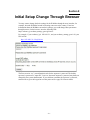
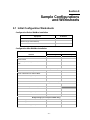
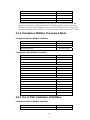
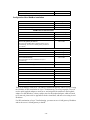
Section 8 Initial Setup Change Through Browser................................................................................ 79 Section 9 Sample Configurations and Worksheets ............................................................................. 81 9.1 Initial Configuration Worksheets .............................................................................................. 81 9.2 Sample Configuration Worksheets .......................................................................................... 82 9.2.1 Standalone WebMux NAT Mode .................................................................................... 82 9.2.2 Standalone WebMux Transparent Mode........................................................................ 83 9.2.3 Out of Path Installation of WebMux ................................................................................ 83 9.2.4 A Redundant Installation ................................................................................................ 85 Section 10 Contact Information ........................................................................................................... 86 Section 11 FAQs .................................................................................................................................. 87 Section 12 Regulations ........................................................................................................................ 90 12.1 Notice to the USA................................................................................................................... 90 12.2 Notice for Canada .................................................................................................................. 90 12.3 Notice for Europe (CE Mark).................................................................................................. 90 Appendix A How to Add a Loopback Adapter ..................................................................................... 91 A.1 Installing the MS Loopback Adapter ........................................................................................ 91 A.2 Configuring the MS Loopback Adapter.................................................................................... 91 Appendix B How to Make Route Delete Reboot Persistent ................................................................ 94 Appendix C Virtual Hosting Issues ...................................................................................................... 95 Appendix D Sample Custom CGI Code .............................................................................................. 96 Appendix E Access CLI Commands.................................................................................................... 98 Appendix F Extended Regular Expressions ...................................................................................... 100 Appendix G Notes on IPv6 ................................................................................................................ 102 Appendix H WebMux SNMP MIB Query ID ...................................................................................... 103 Appendix I Special Details about Out-of-Path Mode......................................................................... 109 Appendix J Tagged VLAN and WebMux ........................................................................................... 110 Appendix K Multiple Uplink/VLAN Support........................................................................................ 112 K.1 Important Considerations Pertaining Only to Additional Network Configurations. ................ 113 Appendix L Bond All Interfaces Setup Guide .................................................................................... 115 Appendix M How to Add Commands to WebMux Startup Sequence .............................................. 117 Appendix N Using Client Side SSL Certificate Authentication on the WebMux ............................... 118 Appendix O Configuring End to End SSL Load Balancing ............................................................... 127 - iii -
Packing List
•
One (1) WebMux unit
•
One (1) User Manual
•
One (1) Warranty registration card
- iv -
Section 1
Main Components
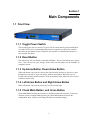
1.1 Front View
1.1.1 Toggle Power Switch
This switch toggles power on and off. To power off, the switch must be pressed and held for
5 seconds. However, it is recommended that you do not regularly use this power switch to
shut down the unit. Please use the LCD panel, web interface, or command line interface to
issue a proper shut down.
1.1.2 Reset Button
Press and release the reset button to reboot the WebMux. This is a hard reboot, not a factory
reset. This will not reset your settings. Please allow several minutes for the WebMux to
completely reboot.
1.1.3 Up Arrow Button, Down Arrow Button
When each button is pressed, the value on the cursor location increases or decreases. It goes
through lower case letters, upper case letters, numbers and symbols. When the cursor is
located at the left most position on the LCD, the up and down arrow allows the user to select
a different item to setup.
1.1.4 Left Arrow Button and Right Arrow Button
When each button is pressed, the cursor moves to the left and right.
1.1.5 Check Mark Button, and Cross Button
Check Mark Button confirms the selection, Cross Button cancels the selection. At any time
when the system is running holding down to the Check Mark Button will invoke the
configuration menu, where you can change IP addresses and other settings.
-5-
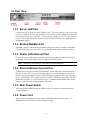
1.2 Rear View
1.2.1 Server LAN Port
Connect this port to the Server LAN switch or hub. This port connects to the servers and
your local computers. It is the right most RJ45 socket. In Out-of Path configuration, this is the
only port that needs to be connected. If your switch is capable of LACP (or port channel),
you can connect both the Internet and Server ports and they will behave as a single port (Outof-Path mode ONLY).
1.2.2 Backup WebMux Port
Optionally, you may connect another WebMux to this port so that you can have redundancy.
Connect them using a cross over cable, or a regular cable with a hub or switch in between.
1.2.3 Router LAN (Internet) Port
Connect this port to the Router LAN switch or hub. In most situations, this port connects to
the Internet side network in NAT mode. It is the left most RJ45 Socket.
Note The Router LAN and Server LAN port are not interchangeable.
1.2.4 External Modem Connect Port
To utilize the phone pager function of the WebMux, please connect the external modem to
this port. In some cases, if you prefer support engineers to not use diagnostic ports over the
Internet, our support engineers can also connect through the modem to assist you with setup
issues. A US Robotics V.Everything modem is required: US Robotics part number 3CP3453.
Modem dip switch has 3, 8, and 10 down, rest up. A standard external modem cable is also
needed. Check with your modem supplier for the cable.
1.2.5 Main Power Switch
This switches the WebMux on and off. When in the "off" position, the front panel power
switch is disabled.
1.2.6 Power Cord
Please use the supplied power cord to connect the WebMux™ to the power source. 1U
WebMux™ has a 115V/230V AC universal power supply.
-6-
Section 2
WebMux Overview
2.1 Key Features
The WebMux is a standalone network appliance designed primarily to load balance IP traffic
to multiple servers. The WebMux includes the following key features.
•
Improves performance by distributing the traffic for a site or domain among
multiple servers. No one server will be bogged down trying to service a particular
site.
•
SSL Termination to reduce the cost of multiple certificates. Also, be able to
regulate the minimum acceptable SSL encryption protocol version.
•
Provides high availability by tracking which servers are functioning properly and
which servers are out of service. If a server unexpectedly goes down, the WebMux
will automatically re-direct the traffic to other servers, or will bring a standby or
backup server online to service the traffic. The WebMux does application level health
check to many network protocols on servers.
•
Provides Persistent Connections by memorizing the user browser session and the
server session and sending the same user to the same server. This is important for
sites using shopping cart and dynamically generated pages, like BroadVision, ASP
and JSP sites.
•
Provides fault tolerance. This installation requires two WebMuxes, a primary and a
secondary. The two WebMuxes will automatically sync the configuration datum.
•
Easy management. It can be managed via a secured web browser session from
anywhere in the world. By using https 128 bit encryption to the management web
console, secure remote management of server farms is truly possible.
•
Operating System independent. No software or agent to load on the servers. Nonintrusive load/failure detection and management.
•
Provides Proxy function. When communication is initiated from behind the
WebMux, the WebMux will substitute its own address for the internal address. This
allows the web servers to initiate communication for services such as credit card
validation and mapping services.
Note This function only works in NAT mode.
•
Built-in Firewall Protections (layer 4/5 only). Stop possible hacker intrusion into
your network from Internet. All IP addresses and ports are blocked except the farm IP
address. Built-in functions will detect any possible denial of service attack and make
your services always available.
Note This function only works in NAT mode with “act as IP router” set to “no”. See
Administration Setup section 6.3 for details.
-7-
•
Built-in Anti-Attack Security Function. Automatic protection against Denial of
Service (DoS) and Distributed Denial of Service (DDoS) attacks. Automatically
block IP addresses that exceed the maximum threshold of concurrent connections for
a specified amount of time. Works in NAT, Transparent, and OOP modes.
•
In-Path or Out-of-Path Load Balancing. In normal setup, the WebMux can be
configured In-Path, to act as firewall in addition to the load balancer and health
checker. However, if outbound traffic is much larger than inbound traffic and you
already have a firewall in place, or change of IP address causes problems, consider
using Out-of-Path configuration. Out-of-Path load balancing is also called direct
routing, or one leg operation.
•
Transparent Mode. In this mode, the WebMux behaves as an Ethernet bridge
between the Server LAN and the Router (Internet) LAN. The main advantage is that
the network settings in the servers do not have to be changed, no loopback adapters
or IP address changes needed. The servers will be connected behind the WebMux but
will appear to be on the same LAN that the front network the WebMux is connected to.
•
Single Network Mode. Allows you to set up load balancing in existing network
without any change to the server configuration. Single network mode changes both
the source and destination IP addresses in the IP packets.
•
Layer 7 Load Balancing. WebMux can direct traffic to specific groups of servers
within a farm according to a match pattern in the HTTP MIME header. This allows
you, for example, to group servers that serve only a specific type of content while
serving other types of content on another group of servers. WebMux Layer 7 load
balancing also includes URI load directing with host name MIME header matching
and cookies in order to memorize the user browser session and the server session and
send the same user to the same server. This is important for sites using shopping cart
and dynamically generated pages.
•
SNAT and load balancing gateways. WebMux has two SNAT support. One is
SNAT on top the NAT or Transparent mode. Another SNAT is for load balancing
uplink gateways, firewalls, or edge servers.
•
Informs you of the status of your network. It provides phone pager and email
notification so that the network administrator can be paged or emailed whenever a
server or WebMux goes down, and when it returns online. This feature could reduce
server room night shift operator costs, or timely repair should the server go down
unexpectedly.
•
SNMP Support. Remotely monitor various WebMux parameters in real time via SNMP.
•
IPV6 Support. WebMux is ready for the next generation of internet protocol, IPV6.
Version 9 firmware fully supports IPV6 in all modes.
•
Multiple Address and Port (MAP) farm to integrate multiple ports and IPs as one
virtual service.
•
HTTP Compression. Reduces amount of data to be transferred for HTTP objects. (NOT
supported in Out-of-Path mode, except when used with Layer 7 Load Balancing).
•
802.1q VLAN ID. WebMux can be used in networks that support tagged VLANs.
Switch port must be configured to use tagged VLAN.
-8-
•
Multiple Uplink/VLAN Support. Using the command line interface command,
nwconfig, WebMux can be configured for use with Multiple ISPs. You can also use
this command line tool to create multiple server subnets. Please see Appendix L for
details.
•
Bond All Interfaces. In combination with 802.1q VLAN and Port Channel or LAG
(Link Aggregation Group) configurations on the switch, you can configure the
WebMux to use its “Internet/rtr” and “Server/svr” ports as a single “bonded”
interface in NAT and Transparent Modes. The traditional front and back networks
will now be dependent on the VLAN configurations on the switch. (Note: Out-ofPath mode already has both interfaces bonded automatically).
•
Client Side SSL Authentication. WebMux can be set up to require Client Side SSL
Authentication to provide another layer of client identification for added security.
Please refer to Appendix N for details.
-9-
Section 3
The WebMux Family
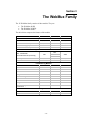
The 1U WebMux family consists of three models. They are:
•
•
•
The WebMux 481SD
The WebMux 592SGQ
The WebMux 690PG
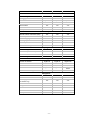
The table below compares the features of the models.
Model Number:
481SD
592SGQ
690PG
Layer 4 Performance
Maximum concurrent connections
1,440,000¹
2,880,000¹
5,760,000¹
Maximum transactions per second
65,000
100,000
400,000
Maximum throughput per second¹
1.7 GBits
2.7 GBits
4GBits
2GB/s
3GB/s
4GB/s
Maximum Internet link speed
Layer 7 and SSL Acceleration
600
Max. 1024bit RSA
terminations/second (round trip)
300
1600²
4000
2600³
Max. Layer 7 connections/s
Number of SSL certificates
50,000
100,000
144,000
32
32
32
Yes
Yes
Load Balancing Methods
Cookie content based
Yes
URL based
Yes
Yes
Yes
Round-robin
Yes
Yes
Yes
Persistent round-robin
Yes
Yes
Yes
Weighted round-robin
Yes
Yes
Yes
Persistent weighted round-robin
Yes
Yes
Yes
Least connections
Yes
Yes
Yes
Persistent least connections
Yes
Yes
Yes
Weighted least connections
Yes
Yes
Yes
Persistent weighted least
connections
Yes
Yes
Yes
Traffic Management Methods
URL based content switch
Yes
Yes
Yes
Cookie based content switch
Yes
Yes
Yes
- 10 -
Model Number:
481SD
592SGQ
690PG
Yes
Yes
Fault Tolerance
Diskless Design
Port aggregation
Yes
Yes
Yes
Yes
Optional
Optional
Optional
Failover via Ethernet link
Yes
Yes
Yes
Service aware
Yes
Yes
Yes
Server aware
Yes
Yes
Yes
Backup server
Yes
Yes
Yes
Failover via network connection
Security
Network Address Translation (NAT)
Yes
Yes
Yes
TCP SYN protection
Yes
Yes
Yes
Address mapping
Yes
Yes
Yes
Port mapping
Yes
Yes
Yes
TCP DoS protection
Yes
Yes
Yes
Yes
Yes
Yes
HTTPS/SSH management
Topologies
IPV4/IPV6 support
Yes
Yes
Yes
Gb Ethernet (1000Base-TX)
Yes
Yes
Yes
Rackmount 1U form factor
Yes
Yes
Yes
One-Arm Single Network Mode
Yes
Yes
Yes
Device Support
Interface to switches
Gigabit x2
Gigabit x4
Gigabit x20
Maximum virtual servers
Unlimited
Unlimited
Unlimited
65,532
65,532
Device’s role in the network
Bridge/router
Bridge/router
UDP-based service support
Yes
Yes
65,532
Bridge/router/
switch
Yes
Maximum real servers
Management
Secure web browser access
Yes
Yes
Yes
In service / Not in service
Yes
Yes
Yes
Phone / pager alarm notification
(ext modem req)
Yes
Yes
Yes
Email Notification
Yes
Yes
Yes
Configuration access
Yes
Yes
Yes
Remote telnet/SSH access
Yes
Yes
Yes
Persistent connections
Yes
Yes
Yes
Port-specific services
Yes
Yes
Yes
- 11 -
Model Number:
481SD
592SGQ
690PG
200W/500BTU
350W/1000BTU
Miscellaneous
Power and Heat (MAX at full load)
100W/300BTU
Factory warranty
1 years
1 years
1 years
Free telephone and email support
1 years
1 years
1 years
Overnight pre-sent exchange unit
Optional
Optional
Optional
24x7 Gold Premium Support
Optional
Optional
Optional
Yes
Yes
Yes
30-day money-back guarantee
¹Bond interfaces for max throughput in VLAN only mode
²With CAI-RSA3500 option card
³With CAI-RSA7000 option card
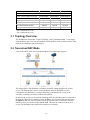
3.1 Topology Overview
The WebMux has four modes: 2 Arm NAT Mode, 2 Arm Transparent Mode, 1 Arm Single
Network Mode, and 1 Arm Out-of-Path Mode. IPV4 and IPV6 work in all those modes. Each
mode has its advantages and disadvantages.
3.2 Two-armed NAT Mode
Let us look at NAT mode first (Transparent Mode refers to the same diagram).
The main purpose of the WebMux is to balance the traffic among multiple web or other
servers. The diagram above shows a NAT installation with two WebMuxes. In this
configuration, one WebMux is serving as the primary, and the other is serving as the
secondary, or backup, providing a fault tolerant solution.
In order for the web servers to share the incoming traffic, the WebMux must be connected to
the network. There are two interfaces on the WebMux. One interface (Internet) connects to
the Router LAN. This is the network to which the Internet router is connected. The other
interface (server) is connected to the Server LAN. This network connects to all the web
servers. The WebMux routes traffic between these two networks.
- 12 -
Next, a Virtual Farm or multiple farms must be configured on the WebMux. A virtual farm
is a single representation of the servers to the clients. A farm consists of a group of servers
that service the same domain, website or services. For example, to configure a farm (or
virtual farm) to serve www.cainetworks.com:
•
First, Server 1 and Server 2 would each need the website www.cainetworks.com
configured on them and HTTP/HTTPS services started, and
•
Second, a farm on the WebMux is defined with Server 1 and Server 2 in it. The
servers would be setup to either share the traffic, or setup as a primary server and
standby server. In either case, if Server 1 goes down, then all traffic will be
automatically directed to Server 2 by the WebMux.
3.3 Two-armed Transparent Mode
In Two-Armed Transparent Mode, the servers need to be isolated from rest the network with
the WebMux in between, even though they are in the same network segment. All
communication from servers to other servers or clients must flow through the WebMux. The
WebMux will load balance any traffic targeted to the farm address and let all other traffic
flow through like a network cable. This simplifies some network configuration, but the
server isolation is an additional requirement.
3.4 One-armed Single Network Mode
In One-Arm mode, the WebMux supports both Single Network Mode and Out-of-Path Mode.
For Single Network Mode, there are no changes to the network or servers. Traffic from
clients send to the farm address on the WebMux, which will in turn send to the servers
through load balancing methods. Server replies to the WebMux will be sent back the clients.
Single Network Mode has a limitation that only 65000 concurrent connections are allowed in
one farm.
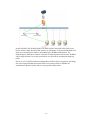
3.5 One-armed Out-Of-Path Mode
In Out-of-Path Mode, only one network in the setup (the server LAN) is connected to the
Internet through the firewall and router. Internet traffic or local connections can both be
directly sent to the WebMux, which forwards the packets to the proper server(s), then the
server routes the return traffic back to the remote or local clients directly.
- 13 -
In most situations, the incoming traffic is in small requests, and return traffic from servers
back to clients is large amount of data, pictures, or documents. Using Out-of-Path Mode will
allow up to 100 times more traffic to be handled by the WebMux load balancer. The
disadvantage for OOP/direct response is that the firewall protections built-in to the WebMux
will no longer function. Users must provide their own firewall for incoming and outgoing
traffic.
However, in L7 and SSL termination configuration, OOP mode does not gain any advantage,
due to the requirement that return traffic from servers must go back to WebMux for
examination of the data headers and/or re-encryption the data packets.
- 14 -
Section 4
Sample Configurations
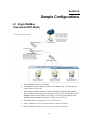
4.1 Single WebMux
(Two-Armed NAT Mode)
•
This installation requires one WebMux.
•
One WebMux interface (Internet) connects to the Router LAN. The other interface
connects to the Server LAN.
•
The WebMux translates the Router LAN IP addresses to an internal non-routable
class-C address. In this example, the netmask is 255.555.255.0. The IP address of the
WebMux interface on the Router LAN is 205.133.156.220. The IP address of the
WebMux interface attached to the Server LAN is 192.168.199.251.
•
The Default Gateway for all the servers is 192.168.199.1.
•
Farm 1 IP address is 205.133.156.200. Servers 1 and 2 serve Farm 1.
•
Farm 2 IP address is 205.133.156.210. Servers 2 and 3 serve Farm 2.
- 15 -
•
Changes to the server: change the default gateway to 192.168.199.1, as well as the IP
address to the 192.168.199.xxx subnet. If on the server there is a service attached to
the IP address (HTTP/S, FTP, etc), please make sure the service will run on the new
IP address.
Note Although the WebMux can work with any IP address range, all server IP addresses
should be Internet non-routable address so that the source address from the Internet does
not conflict with the IP addresses on the Server LAN.
Note If there is a firewall between the WebMux and the Internet Router, a rule must be
defined in the firewall to allow the IP address of the WebMux interface on the Router
LAN along with the farm IP address to communicate out to the Internet on all ports. If
you are doing Network Address Translation of the farm address to a non-routable address,
then both the farm address and the WebMux interface address must be translated to
communicate outbound on all ports.
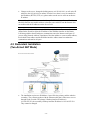
4.2 Redundant Installation
(Two-Armed NAT Mode)
•
The installation requires two WebMuxes. One will be the primary, and the other the
secondary. They connect together with the Ethernet cable that is either cross-over or
through a hub or switch. The primary’s Backup interface IP address is
192.168.255.253; the secondary’s Backup interface IP address is 192.168.255.254.
They cannot be changed.
- 16 -
•
Both WebMuxes connect to the Router LAN, and to the Server LAN. Each WebMux
interface has a unique IP address.
•
The registered Internet IP address range is a class C address range.
•
The IP address of the WebMuxes’ Virtual Farms must be in the same network range
as the Internet router.
•
The WebMux translates the Router LAN IP addresses to an internal non-routable
class A address. In this example, the subnet-mask is 255.0.0.0. The IP address of the
WebMux interfaces attached to the Server LAN are 10.1.1.10 and 10.1.1.20.
•
The Default Gateway for all the servers is 10.1.1.1.
•
Farm 1 IP address is 205.133.156.200.
•
Servers 1 and 2 serve Farm 1.
•
Farm 2 IP address is 205.133.156.210.
•
Servers 2 and 3 serve Farm 2.
•
Changes to the servers: change default the gateway to 10.1.1.1, as well as the IP
addresses to the 10.3.1.10/20/30 addresses. If on the server there is a service attached
to the IP address (HTTP/S, FTP, etc), please make sure the service will run on the
new IP address.
Note Although the WebMux can work with any IP address range, all server IP addresses
should be Internet non-routable address so that the source address from the Internet does
not conflict with the IP addresses on the Server LAN.
Note If there is a firewall between the WebMux and the Internet Router, a rule must be
defined in the firewall to allow the IP address of the WebMux interfaces on the Router
LAN in addition to the farm IP address (could be same as the WebMux Router LAN IP
address) to communicate out to the Internet on all ports. Since the WebMux is doing
Network Address Translation of the farm address to a non-routable address, the farm
addresses on the WebMux must be able to communicate outbound on all ports defined in
the farms.
- 17 -
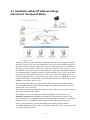
4.3 Installation without IP Address Change
(Two-Armed Transparent Mode)
Transparent Mode is another WebMux configuration that allows you to keep the existing IP
addresses of your servers. Like Out-of-Path Mode, the servers and the WebMux will be on
the same IP network. However, physically, the servers will be connected to the WebMux in
the same way they would be for NAT mode, on the server LAN port. The “internet” port on
the WebMux is connected towards the Firewall/Router. In this mode, the WebMux functions
as an Ethernet bridge. Anything connected to its back interface (server LAN) is on the same
network as its front interface (internet/router LAN). If you look at the diagram above, you
will see that the terminals are on the same network as the servers, even though the servers are
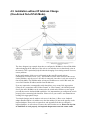
“behind” the WebMux. The terminals can communicate with the servers IP directly as if the
WebMux was not there, and vise versa.
When creating a farm, choose a unique farm IP address in the network, and then add the
server IP address under that farm. Load balancing occurs when the “Farm IP” is accessed
instead of the servers’ actual IP.
There are no configuration changes that need to be made on the servers, only the way they are
physically connected to the network.
The diagram also gives an example of a redundant WebMux setup. In this case, it is
absolutely required that the WebMuxes are connected in between two switches. In the
earlier version firmware, WebMux depends on STP (spanning tree protocol) to avoid packet
looping. From 8.7.xx, WebMux does not require switches supporting STP any more.
During a failover situation, you may immediately notice that the backup becomes
unreachable though the Internet LAN side. In firmware older than 8.7.09, you may notice the
server LAN side not accessible.
- 18 -
For single WebMux setup, any kind of switch will work, since there is only one bridge path
exist on the network. No Spanning Tree Protocol is required.
4.4 Installation without IP Address Change
(One-Armed Single Network Mode)
Single Network Mode configuration is simple, with only one interface connected to the
network. You can use either the Internet Port or the Server Port of the WebMux, but only
ONE of them. The WebMux and the servers are also all on the same subnet.
In Single Network Mode, connections being load balanced and going to the real servers will
appear to come from the WebMux itself. You will not need to make any changes on your
servers since the servers will always reply back to the WebMux when sending back their
reply.
In this mode, the client’s real IP addresses will not be logged in your server log. You have to
use “X-Forwarded-For” (XFF) http header to find where the client’s real IP address. If the
HTTP header already has X-Forwarded-For tag in it, WebMux will not alter the tag. If the
traffic is not for HTTP port, WebMux will not insert the XFF header for the traffic. Enable
XFF header insertion is optional on the per farm basis. If your host software does not need
this header, it is better not insert it to reduce CPU usage.
If you are configuring a redundant configuration in Single Network Mode, be sure you have
selected the “1ARM-Single Network” option in both WebMuxes’ initial configuration shown
in the following section to ensure that the failover checking between the two WebMuxes will
be correct.
- 19 -
4.5 Installation without IP Address Change
(One-Armed Out-of-Path Mode)
The above diagram is an example about how to configure the WebMux in Out-of-Path Mode
without changing the IP addresses of the web servers and other servers that already exist on
the network. This is particularly helpful when the changing of an existing network of servers
causes problems.
In this configuration, all the servers still remain on the same IP network and can
communicate. From the servers “view,” the WebMux is on the same network as the servers.
On the WebMux, only the server LAN cable is connected, since there is only one network in
Out-of-Path Mode. The WebMux takes at least two IP addresses to work in this mode, the
server LAN Interface IP address and the farm IP addresses.
If you are connected to a manageable switch that allows you to create Link Aggregation
Groups (LAG), sometimes called “Ether-Channel” or “Port Channel,” the Internet port and
Server port on the WebMux can be connected to the switch and will behave as one logical
port with about twice the bandwidth capabilities. It is important that you configure the switch
properly before connecting both interfaces. Please refer to your switch’s user manual about
creating Link Aggregation Groups.
Two simple changes must be made to each server in the farm. 1) Have a new loopback
adapter installed and have its address set to the farm address. Do not set the gateway on the
loopback adapter. Please refer to Appendix A and Appendix B for how to configure a
loopback adapter, as well as how to remove the route from the servers. Please note for Outof-Path Mode to work properly, the loopback adapter must route the return traffic
- 20 -
through the real network interface. In other words, the loopback adapter cannot have
the gateway specified. Please refer to Appendix A and B for more details on how to
configure the loopback adapter on servers. In case the server is running Windows
2003/2008, the route created when adding loopback adapter cannot be deleted; please
make sure the loopback adapter metric has a higher number. 2) If your service binds to
any specific IP address, add the loopback adapter’s IP address to that service.
The firewall configuration must be changed to point to the new farm address on the WebMux.
Since the WebMux always uses one IP address in the server LAN, the farm address must be a
different IP address in the server LAN in Out-of-Path Mode.
Out-of-Path Mode also allows two WebMuxes to fully backup each other. The two
WebMuxes are connected to each other through a cross-over Ethernet cable or with a hub or
switch in between.
Note Under normal Out-of-Path operations, you will only need to set the external
gateway IP address for the WebMux. However, if you are going to have the WebMux do
SSL termination or Layer 7 load balancing, you must set a “server LAN gateway” IP in
the WebMux and have the servers’ default gateway point to that IP address.
4.6 IPV6 Consideration
WebMux can load balance IPV4 and IPV6 traffic in all above modes. Both IPV4 and IPV6
can work in L4 and L7. Simply specifying the IPV6 prefix will enable WebMux load balance
IPV6 only or IPV6/IPV4 mixed traffic. However, if public side is IPV6 and local side is IPV4,
load balancing farm must be L7. If the protocol is not in the list, please select “L7 generic
TCP load directing”.
- 21 -
Section 5
Configuring the WebMux
5.1 Before you Start
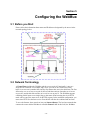
Please collect the information about names and IP addresses designated by the arrows in the
network topology below.
5.2 Network Terminology
A Virtual Farm includes the WebMux and the servers under it. Functionally, it acts as a
single unit on a network. For example, http://www.you.com is one virtual server farm;
https://www.me.com is another farm, and ftp://ftp.cainetworks.com is the third farm. The first
farm works on a set of servers on port 80, the second farm consists of another set of servers
on port 443, and the third farm works on a set of servers on port 21. The WebMux supports
combining 80/443 ports as one single farm, so that same client browsing the site in HTTP
mode will be sent to the same server for HTTPS requests. In the combined configuration, you
must select HTTP/S as the farm service. Ports 80/443 will then be combined into one farm.
To serve the Internet, there must be at least one Internet Router. The local area network that
connects the router and the WebMux is called the Router LAN. In this LAN, the WebMux
- 22 -
takes the Internet traffic and distributes it to the servers behind it. The LAN connecting the
WebMux and real servers together is called Server LAN.
WebMux has four modes: 2 Arm NAT Mode, 2 Arm Transparent Mode, 1 Arm Single
Network Mode, and 1 Arm Out-of-Path Mode. In NAT mode, the WebMux boxes are
connected to both Router LAN and Server LAN. At least one WebMux is needed to define
the Router LAN and the Server LAN. We will explain other modes in detail in later
chapters.
The side of the WebMux that connects to the Router LAN sends and receives all the IP
packets from the router to the Internet. The side of the WebMux that connects to the Server
LAN sends and receives IP packets to and from the servers in the farms. By properly
configuring the WebMux, one can create one or more Virtual Farms on top of the physical
hardware.
5.3 Hardware Setup — Collect Information
•
Make a drawing of the existing network and note all the configuration settings. This
will help you to fall back to the existing configurations if needed.
•
Make a new drawing for the new setup with the WebMux and the web farm in place.
This will be used as a guide for setup and preparation of all the necessary material
and equipment.
•
Collect all the IP addresses, their network masks, network addresses, and broadcast
addresses for the Server LAN and Router LAN WebMux interfaces. The IP address
of the Internet router is also needed.
•
Label all the cables. Prepare additional cables if needed.
•
Make sure there are enough electrical or UPS outlets for all the new equipment.
5.4 Hardware Setup — Setup the new network
•
Power down all the devices on the network.
•
If you have a secondary WebMux, connect the WebMuxes with a cross-over Ethernet
cable.
•
Connect the servers to the Server LAN.
•
Connect the WebMux to the uplink switch.
•
Power up all devices in the network.
•
Verify that all the devices are up and running.
•
You are now ready to configure WebMux.
5.5 Hardware Setup — Configuration Summary
CAUTION Do not proceed without collecting all necessary information.
Note The IP addresses in the following examples are general examples and are not
meant for literal use in an actual setup.
- 23 -
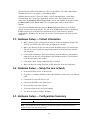
•
Turn on the WebMux. Turn on the switch on the back of the WebMux and push the
power-on button in the front momentarily. You will see the version number like this:
•
After self-test, hold down the Check-Mark button on the WebMux until the LCD
displays the first question—“Enter WebMux host name.”
•
During the initial configuration, you will be asked to provide names and IP addresses.
(See next section.) Each item is explained in the order it is asked.
•
Answer the questions. Reboot.
Note When reboot is complete, the service statistics screen will appear.
•
Run the Management Browser.
5.6 Initial Configuration
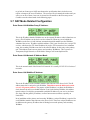
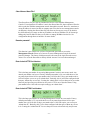
Enter WebMux Host Name:
Enter the host name of the WebMux. Use the right arrow to move the position, the up and
down arrows to select characters, left arrow to move back in position, check mark button to
confirm the change. This host name is for identification purposes. You may call it webmux1,
webmux2, etc. (You can hold down the up/down button for more than a second to make
quicker changes.) Note the left most down arrow on the LCD allows the user to move to other
settings.
Enter WebMux Domain Name:
This is for identification only; this has no effect for network operation. Although it can be any
name, we suggest using the primary domain name of the Router LAN network. If you have
only one domain, use that domain name. Note the left most position on the LCD has changed
to an up and down arrow, allowing the user to go back and forth for questions and answers.
- 24 -
Is this a Primary WebMux?
If this is the Primary, answer Yes. If this is the Secondary WebMux, answer No. The
secondary WebMux automatically gets configuration information from the Primary once it
sets up. If this is the only WebMux, answer Yes.
5.6.1 Primary WebMux Information
This question is not asked for the Secondary WebMux.
Is this WebMux running solo without a backup WebMux?
If the Primary WebMux is running in a standalone configuration (see sample configuration—
Standalone WebMux.), answer Yes. If you plan to add 2nd WebMux in the future, you may
answer NO, even there is only one WebMux at the time. When you add second WebMux
later on, WebMux will automatically detect the backup and start functioning.
Choose the WebMux Mode:
This is where to choose which mode you want to run the WebMux: Two-Armed NAT, TwoArmed Transparent, One-Armed Single Network, or One-Armed Out-of-Path Mode. “*” is a
default or selected option. Two-Armed Network address translation provides protection to the
servers; it can handle large amounts of data as noted in the specification. It provides the best
security for isolating servers from any other part of the networks. Two-Armed Transparent
Mode or One-Armed Single Network Mode provides the convenience of preserving your
server IPs, but may require physical relocation of the network connection or modifying the
default gateways. Out-of-Path provides better performance when huge amounts of data need
- 25 -
to go back to clients (up to 100X more than on the specification chart); it also does not
require a change to the server IP address. The screens will cycle among the modes until you
select yes on one of them. Once one is selected it will continue to the next setup screen.
Continue on to the related mode in the following pages.
5.7 NAT Mode Related Configuration
Enter Router LAN WebMux Proxy IP Address:
This is the IP address that the WebMux uses as the external IP address when it functions as a
proxy. (This IP address can be also be used as a farm IP). When any server behind the
WebMux (on the Server LAN) initiates communication with another host, the WebMux
substitutes the servers’ IP address with this address. (This is true for all services, except FTP
services, which uses the FTP farm IP address for passive FTP connection). In a redundant
setup, the secondary WebMux can also be the same IP address for this entry as the primary
unit. This address floats between primary and secondary WebMuxes. This is not true in
Transparent, Single Network, or OOP modes. Doing so will create duplicate IPs.
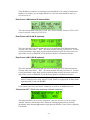
Enter Router LAN Network IP Address Mask:
This is the network mask of the Router LAN network. It is usually 255.255.255.0 for class C
networks.
Enter Server LAN WebMux IP Address:
This is the IP address of the WebMux interface that connects to the Server LAN. This IP
address must also be unique for each WebMux. This address must be different from the
server LAN gateway address. The purpose of this IP address is to allow the WebMux to
check the network and server health situation. Even for the backup WebMux, this address
must be unique. It is highly recommended to add this IP address to your servers /etc/hosts
file, along with the gateway IP address, to allow faster name resolution, especially on
Linux/Unix.
In an installation with a primary and secondary WebMux, a unique IP address is required for
each WebMux interface that connects to the Server LAN. Those two unique IP addresses are
in addition to the gateway IP address that is floating between the primary and secondary
WebMux.
- 26 -
These IP addresses cannot be your Internet registered addresses. They must be Internet nonroutable. For example, you can assign addresses in a 10.0.0.0 network address range, or a
192.168.199.0, etc.
Enter Server LAN Network IP Address Mask:
This is the network mask of the Server LAN. For a class A network, it may be 255.0.0.0. For
a class C network, it may be 255.255.255.0.
Enter Router LAN VLAN ID (optional):
This is the optional VLAN ID tag that will be used for the Router LAN (Internet) interface.
You may enter values from 1 – 4067. The cursor position will only go from 0 to 9. To enter
a value greater than a single digit, press the left arrow button to move the cursor to the next
digit. Enter zero (0) to disable the VLAN ID for the Router LAN (Internet) interface.
Enter Server LAN VLAN ID (optional):
This is the optional VLAN ID tag that will be used for the Router LAN (Internet) interface.
You may enter values from 1 – 4067. The cursor position will only go from 0 to 9. To enter
a value greater than a single digit, press the left arrow button to move the cursor to the next
digit. Enter zero (0) to disable the VLAN ID for the Router LAN (Internet) interface.
Note The VLAN ID is used for full 8021q VLAN support. This means that your switch
must be configured to be using “tagged” VLAN. Please see Appendix K for other details
regarding using VLAN with WebMux.
If you entered a non-zero value for the VLAN IDs, you will see an additional screen:
“Bond rtr/svr NI?” (“Bond router and server Network Interfaces”):
This option will allow you to use the “Internet/rtr” port and “Server/svr” port as a single
“bonded” interface, also known as Port Channel or Link Aggregation Group, allowing
substantially more data throughput than a single physical interface. Please refer to Appendix
N for details.
- 27 -
Enter Server LAN Gateway IP address:
This IP address is on WebMux. It will be the Default Gateway entry for all the servers on the
Server LAN. This address will ’float’ between the primary and secondary WebMux. If the
Primary went down, the address entered here will float to the backup. Please pay very careful
attention that THIS IS NOT YOUR EXTERNAL ROUTER/GATEWAY IP. The IP address
you put here will be assigned to the Server LAN interface. Make sure it is a unique IP
address.
In the single WebMux setup, this address CANNOT be the same as the WebMux IP interface
address on the Server LAN. When configuring a backup unit, this screen will not be
displayed. Please continue to the Common Configuration section.
5.8 Transparent Mode or Single Network Mode Related
Configuration
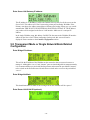
Enter Bridge IP Address:
This will be the IP address of the WebMux on the network so that you can use browser to
manage it. Although the “server” and “internet” ports are interchangeable in transparent mode,
it is recommended that you stick with labeling scheme and connect the port labeled “internet”
to the switch on the firewall/router side and connect switch on the servers to the port labeled
“server.”
Enter Bridge Net Mask:
This should match the net mask of the existing network the WebMux will be a part of.
Enter Router LAN VLAN ID (optional):
- 28 -
Enter Server LAN VLAN ID (optional):
Note The VLAN ID is used for full 802.1q VLAN support. In Single Network Mode
the Router LAN VLAN ID and Server LAN VLAN ID still pertain to the specific ports
on the WebMux and they cannot be the same value. Even though you only need to use
one of the ports in Single Network Mode, it is important that your switch setting matches
the value of the port you are connecting to.
If you entered a non-zero value for the VLAN IDs, you will see an additional screen:
“Bond rtr/svr NI?” (“Bond router and server Network Interfaces”):
This option will allow you to use the “Internet/rtr” port and “Server/svr” port as a single
“bonded” interface, also known as Port Channel or Link Aggregation Group, allowing
substantially more data throughput than a single physical interface. Please refer to Appendix
N for details.
Please continue to the Common Configuration section.
5.9 Out-of-Path Related Configuration
Enter Server LAN WebMux IP Address:
In Out-of-Path Mode, at minimum, you only need to connect the Server LAN interface. This
is the IP address of the WebMux Server LAN interface. This IP address must also be unique
for each WebMux. The purpose of this IP address is to allow the WebMux to check the
network and server health. Even for the backup WebMux, this address must be unique. It is
highly recommended to add this IP address to your servers /etc/hosts file, along with the
gateway IP address, to allow faster name resolution, especially on Linux/Unix. Please also
refer to Appendix A for adding loopback to servers.
In an installation with a primary and secondary WebMux, one unique IP address is required
for each WebMux interface that connects to the Server LAN. Those two unique IP addresses
are in addition to the farm IP address that is floating between the primary and secondary
WebMux.
- 29 -
Enter Server LAN Network IP Address Mask:
This is the network mask of the Server LAN. For a class A network, it may be 255.0.0.0. For
a class C network, it may be 255.255.255.0.
Enter Server LAN VLAN ID (optional):
Note The VLAN ID is used for full 802.1q VLAN support.
Enter Server LAN Gateway IP address (optional):
This is an optional configuration that is used only if you are going to do SSL termination or
Layer 7 load balancing. Keep in mind this is an IP address assigned to the Server LAN
network interface. Be sure to use a unique IP address or duplicate IPs on the network will
occur. Enter 0.0.0.0 if not needed.
5.10 Common Configuration—For NAT, Transparent,
Single Network, and Out-of-Path Mode
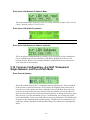
Enter External Gateway:
This is the common setup for NAT, Transparent, and Out-of-Path modes. This is an address
on the firewall or router local interface. In NAT mode, the WebMux needs to know this to
route the server replies back to the clients. Although in Out-of-Path Mode this is not being
used to route return traffic back to the Internet clients, the WebMux uses this IP address to
check the connectivity of the external network on this gateway or through this gateway to the
ISP side routers. For SSL termination or Layer 7 load balancing, servers must route traffic
back to the WebMux via the server LAN gateway (previously mentioned). The WebMux then
forwards it to the client through the external gateway. If health check on external gateway is
enabled (by default), WebMux will turn the farm listing red to indicate the external gateway
failure.
- 30 -
Clear Allowed Host File?
The allowed host file prevents any unauthorized access to the WebMux Management
Console. If a workstation’s IP address is not in the allowed host file, that computer will not be
able to reach the WebMux management console through the network. However, sometimes a
wrong IP address is entered so that no computer can access the browser management console.
At that point, clearing the allowed host file will allow any browser to access it. By default,
the allowed host list is empty so that any IP address can access WebMux. We do encourage
adding only host IP addresses that you do allow to manage WebMux into the list. See
configuration through browser interface for more details.
Remake passwds?
This function is provided in case you have forgotten the passwords to access the
Management Console. Please use a browser to access Management Console for normal
password changes. The factory default password is the same as the login ID on the screen.
Answer Y to reset the Passwords to factory default. Answer N to leave them unchanged.
Enter Admin HTTP Port Number:
This is the http port number for accessing Management Console in non-secure mode. Any
unused port number can be used. Factory default port number is 24, one could choose to use
any unused port below 1024 or port number above 1024 for this. Using a port number above
1024 will require you to set up an “admin farm”. Basically, this is just a farm configured with
that port, without any servers in it. Creating the “admin farm” reserves that port for use to that
farm only and prevents port collision in case passive FTP is one of the other farms. Using
port number below 1024 will not require setting up an “admin farm.”
Enter Admin HTTPS Port Number:
This is the https port number for accessing Management Console in secure mode. Factory
default port number is 35, one could choose to use any unused port below 1024 or port
number above 1024 for this. Using a port number above 1024 will require you to set up an
“admin farm IP”. Basically, this is just a farm configured with that port, without any servers
in it. Creating the “admin farm IP” reserves that port for use to that farm only and prevents
- 31 -
port collision in case passive FTP is one of the other farms. Using port number below 1024
will not require setting up an “admin farm IP.”
Discard Changes Made?
If you select Yes at this point, all the changes made will be discarded and you will exit the
setup mode. By default the answer is NO; all the changes will be saved. Only when you select
NO (do not discard changes), changes will be saved to the internal solid state storage.
Changes will take effect after next reboot.
The next question will be Reboot Now?
Reboot Now?
This is the end of initial configuration. Most of the setup or changes require a reboot to take
effect. Press and hold the center Check-Mark button to make the WebMux reboot. Use the
UP arrow button to return to “Discard Changes” and select “Yes” to exit without change.
Press the DOWN arrow or Cross Button to continue to the Factory Reset option (see Factory
Reset below).
After the WebMux is rebooted, the statistics of the incoming packets, outgoing packets, etc
will be displayed on LCD periodically.
Power Off:
Pressing the “down” button at the “Reboot?” screen will bring you to the “Power Off” screen.
We recommend that you always power down the WebMux via the LCD panel, Web GUI, or
Command Line Interface. If at all possible, avoid powering off the unit using the switch on
the front or back of the unit.
- 32 -
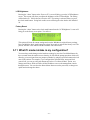
LCD Brightness:
Pressing the “down” button at the “Power off?” screen will bring you to the LCD Brightness
screen. This screen will allow you adjust the brightness of the LCD backlight. The setting
will default at 50. Valid values are from 0 to 100. The setting is activated when you press
the check mark button. Going back to this screen will bring the value back to the default of
50.
Factory Reset:
Pressing the “down” button or the check mark button from the “LCD Brightness” screen will
bring you to the factory reset option. You will see:
This option will clear all current settings and reset the WebMux to original factory settings.
Press and hold the check-mark button for at least 20 seconds to activate the factory reset. The
process will take a few minutes and the WebMux will reboot itself.
5.11 What if I made mistake in my configuration?
You can always make changes to the hardware settings by press the Check-Mark button for
three seconds when the statistic screen showing. It will start the prompt questions which will
allow the you to navigate from one prompt to another by using the up/down button on the left
most LCD position. For example, if you configured the Allowed Hosts wrong and lock
yourself out, you can go to the push buttons and select “Clr Allowed Hosts” option, save
changes and reboot, which will allow all the IP address to access the management console
through browser. You can clear the allowed hosts but not reset the password, or change one
option and not change the others.
- 33 -
Section 6
Management Console
After the Initial Configuration, you should be able to use a web browser to connect to the
WebMux. The web browser interface does all of the WebMux management. The following
sections explain each of the easy ways to use the management console screens.
•
Login
•
Administration Setup Page
• Change Password
• Set Clock
•
Status
•
Add Farm
•
Modify Farm
•
Add Server
•
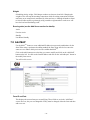
Modify Server
- 34 -
6.1 Login
Start Login Page:
Start a web browser from your management workstation.
Set URL to https://webmuxip:webmuxport/
webmuxip is the IP address of the WebMux on the server LAN.
webmuxport is the management port address of the WebMux. The default ports are 24 for an
unsecured connection, and 35 for the secured connection. Use http instead of https on the
URL line if you decide to use port 24 for unsecured communications. (The port number can
be changed per your specification, in the “setup” section the “network” screen).
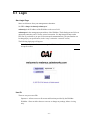
The following login page will appear.
Note In order to use a browser to manage the WebMux, the browser must be set to
accept all cookies.
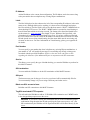
User ID:
There are two preset user IDs:
Superuser—Allows access to all screens and functions provided by the WebMux.
WebMux—Does not allow the user to access or change any settings; allows viewing
only.
- 35 -
Password:
Fill in the correct password for the selected User ID. The password is case sensitive.
The default passwords are:
ID
Password
superuser
superuser
webmux
webmux
It is recommended to change the passwords periodically. No new user ID can be added.
Login:
After entering the correct password, click Login.
Note For first time setup, please login as superuser and go to the Administration Setup
by clicking the Setup button. It is important to set up the Server Farm Gateway IP
address and network mask first.
If only HTTPS management login is allowed, go to “setup” and make the first port number
for HTTP/HTTPS management port to 0:35
Note For customers who have configured TACACS+ support, the login screen will
display the TACACS+ user login field and password. WebMux will validate the user to
the specified TACACS+ server specified in the “Setup” screen. Please refer to that
section for details.
- 36 -
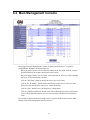
6.2 Main Management Console
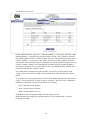
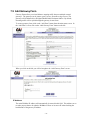
Once logged in to the Management Console, the main screen will show. To continue
configuring the WebMux, the normal steps are:
Hover the mouse pointer over the four main menus on the top (main, network, security,
and miscellaneous) to navigate the different setup screens.
Hover the mouse pointer over the “main” menu and click on “SSL keys” link to manage
SSL keys, if SSL termination is desired;
Click on “Add Farm” button on the left to create a new server farm;
Click on the “IP address” portion of the farm display to add servers, or select a radio
button of a farm and click the “add server” button on the left;
Click on “Save” button to save the farm/server configuration.
Click on “modify health check” button on the left to adjust the timeout for each kind of
services. Note that same protocol services between farms will share the same timeout
value.
We will discuss those buttons and related features in greater detail in later sections. Other
buttons on the main management console screen are:
- 37 -
6.2.1 Save
On the main management console, clicking on the Save button will cause the WebMux to
save its configuration. Changes made to the “Farm” and “Server” will take effect
immediately without saving. However, changes are not saved permanently to the solid state
storage until the “Save” button is clicked. Unsaved farm/server settings will be lost during
power outage or WebMux reboot.
6.2.2 Pause/ Resume
The status screen automatically refreshes frequently to provide most up to date status. You
can use the Pause button to freeze the auto refresh.
After clicking the Pause button, the button will change to Resume and the auto refresh will
stop. Click the Resume button to restart the auto refresh.
6.2.3 Adjusting Timeout for Each Service
Clicking on the service type (under the service column) for the farm or clicking on the
“modify health check” button on the left of the main screen will allow you to change the
timeout value of layer 7 protocol healthcheck for each different service. Please note this
change is global and will affect all the farms using the same type of service. For example, the
default timeout to check the HTTP protocol is 5 seconds. If the web server does not respond
to the WebMux protocol chat within 5 seconds, the WebMux will declare that server is dead
and switch that server out from service and notify the operator through email or pager.
Note WebMux will declare a server dead only if it fails the health check 3 consecutive
times.
If your web server is not really dead but for some reason is not responding to the checking
request within the given timeout, the WebMux will false alarm. To avoid this, the user can
change the timeout value to a larger value. Many times, servers cannot resolve the IP address
of WebMux server LAN interface and could cause the server to not respond to the WebMux’s
protocol checking. Adding the WebMux server LAN IP address and server LAN gateway
address to the name resolution table will help resolve this problem. Please read the Q&A
section for more information.
- 38 -
6.3 Network Setup
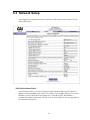
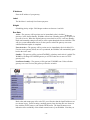
After logging into management console as superuser, click on the network menu. You will
come to this screen:
IPv6 96-bit Address Prefix:
To load balance in IPV6, you will set the option field of an IPv6 address prefix. The IPv4
addresses will be appended to this prefix. For example, if you assigned 192.168.12.21 for the
WebMux’s server LAN IP and you assigned fec0:: as the IPv6 prefix, the WebMux’s
complete IPv6 address will be fec0::192.168.12.21 (or fec0::c0a8:c15). See also Appendix H
for extra info on using IPv6.
- 39 -
Server for email notification:
The WebMux can send email notifications. Enter the IP address of the email server that will
forward the notifications.
Note Because the WebMux does not resolve names, this entry must be an IP address.
Also, you must allow relaying from the WebMux IP on your email server in order to
accept emails from the WebMux.
Addresses for email notification:
Enter the email addresses to be notified. Separate multiple addresses with a colon. For
example: [email protected]:[email protected]
UDP syslog server IP address notification:
The WebMux can be configured to send syslog messages to a remote syslogd server. Enter
the syslogd server IP address to use this feature. The syslogd server must be configured to
accept remote UDP syslog connections. The facility for WebMux syslog messages is
LOCAL6.
The notification levels of the syslog messages are as follows:
Level
Search Key
Description
INFO
STATS
LCD display messages
NOTICE
LOGIN
Successful browser login/logout (excludes timeout logout)
NOTICE
SETUP
Significant access and changes to setup and configuration items.
NOTICE
EVENT
Same as pager/mail messages
WARNING
LOGIN
Unsuccessful browser login
Server gateway IP address:
The WebMux appears to all the servers in the farms as a gateway or router. This is the IP
address for the WebMux acting as a router for the servers. This is the IP address that should
be used as the default gateway IP address in the web (or other) servers. It is highly
recommend adding it to the /etc/hosts file on your servers. Only apply for the NAT mode (or
for Out-of-Path Mode that requires the WebMux to do the SSL termination or Layer 7 load
balancing. Normally, this is optional for Out-of-Path Mode).
Note For first time setup, it is very important to set up this address and the Server Farm
network mask (below) first. Also when setting up the servers, you may be asked to fill in
the default gateway IP address for the server. Use this IP address to setup all the servers
under it. The WebMux will not function properly if this IP address is not set correctly for
both WebMux and the servers.
WebMux http control port:
Since the WebMux is load balancing incoming HTTP traffic, the HTTP port for the
management console must be set to a different port. By default, the port is 24. You can
change the port to any port that is not being load balanced, if so desired. The font push
buttons can also change this.
- 40 -
WebMux https control port:
Since the WebMux is load balancing incoming HTTPS traffic, the HTTPS port for the
management console must be set to a different port. By default, the port is 35. You can
change the port to any port that is not being load balanced, if so desired. The front push
buttons can also change this.
SNMP UDP Port:
SNMP on the WebMux is active and uses port 161 by default. You can change the port here.
Or you can enter “0” or “none” or leave blank to disable SNMP altogether.
SNMP Community String:
WebMux uses SNMP v1 and the community string “webmux” by default.
WebMux diagnostic ports:
The WebMux allows diagnostic sessions from remote access for factory technical support or
trained network engineers through ssh or telnet. Access is also subject to the restriction of the
“Allowed-Host” setting earlier. “superuser” can login with its password using “ssh” to run
certain diagnostic tools (help shows the commands, how to use these commands are not
supported). When this entry is blank, any diagnostic access is denied. This entry should
remain blank under normal operations. Default port numbers are 77 / 87. The first port is ssh
and second is telnet. If only one port specified, only ssh login is possible. You will need to
notify us the port numbers before obtaining support from us.
WebMux failover ports:
The WebMux allows configuration of fail-over ports being used by primary and backup
WebMuxes. Default port numbers are 2000 and 2001. You will only need to change the port
numbers unless there conflict with other services.
Least significant bits in client IP address to ignore for persistent connections:
This feature allows persistent connections to be handled properly when communicating with
America Online’s bank of cache servers. With AOL’s cache servers, the IP address of the
cache server becomes the source address. Since an end user can be sent through multiple
cache servers; it is possible the requests for one HTML page are being routed to different web
servers in the same session. Therefore, applications, such as shopping carts, that require
persistent and secure connections will not work properly. This feature will treat multiple
cache servers as one source, thus the WebMux can properly handle the persistent requests
from browsers. From customers’ feedback, number three (3) is good enough for most AOL
requests.
The WebMux will use this entry to determine how to load-balance the traffic. It calculates
based on two to the power of the entry as the number of IP addresses to combine. When too
large a mask applied, it will defeat the load balancing function of the WebMux.
Act as IP Router:
Yes: The WebMux will route IP packets both directions. The WebMux will not act as a
firewall in this mode.
- 41 -
No: The WebMux will NOT route incoming IP packets through the WebMux, except IP
packets for farm IP/port. This is the default setting.
Front Network Verification:
The WebMux checks the availability of the front network by checking on the IP address you
configured as your “external gateway ip” (your router IP). The selection here determines the
protocol used to check the connectivity of that IP address. It can be “none,” “ARP,” “TCP
Connection,” or “ping.” Depending on the front end router, this can be changed. For example,
most Cisco routers will talk to the WebMux through ARP and TCP Connection; however,
most Cisco DSL modems will only talk to the WebMux through Ping. Changes to this
verification method will take effect after the WebMux has been rebooted. If you have
configured a farm on the WebMux and the farm IP itself is showing dead, please verify that
your router responds to the method you have specified in this field.
Front Network Verification IP Address:
You can specify a different IP address for the WebMux to use to check the front network. It
can be the router in front of the WebMux, or a router in your ISP’s WAN. It can be any
address that is reachable on your Internet side. The protocol specified in the above field is
used. If you see the farm IP turning red, it is an indication that this address failed the check.
Leaving this field blank will cause the WebMux to use the IP address you specified as the
“external gateway ip” when you first set up the WebMux.
Persistence Timeout:
The WebMux will keep track the clients’ browser connections if the persistent farm is
defined and accessed. Within the timeout time period, the WebMux will send any request
from the browser IP address to the same server. Our survey shows 5–6 minutes is the best
value for most cases. The larger the persistence timeout value, the less chance user
connection get lost. However, by keeping a lot of connections in the WebMux memory, the
maximum number of available connections for new clients will drop.
Connection Timeout (Outbound):
The WebMux keeps track the outbound connections. This outbound proxy function provides
communication tunnels for servers behind it to talk to other computers on the Internet side.
This type of connection is different from the connections from outside through server farms
to the servers. After the connection closed from the servers to the outside computer, it will
wait this timeout minutes before it removes that from the tracking table. Setting this too long
will cause the WebMux to allocate too much memory, thus reduce the memory for other
functions. The default value is 15 minutes. This function has no effect in Out-of-Path Mode.
UDP NTP Time Server IP Address:
Since version 5.4, the WebMux can sync its internal clock with any UDP NTP server. By
default it points to a tier 2 NTP server. You can also set it to your Internet NTP server, or
wipe out the entry to not sync to any NTP server.
- 42 -
Reset Stranded TCP Connections:
When a server failed to function, there could be many TCP connections still in TCP_WAIT
state. If this set to “Yes,” when client tries to access the failed server, the WebMux will
pretend the server is sending TCP Reset to the client, thus freeing all the TCP_WAIT state
connections. Default setting is “Yes” to conserve resources.
Route Returning Layer 4 Load Balanced Traffic Whence Original Client Traffic
Came:
For configurations where you have multiple gateways, your originating connections may
come from the server side. You may have returning connections from the internet side that
you may want to be sure to be routed through the same gateway that the originating server
side client used to reach the destination. Default setting is “Yes”.
Front Proxy Addresses:
By default, the WebMux will use the main IP address you configured in the router/internet
LAN interface or Bridge IP as the source IP for outgoing connections. You may want to
specify a different IP address instead. You can list more than one IP address by separating
them with a colon (:). If you have more than one front proxy address, the WebMux will
choose a proxy address in a round-robin fashion. This option is not available in 1 Arm Outof-Path Mode.
SNAT:
By default, the WebMux will not change the source IP address of the originating client from
the internet/router LAN side of the network when sending packets to the destination server.
When the server receives these packets it will see that the client is external from its network.
In some cases, as in OCS 2007R2, you may need to enable SNAT so that the destination
server see that the request is coming from a local client. Enable this option so that the
WebMux will substitute its own IP address as the originating client.
6.3.1 Adding Static Routes
You can add static routes to the WebMux using the Web GUI or through the Command Line
Interface (CLI). From the Web GUI, hover the mouse over the “network” menu, then click
on the “routing table” button.
- 43 -
You should see this screen:
Routes displayed that are “grayed out” cannot be modified. To add a route, make sure “make
indicated changes” is selected in the drop down menu, click the “add” checkbox, and fill in
the remaining fields. Click the “confirm” button. Your new route should appear along with a
“delete” checkbox. You can click on the “delete” checkbox and click confirm to delete the
selected route. Please remember that even though a new route is immediately active once you
click the “confirm” button, it is not automatically saved and will get lost if the WebMux is
rebooted or powered off. To save your settings, select “save displayed table” from the drop
down menu and click the “confirm” button.
If you made unsaved changes and want to quickly revert back to your previously saved
settings, select “restore last saved table” from the drop down menu and click the “confirm”
button
To get to the CLI, you can either telnet or ssh in to the WebMux diagnostic port. By default it
is port 77 for ssh and port 87 for telnet. Login as “superuser.” Issue the “route” command to
modify the routing table. The network interfaces are as follows:
ethf0—Interface labeled “Internet”
eths0—Interface labeled “Backup”
ethb0—Interface labeled “Server”
In Single Network or Transparent modes, the main interface is br0.
Modifications to the routing table issued through the CLI are automatically saved after
issuing the command.
- 44 -
6.3.2 Reconfigure
The reconfigure button will bring you to the initial network settings page. More details about
this are covered in Section 8 “Initial Setup Change Through Browser.
- 45 -
6.4 Security Settings
Allowed remote host IPs:
The WebMux management console and diagnostic login only allow logins from these IP
addresses to establish a management session. You can access from more than one IP address
by specifying all the allowed IP addresses separated by a “:” (except use “,” as divider for
IPv6 addresses). You can put the netmask following the IP address to specify the range of
hosts that can access the management console. For example, 192.168.12.0/24 will allow all
hosts in 192.168.12 network to access it. From version 6.4.00, 192.168.12 will be allowed for
class C allowed host. If this field is left blank, you can access the management software from
any IP address. It is recommended to set this up for security reasons. If the wrong IP
addresses are entered, management console login might not be possible. Use the setup mode
on the LCD panel to clear the allowed host list. This field is blank by default.
TACACS+ Server Configuration:
The WebMux allows you to control the user/passwords for the “superuser” group logins with
a TACACS+ server so that password changes can be administered to several WebMux
machines instantly through a central authentication server. In this field you will need to
specify the TACACS+ server IP with “server=xxx.xxx.xxx.xxx.” Other arguments include
“secret=” (if the TACACS+ server requires a password to be accessed) and “encrypt.” Each
argument must be separated with a space. If for some reason the TACACS+ server is not
working, the WebMux will default back to the passwords configured in its password setup
screen.
Connection warning threshold:
The WebMux monitors the number of connections established. When the number of
connections is greater than the value entered, the WebMux will page the designated numbers.
For example, if a DoS attack is occurring, the number of connections to the site would be
extremely high. Assuming they exceeded the value set for the “connection warning”
threshold, the designated numbers would be paged.
- 46 -
ICMP Packet input policy:
Accept: The WebMux will allow all ICMP packets to travel through the WebMux. For CLI
arp commands working properly, this must be accept.
Deny: The WebMux will NOT allow any ICMP packets to travel through the WebMux.
Note During installation, having the ability to PING the other hosts on the networks is
typically useful. When the installation is complete, setting the “ICMP packet policy” to
DENY, is recommended as a security precaution.
6.4.1 Change Password
Name:
Select the login name for which the password is to be changed.
New Password:
Enter the new password. This is the password to which the login will be changed.
New Password Again:
Enter the same password as in the previous box.
Confirm/Cancel:
Click Confirm to execute the change. Click Cancel to return to the previous screen
WITHOUT changing the password.
6.4.2 Change PIN
To protect the WebMux from unauthorized changes from the front LCD panel, a PIN can be
entered here to prevent saving any changes from the front LCD panel. By default, there is no
PIN. You can unset the PIN by submitting blank fields.
- 47 -
6.4.3 Activating the Anti-Attack Feature
To get to the Anti-Attack settings of the WebMux, hover the mouse over the security menu
on top and then click on the AAD link.
You will see this screen:
TCP Connection Attack Threshold:
This will set the maximum number of concurrent connection a client can make before the
WebMux will consider it an attack. You do not want to set this value too low because most of
time servers will experience several concurrent connections during normal operations.
Usually a DoS or DDoS connection attack comes in by the hundreds. Set this value according
to your needs.
Client Whitelist for TCP Attacks:
It may be necessary to allow certain IPs to make connections that may appear to be attacks.
For example, if you have a third party company that regularly benchmarks your services for
maximum load handling, you will need to allow that company uninterrupted access. You can
use a specific IP address or specify a network range (i.e. xxx.xxx.xxx.0/24). Separate each
entry with a colon (:).
- 48 -
Duration to block attackers:
This sets the amount of time to block attacker IP addresses. It may not be desirable to block
specific IP addresses indefinitely because of the dynamic nature of IP addresses used by the
general public. You may end up blocking out potential customers in the future. Therefore,
this setting allows you to set the IP blocking duration that suite your needs.
Changing the settings in this page will not require a reboot and is effective once you click the
confirm button.
- 49 -
6.5 Miscellaneous Settings
The miscellaneous screen will show the events log by default.
6.5.1 Show Event
This button will display all the events since the WebMux’s last reboot. The event includes
server failure or state change.
6.5.2 Logout
It is not recommended to leave the management browser logged in unattended. Click the
Logout button to close the session. The “Login” screen will re-appear.
6.5.3 Upload/Download (Backup/Restore)
- 50 -
Download:
This feature allows the SAVED (not necessarily the active) configuration to be saved at the
Administrative Browser workstation. Be sure you have saved your farm configurations from
the main screen before exporting your configuration to ensure that you are getting your most
recent changes. Click on the Click Here to display the configuration. Choose ’File->Save As’
from the browser menu to save it as a text file. Changes can be made to this file and uploaded
to the WebMux. DO NOT change the first comment line.
Upload:
Upload allows a configuration file that has been saved at the browser workstation to be
uploaded to the WebMux. Enter the full path of the configuration file, or click on Browse to
search for the file. Click Upload to upload the file to the WebMux. This file will
IMMEDIATELY become the saved and active configuration. Upload ALL Settings to
WebMux will actually upload settings including IP addresses, farms, and information you
entered in the Administration Setup. If you want to replace the WebMux with a new unit, you
could save the configuration and upload all settings to the WebMux, so that you do not need
to go through step by step configuration (requires both WebMuxes on the same firmware
revision).
6.5.4 Set Clock
Click this link to go to the “Set the Clock” page. The time and date of the WebMux can then
be set. Please note that the WebMux internally uses GMT time zone, not your local time
zone, per W3C/HTTP protocol. If the time zone is not set correctly, the browser access could
be denied due to “cookie” time out. If the UDP NTP server is set up correctly, there is no
need to set the clock anymore, since the WebMux automatically sets its clock periodically.
Month:
Enter the number of the month, 1 through 12. Leading zeroes are not necessary.
Day of the Month:
Enter the day of the month, 1 through 31.
- 51 -
Year:
Enter the year. Enter all 4 digits.
Hour:
Enter the hour of the day. Use the 24 hour clock, or military time.
Minute:
Enter the minute of the hour.
Time Zone:
Select the time or hour offset to the UTC (GMT) time. You can set the WebMux to your local
time, if your time zone is selected here.
Confirm/Cancel:
Click Confirm to execute the date and time change. Click Cancel to return to the previous
screen WITHOUT making any date or time changes.
Note It is recommended to set the WebMux clock to UTC (GMT) time.
6.5.5 Shutdown
The shutdown button will bring you to a confirmation screen to power off the WebMux.
6.5.6 Reboot
Changes to “TACACS+ server configuration,” “server gateway address,” “server farm
network mask,” “WebMux http control port,” “WebMux https control port,” “WebMux
SNMP UDP Port,” “WebMux SNMP Community,” “WebMux diagnostic ports,” “least
significant bits,” “forwarding policy,” “front network verification,” and “persistence timeout”
require a reboot for the new configuration to take effect. You can use the Reboot button to
reboot the WebMux remotely. Reboot button will require confirmation before proceeding
with reboot.
- 52 -
Section 7
Setting Up Load Balancing
7.1 Add Farm
Back at the “main” screen of the Main Management console, click the “Add Farm” button to
add a virtual site for the services you want to provide. The “add farm” screen will appear:
Farm IP address:
This is the IP address of the new farm.
For SSL terminated traffic, each farm must have its own IP address.
The farm address could be the Internet known address or the address has been translated by
your firewall. For example, if you want to create an http farm for www.mydomain.com, the
farm IP address will be the IP address for www.mydomain.com from your DNS record. If the
IP address of www.mydomain.com is 205.188.166.10, then the Farm IP address is also
205.188.166.10. The WebMux will then translate the farm address to the web server address
in your DMZ or internal network.
Label:
Since version 4.0.3, we introduced the “label” concept for the farms and servers. Once the
label is specified, the WebMux will display the label for the farm on the column to the left of
- 53 -
the corresponding IP addresses in the status screen. Although labels can be anything, it is
better to have meaningful and unique label for each farm. Since version 5.6, the label field is
also used as the host name in “HOST:” MIME header to when checking HTTP servers. The
“HOST:” MIME header is essential in virtual hosting as that will determine which site is
being accessed. The format of the farm label should be the site host name (i.e. www.xyz.com),
max length 75 bytes. Without a label specified, a 401 (Unauthorized) error code is still
considered a live server. If you have a label specified and the server returns error code 401,
then the WebMux will consider that server dead. For both IIS and Apache servers doing
virtual hosting, the farm name label must be an existing web site name on the server. For
more information on Virtual hosting, please go to Appendix D for details.
In NAT mode, if you use the WebMux for your intranet, the farm IP address will be the
original IP address of the web or application server. The web or application server must have
its IP address in the address range of the Server LAN subnet. The WebMux will translate
farm IP address to the server IP address. You can use the IP address used as the Route LAN
IP of WebMux as your farm addresses to save an IP address. You can create more farms with
the same IP address, as long as the port number is different.
In the NAT mode, the WebMux also acts as a firewall. All ports except the farm port(s) are
blocked. All servers behind the WebMux will still be able to reach to the outside through the
WebMux. Traffic from the servers to the outside network will be seen as coming from the
WebMux’s Router LAN IP address, or proxy address. If a WebMux is placed behind a
firewall, be sure to allow the WebMux Router LAN IP address to get to anywhere/anyport.
All farm IP addresses should have rules to allow incoming traffic mapped to the address and
port number, as well as the return traffic for each farm IP address from any port to anywhere.
In Transparent Mode or Single Network Mode, there is no firewall protection from the
WebMux. All servers talk to each other freely across the WebMux. Load balancing occurs
when the farm IP is accessed.
In Out-of-Path Mode, only the Server LAN port is connected, and the farm(s) must use a
different IP address than the WebMux Server LAN IP address. You can use reuse an IP
address for more than one farm as long as the port number is different from each other. In this
mode, each server must add a loopback adapter. In a Windows server, the route for the
loopback adapter must be removed. Please refer to Appendix A and B for more detailed
procedures. The WebMux has been tested extensively working with all versions of Windows,
Linux and HP-UX 11.X under this mode. Other OS should also work fine.
CAUTION Once a new farm is added, the IP address of the farm cannot be changed. To
correct the IP address, the farm has to be deleted and a new one created.
Port Number:
This is the port number for the farm. If you are choosing one of the known services (see
below), you do not have to specify anything in this field. However, if the service you choose
is not listed in the list below, you will need to specify a port number here. For example, for
MS Terminal Services, use port number 3389. If you enable SSL termination (see “Enabling
SSL Termination” section), then specify port 80 for the farm and servers in the farm
(choosing “HTTP—hypertext transfer protocol will automatically specify port 80 for the
farm). The WebMux will terminate all SSL traffic on port 443 and send them to port 80(DO
NOT specify port 443 if you enable SSL termination).
- 54 -
Service:
The service selection determines the type of service running on the servers in the farm and
how the WebMux will check the server health status. The service type selection will create a
farm using the well-known port for that service type. If a port other than a well-known port
for TCP or UDP service is to be used, then choose one of the “Generic” selections and enter
the port number in the PORT NUMBER field. You do will not need to specify the port
number if the service protocol is on the list. The WebMux has level 7 protocol checks for the
known ports in the list. For Custom Defined TCP Service (custom health check), please
specify the URL for the CGI code in the Administration Setup screen.
CAUTION Once a farm is created, the port number cannot be changed. Like the IP
address, the farm must be deleted and a new one created in order to change farm settings.
Please choose “Generic TCP” and specify port number, if service is not listed below. If
multiple ports to be used, please also select “Generic TCP” and specify port number “0.”
Service
Well-Known Port#
DNS—Domain Name Service (TCP)
53
FTP—File Transfer Protocol (TCP)
21
HTTP—Hypertext Transfer Protocol (TCP)
80
HTTPS—Secure Hypertext Transfer Protocol (TCP)
HTTP/HTTPS Combined Ports
443
80/443
LDAP – Lightweight Directory Access Protocol
389
MMCC – Multimedia Conference Control (TCP)
5050
NNTP – Network News Transfer Protocol (TCP)
119
NTP— Network Time Protocol
123
POP3— Post Office Protocol
110
SMTP—Simple Mail Transfer Protocol (TCP)
25
SNPP – Simple Network Paging Protocol (TCP)
444
Generic TCP
User Specify
Generic UDP
User Specify
Generic TCP/UDP
User Specify
Generic no health check (TCP)
User Specify
Generic no health check (UDP)
User Specify
Generic no health check (TCP/UDP)
User Specify
Custom Defined TCP Services
User Specify
Custom Defined + Generic TCP
User Specify
Custom Defined UDP Services
User Specify
Custom Defined TCP/UDP Services
User Specify
Custom Defined Paired HTTP and HTTPS (TCP) Service
User Specify
- 55 -
Scheduling method:
The scheduling method is the way in which traffic is distributed among the servers in the
farm. Eight different methods are supported. If you are using a shopping cart service, a
persistent scheduling method is recommended.
Least connections
Least connections—persistent
Round robin
Round robin—persistent
Weighted least connections
Weighted least connections—persistent
Weighted round robin
Weighted round robin—persistent
Weighted fastest response
Weighted fastest response—persistent
Faster Layer 7 HTTP URI load directing (no compression)
Layer 7 HTTP URI load directing
Layer 7 HTTP URL load directing with cookies
Layer 7 HTTP cookie load directing with cookies
Layer 7 HTTP virtual host load directing with cookies
Layer 7 generic TCP load directing
Layer 7 scheduling methods can only be used with TCP service. These scheduling methods
allow you to direct traffic to a specific group of servers depending on a match pattern that is
tested against the URI in the client’s GET request header. When selecting any of L7
scheduling method, user can also enable IPV6 to IPV4 translation.
Layer 7 HTTP URI load directing is your basic Layer 7 load balancing method.
The “Faster Layer 7 HTTP URI load directing (no compression)” option is the original basic
Layer 7 load balancing feature that was not built with the HTTP compression logic.
Although, both selections will load balance exactly the same way, selecting the “Faster”
method may free up more resources than the normal Layer 7 HTTP URL load directing
option; even if HTTP compression is not being used.
Layer 7 HTTP URL load directing with cookies allows the WebMux to maintain client/server
persistence. This scheduling method also compares the match pattern against the host MIME
header. In other words, a host name can be specified as a match pattern. In order for
client/server persistence to occur, the server will have to generate a cookie first. The
WebMux will generate its own cookie to keep track of which client session belongs to which
server. These are useful for shopping cart services, for example, so that a client will be
directed to the same server and keep their shopping cart items valid. The WebMux cookie
expire time matches the MAX_AGE setting specified in the cookie generated by the servers.
When MAX_AGE is not defined, the cookie expire time is 30 minutes. If the server deletes
the original cookie, the WebMux will also delete its corresponding cookie.
Layer 7 HTTP cookie load directing with cookies tests the match pattern against the cookie
MIME header content only. Client to server persistence is also enabled in this scheduling
method. Lync and Exchange configuration may need to use this option.
Layer 7 HTTP virtual host load directing with cookies allows you to direct traffic to name
based virtual hosts. For other scheduling methods, you cannot put the same server IP address
- 56 -
more than once in a single farm. This scheduling method will allow you to have several
name based virtual hosts on a single physical server with one IP address. Client to server
persistence is enabled in this scheduling method.
SSL Termination:
Selecting an SSL key in this section will enable SSL termination for this farm.
The HTTP service and POP3 service terminate to ports 443 and 995, respectively, and will
allow you to choose any port for the clear traffic to the servers.
When using the generic or custom services, specifying the clear traffic port for the service in
the “port number” section causes the WebMux to automatically assume the secure port for
the following services:
Clear Traffic Port
Secure Port
Service
80
443
HTTP
110
995
POP3
23
992
Telnet
25
465
SMTP
119
563
NNTP
143
993
IMAP
194
994
IRC
389
636
LDAP
SSL Port:
If the SSL traffic is not standard secure port listed above, user can specify his own.
Block non-SSL access to farm:
If the incoming traffic is not encrypted, drop the packet.
tag SSL terminated HTTP requests:
Adding a tag to MIME header to distinguish the incoming traffic was encrypted. By default,
no tag. Tag format: "X-WebMux-SSL-termination: true"
Servers are HTTPS servers, not HTTP server:
Enable SSL end to end re-encryption, by default, no. Only allowed on farm doing SSL
termination. Lync and Exchange server may need this feature.
Servers only server IPV4, not IPV6:
If the incoming traffic is IPV6, WebMux can map them into IPV4 servers.
Connection throttling watermarks:
If specified, traffic will be stopped at the high watermark, and allowed again below low
watermark.
- 57 -
Compress HTTP Traffic:
Selecting “yes” to this option will activate the WebMux HTTP compression. If the client web
browser sends out a MIME header that states that it accepts compressed data. The WebMux
will compress HTTP data to the client browser. If the WebMux detects that the servers in the
farm are already compressing the data, the WebMux will not perform compression. Instead, it
will let the compressed data from the servers pass through without additional processing.
When enabled the MIME header “X-WebMux-Compression: true” will be appended to the
server response MIME header. The WebMux will also automatically disable compression
should its CPU usage reach 50%.
Note Compression is NOT supported in Out-of-Path Mode, except when used in a
Layer 7 Farm.
SNAT:
Enable SNAT for this farm only. In the Network Configuraiton screen, user can specify the
system wide SNAT, or use this field to enable per farm based SNAT.
HTTP server response comparison string:
When a string is entered in this field, WebMux HTTP healthcheck will search the first 1024
bytes in the HTTP content. String is case sensitive match.
HTTP server URI:
By default, WebMux healthcheck checks default page loading. If specifying a URI here,
WebMux will use this URI instead of default page do healthcheck.
- 58 -
7.2 Enabling SSL Termination
By default, the SSL termination is NOT on. The following description is about enabling SSL
termination for an HTTP farm.
In the “Add Farm” screen, select “HTTP—hypertext transfer protocol (TCP)” in the “service”
section. In the “SSL Termination” section, choose from any key other than “none” (see the
SSL Keys section about importing your SSL keys). This will enable SSL termination on the
HTTP farm. All the HTTPS incoming traffic will be sent terminated to farms on HTTP port
(80). Please set the “port number” to a clear port, since after the WebMux terminates the SSL
traffic, only clear traffic will go to servers. When the servers return traffic back, the WebMux
will re-encrypt the data and send encrypted back to client. If you are using Out-of-Path Mode,
please make sure your servers’ gateway points to the WebMux server LAN gateway IP
address (not the router); so that the WebMux has the chance to re-encrypt the data before
replying back to clients.
Block non-SSL access to farm:
One can also block non-encrypted incoming traffic, so that only encrypted traffic can reach
your server. This might be useful, when you only want encrypted traffic to reach your servers.
Tag SSL-terminated HTTP requests:
Because traffic between the WebMux to your servers is unencrypted traffic, your servers will
not be able to tell if the originating connection was HTTPS or HTTP. This may be important
if the application on the server requires that kind of information. You can turn on “tag SSLterminated HTTP requests.” By selecting “Yes,” the decrypted traffic to the servers will have
the added MIME header “X-WebMux-SSL-termination: true.” It is up to you how you want
the server to process this information. For example, you can write a script on your server to
identify if the original traffic was HTTPS or HTTP, and then properly redirect the traffic to
the HTTPS.
- 59 -
The WebMux allows SSL termination from any port to the farm port. If your SSL/TLS traffic
is other than the standard HTTPS traffic, you may want to specify the SSL traffic port in the
“SSL port” field. The WebMux will listen to that SSL port, terminate the encrypted traffic
from that port into the farm port, and re-encrypt the return traffic from the server to the
clients.
7.3 SSL Keys
The WebMux supports SSL V2, SSL V3, and TLS V1 with RSA key length from 512, 1024,
and 2048. For each WebMux, one can have 32 SSL certificates: Any key can be active or not
active. The first line of the private key is the comment. See included two sample keys for
details. If there is no comment line in the key, it will be blank. If there is no key, it will
display “(key and certificate unset).”
Key length can be from 512 to 2048. RSA key length 1024 is also called 128bit strong
encryption.
- 60 -
At the bottom of the screen you will see the option to choose encryption protocols allowed:
This will enable you to restrict SSL connections that do not follow the minimum protocol. If
there are already active farms using SSL Termination, then changing this setting will require
you to reboot the WebMux to activate changes. If you decide not to reboot, existing farms
will run under the previous criteria and new farms will follow the new criteria. Rebooting the
WebMux will ensure that ALL the farms with SSL Termination will adhere to the new
protocol requirement.
- 61 -
You can click a key number to generate keys, copy and paste signed certificates:
You can view, copy and paste keys into the two windows. You should backup your private
key and save in a secure place. Each private key and public key pair must match to be able to
work properly.
If you plan to generate new keys, click on the drop down box above the private key window
to select the “use newly generated” item with the desired key length, and then click on the
“Submit” button. This process is also known as “generating a CSR”—Certificate Signing
Request. It is the process where you generated a key pair and send the public key to the CA
for “signing.” Once your public key signed and pasted into the key management screen, all
the browsers over Internet will accept it without complaint during the lifetime assigned to the
key. You can visit www.thawte.com or www.verisign.com for more information.
- 62 -
After submitting the selection, you will see this next screen:
Enter all the necessary information. Click on the “Confirm” button to complete the key
generation. A certificate request will be generated. BE SURE TO COPY AND SAVE THIS
BEFORE YOU CONTINUE. When you are done saving the certificate request, you can click
on the “Confirm” button. You will be taken back to the dialog boxes that will display the
newly created private key. You should make a backup copy of that as well.
Submit the certificate request to the CA of your choice to sign. Once they send you back the
signed certificate, you will need to paste that into the certificate dialog box, select “use new
certificate pasted in” and click on the “Confirm” button to save it into the WebMux.
Generally, you will receive three certificates. The one whose identity is your e-mail address is
the site certificate. The one whose subject and issue are identical is the CA root. The third one
is called the intermediate certificate. Please paste your site certificate first, followed by your
intermediate certificate.
If you have existing signed keys from a Windows IIS server or a Linux server, you can
transfer them into the WebMux and continue using them until they expire. You should be
- 63 -
able to directly transfer your existing key and certificate from your Linux server. For
Windows IIS keys and certificates, you will need to convert them to PEM format.
Please refer to our support site for instructions:
http://www.cainetworks.com/support/how-to-convert-ssl.html
You can get OpenSSL for Windows at:
http://www.slproweb.com/products/Win32OpenSSL.html
If you would rather, you may contact us at [email protected] and we can do the
conversion for you.
Note The CA certificate field is only for client side SSL authentication. It is not for the
intermediate certificate. Please see Appendix O for details about setting up client side
SSL authentication.
7.4 Modify Farm
Modify farm can be invoked from the main management console screen by clicking on the
farm IP address or selecting a radio button of a farm and clicking the “modify farm” button
on the left side of the screen.
Farm IP address and port number:
This displays the current farm IP that is being modified. These fields are set in the “Add
Farm” screen. Once set, they are not changeable. If they must be changed, delete the farm and
then add a new one.
Label:
The label is displayed on the column to the left of the corresponding IP addresses in the main
status screen. Although labels can be anything, it is better to have meaningful and unique
label for each farm. The label field is also used as the host name in “HOST:” MIME header to
when checking HTTP servers. The “HOST:” MIME header is essential in virtual hosting as
- 64 -
that will determine which site is being accessed. The format of the farm label should be the
site host name (i.e., www.xyz.com), max length 75 bytes. Without a label specified, a 401
(Unauthorized) error code is still considered a live server. If you have a label specified and
the server returns error code 401, then the WebMux will consider that server dead. For both
IIS and Apache servers doing virtual hosting, the farm name label must be an existing web
site name on the server. For more information on Virtual hosting, please go to Appendix D
for details.
Farm scheduling method:
Eight different methods are supported:
Least connections
Least connections—persistent
Round robin
Round robin—persistent
Weighted least connections
Weighted least connections—persistent
Weighted round robin
Weighted round robin—persistent
Weighted fastest response
Weighted fastest response—persistent
Faster Layer 7 HTTP URI load directing (no compression)
Layer 7 HTTP URI load directing
Layer 7 HTTP URL load directing with cookies
Layer 7 HTTP cookie load directing with cookies
Layer 7 virtual host load directing with cookies
SSL Termination:
You can change the SSL key/certificate pair used for this farm. All current connections for
this farm will be reset if you change the key/certificate pair selection.
Block non-SSL Access to farm:
If you do not want to allow non-encrypted traffic connecting to the farm, select “Yes.”
Tag SSL-terminated HTTP requests:
If SSL termination is active for this farm, choosing “Yes” for this option will add an “XWebMux-SSL-termination: true” MIME header in the decrypted http request going to the real
server.
Connection throttling watermarks:
Setting a value in the “high” field will control the maximum number of concurrent
connections allowed on a farm. The “low” field will control when to resume allowing more
connections. For example, with a high set to 20 and a low set to 10, the WebMux stop
allowing more connections when the number of concurrent connections hit 20 and new
connections will not be allowed until the number of concurrent connections drop to 10 or
below.
- 65 -
SNAT:
Selecting YES in this field will enable SNAT for this farm only. This option is not available
when SNAT is enabled system-wide in the network management or when running in Single
Network Mode.
Compress HTTP traffic:
Enable or disable HTTP compression. When enabled the MIME header “X-WebMuxCompression: true” will be appended to the server response MIME header. (NOT supported
in Out-of-Path Mode, except when used in a Layer 7 Farm).
Delete:
Click this button to delete the entire farm.
CAUTION This function also deletes ALL the servers under this farm.
7.5 Add Server
In the Modify Farm screen click on the “Add Server” button to add a new server to this farm.
Or you can select the radio button of the farm from the main screen and click on the “add
server” button on the left.
Server IP Address:
This is the IP address of the server to be added.
Label:
Since version 4.0.3, the WebMux allows adding a label to each server’s IP address. The
purpose of labeling a server is only to help identify the server in the farm. It has nothing to do
with the name resolution of the server. Although label can be anything, it is always better to
have meaningful and unique label for each server.
CAUTION Once the server is added, the IP address cannot be changed. To correct the IP
address, the server must be deleted and a new one be created.
- 66 -
Server Port Number:
If the port number specified in the farm setup is the same as the real server’s port number,
you can leave this as “same.” In NAT mode, the WebMux can perform port forwarding from
the farm IP port to the server IP port if you specify a server port that is different from the
farm port.
CAUTION Like the IP address, once created, the port number cannot be changed. To
correct the port number, the server needs to be deleted and a new one to be created.
Weight:
Scheduling priority weight. Valid integer numbers are between 1 and 100. A server that has a
weight of 2 will be directed twice as much traffic as a server with a weight of 1.
A special zero weight setting is provided for a graceful shut down of a server. When the
weight is changed to zero, the WebMux will not send new connections, but will maintain all
current connections to the server. The connections will gradually reduce to zero as current
clients’ sessions terminated. When there are no connections, the server is functionally “dead”
or off line until the weight is changed back to a valid number. Then the server can then be
shutdown or taken out of service without affecting any users.
CAUTION Unlike a server that can go down unexpectedly, the WebMux will not move a
STANDBY server to ACTIVE when one or more server’s weight is set to zero. If the
weight of all the servers in a farm were set to zero, then the farm would be “down”
because none of the servers are accepting new connections.
Note If your scheduling method is of the “persistent” type, be aware that the WebMux
will continue to honor those existing persistent sessions. If you have clients that continue
to return before the persistence timeout has expired, then you will continue to see
connections coming in.
Run State
Active—The server will be put into service immediately after it is added. If there are servers
in the farm in Standby, WebMux will activate a Standby server in its place if it goes out of
service. When the original server comes back in service, it will stay Standby mode until
manually setting its run state to Active again through the browser interface. This will give
system administrator time to fix the system or reboot the server once some software/hardware
update is completed.
Favorite Active—The server will be put into services immediately after it is added. If a
Favorite Active server failed, once it is operational, the WebMux will automatically put it
back to the Active state.
Standby—The server will be put into STANDBY, or backup, mode after it is added. The
WebMux will change a STANDBY server to ACTIVE when one or more ACTIVE servers
fail. The weights will also have an effect on the number of standby servers that are activated.
The if the failed active server had a weight of 20 and there are two standby servers with the
weight of 10, the WebMux will activate the two standby servers to make up the difference.
- 67 -
Last Resort Standby—The server will be put into STANDBY state. Unless all other servers
are out of services, this server will not be switch in. This will allow the last server to show a
different web page from others.
7.6 Add L7 Server
If setting up a Layer 7 farm, the add server screen will be similar to this:
Two options extra options are available:
Match Pattern
Pattern is anchored
Match Pattern:
This is the pattern that will need to match the client request data to access this server. It is in
extended regular expression format. In previous version, the pattern is restricted to 50 bytes
in length. From version 8.6 firmware, the match pattern length enlarged to 100 bytes. Please
refer to Appendix G for some match pattern examples.
Pattern is Anchored:
This means that the match pattern will be checked against the very beginning of the string
following the “http://.”
Note If you chose Layer 7 URL load directing with cookies or URL cookie load
directing with cookies as the scheduling method, the match pattern is also compared to
the host MIME header. In other words, you can use a host name as a match pattern
criterion.
- 68 -
Virtual Host Load Directing:
If you selected Layer 7 virtual host load directing with cookies as the scheduling method, the
add server screen will look slightly different:
In this screen, you will need to specify the virtual host name of the server you are adding. The
WebMux will use this host name when it does the server health check and as the match pattern to
direct clients to the correct site.
7.7 Modify Server
Modify Server can be invoked by clicking on the server IP address on the Status screen.
Destination server IP address and port number:
These parameters are set in the “Add Server” screen. Once set, these fields cannot be
modified. To correct this setting, delete the server and add a new one.
Label:
The label can be changed at any time. The change will not affect how server is performing in
the farm; rather it is for description purpose only.
- 69 -
Weight:
Scheduling priority weight. Valid integer numbers are between 0 and 100. Changing the
weight to zero will stop the incoming connections while all existing connections continue
until time out or connection is terminated by client and server. Although all numbers from 1
to 100 will allow traffic to go through, using a smaller weight number in each server will
have the best load distributing result.
Running state (see the Add Server section for details):
Active
Favorite Active
Standby
Last Resort Standby
7.8 Add MAP
Use the MAP TM feature to create additional IP address/port protocol combinations for the
farm. When using a persistent scheduling method, the same client will also be sent to the
same server no matter which port it accesses within that MAP TM.
Click on the radio button next to the farm you want to modify and click on the “add MAP”
button on the left. Or click on the farm IP address and click on the “add addr/port” button in
the modify farm screen.
You will see this screen:
Farm IP and Port:
This displays the current farm you are modifying. These fields are set in the “Add Farm”
screen. Once set, they are not changeable. If they must be changed, delete the farm and then
add a new one.
- 70 -
IP Address:
Add an IP address to the current farm configuration. The IP address can be the same as long
as the port number does not duplicate any existing IP/port combinations.
Label:
The label is displayed on the column to the left of the corresponding IP addresses in the main
status screen. Although labels can be anything, it is better to have meaningful and unique
label for each farm. The label field is also used as the host name in “HOST:” MIME header to
when checking HTTP servers. The “HOST:” MIME header is essential in virtual hosting as
that will determine which site is being accessed. The format of the farm label should be the
site host name (i.e. www.xyz.com), max length 75 bytes. Without a label specified, a 401
(Unauthorized) error code is still considered a live server. If you have a label specified and
the server returns error code 401, then the WebMux will consider that server dead. For both
IIS and Apache servers doing virtual hosting, the farm name label must be an existing web
site name on the server. For more information on Virtual hosting, please go to Appendix D
for details.
Port Number:
You can specify a port number that doesn’t duplicate any existing IP/port combinations. A
port number of “all” will enable all port ranges, but excluding any already existing ports
associated with the specified IP address. Please see the note at the end of this section
regarding the behaviors of the additional IP/port in conjunction with SSL termination.
Service:
This allows you to specify the type of health checking you want the WebMux to perform for
this MAP™ instance.
SSL termination:
You can enable the WebMux to do the SSL termination of this MAP™ instance.
SSL port:
The known secure port for the type of service you selected will be automatically filled in.
You can manually change it if you are using a different port for that service.
Block non-SSL access to farm:
Prohibits non-SSL connection to this MAP™ instance.
Tag SSL-terminated HTTP requests:
This will enable the WebMux to add an “X-WebMux-SSL-termination: true” MIME header
in the decrypted http request sent to the server.
CAUTION If your farm is already SSL terminated and you create an additional IP/port
combination using the main farm IP and specifying the same secure port (or “all”), the
SSL termination by the WebMux will be bypassed and SSL will be done directly by the
server.
- 71 -
7.9 Add Gateway Farm
Gateway Farms allow you to load balance outgoing traffic between multiple external
gateways. The gateways can be routers, proxy servers, firewalls or edge servers. The
gateways will be balanced in a Weighted Round Robin Persistent fashion. By default,
incoming traffic will be replied through the gateway it came from.
To create a gateway farm, click on the “Add Farm” button from the main status screen. In
the “Add Farm” screen, click on the “Add Gateway Farm” button on the left:
When you click on the link you will be brought to the “Add Gateway Farm” screen:
IP Address:
The main WebMux IP address will automatically be entered in this field. This address serves
no other purpose than to be what the WebMux will use as its source IP when checking the
health status of the gateway IP address.
- 72 -
Label:
You can enter a label for reference purposes. The use of the label for gateways is optional.
Click the “Confirm” button to create the gateway farm. Your status screen will look
something like this:
Your original default external gateway will be automatically added to the gateway farm.
Click on the gateway farm IP on the grey line above the router IP to add more gateways to the
gateway farm.
Click on the “Add Gateway” button to add more gateways IPs to your gateway farm.
- 73 -
IP Address:
Enter the IP address of your gateway.
Label:
The label here is used only for reference purposes.
Weight:
Scheduling priority weight. Valid integer numbers are between 1 and 100.
Run State
Active—The gateway will be put into service immediately after it is added. If there are
gateways in the farm in Standby, WebMux will activate a Standby gateway in its place if it
goes out of service. When the original gateway comes back in service, it will stay Standby
mode until manually setting its run state to Active again through the browser interface. This
will give system administrator time to fix the system or reboot the gateway once some
software/hardware update is completed.
Favorite Active—The gateway will be put into service immediately after it is added. If a
Favorite Active gateway failed, once it is operational, the WebMux will automatically put it
back to the Active state.
Standby—The gateway will be put into STANDBY, or backup, mode after it is added. The
WebMux will change a STANDBY gateway to ACTIVE when one or more ACTIVE
gateways fail.
Last Resort Standby—The gateway will be put into STANDBY state. Unless all other
gateways are out of services, this gateway will not be switch in.
Back at the main status page of the web GUI, you will notice that the farm IP addresses are
now shown in grey. Before creating a nexthop gateway farm, the farm IPs were shown in
blue with the ALIVE status, or red with the DEAD status. The farm IP status was an
indication of the availability of the default external route of your WebMux. Now that you
- 74 -
have created a gateway farm, the status of your external route is determined by the
availability of any one of the gateways in your gateway farm. As with a single default
gateway the type of health checking done on the router IPs is determined by the “front
network verification” protocol setting in the Administrator Setup page (see section 6.3).
If you click on the “nh” link under the “service” column, you will get to the “modify service
timeout page.
The setting in this page will determine how long or how short the WebMux will wait to be
able to verify if the gateway IP is still valid or not. You can disable the checking altogether
by setting the timeout value to 0 or you can set the “front network verification” protocol to
“none” in the Network Setup page (see Section 6.3).
- 75 -
7.10 Modify Health Check
User may change the healthcheck behavior by modify and enable custom healthck, modifying
the HTTP server respond code behavior, and change the healthcheck TCP timeout value.
To modify the healthcheck timeout:
To modify the custom healthcheck:
URL for Custom Service Check:
Sometimes the WebMux built-in server health check is not enough for special needs. When a
ASP/JSP server’s output depends on the database server and the database server connection is
down, one might want to reduce the incoming traffic to the server, suspend new traffic to the
server, or totally redirect incoming traffic to a different server. To accomplish that, the
WebMux allows a farm set up using “custom defined service.” It will then call the CGI’s
URL on the server defined in this field. This will involve a custom developed CGI code by
your software developer on your server and place it on the path. Upon success the page
should return HTTP response code 200 and a plain text page beginning with one of the
- 76 -
allowed responses. The URL is truncated to 255 bytes (to be a string of at most 256 bytes
with a terminating null). The response from the server must fit in 4k, including all nondisplay tag and headers etc. This custom CGI code must complete within 15 seconds or the
server is considered dead. The custom defined service also allows for CGI code responses
that allow the server to change its own weight and announce such change to a remote syslog
daemon. Please see Appendix E for a sample code and a list of allowed responses.
TCP Port for Custom Service Check:
By default, the WebMux will do its custom service check on port 80 no matter what port you
set up for the farm. If you wish to change this, you can specify a port here. This is a global
setting and will be used for all farms using the custom health check service.
To modify the HTTP respond code:
HTTP Check Management:
By default, HTTP server return code 200 indicating successful result. Sometimes a different
return code or a group of numbers are disirable. User can modify the valid HTTP return code
in this screen.
- 77 -
7.11 Monitor Traffic History Chart
To monitor the traffic history, WebMux keep some of its statistics information in the memory
during running. Please note these inforamtion will be lost once WebMux is rebooted.
- 78 -
Section 8
Initial Setup Change Through Browser
You may want to change the basic settings for the WebMux through browser interface, for
example, when the WebMux located in a hosting center across the country. If one has
information about the WebMux current basic settings, one could change those parameters
through browser. On the browser, enter the following URL:
https://webmux_ip:webmux_manage_port/cgi-bin/rec
For example, if your webmux_ip is 192.168.12.1, and your webmux_manage_port is 24, your
URL will be
http://192.168.12.1:24/cgi-bin/rec
The first screen in “rec” (reconfiguration) asks for the superuser’s password. The default
superuser’s password is “superuser,” however, the actual superuser’s password may had been
changed by the system administrator. If you could not remember the superuser’s password,
someone has to go to the keypad to reset the password. See page 22 for more details.
- 79 -
The next question on the screen asks to set the time in the WebMux. The WebMux uses its
clock to set the cookie for the management browser. When a WebMux manager is logged in
for more than 8 hours without activity, the WebMux will log out the user based on the cookie.
If the clock is off by more than 8 hours, the manager will not be able to login in to the
WebMux. This section on the “rec” screen will allow the manager to correct the clock if it is
off. After entering proper password and setting the clock information (optional), the
“continue” button will bring up this screen:
Click the mouse into a field or use the TAB key to move the cursor into a field to see the
current values. The user may change it based on new information obtained from ISP or
network engineers. Once you press on the submit button, the WebMux will save all the
changes to its internal solid state storage and reboot itself with the new value.
- 80 -
Section 9
Sample Configurations
and Worksheets
9.1 Initial Configuration Worksheets
Configuration Before WebMux Installation
Equipment
IP Address
Internet Router (or Firewall) Address
Webserver(s) Default Gateway
Web Site IP Addresses
Configuration After WebMux Installation
Entry
Question
Primary
Host Name
Domain Name
NAT, Transparent, Single Network, or Out-ofPath
Router LAN Information (NAT ONLY)
Router LAN WebMux Proxy IP Address
Router LAN Network IP Address Mask
Router LAN VLAN ID (optional)
Server LAN Information (NAT and OOP)
Server LAN WebMux IP Address
Server LAN Gateway IP Address (optional for OOP)
Server LAN Network IP Address Mask
Server LAN VLAN ID (optional)
Bridge Settings (For Transparent Mode Only)
WebMux Bridge IP Address
WebMux Bridge IP Network Mask
Router LAN VLAN ID (optional)
- 81 -
Secondary
Entry
Question
Primary
Secondary
Server LAN VLAN ID (optional)
Administration Setup Information
External Gateway Address
Remake /home/WebMux/conf/passwd
Y/N
Y/N
Y
N
Administration HTTP Port Number
Secure Administration HTTP Port #
Is this WebMux primary
WebMux running solo without backup
Y/N
Reboot?
Y/N
Y/N
9.2 Sample Configuration Worksheets
9.2.1 Standalone WebMux NAT Mode
Configuration Before WebMux Installation
Equipment
IP Address
Internet Router (or Firewall) Address
205.133.156.1
Webserver(s) Default Gateway
205.133.156.1
Web Site IP Address
205.133.156.200
Configuration After WebMux Installation
Question
Entry
Host Name
webmux
Domain Name
cainetworks.com
NAT, Transparent, Single Network, or Out-of-Path
NAT
Router LAN Information
Router LAN WebMux Proxy IP Address
205.133.156.200
Router LAN Network IP Address Mask
255.255.255.0
Router LAN VLAN ID (optional)
101
Server LAN Information
Server LAN WebMux IP Address
192.168.199.251
Server LAN Gateway IP Address
192.168.199.1
Server LAN Network IP Address Mask
255.255.255.0
Server LAN VLAN ID (optional)
102
Administration Setup Information
External Gateway IP address
205.133.156.1
Remake /home/WebMux/conf/passwd
Y
- 82 -
Administration HTTP Port Number
24
Secure Administration HTTPS Port Number
35
Is this WebMux primary
Y
WebMux running solo without backup
Y
Reboot?
Y
You will also need to change the Web server IP address to 192.168.199.10, and its default
gateway to 192.168.199.1. Add a farm for 205.133.156.200 and add a server to the farm at
192.168.199.10. You can then add more servers at 192.168.199.20 and 192.168.199.30. You
can also add additional farm at 205.133.156.210, and add above three servers to the 2nd farm.
9.2.2 Standalone WebMux Transparent Mode
Configuration Before WebMux Installation
Equipment
IP Address
Internet Router (or Firewall) Address
205.133.156.1
Webserver(s) Default Gateway
205.133.156.1
Web Site IP Address
205.133.156.200
Configuration After WebMux Installation
Question
Entry
Host Name
WebMux
Domain Name
Cainetworks.com
NAT, Transparent, Single Network or Out-of-Path
Transparent
Bridge Information
Bridge IP Address
205.133.156.210
Bridge IP Network Mask
255.255.255.0
WebMux farm IP Address
205.133.156.200
(front) Router LAN VLAN ID (optional)
101
(back) Server LAN VLAN ID (optional)
102
Administration Setup Information
External Gateway IP address
205.133.156.1
Remake /home/WebMux/conf/passwd
Y
Administration HTTP Port Number
24
Secure Administration HTTPS Port Number
35
Is this WebMux primary
Y
WebMux running solo without backup
Y
Reboot?
Y
9.2.3 Out of Path Installation of WebMux
Configuration Before WebMux Installation
Equipment
IP Address
Internet Router (or Firewall) Address
10.1.1.1
- 83 -
Webserver(s) Default Gateway
10.1.1.1
Web Site IP Address
10.1.1.200/255.255.0.0
Configuration After WebMux Installation
Question
Entry
Host Name
webmux
Domain Name
cainetworks.com
NAT, Transparent, Single Network or Out-of-Path
Out-of-Path
WebMux Server LAN Information
Server LAN WebMux IP Address
10.1.2.254 (any)
Server LAN WebMux IP Address Mask
255.255.0.0
Server LAN WebMux farm IP Address
10.1.1.200
Server LAN VLAN ID (optional)
102
Server LAN gateway IP address
10.1.1.253
(Necessary for WebMux SSL termination and for Layer 7
load balancing. Each server’s default gateway needs to be
set to this IP)
Server Configuration
Server IP address
No Change
Server NetMask
No Change
Server Default Gateway
No Change
Server Default Gateway
10.1.1.253
(If using WebMux for SSL Termination or Layer 7
load balancing)
Server add loopback adapter
10.1.1.200
Route Deletion Refer to Appendix B
10.1.1.200
Administration Setup Information
WebMux External Gateway IP address
10.1.1.1
Remake /home/WebMux/conf/passwd
Y
Administration HTTP Port Number
24
Secure Administration HTTPS Port Number
35
Is this WebMux primary
Y
WebMux running solo without backup
Y
Reboot?
Y
There is no change to each server’s IP address, netmask and gateway address (except if using
the WebMux for SSL termination or Layer 7 load balancing. See next paragraph). You will
need to add a loopback adapter to each server, and assign the farm address to the loopback
adapter. For MS Windows, it always adds a route for the loopback adapter, which will need
to be removed, please refer to Appendix B. In the virtual farm, add each server using its real
IP address.
For SSL termination or Layer 7 load balancing, you must set server LAN gateway IP address
and set the servers’ default gateway to that IP.
- 84 -
If using multiple VLAN configuration, please note the VLAN IP address cannot be used for
FARM address. FARM address must be an address within that VLAN and other than the
VLAN IP address.
9.2.4 A Redundant Installation
Configuration Before WebMux Installation
Equipment
IP Address
Internet Router (or Firewall) Address
205.133.156.1
Webserver(s) Default Gateway
205.133.156.1
Web Site IP Address
205.133.156.200
Configuration After WebMux Installation
Entry
Question
Primary
Host Name
Domain Name
NAT, Transparent, Single Network, or Outof-Path
Secondary
webmux1
webmux2
Cainetworks.com
Cainetworks.com
NAT
NAT
Router LAN Information
Router LAN WebMux Proxy IP Address
205.133.156.200
205.133.156.200
Router LAN Network IP Address Mask
255.255.255.0
255.255.255.0
101
101
Router LAN VLAN ID (optional)
Server LAN Information
Server LAN WebMux IP Address
10.1.1.10
Server LAN Gateway IP Address
10.1.1.1.1
Server LAN Network IP Address Mask
255.0.0.0
255.0.0.0
Server LAN Network IP Address
10.0.0.0
10.0.0.0
10.255.255.255
10.255.255.255
102
102
Server LAN Network Broadcast Address
Server LAN VLAN ID (optional)
10.1.1.20
Administration Setup Information
External gateway IP address
205.133.156.1
205.133.156.1
Remake /home/WebMux/conf/passwd
Y
Y
Administration HTTP Port Number
24
24
Secure Administration HTTPS Port
35
35
Is this WebMux primary
Y
N
WebMux running solo without backup
N
Reboot?
Y
- 85 -
Y
Section 10
Contact Information
For latest product and support information, please visit our web site at:
http://www.cainetworks.com
To reach us by e-mail:
Support: [email protected]
Sales: [email protected]
To reach us by phone:
Support: 714-550-0901 X2
- 86 -
Section 11
FAQs
I can’t login with my browser. It always says you are not logged in.
To use your browser to manage the WebMux, it must be set to accept all cookies. Because the
cookie is set to expire in 8 hours, you also need to make sure your system clock set correctly
using GMT. The message is an indication that your system clock is off. Please refer to page
84 on how to set the system clock of the WebMux.
I can’t login with my browser because the WebMux does not respond.
Your IP address is not on the allowed host list, or the wrong IP addresses were entered by
accident. Use the LCD panel setup to clear that list.
If I have multiple servers assigned as STANDBY, how does the WebMux choose
which server to use if an ACTIVE server goes down?
The WebMux checks the standby servers in order and activates each one until their total
weight meets or exceeds the server that is unavailable
Will a server with weight 0 act as a STANDBY?
No. A weight of 0 indicates that the server will not accept any new connections. The state is
considered neither ACTIVE nor STANDBY. This is to quiet the new connections for the
server so that it can be taken out of service.
Is the Server LAN and the Router or Front LAN required to be on separate IP
subnets?
It is required that the server LAN and the router LAN be separate IP subnets.
What notification services are compatible with the WebMux?
Airtouch and PageMart are the services that are currently supported. Any SMTP server
configured to allow relaying from the WebMux can be used for sending email notifications.
If I’m running a Unix-based FTP, such as wuftp, how can I get the ftp server in the
farm to resolve the WebMux IP addresses?
The IP addresses typically will not be able to be resolved since the servers in the farm are
typically using non-routable or private network addresses. In order for wuftp to resolve the IP
addresses and stop complaining, place the non-routable IP address entries in the /etc/hosts file
on those servers.
- 87 -
How come my servers in the farm are showing in red color from time to time, even
the servers are okay?
Your servers are trying to resolve the WebMux’s IP address to name so it could log them into
log file. To avoid this problem, set the servers not resolve the IP addresses. You can also try
adding all the IP address to the /etc/hosts file on your servers. For example,
www.mydomain.com
1.2.3.4
// use your real IP address
webmuxgw
192.168.199.1
// server lan gateway
webmuxip
192.168.199.254
// server lan WebMux
How many browsers can simultaneously access the WebMux management
console?
The limit is 4.
I have added a new farm/server, but the changes are not showing up on the
STATUS screen.
The web browser cache may be the cause of this. If the new configuration does not appear
after clicking on Reload or Refresh, then clear the cache or temporary files on the browser.
Will my web server be able to communicate to a credit card validation service, like
Cybercash?
Yes. Any communication initiated from the internal or private network, the WebMux will
substitute the IP address of its router LAN interface for the IP address of the host initiating
the conversation. For any service that requires a specific IP address to allow communication
into their network, the IP address of the router LAN interface must be the one provided. We
have had CyberCash engineers work with us to test this.
Can I use the WebMux as a proxy server for other hosts in my internal network?
Yes. The function that allows the web servers to talk to services such as the credit card
validation, allows the WebMux to function as a proxy server for any host in the internal
network. The WebMux will translate all internal addresses to the IP address of the “first
farm” defined. This is the farm that is created when answering the question: WebMux Router
LAN IP address:.
Configuring other computers using the WebMux’s proxy function is easy—just point the
gateway IP address to the WebMux backend IP address.
Do I need to have a firewall in front of the WebMux?
In most cases, no. In NAT mode, the WebMux blocks all the incoming traffic from router
LAN to your internal network. Unless there is a farm defined for a port number, the outside
traffic will not be able to reach to any server or computers behind the WebMux. The
WebMux does not have the management functionality for restricting which IP address or
services an internal host can reach to the outside. If such restriction is desirable, then
additional firewall is needed. A firewall is recommended if running the WebMux in
Transparent Mode or Out-of-Path.
- 88 -
What can I do if the service that I want to load balance is not in the list?
The WebMux already supports many different services. If your service is not in the list, you
could use generic TCP and/or UDP to set your farm. If that is still not good enough, you may
contact us for developing a special service aware module for you. In most cases, there is a
very reasonable fee to be charged.
Why didn’t the secondary WebMux take over when I powered down Primary
WebMux?
Possible reasons: 1) The two WebMuxes are not running on the same version of firmware, or
2) The secondary WebMux not only monitors the primary WebMux, but a few other things as
well. Before it takes over, it makes sure it can reach to the router LAN gateway, as well as at
least one server defined in any farm. If the secondary WebMux cannot reach to the front
router LAN gateway, or if it cannot see any server in any farm, then it will consider that the
primary was disconnected or powered down purposely by operator.
Why can’t VLAN IP address be used as farm IP in OOP WebMux?
WebMux uses VLAN IP to forward the packets to the servers in OOP mode. If that VLAN IP
address is also the farm address, then the loopback adapter on the server will have the same
IP address. During healthcheck from WebMux, server will not be able to send the reply back
to WebMux, since server finds the same IP address on itself.
- 89 -
Section 12
Regulations
12.1 Notice to the USA
Compliance Information Statement (Declaration of Conformity Procedure)
DoC FCC Part 15: This device complies with part 15 of the FCC Rules.
Operation is subject to the following conditions:
1. This device may not cause harmful interference, and
2. This device must accept any interference received including
interference that may cause undesired operation. If this equipment does cause
harmful interference to radio or television reception, which can be determined by
turning the equipment off and on, the user is encouraged to try one or more of the
following measures:
• Reorient or relocate the receiving antenna.
• Increase the separation between the equipment and the receiver.
• Plug the equipment into an outlet on a circuit different from that of the receiver.
• Consult the dealer or an experienced radio/television technician for help.
12.2 Notice for Canada
This apparatus complies with the Class B limits for radio interference as specified in the
Canadian Department of Communications Radio Interference Regulations. (Cet appareil est
conforme aux norms de Classe B d’interference radio tel que specifie par le Ministere
Canadien des Communications dans les reglements d’ineteference radio.)
12.3 Notice for Europe (CE Mark)
This product is in conformity with the Council Directive 89/336/EEC,
92/31/EEC (EMC).
CAUTION Lithium battery included with this device. Do not
puncture, mutilate, or dispose of batter in fire. Danger of explosion if
battery is incorrectly replaced. Replace only with the same or
equivalent type recommended by manufacture. Dispose of used Battery according to
manufacture instruction and in accordance with your local regulations.
- 90 -
Appendix A
How to Add a Loopback Adapter
For Out-of-Path Mode, a loopback adapter or device similar in function is required.
This appendix lists a few different ways to add such a device for different OSes.
A.1 Installing the MS Loopback Adapter
1. Click Add Hardware -> Add a new device -> No, I want to select the hardware from
a list, and select Microsoft Loopback Adapter from the list and click OK.
2. At the MS Loopback Adapter Card Setup screen hit OK to the default of 802.3
3. You should be prompted for the path to the NT setup files. Click Continue once the
path is correct.
4. Click Close. Reboot maybe necessary. Go to step below for Configuring the MS
Loopback Adapter
A.2 Configuring the MS Loopback Adapter
If not there already, goto Start > Settings > Control Panel > Network > Protocols tab.
Select TCP/IP and click the Properties button
You should be at the Microsoft TCP/IP Properties dialog box. Be sure the MS Loopback
Adapter is the Adapter selected. Enter your farm IP address for IP address (Subnet should
be match your servers, change it if not) Make sure not enter Default Gateway or DNS for this
loopback adapter.
Click Apply, then OK, then Yes when prompted to restart the computer
For Windows 2003 Server, make sure the metric is the highest number in routing table, stop
here.
Note The highest number meaning 1000 is higher than 100. You need to make sure that
the Loopback Adapter has the highest number in the routing table. Giving a lower
number means a higher priority. You want the Loopback Adapter to have the lowest
route priority, therefore a higher number value.
For Windows 2000/NT Systems, please proceed to the Appendix B for remove the route
entry in the routing table.
If you are noticing that the Loopback Adapter is picking up or creating NetBIOS chatter, you
will need to turn off anything related to Client for Microsoft Networks, File and Printer
Sharing for Microsoft Networks, and WINS. Right click on the Loopback Adapter icon, and
click on Properties. In the Networking tab, unselect “Client for Microsoft Networks” and
“File and Printer Sharing for Microsoft Networks.” Next click on “Internet Protocol
Version 4 (TCP/IP)” then click the Properties button. In the General tab, click the
Advanced… button. Click on the WINS tab and unselect Enable LMHOSTS lookup and
- 91 -
select Disable NetBIOS over TCP/IP. Click OK in the various windows to make all the
changes permanent.
Beginning with Windows Server 2008, the default networking has moved to the “strong host”
model as outlined in RFC 1122.
You need to use the following command line :
netsh interface ipv4 set interface "net" weakhostreceive=enabled
netsh interface ipv4 set interface "loopback" weakhostreceive=enabled
netsh interface ipv4 set interface "loopback" weakhostsend=enabled
Obviously first you will need to rename the specific adapters from the default of “Local Area
Network Connection 1″ to either “net” or “loopback” respectively i.e.
For Linux, HP/UX, and FreeBSD perform the following:
For Linux 2.4/2.6 Systems:
Login as root, and add this command to the bootup script:
iptables -t nat -A PREROUTING -d <farm_ip> -j DNAT —to-dest <server_ip>
For IP-based virtual hosting with multiple IPs, repeat the command for each farm IP on all
the servers. Don’t forget to add the proper farm IP to each virtual host configuration.
With IPv6 addresses, add the IPv6 address of the FARM to “lo” adaptor. Also, be sure that
the routing table has an IPv6 entry for the network and a default gateway entry for the real
interface of the server. You can check by issuing the “route —inet6” command. See
Appendix H for other IPv6 related information.
If your server requires that you have an actual IP address on an interface to bind to you can
use this method (requires arptables):
ip addr add <farm_ip> eth0
# add farm IP address on "eth0"
arptables -t filter -A IN -d <farm_ip> -j DROP
# keep it from responding to ARP
- 92 -
For SUSE Enterprise Linux 9:
You can use YAST to set up a Virtual Interface and add the farm IP.
Login as root, and add this command to the bootup script:
iptables -t nat -A PREROUTING -d <farm_ip> -j DNAT —to-dest <server_ip>
For HP/UX 11.00 and 11i:
Please make sure PHNE_26771 and related patches applied first.
Login as root, and add this command to the bootup script:
ifconfig lo0:1 farm_ip_address up
For FreeBSD:
ifconfig lo0 inet farm_ip_address netmask 255.255.255.255 alias
For Solaris:
ifconfig lo0:1 FARM_IP_ADDR
ifconfig lo0:1 FARM_IP_ADDR FARM_IP_ADDR
ifconfig lo0:1 netmask 255.255.255.255
ifconfig lo0:1 up
For Apple Servers:
ifconfig lo0 inet farm_ip_addr netmask 255.255.255.255 alias
route delete gateway_ip farm_ip_addr netmask
Where lo0 is the loopback adapter.
- 93 -
Appendix B
How to Make Route Delete
Reboot Persistent
These instructions are for Windows 2000/NT systems. This is not necessary for
Windows 2003 or 2008 systems.
1. In a Windows system, go to boot drive root by cd C:\
2. Use a text editor to create a text file, in which it contains one line:
route delete 10.1.0.0 mask 255.255.0.0 10.1.1.200
3. In above file 10.1.0.0 is the network destination, 255.255.0.0 is the Netmask for the
network, and 10.1.1.200 is the farm address, also is the address for the loopback
adapter address.
4. Start Scheduled Task in control panel;
5. Click “add Scheduled Task”; then next;
6. “Browse” to the .bat file we created—like WebMux.bat under c:\ ;
7. Choose “Perform this task”—“when my computer starts.”
That will delete the route every time the Windows computer reboots. Please make sure after
“route delete” the only route left in the routing table for the loopback adapter is this one (your
actual IP address and netmask maybe different):
10.1.1.255 255.255.255.255 10.1.1.200 10.1.1.200 1
All other routes for the loopback adapter must not show in the routing table. On both
Windows and Unix, the routing table can be seen by execute this command:
“netstat –rn”
Please note for Windows 2003 servers, the route for the loopback adapter cannot be deleted.
However, since Windows 2003 server automatically sets a high metric number, the route does
not need to be deleted.
- 94 -
Appendix C
Virtual Hosting Issues
Servers serving more than one web site may do virtual hosting. The WebMux supports virtual
hosting by checking the virtual server’s response. There are three different situations for the
WebMux to handle.
If the service is HTTPS, there is no way to do virtual hosting on the same IP address. However,
each HTTPS farm can be on a different IP address on the same server. The reason that each
HTTPS server must have its own IP address is that any web server software, IIS or Apache,
can not see the URL in the HTTPS packets, since they are encrypted. The IIS or Apache
server only decrypts the URL after the packet is sent to a particular process. Since no web
server software supports virtual hosting HTTPS on the same IP address, the WebMux does
not need to do anything extra other than load balancing all the packets for that particular farm.
If the service is HTTP, then any web server software, IIS or Apache, can host almost
unlimited virtual farms on each IP address. Many hosting centers handle this situation by
putting all the servers serving each virtual host on a server farm on the WebMux. The
WebMux will load balance the traffic for all the incoming traffic for that IP address to
different servers in that farm. During farm setup, the label for the farm could be one of the
virtual farm’s base URL, say www.mydomain.com , the WebMux actually periodically reads
a page from this URL. If server that serves that URL does not response correctly, the
WebMux will mark that server dead. Since every server in that farm serves all the virtual
farms, the WebMux expects the problem with one server in one URL will affect all the URLs
in that farm.
Another situation is the server that serves HTTP virtual sites using a single private IP address
already before load balancing. After adding load balancer, some the sites want to have their
own IP addresses. The WebMux allows set up separate farm for each site having its own
public IP address, but point to the same sets of servers in the private network. In this situation,
each separate farm could have its own label as www.site1.com and www.site2.com, etc. The
WebMux will actually do health check on each URL by periodically read a default page from
that site.
In the virtual hosting situation, the label and response from the web servers are critical for
reliable services. The WebMux checks the label and checks the server for its health situation
based on the URL supplied in the label. If the server response is 500 or greater, which is an
error code indicating server internal error, the WebMux will exclude that server from serving
the farm. If server responses 402, which indicating access is denied for that virtual farm, the
WebMux will mark that server dead. We have checked with IIS server and Apache server,
they both follow the same rules.
- 95 -
Appendix D
Sample Custom CGI Code
The custom cgi-bin checking program may be written in Java, VB, C, or Perl, for example, or
it may be a WB or shell script. Here is sample script written for the linux shell bash which
sees if an SSH daemon is running as its check criterion.
#!/bin/bash
echo “Content-type: text/plain”
echo
# blank line
if ps -C sshd &>/dev/null ; then
echo “OK” # response from server goes here, see list below.
echo “SSH service available”
else
echo “NOT OK”
echo “SSH daemon not running”
fi
The following is a list of valid CGI code responses:
OK
server/service is alive, no weight change
NOT OK
server/service is dead
OVERLOAD
set weight to 0, to quiesce (same as “WEIGHT=0”)
QUIESCE
set weight to 0, to quiesce (same as “WEIGHT=0”)
WEIGHT=n
set weight to integer n
WEIGHT-=n
subtract integer n from the weight
WEIGHT+=n
add integer n to the weight
The response must be in all capitals to be recognized. The changes in weight count as an
unsaved configuration change. It is not automatically saved. Anything not matching the
above list will cause the WebMux to believe the server is not responding properly, thus the
server will be taken out of service.
When the WebMux sends its health check, it will provide information in a query string that
can be passed to your custom health check script. For example, the actual request from the
WebMux will include the query string:
/custom?farm=<IP>:<PORT>&server=<IP>:<PORT>&alive=1&standby=0&favorite=0
&lastresort=0&weight=1
“farm” and “server” each consist of a dotted quad IP address followed by a colon and a port
number (a server port of 0 means the port is the same as what is specified on the farm IP).
“weight” is the numerical weight. The remaining items are either 0 for false or 1 for true.
You can have your script access the query string elements for further processing.
- 96 -
Also, the MIME header of the custom health check request will include the “Host:” and
“User-Agent:.” The “Host:” MIME header will be the label you used for the farm (not the
label you use for the server). The “User-Agent:” MIME header will show “WebMux health
check for <farm IP>:<port>.”
Note The HTTP server will also have its own environment variables that you can utilize
for your custom health check script. Please refer to your HTTP server manual and the
manual for your scripting language for more information about environment variables.
If you select “Custom Defined + Generic TCP” service for a farm, the health checking
process is a bit different. The health check script will pass for the following responses:
OK
server/service is alive, no weight change
OVERLOAD
set weight to 0, to quiesce (same as “WEIGHT=0”)
QUIESCE
set weight to 0, to quiesce (same as “WEIGHT=0”)
WEIGHT=n
set weight to integer n
WEIGHT-=n
subtract integer n from the weight
WEIGHT+=n
add integer n to the weight
However, if the custom health check script returns an unknown response or if it is missing
altogether, the WebMux will fall back to Generic TCP port checking. If the port for the
custom check is different from the server port in the farm configuration, the WebMux will do
Generic TCP port check on the server port. As long as the port is open and responding to
TCP connect, the server will be considered alive.
The conditions where the WebMux is consider the server dead will be if the custom health
check script explicitly returns “NOT OK”, or if the service port goes completely offline.
- 97 -
Appendix E
Access CLI Commands
Once the diagnose ports set, superuser could use ssh or telnet to access the CLI commands to
help troubleshoot network problems or server problems. There are maximum two diagnose
ports. By default they are 77:87. The first one will be SSH and second one will be Telnet. If
there is only one port specified, only SSH access is allowed.
“ssh –l superuser –p port_number WebMux_ip_address”
Can be issued from any Linux/Unix computer. For Windows computer, PuTTY can be freely
downloaded over Internet.
Once logged into the CLI, the following screen will be shown:
Enter “help” for list of commands.
Enter “cmd —help” give help for the command “cmd”.
Enter “exit” or “logout” to end this session.
Following are commands available in CLI:
about - displays WebMux model, serial number, and firmware version information.
arp - manipulate the system ARP cache
arping - ping <address> on device <interface> by ARP packets, using source address
<source>.
brctl - manually manipulate Ethernet bridge properties when the WebMux is in
Transparent Mode.
checkssl - verifies key and certificate. For example, “checkssl 1” will check the key and
certificate in slot 1 (from the SSL Termination Management page of the web GUI).
If no messages are returned, the test passed.
date - displays current system date and time. Allows you to adjust system date and time.
ethtool - allows you to display the status or manipulate the settings of the Ethernet
hardware.
factory_reset - reset WebMux settings to original settings, clear all current setting.
getallsettings - save all WebMux settings from WebMux to your PC
getconfig - save all farm/server settings from WebMux to your PC
hwclock - displays current hardware date and time. Allows you to adjust hardware date
and time.
ifcfg-eth - In Out-of-Path Mode, you can use this command to set a reboot permanent IP
address on the “Internet” port (ethf0). See Appendix J for details.
ifconfig - display and configure a network interface(s)
ip - TCP/IP interface configuration and routing utility.
iptables - allows you to create custom packet filtering for the WebMux. The changes
made here are not reboot persistent.
ip6tables - version of iptables for IPv6
netstat - display network connections, routing tables, interface statistics, etc.
nwconfig - allows you create additional networks for use in multiple ISP configurations
and/or for multiple server subnets in NAT mode. See Appendix K for more details.
ping - send ICMP ECHO_REQUEST packets to network hosts
ping6 - version of ping command for IPv6
- 98 -
poweroff - initiates the proper shutdown sequence
putconfig - restore farm/server settings from your PC to WebMux
reboot - initiates a soft reboot.
restart - restarts the WebMux’s internal processes without rebooting the hardware.
rec - allowing configure basic WebMux IP without using pushbutton.
route - manipulate or display the routing table. Settings made here ARE reboot persistent.
sysinit - allows you to create a custom startup script. (Useful for making custom iptables
rules reboot permanent, etc.).
tcpdump - capture and display network traffic
traceroute - print the route packets take to network host
upgrade – superuser upgrade the firmware to a newer version. It can not be used for
downgrade.
vconfig - manipulate VLAN configurations.
Most commands can be found on Unix, for detailed usage, please refer to any Unix man
pages. Our support center does not support the usage of these commands.
- 99 -
Appendix F
Extended Regular Expressions
Extended Regular Expressions is powerful system for filtering and matching string patterns.
Although you may be familiar with the wildcard characters used in DOS or Linux command
lines, such as the “?” and “*,” it is important to point out that these characters do not mean
the same thing in Extended Regular Expressions. The “?” and “*” are called quantifiers and
they by themselves do not represent actual characters. The wildcard character in Extended
Regular Expressions is the period (“.”). However, the “.” only represents a single instance of
any character (the way the “?” is normally understood in command lines). A quantifier, in
Extended Regular Expressions, tells you how many times an element to its left is allowed to
occur and still be considered a valid match. A “?” says that the element to its left is allowed
to occur zero or one time. For example, “colou?r” will match both “color” and “colour”
because the “u” can either not occur at all or occur only one time in the string to be valid. The
string “colouur” will not be a valid match in this example. The “*” means that the element to
its left can occur zero or more times. So, “colou*r” will match “color” or “colour” or
“colouur” or “colouuuur” and so on. Quantifiers require that it is preceded with an element
(or character). So, to get the same result as an “*” by itself in a command line, you must use
“.*” in Extended Regular Expressions. “.*” meaning match any character (“.” being the
wildcard character) occurring zero or more times in the string (as dictated by the “*”
quantifier).
Here are other example patterns:
An item which has the string “Compiler” in it.
Compiler
Items with various spellings of “Dijkstra” with the j replaced by any character
Di.kstra
Items with various spellings of “Dijkstra” with the “ijk” replaced by any number of
characters
D.*stra
An item with either “Compiler” or “compiler” in it.
[cC]ompiler
String like bananas, banananas, bananananas etc.
bana(na)+s
Items with the strings “regular” and “expression” on the same line with anything or nothing
between them
regular.*expression
Items with either regular or expression (or both).
regular|expression
- 100 -
Items with either OO or “Object Oriented” or “Object-Oriented” on one line.
OO|([oO]bject( |\-)[oO]riented)
To search for characters other than letters or digits put a “\” in front of them.
S\/SL
These examples were taken from the following web page:
http://www.csci.csusb.edu/dick/samples/egrep.html
You can also find helpful information at
http://en.wikipedia.org/wiki/Regular_expression
- 101 -
Appendix G
Notes on IPv6
Because IPv6 uses the colon (:) symbol in the address, there are special considerations needed
when using the IPv6 address in a web browser because the colon (:) is also used to denote a
port number (i.e. 192.168.12.21:24). Because accessing the WebMux’s web management
requires access to port 24, you cannot simply put the IPv6 address in the address bar of the
browser like you would for an IPv4 address. You must enclose the address in brackets ([]).
For example, if the IPv6 address of the WebMux is fec0::c0a8:c15, then you would enter
http://[fec0::c0a8:c15]:24/ to get to the web management.
There are also IPv6 versions of some basic networking tools such as ping6, traceroute6, and
tcpdump with the IPv6 flag, ip –f inet6, route –inet6, etc. Please be sure that network
software/client is indeed IPv6 capable or is the correct IPv6 version to use before assuming
that your network is not working.
Also, when adding an IPv6 address to your server’s NIC (network interface card), your
server’s OS might not automatically add a default gateway in its routing table for the IPv6
address. Please double check the routing tables and make sure the proper entries are there. If
your servers are not accessible from the outside but are accessible within the subnet, you
might want to check and make sure that the default gateway was set up correctly.
From firmware version 9.0.0, WebMux IPV6 supports all modes operation. It can operate in
two arms NAT mode, Transparent mode, as well as one arm Single Network mode and OOP
(Out-of-Path) mode. It does allow SNAT, L4 and L7 operations, as well as SSL termination.
It also allows incoming IPV6 traffic being load balanced to internal IPV4 based servers.
However, for traffic initiated behind the WebMux (not load balanced), it does not translate
IPV4 to IPv6.
- 102 -
Appendix H
WebMux SNMP MIB Query ID
.1.3.6.1.4.1.27182.3.1.1.1.11.0
caiWebMuxActive.0
SYNTAX INTEGER { true(1), false(2) }
DESCRIPTION “Whether this WebMux unit is active.”
.1.3.6.1.4.1.27182.3.1.1.1.7.0
caiWebMuxCPUSpeed.0
SYNTAX Integer32
UNITS “MHz”
DESCRIPTION “The clock speed of the CPU(s) in this unit.”
.1.3.6.1.4.1.27182.3.1.1.1.9.0
caiWebMuxCPUUsage.0
SYNTAX Unsigned32
UNITS “%”
DESCRIPTION “The current CPU usage expressed as a percentage.”
.1.3.6.1.4.1.27182.3.1.1.1.8.0
caiWebMuxCPUs.0
SYNTAX Unsigned32
DESCRIPTION “The number of CPUs in this unit.”
.1.3.6.1.4.1.27182.3.1.1.3.1.9.x.y
caiWebMuxFarmAddressBlockNonSSL.x.y
SYNTAX INTEGER { true(1), false(2) }
DESCRIPTION “If the value of this object is true(1), then connections to the IP address
given for this row that are not using SSL will not be accepted.”
.1.3.6.1.4.1.27182.3.1.1.3.1.5.x.y
caiWebMuxFarmAddressIPv4.x.y
SYNTAX IpAddress
DESCRIPTION “An IPv4 address used to access the service provided by this server
farm.”
.1.3.6.1.4.1.27182.3.1.1.3.1.6.x.y
caiWebMuxFarmAddressIPv6.x.y
SYNTAX OCTET STRING (16)
DESCRIPTION “An IPv6 address used to access the service provided by this server
farm.”
.1.3.6.1.4.1.27182.3.1.1.3.1.3.x.y
caiWebMuxFarmAddressLabel.x.y
SYNTAX OCTET STRING (0..255)
DESCRIPTION “The mnemonic label assigned to this address and port for a server
farm.”
- 103 -
.1.3.6.1.4.1.27182.3.1.1.3.1.7.x.y
caiWebMuxFarmAddressPort.x.y
SYNTAX Unsigned32 (1..65535)
DESCRIPTION “A TCP or UDP port number used to access the service provided by this
server farm.”
.1.3.6.1.4.1.27182.3.1.1.3.1.2.x.y
caiWebMuxFarmAddressRowStatus.x.y
SYNTAX INTEGER { active(1), notInService(2), notReady(3), createAndGo(4),
createAndWait(5), destroy(6) }
DESCRIPTION “The status of this row. As this table is read-only, the value of this object
will always be active(1) at the present time.”
.1.3.6.1.4.1.27182.3.1.1.3.1.8.x.y
caiWebMuxFarmAddressSSLPort.x.y
SYNTAX Unsigned32 (1..65535)
DESCRIPTION “A port number used to access the service provided by this server farm
securely using the secure sockets layer (SSL).”
.1.3.6.1.4.1.27182.3.1.1.3.1.4.x.y
caiWebMuxFarmAddressService.x.y
SYNTAX OCTET STRING (0..255)
DESCRIPTION “The type of service provided by this address and port for this server
farm.”
.1.3.6.1.4.1.27182.3.1.1.3.1.10.x.y
caiWebMuxFarmAddressTagSSL.x.y
SYNTAX INTEGER { true(1), false(2) }
DESCRIPTION “If the value of this object is true(1), then HTTP requests to the IP
address given for this row that are using SSL will have the following header line
added:”
.1.3.6.1.4.1.27182.3.1.1.2.1.4.x
caiWebMuxFarmConnections.x
SYNTAX Counter32
DESCRIPTION “The current number of connections being serviced by this server farm.
The total number of connections serviced by this server farm.
XXX delete as appropriate
”
.1.3.6.1.4.1.27182.3.1.1.2.1.5.x
caiWebMuxFarmConnectionsPerSec.x
SYNTAX Gauge32
DESCRIPTION “The current rate of incoming server connections for this server farm.”
.1.3.6.1.4.1.27182.3.1.1.2.1.6.x
caiWebMuxFarmPacketsPerSec.x
SYNTAX Gauge32
DESCRIPTION “The current rate of incoming packets for this server farm.”
- 104 -
.1.3.6.1.4.1.27182.3.1.1.2.1.2.x
caiWebMuxFarmRowStatus.x
SYNTAX INTEGER { active(1), notInService(2), notReady(3), createAndGo(4),
createAndWait(5), destroy(6) }
DESCRIPTION “The status of this row. As this table is read-only, the value of this object
will always be active(1) at the present time.”
.1.3.6.1.4.1.27182.3.1.1.2.1.3.x
caiWebMuxFarmScheduling.x
SYNTAX OCTET STRING (0..255)
DESCRIPTION “The load balancing algorithm used to distribute incoming connections
amongst the servers of this farm.”
.1.3.6.1.4.1.27182.3.1.1.1.3.0
caiWebMuxFirmwareDate.0
SYNTAX OCTET STRING (8 | 11)
DESCRIPTION “The date and time the current firmware version was built.”
.1.3.6.1.4.1.27182.3.1.1.1.16.1.4.x
caiWebMuxIfCurrentLinkSpeed.x
SYNTAX Unsigned32
UNITS “Mbps”
DESCRIPTION “The current link speed of this interface, in megabits per seconds
(Mbps).”
.1.3.6.1.4.1.27182.3.1.1.1.16.1.x.y
caiWebMuxIfIPv4Address.x
SYNTAX IpAddress
DESCRIPTION “The IPv4 address of this interface.”
.1.3.6.1.4.1.27182.3.1.1.1.16.1.2.x
caiWebMuxIfIPv6Address.x
SYNTAX OCTET STRING (16)
DESCRIPTION “The IPv6 address of this interface.”
.1.3.6.1.4.1.27182.3.1.1.1.16.1.5.x
caiWebMuxIfLinkUp.x
SYNTAX INTEGER { true(1), false(2) }
DESCRIPTION “If this interface is up and running, the value of this object will be true(1).”
.1.3.6.1.4.1.27182.3.1.1.1.16.1.3.x
caiWebMuxIfMaxLinkSpeed.x
SYNTAX Unsigned32
UNITS “Mbps”
DESCRIPTION “The maximum link speed of this interface, in megabits per seconds
(Mbps).”
.1.3.6.1.4.1.27182.3.1.1.1.5.0
caiWebMuxManufactured.0
SYNTAX OCTET STRING (8 | 11)
DESCRIPTION “The date and time of manufacture of this unit.”
- 105 -
.1.3.6.1.4.1.27182.3.1.1.1.10.0
caiWebMuxMemoryUsage.0
SYNTAX Unsigned32
UNITS “%”
DESCRIPTION “The current memory usage expressed as a percentage.”
.1.3.6.1.4.1.27182.3.1.1.1.4.0
caiWebMuxModel.0
SYNTAX OBJECT IDENTIFIER
DESCRIPTION “An object identifier uniquely identifying which model of WebMux this is.
The possible set of identifiers is given under the caiWebMuxFamily sub-tree. Note
that the SNMPv2-MIB object sysObjectID.0 will have the same value as this object in
all cases.”
.1.3.6.1.4.1.27182.3.1.1.1.1.0
caiWebMuxName.0
SYNTAX OCTET STRING (0..255)
DESCRIPTION “The assigned name of this WebMux unit.”
.1.3.6.1.4.1.27182.3.1.1.1.13.0
caiWebMuxPrimary.0
SYNTAX INTEGER { true(1), false(2) }
DESCRIPTION “The value of this object is true(1) if this WebMux is the primary partner
of a redundant pair, or is running solo. The value of this object is false(2) if this
WebMux is the secondary partner of a redundant pair.”
.1.3.6.1.4.1.27182.3.1.1.1.6.0
caiWebMuxSerialNumber.0
SYNTAX OCTET STRING (0..255)
DESCRIPTION “The unique serial number of this unit.”
.1.3.6.1.4.1.27182.3.1.1.4.1.4.x.y
caiWebMuxServerAddressIPv4.x.y
SYNTAX IpAddress
DESCRIPTION “The IPv4 address of this server.”
.1.3.6.1.4.1.27182.3.1.1.4.1.5.x.y
caiWebMuxServerAddressIPv6.x.y
SYNTAX OCTET STRING (16)
DESCRIPTION “The IPv6 address of this server.”
.1.3.6.1.4.1.27182.3.1.1.4.1.9.x.y
caiWebMuxServerConnections.x.y
SYNTAX Counter32
DESCRIPTION “The current number of connections being serviced by this server.
The total number of connections serviced by this server.
XXX delete as appropriate
”
- 106 -
.1.3.6.1.4.1.27182.3.1.1.4.1.10.x.y
caiWebMuxServerConnectionsPerSec.x.y
SYNTAX Gauge32
DESCRIPTION “The current rate of connections being serviced by this server.”
.1.3.6.1.4.1.27182.3.1.1.4.1.14.x.y
caiWebMuxServerError.x.y
SYNTAX Integer32
DESCRIPTION “most recent error code for server if available”
.1.3.6.1.4.1.27182.3.1.1.4.1.7.x.y
caiWebMuxServerL7Pattern.x.y
SYNTAX OCTET STRING (0..255)
DESCRIPTION “The layer 7 pattern to match a request against for this server.”
.1.3.6.1.4.1.27182.3.1.1.4.1.8.x.y
caiWebMuxServerL7PatternAnchored.x.y
SYNTAX INTEGER { true(1), false(2) }
DESCRIPTION “If the value of this object is true(1) then the layer 7 pattern to be
matched has the leading ’/’ included.”
.1.3.6.1.4.1.27182.3.1.1.4.1.3.x.y
caiWebMuxServerLabel.x.y
SYNTAX OCTET STRING (0..255)
DESCRIPTION “The mnemonic label assigned to this server.”
.1.3.6.1.4.1.27182.3.1.1.4.1.11.x.y
caiWebMuxServerPacketsPerSec.x.y
SYNTAX Gauge32
DESCRIPTION “The current rate of packets being sent to this server.”
.1.3.6.1.4.1.27182.3.1.1.4.1.6.x.y
caiWebMuxServerPort.x.y
SYNTAX Unsigned32 (1..65535)
DESCRIPTION “The TCP or UDP port number used to access the service on the
provided address.”
.1.3.6.1.4.1.27182.3.1.1.4.1.2.x.y
caiWebMuxServerRowStatus.x.y
SYNTAX INTEGER { active(1), notInService(2), notReady(3), createAndGo(4),
createAndWait(5), destroy(6) }
DESCRIPTION “The status of this row. As this table is read-only, the value of this object
will always be active(1) at the present time.”
- 107 -
.1.3.6.1.4.1.27182.3.1.1.4.1.12.x.y
caiWebMuxServerState.x.y
SYNTAX Unsigned32
DESCRIPTION “The current state of this server. The bits have the following meaning:
Bit
0x0001
0x0002
0x0020
0x0040
”
Meaning
If bit set server is available
If bit set WebMux will send traffic to this server
If bit set always try to use this server if it is available
If bit set, only try to use this server if no other server in the farm is available
.1.3.6.1.4.1.27182.3.1.1.4.1.13.x.y
caiWebMuxServerWeight.x.y
SYNTAX Unsigned32 (1..100)
DESCRIPTION “The current rate of packets being sent to this server.”
.1.3.6.1.4.1.27182.3.1.1.1.12.0
caiWebMuxSolo.0
SYNTAX INTEGER { true(1), false(2) }
DESCRIPTION “The value of this object is true(1) if this WebMux is running solo, or
false(2) if this WebMux is part of a redundant pair.”
.1.3.6.1.4.1.27182.3.1.1.1.2.0
caiWebMuxVersion.0
SYNTAX OCTET STRING (0..255)
DESCRIPTION “The WebMux firmware version running this WebMux unit.”
- 108 -
Appendix I
Special Details about Out-of-Path Mode
Since firmware version 8.2.03, the WebMux bonds the “Internet” and “Server” ports in a
Link Aggregation Group. If you have switch that has “LAG,” or “Ether Channel,” or “Port
Channel” capabilities, the “Internet” and “Server” interfaces will behave as a single interface
and effectively double the amount of data throughput. Prior to version 8.2.03, the “Internet”
port was deactivated in Out-of-Path Mode.
It may be desirable to use the “Internet” port for a completely separate network (i.e. for
internal management), but because of port bonding it is not possible without direct
modification to the WebMux.
Starting with version 8.4.00, a command utility “ifcfg-eth” has been introduced to allow the
end user to re-assign the “Internet” port, effectively disabling the link aggregation, and
allowing these changes to be reboot persistent.
The general usage of this command is:
ifcfg-eth [-v vtag] eth netaddr [netmask]
vtag (optional) is the VLAN ID for the interface.
eth is interface you want to reassign (“Internet” port = ethf0)
netaddr is the IP address you want to assign.
netmask is automatic according to the IP block, or you can specifically assign it here.
PLEASE REBOOT THE WEBMUX WITH THE “reboot” COMMAND TO
COMPLETE THE CHANGES.
- 109 -
Appendix J
Tagged VLAN and WebMux
VLANs may be untagged and tagged. To use untagged VLANs, also known as port based
VLANs, no additional configuration of the WebMux is necessary.
To the WebMux it appears as if no VLANs are used, and VLAN configuration is done on the
switches. This appendix will discuss using tagged VLANs, also known as 802.1q VLANs for
the original networks configured on the WebMux.
When you configure the WebMux original network addresses and masks, whether with the
front keypad and LCD (see Initial Configuration, page 25), the browser screen (see Initial
Setup Change through Browser, page 84), or through the superuser’s command line interface
with rec_cmdline (see Appendix F), you may also specify VLAN tagging for these networks.
VLAN tagging is optional. If it is used, the switches to which the WebMux is connected must
also be configured correctly to use these tags. (When additional networks are configured for
the WebMux using the superuser’s command line utility nwconfig, you may also arrange for
their VLAN tagging at that time. See Appendix L.)
Besides configuring the WebMux to use VLAN tags, the switches to which the WebMux is
connected must be configured to use these tags. In most switches, there are three items to be
addressed when setting up VLANs: the VLAN name, the port participation, and if it will be
tagged or untagged.
First a VLAN must be chosen and named. Choosing a VLAN name on the switch does not
automatically determine whether its VLAN is tagged or untagged. It merely specifies its
name.
Once the VLAN name has been chosen, you must next select which ports participate in this
VLAN. If the port selection does not match the physical connectivity, traffic will not pass.
The third and very important setting to make sure is that the port on the switch connected to
the WebMux will accept correctly tagged VLAN packets only. In some switches, you must
first configure the port to use .general. mode and then specify that the port will be tagged. If
you plan to use more than one VLANs, you may configure the switch port to be trunk port, or
add multiple VLAN tags to it.
At this point you should be able to access the WebMux from other devices that are also using
the same tagged VLAN ID.
There are some specific considerations when configuring VLAN IDs in NAT, Transparent, or
Out-of-Path Mode. In NAT mode, you have the option to have a VLAN ID for both the
Router (Internet) LAN interface and the Server LAN interface. Even though the WebMux
will allow for both sides to have the same VLAN ID, it is still recommended that you have a
different VLAN ID for each to ensure complete network separation between both sides.
In Transparent mode, you will only have one Bridge IP address, but you will need to create a
VLAN ID on both the Router (Internet) LAN interface and the Server LAN interface. The
WebMux will allow you to create the same VLAN ID on both interfaces, but this is not
recommended, unless each physical side is on a separate switch completely isolated from
each other. Be careful of Ethernet Bridge loops.
- 110 -
In Out-of-Path Mode, you only have one VLAN ID to assign for the original network since
the WebMux only uses one network for both incoming traffic from clients and outgoing
traffic to the servers. In Out-of-Path Mode, the Internet LAN interface and Server LAN
interface are bonded in a Link Aggregation Group, and both interfaces have identical
configuration (unless the port bonding is specifically disabled—see Appendix J).
- 111 -
Appendix K
Multiple Uplink/VLAN Support
As of version 8.5.00, the WebMux support load balancing multiple uplink capabilities. You
can configure this feature using the command line interface command:
nwconfig—additional network configuration add/list/delete/install tool
With multiple uplink, you can configure the WebMux to use multiple ISPs and gateways. The
WebMux uses source based routing to be sure that packets that came in from one ISP will
return through the same ISP. All uplinks are useable simultaneously. Once you have
configured farms on both networks, the WebMux will monitor the default gateways of the
different uplinks and failover to any available ISPs should one ISP go down.
To set up multiple uplinks, first log into the command line interface via telnet on port 87 or
ssh on port 77. We will refer to the main network configuration of the WebMux (the IP
addresses created via the LCD setup or the “rec” page in the web GUI or rec_cmdline from
the CLI) as the “original” network. Networks created with the “nwconfig” command will be
referred to as “additional” networks.
Usage:
nwconfig -A|—add NAME -i|—ipaddr IPADDR [other options]
nwconfig -D|—delete NAME
nwconfig -I|—install NAME
nwconfig -L|—list [PATTERN …]
nwconfig -R|—replace NAME -i|—ipaddr IPADDR [other options]
nwconfig -U|—uninstall NAME
For the -A or —add case, the -i or —ipaddr option is required, but other options are optional.
Whatever information they supply is used, and what information they don’t supply is
calculated from the supplied information as best possible. However if an external gateway
address for routing is to be used, it must be supplied with -g or —gateway.
Options:
-A|—add NAME add new network configuration NAME
-D|—delete NAME delete existing network configuration NAME
-I|—install NAME install network described by network configuration NAME
-R|—replace NAME like -A, except allows configuration to already exist
-U|—uninstall NAME uninstall network described by network configuration NAME
-b|—broadcast BROADCAST broadcast address is BROADCAST, e.g.,
192.168.14.255
-g|—gateway GATEWAY address of gateway/router on the network is GATEWAY,
e.g. 192.168.14.1
—help|—usage print this usage message
-i|—ipaddr IPADDR WebMux’s IP address on the network is IPADDR, e.g.,
192.168.14.22
-L|—list [PATTERN … ] list existing additional network configurations whose name
match the given pattern(s). If no pattern is given, list all additional network
configurations.
- 112 -
-m|—netmask NETMASK network mask for the network is NETWORK, e.g.,
255.255.255.0
-n|—network NETWORK address of the network is NETWORK, e.g., 192.168.14.0
-r|—router-vid VID VLAN ID for the network for the router in transparent mode
-s|—server-vid VID VLAN ID for the network for the servers in transparent mode
-p|—prefix PREFIX network mask as a prefix width is PREFIX, e.g., 24
-v|—vid VID VLAN ID for the network is VID
default: original VLAN tag
For example:
nwconfig -A newISP -i 192.168.14.21 -g 192.168.14.1
The IP you specify will be the WebMux’s main IP on the additional network.
To activate the configuration immediately without rebooting:
nwconfig -I newISP
If you need to assign VLAN ID for the additional network use the -v option:
nwconfig -A newISP -i 192.168.14.21 -g 192.168.14.1 -v 200
In NAT mode, if you do not specify a gateway IP, the new network will be put on the Server
LAN side.
If you will be pairing up WebMuxes in a failover configuration, we recommend that you
perform these preliminary configurations first before attempting to connect the two units
together.
K.1 Important Considerations Pertaining Only to
Additional Network Configurations.
NAT Mode VLAN and Server LAN Gateway IP:
In NAT mode, the interface assigned for the additional network depends on whether or not
you specify a gateway IP. If you specify, a gateway IP, the additional network IP will be
configured on the Router (Internet) LAN interface for multiple uplink. Otherwise, it will be
used on the Server LAN interface to create additional networks for the server LAN side.
We recommend that you set up different tagged VLANs for each additional network you set
up for the WebMux.
If you already have a VLAN ID configured for your original network configuration and you
do not specify a VLAN ID for your additional network configuration with nwconfig, the
additional network will use the same VLAN ID that you specified for your original network
configuration. Even though the WebMux allows for this kind of configuration, it is generally
not recommended. We suggest that all separate networks be on separate VLAN IDs.
Also, you cannot create an additional network with a VLAN ID unless the original network is
also configured with a VLAN ID. This is true for all modes (NAT, Transparent, and Out-ofPath). Generally, it is not recommended that you create additional networks unless you are
using VLANs.
If you are pairing up two WebMuxes in a failover configuration, you can use the same Router
(Internet) LAN and Server LAN IP address for the additional networks in both the primary
- 113 -
and secondary units. In NAT mode, the Router (Internet) LAN and Server LAN interfaces are
deactivated when the unit is in standby to eliminate duplicate IP address issues and to allow
you to conserve available IP addresses.
In the original network configuration you had to specify a “server LAN gateway IP” to be
used as the servers’ default gateway IP address. The “server LAN gateway IP” is a floating IP
address that is available only on the active WebMux in a WebMux pair. When creating
additional network configurations on the server side, you do not have the option to create a
“server LAN gateway IP” like the original network configuration. In this case, you will need
to configure your additional server networks using the same IP addresses on the secondary as
with the primary. The IP address you create for you additional server network will be used as
the server’s default gateway IP. Since only the active WebMux will have this IP enabled on
its interface, you will not have a duplicate IP address between both units. If one unit goes out
of service, the IP address becomes available on the other unit and the servers can continue to
communicate to the external network uninterrupted.
Transparent Mode VLAN:
In Transparent mode, it is recommended that you assign a different VLAN ID for the
physical front and back interfaces with the -r (—router_vid) and -s (—server_vid) flags. For
example:
nwconfig -A tm_vlan -i 192.168.14.21 -g 192.168.14.1 -r 200 -s 300
If you use the -v flag, both the physical front and back interfaces will have the same VLAN
ID. It is not recommended that you use the same VLAN ID for the front and back interfaces
in Transparent mode.
Out of Path Mode VLAN and Server LAN Gateway:
When creating an additional network in Out-of-Path Mode, it is important that your farm IPs
are different from the main IP address you create with the “nwconfig” tool. This is important
because the main IP address you create will be the IP address the WebMux’s health checks
will appear to come from. You will have problems with Windows servers if you use a farm IP
that is the same as the main IP. This is because Windows utilizes the MS Loopback Adapter
with the farm IP. When the WebMux send its health check request coming from the main IP,
the Windows machine will see that the IP address is on its Loopback Adapter and will not
send back a reply since it believes it is coming from itself. The WebMux will mark the server
dead since it will not receive a reply. To ensure that this will not occur, do not use a farm IP
that is the same as the main IP in Out-of-Path Mode.
It is important to remember that when you are doing SSL termination or Layer 7 load
balancing that you must point your servers’ default gw back to the WebMux. In the original
network configuration, you had an option to create a “server LAN gateway IP.” The servers
used this IP address as their default gateway IP. This IP is a floating IP that transfers between
WebMuxes in a failover configuration. Only the active WebMux will have that IP address
available on its network interface to avoid duplicate IP address issues. Additional network
configurations do not have the option to create a “server LAN gateway IP” like the original
network configuration. In this case, you will need to use the FARM IP as your servers’
default gateway IP address. Since the FARM IPs are only available on the active WebMux
they will effectively serve as the floating server LAN gateway IP.
- 114 -
Appendix L
Bond All Interfaces Setup Guide
As of firmware version 8.5.04, when you specify a non-zero VLAN ID in NAT Mode or
Transparent Mode, you will be given an additional option to “Bond rtr/svr NI”. This feature
allows you to use the “Internet” and “Server” ports as a “single” bonded interface (also
known as Port Channel or Link Aggregation Group). When this option is enabled, the
traditional “front” and “back” LAN of the WebMux is no longer partitioned on the WebMux
itself, rather, on the network SWITCH using tagged and untagged VLAN ID settings.
Specific concepts need to be followed when setting up the WebMux with VLAN IDs. One is
that the ports on the switch connected to the WebMux MUST be configured to be using
“tagged” VLAN (802.1q). VLAN IDs configured on the WebMux for any mode (NAT,
Transparent, or Out-of-Path) is a “tagged” VLAN (802.1q) specification. For the rest of the
network, there are two ways to configure the switch and devices in order for them to be able
to communicate with each other. One way is to make all the devices in the local network use
802.1q VLAN tagging, since only devices using 802.1q VLAN tagging will be able to
communicate with each other. However, that option depends on the actual network interface
in the device and whether or not it supports 802.1q VLAN tagging. The other option is to
leave the network interface configuration on the other devices alone and configure the switch
to do the VLAN tagging. This will be the option that we will be using in our example. All
manageable switches with VLAN capabilities have these features, but since the switch
configuration commands vary from brand to brand, we will only lay out the main
configuration concepts and leave it up to you to refer to your switch user manual for
specifics.
In the following example, we will be configuring a WebMux in NAT Mode using the “Bond
rtr/svr NI” option enabled:
RTR LAN IP: 192.168.12.21
RTR LAN mask: 255.255.255.0
SVR LAN IP: 192.168.11.21
SVR LAN mask: 255.255.255.0
RTR LAN vlan id: 100
SVR LAN vlan id: 200
Bond svr/rtr NI? YES
SVR LAN gateway IP: 192.168.11.1
External Gateway IP: 192.168.12.1
On the switch, we will be connecting ports 1 and 2 to the “Internet/rtr” port and “Server/svr”
ports of the WebMux. We will designate ports 3, 4, 5, and 6 for the “Front/Internet” LAN
and ports 7, 8, 9, and 10 for the “Back/Server” LAN.
First you will need to create a “port channel” or “link aggregation group” that includes
physical ports 1 and 2. In most switches your real ports are designated by 0/1, 0/2, and so on.
- 115 -
When you create a port channel, a new interface may be created designated by 1/1 for
example.
Next, you will assign the VLAN IDs to the PORT-CHANNEL interface (1/1). First,
configure the port-channel interface to “participate” or “include” VLAN 100 and make sure
that it is TAGGED. Then, configure the port-channel interface to “participate” or “include”
VLAN 200 and make sure that it is TAGGED. The port-channel interface should now be part
of both VLAN 100 and VLAN 200 using TAGGED VLAN.
Now, configure the switch to use ports 3, 4, 5, and 6 for the “Front/Internet” LAN. The
devices connected these ports will not be using any VLAN configurations. The switch will
be configured to accept incoming “untagged” packets and automatically assign a VLAN ID to
those packets. In this case, you will be using VLAN ID 100. First, you will configure ports
3, 4, 5, and 6 to “participate” or “include” VLAN 100 and make sure that you specify that it
is UNTAGGED. On some switches, that means you have to first issue the command to have
the port “participate” on VLAN 100, then you have no issue a “no vlan tagging 100”
command. Next is very important to make this portion work properly, you must make these
ports “accept all frames” AND you must assign them the PVID of 100. If you are unsure
where, or how, to set the PVID, then please refer to your switch user manual. This tells the
switch that these ports are part of VLAN 100, the data from the devices connected will be
untagged and it should accept it anyway, and finally the switch will automatically assign a
VLAN ID of 100 to these untagged packets. At this point, assuming that your device has a
192.168.12.0/24 address, you should now be able to ping the WebMux rtr LAN IP address of
192.168.12.21.
Finally, on the “server” side you will configure the switch to use ports 7, 8, 9, and 10 for the
“Back/Server” LAN. Again, the devices on these ports will not be using any VLAN
configurations. The switch will be configured to accept incoming “untagged” packets and
automatically assign a VLAN ID to those packets. Your “server” side VLAN ID is 200. You
will need to configured port 7, 8, 9, and 10 to “participate” or “include” VLAN 200 and make
sure that you specify that it is UNTAGGED. Next you will need to make these ports “accept
all frames” AND you must assign them the PVID of 200. Again, please refer to your switch
user manual for specific commands. At this point, any device connected to port 7, 8, 9, or 10
(and assuming that it already has a 192.168.11.0/24 address), you should now be able to ping
the WebMux svr LAN IP address of 192.168.11.21.
- 116 -
Appendix M
How to Add Commands to
WebMux Startup Sequence
Sometimes there is a need to add commands to the WebMux startup sequence so that certain
commands can be reboot persistent. In 8.5.02 firmware release and later, there is a new
superuser command “sysinit” provided for the user to add iptables command or other
commands to the startup sequence. Please note that adding a wrong command to the startup
sequence may render the WebMux not accessible, thus it is always a good practice to test the
commands first before adding it to the WebMux startup sequence.
For example, if you want an SMTP server at 192.168.10.98 always appear to be sent from one
of your public IP addresses (i.e. 66.1.1.98) on the WebMux, you can use this iptables command:
iptables -t nat -I POSTROUTING -s 192.168.10.98 -d ! 192.168.10.98 \ -m multiport -p
tcp —destination-ports 25 -j SNAT —to-source 66.1.1.98
This command works the moment it is issued, but when you reboot the WebMux, it gets lost.
To make it reboot persistent, you want to add it to the WebMux startup sequence. You can
use the sysinit command to add the above command to the sysinit table in the WebMux, so
that it will always be executed during the WebMux startup.
The sysinit command has following syntax:
$ sysinit —help
usage: sysinit [—help] [—quiet] [—write]
—help print help
—quiet skip prompts and confirmation
—write write stdin to superuser’s sysinit script table
(without parameter will read existing table) The superuser’s sysinit table may contain any
commands that are allowed at the superuser’s command prompt. At system startup, it will be
run after networking has been started.
If typing or pasting new input, use control-D for EOF.
$ sysinit —write
sysinit: Enter new script up to EOF (cntl-D):
echo AAA >/dev/console
sysinit: You entered 23 bytes. [done]
$ sysinit
sysinit: reading sysinit file:
echo AAA >/dev/console
sysinit: sysinit file contains 23 bytes. [done]
For the purpose of the above example, the echo AAA will be saved in the sysinit table. If you
want to add a new command, it is always good idea to test them before adding to the sysinit
table. To clear the sysinit table, use a space and control-D to write a blank table into sysinit
table. Please note that sysinit table will not be send over to the backup WebMux. In case the
wrong command caused user no longer able to login into WebMux, use the LCD “factory
reset” to reset the sysinit table to blank.
- 117 -
Appendix N
Using Client Side SSL Certificate
Authentication on the WebMux
WebMux can authenticate visiting browsers by installing client side SSL certificates. With client side
SSL certificate authentication, unauthrourized visitor can be dropped or directed to a different page.
1. Create the Certificate Authority using OpenSSL.
a. Generate a private key:
openssl genrsa -out ca.key 1024
b. Generate a certificate request:
openssl req -new -key ca.key -out ca.csr
Fill in all the proper fields.
c. Self-sign the certificate request:
openssl x509 -req -days 365 -in ca.csr -signkey ca.key -out
ca.crt
2. Import the CA root certificate into the Webmux.
a. Click on the SSL Keys button to go to the SSL Management page:
- 118 -
b. Select an unused key slot (key 3, for example):
c. Open the ca.crt file created in step 1 as a text file.
d. Copy and paste the text in to the CA certificate text box. Be sure to select “use new
CA certificate pasted in and add the line “CAFILE level 2” on the very top.
e. Click the confirm button.
3. Create a private key and generate a certificate request.
a. Using OpenSSL:
i. Create the private key:
openssl genrsa -out webmux.key 1024
ii. Open the “webmux.key” file and copy and paste into the private key text box
of the key slot you imported the CA certificate. Be sure to select “use new
private key pasted in”.
iii. Generate a certificate request:
openssl req -new -key webmux.key -out webmux.csr
Fill in the appropriate fields.
- 119 -
iv. Your certificate request is saved in the file “webmux.csr”
4. Self-sign the certificate request and import the certificate into the WebMux.
a. Use openssl to sign the certificate request with the CA using the ca.key and ca.crt
created in step 1:
openssl x509 -req -days 365 -CA ca.crt -CAkey ca.key \
-CAcreateserial-in webmux.csr -out webmux.crt
b. Open “webmux.crt” as a text file and copy and paste into the certificate text box:
c. Click the “Confirm” button.
5. Generate the client key and certificate request.
a. Generate the client key using OpenSSL:
openssl genrsa -out client.key 1024
b. Generate the client certificate request:
openssl req -new -key client.key -out client.csr
6. Sign the certificate request:
openssl x509 -req -days 365 -CA ca.crt -CAkey ca.key CAcreateserial \
-in client.csr -out client.crt
7. Convert client certificate to PKCS#12 format:
a. Using the client.key created in step 5a and the client.crt created in step 6:
openssl pkcs12 -export -clcerts -in client.crt -inkey
client.key \
-out client.p12
8. Import the Client Certificate.
a. For Firefox:
- 120 -
i. Go back to the Certificate Manager and click on the “Your Certificates” tab.
Click on “Import”:
ii. Select the “client.p12” file created in step 7:
iii. Click the “OK” button.
b. For Internet Explorer:
i. Go to the Tools menu and select Internet Options.
- 121 -
ii. Click on the Content Tab, then click on the Certificates button:
- 122 -
iii. In the Certificates windows, click on the Personal tab:
iv. Click on the Import button. You will see this screen. Click the Next button:
- 123 -
v. Click the Browse button:
vi. Be sure to select the Personal Information Exchange (p12) format:
- 124 -
vii. Enter the password you created at 7a:
viii. Click the Next button:
- 125 -
ix. Click the Finish button:
x. The Certificate has been imported:
9. To enable client side certificate authentication on the WebMux:
a. Create a farm with SSL termination using the key slot that has the CA certificate
imported.
b. Select “tag SSL-terminated HTTP requests”.
- 126 -
Appendix O
Configuring End to End SSL Load
Balancing
End to End SSL Load Balancing allows you to enable SSL on the front end between the
client and the WebMux farm, but also on the back end between the WebMux and the real
servers for added security. This section shows you how to create a farm with End to End SSL
Load Balancing.
1.
Create a farm as you normally would, but be sure to select the
following options for the farm:
a. Use HTTP service.
b. Select any Layer 7 scheduling method. The most basic
Layer 7 scheduling method would be “URI load directing”.
c. Select an SSL termination key/cert slot. This is for the front
end SSL termination between the WebMux farm and
incoming clients.
d. Select “Yes” for the “servers are HTTPS servers, not HTTPS
servers” field.
e. By default, the farm will still allow non-SSL connection on
the front end, but the connections between the WebMux and
servers will always be SSL. You can restrict clients from
connecting non-SSL by selecting “Yes” in the “block nonSSL access to farm”
- 127 -
2. Click the submit button and you should be back at the main console
screen with the newly added farm showing.
3. Click on the farm IP and add servers as you normally would. You
can just add the server IP address and leave the rest of the fields as is:
4. Click the submit button.
5. Be sure to click the “save” button so you do not lose your farm
configuration.
- 128 -
Index
128bit, 60
ACTIVE, 67, 74, 87
Add, 34, 37, 53, 64, 66, 68, 69, 83, 91
Add Gateway Farm, 72
Allowed, 31, 33, 46, See
Anti-Attack, 8, 48
arp, 47, 98
Bond All Interfaces, 9, 115
certificate, 63
Certificate Signing Request, 62
Client Side SSL, 9, 118
Compliance, 90
cookie expire, 56
cookies, 8, 35, 56, 68, 87
CSR, 62
Custom Defined, 55
default, 16, 17, 19, 21, 25, 30, 31, 32, 35, 36, 38, 40, 41, 42, 44, 46, 47, 59, 77, 79, 83, 84, 91, 92, 95,
98, 102, 112, 113, 114
Default Gateway, 15, 17, 28, 81, 82, 83, 84, 85
diagnostic ports, 41
Download, 51
email notification, 8, 40
End to End SSL, 127
End to End SSL Load Balancing, 127
expire, 56, 63
farm, 13, 16, 17, 20, 22, 23, 26, 31, 38, 42, 52, 53, 54, 55, 56, 64, 66, 67, 71, 83, 84, 87, 88, 89, 91, 94
fault tolerance, 7
Firewall, 7, 81, 82, 83, 85
gateway, 16, 17, 20, 26, 28, 29, 30, 38, 40, 52, 59, 83, 84, 85, 88, 89, 93
Gateway Farms, 72
generate, 62
Hardware Setup, 23
health check, 7, 55, 76
IPv6, 8, 39, 92, 102, 103
IPV6, 8, 11, 12, 21, 39, 56, 57, 102
Layer 7, 8, 10, 21, 30, 40, 56, 65, 68, 84
loopback, 20, 29, 84, 94
Loopback, 91
Lync, 56, 57
management console, 31, 33, 34, 40, 41, 46, 88
MAP, 8
MIB, 103, 106
MIME, 8, 56, 59, 65, 68, 71
Modify, 34, 64, 69
NAT, 7, 12, 25, 26, 28, 30, See, See
netmask, 15, 46, 84
network, 7, 8, 11, 12, 13, 17, 18, 19, 20, 21, 22, 23, 24, 26, 27, 28, 29, 30, 31, 36, 40, 41, 42, 44, 46,
48, 52, 53, 54, 80, 87, 88, 92, 94, 95, 98, 99, 102, 109, 110, 111, 112, 113, 114
Nexthop, 72
NTP, 42, 51, 55
nwconfig, 9, 98, 110, 112, 113, 114
out-of-path, 20, 59, 91
Out-of-Path, 8, 13, 20, 21, 25, 29, 30, 42
OVERLOAD, 96, 97
Overview, 7, 12, 13
pager, 8, 38
passwd, 31, 82, 83, 84, 85
Pattern, 68
persistent, 41, 42, 56, 64, 65, 94
PIN, 47
primary, 16
- 129 -
Proxy, 7, 26, 81, 82, 83, 85
public key, 62
Reboot, 24, 32, 52, 82, 83, 84, 85, 91
re-encryption, 14, 57
Round-Robin, 10
route, 20, 30, 41, 54, 84, 91, 94, 99
Router LAN, 12, 15, 16, 17, 22, 23, 24, 26, 81, 82, 83, 85, 88
routes, 12, 43, 94
scheduling, 56, 65
secondary, 16
Server LAN, 6, 12, 15, 16, 17, 23, 26, 27, 28, 29, 30, 81, 82, 84, 85, 87
server return code, 77
Single network mode, 8, 13
SNAT, 8, 43, 117
SNMP, 103
Spanning Tree Protocol, 19
SSL, 7, 30, 54, 59, 60
SSL termination, 21, 30, 37, 54, 57, 59, 60, 65, 71, 84
startup, 99, 117
superuser, 36, 39
sysinit, 99, 117
syslogd, 40
Tag, 65
tagged, 8, 110, 113
timeout, 37, 38, 40, 42
Timeout, 38, 42
TLS, 60
Transparent, 8, 18, 30, 54, 81, 82, 83, 84, 85
uplink, 112, 113
Upload, 50, 51
URL, 35, 55, 76, 79, 95
version, 24, 42, 53, 66
Virtual Farm, 13, 22
Virtual Host Load Directing, 69
VLAN, 8, 9, 12, 27, 28, 29, 30, 81, 82, 83, 84, 85, 89, 99, 109, 110, 111, 112, 113, 114, 115, 116
weight, 67, 70, 74, 77, 87, 96, 97
X-FORWARD-FOR, 19
X-WebMux-SSL-termination, 57, 59, 65, 71
- 130 -