1
Using LANVIEW
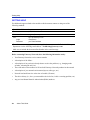
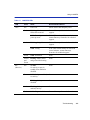
Table 4-1
LANVIEW LEDs (Continued)
LED
Color
State
Recommended Action
TX
(Transmit)
Off
Port enabled, and no
activity.
1. Ensure that the STA is enabled and that
there is a valid link.
2. Contact Enterasys Networks for technical
support.
Should flash green every
two seconds indicating
BPDUs being sent if STA
is enabled and there is a
valid link.
Green
Flashing. Indicates
activity. Rate indicates
data rate.
None.
Amber
Blinking. Port in
standby.
1. Ensure that the port is not disabled.
2. Contact Enterasys Networks for technical
support.
Port may be disabled due
to Spanning Tree.
Red
4-4
Troubleshooting
Flashing. Indicates
collision rate.
None, unless there is a high amount of
activity. In this case, check for network
configuration problems or a defective
device.
Solid. Diagnostic failure.
Contact Enterasys Networks for technical
support.