1
CONTROL PANELS
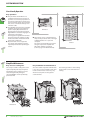
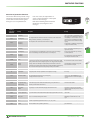
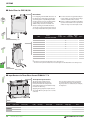
Parameter Unit FR-PU04 (optional)
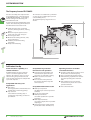
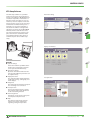
The parameter unit FR-PU04 including extended functions is available as optional
accessory. It provides a 10-key keypad
for entering directly numerical values.
A 4-row LC display returns operational
data, parameter names or status and error
messages in uncoded text. The parameter
unit displays text in the following selectable languages:
English, German, French, Spanish,
Swedish, Italian, Finnish, and Japanese.
In addition to the functions of the
standard parameter unit the FR-PU04
displays and monitors 21 different values
and states in total.
The parameter unit FR-PU04 is used
instead of the standard parameter unit
FR-DU04 and can be replaced by this
after use.
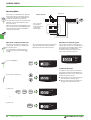
PARAMETER UNIT
FR-PU-04
4-row Liquid Cristal Display (backlit)
앫 Interactive parameter setting
앫 Help function
앫 Error indication
앫 21 different displays (frequency, current,
voltage, etc.)
50 0 0EXHzT
- - - STOP
MON
SET
EXT
HELP
SHIFT
ESC
7
8
9
4
5
6
1
2
3
WRITE
0
READ
Display of
output frequency
MONITOR
LC display
PU
Buttons for selecting operating mode
The desired operating mode is selected by
pressing the buttons MONITOR, SET, EXT OP or
PU OP.
FWD
REV
Function keys and numerical keys
STOP
Keys for selecting specific functions via display
and entering of numerical values
RESET
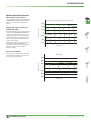
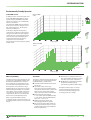
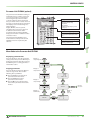
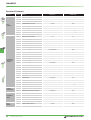
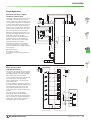
Menu Guide to the Parameter Unit FR-PU04
Displaying parameter lists
Press the SET key to enter the parameter
setting menu. Then press the HELP key to
display the parameter lists. After pressing
the READ key, the according parameter
value will be read in.
0 0 0 Hz
- - - STOP EXT
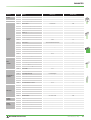
Copying parameters
Press the SET key and then the ▲ key to
enter the copy mode. There are the
following three possibilities:
앬 Press the READ key to read out all
parameters from the inverter.
앬 Press the WRITE key to write
parameters to the inverter.
앬 Press the ▼ key to verify the values
stored in the parameter unit and the
inverter.
Display of
output current
SHIFT
SHIFT
0.00Hz
0.00A
0. 0V
- - - STOP EXT
0 00
A
- - - STOP EXT
Display of
output voltage
SHIFT
SHIFT
Others
0 00V
<HELP>
- - - STOP EXT
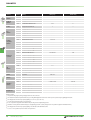
Display of
alarm history
SHIFT
SHIFT
Al ar m Hi stor y
<READ>
MITSUBISHI ELECTRIC
READ
SHIFT
HELP
Monitor
selection
Display of
alarms
(up to 8)
1 UVT 5
2 UVT 6
7
3
8
4
FR-E 500 EC
13