1
EPSON Expression 800
Maximum
document size
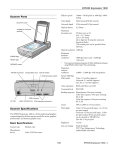
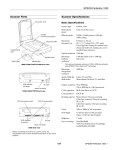
Scanner Parts
document cover
carriage (in the home
position)
Optical resolution 800 dpi
Maximum
hardware
resolution*
*
Speed (800 dpi,
draft mode)
ERROR light
READY light
OPERATE light
OPERATE button
AC inlet
transportation
lock
option connector
SCSI interface connectors
Scanner Specifications
Color CCD line sensor
Effective pixels
6800 × 9360 pixels at 800 dpi, 100%
Color separation
RGB color filters on CCD
Command level
ESC/I-B8
Zoom
50% to 200% in 1% increments
Pixel depth
Color: 12 bits per pixel input, 1 to 12 bits
per pixel output
Grayscale: 10 bits per pixel input, 8 bits
per pixel output
Brightness
7 levels
Line art settings
Fixed threshold
TET (Text Enhancement Technology,
enable/disable selectable)
Gamma correction 2 types for CRT display
3 types for printer
1 type for user-defined
Basic Specifications
Photoelectric
device
Color: 7.5 ms/line
Monochrome (bi-level): 7.5 ms/line
Digital halftoning AAS (Auto Area Segmentation, enable/
disable selectable)
3 halftoning modes (A, B, and C) and
4 dither patterns (A, B, C, and D) for
bi-level and quad-level data
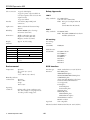
The EPSON Expression 800 is a 36-bit professional graphics
scanner designed to deliver superior results for artists, graphics
professionals, and business graphics users.
Flatbed, color
12800 × 12800 dpi with interpolation
Reading sequence Monochrome: One-pass scanning
Color page sequence: One-pass scanning
(R, G, B)
Color byte sequence: One-pass scanning
(R, G, B)
Color line sequence: One-pass scanning
(R, G, B)
SCSI ID rotary switch
Scanner type
800 dpi (main scan) × 3200 dpi (sub scan)
The maximum hardware resolution of 800 × 3200 dpi is achieved
using EPSON’s Micro Step™ Drive technology.
Maximum
software
resolution
SCSI terminator
switch
US letter size or A4
(8.5 × 11.7 inches
[216 × 297 mm])
(The reading area can be specified from
software.)
1/99
EPSON Expression 800 - 1
EPSON Expression 800
Color correction
Safety Approvals
1 type for CRT display
3 types for printer output (available in
color byte sequence mode and color line
sequence mode)
1 type user-defined
120 V
Safety standards
Interface
Two SCSI 2 (50-pin half-pitch
connectors)
Light source
White cold cathode fluorescent lamp
(Xenon)
Reliability
MCBF 100,000 cycles of carriage
movements (main unit)
Safety standards
Dimensions
Width: 13.0 inches (332 mm)
Depth: 22.1 inches (562 mm)
Height: 5.3 inches (134 mm)
CE marking
Weight
Approx. 18.7 lb (8.5 kg)
UL 1950 with D3
CSA C22.2 No. 950 with D3
EMC FCC part 15 subpart B class B
(USA)
CSA C108.8 class B (Canada)
230 V
Low Voltage
Directive
73/23/EEC
Electrical
EN 60950 (VDE)
EMC EN 55022 (CISPR Pub 22) class B
AS/NZS 3548 class B
EN60950
Specification
Input voltage range
100 to 240 VAC; universal autoswitching
Rated frequency
50 to 60 Hz
Input frequency
49.5 to 60.5 Hz
Rated current
0.8 A at 100 to 120 V
Power consumption
Approx. 40 W
Insulation resistance
10 mΩ at 500 VDC (between AC line and
chassis)
EMC Directive
89/336/EEC
0.4 A at 220 to 240 V
Check the label on the back of the scanner for voltage information.
EN 55022 Class B
EN 61000-3-2
EN 61000-3-3
EN 50082-1
IEC 801-2
IEC 801-3
IEC 801-4
Environmental
SCSI Interface
Temperature
Interface type
ANSI Standard X3.131-1994 (SCSI-2)
Functions
BUS FREE phase
ARBITRATION phase
SELECTION/RESELECTION phase
COMMAND phase
(the Logical Unit Number is fixed at 0
and the Command Link Function
is not supported)
DATA phase
DATA IN phase
DATA OUT phase
STATUS phase
MESSAGE phase
MESSAGE IN phase
MESSAGE OUT phase
ATTENTION condition
RESET condition
Logic level
TTL compatible
Operation
41 to 95 °F (5 to 35 °C)
Storage
–13 to 140 °F (–25 to 60 °C)
Humidity (without
condensation)
Operation
10% to 80%
Storage
10% to 85%
Operating
conditions
Ordinary office or home conditions; avoid
dust, direct sunlight, or strong light. Be sure
the outlet provides enough power.
Electrical standard ANSI Standard X3.131-1994 (SCSI-2)
2 - EPSON Expression 800
1/99
EPSON Expression 800
ID Setting
Selectable from 0 to 7 (factory setting: 2);
asterisk (*) setting is only used when
transporting scanner
Terminator
Internal terminator selectable (enable/
disable)
Connector type
Two 50-pin half-pitch connectors
Electrical
Resistance to
electrical noise
(static electricity)
Connector pin arrangement
25
1
50
Initialization
methods
MCBF 100,000 cycles
Temperatures
Operation
41 to 95 °F (5 to 35 °C)
Storage
−4 to 140 °F (-20 to 60 °C)
Humidity (without
condensation)
Operation
10% to 80%
Storage
10% to 85%
The scanner can be initialized (returned to
a fixed set of conditions) in the following
ways:
When the scanner is turned on.
When the scanner receives a SCSI Reset signal from
the SCSI interface.
Software
initialization
When the software sends the ESC @ (initialize the
scanner) command.
When the scanner receives a SCSI Bus Device
Message.
Operating
conditions
Optional Transparency Unit
Specifications
The transparency unit (B813152) allows you to scan positive
and negative transparent materials —35 mm slides, 35 mm
filmstrips, and film up to 8.5 × 11.7 inches in size. In addition
to four film guides, it comes with a reflective document mat
that allows you to alternate between scanning transparent
materials and normal reflective (paper) documents.
Width: 12.8 inches (324 mm)
Depth: 21.3 inches (540 mm)
Height: 3.6 inches (92 mm)
Weight
11 lbs (5 kg)
Maximum
read area
8.5 × 11.7 inches (216 × 297 mm)
UL 1950
CSA C22.2 No. 950
EN 60950
IEC 950
EMC
FCC Part 15 subpart B class B
CSA C108.8 class B
AS/NZS3548 Class B
CE Marking
Low Voltage Directive 73/23/EEC
EN60950
EMC Directive 89/336/EECEN55022
Class B
EN50082-1
IEC 801-2/801-3/801-4
Document
specifications
1/99
Ordinary office or home conditions; avoid
extreme dust, operation under direct
sunlight, and strong light sources.
Safety approvals
Basic Specifications
Dimensions
case: 10 kV or less
metal: 7 kV or less
Reliability
26
Hardware
initialization
Power supply: (supplied from the scanner)
24 VDC
5 VDC
Power consumption:
24 VDC: 0.6 A
5 VDC: 0.1 A
Transparencies up to 8.5 × 11.7 inch film
(negative film, positive film)
35 mm strip film (negative, positive)
35 mm slides (negative, positive)
Brownie size strip film
EPSON Expression 800 - 3
EPSON Expression 800
Optional Auto Document Feeder
Specifications
Electrical
Power supply (supplied by the scanner):
24 VDC ± 10%
5 VDC ± 10%
Power consumption: approximately 22 W
Insulation resistance: 10 mΩ or more at
500 VDC (between AC line and chassis)
Dielectric strength: 1000 VAC per minute
(between AC line and chassis)
Resistance to static electric noise:
Casing: 10 kV
Metal: 7 kV
Safety approvals
UL 1950
CSA C22.2 No. 950
EN60950 (VDE)
IEC950 (ROSTEST, PSB)
EMC
FCC Part 15 Subpart B Class B
CSA C108.8 Class B
AS/NZS3548 Class B
CE Marking
Low Voltage Directive 73/23/EEC
EN60950
EMC Directive 89/336/EEC
EN55022
Class B
EN50082-1
IEC 801-2/801-3/801-4
The auto document feeder (B813162) allows you to
automatically load multi-page documents into your scanner.
Basic Specifications
Dimensions
Width: 12.2 inches (310 mm)
Depth: 20.8 (528 mm)
Height: 3.6 inches (92 mm)
Weight
9.9 lbs (4.5 kg)
Feeder type
Sheet through, face up loading, face down
ejecting, roller friction
Document feeding Pages are center aligned, fed face up from
the top of the stack, ejected face down
Feeder capacity
30 sheets of 21 lb (80 g/m2) paper; Letter,
A4 or smaller
Ejecting capacity
100 sheets
Multiple sizes
Unavailable; all documents in the stack
must be the same size
Connector
15-pin DIN male
Operating
temperatures
Operation
41 to 95 °F (5 to 35 °C)
Storage
−4 to 140 °F (–20 to 60 °C)
Document Specifications
Size
Letter, Legal, A4, B5, 3 × 6 inch (checksize)
Humidity (without
Operation
condensation)
20% to 85%
Storage
95% or less
Thickness
0.0028 to 0.0063 inch (0.07 to 0.16 mm)
Weight
99.2 to 242.5 lb (45 to 110 kg)
Paper quality
High-quality bond or thermal paper, ink
jet paper (fine and super-fine)
Operating
conditions
Document type
Documents printed with impact printers,
laser printers, or facsimile machines
Reliability
Ordinary office or home conditions; avoid
extreme dust, direct sunlight, and strong
light.
Don’t use the following paper types:
transparencies, tracing paper, coated paper
(such as photo quality and glossy paper), labels,
multipart forms, carbon paper, or paper with
staples, holes, rips, curls, or folds.
Load/eject: 100,000 sheets (MCBF)
Hinge: 30,000 cycles (MCBF)
4 - EPSON Expression 800
1/99
EPSON Expression 800
Scanner buttons
Lights and Buttons
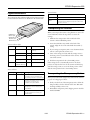
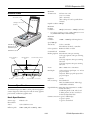
The scanner has three indicator lights and two buttons. Light
status and button functions are described in the tables below.
Button
Function
P OPERATE
Turns the scanner on and off.
RESET
Resets the scanner after an error. (Pressing this button
while scanning is in progress stops the scanner and
may cause an error.)
Transporting the Scanner
When you transport the scanner a long distance or store it for
an extended time, follow the steps below to secure the
carriage:
ERROR light
READY light
OPERATE light
RESET button
OPERATE button
1. Make sure the transportation lock on the back of the
scanner is in the UNLOCK position.
2. Locate the SCSI ID rotary switch on the back of the
scanner. Align the dot on the switch with the asterisk (*)
setting.
Scanner indicator lights
Light
OPERATE
READY
ERROR
Light status
Color
Scanner status
N
Green
Initializing or busy
scanning
3. If you’re using a transparency unit or auto document feeder,
remove it and replace the scanner cover.
O
N/A
Scanner is turned off
N
Green
Ready to scan images
4. Turn on the carriage and wait until the carriage moves to
the home position (toward the back of the scanner). Then
turn off the scanner.
F (flashing)
Green
Scanning in progress
5. Slide the transportation lock to the LOCK position.
N
F (rapidly flashing)
Red
An error has occurred
If the carriage doesn’t automatically return to the home
position, slowly raise the front of the scanner and hold it up
until the carriage comes to rest in the home position. Then
slide the transportation lock to the LOCK position.
N = on, O = off, F = flashing
Error conditions
ERROR light
READY light
Error type
N
N
Command error: The scanner has
received incorrect commands from
the scanning software. Try rescanning.
O
F
Interface error: Make sure the scanner
is securely connected to the
computer, then press RESET.
F
O
F
O
Transporting the Transparency Unit
After you’ve removed the transparency unit from the scanner,
prepare it for shipping as follows:
1. Slowly raise the front of the transparency unit to allow the
lamp assembly to slide to the back of the unit. Wait until
the lamp assembly comes to rest.
Fatal error: Make sure the
transportation lock is released, then
press RESET.
2. Reinstall the transparency unit’s shipping screw in the hole
marked CLAMP.
Option error: There’s a problem with
the TPU or ADF unit. Consult your
EPSON dealer.
1/99
EPSON Expression 800 - 5
EPSON Expression 800
Selecting a Driver and Settings
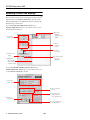
Here is a brief overview of the scanning steps using LaserSoft®
SilverFast™ Lite and EPSON TWAIN Pro. In both of the
following illustrations, the Macintosh interface is shown; the
Windows steps are the same.
If you select Expression 800 (32-bit) (Windows) or
Expression800 (Macintosh) as your scanner source, you see
the SilverFast Lite window:
4 Use Auto
Adjust to
optimize image
quality
1 Select the
basic settings
5 Size or
scale the
image
6 Set the
Resolution
2 Preview your
image
7 Scan the image
into your
application
3 Adjust the
frame border
(dotted line) to
crop the image
If you select EPSON TWAIN Pro(32-bit) (Windows) or
EPSON TWAIN Pro (Macintosh) as your scanner source, you
see the EPSON TWAIN Pro window.
1 Select the
basic settings
3 Size or scale the
image
4 Customize your
settings and use
color management
2 Preview
your image
5 Scan the image into
your application
6 - EPSON Expression 800
1/99
EPSON Expression 800
Here are some recommended settings for different types of
scans.
Photoshop 5.0 LE Macintosh
Configuration Tips
Scanning
resolution
for
printing*
To avoid memory problems on the Macintosh when using the
scanner with Photoshop 5.0 LE, follow these
recommendations:
Image type
Recommended
driver
Recommended
driver options
Photograph
SilverFast Lite
Filter: None or
Sharpen
300 dpi
Polaroid ®
photograph
SilverFast Lite
Original:
Spectra® Polaroid or
600 Polaroid
300 dpi
1. Set Preferred memory in Photoshop 5.0 LE to twice the
suggested memory size. (Select the Photoshop 5.0 LE
desktop icon, then select File, Get Info.)
Magazine
SilverFast Lite
Filter: Descreening
300 dpi
2. Turn Virtual memory OFF. (From the Apple icon, select
Control Panel, Memory.)
Newspaper
(text only)
EPSON TWAIN
Pro
Image Type: OCR**
300 or
400 dpi***
Text for OCR
EPSON TWAIN
Pro
Image Type: OCR**
300 or
400 dpi***
Text with
images
EPSON TWAIN
Pro
Image Type: Line
Art
B/W option: Auto
Area Segmentation
300 or
400 dpi ***
Line art
SilverFast Lite
Filter: Sharpen
300 to 3200
dpi
35 mm film
(negative)
SilverFast Lite
Original: 35 mm or
Neg. Transparency
300 to 3200
dpi
35 mm slide
or 4 × 5
transparency
(positive)
SilverFast Lite
Original:
Pos. Transparency
300 to 3200
dpi
*
If the final output is for on-screen viewing (for example, on a
web page), select 72 dpi for your resolution.
**
Automatically selects Text Enhancement Technology (TET) as
your B/W option.
3. Assign a scratch disk. (Start Photoshop 5.0 LE, then select
File, Preferences, Plug-ins & Scratch Disks.)
4. Restart your Macintosh.
See the electronic Photoshop 5.0 LE manual on your
Photoshop 5.0 LE CD-ROM for detailed information.
Scanner Bundle Kits
The scanner is available in three models: Executive, Artist, and
Professional. The Professional model includes a transparency
unit.
Check with EPSON for information about the configuration
of each scanner bundle kit.
Related Documentation
*** If you are enlarging your image, you must manually increase the
resolution (dpi) proportionally to maintain the resolution of your
original.
1/99
CPD-7758
Setting Up and Using Your Scanner
ETP1298-00
EPSON TWAIN Pro User’s Guide (pdf)
LSL1298-00
LaserSoft SilverFast Lite User’s Guide
(pdf)
EX8001298-00
EPSON Expression 800 Reference Guide
(pdf)
TM-EXPR800
EPSON Expression 800 Service Manual
PL-EXPR800
EPSON Expression 800 Parts Price List
EPSON Expression 800 - 7