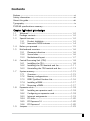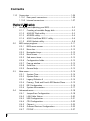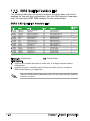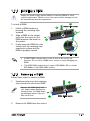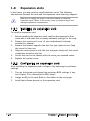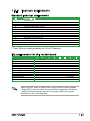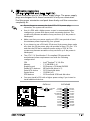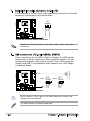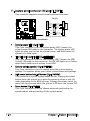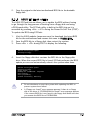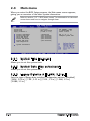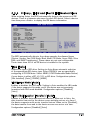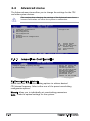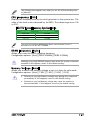
1
Motherboard P5GZ-MX E2800 First Edition August 2006 Copyright © 2006 ASUSTeK COMPUTER INC. All Rights Reserved. No part of this manual, including the products and software described in it, may be reproduced, transmitted, transcribed, stored in a retrieval system, or translated into any language in any form or by any means, except documentation kept by the purchaser for backup purposes, without the express written permission of ASUSTeK COMPUTER INC. (“ASUS”). Product warranty or service will not be extended if: (1) the product is repaired, modified or altered, unless such repair, modification of alteration is authorized in writing by ASUS; or (2) the serial number of the product is defaced or missing. ASUS PROVIDES THIS MANUAL “AS IS” WITHOUT WARRANTY OF ANY KIND, EITHER EXPRESS OR IMPLIED, INCLUDING BUT NOT LIMITED TO THE IMPLIED WARRANTIES OR CONDITIONS OF MERCHANTABILITY OR FITNESS FOR A PARTICULAR PURPOSE. IN NO EVENT SHALL ASUS, ITS DIRECTORS, OFFICERS, EMPLOYEES OR AGENTS BE LIABLE FOR ANY INDIRECT, SPECIAL, INCIDENTAL, OR CONSEQUENTIAL DAMAGES (INCLUDING DAMAGES FOR LOSS OF PROFITS, LOSS OF BUSINESS, LOSS OF USE OR DATA, INTERRUPTION OF BUSINESS AND THE LIKE), EVEN IF ASUS HAS BEEN ADVISED OF THE POSSIBILITY OF SUCH DAMAGES ARISING FROM ANY DEFECT OR ERROR IN THIS MANUAL OR PRODUCT. SPECIFICATIONS AND INFORMATION CONTAINED IN THIS MANUAL ARE FURNISHED FOR INFORMATIONAL USE ONLY, AND ARE SUBJECT TO CHANGE AT ANY TIME WITHOUT NOTICE, AND SHOULD NOT BE CONSTRUED AS A COMMITMENT BY ASUS. ASUS ASSUMES NO RESPONSIBILITY OR LIABILITY FOR ANY ERRORS OR INACCURACIES THAT MAY APPEAR IN THIS MANUAL, INCLUDING THE PRODUCTS AND SOFTWARE DESCRIBED IN IT. Products and corporate names appearing in this manual may or may not be registered trademarks or copyrights of their respective companies, and are used only for identification or explanation and to the owners’ benefit, without intent to infringe. ii Contents Notices................................................................................................. vi Safety information...............................................................................vii About this guide..................................................................................viii Typography.......................................................................................... ix P5GZ-MX specifications summary.......................................................... x Chapter 1: Product introduction 1.1 Welcome!............................................................................... 1-2 1.2 Package contents.................................................................. 1-2 1.3 Special features..................................................................... 1-2 1.3.1 Product highlights.................................................... 1-2 1.3.2 Innovative ASUS features........................................ 1-4 1.4 Before you proceed............................................................... 1-5 1.5 Motherboard overview........................................................... 1-6 1.6 1.7 1.8 1.9 1.5.1 Placement direction................................................. 1-6 1.5.2 Screw holes.............................................................. 1-6 1.5.3 Motherboard layout................................................. 1-7 Central Processing Unit (CPU)............................................... 1-8 1.6.1 Installling the CPU.................................................... 1-8 1.6.2 Installling the CPU heatsink and fan....................... 1-11 1.6.3 Uninstalling the CPU heatsink and fan.................... 1-13 System memory................................................................... 1-15 1.7.1 Overview................................................................ 1-15 1.7.2 Memory configurations.......................................... 1-15 1.7.3 DDR2 Qualified Vendors List.................................. 1-16 1.7.4 Installing a DIMM.................................................... 1-17 1.7.5 Removing a DIMM................................................... 1-17 Expansion slots.................................................................... 1-18 1.8.1 Installing an expansion card................................... 1-18 1.8.2 Configuring an expansion card............................... 1-18 1.8.3 Interrupt assignments............................................ 1-19 1.8.4 PCI slots................................................................. 1-20 1.8.5 PCI Express x16 .................................................... 1-20 1.8.6 PCI Express x1 ...................................................... 1-20 Jumpers............................................................................... 1-23 iii Contents 1.10 Connectors.......................................................................... 1-26 1.10.1 Rear panel connectors........................................... 1-26 1.10.2 Internal connectors................................................ 1-27 Chapter 2: BIOS setup 2.1 2.2 2.3 2.4 iv Managing and updating your BIOS......................................... 2-2 2.1.1 Creating a bootable floppy disk............................... 2-2 2.1.2 ASUS EZ Flash utility................................................ 2-3 2.1.3 AFUDOS utility......................................................... 2-4 2.1.4 ASUS CrashFree BIOS 2 utility................................. 2-6 2.1.5 ASUS Update utility................................................. 2-8 BIOS setup program............................................................. 2-11 2.2.1 BIOS menu screen.................................................. 2-12 2.2.2 Menu bar................................................................ 2-12 2.2.3 Navigation keys...................................................... 2-12 2.2.4 Menu items............................................................ 2-13 2.2.5 Sub-menu items..................................................... 2-13 2.2.6 Configuration fields................................................ 2-13 2.2.7 Pop-up window....................................................... 2-13 2.2.8 Scroll bar................................................................ 2-13 2.2.9 General help........................................................... 2-13 Main menu............................................................................ 2-14 2.3.1 System Time.......................................................... 2-14 2.3.2 System Date.......................................................... 2-14 2.3.3 Legacy Diskette A ................................................ 2-14 2.3.4 Primary, Third and Fourth IDE Master/Slave.......... 2-15 2.3.5 IDE Configuration................................................... 2-16 2.3.6 System Information............................................... 2-17 Advanced menu................................................................... 2-18 2.4.1 JumperFree Configuration...................................... 2-18 2.4.2 LAN Cable Status................................................... 2-20 2.4.3 USB Configuration.................................................. 2-21 2.4.4 CPU Configuration.................................................. 2-22 2.4.5 Chipset................................................................... 2-23 2.4.6 Onboard Devices Configuration.............................. 2-25 2.4.7 PCI PnP................................................................... 2-27 Contents 2.5 2.6 2.8 Power menu......................................................................... 2-28 2.5.1 Suspend Mode........................................................ 2-28 2.5.2 ACPI 2.0 Support .................................................. 2-28 2.5.3 ACPI APIC Support ................................................ 2-28 2.5.4 APM Configuration................................................. 2-29 2.5.5 Hardware Monitor................................................... 2-31 Boot menu........................................................................... 2-32 2.6.1 Boot Device Priority............................................... 2-32 2.6.2 Boot Settings Configuration.................................. 2-33 2.6.3 Security.................................................................. 2-34 Exit menu............................................................................. 2-36 Chapter 3: Software support 3.1 Installing an operating system............................................... 3-2 3.2 Support CD information......................................................... 3-2 3.2.1 Running the support CD........................................... 3-2 3.2.2 Drivers menu............................................................ 3-3 3.2.3 Utilities menu........................................................... 3-4 3.2.4 Manuals menu.......................................................... 3-5 3.2.5 ASUS Contact information....................................... 3-6 Appendix: CPU features A.1 Intel® EM64T.......................................................................... A-2 Using the Intel® EM64T feature............................................. A-2 A.2 A.3 Enhanced Intel SpeedStep® Technology (EIST)..................... A-2 A.2.1 System requirements............................................... A-2 A.2.2 Using the EIST.......................................................... A-3 Intel® Hyper-Threading Technology....................................... A-4 Using the Hyper-Threading Technology ............................... A-4 Notices Federal Communications Commission Statement This device complies with Part 15 of the FCC Rules. Operation is subject to the following two conditions: • This device may not cause harmful interference, and • This device must accept any interference received including interference that may cause undesired operation. This equipment has been tested and found to comply with the limits for a Class B digital device, pursuant to Part 15 of the FCC Rules. These limits are designed to provide reasonable protection against harmful interference in a residential installation. This equipment generates, uses and can radiate radio frequency energy and, if not installed and used in accordance with manufacturer’s instructions, may cause harmful interference to radio communications. However, there is no guarantee that interference will not occur in a particular installation. If this equipment does cause harmful interference to radio or television reception, which can be determined by turning the equipment off and on, the user is encouraged to try to correct the interference by one or more of the following measures: • Reorient or relocate the receiving antenna. • Increase the separation between the equipment and receiver. • Connect the equipment to an outlet on a circuit different from that to which the receiver is connected. • Consult the dealer or an experienced radio/TV technician for help. The use of shielded cables for connection of the monitor to the graphics card is required to assure compliance with FCC regulations. Changes or modifications to this unit not expressly approved by the party responsible for compliance could void the user’s authority to operate this equipment. Canadian Department of Communications Statement This digital apparatus does not exceed the Class B limits for radio noise emissions from digital apparatus set out in the Radio Interference Regulations of the Canadian Department of Communications. This class B digital apparatus complies with Canadian ICES-003. vi Safety information Electrical safety • To prevent electrical shock hazard, disconnect the power cable from the electrical outlet before relocating the system. • When adding or removing devices to or from the system, ensure that the power cables for the devices are unplugged before the signal cables are connected. If possible, disconnect all power cables from the existing system before you add a device. • Before connecting or removing signal cables from the motherboard, ensure that all power cables are unplugged. • Seek professional assistance before using an adapter or extension cord. These devices could interrupt the grounding circuit. • Make sure that your power supply is set to the correct voltage in your area. If you are not sure about the voltage of the electrical outlet you are using, contact your local power company. • If the power supply is broken, do not try to fix it by yourself. Contact a qualified service technician or your retailer. Operation safety • Before installing the motherboard and adding devices on it, carefully read all the manuals that came with the package. • Before using the product, make sure all cables are correctly connected and the power cables are not damaged. If you detect any damage, contact your dealer immediately. • To avoid short circuits, keep paper clips, screws, and staples away from connectors, slots, sockets and circuitry. • Avoid dust, humidity, and temperature extremes. Do not place the product in any area where it may become wet. • Place the product on a stable surface. • If you encounter technical problems with the product, contact a qualified service technician or your retailer. This symbol of the crossed out wheeled bin indicates that the product (electrical and electronic equipment) should not be placed in municipal waste. Check local regulations for disposal of electronic products. vii About this guide This user guide contains the information you need when installing and configuring the motherboard. How this guide is organized This manual contains the following parts: • Chapter 1: Product introduction This chapter describes the features of the motherboard and the new technology it supports. This chapter also lists the hardware setup procedures that you have to perform when installing system components. It includes description of the jumpers and connectors on the motherboard. • Chapter 2: BIOS setup This chapter tells how to change system settings through the BIOS Setup menus. Detailed descriptions of the BIOS parameters are also provided. • Chapter 3: Software support This chapter describes the contents of the support CD that comes with the motherboard package. Where to find more information Refer to the following sources for additional information and for product and software updates. 1. ASUS websites The ASUS website provides updated information on ASUS hardware and software products. Refer to the ASUS contact information. 2. Optional documentation Your product package may include optional documentation, such as warranty flyers, that may have been added by your dealer. These documents are not part of the standard package. viii Conventions used in this guide To make sure that you perform certain tasks properly, take note of the following symbols used throughout this manual. DANGER/WARNING: Information to prevent injury to yourself when trying to complete a task. CAUTION: Information to prevent damage to the components when trying to complete a task. IMPORTANT: Instructions that you MUST follow to complete a task. NOTE: Tips and additional information to help you complete a task. Typography Bold text Indicates a menu or an item to select Italics Used to emphasize a word or a phrase <Key> Keys enclosed in the less-than and greater-than sign means that you must press the enclosed key Example: <Enter> means that you must press the Enter or Return key <Key1+Key2+Key3> If you must press two or more keys simultaneously, the key names are linked with a plus sign (+) Example: <Ctrl+Alt+D> Command Means that you must type the command exactly as shown, then supply the required item or value enclosed in brackets Example: At the DOS prompt, type the command line: afudos /i[filename] afudos /iP5GZMX.ROM ix P5GZ-MX specifications summary CPU LGA775 socket for Intel® Core™2 Duo / Pentium® D / Pentium® 4 / Celeron® D Processors Compatible with Intel® 06/05B/05A processors Supports Intel® Enhanced Memory 64 Technology (EM64T), Enhanced Intel SpeedStep® Technology (EIST), and Intel® Hyper-Threading Technology * Refer to www.asus.com for Intel CPU support list Chipset Northbridge: Intel® 945GZ Southbridge: Intel® ICH7 Front Side Bus 1066 (O.C. mode with add-on card and Intel® Core™2 processors only) /800/533 MHz Memory Dual-channel memory architecture 2 x 240-pin DIMM sockets support up to 2GB of unbufferred non-ECC 533/400 MHz DDR2 DIMMs VGA Integrated Intel® Graphics Media Accelerator 950 Expansion slots 1 x PCI Express x16 slot for discrete graphics cards (max. 2Gb/s rate, x4 mode) 1 x PCI Express x1 2 x PCI 2.2 slots Storage Intel® ICH7 SouthBridge supports: - 1 x Ultra DMA 100/66/33 - 4 x Serial ATA 3Gb/s ports Audio Realtek® ALC883 High-Definition audio CODEC, 6-channel audio port Support Jack-Sensing, Enumeration, Multi-streaming and Jack-Retasking Technology S/PDIF out interface LAN Marvell™ 88E8001 PCI Gigabit LAN controller USB Supports up to 8 USB 2.0 ports Rear panel 1 x Parallel port 1 x Serial port 1 x LAN (RJ-45) port 4 x USB 2.0 ports 1 x VGA port 1 x PS/2 keyboard port 1 x PS/2 mouse port 6-channel high-definition audio I/O ports BIOS features 4 Mb Flash ROM, AMI BIOS, PnP, WfM2.0, DMI2.0, SM BIOS 2.3 (continued on the next page) P5GZ-MX specifications summary Special features ASUS EZ Flash ASUS CrashFree BIOS 2 ASUS MyLogo™ ASUS CPR (CPU Parameter Recall) ASUS Q-Fan Manageability WfM 2.0, DMI 2.0, WOL by PME, WOR by PME, PXE, Chassis Intrussion Internal connectors 2 x USB 2.0 connectors for 4 additional USB 2.0 ports 1 x CPU fan connector 1 x Chassis fan connector 1 x 24-pin EATX power connector 1 x 4-pin ATX 12 V power connector 1 x CD in connector 1 x Chassis intrusion connector 1 x Front panel high-definition audio connector 1 x S/PDIF out connector 1 x System Panel connector Power Requirement ATX power supply (with 24-pin and 4-pin 12 V plugs) Form Factor Micro-ATX form factor: 9.6 in x 8 in Support CD contents Device drivers ASUS PC Probe II ASUS Live Update utility Anti-virus software (OEM version) *Specifications are subject to change without notice. xi xii This chapter describes the motherboard features and the new technologies it supports. 1 Product introduction 1.1 Welcome! Thank you for buying an ASUS® P5GZ-MX motherboard! The motherboard delivers a host of new features and latest technologies, making it another standout in the long line of ASUS quality motherboards! Before you start installing the motherboard, and hardware devices on it, check the items in your package with the list below. 1.2 Package contents Check your motherboard package for the following items. Motherboard ASUS P5GZ-MX motherboard Cables 1 x Serial ATA signal cables 1 x Serial ATA power cable 1 x Ultra DMA 100/66 cable 1 x Floppy disk drive cable Accessories I/O shield Application CDs ASUS motherboard support CD Documentation User guide If any of the above items is damaged or missing, contact your retailer. 1.3 Special features 1.3.1 Product highlights LGA775 Intel ® Core™2 Processor Ready This motherboard supports the latest Intel® Core™2 processor in the LGA775 package. With the new Intel® Core™ microarchitecture technology and 1066* / 800 /533 MHz FSB, Intel® Core™2 processor is one of the most powerful and energy efficient CPU in the world. You need to install an additional graphics card and Intel Core™ 2 processor to run at FSB 1066MHz. 64-bit CPU support The motherboard supports 64-bit processors that provides high‑performance computing and faster memory access required for memory and data intensive applications. 1- Chapter 1: Product introduction Intel ® 945GZ chipset The Intel® 945GZ graphics memory controller hub (GMCH) and the ICH7 I/O controller hub provide the vital interfaces for the motherboard. The GMCH features the Intel® Graphics Media Accelerator 950, an integrated graphics engine for enhanced 3D, 2D, and video capabilities. The GMCH provides the interface for a processor in the 775-land package with 533/800 MHz front side bus (FSB), dual channel DDR2 at speeds of up to 533 MHz. The Intel® ICH7 Southbridge represents the seventh generation I/O controller hub that provides the interface for PCI Express and high definition audio. DDR2 memory support The motherboard supports DDR2 memory which features data transfer rates of 533 /400 MHz to meet the higher bandwidth requirements of the latest 3D graphics, multimedia, and Internet applications. The dual-channel DDR2 architecture doubles the bandwidth of your system memory to boost system performance, eliminating bottlenecks with peak bandwidths of up to 8.5 GB/s. See pages 1‑15 to 1-17 for details. PCI Express™ interface The motherboard fully supports PCI Express, the latest I/O interconnect technology that speeds up the PCI bus. PCI Express features point‑to‑point serial interconnections between devices and allows higher clockspeeds by carrying data in packets. This high speed interface is software compatible with existing PCI specifications. See page 1-20 for details. Serial ATA 3.0 Gb/s technology The motherboard supports the Serial ATA technology through the Serial ATA interfaces and the Intel® ICH7 chipset. The SATA specification allows for thinner, more flexible cables with lower pin count, reduced voltage requirement, and up to 300 MB/s data transfer rate. ASUS P5GZ-MX 1- High Definition Audio Enjoy high-end sound quality on your PC! The onboard HD audio (High Definition Audio, previously codenamed Azalia) CODEC enables high-quality 192KHz/24-bit audio output, jack-sensing feature, retasking functions and multi-streaming technology that simultaneously sends different audio streams to different destinations. You can now talk to your partners on the headphone while playing multi-channel network games. The re-tasking function of Microphone jack is supported by the front panel audio ports only. 1.3.2 Innovative ASUS features CrashFree BIOS 2 This feature allows you to restore the original BIOS data from the support CD in case when the BIOS codes and data are corrupted. This protection eliminates the need to buy a replacement ROM chip. See page 2-6 for details. ASUS EZ Flash BIOS With the ASUS EZ Flash, you can easily update the system BIOS even before loading the operating system. No need to use a DOS-based utility or boot from a floppy disk. See page 2-3 for details. C.P.R. (CPU Parameter Recall) The C.P.R. feature of the motherboard BIOS allows automatic re-setting to the BIOS default settings in case the system hangs due to overclocking. When the system hangs due to overclocking, C.P.R. eliminates the need to open the system chassis and clear the RTC data. Simply shut down and reboot the system, and the BIOS automatically restores the CPU default setting for each parameter. ASUS Q-Fan technology The ASUS Q-Fan technology smartly adjusts the fan speeds according to the system loading to ensure quiet, cool, and efficient operation. 1- Chapter 1: Product introduction 1.4 Before you proceed Take note of the following precautions before you install motherboard components or change any motherboard settings. • Unplug the power cord from the wall socket before touching any component. • Use a grounded wrist strap or touch a safely grounded object or to a metal object, such as the power supply case, before handling components to avoid damaging them due to static electricity • Hold components by the edges to avoid touching the ICs on them. • Whenever you uninstall any component, place it on a grounded antistatic pad or in the bag that came with the component. • Before you install or remove any component, ensure that the ATX power supply is switched off or the power cord is detached from the power supply. Failure to do so may cause severe damage to the motherboard, peripherals, and/or components. Onboard LED P5GZ-MX The motherboard comes with a standby power LED that lights up to indicate that the system is ON, in sleep mode, or in soft-off mode. This is a reminder that you should shut down the system and unplug the power cable before removing or plugging in any motherboard component. The illustration below shows the location of the onboard LED. R P5GZ-MX Onboard LED ASUS P5GZ-MX SB_PWR ON Standby Power OFF Powered Off 1- 1.5 Motherboard overview Before you install the motherboard, study the configuration of your chassis to ensure that the motherboard fits into it. Make sure to unplug the power cord before installing or removing the motherboard. Failure to do so can cause you physical injury and damage motherboard components. 1.5.1 Placement direction When installing the motherboard, make sure that you place it into the chassis in the correct orientation. The edge with external ports goes to the rear part of the chassis as indicated in the image below. 1.5.2 Screw holes Place eight (6) screws into the holes indicated by circles to secure the motherboard to the chassis. Do not overtighten the screws! Doing so can damage the motherboard. P5GZ-MX Place this side towards the rear of the chassis R 1- Chapter 1: Product introduction 1.5.3 Motherboard layout 20.3cm (8in) CPU_FAN PS/2KBMS T: Mouse B: Keyboard Super I/O AUDIO PCIEX1_1 XJ2 XJ1 FLOPPY XJ5 XJ4 CR2032 3V XJ3 Lithium Cell CMOS Power PCIEX16 Marvell 88E8001 SB_PWR PCI1 Intel ICH7 CLRTC SATA4 USB78 SATA3 USB56 SATA2 SPI_J1 SATA1 CD SPDIF_OUT ASUS P5GZ-MX 4Mb BIOS USBPW5-8 PCI2 ALC883 PANEL R AAFP 24.5cm (9.6in) Intel MCH 945GZ EATXPWR CHASSIS LAN_USB34 CHA_FAN PRI_IDE P5GZ-MX USBPW1-4 DDR2 DIMM_B1 (64 bit,240-pin module) VGA USB12 DDR2 DIMM_A1 (64 bit,240-pin module) LGA775 PARALLEL PORT COM1 ATX12V 1- 1.6 Central Processing Unit (CPU) The motherboard comes with a surface mount LGA775 socket designed for the Core™2 Duo/Pentium® D/Pentium® 4 and Celeron® D processors. • Your boxed Intel® Core™2 Duo/Pentium® D/Pentium® 4 or Celeron® D LGA775 processor package should come with installation instructions for the CPU, fan and heatsink assembly. If the instructions in this section do not match the CPU documentation, follow the latter. • Upon purchase of the motherboard, make sure that the PnP cap is on the socket and the socket pins are not bent. Contact your retailer immediately if the PnP cap is missing, or if you see any damage to the PnP cap/socket pins/motherboard components. ASUS will shoulder the cost of repair only if the damage is shipment/ transit-related. • Keep the cap after installing the motherboard. ASUS will process Return Merchandise Authorization (RMA) requests only if the motherboard comes with the cap on the LGA775 socket. • The product warranty does not cover damage to the socket pins resulting from incorrect CPU installation/removal, or misplacement/ loss/incorrect removal of the PnP cap. 1.6.1 Installling the CPU To install a CPU: Locate the CPU socket on the motherboard. P5GZ-MX 1. R P5GZ-MX CPU Socket 775 Before installing the CPU, make sure that the socket box is facing towards you and the load lever is on your left. 1- Chapter 1: Product introduction 2. Press the load lever with your thumb (A) and move it to the left (B) until it is released from the retention tab. Retention tab PnP Cap A Load lever B This side of the cam box should face you. To prevent damage to the socket pins, do not remove the PnP cap unless you are installing a CPU. 3. Lift the load lever in the direction of the arrow to a 135º angle. 4. Lift the load plate with your thumb and forefinger to a 100º angle (A), then push the PnP cap from the load plate window to remove (B). B A Load plate 5. Position the CPU over the socket, making sure that the gold triangle is on the bottom‑left corner of the socket. The socket alignment key should fit into the CPU notch. Alignment key Gold triangle mark ASUS P5GZ-MX 1- 6. Close the load plate (A), then push the load lever (B) until it snaps into the retention tab. A B The CPU fits in only one correct orientation. DO NOT force the CPU into the socket to prevent bending the connectors on the socket and damaging the CPU! The motherboard supports Intel® LGA775 processors with the Intel® Enhanced Memory 64 Technology (EM64T), Enhanced Intel SpeedStep® Technology (EIST), and Hyper‑Threading Technology. 1-10 Chapter 1: Product introduction 1.6.2 Installling the CPU heatsink and fan The Intel® Core™2 Duo/Pentium® D/Pentium® 4 and Celeron® D processors require a specially designed heatsink and fan assembly to ensure optimum thermal condition and performance. • Install the motherboard to the chassis before you install the CPU fan and heatsink assembly • When you buy a boxed Intel® Core™2 Duo/Pentium® D/Pentium® 4 or Celeron® D LGA775 processor, the package includes the CPU fan and heatsink assembly. If you buy a CPU separately, make sure that you use only Intel®‑certified multi‑directional heatsink and fan. • Your I Intel® Core™2 Duo/Pentium® D/Pentium® 4 or Celeron® D LGA775 LGA775 heatsink and fan assembly comes in a push-pin design and requires no tool to install. If you purchased a separate CPU heatsink and fan assembly, make sure that a Thermal Interface Material is properly applied to the CPU heatsink or CPU before you install the heatsink and fan assembly. To install the CPU heatsink and fan: 1. Place the heatsink on top of the installed CPU, making sure that the four fasteners match the holes on the motherboard. Fastener Motherboard hole Make sure each fastener is oriented as shown, with the narrow groove directed outward. ASUS P5GZ-MX 1-11 2. 3. Push down two fasteners at a time in a diagonal sequence to secure the heatsink and fan assembly in place. A B B A B A A B When the fan and heatsink assembly is in place, connect the CPU fan cable to the connector on the motherboard labeled CPU_FAN. CPU_FAN P5GZ-MX CPU FAN PWM CPU FAN IN CPU FAN PWR GND R P5GZ-MX CPU Fan Connector • Do not forget to connect the CPU fan connector! Hardware monitoring errors can occur if you fail to plug this connector. • We recommend you to install the chassis fan for better thermal state. 1-12 Chapter 1: Product introduction 1.6.3 Uninstalling the CPU heatsink and fan To uninstall the CPU heatsink and fan: 1. Disconnect the CPU fan cable from the connector on the motherboard. 2. Rotate each fastener counterclockwise. 3. Pull up two fasteners at a time in a diagonal sequence to disengage the heatsink and fan assembly from the motherboard. A B B A ASUS P5GZ-MX B A A B 1-13 4. Remove the heatsink and fan assembly from the motherboard. 5. Rotate each fastener clockwise to reset the orientation. Narrow end of the groove The narrow end of the groove should point outward after resetting. (The photo shows the groove shaded for emphasis.) 1-14 Chapter 1: Product introduction 1.7 System memory 1.7.1 Overview The motherboard comes with two Double Data Rate 2 (DDR2) Dual Inline Memory Modules (DIMM) sockets. A DDR2 module has the same physical dimensions as a DDR DIMM but has a 240-pin footprint compared to the 184-pin DDR DIMM. DDR2 DIMMs are notched differently to prevent installation on a DDR DIMM socket. 128 Pins P5GZ-MX 112 Pins DIMM_A1 DIMM_B1 The figure illustrates the location of the DDR2 DIMM sockets: R P5GZ-MX 240-pin DDR2 DIMM Sockets Channel Sockets Channel A DIMM_A1 Channel B DIMM_B1 1.7.2 Memory configurations You may install 256 MB, 512 MB, 1 GB, and 2 GB unbuffered non-ECC DDR2 DIMMs into the DIMM sockets. • For dual-channel configuration, the total size of memory module(s) installed per channel must be the same (DIMM_A1 = DIMM_B1). • Always install DIMMs with the same CAS latency. For optimum compatibility, it is recommended that you obtain memory modules from the same vendor. Refer to the DDR2 Qualified Vendors List on next page for details. • This motherboard does not support memory modules made up of 128 Mb chips or double-sided x16 memory moudules. . ASUS P5GZ-MX 1-15 1.7.3 DDR2 Qualified Vendors List The following table lists the memory modules that have been tested and qualified for use with this motherboard. Visit the ASUS website (www.asus. com) for the latest DDR2 DIMM modules for this motherboard. DDR2 533 Qualified Vendors List Size Vendor Model Side(s) Component 512MB 1024MB 256MB 512MB 512MB 512MB 1024MB 1024MB 512MB 1024MB 512MB 512MB 256MB 512MB 1024MB 512MB 1024MB KINGSTON KINGSTON Qimonda Qimonda Qimonda Hynix Hynix Hynix Hynix Hynix ELPIDA ELPIDA Apacer KINGMAX KINGMAX KINGMAX KINGMAX HYB18T512800AF37 5YDIID9GCT HYB18T512160AF-3.7 HYB18T512800AF37 HYB18T512800BF37 HY5PS12821F-C4 HY5PS12821F-C4 HY5PS12821FP-C4 HY5PS12821AFP-C3 HY5PS12821AFP-C3 E5108AB-5C-E E5108AB-5C-E E5116AB-5C-E E5108AE-5C-E E5108AE-5C-E KKEA88E4AAK-37 5MB22D9DCN Side(s): SS - Single Sided SS DS SS SS SS SS DS DS SS DS SS SS SS SS DS SS DS KVR533D2N4/512 KVR533D2N4/1G HYS64T32000HU-3.7-A HYS64T64000HU-3.7-A HYS64T64000HU-3.7-B HYMP564U648-C4 HYMP512U648-C4 HYMP512U648-C4 HYMP564U64AP8-C3 HYMP512U64AP8-C3 EBE51UD8ABFA-5C EBE51UD8ABFA-5C-E 78.81077.420 KLBC28F-A8EB4 KLBD48F-A8EB4 KLBC28F-A8KE4 KLBD48F-A8ME4 DIMM support A B • • • • • • • • • • • • • • • • • • • • • DS - Double Sided DIMM Support: A - supports one module inserted into either slot, in a Single-channel memory configuration. B - supports one pair of modules inserted into the yellow slots as one pair of Dual‑channel memory configuration. Visit the ASUS website (www.asus.com) for the latest memory Qualified Vendor List (QVL). 1-16 Chapter 1: Product introduction 1.7.4 Installing a DIMM Unplug the power supply before adding or removing DIMMs or other system components. Failure to do so can cause severe damage to both the motherboard and the components. 2 To install a DIMM: 1. Unlock a DIMM socket by pressing the retaining clips outward. 2. Align a DIMM on the socket such that the notch on the DIMM matches the break on the socket. 3. 3 DDR2 DIMM notch 1 Firmly insert the DIMM into the socket until the retaining clips snap back in place and the DIMM is properly seated. Unlocked retaining clip • A DDR2 DIMM is keyed with a notch so that it fits in only one direction. Do not force a DIMM into a socket to avoid damaging the DIMM. • The DDR2 DIMM sockets do not support DDR DIMMs. DO not install DDR DIMMs to the DDR2 DIMM sockets. 1.7.5 Removing a DIMM Follow these steps to remove a DIMM. 1. Simultaneously press the retaining clips outward to unlock the DIMM. Support the DIMM lightly with your fingers when pressing the retaining clips. The DIMM might get damaged when it flips out with extra force. 2. 2 1 1 DDR2 DIMM notch Remove the DIMM from the socket. ASUS P5GZ-MX 1-17 1.8 Expansion slots In the future, you may need to install expansion cards. The following sub‑sections describe the slots and the expansion cards that they support. Make sure to unplug the power cord before adding or removing expansion cards. Failure to do so may cause you physical injury and damage motherboard components. 1.8.1 Installing an expansion card To install an expansion card: 1. Before installing the expansion card, read the documentation that came with it and make the necessary hardware settings for the card. 2. Remove the system unit cover (if your motherboard is already installed in a chassis). 3. Remove the bracket opposite the slot that you intend to use. Keep the screw for later use. 4. Align the card connector with the slot and press firmly until the card is completely seated on the slot. 5. Secure the card to the chassis with the screw you removed earlier. 6. Replace the system cover. 1.8.2 Configuring an expansion card After installing the expansion card, configure it by adjusting the software settings. 1-18 1. Turn on the system and change the necessary BIOS settings, if any. See Chapter 2 for information on BIOS setup. 2. Assign an IRQ to the card. Refer to the tables on the next page. 3. Install the software drivers for the expansion card. Chapter 1: Product introduction 1.8.3 Interrupt assignments Standard interrupt assignments IRQ 0 1 2 4 5 6 7 8 9 10 11 12 13 14 Standard Function System Timer Keyboard Controller Re-direct to IRQ#9 Communications Port (COM1)* IRQ holder for PCI steering* Floppy Disk Controller Printer Port (LPT1)* System CMOS/Real Time Clock IRQ holder for PCI steering* IRQ holder for PCI steering* IRQ holder for PCI steering* PS/2 Compatible Mouse Port* Numeric Data Processor Primary IDE Channel * These IRQs are usually available for ISA or PCI devices. IRQ assignments for this motherboard A PCI slot 1 PCI slot 2 PCI Express x16 slot PCI Express x1 slot Onboard USB controller 1 Onboard USB controller 2 Onboard USB controller 3 Onboard USB controller 4 Onboard USB 2.0 controller Onboard IDE port Onboard HD audio Onboard LAN B C D E F G — shared — — — — — — — — — — non-shared — shared — — — — — — — — — shared — — — — — — — shared — — — shared — — — — — — — shared — — — — — — — shared — — — — — — — shared — — — — — — — — non-shared — — — shared — — — — shared — — — — — H — — — — — — — — — — — — When using PCI cards on shared slots, ensure that the drivers support “Share IRQ” or that the cards do not need IRQ assignments. Otherwise, conflicts will arise between the two PCI groups, making the system unstable and the card inoperable. ASUS P5GZ-MX 1-19 1.8.4 PCI slots The PCI slots support cards such as a LAN card, SCSI card, USB card, and other cards that comply with PCI specifications. The figure shows a LAN card installed on a PCI slot. If you install a PCI graphics card, we recommend that you remove the onboard graphics card driver. 1.8.5 PCI Express x1 This motherboard supports PCI Express x1 network cards, SCSI cards and other cards that comply with the PCI Express specifications. The figure shows a network card installed on the PCI Express x1 slot. 1.8.6 PCI Express x16 This motherboard supports one PCI Express x16 graphics card. The figure shows a graphics card installed on the PCI Express x16 slot. The PCI Express x 16 slot runs at x 4 speed max. 1-20 Chapter 1: Product introduction VGA Qualified Vendors List (PCIe x4 mode) PCIe X 16 VGA Card PCB version BIOS version ASUS EAX550 128M ASUS EAX700 ASUS EAX700LE 128M ASUS EAX800PRO ASUS EAX800XT ASUS EAX850PRO ASUS EAX850XT 256MB ASUS EAX1300 ASUS EAX1600XT Silent 256MB ASUS EAX1900XTX ASUS EAX1900CrossFire ASUS EN5900 ASUS EN6200GE ASUS EN6200TC128/T/16M ASUS EN6500 128M ASUS EN6600 128M ASUS EN6600 256M ASUS EN6600GT ASUS EN6800LE ASUS EN6800GT ASUS EN6800ULTRA ASUS EN7600GS Silent 256MB ASUS EN7600GT Silent/256M ASUS EN7800GT 256MB ASUS EN7800GTX 256MB ASUS EN7900GTX 512MX16 ATI FireMV2200 ATI Radeon X850 CrossFire Elsa Gladiac PCX 935 Elsa Gladiac 620TC 128T DVT Elsa Gladiac 660 128T Elsa Gladiac 660LE 256MB Elsa Gladiac 780GTX 256B3 Elsa ATI Fire GL V3100 Gecube RADEON X1300PRO Gigabyte GV-NX62TC256D8 Gigabyte GV-NX66T128D Gigabyte GV-NX73G128D Gigabyte GV-NX76T256DBRH Gigabyte GV-NX79T256DBRH-256MX16 Gigabyte GV-RX70P128D Gigabyte GV-RX13P256DRH Gigabyte GV-RX16T256VRH Gigabyte GV-RX19X512VBRH Leadtek WinFast PX6200 TD Leadtek WinFast PX6200TC 64M - - - V1.00 V1.00 - PN: 109-A47401-10 - V.1.00 - - 1.01 V1.00A V1.01 V1.02 V1.00A V1.00A V1.00 V1.00 V1.02 - - - V1.00 - - - - W01-46W53 1A 1.B 3C - - - - - - - - Rev: 1.1 - - - A1 A V5B60.8.15.139. AS05 V5E4D.9.7.1.3. A901 V5E4D.9.8.1.4. AS13 V5549.9.4.1.10.AS V5D57.9.4.1.8.AS V5D4F.9.7.1.4.AS02 V009.007.001.004 V113.AA77100.102 71C0.9.12.4.2 V009.012.005.002 7249.9.12.5.2AS05 V04.35.20.45 V5.43.02.27.AS07 V5.44.02.11 V5.44.02.45.0 V5.43.02.61 V5.43.02.16.AS11 V5.43.02.16.AS27 V5.41.02.34.AS01 V5.40.02.26.AS05 V5.40.02.32.AS07 V5.73.22.19.AS07 V5.73.22.15.01 V5.70.02.13.AS01 V5.70.02.11.01 V5.71.22.12.01 V113.A25915.100 V009.010.001.015 V4.35.20.45.E0 V5.44.02.11.E1 V5.43.02.16.E1 V5.43.02.69.E2 V5.70.02.11.E1 V113.A33429.100 V133.A671B1.102 V5.44.02.32 V5.43.02.16 5.72.22.34.00 5.73.22.15.01 5.71.22.12.02 V009.004.001.032 113-AA76900-100-GB 113-AA77001-100 113A52021-104 V5.43.02.36.68 V5.44.02.18 (Continued on the next page) ASUS P5GZ-MX 1-21 PCIe X 16 VGA Card PCB version Leadtek WinFast PX6500 TDH A1 Leadtek WinFast PX6600GT TDH A Leadtek WinFast PX7800GTX TDH 256MB - Leadtek Quadro FX540 128M - Leadtek Quadro FX1400 128M - Matrox Parhelia APVe 128M A MSI NX6800GS-TD256E MSI NX7300GS-TD256E V200 MSI RX700PRO-TD128E V2.00 Powercolor Radeon X800GT 256M - Powercolor Radeon X1800XT - BIOS version V5.44.02.45.68 V5.43.02.1 V5.70.02.11.68 V5.43.02.64.35 V5.41.02.43.03 V1.3-11 V5.41.02.49.04 V5.72.22.34.00 V009.004.001.032 V009.010.001.015 V133.A52001.102 • Set the XJ1-5 jumpers to x1 mode (pin 1-2) if your graphics card cannot run at x4 mode. • Visit the ASUS website for the latest VGA Qualified Vendors List. 1-22 Chapter 1: Product introduction 1.9 Jumpers 1. Clear RTC RAM (CLRTC) This jumper allows you to clear the Real Time Clock (RTC) RAM in CMOS. You can clear the CMOS memory of date, time, and system setup parameters by erasing the CMOS RTC RAM data. The onboard button cell battery powers the RAM data in CMOS, which include system setup information such as system passwords. To erase the RTC RAM: 1. Turn OFF the computer and unplug the power cord. 2. Remove the onboard battery. 3. Move the jumper cap from pins 1-2 (default) to pins 2-3. Keep the cap on pins 2-3 for about 5~10 seconds, then move the cap back to pins 1-2. 4. Re-install the battery. 5. Plug the power cord and turn ON the computer. 6. Hold down the <Del> key during the boot process and enter BIOS setup to re-enter data. P5GZ-MX Except when clearing the RTC RAM, never remove the cap on CLRTC jumper default position. Removing the cap will cause system boot failure! CLRTC 1 2 R P5GZ-MX Clear RTC RAM Normal (Default) 2 3 Clear CMOS You do not need to clear the RTC when the system hangs due to overclocking. For system failure due to overclocking, use the C.P.R. (CPU Parameter Recall) feature. Shut down and reboot the system so the BIOS can automatically reset parameter settings to default values. ASUS P5GZ-MX 1-23 2. PCI-E mode slection (3-pin XJ1, XJ2, XJ3, XJ4, XJ5) P5GZ-MX These jumpers allow you to adjust the operating speed of PCIE x1 and PCIE x16 slots. Refer to the table below for detailed jumper setting configurations. XJ1-5 1 2 R P5GZ-MX XJ Setting 2 3 PCI-E x1, x1 PCI-Ex4, N/A (Default) XJ1-5 jumper setting configurations Graphics card mode Jumper Setting (XJ1~XJ5) Add-on card mode Integrated Graphics mode (default) PCIE x 16 slot PCIE x 1 slot Card type speed Card type speed 2-3 pin PCIe graphics card or other PCIe x8/x4 device x4 N/A N/A 1-2 pin other PCIe devices x1 other PCIe devices x1 The PCIEx1 slot is disabled when you set XJ1-5 to pins 2-3. 1-24 Chapter 1: Product introduction 3. USB device wake-up (3-pin USBPW1-4, USBPW5-8) Set these jumpers to +5V to wake up the computer from S1 sleep mode (CPU stopped, DRAM refreshed, system running in low power mode) using the connected USB devices. Set to +5VSB to wake up from S3 and S4 sleep modes (no power to CPU, DRAM in slow refresh, power supply in reduced power mode). The USBPW1-4 jumper is for the rear USB ports (USB port 1-4). The USBPW5-8 jumper is for the internal USB connectors (USB port 5-8) that you can connect to additional USB ports. USBPW1-4 R P5GZ-MX USB Device Wake Up +5V (Default) 2 3 +5VSB +5V (Default) 2 3 USBPW5-8 1 2 P5GZ-MX 1 2 +5VSB • The USB device wake-up feature requires a power supply that can provide 500 mA on the +5VSB lead for each USB port; otherwise, the system would not power up. • The total current consumed must NOT exceed the power supply capability (+5VSB) whether under normal condition or in sleep mode. ASUS P5GZ-MX 1-25 1.10 Connectors 1.10.1Rear panel connectors 1 2 3 4 5 6 11 10 9 8 7 1. PS/2 mouse port (green). This port is for a PS/2 mouse. 2. Parallel port. This 25-pin port connects a parallel printer, a scanner, or other devices. 3. LAN (RJ-45) port. Supported by Marvell Gigabit LAN controller, this port allows Gigabit connection to a Local Area Network (LAN) through a network hub. Refer to the table below for the LAN port LED indications. LAN port LED indications ACT/LINK LED SPEED LED Status Description Status Description OFF No link OFF 10 Mbps connection ORANGE Linked ORANGE 100 Mbps connection BLINKING Data activity GREEN 1 Gbps connection ACT/LINK SPEED LED LED LAN port 4. Line In port (light blue). This port connects the tape, CD, DVD player, or other audio sources. 5. Line Out port (lime). This port connects a headphone or a speaker. In 4-channel, and 6-channel configuration, the function of this port becomes Front Speaker Out. 6. Microphone port (pink). This port connects a microphone. Refer to the audio configuration table on the next page for the function of the audio ports in 2, 4, or 6-channel configuration. 1-26 Chapter 1: Product introduction Audio 2, 4, or 6-channel configuration Port Headset 2-channel Light Blue 4-channel 6-channel Line In Rear Speaker Out Rear Speaker Out Lime Line Out Front Speaker Out Front Speaker Out Pink Mic In Mic In Bass/Center 7. USB 2.0 ports 3 and 4. These two 4-pin Universal Serial Bus (USB) ports are available for connecting USB 2.0 devices. 8. USB 2.0 ports 1 and 2. These two 4-pin Universal Serial Bus (USB) ports are available for connecting USB 2.0 devices. 9. VGA port. This port is for a VGA monitor or other VGA-compatible devices. 10. Serial port. This 9-pin COM1 port is for pointing devices or other serial devices. 11. PS/2 keyboard port (purple). This port is for a PS/2 keyboard. 1.10.2Internal connectors 1. Floppy disk drive connector (34-1 pin FLOPPY) This connector is for the provided floppy disk drive (FDD) signal cable. Insert one end of the cable to this connector, then connect the other end to the signal connector at the back of the floppy disk drive. Pin 5 on the connector is removed to prevent incorrect cable connection when using an FDD cable with a covered Pin 5. R PIN 1 P5GZ-MX FLOPPY NOTE: Orient the red markings on the floppy ribbon cable to PIN 1. P5GZ-MX Floppy Disk Drive Connector ASUS P5GZ-MX 1-27 2. IDE connectors (40-1 pin PRI_IDE) PRI_IDE P5GZ-MX The onboard IDE connectors are for Ultra DMA 100/66/33 signal cables. There are three connectors on each Ultra DMA 100/66/33 signal cable: blue, black, and gray. Connect the blue connector to the motherboard’s IDE connector, then select one of the following modes to configure your device(s). R P5GZ-MX IDE Connector Drive jumper setting Mode of device(s) Cable connector Single device Cable-Select or Master - Black Two devices Cable-Select Master Black Slave Gray Master Master Slave Slave Black or gray • Pin 20 on the IDE connector is removed to match the covered hole on the Ultra DMA cable connector. This prevents incorrect insertion when you connect the IDE cable. • Use the 80-conductor IDE cable for Ultra DMA 100/66/33 IDE devices. If any device jumper is set as “Cable-Select,” make sure all other device jumpers have the same setting. 1-28 Chapter 1: Product introduction 3. Serial ATA connectors (7-pin SATA1, SATA2, SATA3, SATA4) P5GZ-MX These connectors are for the Serial ATA signal cables for Serial ATA hard disk drives. SATA1 SATA2 GND RSATA_RXN1 RSATA_RXP1 GND RSATA_TXN1 RSATA_TXP1 GND R GND RSATA_RXN2 RSATA_RXP2 GND RSATA_TXN2 RSATA_TXP2 GND SATA3 SATA4 GND RSATA_RXN3 RSATA_RXP3 GND RSATA_TXN3 RSATA_TXP3 GND GND RSATA_RXN4 RSATA_RXP4 GND RSATA_TXN4 RSATA_TXP4 GND P5GZ-MX SATA Connectors When using the connectors in Standard IDE mode, connect the primary (boot) hard disk drive to the SATA1/2 connector. Refer to the table below for the recommended SATA hard disk drive connections. Serial ATA hard disk drive connection Connector Color Setting Use SATA1/2 Red Master Boot disk SATA3/4 Black Slave Data Disk ASUS P5GZ-MX 1-29 4. CPU, Power and Chassis fan connectors (4-pin CPU_FAN, 3-pin CHA_FAN) The fan connectors support cooling fans of a total of 1A~2.2A (26.4W max.) at +12V. Connect the fan cables to the fan connectors on the motherboard, making sure that the black wire of each cable matches the ground pin of the connector. Do not forget to connect the fan cables to the fan connectors. Insufficient air flow inside the system may damage the motherboard components. These are not jumpers! DO NOT place jumper caps on the fan connectors. CPU_FAN CPU FAN PWM CPU FAN IN CPU FAN PWR GND CHA_FAN P5GZ-MX GND +12V Rotation R P5GZ-MX Fan Connectors 5. Digital Audio connector (4-1 pin SPDIF_OUT) SPDIFOUT GND +5V P5GZ-MX This connector is for the S/PDIF audio module to allow digital sound output. Connect one end of the S/PDIF audio cable to this connector and the other end to the S/PDIF module. R P5GZ-MX Digital Audio Connector SPDIF_OUT The S/PDIF out module is purchased separately. 1-30 Chapter 1: Product introduction 6. ATX power connectors (24-pin EATXPWR and 4-pin ATX12V) These connectors are for ATX power supply plugs. The power supply plugs are designed to fit these connectors in only one orientation. Find the proper orientation and push down firmly until the connectors completely fit. • Do not forget to connect the 4-pin ATX +12 V power plug; otherwise, the system will not boot. • Use of a PSU with a higher power output is recommended when configuring a system with more power-consuming devices. The system may become unstable or may not boot up if the power is inadequate. • Make sure that your power supply unit (PSU) can provide at least the minimum power required by your system. • If you intent to use a PSU with 20-pin and 4-pin power plugs, make sure that the 20-pin power plug can provide at least 15A on +12V and that the PSU has a minimum power rating of 350 W. The system may become unstable or may not boot up if the power is inadequate. • The ATX 12 V Specification 2.0-compliant PSU passed the motherboard power requirement test with the following configuration: CPU : Memory : Graphics card : Parallel ATA devices: Serial ATA device : Optical drive : SCSI devices : Intel® Pentium® 4 3.6 GHz 512 MB DDR (x 4) PCI Express x16 Nvidia EN5900 IDE hard disk drive (x 2) SATA hard disk drive CD-ROM (x2) SCSI card and SCSI hard disk drive • You must install a PSU with a higher power rating if you intend to install additional devices. EATX12V P5GZ-MX +12V DC GND R P5GZ-MX ATX Power Connector ASUS P5GZ-MX EATXPWR +12V DC +3 Volts GND +12 Volts +12 Volts +5V Standby Power OK Ground +5 Volts Ground +5 Volts Ground +3 Volts +3 Volts Ground +5 Volts +5 Volts +5 Volts -5 Volts Ground Ground Ground PSON# Ground -12 Volts +3 Volts 1-31 7. Optical drive audio connector (4-pin CD) This connector is for the 4-pin audio cable that connects to the audio connector at the back of the optical drive. P5GZ-MX Left Audio Channel Ground Ground Right Audio Channel CD (black) R P5GZ-MX Internal Audio Connector Enable the CD-IN function in the audio utility when using this connector. 8. USB connectors (10-1 pin USB56, USB78) 1 USB+5V USB_P8USB_P8+ GND NC USB78 1 USB+5V USB_P7USB_P7+ GND R USB+5V USB_P6USB_P6+ GND NC USB56 USB+5V USB_P5USB_P5+ GND P5GZ-MX These connectors are for USB 2.0 ports. Connect the USB module cable to any of these connectors, then install the module to a slot opening at the back of the system chassis. These USB connectors comply with USB 2.0 specification that supports up to 480 Mbps connection speed. P5GZ-MX USB 2.0 Connectors Never connect a 1394 cable to the USB connectors. Doing so will damage the motherboard! The USB module is purchased separately. 1-32 Chapter 1: Product introduction 9. Front panel audio connector (10-1 pin AAFP) This connector is for a chassis-mounted front panel audio I/O module that supports either HD Audio or legacy AC’97 audio standard. NC AGND NC NC HP_HD AGND PRESENSE# MIC2_JD Legacy AC’97-compliant pindefinition AAFP R MIC2_L MIC2_R Line out_R NC Line out_L MIC2_L MIC2_R HP_R Jack_Sense HP_L P5GZ-MX Azalia-compliant pindefinition P5GZ-MX Front Panel Audio Connector • We recommend that you connect a high-definition front panel audio module to this connector to avail of the motherboard’s highdefinition audio capability. • By default, this connector is set to AC97 Audio. If you want to connect a High Definition front panel audio module to this connector, set the Front Panel Support Type item in the BIOS to [HD Audio]. See section “2.4.6 Onboard Device Configuration” for details. 10. Chassis intrusion connector (4-1 pin CHASSIS) This connector is for a chassis-mounted intrusion detection sensor or switch. Connect one end of the chassis intrusion sensor or switch cable to this connector. The chassis intrusion sensor or switch sends a high-level signal to this connector when a chassis component is removed or replaced. The signal is then generated as a chassis intrusion event. CHASSIS Chassis Signal GND +5VSB_MB P5GZ-MX By default, the pins labeled “Chassis Signal” and “Ground” are shorted with a jumper cap. Remove the jumper caps only when you intend to use the chassis intrusion detection feature. (Default) R P5GZ-MX Intrusion Connector ASUS P5GZ-MX 1-33 11. System panel connector (20-8 pin F_PANEL) This connector supports several chassis-mounted functions. PLEDPLED+ RESET Ground Reset Ground PWR IDE_LEDIDE_LED+ PWRSW Speaker Ground Ground +5V IDE_LED SPEAKER PLED P5GZ-MX PA NEL R *Requires an ATX power supply P5GZ-MX System Panel Connector 1-34 • System power LED (2-pin PLED) This 2-pin connector is for the system power LED. Connect the chassis power LED cable to this connector. The system power LED lights up when you turn on the system power, and blinks when the system is in sleep mode. • Hard disk drive activity LED (2-pin IDE_LED) This 2-pin connector is for the HDD Activity LED. Connect the HDD Activity LED cable to this connector. The IDE LED lights up or flashes when data is read from or written to the HDD. • System warning speaker (4-pin SPEAKER) This 4-pin connector is for the chassis-mounted system warning speaker. The speaker allows you to hear system beeps and warnings. • ATX power button/soft-off button (2-pin PWRSW) This connector is for the system power button. Pressing the power button turns the system on or puts the system in sleep or soft-off mode depending on the BIOS settings. Pressing the power switch for more than four seconds while the system is ON turns the system OFF. • Reset button (2-pin RESET) This 2-pin connector is for the chassis-mounted reset button for system reboot without turning off the system power. Chapter 1: Product introduction This chapter tells how to change the system settings through the BIOS Setup menus. Detailed descriptions of the BIOS parameters are also provided. 2 BIOS setup 2.1 Managing and updating your BIOS The following utilities allow you to manage and update the motherboard Basic Input/Output System (BIOS) setup. 1. ASUS EZ Flash (Updates the BIOS using a floppy disk, or the motherboard support CD during POST.) 2. ASUS AFUDOS (Updates the BIOS in DOS mode using a bootable floppy disk.) 3. ASUS CrashFree BIOS 2 (Updates the BIOS using a bootable floppy, or the motherboard support CD when the BIOS file fails or gets corrupted.) 4. ASUS Update (Updates the BIOS in Windows® environment.) Refer to the corresponding sections for details on these utilities. Save a copy of the original motherboard BIOS file to a bootable floppy disk in case you need to restore the BIOS in the future. Copy the original motherboard BIOS using the ASUS Update or AFUDOS utilities. 2.1.1 Creating a bootable floppy disk 1. 2- Do either one of the following to create a bootable floppy disk. DOS environment a. Insert a 1.44MB floppy disk into the drive. b. At the DOS prompt, type format A:/S then press <Enter>. Windows® XP environment a. Insert a 1.44 MB floppy disk to the floppy disk drive. b. Click Start from the Windows® desktop, then select My Computer. c. Select the 3 1/2 Floppy Drive icon. d. Click File from the menu, then select Format. A Format 3 1/2 Floppy Disk window appears. e. Select Create an MS-DOS startup disk from the format options field, then click Start. Windows® 2000 environment To create a set of boot disks for Windows® 2000: a. Insert a formatted, high density 1.44 MB floppy disk into the drive. b. Insert the Windows® 2000 CD to the optical drive. c. Click Start, then select Run. d. From the Open field, type D:\bootdisk\makeboot a: assuming that D: is your optical drive. e. Press <Enter>, then follow screen instructions to continue. Chapter 2: BIOS setup 2. Copy the original or the latest motherboard BIOS file to the bootable floppy disk. 2.1.2 ASUS EZ Flash utility The ASUS EZ Flash feature allows you to update the BIOS without having to go through the long process of booting from a floppy disk and using a DOS‑based utility. The EZ Flash utility is built-in the BIOS chip so it is accessible by pressing <Alt> + <F2> during the Power-On Self-Test (POST). To update the BIOS using EZ Flash: 1. Visit the ASUS website (www.asus.com) to download the latest BIOS file for the motherboard and rename the same to P5GZMX.ROM. 2. Save the BIOS file to a floppy disk, then restart the system. 3. Press <Alt> + <F2> during POST to display the following. EZFlash starting BIOS update Checking for floppy... 4. Insert the floppy disk that contains the BIOS file to the floppy disk drive. When the correct BIOS file is found, EZ Flash performs the BIOS update process and automatically reboots the system when done. EZFlash starting BIOS update Checking for floppy... Floppy found! Reading file “P5GZMX.ROM”. Completed. Start erasing....... Start programming... Flashed successfully. Rebooting. • Do not shutdown or reset the system while updating the BIOS to prevent system boot failure! • A “Floppy not found!” error message appears if there is no floppy disk in the drive. A “P5GZMX.ROM not found!” error message appears if the correct BIOS file is not found in the floppy disk. Make sure that you rename the BIOS file to P5GZMX.ROM. ASUS P5GZ-MX 2- 2.1.3 AFUDOS utility The AFUDOS utility allows you to update the BIOS file in DOS environment using a bootable floppy disk with the updated BIOS file. This utility also allows you to copy the current BIOS file that you can use as backup when the BIOS fails or gets corrupted during the updating process. Copying the current BIOS To copy the current BIOS file using the AFUDOS utility: • Make sure that the floppy disk is not write-protected and has at least 1024KB free space to save the file. • The succeeding BIOS screens are for reference only. The actual BIOS screen displays may not be same as shown. 1. Copy the AFUDOS utility (afudos.exe) from the motherboard support CD to the bootable floppy disk you created earlier. 2. Boot the system in DOS mode, then at the prompt type: afudos /o[filename] where the [filename] is any user-assigned filename not more than eight alphanumeric characters for the main filename and three alphanumeric characters for the extension name. A:\>afudos /oOLDBIOS1.rom Main filename 3. Extension name Press <Enter>. The utility copies the current BIOS file to the floppy disk. A:\>afudos /oOLDBIOS1.rom AMI Firmware Update Utility - Version 1.19(ASUS V2.07(03.11.24BB)) Copyright (C) 2002 American Megatrends, Inc. All rights reserved. Reading flash ..... done Write to file...... ok A:\> The utility returns to the DOS prompt after copying the current BIOS file. 2- Chapter 2: BIOS setup Updating the BIOS file To update the BIOS file using the AFUDOS utility: 1. Visit the ASUS website (www.asus.com) and download the latest BIOS file for the motherboard. Save the BIOS file to a bootable floppy disk. Write the BIOS filename on a piece of paper. You need to type the exact BIOS filename at the DOS prompt. 2. Copy the AFUDOS utility (afudos.exe) from the motherboard support CD to the bootable floppy disk you created earlier. 3. Boot the system in DOS mode, then at the prompt type: afudos /i[filename] A:\>afudos /iP5GZMX.ROM 4. The utility verifies the file and starts updating the BIOS. A:\>afudos /iP5GZMX.ROM AMI Firmware Update Utility - Version 1.19(ASUS V2.07(03.11.24BB)) Copyright (C) 2002 American Megatrends, Inc. All rights reserved. WARNING!! Do not turn off power during flash BIOS Reading file ....... done Reading flash ...... done Advance Check ...... Erasing flash ...... done Writing flash ...... 0x0008CC00 (9%) Do not shut down or reset the system while updating the BIOS to prevent system boot failure! 5. The utility returns to the DOS prompt after the BIOS update process is completed. Reboot the system from the hard disk drive. A:\>afudos /iP5GZMX.ROM AMI Firmware Update Utility - Version 1.19(ASUS V2.07(03.11.24BB)) Copyright (C) 2002 American Megatrends, Inc. All rights reserved. WARNING!! Do not turn off power during flash BIOS Reading file ....... done Reading flash ...... done Advance Check ...... Erasing flash ...... done Writing flash ...... done Verifying flash .... done Please restart your computer A:\> ASUS P5GZ-MX 2- 2.1.4 ASUS CrashFree BIOS 2 utility The ASUS CrashFree BIOS 2 is an auto recovery tool that allows you to restore the BIOS file when it fails or gets corrupted during the updating process. You can update a corrupted BIOS file using the motherboard support CD, or the floppy disk that contains the updated BIOS file. • Prepare the motherboard support CD, or the floppy disk containing the updated motherboard BIOS before using this utility. • Make sure that you rename the original or updated BIOS file in the floppy disk to P5GZMX.ROM. Recovering the BIOS from a floppy disk To recover the BIOS from a floppy disk: 1. Turn on the system. 2. Insert the floppy disk with the original or updated BIOS file to the floppy disk drive. 3. The utility displays the following message and automatically checks the floppy disk for the original or updated BIOS file. Bad BIOS checksum. Starting BIOS recovery... Checking for floppy... If your display monitor is connected to the onboard VGA connector, the display monitor will turn-off and the system will beep once while the CrashFree BIOS 2 starts updating your system. The system will beep once again while the process is finished, and the display will return after the system restarts. When found, the utility reads the BIOS file and starts flashing the corrupted BIOS file. Bad BIOS checksum. Starting BIOS recovery... Checking for floppy... Floppy found! Reading file “P5GZMX.ROM”. Completed. Start flashing... DO NOT shut down or reset the system while updating the BIOS! Doing so can cause system boot failure! 4. 2- Restart the system after the utility completes the updating process. Chapter 2: BIOS setup Recovering the BIOS from the support CD To recover the BIOS from the support CD: 1. Remove any floppy disk from the floppy disk drive, then turn on the system. 2. Insert the support CD to the optical drive. 3. The utility displays the following message and automatically checks the floppy disk for the original or updated BIOS file. Bad BIOS checksum. Starting BIOS recovery... Checking for floppy... When no floppy disk is found, the utility automatically checks the optical drive for the original or updated BIOS file. The utility then updates the corrupted BIOS file. Bad BIOS checksum. Starting BIOS recovery... Checking for floppy... Floppy not found! Checking for CD-ROM... CD-ROM found! Reading file “P5GZMX.ROM”. Completed. Start flashing... DO NOT shut down or reset the system while updating the BIOS! Doing so can cause system boot failure! 4. Restart the system after the utility completes the updating process. The recovered BIOS may not be the latest BIOS version for this motherboard. Visit the ASUS website (www.asus.com) to download the latest BIOS file. ASUS P5GZ-MX 2- 2.1.5 ASUS Update utility The ASUS Update is a utility that allows you to manage, save, and update the motherboard BIOS in Windows® environment. The ASUS Update utility allows you to: • Save the current BIOS file • Download the latest BIOS file from the Internet • Update the BIOS from an updated BIOS file • Update the BIOS directly from the Internet, and • View the BIOS version information. This utility is available in the support CD that comes with the motherboard package. ASUS Update requires an Internet connection either through a network or an Internet Service Provider (ISP). Installing ASUS Update To install ASUS Update: 1. Place the support CD in the optical drive. The Drivers menu appears. 2. Click the Utilities tab, then click Install ASUS Update. 3. The ASUS Update utility is copied to your system. Quit all Windows® applications before you update the BIOS using this utility. 2- Chapter 2: BIOS setup Updating the BIOS through the Internet To update the BIOS through the Internet: 1. Launch the ASUS Update utility from the Windows® desktop by clicking Start > Programs > ASUS > ASUSUpdate > ASUSUpdate. The ASUS Update main window appears. 2. Select Update BIOS from the Internet option from the drop‑down menu, then click Next. ASUS P5GZ-MX 3. Select the ASUS FTP site nearest you to avoid network traffic, or click Auto Select. Click Next. 2- 4. From the FTP site, select the BIOS version that you wish to download. Click Next. 5. Follow the screen instructions to complete the update process. The ASUS Update utility is capable of updating itself through the Internet. Always update the utility to avail all its features. Updating the BIOS through a BIOS file To update the BIOS through a BIOS file: 2-10 1. Launch the ASUS Update utility from the Windows® desktop by clicking Start > Programs > ASUS > ASUSUpdate > ASUSUpdate. The ASUS Update main window appears. 2. Select Update BIOS from a file option from the drop‑down menu, then click Next. 3. Locate the BIOS file from the Open window, then click Open. 4. Follow the screen instructions to complete the update process. Chapter 2: BIOS setup 2.2 BIOS setup program This motherboard supports a programmable firmware chip that you can update using the provided utility described in section “2.1 Managing and updating your BIOS.” Use the BIOS Setup program when you are installing a motherboard, reconfiguring your system, or prompted to “Run Setup”. This section explains how to configure your system using this utility. Even if you are not prompted to use the Setup program, you can change the configuration of your computer in the future. For example, you can enable the security password feature or change the power management settings. This requires you to reconfigure your system using the BIOS Setup program so that the computer can recognize these changes and record them in the CMOS RAM of the firmware hub. The firmware hub on the motherboard stores the Setup utility. When you start up the computer, the system provides you with the opportunity to run this program. Press <Del> during the Power-On-Self-Test (POST) to enter the Setup utility; otherwise, POST continues with its test routines. If you wish to enter Setup after POST, restart the system by pressing <Ctrl+Alt+Delete>, or by pressing the reset button on the system chassis. You can also restart by turning the system off and then back on. Do this last option only if the first two failed. The Setup program is designed to make it as easy to use as possible. Being a menu-driven program, it lets you scroll through the various sub-menus and make your selections from the available options using the navigation keys. • The default BIOS settings for this motherboard apply for most conditions to ensure optimum performance. If the system becomes unstable after changing any BIOS settings, load the default settings to ensure system compatibility and stability. Select the Load Default Settings item under the Exit Menu. See section “2.8 Exit Menu.” • The BIOS setup screens shown in this section are for reference purposes only, and may not exactly match what you see on your screen. • Visit the ASUS website (www.asus.com) to download the latest BIOS file for this motherboard. ASUS P5GZ-MX 2-11 2.2.1 BIOS menu screen Menu items Menu bar Configuration fields General help [11:51:19] [Thu 05/07/2004] [1.44M, 3.5 in] Use [ENTER], [TAB] or [SHIFT-TAB] to select a field. :[ST320413A] :[Not Detected] :[Not Detected] :[Not Detected] :[Not Detected] :[Not Detected] Use [+] or [-] to configure system time. System Time System Date Legacy Diskette A Primary IDE Master Primary IDE Slave Third IDE Master Third IDE Slave Fourth IDE Master Fourth IDE Slave IDE Configuration System Information Sub-menu items Navigation keys 2.2.2 Menu bar The menu bar on top of the screen has the following main items: Main For changing the basic system configuration Advanced For changing the advanced system settings Power For changing the advanced power management (APM) configuration Boot For changing the system boot configuration Exit For selecting the exit options and loading default settings To select an item on the menu bar, press the right or left arrow key on the keyboard until the desired item is highlighted. 2.2.3 Navigation keys At the bottom right corner of a menu screen are the navigation keys for that particular menu. Use the navigation keys to select items in the menu and change the settings. Some of the navigation keys differ from one screen to another. 2-12 Chapter 2: BIOS setup 2.2.4 Menu items The highlighted item on the menu bar displays the specific items for that menu. For example, selecting Main shows the Main menu items. The other items (Advanced, Power, Boot, and Exit) on the menu bar have their respective menu items. System Time System Date Legacy Diskette A Language Primary IDE Master Primary IDE Slave Secondary IDE Master Secondary IDE Slave Third IDE Master Fourth IDE Master IDE Configuration [11:10:19] [Thu 03/27/2003] [1.44M, 3.5 in] [English] :[ST320413A] :[ASUS CD-S340] :[Not Detected] :[Not Detected] :[Not Detected] :[Not Detected] Use [ENTER], [TAB] or [SHIFT-TAB] to select a field. Use [+] or [-] to configure system time. +Tab F1 F10 ESC System Information Select Screen Select Item Change Field Select Field General Help Save and Exit Exit Main menu items 2.2.5 Sub-menu items A solid triangle before each item on any menu screen means that the iteam has a sub-menu. To display the sub-menu, select the item and press <Enter>. 2.2.6 Configuration fields These fields show the values for the menu items. If an item is userconfigurable, you can change the value of the field opposite the item. You cannot select an item that is not user-configurable. A configurable field is enclosed in brackets, and is highlighted when selected. To change the value of a field, select it then press <Enter> to display a list of options. Refer to “2.2.7 Pop-up window.” 2.2.7 Pop-up window Select a menu item then press <Enter> to display a pop-up window with the configuration options for that item. 2.2.8 Scroll bar A scroll bar appears on the right side of a menu screen when there are items that do not fit on the screen. Press the Up/Down arrow keys or <Page Up> /<Page Down> keys to display the other items on the screen. 2.2.9 General help At the top right corner of the menu screen is a brief description of the selected item. ASUS P5GZ-MX Advanced Chipset settings WARNING: Setting wrong values in the sections below may cause system to malfunction. Configure DRAM Timing by SPD Memory Acceleration Mode DRAM Idle Timer DRAm Refresh Rate [Enabled] [Auto] [Auto] [Auto] Graphic Adapter Priority Graphics Aperture Size Spread Spectrum [AGP/PCI] [ 64 MB] [Enabled] ICH Delayed Transaction [Enabled] MPS Revision [1.4] +F1 F10 ESC Select Screen Select Item Change Option General Help Save and Exit Exit Pop-up window Scroll bar 2-13 2.3 Main menu When you enter the BIOS Setup program, the Main menu screen appears, giving you an overview of the basic system information. Refer to section “2.2.1 BIOS menu screen” for information on the menu screen items and how to navigate through them. System Time System Date Legacy Diskette A Primary IDE Master Primary IDE Slave Third IDE Master Third IDE Slave Fourth IDE Master Fourth IDE Slave IDE Configuration [11:51:19] [Thu 05/07/2004] [1.44M, 3.5 in] Use [ENTER], [TAB] or [SHIFT-TAB] to select a field. :[ST320413A] :[Not Detected] :[Not Detected] :[Not Detected] :[Not Detected] :[Not Detected] Use [+] or [-] to configure system time. System Information 2.3.1 System Time [xx:xx:xx] Allows you to set the system time. 2.3.2 System Date [Day xx/xx/xxxx] Allows you to set the system date. 2.3.3 Legacy Diskette A [1.44M, 3.5 in.] Sets the type of floppy drive installed. Configuration options: [Disabled] [360K, 5.25 in.] [1.2M , 5.25 in.] [720K , 3.5 in.] [1.44M, 3.5 in.] [2.88M, 3.5 in.] 2-14 Chapter 2: BIOS setup 2.3.4 Primary, Third and Fourth IDE Master/Slave While entering Setup, the BIOS automatically detects the presence of IDE devices. There is a separate sub-menu for each IDE device. Select a device item then press <Enter> to display the IDE device information. Primary IDE Master Device : Hard Disk Vendor : ST320413A Size : 20.0GB LBA Mode : Supported Block Mode : 16 Sectors PIO Mode : Supported Async DMA : MultiWord DMA-2 Ultra DMA : Ultra DMA-5 SMART Monitoring: Supported Type LBA/Large Mode Block(Multi-sector Transfer) PIO Mode DMA Mode Smart Monitoring 32Bit Data Transfer [Auto] [Auto] [Auto] [Auto] [Auto] [Auto] [Disabled] The BIOS automatically detects the values opposite the dimmed items (Device, Vendor, Size, LBA Mode, Block Mode, PIO Mode, Async DMA, Ultra DMA, and SMART monitoring). These values are not user-configurable. These items show N/A if no IDE device is installed in the system. Type [Auto] Selects the type of IDE drive. Setting to Auto allows automatic selection of the appropriate IDE device type. Select CDROM if you are specifically configuring a CD-ROM drive. Select ARMD (ATAPI Removable Media Device) if your device is either a ZIP, LS-120, or MO drive. Configuration options: [Not Installed] [Auto] [CDROM] [ARMD] LBA/Large Mode [Auto] Enables or disables the LBA mode. Setting to Auto enables the LBA mode if the device supports this mode, and if the device was not previously formatted with LBA mode disabled. Configuration options: [Disabled] [Auto] Block (Multi-sector Transfer) [Auto] Enables or disables data multi-sectors transfers. When set to Auto, the data transfer from and to the device occurs multiple sectors at a time if the device supports multi-sector transfer feature. When set to [Disabled], the data transfer from and to the device occurs one sector at a time. Configuration options: [Disabled] [Auto] ASUS P5GZ-MX 2-15 PIO Mode [Auto] Selects the PIO mode. Configuration options: [Auto] [0] [1] [2] [3] [4] DMA Mode [Auto] Selects the DMA mode. Configuration options: [Auto] [SWDMA0] [SWDMA1] [SWDMA2] [MWDMA0] [MWDMA1] [MWDMA2] [UDMA0] [UDMA1] [UDMA2] [UDMA3] [UDMA4] [UDMA5] SMART Monitoring [Auto] Sets the Smart Monitoring, Analysis, and Reporting Technology. Configuration options: [Auto] [Disabled] [Enabled] 32Bit Data Transfer [Disabled] Enables or disables 32-bit data transfer. Configuration options: [Disabled] [Enabled] 2.3.5 IDE Configuration The items in this menu allow you to set or change the configurations for the IDE devices installed in the system. Select an item then press <Enter> if you wish to configure the item. IDE Configuration Onboard IDE Operate Mode [Enhanced Mode] Enhanced Mode Support On [S-ATA] IDE Detect Time Out (Sec) [35] Onboard IDE Operate Mode [Enhanced Mode] Disables or allows selection of the IDE operation mode depending on the operating system (OS) that you installed. Set to Enhanced Mode if you are using native OS, such as Windows® 2000/XP. Configuration options: [Disabled] [Compatible Mode] [Enhanced Mode] 2-16 Chapter 2: BIOS setup Enhanced Mode Support On [S-ATA] The default setting S-ATA allows you to use native OS on Serial ATA and Parallel ATA ports. We recommend that you do not change the default setting for better OS compatibility. In this setting, you may use legacy OS on the Parallel ATA ports only if you did not install any Serial ATA device. The P-ATA+S-ATA and P-ATA options are for advanced users only. If you set to any of these options and encounter problems, revert to the default setting S-ATA. Configuration options: [S-ATA+P-ATA] [S‑ATA] [P-ATA] IDE Detect Time Out [35] Selects the time out value for detecting ATA/ATAPI devices. Configuration options: [0] [5] [10] [15] [20] [25] [30] [35] 2.3.6 System Information This menu gives you an overview of the general system specifications. The BIOS automatically detects the items in this menu. AMIBIOS Version : 0203 Build Date : 08/25/06 Processor Type Speed Count : Genuine Intel(R) CPU 3.20GHz : 3200 MHz : 1 System Memory Size : 512MB Appropriated : 0MB Available : 504MB AMI BIOS Displays the auto-detected BIOS information Processor Displays the auto-detected CPU specification System Memory Displays the auto-detected system memory ASUS P5GZ-MX 2-17 2.4 Advanced menu The Advanced menu items allow you to change the settings for the CPU and other system devices. Take caution when changing the settings of the Advanced menu items. Incorrect field values can cause the system to malfunction. JumperFree Configuration LAN Cable Status USB Configuration Configure CPU. CPU Configuration Chipset Onboard Devices Configuration PCI PnP Enter F1 F10 ESC Select Screen Select Item Go to Sub-screen General Help Save and Exit Exit 2.4.1 JumperFree Configuration Configure System Frequency/Voltage AI Overclocking [Auto] Select the target CPU frequency, and the relevant parameters will be auto-adjusted. Frequencies higher than CPU manufacturer recommends are not guaranteed to be stable. If the system AI Overclocking [Auto] Allows selection of CPU overclocking options to achieve desired CPU internal frequency. Select either one of the preset overclocking configuration options: Manual - allows you to individually set overclocking parameters. Auto - loads the optimal settings for the system. 2-18 Chapter 2: BIOS setup The following item appears only when you set the AI Overclocking item to [Manual]. CPU Frequency [200] Displays the frequency sent by the clock generator to the system bus. The value of this item is auto-detected by the BIOS. The values range from 100 to 450. FSB/CPU External Frequency Synchronization Front Side Bus CPU External Frequency FSB 1066 266 MHz FSB 800 200 MHz FSB 533 133 MHz You need to install an additional graphics card and Intel Core™ 2 processor to run at FSB 1066MHz. DRAM Frequency [Auto] Allows you to set the DDR2 operating frequency. Configuration options: [Auto] [DDR2-400MHz] [DDR2-533MHz] Selecting a very high DRAM frequency may cause the system to become unstable! If this happens, revert to the default setting. Memory Voltage [Auto] Allows you to select the memory voltage or set it to Auto for safe mode. Configuration options: [Auto] [1.80V] [1.85V] [1.90V] [1.95V] • Selecting a very high Memory voltage may damage the component permanently! If this happens, revert to the default setting. • Selecting a very low Memory voltage may cause the system to become unstable! If this happens, revert to the default setting. ASUS P5GZ-MX 2-19 2.4.2 LAN Cable Status Advanced BIOS SETUP UTILITY POST Check LAN cable [Disabled] LAN Cable Status Pair Status Length 1-2 3-6 4-5 7-8 Check LAN cable during POST. N/A N/A N/A N/A +- Tab F1 F10 ESC Select Screen Select Item Change Field Select Field General Help Save and Exit Exit v02.58 (C)Copyright 1985-2006, American Megatrends, Inc. POST Check LAN Cable [Disabled] Enables or disables checking of the LAN cable during the Power-On Self‑Test (POST). Configuration options: [Disabled] [Enabled] 2-20 Chapter 2: BIOS setup 2.4.3 USB Configuration The items in this menu allows you to change the USB-related features. Select an item then press <Enter> to display the configuration options. USB Configuration Module Version - 2.24.0-F.4 USB Devices Enabled: None USB Function [Enabled] Legacy USB Support [Auto] USB 2.0 Controller [Enabled] USB 2.0 Controller Mode [HiSpeed] BIOS EHCI Hand-Off [Disabled] The Module Version and USB Devices Enabled items show the auto-detected values. If no USB device is detected, the item shows None. USB Function [Enabled] Allows you to enable or disable the USB function. Configuration options: [Disabled] [Enabled] Legacy USB Support [Auto] Allows you to enable or disable support for USB devices on legacy operating systems (OS). Setting to Auto allows the system to detect the presence of USB devices at startup. If detected, the USB controller legacy mode is enabled. If no USB device is detected, the legacy USB support is disabled. Configuration options: [Disabled] [Enabled] [Auto] USB 2.0 Controller [Enabled] Allows you to enable or disable the USB 2.0 controller. Configuration options: [Disabled] [Enabled] USB 2.0 Controller Mode [HiSpeed] Allows you to configure the USB 2.0 controller in HiSpeed (480 Mbps) or Full Speed (12 Mbps). Configuration options: [HiSpeed] [Full Speed] BIOS EHCI Hand-off [Disabled] Allows you to enable support for operating systems without an EHCI hand‑off feature. Configuration options: [Enabled] [Disabled] Do not disable the BIOS EHCI Hand-Off option if you are running a Windows® operating system with USB device. ASUS P5GZ-MX 2-21 2.4.4 CPU Configuration The items in this menu show the CPU-related information that the BIOS automatically detects. Configure Advanced CPU settings Manufacturer: Brand String: Frequency : FSB Speed : Cache L1 Cache L2 Cache L3 Intel Genuine Intel(R) CPU 3.20GHz 3200 MHz 800 MHz : 16 KB : 1024 KB : 0 KB Ratio Status: Unlocked (Max:19, Min:14) Ratio Actual Value : 19 Ratio CMOS Setting: [ 6] VID CMOS Setting: [ 62] Microcode Updation [Enabled] Max CPUID Value Limit [Disabled] Execute Disable Function [Disabled] CPU Internal Thermal Control [Auto] Sets the ratio between CPU Core Clock and the FSB Frequency. NOTE: If an invalid ratio is set in CMOS then actual and setpoint values may differ. +F1 F10 ESC Select Screen Select Item Change Option General Help Save and Exit Exit Ratio CMOS Setting [ 6] Sets the ratio between the CPU Core Clock and the Front Side Bus frequency. The default value of this item is auto-detected by BIOS. Use the <+> or <-> keys to adjust the values. VID CMOS Setting [ 62] Allows you to set the VID CMOS setting at which the processor is to run. The BIOS auto-detects the default value of this item. Use the <+> or <-> keys to adjust the values. Microcode Updation [Enabled] Allows you to enable or disable the microcode updation. Configuration options: [Disabled] [Enabled] Max CPUID Value Limit [Disabled] Enable this item to boot legacy operating systems that cannot support CPUs with extended CPUID functions. Configuration options: [Disabled] [Enabled] 2-22 Chapter 2: BIOS setup Execute Disable Function [Disabled] Enables or disables the Execute Disable function. This item appears only when you install a processor with the Execute Disable function. Configuration options: [Disabled] [Enabled] CPU Internal Thermal Control [Auto] Disables or sets the CPU internal thermal control. Configuration options: [Disabled] [Auto] The following item appears only when you installed an Intel® Pentium® 4 and later processors that supports the Enhanced Intel SpeedStep® Technology (EIST). Intel(R) SpeedStep Technology [Automatic] Allows you to use the Enhanced Intel SpeedStep® Technology. When set to [Automatic], you can adjust the system power settings in the operating system to use the EIST feature. Set this item to [Maximum] or [Disabled] if you do not want to use the EIST. The CPU constantly operates at a lower internal frequency when you set this item to [Minimum]. Configuration options: [Maximum] [Minimum] [Automatic] [Disabled] 2.4.5 Chipset The Chipset menu allows you to change the advanced chipset settings. Select an item then press <Enter> to display the sub-menu. Advanced Chipset Settings Configure DRAM Timing by SPD [Enabled] Boot Graphic Adapter Priority [Internal VGA] Internal Graphics Mode Select [Enabled, 8MB] Graphics memory type [Auto] Select Screen Select Item +Change Option F1 General Help F10 Save and Exit ESC are Exit parameters set according Configure DRAM Timing by SPD [Enabled] When this item is enabled, the DRAM timing to the DRAM SPD (Serial Presence Detect). When disabled, you can manually set the DRAM timing parameters through the DRAM sub-items. The following sub-items appear when this item is Disabled. Configuration options: [Disabled] [Enabled] ASUS P5GZ-MX 2-23 DRAM CAS# Latency [5 Clocks] Controls the latency between the SDRAM read command and the time the data actually becomes available. Configuration options: [6 Clocks] [5 Clocks] [4 Clocks] [3 Clocks] DRAM RAS# Precharge [4 Clocks] Controls the idle clocks after issuing a precharge command to the DDR SDRAM. Configuration options: [2 Clocks] [3 Clocks] [4 Clocks] [5 Clocks] [6 Clocks] DRAM RAS# to CAS# Delay [4 Clocks] Controls the latency between the DDR SDRAM active command and the read/write command. Configuration options: [2 Clocks] [3 Clocks] [4 Clocks] [5 Clocks] [6 Clocks] DRAM RAS# Activate to Precha [15 Clocks] Sets the RAS Activate timing to Precharge timing. Configuration options: [1 Clock] [2 Clocks] ~ [18 Clocks] DRAM Write Recovery Time [4 Clocks] Sets the DRAM Write Recover Time. Configuration options: [2 Clocks] [3 Clocks] [4 Clocks] [5 Clocks] [6 Clocks] Booting Graphic Adapter Priority [Internal VGA] Allows selection of the graphics controller to use as primary boot device. Configuration options: [Internal VGA] [PCI/Int-VGA] Internal Graphics Mode Select [Enabled, 8MB] Sets the internal graphics mode. Configuration options: [Disabled] [Enabled, 1MB] [Enabled, 8MB] Graphics memory type [Auto] Sets the graphics memory type. Configuration options: [Auto] [DVMT] [FIX] [DVMT+FIX] 2-24 Chapter 2: BIOS setup 2.4.6 Onboard Devices Configuration Configure Win627EHF Super IO Chipset HD Audio Controller [Enabled] Front Panel Support Type [AC97] Onboard PCI GbE LAN [Enabled] PCI LAN Option ROM [Disabled] Serial Port1 Address [3F8/IRQ4] Parallel Port Address [378] Parallel Port Mode [ECP] ECP Mode DMA Channel [DMA3] Parallel Port IRQ [IRQ7] HD Audio Controller [Enabled] Enables or disables the Azalia/AC’97 CODEC. Configuration options: [Enabled] [Disabled] Front Panel Support Type [AC97] Allows you to set the front panel audio connector (AAFP) mode to legacy AC’97 or high-definition audio depending on the audio standard that the front panel audio module supports. Configuration options: [AC97][HD Audio] OnBoard PCI GbE LAN [Enabled] Allows you to enable or disable the onboard PCI Gigabit LAN controller. Configuration options: [Disabled] [Enabled] PCI LAN Option ROM [Disabled] Allows you to enable or disable the option ROM in the onboard LAN controller. This item appears only when the Onboard LAN item is set to Enabled. Configuration options: [Disabled] [Enabled] Serial Port1 Address [3F8/IRQ4] Allows you to select the Serial Port1 base address. Configuration options: [Disabled] [3F8/IRQ4] [2F8/IRQ3] [3E8/IRQ4] [2E8/IRQ3] Parallel Port Address [378] Allows you to select the Parallel Port base addresses. Configuration options: [Disabled] [378] [278] [3BC] ASUS P5GZ-MX 2-25 ECP Mode DMA Channel [DMA3] Appears only when the Parallel Port Mode is set to [ECP]. This item allows you to set the Parallel Port ECP DMA. Configuration options: [DMA0] [DMA1] [DMA3] Parallel Port IRQ [IRQ7] Configuration options: [IRQ5] [IRQ7] 2-26 Chapter 2: BIOS setup 2.4.7 PCI PnP The PCI PnP menu items allow you to change the advanced settings for PCI/PnP devices. The menu includes setting IRQ and DMA channel resources for either PCI/PnP or legacy ISA devices, and setting the memory size block for legacy ISA devices. Take caution when changing the settings of the PCI PnP menu items. Incorrect field values can cause the system to malfunction. Advanced PCI/PnP Settings WARNING: Setting wrong values in below sections may cause system to malfunction. Plug And Play O/S [No] PCI Latency Timer [64] Allocate IRQ to PCI VGA [Yes] Palette Snooping [Disabled] IRQ-3 assigned to [PCI IRQ-4 assigned to [PCI IRQ-5 assigned to [PCI IRQ-7 assigned to [PCI IRQ-9 assigned to [PCI IRQ-10 assigned to [PCI IRQ-11 assigned to [PCI IRQ-14 assigned to [PCI IRQ-15 assigned to [PCI Device] Device] Device] Device] Device] Device] Device] Device] Device] +F1 F10 ESC Select Screen Select Item Change Option General Help Save and Exit Exit Plug and Play O/S [No] When set to [No], BIOS configures all the devices in the system. When set to [Yes] and if you install a Plug and Play operating system, the operating system configures the Plug and Play devices not required for boot. Configuration options: [No] [Yes] PCI Latency Timer [64] Allows you to select the value in units of PCI clocks for the PCI device latency timer register. Configuration options: [32] [64] [96] [128] [160] [192] [224] [248] Allocate IRQ to PCI VGA [Yes] When set to [Yes], BIOS assigns an IRQ to PCI VGA card if the card requests for an IRQ. When set to [No], BIOS does not assign an IRQ to the PCI VGA card even if requested. Configuration options: [No] [Yes] Palette Snooping [Disabled] When set to [Enabled], the pallete snooping feature informs the PCI devices that an ISA graphics device is installed in the system so that the latter can function correctly. Configuration options: [Disabled] [Enabled] ASUS P5GZ-MX 2-27 IRQ-xx assigned to [PCI Device] When set to [PCI Device], the specific IRQ is free for use of PCI/PnP devices. When set to [Reserved], the IRQ is reserved for legacy ISA devices. Configuration options: [PCI Device] [Reserved] 2.5 Power menu The Power menu items allow you to change the settings for the Advanced Configuration and Power Interface (ACPI) and the Advanced Power Management (APM). Select an item then press <Enter> to display the configuration options. Configure CPU. Suspend Mode [Auto] ACPI 2.0 Support [No] ACPI APIC Support [Enabled] APM Configuration Hardware Monitor Enter F1 F10 ESC 2.5.1 Suspend Mode [Auto] Select Screen Select Item Go to Sub-screen General Help Save and Exit Exit Allows you to select the Advanced Configuration and Power Interface (ACPI) state to be used for system suspend. Configuration options: [S1 (POS) Only] [S3 Only] [Auto] 2.5.2 ACPI 2.0 Support [No] Allows you to add more tables for Advanced Configuration and Power Interface (ACPI) 2.0 specifications. Configuration options: [No] [Yes] 2.5.3 ACPI APIC Support [Enabled] Allows you to enable or disable the Advanced Configuration and Power Interface (ACPI) support in the Application-Specific Integrated Circuit (ASIC). When set to Enabled, the ACPI APIC table pointer is included in the RSDT pointer list. Configuration options: [Disabled] [Enabled] 2-28 Chapter 2: BIOS setup 2.5.4 APM Configuration APM Configuration Power Button Mode [On/Off] Enabled or disable APM. Restore on AC Power Loss [Power Off] Power On By RTC Alarm [Disabled] Power On By External Modems [Disabled] Power On By PCI Devices [Disabled] Power On By PCIE Devices [Disabled] Power On By PS/2 Keyboard [Disabled] Power On By PS/2 Mouse [Disabled] Power Button Mode [On/Off] +F1 F10 ESC Select Screen Select Item Change Option General Help Save and Exit Exit Allows the system to go into On/Off mode or suspend mode when the power button is pressed. Configuration options: [On/Off] [Suspend] Restore on AC Power Loss [Power Off] When set to Power Off, the system goes into off state after an AC power loss. When set to Power On, the system goes on after an AC power loss. When set to Last State, the system goes into either off or on state, whatever the system state was before the AC power loss. Configuration options: [Power Off] [Power On] [Last State] Power On By RTC Alarm [Disabled] Allows you to enable or disable RTC to generate a wake event. When this item is set to Enabled, the items RTC Alarm Date, RTC Alarm Hour, RTC Alarm Minute, and RTC Alarm Second appear with set values. Configuration options: [Disabled] [Enabled] Power On By External Modems [Disabled] This allows either settings of [Enabled] or [Disabled] for powering up the computer when the external modem receives a call while the computer is in Soft-off mode. Configuration options: [Disabled] [Enabled] The computer cannot receive or transmit data until the computer and applications are fully running. Thus, connection cannot be made on the first try. Turning an external modem off and then back on while the computer is off causes an initialization string that turns the system power on. Power On By PCI Devices [Disabled] When set to [Enabled], this parameter allows you to turn on the system through a PCI LAN or modem card. This feature requires an ATX power supply that provides at least 1A on the +5VSB lead. Configuration options: [Disabled] [Enabled] ASUS P5GZ-MX 2-29 Power On By PCIE Devices [Disabled] When set to [Enabled], this parameter allows you to turn on the system through a PCI Express LAN card. This feature requires an ATX power supply that provides at least 1A on the +5VSB lead. Configuration options: [Disabled] [Enabled] Power On By PS/2 Keyboard [Disabled] Allows you to use specific keys on the keyboard to turn on the system. This feature requires an ATX power supply that provides at least 1A on the +5VSB lead. Configuration options: [Disabled] [Space Bar] [Ctrl-Esc] [Power Key] Power On By PS/2 Mouse [Disabled] When set to [Enabled], this parameter allows you to use the PS/2 mouse to turn on the system. This feature requires an ATX power supply that provides at least 1A on the +5VSB lead. Configuration options: [Disabled] [Enabled] 2-30 Chapter 2: BIOS setup 2.5.5 Hardware Monitor Hardware Monitor CPU Temperature [51ºC/122.5ºF] MB Temperature [41ºC/105.5ºF] CPU Fan Speed (RPM) [3813 RPM] CPU Q-Fan Control [Disabled] Chassis Fan Speed (RPM) [N/A] VCORE Voltage [ 1.320V] 3.3V Voltage [ 3.345V] 5V Voltage [ 5.094V] 12V Voltage [11.880V] +F1 F10 ESC Select Screen Select Item Change Option General Help Save and Exit Exit CPU Temperature [xxxC/xxxF] MB Temperature [xxxC/xxxF] The onboard hardware monitor automatically detects and displays the motherboard and CPU temperatures. Select [Ignored] if you do not wish to display the detected temperatures. Configuration options: [Ignored] [xxxC/xxxF] CPU Fan Speed [xxxxRPM] or [N/A] or [Ignored] The onboard hardware monitor automatically detects and displays the CPU fan speed in rotations per minute (RPM). If the fan is not connected to the motherboard, the field shows N/A. Configuration options: [Ignored] [xxxRPM] CPU Q-Fan Control [Disabled] Allows you to enable or disable the ASUS Q-Fan feature that smartly adjusts the fan speeds for more efficient system operation. Configuration options: [Disabled] [Enabled] Chassis Fan Speed [xxxxRPM] or [N/A] or [Ignored] The onboard hardware monitor automatically detects and displays the chassis fan speed in rotations per minute (RPM). If the fan is not connected to the chassis, the specific field shows N/A. Configuration options: [Ignored] [xxxRPM] or [N/A] VCORE Voltage, 3.3V Voltage, 5V Voltage, 12V Voltage The onboard hardware monitor automatically detects the voltage output through the onboard voltage regulators. ASUS P5GZ-MX 2-31 2.6 Boot menu The Boot menu items allow you to change the system boot options. Select an item then press <Enter> to display the sub-menu. Boot Settings Boot Device Priority Boot Settings Configuration Security Enter F1 F10 ESC Select Screen Select Item Go to Sub-screen General Help Save and Exit Exit 2.6.1 Boot Device Priority Boot Device Priority 1st Boot Device [1st FLOPPY DRIVE] 2nd Boot Device [PM-ST330620A] 3rd Boot Device [PS-ASUS CD-S360] 1st ~ xxth Boot Device [1st Floppy Drive] Select Screen Select Item to available Sub-screen These items specify the boot device priority sequenceEnter fromGothe F1 General Help devices. The number of device items that appears on F10 the screen depends Save and Exit ESC Exit on the number of devices installed in the system. Configuration options: [xxxxx Drive] [Disabled] 2-32 Chapter 2: BIOS setup 2.6.2 Boot Settings Configuration Boot Settings Configuration Quick Boot [Enabled] Full Screen Logo [Enabled] AddOn ROM Display Mode [Force BIOS] Bootup Num-Lock [On] PS/2 Mouse Support [Auto] Wait For ‘F1’ If Error [Enabled] Hit ‘DEL’ Message Display [Enabled] Interrupt 19 Capture [Disabled] Quick Boot [Enabled] Allows BIOS to skip certain tests while booting. This will decrease the time needed to boot the system. +F1 F10 ESC Select Screen Select Item Change Option General Help Save and Exit Exit Enabling this item allows the BIOS to skip some power on self tests (POST) while booting to decrease the time needed to boot the system. When set to [Disabled], BIOS performs all the POST items. Configuration options: [Disabled] [Enabled] Full Screen Logo [Enabled] This allows you to enable or disable the full screen logo display feature. Configuration options: [Disabled] [Enabled] Set this item to [Enabled] to use the ASUS MyLogo™ feature. Add On ROM Display Mode [Force BIOS] Sets the display mode for option ROM. Configuration options: [Force BIOS] [Keep Current] Bootup Num-Lock [On] Allows you to select the power-on state for the NumLock. Configuration options: [Off] [On] PS/2 Mouse Support [Auto] Allows you to enable or disable support for PS/2 mouse. Configuration options: [Disabled] [Enabled] [Auto] Wait for ‘F1’ If Error [Enabled] When set to Enabled, the system waits for the F1 key to be pressed when error occurs. Configuration options: [Disabled] [Enabled] Hit ‘DEL’ Message Display [Enabled] When set to Enabled, the system displays the message “Press DEL to run Setup” during POST. Configuration options: [Disabled] [Enabled] ASUS P5GZ-MX 2-33 Interrupt 19 Capture [Disabled] When set to [Enabled], this function allows the option ROMs to trap Interrupt 19. Configuration options: [Disabled] [Enabled] 2.6.3 Security The Security menu items allow you to change the system security settings. Select an item then press <Enter> to display the configuration options. Security Settings Supervisor Password User Password : Not Installed : Not Installed <Enter> to change password. <Enter> again to disabled password. Change Supervisor Password Change Supervisor Password Select Screen Select Item +Change Option F1 General Help F10 Save and Exit password. The Supervisor ESC Exit Select this item to set or change the supervisor Password item on top of the screen shows the default Not Installed. After you set a password, this item shows Installed. To set a Supervisor Password: 1. Select the Change Supervisor Password item and press <Enter>. 2. From the password box, type a password composed of at least six letters and/or numbers, then press <Enter>. 3. Confirm the password when prompted. The message “Password Installed” appears after you successfully set your password. To change the supervisor password, follow the same steps as in setting a user password. To clear the supervisor password, select the Change Supervisor Password then press <Enter>. The message “Password Uninstalled” appears. If you forget your BIOS password, you can clear clear it by erasing the CMOS Real Time Clock (RTC) RAM. See section “2.6 Jumpers” for information on how to erase the RTC RAM. 2-34 Chapter 2: BIOS setup After you have set a supervisor password, the other items appear to allow you to change other security settings. Security Settings Supervisor Password User Password : Not Installed : Not Installed Change Supervisor Password User Access Level [Full Access] Change User Password Clear User Password Password Check [Setup] User Access Level [Full Access] +F1 F10 ESC Select Screen Select Item Change Option General Help Save and Exit Exit This item allows you to select the access restriction to the Setup items. Configuration options: [No Access] [View Only] [Limited] [Full Access] No Access prevents user access to the Setup utility. View Only allows access but does not allow change to any field. Limited allows changes only to selected fields, such as Date and Time. Full Access allows viewing and changing all the fields in the Setup utility. Change User Password Select this item to set or change the user password. The User Password item on top of the screen shows the default Not Installed. After you set a password, this item shows Installed. To set a User Password: 1. Select the Change User Password item and press <Enter>. 2. On the password box that appears, type a password composed of at least six letters and/or numbers, then press <Enter>. 3. Confirm the password when prompted. The message “Password Installed” appears after you set your password successfully. To change the user password, follow the same steps as in setting a user password. Clear User Password Select this item to clear the user password. ASUS P5GZ-MX 2-35 Password Check [Setup] When set to [Setup], BIOS checks for user password when accessing the Setup utility. When set to [Always], BIOS checks for user password both when accessing Setup and booting the system. Configuration options: [Setup] [Always] 2.8 Exit menu The Exit menu items allow you to load the optimal or failsafe default values for the BIOS items, and save or discard your changes to the BIOS items. Exit Options Exit & Save Changes Exit & Discard Changes Discard Changes Load Setup Defaults Exit system setup after saving the changes. F10 key can be used for this operation. Enter F1 F10 ESC Select Screen Select Item Go to Sub-screen General Help Save and Exit Exit Pressing <Esc> does not immediately exit this menu. Select one of the options from this menu or <F10> from the legend bar to exit. Exit & Save Changes Once you are finished making your selections, choose this option from the Exit menu to ensure the values you selected are saved to the CMOS RAM. An onboard backup battery sustains the CMOS RAM so it stays on even when the PC is turned off. When you select this option, a confirmation window appears. Select Ok to save changes and exit. If you attempt to exit the Setup program without saving your changes, the program prompts you with a message asking if you want to save your changes before exiting. Press <Enter> to save the changes while exiting. 2-36 Chapter 2: BIOS setup Exit & Discard Changes Select this option only if you do not want to save the changes that you made to the Setup program. If you made changes to fields other than System Date, System Time, and Password, the BIOS asks for a confirmation before exiting. Discard Changes This option allows you to discard the selections you made and restore the previously saved values. After selecting this option, a confirmation appears. Select Ok to discard any changes and load the previously saved values. Load Setup Defaults This option allows you to load the default values for each of the parameters on the Setup menus. When you select this option or if you press <F5>, a confirmation window appears. Select Ok to load default values. Select Exit & Save Changes or make other changes before saving the values to the non-volatile RAM. ASUS P5GZ-MX 2-37 2-38 Chapter 2: BIOS setup This chapter describes the contents of the support CD that comes with the motherboard package. 3 Software support 3.1 Installing an operating system This motherboard supports Windows® 2000/XP operating systems (OS). Always install the latest OS version and corresponding updates to maximize the features of your hardware. • Motherboard settings and hardware options vary. Use the setup procedures presented in this chapter for reference only. Refer to your OS documentation for detailed information. • Make sure that you install Windows® 2000 Service Pack 4 or the Windows® XP Service Pack 1 or later versions before installing the drivers for better compatibility and system stability. 3.2 Support CD information The support CD that came with the motherboard package contains the drivers, software applications, and utilities that you can install to avail all motherboard features. The contents of the support CD are subject to change at any time without notice. Visit the ASUS website(www.asus.com) for updates. 3.2.1 Running the support CD Place the support CD to the optical drive. The CD automatically displays the Drivers menu if Autorun is enabled in your computer. Click an icon to display support CD/motherboard information Click an item to install If Autorun is NOT enabled in your computer, browse the contents of the support CD to locate the file ASSETUP.EXE from the BIN folder. Doubleclick the ASSETUP.EXE to run the CD. 3- Chapter 3: Software support 3.2.2 Drivers menu The drivers menu shows the available device drivers if the system detects installed devices. Install the necessary drivers to activate the devices. ASUS InstAll-Drivers Installation Wizard Installs the ASUS InstAll-Drivers Installation Wizard for all drivers. Intel Chipset Inf Update Program This item installs the Intel® Chipset INF Update Program. This driver enables Plug‑n-Play INF support for the Intel® chipset components on the motherboard. When installed to the target system, this driver provides the method for configuring the chipset components. You can install this utility using three different modes: interactive, silent, or unattended preload. Installing the driver in interactive mode requires user input during installation. User input is not required when installing the driver in silent or unattended preload modes. Refer to the online help or readme file that came with the utility for details. Intel(R) Graphics Accelerator Driver Installs the Intel® Graphics Accelerator driver. Realtek Audio Driver Installs the Realtek® ALC883 high-definition audio driver and application. Marvell Yukon Gigabit Ethernet Driver Installs the Marvel Yukon Gigabit Ethernet driver. USB 2.0 Driver Installs the USB 2.0 driver. ASUS P5L-MX 3- 3.2.3 Utilities menu The Utilities menu shows the applications and other software that the motherboard supports. ASUS InstAll-Installation Wizard for Utilities Install the ASUS InstAll-Installation Wizard for all ASUS utilities. Marvell Yukon VCT Application Installs the Marvell Yukon VCT Application. ASUS PC Probe II This smart utility monitors the fan speed, CPU temperature, and system voltages, and alerts you of any detected problems. This utility helps you keep your computer in healthy operating condition. ASUS Update The ASUS Update utility allows you to update the motherboard BIOS in a Windows® environment. This utility requires an Internet connection either through a network or an Internet Service Provider (ISP). ADOBE Acrobat Reader V7.0 Installs the Adobe® Acrobat® Reader that allows you to open, view, and print documents in Portable Document Format (PDF). 3- Chapter 3: Software support Microsoft DirectX 9.0c Installs the Microsoft® DirectX 9.0c driver. The Microsoft DirectX® 9.0c is a multimedia technology that enhances computer graphics and sound. DirectX® improves the multimedia features of you computer so you can enjoy watching TV and movies, capturing videos, or playing games in your computer. Visit the Microsoft website (www.microsoft.com) for updates. Anti-Virus Utility The anti-virus application scans, identifies, and removes computer viruses. View the online help for detailed information. 3.2.4 Manuals menu The Manuals menu contains a list of supplementary user manuals. Click an item to open the folder of the user manual. Most user manual files are in Portable Document Format (PDF). Install the Adobe® Acrobat® Reader from the Utilities menu before opening a user manual file. ASUS P5L-MX 3- 3.2.5 ASUS Contact information Click the Contact tab to display the ASUS contact information. You can also find this information on the inside front cover of this user guide. 3- Chapter 3: Software support The Appendix describes the CPU features that the motherboard supports. A CPU features A.1 Intel® EM64T • The motherboard is fully compatible with Intel® Pentium® 4 LGA775 processors running on 32-bit operating systems. • The motherboard comes with a BIOS file that supports EM64T. You can download the latest BIOS file from the ASUS website (www.asus. com/support/download/) if you need to update the BIOS file. See Chapter 2 for details. • Visit www.intel.com for more information on the EM64T feature. • Visit www.microsoft.com for more information on Windows® 64-bit OS. Using the Intel ® EM64T feature To use the Intel® EM64T feature: 1. Install an Intel® Pentium® 4 CPU that supports the Intel® EM64T. 2. Install a 64-bit operating system (Windows® XP Professional x64 Edition). 3. Install the 64-bit drivers for the motherboard components and devices from the support CD. 4. Install the 64-bit drivers for expansion cards or add-on devices, if any. Refer to the expansion card or add-on device(s) documentation, or visit the related website, to verify if the card/device supports a 64-bit system. A.2 Enhanced Intel SpeedStep® Technology (EIST) • The motherboard comes with a BIOS file that supports EIST. You can download the latest BIOS file from the ASUS website (www. asus.com/support/download/) if you need to update the BIOS. See Chapter 2 for details. • Visit www.intel.com for more information on the EIST feature. A.2.1 System requirements Before using EIST, check your system if it meets the following requirements: A- • Intel® Pentium® 4 processor with EIST support • BIOS file with EIST support • Operating system with EIST support (Windows® XP SP2/Linux 2.6 kernel or later versions) Appendix: CPU features A.2.2 Using the EIST To use the EIST feature: 1. Turn on the computer, then enter the BIOS Setup. 2. Go to the Advanced Menu, highlight CPU Configuration, then press <Enter>. 3. Set the Intel(R) SpeedStep Technology item to [Automatic], then press <Enter>. See page 2-24 for details. 4. Press <F10> to save your changes and exit the BIOS setup. 5. After the computer restarts, right click on a blank space on the desktop, then select Properties from the pop-up menu. 6. When the Display Properties window appears, click the Screen Saver tab. 7. Click the Power button on the Monitor power section to open the Power Options Properties window. 8. On the Power schemes section, click , then select any option except Home/Office Desktop or Always On. 9. Click Apply, then click OK. 10. Close the Display Properties window. After you adjust the power scheme, the CPU internal frequency slightly decreases when the CPU loading is low. The screen displays and procedures may vary depending on the operating system. ASUS P5L-VM 1394 A- A.3 Intel® Hyper-Threading Technology • The motherboard supports Intel® Pentium® 4 LGA775 processors with Hyper-Threading Technology. • Hyper-Threading Technology is supported under Windows® XP and Linux 2.4.x (kernel) and later versions only. Under Linux, use the Hyper-Threading compiler to compile the code. If you are using any other operating systems, disable the Hyper-Threading Techonology item in the BIOS to ensure system stability and performance. • Installing Windows® XP Service Pack 1 or later version is recommended. • Make sure to enable the Hyper-Threading Technology item in BIOS before installing a supported operating system. • For more information on Hyper-Threading Technology, visit www. intel.com/info/hyperthreading. Using the Hyper-Threading Technology To use the Hyper-Threading Technology: A- 1. Install an Intel® Pentium® 4 CPU that supports Hyper-Threading Technology. 2. Power up the system and enter the BIOS Setup. Under the Advanced Menu, make sure that the item Hyper‑Threading Technology is set to Enabled. The BIOS item appears only if you installed a CPU that supports Hyper‑Threading Technology. 3. Restart the computer. Appendix: CPU features