1
Static Buildup
Check the electrical ground. The Conveyor Table is
equipped with an anti-static brush. To work correctly,
the machine must be properly grounded through the
power cord.
5.4 Crooked Folds
Possible Cause
Excessive side play between Paper Guides.
Solution
Readjust the Paper Guides and paper edges.
Fold Table Paper Stops improperly set or not locked.
Readjust the Paper Stops and lock into position.
Paper not square.
Recut paper until square or adjust Fold Table Paper
Stops.
Contaminated Folding Rollers
Clean according to instructions in 4.2, Folding Rollers
5.5
Ink smudges on paper
Possible Cause
Ink not dry.
Solution
Allow additional ink drying time before folding. Some
inks do not dry, they only set (dry to the touch).
Because of the physical nature of friction feeding, you
may notice a mark on the leading edge of the paper.
Excessive toner on photocopied stock.
Check copy machine.
5.6
Paper Jams
Possible Cause
More than a single sheet feeding into the folder.
Solution
Readjust the Retarder Assembly according to the
instructions in Section 3.2. Replace the Feed Wheel
Assembly or rotate Retarder Assembly if necessary.
Folded sheets backing into the folder.
Reset the Stacking Wheels according to instructions in
Section 3.4, Stacking Wheels.
Paper Jammed in Rollers
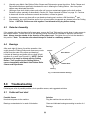
To remove paper jams manually, make sure the folder
is unplugged. Insert a large (3/8”) flat tipped screwdriver into the slot located in the shaft, just inside the
small access hole on the Right Side Cover. Turn the
screwdriver clockwise to rotate rollers in a forward
direction. It may be necessary to remove the 1st Fold
Table top by removing the two thumbscrews and sliding it off the rubber grommets.
(10)