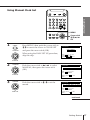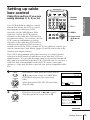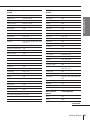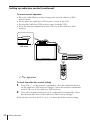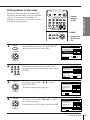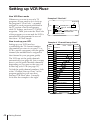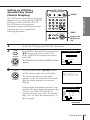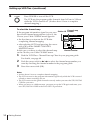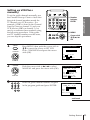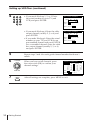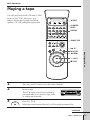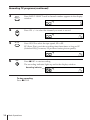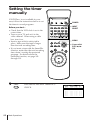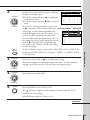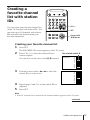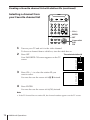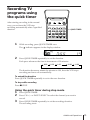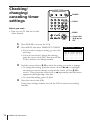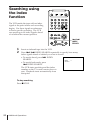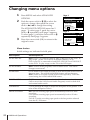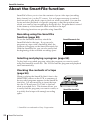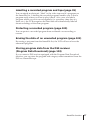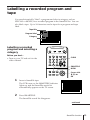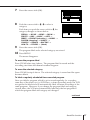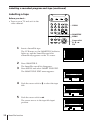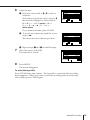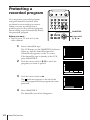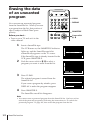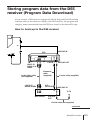
1
3-861-573-11 (1) Video Cassette Recorder Operating Instructions Owner’s record The model and serial numbers are located at the rear of the unit. Record these numbers in the spaces provided below. Refer to them whenever you call upon your Sony dealer regarding this product. Model No. Serial No. TM SLV-M10HF ©1998 by Sony Corporation WARNING To prevent fire or shock hazard, do not expose the unit to rain or moisture. This symbol is intended to alert the user to the presence of uninsulated “dangerous voltage” within the product’s enclosure that may be of sufficient magnitude to constitute a risk of electric shock to persons. This symbol is intended to alert the user to the presence of important operating and maintenance (servicing) instructions in the literature accompanying the appliance. CAUTION To prevent electric shock, do not use this polarized AC plug with an extension cord, receptacle or other outlet unless the blades can be fully inserted to prevent blade exposure. WARNING The AC power cord must be changed at qualified service shop. Precautions Safety • Operate the unit only on 120 V AC, 60 Hz. • If anything falls into the cabinet, unplug the unit and have it checked by qualified personnel before operating it any further. • This unit is not disconnected from the AC power source (mains) as long as it is connected to the wall outlet, even if the unit itself has been turned off. • One blade of the plug is wider than the other for the purpose of safety and will fit into the power outlet only one way. If you are unable to insert the plug fully into the outlet, contact your Sony dealer. • Unplug the unit from the wall outlet if you do not intend to use it for an extended period of time. To disconnect the cord, pull it out by the plug, never by the cord. Installing 2 • Allow adequate air circulation to prevent internal heat buildup. • Do not place the unit on surfaces (rugs, blankets, etc.) or near materials (curtains, draperies) that may block the ventilation slots. Introduction • Do not install the unit near heat sources such as radiators or air ducts, or in a place subject to direct sunlight, excessive dust, mechanical vibration or shock. • Do not install the unit in an inclined position. It is designed to be operated in a horizontal position only. • Keep the unit and cassettes away from equipment with strong magnets, such as microwave ovens or large loudspeakers. • Do not place heavy objects on the unit. • If the unit is brought directly from a cold to a warm location, moisture may condense inside the VCR and cause damage to the video head and tape. When you first install the unit, or when you move it from a cold to a warm location, wait for about one hour before operating the unit. Information For customers in the USA You are cautioned that any changes or modifications not expressly approved in this manual could void your authority to operate this equipment. This equipment has been tested and found to comply with the limits for a Class B digital device, pursuant to Part 15 of the FCC Rules. These limits are designed to provide reasonable protection against harmful interference in a residential installation. This equipment generates, uses, and can radiate radio frequency energy and, if not installed and used in accordance with the instructions, may cause harmful interference to radio communications. However, there is no guarantee that interference will not occur in a particular installation. If this equipment does cause harmful interference to radio or television reception, which can be determined by turning the equipment off and on, the user is encouraged to try to correct the interference by one or more of the following measures: • Reorient or relocate the receiving antenna. • Increase the separation between the equipment and receiver. • Connect the equipment into an outlet on a circuit different from that to which the receiver is connected. • Consult the dealer or an experienced radio/TV technician for help. For customers in Canada Operation is subject to the following two conditions: (1) this VCR may not cause interference, and (2) this VCR must accept any interference, including interference that may cause undesired operation of the VCR. Caution Television programs, films, video tapes and other materials may be copyrighted. Unauthorized recording of such material may be contrary to the provisions of the copyright laws. Also, use of this recorder with cable television transmission may require authorization from the cable television transmission and/or program owner. Table of contents 4 5 Step 1: Unpacking Step 2: Setting up the remote commander 8 Step 3: Hookups 32 Selecting a language Basic Operations 53 55 59 61 Playing a tape Recording TV programs Locating a channel by station ID Recording TV programs using VCR Plus+ 64 Setting the timer manually Additional Operations 67 Playing/searching at various speeds 70 Searching for a selected point on the tape 72 Skip-searching automatically 73 Creating a favorite channel list with station IDs 75 Recording TV programs using the quick timer 76 Checking/changing/canceling timer settings 78 Recording stereo and bilingual programs 80 Searching using the index function 81 Adjusting the picture 82 Changing menu options 84 Editing with another VCR 33 39 44 48 Setting the clock Setting up cable box control Presetting channels Setting up VCR Plus+* Getting Started Getting Started SmartFile function 86 About the SmartFile function 88 Recording using the SmartFile function 93 Selecting and playing a program 94 Checking the contents of a tape 95 Labelling a recorded program and tape 100 Protecting a recorded program 102 Erasing the data of an unwanted program 103 Storing program data from the DSS receiver (Program Data Download) Additional Information 105 General setup information 107 Troubleshooting 110 Specifications 111 Index to parts and controls 117 Index back cover Quick reference to using the VCR * VCR Plus+ and PlusCode are trademarks of Gemstar Development Corporation. VCR Plus+ system is manufactured under license from Gemstar Development Corporation. Introduction 3 Getting Started Step 1 Unpacking Check that you have received the following items with the VCR: 4 • Remote commander • Cable Mouse (cable box controller) • Size AA (R6) batteries • 75-ohm coaxial cable with F-type connectors • Audio/video cable (3-phono, 1-mini to 3-phono, 1-mini) • Jack cover • Monaural cable (1-mini to 1-mini) • SmartFile labels Getting Started Step 2 Setting up the remote commander Getting Started Inserting the batteries Insert two size AA (R6) batteries by matching the + and – on the batteries to the diagram inside the battery compartment. Insert the negative (–) end first, then push in and down until the positive (+) end clicks into position. Using the remote commander Remote sensor You can use this remote commander to operate this VCR and a Sony TV or AV receiver. Buttons on the remote commander marked with a dot (•) can be used to operate your Sony TV. The RECEIVER VOL +/– and MUTING buttons can be used to operate your Sony AV receiver. TV / VIDEO RECEIVER VOL +/– MUTING To operate Set TV / VIDEO to the VCR VIDEO and point at the remote sensor on the VCR a Sony TV TV and point at the remote sensor on the TV Notes • With normal use, the batteries should last about three to six months. • If you do not use the remote commander for an extended period of time, remove the batteries to avoid possible damage from battery leakage. • Do not use a new battery with an old one. • Do not use different types of batteries. • Some Sony AV receivers may not be operated with the remote commander. continued Getting Started 5 Step 2: Setting up the remote commander (continued) Setting the COMMAND MODE switch To remotely control the VCR with the remote commander, set COMMAND MODE on the remote commander to the same position as that on the VCR. Usually set to VTR 3. Change the position as shown below to control other Sony VCRs: 1 2 3 4 5 6 COMMAND MODE VTR 1: For Sony Betamax format VCRs VTR 2: For Sony 8mm format VCRs VTR 3: For Sony VHS format VCRs To change the command mode position of the VCR, press and hold COMMAND MODE on the VCR for about two seconds and repeat until the desired position appears in the display window. COMMAND MODE VTR 3 Controlling other TVs with the remote commander The remote commander is preprogrammed to control non-Sony TVs. If your TV is listed in the table below, set the appropriate manufacturer’s code number. 1 2 Set TV / VIDEO at the top of the remote commander to TV . Hold POWER down, and enter your TV’s code number(s) using the number buttons. Then release POWER. Now you can use the POWER, VOL +/–, CH +/–, and TV/VIDEO buttons to control your TV. You can also use the buttons marked with a dot (•) to control a Sony TV. To control the VCR, reset TV / VIDEO to VIDEO . Tip • If you set your TV’s code number correctly while the TV is turned on, the TV turns off automatically. 6 Getting Started Code numbers of controllable TVs If more than one code number is listed, try entering them one at a time until you find the one that works with your TV. Code number Manufacturer Code number Manufacturer Code number Sony 01 JVC 09 RCA 04, 10 Akai 04 KMC 03 Sampo 12 AOC 04 Magnavox 03, 08, 12 Sanyo 11 Centurion 12 Marantz 04, 13 Scott 12 Coronado 03 MGA/Mitsubishi 04,12,13,17 Sears 07, 10, 11 Curis-Mathes 12 NEC 04, 12 Sharp 03, 05, 18 Daytron 12 Panasonic 06, 19 Sylvania 08, 12 Emerson 03, 04, 14 Philco 03, 04 Teknika 03, 08, 14 Fisher 11 Philips 08 Toshiba 07 General Electric 06, 10 Pioneer 16 Wards 03, 04, 12 Gold Star 03, 04, 17 Portland 03 Yorx 12 Hitachi 02, 03 Quasar 06, 18 Zenith 15 J.C.Penny 04, 12 Radio Shack 05, 14 Getting Started Manufacturer Notes • If the TV uses a different remote control system from the one programmed to work with the VCR, you cannot control your TV with the remote commander. • If you enter a new code number, the code number previously entered will be erased. • When you replace the batteries of the remote commander, the code number may automatically reset to 01 (Sony). If your TV is not a Sony, it is recommended to manually set the appropriate code number every time you replace the batteries. Getting Started 7 Step 3 Hookups Selecting the best hookup option There are many ways in which your VCR can be hooked up. To hook up your VCR so that it works best for you, first scan through the table below. Then use the accompanying diagrams and procedures on the following pages to set up your VCR. If you have Use Refer to TV that has audio/video inputs Audio/video (A/V) hookup, then follow one of the hookups below. Pages 9 and 10 Cable box that is compatible with the VCR’s cable box control feature Hookup 1 Pages 11 to 13 No cable box or incompatible cable box with only a few scrambled channels Hookup 2 Pages 14 to 16 Antenna only, no cable TV Hookup 3 Pages 17 to 19 Incompatible cable box with many scrambled channels Hookup 4 Pages 20 to 23 DSS* receiver Hookup 5 Pages 24 to 26 Incompatible cable box with only a few scrambled channels, using an A/B switch Hookup 6 Pages 27 to 31 After you’ve completed the connections, follow the instructions for setup. During setup, if you need more details on the procedure described, page numbers are provided where you can find complete, step-by-step instructions. After you’ve completed the setup, you’re ready to use your VCR. Procedures differ depending on the hookup you used. For an overview, refer to “Quick reference to using the VCR” on the back cover. Before you get started • Turn off the power to all equipment. • Do not connect the AC power cords until all of the connections are completed. • Be sure you make connections firmly. Loose connections may cause picture distortion. • If your TV doesn’t match any of the examples provided, see your nearest Sony dealer or qualified technician. * DSS is a registered trademark of DIRECTV, Inc., a unit of Hughes Electronics Corporation. 8 Getting Started Audio/video (A/V) hookup Pages 9 and 10 If your TV has the S-Link* (A/V bus control) function, hook up your VCR using the connection shown on page 10. Your TV will automatically switch to the A/V inputs for your VCR when you play back or operate menu on the VCR. Getting Started If your TV has audio/video (A/V) input jacks, you will get a better picture and sound if you hook up your VCR using these connections. In addition, for a true “home theater” experience, you should connect the audio outputs of your VCR or TV to your stereo system. If your TV doesn’t have A/V inputs, see the following pages for antenna or cable hookups. If you’re not planning to use your VCR to record programs, you’re finished setting up the VCR after you’ve made the connections shown on pages 9 and 10. If you want to record off-air or off your cable TV system, complete these connections first, and then go to the following pages for antenna or cable hookups. * S-Link is a trademark of Sony Corporation. A Use this hookup if your TV has stereo jacks VCR Stereo receiver TV AUDIO VIDEO AUX IN LINE-1 IN IN LINE OUT VIDEO AUDIO OUT AUDIO * * Audio cable (not supplied) Audio/video cable (supplied) * Do not connect the miniplugs for this hookup. B Use this hookup if your TV doesn’t have stereo jacks VCR Stereo receiver TV AUDIO VIDEO AUX IN LINE-1 IN LINE OUT IN VIDEO AUDIO Video cable (not supplied) Audio cable (not supplied) continued Getting Started 9 Step 3: Hookups (continued) C Use this hookup if your TV has the S-Link function VCR Stereo receiver TV AUDIO VIDEO LINE-1 IN S-LINK LINE OUT AUX IN IN VIDEO AUDIO OUT AUDIO S-LINK Audio cable (not supplied) Audio/video cable (supplied) Note • To play a tape in stereo, you must use the A/V connection. A/V hookup: VCR setup After you’ve connected your TV and completed antenna or cable hookup, use the following procedure to set up the VCR. Set AUTO ANT SEL to OFF and press the cursor stick (OK). Press MENU and select ADVANCED OPTIONS. MENU TIMER SET / CHECK TUNER PRESET CLOCK SET LANGUAGE SET VCR Plus+ CHANNELS CABLE BOX CONTROL ADVANCED OPTIONS SMART FILE EDIT ADVANCED OPTIONS / AUTO ANT SEL AUTO STEREO AUDIO MIX TUNER AUDIO SHARPNESS DEFAULT SPEED Use t o s e l ec i t e m, t h e n p u s h page1 ON OFF ON OFF ON OFF MAIN SAP L – – H EP t an For details, see page 82. Caution Connections between the VCR’s VHF/UHF connector and the antenna terminals of the TV receiver should be made only as shown in the following instructions. Failure to do so may result in operation that violates the regulations of the Federal Communications Commission regarding the use and operation of RF devices. Never connect the output of the VCR to an antenna or make simultaneous (parallel) antenna and VCR connections at the antenna terminals of your receiver. Note to CATV system installer (in USA) This reminder is provided to call the CATV system installer’s attention to Article 82040 of the NEC that provides guidelines for proper grounding and, in particular, specifies that the cable ground shall be connected to the grounding system of the building, as close to the point of cable entry as practical. 10 Getting Started Hookup 1 Pages 11 to 13 Using cable box control What you can do with this hookup • Record any channel using the VCR’s cable box control feature to select channels on the cable box Getting Started Recommended use You should use this hookup if you have a cable box, especially if your cable system scrambles all or most channels. This hookup allows the VCR’s cable box control feature to control the channel on the cable box, simplifying the recording process. A list of compatible cable boxes is on pages 40 and 41. What you can’t do • Record with the cable box turned off • Record one channel while watching another channel Cable Mouse Wall Cable box IN OUT or Rear of TV VHF/UHF A Match the type of connector on your TV: A, B, or C. VHF B UHF or For connector types B and C, no UHF connection is required. VHF C VCR CONTROL S OUT CABLE BOX CONTROL IN (PLUG ) POWER VHF/UHF IN UHF OUT Positioning the Cable Mouse Place the Cable Mouse so that it hangs out over the cable box front. Side view continued Getting Started 11 Step 3: Hookups (continued) Hookup 1: VCR setup 1 2 3 Set the RF UNIT switch to CH 3 or CH 4, whichever channel is not used in your area. If both are used, set the switch to either channel. For details, see page 105. If you made A/V connections (from page 9), you can skip this step. RF UNIT CH3 CH4 EASY SET UP Turn on your cable box. Press EASY SET UP on the VCR. 1 The LANGUAGE menu appears. Change the on-screen display language to Spanish (ESPAÑOL) or French (FRANÇAIS) if desired, and press the cursor stick (OK). For details, see page 32. 2 The CLOCK SET menu appears. Select AUTO and press the cursor stick (OK). For details, see page 33. SET UP LANGUAGE ENGLISH ESPAÑOL FRANÇAIS t o s e l ec t Use Th e n p u s h OK Pu s h EASY SET UP t o q u i t SET UP CLOCK SET AUTO MANUAL Use t o s e l ec t Th e n p u s h OK Pu s h EASY SET UP t o q u i t 3 The SMART CH MAPPING menu appears. Push the cursor stick to >/./?// to enter the ZIP/POSTAL CODE in your area and press the cursor stick (OK). (You can also use the number buttons to enter the ZIP/POSTAL CODE.) 4 The CABLE BOX menu appears. Select ON. For details, see page 39. SET UP SMART CH MAPPING ZIP / POSTAL CODE 123–– E n t e r y o u r Z I P / POSTAL CODE u s i n g 0 – 9 , o r and k e y s, t h e n p u s h OK CABLE BOX SET UP CABLE BOX CONTROL CABLE MOUSE ON OFF BOX CODE NO. – –– BOX OUTPUT CH CH3 Use t o s e l ec t Pu s h EASY SET UP t o q u i t 5 Enter your cable box code number and push the cursor stick to .. For details, see page 39. CABLE BOX SET UP CABLE BOX CONTROL CABLE MOUSE ON OFF BOX CODE NO. – –– BOX OUTPUT CH CH3 En t e r y o u r CABLE BOX Cod e No. u s i n g 0 – 9 k e y s Re f e r t o t h e Ope r a t i n g Ma nu a l f o r t h e Cod e 12 Getting Started 6 Select your cable box output channel and press the cursor stick (OK). CABLE BOX SET UP CABLE BOX CONTROL CABLE MOUSE ON OFF BOX CODE NO. 0 18 BOX OUTPUT CH CH3 SET UP / SET UP i s d o n e . Normal display Hookup 1: VCR Plus+ channel setup 1 Press MENU and select SET VCR Plus+ CHANNELS. 2 Push the cursor stick to ?// to select AUTO and press the cursor stick (OK). MENU TIMER SET / CHECK TUNER PRESET CLOCK SET LANGUAGE SET VCR Plus+ CHANNELS CABLE BOX CONTROL ADVANCED OPTIONS SMART FILE EDIT SMART CHANNEL MAPPING AUTO 3 Press POWER to turn off the VCR. Getting Started Use t o s e l e c t CABLE BOX CH. Then push OK MANUAL Use t o s e l ec t Th e n p u s h OK Pu s h MENU t o q u i t The VCR receives the program information signal from 0:00 am to 5:00 am while the VCR is turned off, and set up the channel for VCR Plus+ recording. After channel setup is finished, you can record TV programs using VCR Plus+. For details, see page 49. Notes • To use auto VCR Plus+ channel setup feature, leave the cable box on. • It takes about 1 hour to complete channel setup. • The VCR can receive the program information signal only while the VCR is turned off and no timer recordings are set. • If the channels in your area don’t carry the program information signals, set the program guide channels manually. For details, see page 51. • If the Choose your Cable CH MAP menu appears the first time you turn on the VCR after finishing channel setup, select the MAP number. For details, see page 50. Automatic clock setting Once you’ve set up the VCR, it automatically sets the clock the first time you turn off the VCR. After that, whenever you turn off the VCR, it checks the time and adjusts the clock, even for Daylight Saving Time. The VCR sets the clock by picking up a time signal provided by some TV channels. If you want to use the timer to record right away, or if the channels in your area do not carry time signals, set the clock manually. For details, see page 37. Note • To use the Auto Clock Set feature, leave the cable box on. continued Getting Started 13 Step 3: Hookups (continued) Pages 14 to 16 Hookup 2 No cable box, or incompatible cable box with only a few scrambled channels Recommended use Use this hookup if you do not have a cable box. Also use this hookup if your cable company cannot supply a cable box that is compatible with the VCR’s cable box control feature, and your cable system scrambles only a few channels. What you can do with this hookup • Record any unscrambled channel by selecting the channel on the VCR What you can’t do • Record scrambled channels that require a cable box Rear of TV VCR Wall VHF/UHF IN OUT or Connect this cable directly to your TV if you don’t have a cable box. or VHF OUT Getting Started C Cable box IN 14 VHF/UHF A Match the type of connector on your TV: A, B, or C. VHF B For connector types B and C, no UHF connection UHF is required. UHF Hookup 2: VCR setup 1 RF UNIT CH3 CH4 Getting Started 2 Set the RF UNIT switch to CH 3 or CH 4, whichever channel is not used in your area. If both are used, set the switch to either channel. For details, see page 105. If you made A/V connections (from page 9), you can skip this step. EASY SET UP Press EASY SET UP on the VCR. 1 The LANGUAGE menu appears. Change the on-screen display language to Spanish (ESPAÑOL) or French (FRANÇAIS) if desired, and press the cursor stick (OK). For details, see page 32. SET UP LANGUAGE ENGLISH ESPAÑOL FRANÇAIS t o s e l ec t Use Th e n p u s h OK Pu s h EASY SET UP t o q u i t 2 The CLOCK SET menu appears. Select AUTO and press the cursor stick (OK). For details, see page 33. CLOCK SET SET UP AUTO MANUAL Use t o s e l ec t Th e n p u s h OK Pu s h EASY SET UP t o q u i t 3 The SMART CH MAPPING menu appears. Push the cursor stick to >/./?// to enter the ZIP/POSTAL CODE in your area and press the cursor stick (OK). (You can also use the number buttons to enter the ZIP/POSTAL CODE.) 4 The CABLE BOX menu appears. Select OFF and press the cursor stick (OK). SMART CH MAPPING SET UP ZIP / POSTAL CODE 123–– E n t e r y o u r Z I P / POSTAL CODE u s i n g 0 – 9 , o r k e y s, and t h e n p u s h OK CABLE BOX SET UP CABLE BOX CONTROL CABLE MOUSE ON OFF Use t o s e l ec t Pu s h EASY SET UP t o q u i t 5 The TUNER PRESET menu appears. Set ANTENNA/CABLE to CABLE and press the cursor stick (OK). For details, see page 44. TUNER PRESET SET UP ANTENNA / CABLE ANT CABLE Use t o s e l ec t Th e n p u s h OK Pu s h EASY SET UP t o q u i t continued Getting Started 15 Step 3: Hookups (continued) 6 The AUTO PRESET starts. SET UP AUTO PRESET TUNER PRESET SET UP SET UP i s d o n e PROCESS I NG / P l e a s e wa i t . Normal display Hookup 2: VCR Plus+ channel setup 1 Press MENU and select SET VCR Plus+ CHANNELS. 2 Push the cursor stick to ?// to select AUTO and press the cursor stick (OK). MENU TIMER SET / CHECK TUNER PRESET CLOCK SET LANGUAGE SET VCR Plus+ CHANNELS CABLE BOX CONTROL ADVANCED OPTIONS SMART FILE EDIT SMART CHANNEL MAPPING AUTO 3 Press POWER to turn off the VCR. MANUAL Use t o s e l ec t Th e n p u s h OK Pu s h MENU t o q u i t The VCR receives the program information signal from 0:00 am to 5:00 am while the VCR is turned off, and set up the channel for VCR Plus+ recording. After channel setup is finished, you can record TV programs using VCR Plus+. For details, see page 49. Notes • It takes about 1 hour to complete channel setup. • The VCR can receive the program information signal only while the VCR is turned off and no timer recordings are set. • If the channels in your area don’t carry the program information signals, set the program guide channels manually. For details, see page 51. • If the Choose your Cable CH MAP menu appears the first time you turn on the VCR after finishing channel setup, select the MAP number. For details, see page 50. Automatic clock setting Once you’ve set up the VCR, it automatically sets the clock the first time you turn off the VCR. After that, whenever you turn off the VCR, it checks the time and adjusts the clock, even for Daylight Saving Time. The VCR sets the clock by picking up a time signal provided by some TV channels. If you want to use the timer to record right away, or if the channels in your area do not carry time signals, set the clock manually. For details, see page 37. 16 Getting Started Pages 17 to 19 Hookup 3 Antenna hookup A Use this hookup if you’re using: • VHF/UHF antenna (you get channels 2–13 and channels 14 and higher) • UHF-only antenna (you get channels 14 and higher) • Separate VHF and UHF antennas Getting Started Make the following connections if you’re using an antenna (if you don’t have cable TV). Rear of TV or VCR VHF/UHF A Match the type of connector on your TV: A, B, or C. VHF B VHF/UHF IN UHF OUT or VHF C UHF B Use this hookup if you’re using a VHF-only antenna (you get channels 2–13 only) Rear of TV or VCR VHF/UHF IN OUT or VHF/UHF A Match the type of connector on your TV: A, B, or C. VHF B For connector types B and C, no UHF UHF connection is required. VHF C UHF If you cannot connect your antenna cable to the VCR directly If your antenna cable is a flat cable (300-ohm twin lead cable), attach an external antenna connector (not supplied) so you can connect the cable to the VHF/UHF IN connector. If you have separate cables for VHF and UHF antennas, you should use a U/V band mixer (not supplied). For details, see page 106. continued Getting Started 17 Step 3: Hookups (continued) Hookup 3: VCR setup 1 2 Set the RF UNIT switch to CH 3 or CH 4, whichever channel is not used in your area. If both are used, set the switch to either channel. For details, see page 105. If you made A/V connections (from page 9), you can skip this step. RF UNIT CH3 CH4 EASY SET UP Press EASY SET UP on the VCR. 1 The LANGUAGE menu appears. Change the on-screen display language to Spanish (ESPAÑOL) or French (FRANÇAIS) if desired, and press the cursor stick (OK). For details, see page 32. SET UP LANGUAGE ENGLISH ESPAÑOL FRANÇAIS t o s e l ec t Use Th e n p u s h OK Pu s h EASY SET UP t o q u i t 2 The CLOCK SET menu appears. Select AUTO and press the cursor stick (OK). For details, see page 33. CLOCK SET SET UP AUTO MANUAL Use t o s e l ec t Th e n p u s h OK Pu s h EASY SET UP t o q u i t 3 The SMART CH MAPPING menu appears. Push the cursor stick to >/./?// to enter the ZIP/POSTAL CODE in your area and press the cursor stick (OK). (You can also use the number buttons to enter the ZIP/POSTAL CODE.) 4 The CABLE BOX menu appears. Select OFF and press the cursor stick (OK). SMART CH MAPPING SET UP ZIP / POSTAL CODE 123–– E n t e r y o u r Z I P / POSTAL CODE u s i n g 0 – 9 , o r k e y s, and t h e n p u s h OK CABLE BOX SET UP CABLE BOX CONTROL CABLE MOUSE ON OFF Use t o s e l ec t Pu s h EASY SET UP t o q u i t 5 The TUNER PRESET menu appears. Set ANTENNA/CABLE to ANT and press the cursor stick (OK). For details, see page 44. TUNER PRESET SET UP ANTENNA / CABLE ANT CABLE Use t o s e l ec t Th e n p u s h OK Pu s h EASY SET UP t o q u i t 18 Getting Started 6 The AUTO PRESET starts. SET UP AUTO PRESET SET UP TUNER PRESET SET UP i s d o n e PROCESS I NG / Normal display Hookup 3: VCR Plus+ channel setup 1 Press MENU and select SET VCR Plus+ CHANNELS. 2 Push the cursor stick to ?// to select AUTO and press the cursor stick (OK). MENU TIMER SET / CHECK TUNER PRESET CLOCK SET LANGUAGE SET VCR Plus+ CHANNELS CABLE BOX CONTROL ADVANCED OPTIONS SMART FILE EDIT SMART CHANNEL MAPPING AUTO 3 Press POWER to turn off the VCR. Getting Started . P l e a s e wa i t MANUAL Use t o s e l ec t Th e n p u s h OK Pu s h MENU t o q u i t The VCR receives the program information signal from 0:00 am to 5:00 am while the VCR is turned off, and set up the channel for VCR Plus+ recording. After channel setup is finished, you can record TV programs using VCR Plus+. For details, see page 49. Notes • It takes about 1 hour to complete channel setup. • The VCR can receive the program information signal only while the VCR is turned off and no timer recordings are set. • If the channels in your area don’t carry the program information signals, set the program guide channels manually. For details, see page 51. • If the Choose your Cable CH MAP menu appears the first time you turn on the VCR after finishing channel setup, select the MAP number. For details, see page 50. Automatic clock setting Once you’ve set up the VCR, it automatically sets the clock the first time you turn off the VCR. After that, whenever you turn off the VCR, it checks the time and adjusts the clock, even for Daylight Saving Time. The VCR sets the clock by picking up a time signal provided by some TV channels. If you want to use the timer to record right away, or if the channels in your area do not carry time signals, set the clock manually. For details, see page 37. continued Getting Started 19 Step 3: Hookups (continued) Hookup 4 Pages 20 to 23 Hookup 4 Incompatible cable box with many scrambledPages 19 to 21 channels Recommended use Use this hookup if your cable company cannot supply a cable box that is compatible with the VCR’s cable box control feature, and your cable system scrambles all or most channels. What you can do with this hookup • Record any channel by selecting the channel on the cable box What you can’t do • Record with the cable box turned off • Record one channel while watching another channel • Select channels directly on the VCR Wall Rear of TV Cable box IN OUT or VHF/UHF A Match the type of connector on your TV: A, B, or C. VHF or B For connector types B and C, no UHF connection UHF is required. VHF C VCR VHF/UHF IN OUT 20 Getting Started UHF Hookup 4: VCR setup 1 RF UNIT CH3 CH4 Getting Started 2 3 Set the RF UNIT switch to CH 3 or CH 4, whichever channel is not used in your area. If both are used, set the switch to either channel. For details, see page 105. If you made A/V connections (from page 9), you can skip this step. EASY SET UP Turn on your cable box. Press EASY SET UP on the VCR. 1 The LANGUAGE menu appears. Change the on-screen display language to Spanish (ESPAÑOL) or French (FRANÇAIS) if desired, and press the cursor stick (OK). For details, see page 32. SET UP LANGUAGE ENGLISH ESPAÑOL FRANÇAIS Use t o s e l ec t Th e n p u s h OK Pu s h EASY SET UP t o q u i t 2 The CLOCK SET menu appears. Select MANUAL, press the cursor stick (OK), and set the clock manually. For details, see page 37. CLOCK SET SET UP AUTO MANUAL Use t o s e l ec t Th e n p u s h OK Pu s h EASY SET UP t o q u i t 3 The SMART CH MAPPING menu appears. Push the cursor stick to >/./?// to enter the ZIP/POSTAL CODE in your area and press the cursor stick (OK). (You can also use the number buttons to enter the ZIP/POSTAL CODE.) 4 The CABLE BOX menu appears. Select OFF and press the cursor stick (OK). SET UP SMART CH MAPPING ZIP / POSTAL CODE 123–– E n t e r y o u r Z I P / POSTAL CODE u s i n g 0 – 9 , o r and k e y s, t h e n p u s h OK CABLE BOX SET UP CABLE BOX CONTROL CABLE MOUSE ON OFF Use t o s e l ec t Pu s h EASY SET UP t o q u i t 5 The TUNER PRESET menu appears. Set ANTENNA/CABLE to ANT and press the cursor stick (OK). For details, see page 44. TUNER PRESET SET UP ANTENNA / CABLE ANT CABLE Use t o s e l ec t Th e n p u s h OK Pu s h EASY SET UP t o q u i t continued Getting Started 21 Step 3: Hookups (continued) 6 The AUTO PRESET starts. SET UP AUTO PRESET TUNER PRESET SET UP SET UP i s d o n e PROCESS I NG / P l e a s e wa i t . Normal display Hookup 4: VCR Plus+ channel setup 1 Find the VCR Plus+ Channel Line-up Chart in your program guide. For details, see page 48. 2 Enter all the channels you want to record and the cable box output channel (usually 2, 3, or 4). For details, see page 51. 1 Press MENU and select SET VCR Plus+ CHANNELS. MENU TIMER SET / CHECK TUNER PRESET CLOCK SET LANGUAGE SET VCR Plus+ CHANNELS CABLE BOX CONTROL ADVANCED OPTIONS SMART FILE EDIT 2 Push the cursor stick to ?// to select MANUAL. SMART CHANNEL MAPPING AUTO MANUAL Use t o s e l ec t Th e n p u s h OK Pu s h MENU t o q u i t 3 Enter the program guide channel, then the cable box output channel. SET VCR Plus+ CHANNELS 4 Press the cursor stick (OK). Pu s h 0 – 9 k e y s t o s e t p r o g r a m GUIDE CH 5 Press MENU. GUIDE CH TV CH 33 – 3 O r , p u s h OK t o s e e VCR Plus+ CHANNEL LIST Program guide channel Cable box output channel 22 Getting Started Automatic clock setting To use the Auto Clock Set feature with this hookup, you need to manually select a channel that carries a time signal: Tune the cable box to a channel that carries a time signal. 3 Turn off the VCR. It automatically sets the clock and adjusts for Daylight Saving Time by picking up the time signal. Select AUTO in the CLOCK SET menu to turn on the Auto Clock Set feature. If you want to use the timer to record right away, or if the channels in your area do not carry time signals, set the clock manually. For details, see page 37. Getting Started 1 2 Note • To use the Auto Clock Set feature, leave the cable box on. continued Getting Started 23 Step 3: Hookups (continued) Hookup 5 Pages 24 to 26 DSS (Digital Satellite System) receiver Recommended use Use this hookup if you have a DSS receiver. It allows the VCR’s cable box control feature to control the channel on the DSS receiver, simplifying the recording process. A list of compatible DSS receivers is on page 41. DSS (Digital Satellite System) is a satellite broadcast that provides superior digital-quality video and crisp digital-quality audio. A variety of program packages are available through your program providers. It also has program guides that are sorted by program categories. What you can do with this hookup • Record any channels using the VCR’s cable box control feature to select channels on the DSS receiver. What you can’t do • Record with the DSS receiver turned off • Record any channels from cable or an antenna (To record channels from cable or an antenna, turn off the cable box control feature.) • Use a cable box Rear of TV • Record programs with VCR Plus+ VHF/UHF Wall or or VCR CONTROL S OUT AUDIO CABLE BOX CONTROL IN (PLUG ) POWER VHF/UHF VIDEO or IN LINE-1 IN OUT LINE OUT A Match the type of connector on your TV: A, B or C. VHF B For connector types B and C, no UHF UHF connection is required. VHF C UHF Cable Mouse VHF/UHF LINE OUT AUDIO VIDEO Positioning the Cable Mouse Place the Cable Mouse so that it hangs out over the DSS receiver front. IN OUT DSS receiver Side view 24 Getting Started Hookup 5: VCR setup 1 RF UNIT CH3 CH4 Getting Started 2 3 Set the RF UNIT switch to CH 3 or CH 4, whichever channel is not used in your area. If both are used, set the switch to either channel. For details, see page 105. If you made A/V connections (from page 9), you can skip this step. EASY SET UP Turn on your DSS receiver. Press EASY SET UP on the VCR. 1 The LANGUAGE menu appears. Change the on-screen display language to Spanish (ESPAÑOL) or French (FRANÇAIS) if desired, and press the cursor stick (OK). For details, see page 32. 2 The CLOCK SET menu appears. Select AUTO and press the cursor stick (OK). For details, see page 33. SET UP LANGUAGE ENGLISH ESPAÑOL FRANÇAIS Use t o s e l ec t Th e n p u s h OK Pu s h EASY SET UP t o q u i t SET UP CLOCK SET AUTO MANUAL Use t o s e l ec t Th e n p u s h OK Pu s h EASY SET UP t o q u i t 3 The SMART CH MAPPING menu appears. Push the cursor stick to >/./?// to enter the ZIP/POSTAL CODE in your area and press the cursor stick (OK). (You can also use the number buttons to enter the ZIP/POSTAL CODE.) 4 The CABLE BOX menu appears. Select ON. For details, see page 39. SET UP SMART CH MAPPING ZIP / POSTAL CODE 123–– E n t e r y o u r Z I P / POSTAL CODE u s i n g 0 – 9 , o r and k e y s, t h e n p u s h OK CABLE BOX SET UP CABLE BOX CONTROL CABLE MOUSE ON OFF BOX CODE NO. – –– BOX OUTPUT CH CH3 Use t o s e l ec t Pu s h EASY SET UP t o q u i t continued Getting Started 25 Step 3: Hookups (continued) 5 Enter your DSS receiver code number and push the cursor stick to .. For details, see page 39. CABLE BOX SET UP CABLE BOX CONTROL CABLE MOUSE ON OFF BOX CODE NO. – –– BOX OUTPUT CH CH3 En t e r y o u r CABLE BOX Cod e No. u s i n g 0 – 9 k e y s Re f e r t o t h e Ope r a t i n g Ma nu a l f o r t h e Cod e 6 Set your DSS receiver output channel (BOX OUTPUT CH) to LINE and press the cursor stick (OK). CABLE BOX SET UP CABLE BOX CONTROL CABLE MOUSE ON OFF BOX CODE NO. 6 50 BOX OUTPUT CH LINE SET UP SET UP i s d o n e / Use t o s e l e c t CABLE B O X C H . T h e n p u s h OK . Normal display Automatic clock setting Once you’ve set up the VCR, it automatically sets the clock the first time you turn off the VCR. After that, whenever you turn off the VCR, it checks the time and adjusts the clock, even for Daylight Saving Time. The VCR sets the clock by picking up a time signal provided by some TV channels. If you want to use the timer to record right away, or if the channels in your area do not carry time signals, set the clock manually. For details, see page 37. Note • To successfully record a program from the DSS receiver, proceed as follows: – Leave the DSS receiver on all the time. – Turn off the display (menu screen, channel number, etc.) of the DSS receiver. – To record or receive locked channels, unlock the channel before the VCR starts recording. – To set pay-per-view programs in the timer setting, order the pay-per-view program before the VCR starts recording. – Some programs are copy protected. You cannot record these programs. 26 Getting Started Hookup 6 Pages 27 to 31 Incompatible cable box with only a few scrambled channels, using an A/B switch What you can do with this hookup • Record any unscrambled channel by selecting the channel directly on the VCR (the A/B switch is set to A) • Record any scrambled channel by selecting the channel on the cable box (the A/B switch is set to B) Getting Started Recommended use By using an A/B switch (not supplied), this hookup allows you to record both scrambled and unscrambled channels conveniently. What you can’t do • Record one scrambled channel while watching another channel (the A/B switch is set to B) Wall Rear of TV Cable box Splitter IN OUT or A/B switch A B or VHF/UHF A Match the type of connector on your TV: A, B, or C. VHF B For connector types B and C, no UHF connection is UHF required. VHF C VCR VHF/UHF IN UHF OUT continued Getting Started 27 Step 3: Hookups (continued) Hookup 6: VCR setup 1 2 3 Set the RF UNIT switch to CH 3 or CH 4, whichever channel is not used in your area. If both are used, set the switch to either channel. For details, see page 105. If you made A/V connections (from page 9), you can skip this step. RF UNIT CH3 CH4 EASY SET UP Set the A/B switch to “A.” Press EASY SET UP on the VCR. 1 The LANGUAGE menu appears. Change the on-screen display language to Spanish (ESPAÑOL) or French (FRANÇAIS) if desired, and press the cursor stick (OK). For details, see page 32. SET UP LANGUAGE ENGLISH ESPAÑOL FRANÇAIS Use t o s e l ec t Th e n p u s h OK Pu s h EASY SET UP t o q u i t 2 The CLOCK SET menu appears. Select AUTO and press the cursor stick (OK). For details, see page 33. SET UP CLOCK SET AUTO MANUAL Use t o s e l ec t Th e n p u s h OK Pu s h EASY SET UP t o q u i t 3 The SMART CH MAPPING menu appears. Push the cursor stick to >/./?// to enter the ZIP/POSTAL CODE in your area and press the cursor stick (OK). (You can also use the number buttons to enter the ZIP/POSTAL CODE.) 4 The CABLE BOX menu appears. Select OFF and press the cursor stick (OK). SET UP SMART CH MAPPING ZIP / POSTAL CODE 123–– E n t e r y o u r Z I P / POSTAL CODE u s i n g 0 – 9 , o r k e y s, and t h e n p u s h OK CABLE BOX SET UP CABLE BOX CONTROL CABLE MOUSE ON OFF Use t o s e l ec t Pu s h EASY SET UP t o q u i t 28 Getting Started 5 The TUNER PRESET menu appears. Set ANTENNA/CABLE to CABLE and press the cursor stick (OK). For details, see page 44. TUNER PRESET SET UP ANTENNA / CABLE CABLE ANT 6 The AUTO PRESET starts. SET UP AUTO PRESET TUNER PRESET SET UP SET UP i s d o n e PROCESS I NG / Getting Started Use t o s e l ec t Th e n p u s h OK Pu s h EASY SET UP t o q u i t P l e a s e wa i t . Normal display 4 Preset the cable box output channel (usually 2, 3, or 4). For details, see page 46. 1 Press MENU and select TUNER PRESET. 2 Enter the cable box output channel. Set MANUAL SET to ADD and press the cursor stick (OK). MENU TIMER SET / CHECK TUNER PRESET CLOCK SET LANGUAGE SET VCR Plus+ CHANNELS CABLE BOX CONTROL ADVANCED OPTIONS SMART FILE EDIT TUNER PRESET CH3 ANTENNA / CABLE ANT AUTO PRESET MANUAL SET ADD AFT ON FINE TUNING CABLE ERASE OFF S e l e c t CH w i t h 0 – 9 . Pu s h ENTER. t o ADD / ERASE continued Getting Started 29 Step 3: Hookups (continued) Hookup 6: VCR Plus+ channel setup 1 Press MENU and select SET VCR Plus+ CHANNELS. 2 Push the cursor stick to ?// to select AUTO and press the cursor stick (OK). MENU TIMER SET / CHECK TUNER PRESET CLOCK SET LANGUAGE SET VCR Plus+ CHANNELS CABLE BOX CONTROL ADVANCED OPTIONS SMART FILE EDIT SMART CHANNEL MAPPING AUTO 3 Press POWER to turn off the VCR. MANUAL Use t o s e l ec t Th e n p u s h OK Pu s h MENU t o q u i t The VCR receives the program information signal from 0:00 am to 5:00 am while the VCR is turned off, and set up the channel for VCR Plus+ recording. After channel setup is finished, you can record TV programs using VCR Plus+. For details, see page 49. Notes • To use the Smart Channel Mapping feature, set the A/B switch to A. • It takes about 1 hour to complete channel setup. • The VCR can receive the program information signal only while the VCR is turned off and no timer recordings are set. • If the channels in your area don’t carry the program information signals, set the program guide channels manually. For details, see page 51. • If the Choose your Cable CH MAP menu appears the first time you turn on the VCR after finishing channel setup, select the MAP number. For details, see page 50. VCR Plus+ channel setup for scrambled channels To set the program guide channels for scrambled channels, enter all the scrambled channels you want to record and the cable box output channel (usually 2, 3, or 4) after finishing Smart Channel Mapping. For details, see page 51. 1 Find the VCR Plus+ Channel Line-up Chart in your program guide. For details, see page 48. 2 Press MENU and select SET VCR Plus+ CHANNELS, then press the cursor stick (OK). 30 Getting Started MENU TIMER SET / CHECK TUNER PRESET CLOCK SET LANGUAGE SET VCR Plus+ CHANNELS CABLE BOX CONTROL ADVANCED OPTIONS SMART FILE EDIT 3 Push the cursor stick to ?// to select MANUAL. SMART CHANNEL MAPPING AUTO MANUAL 4 Enter the program guide channel, then the cable box output channel. SET VCR Plus+ CHANNELS GUIDE CH TV CH 25 – 3 Pu s h 0 – 9 k e y s t o s e t p r o g r a m GUIDE CH 5 Press the cursor stick (OK). Getting Started Use t o s e l ec t Th e n p u s h OK Pu s h MENU t o q u i t O r , p u s h OK t o s e e VCR Plus+ CHANNEL LIST 6 Press MENU. Program guide channel Cable box output channel Automatic clock setting Once you’ve set up the VCR, it automatically sets the clock the first time you turn off the VCR. After that, whenever you turn off the VCR, it checks the time and adjusts the clock, even for Daylight Saving Time. The VCR sets the clock by picking up a time signal provided by some TV channels. If you want to use the timer to record right away, or if the channels in your area do not carry time signals, set the clock manually. For details, see page 37. Note • To use the Auto Clock Set feature, set the A/B switch to A. Getting Started 31 Selecting a language You can change the on-screen display language. 1 2 3 4 5 6 7 8 9 0 MENU Cursor stick >/. OK 1 • MENU • CURSOR Press MENU, then push the cursor stick to >/. to move the cursor to LANGUAGE and press the cursor stick (OK). When using the EASY SET UP procedure, skip this step. LANGUAGE ENGLISH ESPAÑOL FRANÇAIS t o s e l ec t an Use i t e m, t h e n p u s h OK PUSH OK 2 • CURSOR PUSH OK 32 Getting Started Push the cursor stick to >/. to select ENGLISH, ESPAÑOL, or FRANÇAIS, then press the cursor stick (OK). Setting the clock Some TV and cable channels transmit time signals with their broadcasts. Your VCR can pick up this time signal to automatically set the clock. 1 2 3 4 5 6 7 8 9 0 MENU The Auto Clock Set feature works only if a channel in your area is broadcasting a time signal. If broadcasters in your area are not yet sending time signals, set the time manually (page 37). Getting Started Using the Auto Clock Set feature Cursor stick >/./?// OK Before you start… • Turn on the VCR and the TV. • Set the TV to the VCR channel (channel 3 or 4). If your TV is connected to the VCR using A/V connections, set the TV to video input. • Press TV/VIDEO to display the VIDEO indicator in the display window. • Press INPUT SELECT so that a channel number appears in the display window. 1 • MENU • CURSOR Press MENU, then push the cursor stick to >/. to move the cursor to CLOCK SET and press the cursor stick (OK). When using the EASY SET UP procedure, skip this step. CLOCK SET AUTO MANUAL Use t o s e l ec t Th e n p u s h OK Pu s h MENU t o q u i t PUSH OK 2 • CURSOR PUSH OK Push the cursor stick to ?// to select AUTO, then press the cursor stick (OK). AUTO CLOCK SET FULL AUTO Use YES NO t o s e l ec t Pu s h MENU t o q u i t continued Getting Started 33 Setting the clock (continued) 3 • CURSOR Push the cursor stick to ?// to select YES, then press the cursor stick (OK). PUSH OK 4 To activate the Auto Clock Set function, turn off the VCR. The VCR automatically sets the clock by searching for a channel that carries a time signal and sets your time zone and Daylight Saving Time (if applicable). If your clock is set to the wrong time zone or Daylight Saving Time, you can adjust these settings without turning off the Auto Clock Set feature (page 35). Notes • The clock cannot be set automatically if you don’t receive a channel that carries a time signal in your area. If so, set the clock manually. • If there are only a few channels in your area that carry time signals, setting the clock automatically may take up to about 30 minutes. If nothing happens even after you wait about 30 minutes, set the clock manually. • If you use Hookup 1, make sure you leave the cable box on. 34 Getting Started If the clock is not activated 2 3 4 5 6 7 8 9 Number buttons 0 Getting Started 1 Cursor stick >/./?// OK 1 Follow steps 1 and 2 in “Using the Auto Clock Set feature.” AUTO CLOCK SET FULL AUTO YES NO The AUTO CLOCK SET menu is displayed. Use t o s e l ec t Pu s h MENU t o q u i t 2 • CURSOR PUSH OK Push the cursor stick to ?// to select NO for FULL AUTO. AUTO CLOCK SET FULL AUTO CLOCK SET CH TIME ZONE DAYLIGHT SAVING Use YES NO –– AUTO AUTO t o s e l ec t Pu s h MENU t o q u i t continued Getting Started 35 Setting the clock (continued) 3 • CURSOR PUSH OK 1 2 3 4 5 6 7 8 9 0 Push the cursor stick to >/. to highlight the item you want to set, then push the cursor stick to ?// to make the setting. AUTO CLOCK SET FULL AUTO CLOCK SET CH TIME ZONE DAYLIGHT SAVING YES NO 123 EASTERN ON • For CLOCK SET CH Use t o s e l ec t Leave the setting to “– –” to have the VCR automatically search for a channel Pu s h MENU t o q u i t that carries a time signal. Press the number buttons to select a channel that carries a time signal. Use this option if you know of a channel that carries a time signal. Most PBS member stations broadcast a time signal. For the fastest response, select your local PBS station. • For TIME ZONE Select the time zone of your area, or select AUTO to have the VCR automatically set your time zone. The options are: AUTO n ATLANTIC n EASTERN n CENTRAL n MOUNTAIN n PACIFIC n ALASKA n HAWAII n AUTO • For DAYLIGHT SAVING Select ON or OFF (standard time), or AUTO to have the VCR automatically set the daylight saving time. 4 • CURSOR Press the cursor stick (OK). PUSH OK 5 To activate the Auto Clock Set function, turn off the VCR. Notes • If you use both the cable box control feature and the Auto Clock Set feature, the VCR automatically changes channels on the cable box until a channel that carries a time signal is found, whenever you turn off the VCR. If you want to stop the search, change the channel on the cable box with the CHANNEL or CH buttons either on the VCR or on the remote commander. • If you use Hookup 1 or 4, make sure you leave the cable box on. 36 Getting Started Using Manual Clock Set 2 3 4 5 6 7 8 9 0 MENU Getting Started 1 Cursor stick >/./?// OK 1 • MENU • CURSOR Press MENU, then push the cursor stick to >/. to move the cursor to CLOCK SET and press the cursor stick (OK). When using the EASY SET UP procedure, skip this step. CLOCK SET AUTO MANUAL Use t o s e l ec t Th e n p u s h OK Pu s h MENU t o q u i t PUSH OK 2 • CURSOR Push the cursor stick to ?// to select MANUAL, then press the cursor stick (OK). CLOCK SET 1 / 1 / 1 9 9 8 THU 1 2 : 0 0 AM t o s e l ec t Use c u r r e n t MONTH PUSH OK 3 • CURSOR Th e n, p u s h DAY Push the cursor stick to >/. to set the month. t o set CLOCK SET 1 1 / 1 / 1 9 9 8 SUN 1 2 : 0 0 AM t o s e l ec t Use c u r r e n t MONTH PUSH OK Th e n, p u s h DAY t o set continued Getting Started 37 Setting the clock (continued) 4 • CURSOR Push the cursor stick to / to highlight the day and push the cursor stick to >/. to set the day. CLOCK SET 1 1 / 1 6 / 1 9 9 8 MON t o s e l ec t Use c u r r e n t DAY PUSH OK 5 • CURSOR Th e n, p u s h YEAR Set the year, hour and minutes in the same way as the day. The day of the week is set automatically. PUSH OK 6 • CURSOR PUSH OK 38 Getting Started t o set Press the cursor stick (OK) to start the clock. 1 2 : 0 0 AM Setting up cable box control 1 2 3 4 5 6 Number buttons 7 8 9 Your VCR includes a cable box control 0 feature that allows the VCR to control most brands of cable boxes/DSS receivers via the Cable Mouse. With cable box control, the VCR controls channels on the cable box/DSS receiver for timer recording. You can also use the VCR’s remote commander to change channels on the cable box/DSS receiver whenever the cable box/DSS receiver is turned on even if the VCR is turned off. To use cable box control, you need to connect the Cable Mouse (pages 11 and 24) and set the code number and output channel. Getting Started (Skip this section if you are using Hookup 2, 3, 4, or 6.) CH +/– MENU Cursor stick >/./?// OK This VCR is programmed with codes necessary to control channel selection on most brands of cable boxes at the time this VCR was manufactured. It is possible that new cable boxes may be introduced that cannot be controlled with this VCR’s Cable Mouse. If you have a cable box that is incompatible with this VCR, contact your cable operator –– they may be able to provide you with a compatible cable box. 1 • MENU • CURSOR Press MENU, then push the cursor stick to >/. to move the cursor to CABLE BOX CONTROL and press the cursor stick (OK). When using the EASY SET UP procedure, skip this step. CABLE BOX CONTROL CABLE MOUSE ON OFF Use t o s e l ec t Pu s h MENU t o q u i t PUSH OK 2 • CURSOR PUSH OK Push the cursor stick to ?// to select ON, then push the cursor stick to .. CABLE BOX CONTROL CABLE MOUSE BOX CODE NO. BOX OUTPUT CH ON OFF – –– CH3 En t e r y o u r CABLE BOX Cod e No. u s i n g 0 – 9 k e y s Re f e r t o t h e Ope r a t i n g Ma nu a l f o r t h e Cod e continued Getting Started 39 Setting up cable box control (continued) 3 1 2 3 4 5 6 7 8 9 0 • CURSOR Press the number buttons to enter the cable box/DSS receiver code number, then push the cursor stick to .. Find your cable box/DSS receiver code number from the chart below. CABLE BOX CONTROL CABLE MOUSE BOX CODE NO. BOX OUTPUT CH ON OFF 1 23 CH3 Use t o s e l e c t CABLE BOX CH. Th e n p u s h OK PUSH OK 4 • CURSOR PUSH OK If you want to control a cable box, push the cursor stick to ?// to select the output channel for the cable box, then press the cursor stick (OK). If you want to control a DSS receiver, select LINE, then press the cursor stick (OK). Cable box and DSS receiver brand and the corresponding code numbers If more than one code number is listed, try entering them one by one, until you come to the correct code for your equipment. 40 Cable box brand Code numbers Cable box brand Code numbers ABC 018, 022, 024, 028, 217 Eastern 013, 285 Antronix 218 Electricord 089 Archer 033, 050, 164, 218, 808 Electus 055 BBT 278 Focus 411 Cable Star 067 Garrard 164 Cabletenna 033 GC Electronics 027, 067, 341 Cable time 172, 388, 459 GE 243, 244 Century 164 GEC 097 Citizen 164, 326, 327 Gemini 026, 068, 081 Clyde Cablevision 097 General Instrument 022, 287, 487 Colour Voice 036, 042 Hamlin 020, 031, 045, 270, 284 Comband 243, 244 Hitachi 022 Comtronics 051, 071 Jasco 164, 326 Decsat 434 Jerrold Diamond 046 014, 022, 025, 026, 035, 037, 058, 109, 287, 487 Eagle Comtronics 051 Linsay 451 Getting Started Code numbers Cable box brand Code numbers Macom 044 STS 167 Magnavox 038, 043, 080 Sylvania 012 Memorex 011 T-Cable Teletext 116 Movie Time 089, 167, 214 Tandy 269 Northcoast 325 Tatung 108 Novaplex 629 Teknica 157 NSC 074, 081, 167, 214 TeleCaption 232 Oak 018, 030, 259 Teleservice 292 Panasonic 032, 118 Texscan 012, 107 Paragon 011 TFC 321 Philips 036, 038, 039, 040, 041, 042, 071, 301 Timeless 429 Tocom 023, 024 Toshiba 011 Tudi 297 TV86 074 TV COM 018, 030, 259 Uniden 236 Unika 033, 164, 218 United Artists 018 United Cable 014 Universal 033, 050, 067, 088, 089, 164, 202, 218, 333 Getting Started Cable box brand Pioneer 034, 155, 271, 544, 695 Popular Mechanics 411 Pulsar 011 Radio shack 808 RCA 032 Realistic 218 Recoton 411 Regal 031, 270, 284, 290 Regency 013 Rembrandt 081 Samsung 051, 155 Videoway 261 Scientific Atlanta 017, 019, 028, 288 Vidtech 255 Seam 521 Viewstar Sharp 324 038, 071, 074, 122, 222, 269, 300 Signal 051 Zenith 011, 065, 536 Zentek 411 Wave Master 576 DSS receiver brand Code numbers Signature 022 SL Marx 051 Spectravision 069 Sprucer 032, 318 Standard Components 107, 166 Starcom 014, 026, 058, 109 RCA 577 Stargate 026, 051 Sony 650 continued Getting Started 41 Setting up cable box control (continued) To ensure correct operation • Place the Cable Mouse so that it hangs out over the cable box/DSS receiver front. • Do not place the cable box/DSS receiver on top of the VCR. • Position the cable box/DSS receiver away from the VCR. • Point the remote commander at the VCR, not at the cable box/DSS receiver. Side view 1 4 7 2 3 5 6 8 9 0 : Signal flow To check the cable box control setting 1 Press CH +/– on the remote commander. Does the channel indicator on the cable box/DSS receiver change? (Point the remote commander at the VCR, not at the cable box/DSS receiver.) 2 Press all 10 number buttons (0 to 9) on the remote commander. Does the channel indicator on the cable box/DSS receiver change? If the answer to both 1 and 2 is “yes,” you have made the correct setting. 42 Getting Started Getting Started If you cannot get your VCR to control the cable box/DSS receiver • Check that the Cable Mouse is connected to the CABLE BOX CONTROL jack on the VCR. • Check the position of the Cable Mouse. • Place the cable box/DSS receiver and VCR away from each other. Do not place the cable box/DSS receiver on top of the VCR. • Try the setup again making sure to use the correct control code. If the cable box still does not respond, try the other codes that are listed. If your cable box still does not operate with the Cable Mouse, contact your cable company to see if they can provide you with a compatible cable box. Note • Make sure you turn off the VCR when you plug in or unplug the Cable Mouse. If you unplug the Cable Mouse and plug it in again, turn on the VCR before you use the cable box/DSS receiver control feature. Getting Started 43 Presetting channels (Skip this section if you are using cable box/DSS receiver control feature.) This VCR is capable of receiving VHF channels 2 to 13, UHF channels 14 to 69 and unscrambled CATV channels 1 to 125. First, we recommend that you preset the receivable channels in your area using automatic presetting. Then, if there are any unwanted channels, disable them manually. If you have decided which channels you wish to preset, set them directly using manual presetting. 1 2 3 4 5 6 7 8 9 0 MENU Cursor stick >/./?// OK Before you start… • Turn on the VCR and the TV. • Set the TV to the VCR channel (channel 3 or 4). If your TV is connected to the VCR using A/V connections, set the TV to video input. • Press TV/VIDEO to display the VIDEO indicator in the display window. Presetting all receivable channels automatically 1 • MENU • CURSOR Press MENU, then push the cursor stick to >/. to move the cursor to TUNER PRESET and press the cursor stick (OK). When using the EASY SET UP procedure, skip this step. PUSH OK 44 Getting Started TUNER PRESET ANTENNA / CABLE ANT AUTO PRESET MANUAL SET ADD AFT ON FINE TUNING CH2 CABLE ERASE OFF S e l e c t CH w i t h 0 – 9 . Pu s h ENTER. t o ADD / ERASE 2 • CURSOR • To preset cable TV channels: Push the cursor stick to ?// to set ANTENNA/CABLE to CABLE. • CURSOR • To preset VHF and UHF channels: PUSH OK • CURSOR PUSH OK CABLE ERASE OFF t o s e l ec t an Use i t e m, t h e n p u s h Push the cursor stick to ?// to set ANTENNA/CABLE to ANT. 3 CH2 ANTENNA / CABLE ANT AUTO PRESET MANUAL SET ADD AFT ON FINE TUNING TUNER PRESET CH2 ANTENNA / CABLE ANT AUTO PRESET MANUAL SET ADD AFT ON FINE TUNING CABLE ERASE OFF Getting Started PUSH OK TUNER PRESET Use t o s e l ec t an i t e m, t h e n p u s h Push the cursor stick to >/. to select AUTO PRESET then press the cursor stick (OK). All receivable channels are preset in numerical sequence. When no more receivable channels can be found, presetting stops and the picture from the lowest numbered channel is displayed on the TV screen. TUNER PRESET CH2 ANTENNA / CABLE ANT AUTO PRESET MANUAL SET ADD AFT ON FINE TUNING CABLE ERASE OFF T o s t a r t AUTO PRESET, p u s h OK Tip • When receiving a VHF, UHF, or CATV channel, the display changes as follows each time you press DISPLAY. / Channel number, program name, and station ID (if the broadcaster sends those services) . Remaining tape length, and time counter . The bar indicator and pointer for searching a specific point . No display continued Getting Started 45 Presetting channels (continued) Presetting/disabling channels manually 1 2 3 4 5 6 7 8 9 Number buttons, ENTER CH +/– 0 MENU Cursor stick >/./?// OK 1 Press MENU and select TUNER PRESET, then press the cursor stick (OK). • MENU • CURSOR TUNER PRESET ANTENNA / CABLE ANT AUTO PRESET MANUAL SET ADD AFT ON FINE TUNING CH2 CABLE ERASE OFF S e l e c t CH w i t h 0 – 9 . Pu s h ENTER. t o ADD / ERASE PUSH OK 2 1 2 3 4 5 6 7 8 9 0 • CH • To preset a channel: 1 Press the number buttons to enter the channel number, then press ENTER. 2 Push the cursor stick to ?// to set MANUAL SET to ADD. • To disable a channel: 1 Press CH +/– to select the channel number. 2 Push the cursor stick to ?// to set MANUAL SET to ERASE. 3 • CURSOR PUSH OK 46 Getting Started TUNER PRESET ANTENNA / CABLE ANT AUTO PRESET MANUAL SET ADD AFT ON FINE TUNING CH5 CABLE ERASE OFF S e l e c t CH w i t h 0 – 9 . Pu s h ENTER. t o ADD / ERASE TUNER PRESET ANTENNA / CABLE ANT AUTO PRESET MANUAL SET ADD AFT ON FINE TUNING CH5 CABLE ERASE OFF S e l e c t CH w i t h 0 – 9 . Pu s h ENTER. t o ADD / ERASE Repeat step 2 to preset or disable channels as required, then press the cursor stick (OK). If the picture is not clear 1 2 3 4 5 6 7 8 9 Number buttons, ENTER Getting Started Normally, the Auto Fine Tuning (AFT) function automatically tunes in channels clearly. If, however, the picture of a channel is not clear, you can also use the manual tuning function. 0 MENU Cursor stick >/./?// OK 1 • MENU Press MENU and select TUNER PRESET, then press the cursor stick (OK). • CURSOR TUNER PRESET ANTENNA / CABLE ANT AUTO PRESET MANUAL SET ADD AFT ON FINE TUNING CH2 CABLE ERASE OFF S e l e c t CH w i t h 0 – 9 . Pu s h ENTER. t o ADD / ERASE PUSH OK 2 1 2 3 4 5 6 7 8 9 Press the number buttons to select the channel you want to fine-tune, then press ENTER. 0 TUNER PRESET ANTENNA / CABLE ANT AUTO PRESET MANUAL SET ADD AFT ON FINE TUNING CH5 CABLE ERASE OFF S e l e c t CH w i t h 0 – 9 . Pu s h ENTER. t o ADD / ERASE 3 • CURSOR Push the cursor stick to >/. to select FINE TUNING. The fine tuning meter appears. TUNER PRESET ANTENNA / CABLE ANT AUTO PRESET MANUAL SET ADD AFT ON FINE TUNING CH5 CABLE ERASE OFF PUSH OK Pu s h 4 • CURSOR Push the cursor stick to ?// to adjust to a clearer picture. Note that the AFT setting switches to OFF. TUNER PRESET ANTENNA / CABLE ANT AUTO PRESET MANUAL SET ADD AFT ON FINE TUNING CH5 CABLE ERASE OFF PUSH OK Pu s h Getting Started 47 Setting up VCR Plus+ To find the guide channel numbers, look at the “Channel Line-up Chart” in the program guide for your area that features VCR PlusCodes. It usually looks like the example to the right. 48 Getting Started 5:30 14 MOVIE Musical (2hrs.) 33044 2 SPORT Golf (1hr. 25min.) 42060 CNN WS 9974 6:30 2 3 4 DRAMA Comedy (2hrs.) 17390 5 SCIENCE AND TECHNOLOGY (1hr. 15min.) 73457 Example of “Channel Line-up Chart” CABLE CH VCR Plus+ GUIDE CH CABLE TV 16 AMC American Movie Classics 35 17 BRV Bravo (program grid only) 54 20 CNN Cable News Network 42 21 CSP C-SPAN 22 DIS The Disney Channel 53 25 DSC The Discovery Channel 37 34 ESN ESPN 34 35 FAM The Family Channel 47 HBO Home Box Office 33 5 LE The VCR can set the guide channels automatically (see page 49), but you may have to set the guide channels manually depending on your area or the way you hooked up your VCR (see page 51). PlusCode MP How to set up your VCR Setting up your VCR involves coordinating the TV channel number (the number you turn to on your TV or VCR to watch a program) with the guide channel (the number that’s assigned to that channel in your program guide). Example of “PlusCode” 28 27 LIF Lifetime 46 29 MAX Cinemax 45 MTV Music Television 48 NIK Nickelodeon 38 SC Sports Channel 59 30 31 38 SA How VCR Plus+ works Whenever you want to record a TV program, all you need to do is look up the program’s “PlusCode,” a number assigned to each program published in the TV section of most newspapers, cable TV listings, and even TV GUIDE magazine. Then, just enter the PlusCode of the program you want and the VCR is automatically programmed to record that show. It’s that simple. 39 SCA Sports Channel America 70 45 SHO Showtime 41 17 TBS TBS SuperStation 43 44 TMC The Movie Channel 58 49 TNN The Nashville Network 49 50 TNT Turner Network Television 52 51 USA USA Network 44 Setting up VCR Plus+ automatically (Smart Channel Mapping) 1 2 3 4 5 6 7 8 9 0 MENU Getting Started The VCR can automatically set the guide channels in your area from ZIP/POSTAL CODE you entered in EASY SET UP. The VCR receives the program information signal and renews the data everyday after you complete the following procedure. POWER Cursor stick >/./?// OK 1 2 Set up the VCR using the EASY SET UP function. • MENU • CURSOR Press MENU, then push the cursor stick to >/. to move the cursor to SET VCR Plus+ CHANNELS and press the cursor stick (OK). The SMART CHANNEL MAPPING menu appears. SMART CHANNEL MAPPING AUTO MANUAL t o s e l ec t Use Th e n p u s h OK Pu s h MENU t o q u i t PUSH OK 3 • CURSOR PUSH OK Push the cursor stick to ?// to select AUTO and press the cursor stick (OK). The instruction shown on the right appears on the TV screen for few seconds, then the screen returns to the normal display. If the program information signal in your area has several channel map patterns, the Choose your Cable CH MAP menu appears, and you must select the channel map. See “To select the channel map” on the next page. VCR w i l l l o o k f o r c h a n n e l ma p p i n g s i g n a l a f t e r you t u r n i t o f f Choose your Cable CH MAP 1 2 3 4 5 6 7 8 MAP KABC 125 CNN 98 KCBS 4 MTV 55 KAET 14 –––– –– WNET 35 –––– –– Use t o s e l ec t Th e n p u s h OK Pu s h MENU t o q u i t continued Getting Started 49 Setting up VCR Plus+ (continued) 4 • POWER Press POWER to turn off the VCR. The VCR sets the program guide channels from 0:00 am to 5:00 am while the VCR is turned off. (It takes about 1 hour to complete channel mapping.) To select the channel map Channel map If the program information signal in your area Station ID number has several channel map patterns (up to 8), the Choose your Cable CH MAP Choose your Cable CH MAP menu appears: • the first time you turn on the VCR after completing channel mapping • after selecting AUTO and pressing the cursor stick (OK) on the SMART CHANNEL MAPPING menu In this case, you have to select the channel map on the Choose your Cable CH MAP menu. 1 2 3 4 5 6 7 8 MAP KABC 125 CNN 98 KCBS 4 MTV 55 KAET 14 –––– –– WNET 35 –––– –– Use t o s e l ec t Th e n p u s h OK Pu s h MENU t o q u i t Channel number 1 Find the VCR Plus+ Channel Line-up Chart in your program guide. For details, see page 48. 2 Push the cursor stick to ?// to select the channel map number you want by checking the channel number in the program guide. 3 Press the cursor stick (OK). Notes • It takes about 1 hour to complete channel mapping. • The VCR can receive the program information signal only while the VCR is turned off and no timer recordings are set. • The VCR cannot set the guide channels correctly unless you enter the ZIP/POSTAL CODE in your area. • When you move to a different area, you must set up the VCR again and enter your new ZIP/POSTAL CODE in the EASY SET UP procedure. 50 Getting Started Setting up VCR Plus+ manually 1 • MENU • CURSOR 1 2 3 4 5 6 7 8 9 Number buttons, ENTER 0 Press MENU, then push the cursor stick to >/. to move the cursor to SET VCR Plus+ CHANNELS and press the cursor stick (OK). MENU Getting Started To set the guide channels manually, use the Channel Line-up Chart to check that the guide channel numbers match the TV channel your VCR receives. For example, if HBO is listed in the Channel Line-up Chart on channel 33, and your VCR receives HBO on channel 5, you need to coordinate these numbers using the following procedure. If the guide and TV channel numbers are the same, you can skip this procedure. Cursor stick >/./?// OK SMART CHANNEL MAPPING AUTO MANUAL Use t o s e l ec t Th e n p u s h OK Pu s h MENU t o q u i t PUSH OK 2 • CURSOR Push the cursor stick to ?// to select MANUAL and press the cursor stick (OK). SET VCR Plus+ CHANNELS TV CH GUIDE CH –– – –– Pu s h 0 – 9 k e y s t o s e t p r o g r a m GUIDE CH PUSH OK 3 1 2 3 4 5 6 7 8 9 0 O r , p u s h OK t o s e e VCR Plus+ CHANNEL LIST Enter the guide channel number assigned in the program guide and press ENTER. SET VCR Plus+ CHANNELS GUIDE CH TV CH 33 – –– Pu s h 0 – 9 k e y s y o u r TV CH to se t Th e n p u s h ENTER continued Getting Started 51 Setting up VCR Plus+ (continued) 4 1 2 3 4 5 6 7 8 9 • If you made Hookup 1, 2, or 3: Enter the actual number on your TV (and VCR) and press ENTER. SET VCR Plus+ CHANNELS GUIDE CH TV CH 33 – 5 Pu s h 0 – 9 k e y s y o u r TV CH 0 to se t Th e n p u s h ENTER • If you made Hookup 4: Enter the cable output channel (usually 2, 3, or 4) and press ENTER. • If you made Hookup 6: Enter the actual number on your TV (and VCR) for an unscrambled channel and press ENTER. For a scrambled channel, enter the cable box output channel (usually 2, 3, or 4) and press ENTER. 5 6 52 GUIDE CH TV CH 33 – 3 Pu s h 0 – 9 k e y s y o u r TV CH to se t Th e n p u s h ENTER Repeat steps 3 and 4 for each guide channel number that doesn‘t match. • CURSOR PUSH OK 7 SET VCR Plus+ CHANNELS • MENU Getting Started When you have set all channels, press the cursor stick (OK) to confirm your channel settings. VCR Plus+ CHANNEL LIST page 1 GUIDE TV GUIDE TV 2 – 73 59 – 47 5 – 4 61 – 3 17 – 55 77 – 35 28 – 9 86 –120 43 –118 90 – 22 Use t o c hange page Pu s h MENU t o q u i t After all settings are complete, press MENU to exit. Basic Operations Playing a tape You can play back both VHS and S-VHS tapes on this VCR. However, you cannot obtain the original resolution quality of S-VHS (simplified playback). 6 EJECT COUNTER RESET DISPLAY SMART CUE ) FF · PLAY p STOP 1 2 Basic Operations P PAUSE 0 REW Turn on your TV and set it to the video channel. Insert a tape. The VCR turns on and starts playing automatically if you insert a tape with its safety tab removed. 3 PLAY Press · PLAY. When the tape reaches the end, it will rewind automatically. continued Basic Operations 53 Playing a tape (continued) Additional tasks To Press Stop play p STOP Pause play P PAUSE Resume play after pause P PAUSE or · PLAY Fast-forward the tape ) FF during stop Rewind the tape 0 REW during stop Eject the tape 6 EJECT To skip playback You can skip a portion of playback you don‘t want to watch such as a commercial and restart playback by pressing a single button. 1 Press SMART CUE during playback of the scene you want to skip. The VCR starts searching. 2 Press SMART CUE again when you find the scene you want to watch. The VCR stops searching, rewinds a few seconds, then resumes normal playback. If you press and hold SMART CUE while the VCR is skip searching, the VCR will stop searching, and continue rewinding until you release SMART CUE. Tip • You can change the length of rewinding time on the ADVANCED OPTIONS menu. See page 83. To use the time counter At the point on the tape that you want to find later, press COUNTER RESET. The counter in the display window resets to “0:00:00.” Search for the point afterwards by referring to the counter. EP VIDEO To display the counter on the TV screen, press DISPLAY. Notes • Tapes recorded in the LP mode on other VCRs can be played back on this VCR but the picture quality cannot be guaranteed. • The counter resets to “0:00:00” whenever a tape is reinserted. • The counter stops counting when it comes to a portion with no recording. 54 Basic Operations Recording TV programs SP/EP INPUT SELECT TV/VIDEO DISPLAY CH +/– COUNTER/ REMAIN r REC Shuttle ring 1 Basic Operations p STOP Turn on your TV and set it to the video channel. To record from a cable box, turn it on. 2 Insert a tape with its safety tab in place. continued Basic Operations 55 Recording TV programs (continued) 3 INPUT SELECT Press INPUT SELECT until a channel number appears in the display window. EP VIDEO APC VTR 3 4 Press CH +/– to select the channel you want to record. •CH EP VIDEO APC VTR 3 5 SP / EP Press SP/EP to select the tape speed, SP or EP. EP (Extra Play) provides recording time three times as long as SP (Standard Play), however, SP produces better picture quality. SP VIDEO APC VTR 3 6 REC Press r REC to start recording. The recording indicator lights up red in the display window. Recording indicator To stop recording Press p STOP. 56 Basic Operations SP VTR 3 VIDEO APC To check the remaining tape length Press DISPLAY. The white bar indicates the approximate length of tape remaining. With the display on, press COUNTER/REMAIN to check the remaining time. Each time you press COUNTER/REMAIN, the time counter and the remaining time appear alternately. The remaining time with the indicator also appears in the display window. S E 0 : 00 : 22 Remaining tape length Time counter TAPE REMAINING 1 : 46 To check the remaining time of a T-140 or T-180 tape, set TAPE SELECT in the ADVANCED OPTIONS menu to “180.” (For details, see page 83.) 2 If the TV is connected to the VCR’s LINE OUT jacks, set the TV to TV input; if not, skip this step. 3 Select another channel on the TV. Basic Operations To watch another TV program while recording 1 Press TV/VIDEO to turn off the VIDEO indicator in the display window. To select the channel using the shuttle ring To select a channel in step 4 above, you can also use the shuttle ring. During stop, turn the shuttle ring clockwise for higher channels or counterclockwise for lower channels. The VCR switches the channel in the preset order. To save a recording To prevent accidental erasure, break off the safety tab as illustrated. To record on a tape again, cover the tab hole with adhesive tape. Safety tab continued Basic Operations 57 Recording TV programs (continued) Tips • To select a channel, you can use the number buttons on the remote commander. Enter the channel number, then press ENTER. • You can select a video source form the LINE-1 IN or LINE-2 IN jacks using INPUT SELECT. • The display appears on the TV screen indicating information about the tape, but the information won’t be recorded on the tape. • If you don’t want to watch TV while recording, you can turn off the TV. When using a cable box, make sure to leave it on. • You can set the channel with the shuttle ring during stop. However, you cannot set the channel with the shuttle ring on the remote commander when: – you set CABLE MOUSE in the CABLE BOX CONTROL menu to ON. – you press JOG so that VCR is in jog mode. Notes • The remaining time may not be indicated accurately for short tapes such as T-20 or T-30, or tapes recorded in the LP mode. • The display does not appear during still (pause) mode or slow-motion playback. • It may take up to one minute for the VCR to calculate and display the remaining time after you press DISPLAY. 58 Basic Operations Locating a channel by station ID You can select the TV program from the station ID. 1 2 3 4 5 6 7 8 9 CH +/– 0 ENTER Basic Operations 1 Turn on your TV and set it to the video channel. To record from a cable box, turn it on. 2 • ENTER Press ENTER. The station ID appears on the TV screen. The selected station ID 3 9 10 12 13 15 19 22 43 45 E! MTV WGN ABC HBO CBS HBO2 22 TNT ESPN continued Basic Operations 59 Locating a channel by station ID (continued) 3 • CH 4 • ENTER Press CH +/– to select the station ID you want. 3 9 10 12 13 15 19 22 43 45 E! MTV WGN ABC HBO CBS HBO2 22 TNT ESPN Press ENTER. Note • If the TV channel has no station ID, the channel number appears on the TV screen. 60 Basic Operations Recording TV programs using VCR Plus+ Just enter the program’s PlusCode listed in the TV program guide. The date, times and channel number of that program are set automatically. You can preset up to eight programs at a time. POWER VCR Plus+ 1 2 3 4 5 6 7 8 9 CLEAR 0 Number buttons SET Cursor stick ?// p STOP Basic Operations Before you start… • Check that the VCR clock is set to the correct time. • Turn on your TV and set it to the video channel. When using a cable box, turn it on. • Insert a tape with its safety tab in place. Make sure the tape is longer than the total recording time. • If you insert a tape with the SmartFile function, make sure the total recording time doesn’t overlap the protected program. For details about the SmartFile function, see page 100 through 101. SP/EP 1 VCR Plus+ Press VCR Plus+. VCR Plus+ P l u s Co d e –––––––– SP / EP EP En t e r p r o g r a m’ s us i ng 0–9 k ey s P l u s Co d e To c h a n g e t a p e s p e e d, p u s h SP / EP continued Basic Operations 61 Recording TV programs using VCR Plus+ (continued) 2 1 2 3 4 5 6 8 9 7 0 Press the number buttons to enter the program’s PlusCode. If you make a mistake, press CLEAR and re-enter the correct number. VCR Plus+ P l u sCo d e 53 29 2 –– – SP / EP EP Us e keys f o r : ONCE DA I L Y WEEKLY T o c o n f i r m : SET T o c a n c e l : CLEAR 3 SP / EP Press SP/EP to select the tape speed, SP or EP. VCR Plus+ P l u sCo d e 53 29 2 –– – SP / EP SP Us e keys f o r : ONCE DA I L Y WEEKLY T o c o n f i r m : SET T o c a n c e l : CLEAR 4 • CURSOR PUSH OK Push the cursor stick to ?// to select ONCE, DAILY, or WEEKLY, then press SET: To record Select SP / EP P l u s Co d e 53292––– SP RECORDING TIME DATE START STOP CH 9 / 2 5 FRI 8 : 0 0 PM 11 : 3 0 PM 5 2 EP Only once ONCE To s e t t i me r, p u s h POWER To c a n c e l, p u s h CLEAR Everyday Monday to Friday DAILY Once a week WEEKLY SET CLEAR 5 6 VCR Plus+ The date, start and stop times, channel number and tape speed appear on the TV screen. If the information is not correct, press CLEAR to cancel the setting. To enter another setting, repeat steps 1 to 4. • POWER Press POWER to turn off the VCR. indicator appears in the display window and the VCR The stands by for recording. When using a cable box, leave it on. To stop recording To stop the VCR while recording, press p STOP. 62 Basic Operations To use the VCR after setting the timer To use the VCR before a timer recording begins, just press POWER. The indicator turns off and the VCR switches on. Remember to press POWER to reset the VCR in timer recording standby after using the VCR. You can also do the following tasks while the VCR is recording: • • • • Reset the counter. Display tape information on the TV screen. Check the timer settings. Watch another TV program. To lock the VCR after setting the timer (Child Lock) While the VCR turns on, hold POWER down on the VCR until the H indicator appears in the display window. The VCR turns off and the H indicator remains lit. The VCR will not work except for timer recording. To unlock the VCR, hold POWER down on the VCR until the H indicator disappears from the display window. The VCR is unlocked and turns on. To stop timer recording while the VCR is locked, press p STOP. The recording stops and the VCR is unlocked. Basic Operations Tips • To cancel VCR Plus+ recording, press VCR Plus+ before pressing SET in step 4 on page 62. • When you are recording a program in the SP mode and the remaining tape becomes shorter than the recording time, the tape speed is automatically changed to the EP mode. Note that some noises will appear on the picture when the tape speed is changed. If you want to keep the tape speed, set AUTO TAPE SPEED to OFF in the ADVANCED OPTIONS menu (page 83). Notes • If the VCR doesn’t accept the PlusCode, this means that: – the PlusCode is incorrect. – ONCE, DAILY, or WEEKLY was selected incorrectly. You cannot select DAILY or WEEKLY for a program that airs more than seven days ahead. • The VCR will be unlocked when: – you stop timer recording by pressing p STOP. – you insert a tape. – the AC power cord is disconnected or power supply stops. Basic Operations 63 Setting the timer manually If VCR Plus+ is not available in your area, follow the instructions below to set the timer to record programs. Before you start… • Check that the VCR clock is set to the correct time. • Turn on your TV and set it to the video channel. When using a cable box, turn it on. • Insert a tape with its safety tab in place. Make sure the tape is longer than the total recording time. • If you insert a tape with the SmartFile function, make sure the total recording time doesn’t overlap the protected program. For details about the SmartFile function, see page 100 through 101. 1 64 • MENU Basic Operations Press MENU and select TIMER SET/ CHECK. POWER INPUT SELECT MENU Cursor stick >/./?// OK 11 / 16MON TIMER SET / CHECK DATE START STOP CH – / –– – : –– – : –– –– – – / –– – : –– – : –– –– – – / –– – : –– – : –– –– – – / –– – : –– – : –– –– – – / –– – : –– – : –– –– – – / –– – : –– – : –– –– – – / –– – : –– – : –– –– – – / –– – : –– – : –– –– – 2 Set the date, start and stop times, channel number and tape speed: • CURSOR PUSH OK 1 Push the cursor stick to / to highlight each item in turn. 2 Push the cursor stick to ./> to set each item. To correct a setting, push the cursor stick to ? to return to that setting and reset. Channel number When you set the channel number, the station ID appears on the TV screen. You can set it while checking the station ID. To record the same program every day or the same day every week, push the cursor stick to . while the date is highlighting. For details, see “Daily/weekly recording” on the next page. INPUT SELECT • CURSOR Station ID 11 / 16MON TIMER SET / CHECK DATE START STOP ABC 11 / 1 8 WED 7 : 0 0 AM 8 : 0 0 AM 1 2 SP – / –– – : –– – : –– –– – – / –– – : –– – : –– –– – – / –– – : –– – : –– –– – – / –– – : –– – : –– –– – – / –– – : –– – : –– –– – – / –– – : –– – : –– –– – – / –– – : –– – : –– –– – To record from a source connected to the LINE–1 IN or LINE–2 IN jacks, press INPUT SELECT to display “LINE1” or “LINE2” in the “CH” position. Push the cursor stick to / to confirm the setting. The cursor appears at the beginning of the line. To enter another setting, move the cursor to the next line and repeat step 2. Basic Operations 3 11 / 16MON TIMER SET / CHECK DATE START STOP CH – : –– – – SP 11 / 1 8 WED – : – – – / –– – : –– – : –– –– – – / –– – : –– – : –– –– – – / –– – : –– – : –– –– – – / –– – : –– – : –– –– – – / –– – : –– – : –– –– – – / –– – : –– – : –– –– – – / –– – : –– – : –– –– – PUSH OK 4 • CURSOR Press the cursor stick (OK). PUSH OK 5 • POWER Press POWER to turn off the VCR. indicator appears in the display window and the VCR The stands by for recording. When using a cable box, leave it on. continued Basic Operations 65 Setting the timer manually (continued) Daily/weekly recording In step 2 above, push the cursor stick to . to select the recording pattern. Each time you push the cursor stick to ., the indication changes as shown below. Push the cursor stick to > to change the indication in reverse order. the current date n SUN-SAT n MON-SAT n MON-FRI n EVERY SAT ..... n EVERY MON n EVERY SUN n 1 month later n (date counts down) n the current date Tips • To set the channel, you can also use the CH +/– or number buttons. • You can set the channel with the shuttle ring during stop. However, you cannot set the channel with the shuttle ring on the remote commander when: – you set CABLE MOUSE in the CABLE BOX CONTROL menu to ON. – you press JOG so that VCR is in jog mode. • To set the tape speed, you can also use the SP/EP button. • When you are recording a program in SP mode and the remaining tape becomes shorter than the recording time, the tape speed is automatically changed to EP mode. Note that some noises will appear on the picture when the tape speed is changed. If you want to keep the tape speed, set AUTO TAPE SPEED to OFF in the ADVANCED OPTIONS menu (page 83). • To lock the VCR after setting the timer, see page 63. Notes • If you are using cable box control, you cannot select “LINE1” or “LINE2.” • The station ID appears on the TV screen only when you complete Smart Channel Mapping and the VCR receives the program information signal (see page 49). 66 Basic Operations Additional Operations Playing/searching at various speeds TAPE RETURN COUNTER RESET & SLOW +/– ×2 ) FF JOG 0 REW · PLAY ) FF 0 REW · PLAY p STOP JOG Shuttle ring Shuttle ring Playback options Operation View the picture during fastforward or rewind During fast-forward, hold ) FF down. During rewind, hold 0 REW down. Search forward Press ) FF during playback. Search backward Press 0 REW during playback. Play at twice the normal speed Press × 2 during playback. Play in slow motion During playback or pause, press & SLOW +/–. Press the +/– buttons to change the speed. continued Additional Operations 67 Playing/searching at various speeds (continued) Playback options Operation Replay a scene During playback, first press COUNTER RESET when you come to a scene you want to replay later. When you are ready to replay the scene, press p STOP. Then press TAPE RETURN and · PLAY in quick succession. Rewind and start play During stop, hold 0 REW on the VCR, and press · PLAY on the VCR. Using the shuttle ring With the shuttle ring, you can operate a variety of playback options. There are two ways for using the shuttle ring, normal mode and jog mode. To use the shuttle ring in normal mode During playback or pause, turn the shuttle ring clockwise or counterclockwise. Each change in the shuttle ring position changes the playback mode, and the corresponding mark appears on the TV screen for a few seconds in the following way if the on-screen display function is on: Playback mode Normal speed Double speed High speed X2 Mark on the TV screen Slow motion Pause Slow motion in reverse High speed in reverse Double speed in reverse Normal speed in reverse –X2 68 Additional Operations –X1 To use the shuttle ring in jog mode Use this mode for frame-by-frame playback. Press JOG to enter jog mode. The JOG button lights up. If you change to jog mode during any playback mode, the playback pauses so you can see a still picture. Each change in the shuttle ring position shifts the picture one frame. To shift frames in reverse, turn the shuttle ring counterclockwise. The frame shift speed depends on the speed you turn the shuttle ring. To resume normal playback, press JOG again. The JOG indicator goes off. To resume normal playback Press · PLAY. Tip • Adjust the picture using the TRACKING +/– buttons if: – streaks appear while playing in slow motion. – bands appear at the top or bottom while pausing. – the picture shakes while pausing. Notes • The sound is muted during these operations. • Tapes recorded in the LP mode on other VCRs can be played back on this VCR but the picture quality cannot be guaranteed. • The picture may have snow: – when playing at high speed in reverse. – when playing in reverse slow motion. – when playing in reverse. • If the playback mode mark doesn’t appear on the TV screen, press DISPLAY. • The picture may flutter a bit when playing in slow motion. Additional Operations 69 Searching for a selected point on the tape You can easily find a specific point by moving the pointer on the TV screen. The VCR fast-forwards or rewinds to the point you indicate and starts playback automatically. 1 2 3 4 5 6 7 8 9 DISPLAY 0 Cursor stick ?// 1 Press DISPLAY repeatedly until the bar indication appears on the TV screen. A cursor ( ) indicating the current position of the tape appears on the bar indication. If the cursor does not appear, play the tape a few moments (by pressing · PLAY, ) FF or 0 REW) until the cursor appears. 2 120 0 120 Push the cursor stick to ?// to move the pointer (+) to the point where you want to start playback. The VCR starts searching and the cursor ( ) moves toward the pointer. When the VCR locates the marked point, playback starts. To cancel searching Press · PLAY or p STOP. To turn off the bar indication Press DISPLAY again. 70 0 Additional Operations Notes • The figure on the bar indication represents the total time length of the inserted tape as shown below. The total time length may not be displayed correctly for: – tapes other than T-60, T-120, or T-160 – tapes recorded in more than one tape speed mode. Tape type Total time length SP LP EP T-60 or shorter 60 120 180 from T-80 to T-140 120 240 360 T-160 or longer 160 320 480 • If you move the pointer (+) on the bar indication during search, the VCR searches for the new reset point. Additional Operations 71 Skip-searching automatically You can spot check a whole tape quickly. At intervals, the VCR skips playback while searching forward or backward. 1 2 3 4 5 6 7 8 9 0 ) FF 0 REW Press ) FF (or 0 REW) for more than two seconds during stop. “SKIP” appears on the TV screen. SKIP The VCR searches forward (or backward) for about two minutes on the counter, then fastforwards (or rewinds) for about ten minutes on the counter. The VCR repeats this operation until it stops at the end (or beginning) of the tape. search forward # ) fast-forward search forward # ) fast-forward To cancel skip-search Press · PLAY or p STOP. Note • The VCR automatically fast-forwards (or rewinds) any portion with no recording. 72 Additional Operations Creating a favorite channel list with station IDs You can create your favorite channel list of the TV channels with station IDs. You can store up to 10 channels with station IDs and select the channel from your favorite channel list. 1 2 3 4 5 6 7 8 9 CH +/– 0 SET Cursor stick >/./?// Creating your favorite channel list 1 Press SET. The FAVORITE CH screen appears on the TV screen. 2 Press CH +/– to select the station ID you want to replace. You can also use the cursor stick >/. instead. 3 Push the cursor stick to ?// to select the station ID you want to set. 4 Repeat steps 2 and 3 to set the station IDs as required. 5 Press SET. The selected station ID FAVORITE CH 12 15 9 13 19 3 45 43 22 10 ABC CBS MTV HBO HBO2 E! ESPN TNT 22 WGN FAVORITE CH 12 15 27 13 19 3 45 43 22 10 ABC CBS TOP HBO HBO2 E! ESPN TNT 22 WGN Note • If the TV channel has no station ID, the channel number appears on the TV screen. continued Additional Operations 73 Creating a favorite channel list with station IDs (continued) Selecting a channel from your favorite channel list 1 2 3 4 5 6 7 8 9 CH +/– 0 ENTER SET Cursor stick >/. OK 1 Turn on your TV and set it to the video channel. To choose a channel from a cable box, turn the cable box on. 2 Press SET. The selected station ID Your FAVORITE CH screen appears on the TV screen. FAVORITE CH 12 15 27 13 19 3 45 43 22 10 ABC CBS TOP HBO HBO2 E! ESPN TNT 22 WGN FAVORITE CH 12 15 27 13 19 3 45 43 22 10 ABC CBS TOP HBO HBO2 E! ESPN TNT 22 WGN 3 Press CH +/– to select the station ID you want to select. You can also use the cursor stick >/. instead. 4 Press ENTER. You can also use the cursor stick (OK) instead. Note • If the TV channel has no station ID, the channel number appears on the TV screen. 74 Additional Operations Recording TV programs using the quick timer After starting recording in the normal way, you can have the VCR stop recording automatically after a specified duration. 1 QUICK TIMER While recording, press QUICK TIMER once. The indicator appears in the display window. EP VIDEO APC VTR 3 2 Press QUICK TIMER repeatedly to set the duration. Each press advances the time in increments of 30 minutes. 0:00 0:30 1:00 10:30 11:00 The duration decreases minute by minute to 0:00, then the VCR stops recording and turns off automatically. To extend the duration Press QUICK TIMER repeatedly to set to the new duration. To stop while recording Press p STOP. Using the quick timer during stop mode 1 2 Press QUICK TIMER. 3 Press QUICK TIMER repeatedly to set the recording duration. The recording starts. Press CH +/– or INPUT SELECT to select the channel you want to record. Additional Operations 75 Checking/ changing/ canceling timer settings POWER 1 2 3 4 5 6 7 8 9 Before you start… • Turn on your TV and set it to the video channel. CLEAR 0 MENU Cursor stick >/./?// OK 1 2 Press POWER to turn on the VCR. Press MENU and select TIMER SET/CHECK: • If you want to change a setting, go on to the next step. • If you do not need to change the settings, press the cursor stick (OK), then turn off the VCR to return to recording standby. 3 11 / 16MON TIMER SET / CHECK DATE START STOP CH 11 / 1 8 WED 7 : 0 0 AM 8 : 0 0 AM 6 SP 11 / 2 2 SUN 10 : 3 0 PM 11 : 1 5 PM 5 0 EP MON – SAT 1 : 0 0 AM 3 : 0 0 AM LINE1 EP EVERY SUN 12 : 5 5 PM 1 : 3 0 PM 1 2 SP – / –– – : –– – : –– –– – – / –– – : –– – : –– –– – – / –– – : –– – : –– –– – – / –– – : –– – : –– –– – Push the cursor stick to >/. to select the setting you want to change: • To change the setting, push the cursor stick to ?// to highlight the item you want to change, and push the cursor stick to >/. to reset it. Then, push the cursor stick to / repeatedly until the cursor appears at the beginning of the line. • To cancel the setting, press CLEAR. 4 Press the cursor stick (OK). If any timer settings remain, turn off the VCR to return to recording standby. 76 Additional Operations When the timer settings overlap The program that starts first has priority and the second program starts recording only after the first program has finished. If the programs start at the same time, the program listed first in the menu has priority. Program 1 about 20 seconds Program 2 Will be cut off about 20 seconds will be cut off Program 1 Program 2 Additional Operations 77 Recording stereo and bilingual programs Recording stereo programs This VCR automatically receives and records stereo programs. When a stereo program is received, the STEREO indicator lights up. If there is noise in the stereo program, set AUTO STEREO in the ADVANCED OPTIONS menu to OFF. The sound will be recorded in monaural (on both hi-fi and normal audio tracks) but with less noise. For details, see page 82. Recording bilingual programs Normally, this VCR records only the main sound. When a SAP (Second Audio Program) is received, the SAP indicator lights up. To record only SAP sound, set TUNER AUDIO in the ADVANCED OPTIONS menu to SAP. For details, see page 82. Selecting the sound during playback Press AUDIO MONITOR to select the sound you want. (The sound being recorded will not change.) 78 To listen to On-screen display Display window Stereo/main (left and right channels) STEREO STEREO Left channel only LEFT CH STEREO Right channel only RIGHT CH STEREO Monaural No indicator No indicator Additional Operations How sound is recorded on a video tape The VCR records sound onto two separate tracks. Hi-fi audio is recorded onto the main track along with the picture. Monaural sound is recorded onto the normal audio track along the edge of the tape. Monaural sound Normal audio track Hi-fi audio track (main track) Stereo sound (left/right channels) Notes • To play a tape in stereo, you must use the A/V connections. • When you play a tape recorded in monaural, the sound is heard in monaural regardless of the AUDIO MONITOR setting. • If the AUDIO MONITOR button does not function, check that AUDIO MIX in the ADVANCED OPTIONS menu is set to OFF. Additional Operations 79 Searching using the index function The VCR marks the tape with an index signal at the point where each recording begins. Use these signals as references to find a specific recording. The VCR can search up to 99 index signals ahead of or behind the current position. 1 2 3 4 5 6 7 8 9 0 =/+ INDEX SEARCH 1 2 Insert an indexed tape into the VCR. Press =/+ INDEX SEARCH repeatedly to specify how many index signals ahead or behind you want to search: • To search ahead, press + INDEX SEARCH. • To search backwards, press = INDEX SEARCH. The VCR starts searching and the index number on the TV screen counts down to zero. Playback starts automatically from that point. To stop searching Press p STOP. 80 Additional Operations INDEX SEARCH 8 Adjusting the picture Adjusting the tracking Although the VCR automatically adjusts the tracking when playing a tape (the indicator flashes in the display window, then goes off), distortion may occur if the tape was recorded in poor condition. In this case, manually adjust the tracking. Press the TRACKING +/– buttons to display the tracking meter. The distortion should disappear as you press one of the two buttons (the indicator lights up). To resume automatic tracking adjustment, eject the tape and reinsert it. NORMAL TRACKING Tracking meter About Adaptive Picture Control (APC) Adaptive Picture Control (APC) automatically improves recording and playback quality by adjusting the VCR to the condition of the video heads and tape. To maintain better picture quality, we recommend that you set APC to ON in the ADVANCED OPTIONS menu (with the APC indicator in the display window lit). For details, see page 83. APC playback The APC function automatically works on all types of tapes, including rental tapes and tapes that were not recorded with APC. APC recording Whenever you insert a tape and first start recording, the VCR adjusts to the tape using the APC function (the APC indicator flashes rapidly). This adjustment is retained until the tape is ejected. Notes • Auto tracking adjustment cannot be guaranteed to work with on tapes recorded in the LP mode on other VCRs. • The APC function does not work if the tape speed is automatically changed from the SP to EP mode during a timer recording, unless the tape has been recorded in the EP mode with the APC function. • There is a delay of a few seconds before the VCR actually starts recording while the VCR analyzes the tape. To avoid the delay, first set the VCR to recording pause (the APC indicator flashes slowly) and press r REC to have the VCR analyze the tape (the APC indicator flashes rapidly). After the APC indicator stops flashing, press P PAUSE to start recording immediately. If you want to start recording quickly without using the APC function, first set the VCR to recording pause (the APC indicator flashes slowly) and press P PAUSE to start recording. Additional Operations 81 Changing menu options 1 2 Press MENU and select ADVANCED OPTIONS. Push the cursor stick to >/. to select the option to change, then push the cursor stick to ?// to change the setting. The ADVANCED OPTIONS menu has 2 pages. To select page 2, push the cursor stick to . repeatedly until page 2 appears. To select page 1, push the cursor stick to > repeatedly until page 1 appears. 3 Press the cursor stick (OK) to return to the original screen. Page 1 ADVANCED OPTIONS AUTO ANT SEL AUTO STEREO AUDIO MIX TUNER AUDIO SHARPNESS DEFAULT SPEED Use t o s e l ec i t e m, t h e n p u s h page1 ON OFF ON OFF ON OFF MAIN SAP L – – H EP t an Page 2 page2 ADVANCED OPTIONS APC DIMMER AUTO TAPE SPEED TAPE SELECT SMART CUE ON OFF ON OFF ON OFF AUTO 180 MEDIUM Use t o s e l ec t an i t e m, t h e n p u s h Menu choices Initial settings are indicated in bold print. 82 Menu option Set this option to AUTO ANT SEL ON if your TV is connected only to VHF/UHF OUT on the VCR. To play a tape , set the TV to the VCR channel (channel 3 or 4). OFF if your TV is connected to both VHF/UHF OUT and LINE OUT on the VCR. To play a tape, set the TV to the VCR input. AUTO STEREO ON to receive stereo programs, OFF to reduce noise. The sound changes to monaural. AUDIO MIX ON to listen to the sound recorded on hi-fi and normal audio tracks at the same time. The AUDIO MONITOR button will not function. OFF to listen to hi-fi and normal audio tracks separately. Select the sound using the AUDIO MONITOR button. TUNER AUDIO MAIN to record the main sound on both hi-fi and normal audio tracks. SAP to record the SAP (Second Audio Program) sound on both hi-fi and normal audio tracks. SHARPNESS L (Low) through H (High) to adjust the sharpness of the picture. L to turn off the sharpness control. DEFAULT SPEED EP to set the recording tape speed automatically back to EP after recording. SP to set the recording tape speed automatically back to SP after recording. FLOAT to set the recording tape speed to the last position selected from the SP/EP button. Additional Operations Menu option Set this option to APC ON to switch on the APC (Adaptive Picture Control) function and improve picture quality, OFF to switch off APC. DIMMER ON to make the display window dim, OFF to make it brighter. AUTO TAPE SPEED ON to change the timer recording tape speed automatically to the EP mode when the remaining tape becomes shorter than the recording time, OFF to keep the tape speed. TAPE SELECT AUTO or 180 (when using a T-140 or T-180) to select the tape length and display the remaining time correctly. SMART CUE MEDIUM to set the automatic rewinding time on skip playback to a medium length, SHORT to set to short, LONG to set to long. Note • If you set the DEFAULT SPEED option to EP, you can still change the recording tape speed to SP, or vice versa by pressing the SP/EP button only for that program. Next time you record a program, the recording tape speed is automatically set to the position you set in the DEFAULT SPEED option. Additional Operations 83 Editing with another VCR How to hook up to record on this VCR This VCR (Recorder) TV LINE-2 IN Other VCR (Player) LINE OUT : Signal flow VMC-810 audio/video cable (not supplied) How to hook up to a stereo system Connect LINE-2 IN AUDIO on this VCR to the audio output jacks on the stereo system, using the RK-C510KS audio cable (not supplied). If the other VCR has a CONTROL S OUT jack for synchronized editing Hook up to record on the other VCR, then connect the VCRs via the CONTROL S jacks. The CONTROL S connection lets you control (pause and release pause) both VCRs from the recording VCR. Notes • Make sure you connect the plugs to jacks of the same color. • If the other VCR is a monaural type and connected to this VCR’s LINE-2 IN jacks, connect the audio plug to the AUDIO L (white) jack. The sound is recorded on both right and left channels. When connecting to the AUDIO R (red) jack, the sound is recorded only on the right channel. • If you connected this VCR to both the LINE IN and LINE OUT jacks of the other VCR, select the input correctly to prevent a humming noise. • You can also use the LINE-1 IN jacks instead. If the other VCR is a monaural type, the sound is recorded only on the channel whose jack is connected to the audio plug. To record on both right and left channels, connect the audio plugs to the AUDIO R/L jacks using a VMC-910MS audio/video cable (not supplied). • If the CONTROL S IN jack is used for S-Link (A/V bus control) with a TV, the CONTROL S connection cannot be used for editing. 84 Additional Operations Operation (when recording on this VCR) P PAUSE Before you start editing • Turn on your TV and set it to the video channel. • Press INPUT SELECT to display “L2” or “L1” in the display window. • Press SP/EP to select the tape speed, SP or EP. r REC 1 Insert a source tape with its safety tab removed into the other (playback) VCR. Search for the point to start playback and set it to playback pause. 2 Insert a tape with its safety tab in place into this (recording) VCR. Search for the point to start recording and press P PAUSE. 3 4 Press r REC on this VCR and set it to recording pause. To start editing, press the P PAUSE buttons on both VCRs at the same time. To stop editing Press the p STOP buttons on both VCRs. Tips • To edit more precisely, press the P PAUSE buttons on the VCRs to release pause. • To cut out unwanted scenes while editing, press P PAUSE on this VCR when an unwanted scene begins. When it ends, press P PAUSE again to resume recording (Assemble Editing). Note • If you start recording following the procedure above, the VCR won’t start recording with the APC function. To record a tape with the APC function, press r REC again during recording pause in step 3 so that the VCR analyzes the tape. Then when you start recording in step 4, press P PAUSE immediately after the APC indicator stops flashing. If you press P PAUSE before the APC indicator stops flashing, the APC function is canceled. Additional Operations 85 SmartFile function About the SmartFile function SmartFile* allows you to view the contents of your video tape (recording date, channel, etc.) on the TV screen. It is no longer necessary to rewind, fast-forward, or play back a tape to find out what is recorded. You can also locate and start playback of a specific program, or find the position from which you want to start recording by using this list. Program data is stored in the memory of the SmartFile label attached to the tape. The following functions are possible using SmartFile: Recording using the SmartFile function (page 88) To use the SmartFile function, attach the SmartFile label to the tape. If you record a program on a tape with a SmartFile label, the contents will appear on the SmartFile search list. With the SmartFile list, you can also easily find the beginning of the available recording space. SmartFile search list 8/10/98~8/16/98 BLANK TIME SUN 6 : 3 0 PM CH 1 6 THU 8 : 0 0 PM CH 12 MON 2 : 3 0 PM CH 8 START p.1 1H 48M 8 / 16 0 H 3 0 M SP 8 / 13 0 H 5 0 M SP 8 / 10 0 H 3 0 M EP END EP Selecting and playing a program (page 93) To play back a recorded program, select the program you want to watch using the SmartFile search list. The VCR locates the program and playback starts automatically. Checking the contents of a tape (page 94) When you bring the SmartFile label close to the SMARTFILE sensor on the VCR, a summary of the recorded programs appears in the SmartFile check list. It is not necessary to insert the tape into the VCR and press · PLAY to find out what is recorded on it. This feature allows you to easily find the program you want to watch, or to quickly find a tape with enough recording space. SmartFile check list 8/10/98~8/30/98 BLANK TIME SUN 9 : 0 0 PM CH 1 6 SAT 6 : 3 0 PM CH 4 THU 8 : 0 0 PM CH 1 2 THU 5 : 4 5 PM CH 7 WED 1 : 0 0 PM CH 1 2 MON 4 : 3 0 PM CH 8 NEXT : * SmartFile is a trademark of Sony Corporation. 86 SmartFile function EP p.1 1H 48M 8 / 30 8 / 29 8 / 27 8 / 27 8 / 26 8 / 24 QUIT : OK Labelling a recorded program and tape (page 95) You can attach an electronic “label” to the video tape and it’s programs on the SmartFile list. Labelling the recorded programs enables you to find a program easily when you want to play it back. Also, once you label a program which you set to record regularly (i.e. everyday, same day of a week, etc.), the VCR recognizes the label and will automatically label all future recordings of the same program. Protecting a recorded program (page 100) You can protect a recorded program from accidental over-recording or erasure. Erasing the data of an unwanted program (page 102) By erasing a program from the SmartFile list, the VCR will record over the unwanted program. Storing program data from the DSS receiver (Program Data Download) (page 103) If you connect a DSS receiver equipped with the Program Data Download function, you can store the program and category name transmitted from the DSS on a SmartFile tape. SmartFile function 87 Recording using the SmartFile function To use the SmartFile function, attach the SmartFile label to the spine of the cassette tape. If you record a program on a tape with a SmartFile label, program data, such as the date and channel, is automatically stored in the memory of the SmartFile label. Attaching the SmartFile label to the cassette tape To use the SmartFile function, attach the supplied SmartFile label to the cassette tape. Remove any stains or dirt from the surface of the spine of the tape. Then, holding both edges of the SmartFile label so that it doesn’t bend, attach it along the guide line to the spine of the cassette tape. This tape is henceforth referred to as a SmartFile tape. SMARTFILE SENSOR Note on the purchase of SmartFile labels • For the customers in the USA To order additional SmartFile labels, see the back page. • For the customers in Canada Additional SmartFile labels can be purchased at Sony of Canada Ltd. Authorized VHS Dealers. Notes • The SmartFile label is equipped with a memory chip. The memory chip may be damaged and cannot be used when you: - twist or fold the SmartFile label. - remove the SmartFile label and re-attach it to a tape. - attach more than one SmartFile label to a tape. - attach some metal, or sticker which has metal, to the SmartFile label. - write too strongly on the SmartFile label using a ballpoint pen or similar sharp instrument. - disassemble or remodel a label. • Do not leave the SmartFile label in a place subject to excessive dust or dirt, direct sunlight, humidity, mildew, strong magnetism, or near heat sources. • If you attach the SmartFile label to a short length tape, such as T-30 or shorter, you cannot use the SmartFile function. 88 SmartFile function Recording a program on the SmartFile tape When recording a program on the SmartFile tape, no matter what method 1 2 3 you use to record the program (normal recording, VCR Plus+ recording, etc.), 4 5 6 program data (date, channel, recording 7 8 9 start time, etc.) is stored in the memory 0 of the SmartFile label. The SmartFile label can contain up to 12 programs’ data. When the number of the stored programs goes over 12, the oldest program data is erased from the SmartFile list. However, a program which lasts less than about 15 minutes in EP mode or about 5 minutes in SP mode cannot be stored in the memory. When you record a program on the SmartFile tape which already contains program data, see “Recording after locating the Blank Time space” on page 91. SMARTFILE Before you start… • Turn on your TV and set it to the video channel. 1 Insert a SmartFile tape with its safety tab in place. The VCR turns on, the SMARTFILE indicator lights up, and the SmartFile search list automatically appears on the TV screen. 2 BLANK TIME START EP p.1 –H ––M END Press SMARTFILE. The SmartFile search list disappears. 3 Start recording a program. Tip • You can protect a recorded program from accidental over-recording or erasure (see page 100). Note • If you press the P PAUSE button one or more times during recording, thereby creating short lengths of recorded time between such pauses, program data may not be stored in the SmartFile label. continued SmartFile function 89 Recording using the SmartFile function (continued) To check the information of a recorded program Press SMARTFILE. The SmartFile search list appears. The recording day of the week, start time, channel, date, station ID, recording time, and tape speed appear on the list. The longest space which doesn’t have any program data (Blank Time space) appears as “BLANK TIME.” Initial and latest dates of use for this SmartFile tape Channel Day of the week 8/10/98~8/10/98 BLANK TIME MON 2 : 3 0 PM CH 8 X YZ p.1 5H 30M 8 / 10 0 H 3 0 M EP EP Recording start time Date Tape speed Recording time START END Station ID Estimated position of the recorded program Tip • You can manually name a recorded program and select the category. You can also name the SmartFile tape. See pages 95 through 99. Notes • If you don’t set the clock or the clock isn’t set to the correct time, the recording time won’t be stored correctly on the SmartFile list. • When you record a program using the normal recording mode while the CABLE MOUSE option is set to ON in the CABLE BOX CONTROL menu, the channel number is stored as “CH---.” • When you set the AUTO TAPE SPEED option to ON in the ADVANCED OPTIONS menu, and the tape speed automatically changes from SP to EP during recording, the VCR displays the entire recording time converted in SP mode to the SmartFile list. • The recording time length in the SmartFile list is an estimation and may be slightly different from the actual recorded time length. 90 SmartFile function Recording after locating the Blank Time space The SmartFile function identifies not only the largest amount of available blank space, but also recorded material that doesn’t have corresponding program data stored in the SmartFile label. The longest available recording space (including programs that are not stored on the SmartFile label) is referred to as “Blank Time space.” You can locate the beginning of the Blank Time space for recording. If there is a recorded program after the Blank Time space, the VCR will over-record on that program unless you stop recording. If there is a program you want to prevent from being recorded over or erased, protect that program before you start recording another program (see pages 100 through 101). SP/EP Cursor stick >/. OK Before you start… • Turn on your TV and set it to the video channel. 1 Insert a SmartFile tape with its safety tab in place. The VCR turns on, the SMARTFILE indicator lights up, and the SmartFile search list automatically appears on the TV screen. The Blank Time space appears in the “BLANK TIME” row. 2 Push the cursor stick to >/. to select BLANK TIME. BLANK TIME is on page 1 of the SmartFile search list. 8/10/98~8/16/98 BLANK TIME SUN 6 : 3 0 PM CH 1 6 THU 8 : 0 0 PM CH 12 MON 2 : 3 0 PM CH 8 START 8/10/98~8/16/98 BLANK TIME SUN 6 : 3 0 PM CH 1 6 THU 8 : 0 0 PM CH 12 MON 2 : 3 0 PM CH 8 START p.1 1H 48M 8 / 16 0 H 3 0 M SP 8 / 13 0 H 5 0 M SP 8 / 10 0 H 3 0 M EP END EP p.1 1H 48M 8 / 16 0 H 3 0 M SP 8 / 13 0 H 5 0 M SP 8 / 10 0 H 3 0 M EP END EP continued SmartFile function 91 Recording using the SmartFile function (continued) 3 Press SP/EP to select the tape speed, SP or EP. The BLANK TIME changes according to the selected tape speed. Select a tape speed that matches the length of the program you want to record. 4 8/10/98~8/16/98 BLANK TIME SUN 6 : 3 0 PM CH 1 6 THU 8 : 0 0 PM CH 12 MON 2 : 3 0 PM CH 8 START Press the cursor stick (OK). The VCR goes to the beginning of the Blank Time space and stops. SEARCHING START 5 p.1 0H 36M 8 / 16 0 H 3 0 M SP 8 / 13 0 H 5 0 M SP 8 / 10 0 H 3 0 M EP END SP END Start recording. Notes • If a newly recorded program overlaps a stored program, the stored program information is erased from the SmartFile list when: - the stored program is over-recorded for more than about 15 minutes in EP mode and about 5 minutes in SP mode. - the remaining length of the stored program becomes less than about 15 minutes in EP mode and about 5 minutes in SP mode. • You may not be able to locate the beginning of the Blank Time space correctly in the above step 4 when: - the SmartFile tape contains one or more short length (less than about 15 minutes in EP mode and about 5 minutes in SP mode) recorded programs of which program data are not stored in the SmartFile label. - the SmartFile tape is damaged or dirty. 92 SmartFile function Selecting and playing a program You can automatically locate and start playback of a program recorded on the SmartFile tape. Select a program in the SmartFile search list. The SmartFile search list can contain up to 12 programs. 1 2 3 4 5 6 7 8 9 0 SMARTFILE Cursor stick >/. OK Before you start… • Turn on your TV and set it to the video channel. 1 Insert a SmartFile tape. The VCR turns on, the SMARTFILE indicator lights up, and the SmartFile search list automatically appears on the TV screen. 8/10/98~8/16/98 BLANK TIME SUN 6 : 3 0 PM CH 1 6 THU 8 : 0 0 PM CH 12 MON 2 : 3 0 PM CH 8 p.1 1H 48M 8 / 16 0 H 3 0 M SP 8 / 13 0 H 5 0 M SP 8 / 10 0 H 3 0 M EP END EP START If a SmartFile tape is already inserted, press SMARTFILE. 2 Push the cursor stick to >/. to select a program. Pushing the cursor stick to >/. repeatedly will turn the pages. 8/10/98~8/16/98 BLANK TIME SUN 6 : 3 0 PM CH 1 6 THU 8 : 0 0 PM CH 12 MON 2 : 3 0 PM CH 8 START 3 p.1 1H 48M 8 / 16 0 H 3 0 M SP 8 / 13 0 H 5 0 M SP 8 / 10 0 H 3 0 M EP END EP Press the cursor stick (OK). The VCR starts searching for the beginning of the selected program. Playback starts automatically from that point. To stop searching Press p STOP. Note • You may not be able to locate the beginning of the selected program correctly when: - the SmartFile tape contains one or more short length (less than about 15 minutes in EP mode and about 5 minutes in SP mode) recorded programs of which program data are not stored in the SmartFile label. - the SmartFile tape is damaged or dirty. SmartFile function 93 Checking the contents of a tape SmartFile sensor You can display the program data list of a SmartFile tape on the TV screen. It is not necessary to insert the tape into the CURSOR . VCR. This feature allows you to quickly find a specific program or to find a tape with enough recording space. The SmartFile check list can contain up to 12 programs. Before you start… • Turn on your TV and set it to the video channel. 1 Hold the label side of the SmartFile tape close to the SmartFile sensor. Slowly bring the center of the label within 3 cm of the SmartFile sensor. There is a short beep, the SMARTFILE indicator lights up, and the SmartFile check list appears. 8/10/98~8/30/98 BLANK TIME SUN 9 : 0 0 PM CH 1 6 SAT 6 : 3 0 PM CH 4 THU 8 : 0 0 PM CH 1 2 THU 5 : 4 5 PM CH 7 WED 1 : 0 0 PM CH 1 2 MON 4 : 3 0 PM CH 8 EP NEXT : 2 Press CURSOR . repeatedly to turn the pages. 8/10/98~8/30/98 BLANK TIME SAT 6 : 3 0 PM CH 1 6 THU 8 : 0 0 PM CH 1 2 MON 9 : 3 0 PM CH 1 6 SUN 6 : 3 0 PM CH 1 6 THU 8 : 0 0 PM CH 1 2 MON 2 : 3 0 PM CH 8 BACK : p.1 1H 48M 8 / 30 8 / 29 8 / 27 8 / 27 8 / 26 8 / 24 QUIT : OK EP p.2 1H 48M 8 / 22 8 / 20 8 / 17 8 / 16 8 / 13 8 / 10 QUIT : OK Tips • The SmartFile check list automatically disappears after about three minutes of nonuse. • If you press a button other than SP/EP or the cursor stick (OK), the SmartFile check list disappears. • You can turn the pages by pushing the cursor stick to >/. on the remote commander. Notes • You cannot display the SmartFile check list while: - you display the SmartFile list of a different SmartFile tape inserted into the VCR. - you display any other menu. • If the SmartFile check list doesn’t appear on the TV screen, try again by drawing the SmartFile tape away from the SmartFile sensor at least 5 cm, then bring it back to within 3 cm of the sensor. 94 SmartFile function Labelling a recorded program and tape You can electronically “label” a program and select a category, such as SPECIAL or MOVIE, for a recorded program in the SmartFile list. You can also label a tape. Up to 18 characters can be input for a program and tape label. Tape title Program label Favorites BLANK TIME Rock Box MUSIC p.1 5H 30M 8 / 10 0 H 3 0 M EP EP Category START END Labelling a recorded program and selecting a category Before you start... • Turn on your TV and set it to the video channel. 1 2 3 4 5 6 7 8 9 CLEAR 0 SMARTFILE MENU Cursor stick >/.// OK 1 Insert a SmartFile tape. The VCR turns on, the SMARTFILE indicator lights up, and the SmartFile search list automatically appears on the TV screen. 8/10/98~8/16/98 BLANK TIME SUN 6 : 3 0 PM CH 1 6 THU 8 : 0 0 PM CH 12 MON 2 : 3 0 PM CH 8 START 2 p.1 1H 48M 8 / 16 0 H 3 0 M SP 8 / 13 0 H 5 0 M SP 8 / 10 0 H 3 0 M EP END EP Press SMARTFILE. The SmartFile search list disappears. continued SmartFile function 95 Labelling a recorded program and tape (continued) 3 Press MENU and select SMART FILE EDIT. The SMART FILE EDIT menu appears. SMART FILE EDIT 8/10/98~8/16/98 SUN 6 : 3 0 PM CH 1 6 THU 8 : 0 0 PM CH MON 2 : 3 0 PM CH SELECT : CATEGORY : 4 Push the cursor stick to >/. to select a program. SMART FILE EDIT 8/10/98~8/16/98 SUN 6 : 3 0 PM CH 1 6 THU 8 : 0 0 PM CH MON 2 : 3 0 PM CH SELECT : CATEGORY : 5 Push the cursor stick to /. The cursor moves to the program label input position. MON 2 : 3 0 PM CH 6 p.1 8 / 16 0 H 3 0 M SP 12 8 / 13 0 H 5 0 M SP 8 / 10 8 0 H 3 0 M EP QUIT : MENU TITLE : SMART FILE EDIT 8/10/98~8/16/98 SUN 6 : 3 0 PM CH 1 6 SELECT : BACK : NEXT : p.1 8 / 16 0 H 3 0 M SP 12 8 / 13 0 H 5 0 M SP 8 / 10 8 0 H 3 0 M EP QUIT : MENU TITLE : p.1 8 / 16 0 H 3 0 M SP 8 / 13 0 H 5 0 M SP 8 / 10 8 0 H 3 0 M EP CONFIRM : OK Label the program. 1 Push the cursor stick to >/. to select a character. Each time you push the cursor stick to ., the character changes as shown below. A n B n … n Z n symbol n 0 n 1n… 9nanbn…nzn (blank space) SMART FILE EDIT 8/10/98~8/16/98 SUN 6 : 3 0 PM CH 1 6 N MON 2 : 3 0 PM CH SELECT : BACK : NEXT : p.1 8 / 16 0 H 3 0 M SP 8 / 13 0 H 5 0 M SP 8 8 / 10 0 H 3 0 M EP CONFIRM : OK If you make a mistake, press CLEAR. 2 To set the next character, push the cursor stick to /. The cursor moves to the next position. SMART FILE EDIT 8/10/98~8/16/98 SUN 6 : 3 0 PM CH 1 6 N MON 2 : 3 0 PM CH SELECT : BACK : NEXT : 3 Repeat steps 1 and 2 to label the program. 96 SmartFile function p.1 8 / 16 0 H 3 0 M SP 8 / 13 0 H 5 0 M SP 8 8 / 10 0 H 3 0 M EP CONFIRM : OK 7 Press the cursor stick (OK). SMART FILE EDIT 8/10/98~8/16/98 SUN 6 : 3 0 PM CH 1 6 Nick & Matt MON 2 : 3 0 PM CH SELECT : 8 Push the cursor stick to >/. to select a category. Each time you push the cursor stick to ., the category changes as shown below. SPECIAL n MOVIE n NEWS n SHOW n SPORTS n KIDS n MUSIC n ARTS n SERIES n EDUCATI (education) n HOBBY n SHOPPIN (shopping) n VARIETY n COMEDY n DRAMA n DAYTIME n HOW TO n OTHERS n (blank) 9 SMART FILE EDIT 8/10/98~8/16/98 SUN 6 : 3 0 PM CH 1 6 Nick & Matt COMEDY MON 2 : 3 0 PM SELECT : CH p.1 8 / 16 0 H 3 0 M SP 8 / 13 0 H 5 0 M SP 8 / 10 8 0 H 3 0 M EP CONFIRM : OK p.1 8 / 16 0 H 3 0 M SP 8 / 13 0 H 5 0 M SP 8 / 10 8 0 H 3 0 M EP CONFIRM : OK Press the cursor stick (OK). The program label and a selected category are stored. 10 Press MENU. The menu disappears. To erase the program label Press CLEAR after step 4 above. The program label is erased and the recording start time and channel number reappear. To erase the selected category Press CLEAR in step 8 above. The selected category is erased and the space becomes blank. To label a regularly scheduled timer-recorded program Once you label a program which is set to record regularly (i.e. everyday, same day of the week, etc.) in VCR Plus+ or timer recording mode, the VCR recognizes the label and will automatically label all future recordings of the same program. However, if you change the program label and category several times, the VCR may automatically label only the last program of which the program label and category are changed. continued SmartFile function 97 Labelling a recorded program and tape (continued) Labelling a tape Before you start... • Turn on your TV and set it to the video channel. 1 2 3 4 5 6 7 8 9 CLEAR 0 SMARTFILE MENU Cursor stick >/.// OK 1 Insert a SmartFile tape. The VCR turns on, the SMARTFILE indicator lights up, and the SmartFile search list automatically appears on the TV screen. 2 8/10/98~8/16/98 BLANK TIME Someday DRAMA Nick & Matt COMEDY Rock Box MUSIC START p.1 1H 48M 8 / 16 0 H 3 0 M SP 8 / 13 0 H 5 0 M SP 8 / 10 0 H 3 0 M EP END EP Press SMARTFILE. The SmartFile search list disappears. 3 Press MENU and select SMART FILE EDIT. The SMART FILE EDIT menu appears. 4 5 Push the cursor stick to > to select the tape title. Push the cursor stick to /. The cursor moves to the tape title input position. 98 SmartFile function SMART FILE EDIT 8/10/98~8/16/98 Someday DRAMA Nick & Matt COMEDY Rock Box MUSIC SELECT : CATEGORY : SMART FILE EDIT 8/10/98~8/16/98 Someday DRAMA Nick & Matt COMEDY Rock Box MUSIC SELECT : TITLE EDIT : SMART FILE EDIT Someday DRAMA Nick & Matt COMEDY Rock Box MUSIC SELECT : BACK : NEXT : p.1 8 / 16 0 H 3 0 M SP 8 / 13 0 H 5 0 M SP 8 / 10 0 H 3 0 M EP QUIT : MENU TITLE : p.1 8 / 16 0 H 3 0 M SP 8 / 13 0 H 5 0 M SP 8 / 10 0 H 3 0 M EP QUIT : MENU p.1 8 / 16 0 H 3 0 M SP 8 / 13 0 H 5 0 M SP 8 / 10 0 H 3 0 M EP CONFIRM : OK 6 Label the tape. 1 Push the cursor stick to >/. to select a character. Each time you push the cursor stick to ., the character changes as shown below. SMART FILE EDIT F Someday DRAMA Nick & Matt COMEDY Rock Box MUSIC SELECT : BACK : NEXT : p.1 8 / 16 0 H 3 0 M SP 8 / 13 0 H 5 0 M SP 8 / 10 0 H 3 0 M EP CONFIRM : OK A n B n … n Z n symbol n 0 n 1n… 9nanbn…nzn (blank space) If you make a mistake, press CLEAR. 2 To set the next character, push the cursor stick to /. The cursor moves to the next position. SMART FILE EDIT F Someday DRAMA Nick & Matt COMEDY Rock Box MUSIC SELECT : BACK : NEXT : p.1 8 / 16 0 H 3 0 M SP 8 / 13 0 H 5 0 M SP 8 / 10 0 H 3 0 M EP CONFIRM : OK 3 Repeat steps 1 and 2 to label the tape. 7 Press the cursor stick (OK). The tape title is stored. 8 SMART FILE EDIT Favorites Someday DRAMA Nick & Matt COMEDY Rock Box MUSIC SELECT : TITLE EDIT : p.1 8 / 16 0 H 3 0 M SP 8 / 13 0 H 5 0 M SP 8 / 10 0 H 3 0 M EP QUIT : MENU Press MENU. The menu disappears. To erase the tape title Press CLEAR after step 4 above. The tape title is erased and the recording date reappears. When you want to erase the recording date from the tape title column, press CLEAR again. SmartFile function 99 Protecting a recorded program You can protect a recorded program using the SmartFile function from accidental over-recording or erasure. When you start recording from a position prior to the protected program, the recording stops automatically before the protected program. 1 2 3 4 5 6 7 8 9 0 SMARTFILE Before you start… • Turn on your TV and set it to the video channel. 1 Insert a SmartFile tape. The VCR turns on, the SMARTFILE indicator lights up, and the SmartFile search list automatically appears on the TV screen. If the SmartFile tape is already in the VCR, press SMARTFILE. 2 Push the cursor stick to >/. to select the program you want to protect. Cursor stick >/.// 8/10/98~8/16/98 BLANK TIME SUN 6 : 3 0 PM CH 1 6 THU 8 : 0 0 PM CH 12 MON 2 : 3 0 PM CH 8 START 8/10/98~8/16/98 BLANK TIME SUN 6 : 3 0 PM CH 1 6 THU 8 : 0 0 PM CH 12 MON 2 : 3 0 PM CH 8 START 3 Push the cursor stick to /. The indicator appears to the left of the selected program and the program becomes protected. 8/10/98~8/16/98 BLANK TIME SUN 6 : 3 0 PM CH 1 6 THU 8 : 0 0 PM CH 12 MON 2 : 3 0 PM CH 8 START 4 Press SMARTFILE. The SmartFile search list disappears. 100 SmartFile function p.1 1H 48M 8 / 16 0 H 3 0 M SP 8 / 13 0 H 5 0 M SP 8 / 10 0 H 3 0 M EP END EP p.1 1H 48M 8 / 16 0 H 3 0 M SP 8 / 13 0 H 5 0 M SP 8 / 10 0 H 3 0 M EP END EP p.1 1H 48M 8 / 16 0 H 3 0 M SP 8 / 13 0 H 5 0 M SP 8 / 10 0 H 3 0 M EP END EP To unlock the protected program Push the cursor stick to ? in step 4 above. The you can record over this program. indicator disappears and Tips • When you start recording from a position prior to the protected program, the recording automatically stops no more than about three minutes in SP mode and about eight minutes in EP mode before the beginning of the protected program. • If you protect a program just after the Blank Time space, BLANK TIME becomes shortened by about three minutes in SP mode and about eight minutes in EP mode. • If you try to record on a SmartFile tape containing a protected program, a message indicating that there is a protected program on this tape appears on the TV screen. Notes • When you record another program just after a protected program, locate the beginning of the Blank Time space by following the instructions in “Recording after locating the Blank Time space” on page 91. Otherwise, if the recording start point overlaps the protected program, the VCR may over-record the protected program. • If the VCR Plus+ or timer recording program overlaps the protected program, the VCR automatically stops recording before the protected program and ejects the tape. • If you insert a SmartFile tape which contains a protected program or protect a program for the first time on a new tape, the VCR will analyze the position of the protected program for a few seconds. You cannot operate the VCR while the VCR is analyzing the tape. • If the SmartFile list contains 12 protected programs, the next program you record won’t be stored in the SmartFile list. SmartFile function 101 Erasing the data of an unwanted program You can erase an unwanted program from the SmartFile list. When you erase a program from the list, that portion of tape is subject to Blank Time space priority. 1 2 3 4 5 6 7 8 9 CLEAR DISPLAY 0 SMARTFILE Before you start… • Turn on your TV and set it to the video channel. 1 Insert a SmartFile tape. The VCR turns on, the SMARTFILE indicator lights up, and the SmartFile search list automatically appears on the TV screen. Cursor stick >/. 8/10/98~8/16/98 BLANK TIME SUN 6 : 3 0 PM CH 1 6 THU 8 : 0 0 PM CH 12 MON 2 : 3 0 PM CH 8 p.1 1H 48M 8 / 16 0 H 3 0 M SP 8 / 13 0 H 5 0 M SP 8 / 10 0 H 3 0 M EP END EP START If the SmartFile tape is already inserted in the VCR, press SMARTFILE. 2 Push the cursor stick to >/. to select a program you want to erase from the list. 8/10/98~8/16/98 BLANK TIME SUN 6 : 3 0 PM CH 1 6 THU 8 : 0 0 PM CH 12 MON 2 : 3 0 PM CH 8 p.1 1H 48M 8 / 16 0 H 3 0 M SP 8 / 13 0 H 5 0 M SP 8 / 10 0 H 3 0 M EP END EP START 3 Press CLEAR. The selected program is erased from the SmartFile list. If you erase a program by mistake, press DISPLAY to make the program reappear. 4 8/10/98~8/16/98 BLANK TIME SUN 6 : 3 0 PM CH 1 6 MON 2 : 3 0 PM CH 8 p.1 2H 30M 8 / 16 0 H 3 0 M SP 8 / 10 0 H 3 0 M EP EP START Press SMARTFILE. The SmartFile search list disappears. Note • You cannot erase a protected program from the SmartFile list. You have to first unlock the protected program by following the instructions in “To unlock the protected program” on page 101, then erase that program from the list. 102 SmartFile function END Storing program data from the DSS receiver (Program Data Download) If you connect a DSS receiver equipped with the Program Data Download function and use the timer recording of the DSS receiver, the program and category name transmitted from the DSS are stored on the SmartFile tape. How to hook up to the DSS receiver Wall or VHF/UHF IN VCR CPD IN VHF/UHF OUT LINE-1 IN AUDIO L/R/ VIDEO Audio/video cable (not supplied) Monaural cable (supplied) LINE OUT AUDIO/VIDEO Coaxial cable (supplied) VCR CONTROL VHF/UHF IN To TV DSS receiver VHF/UHF OUT Coaxial cable (not supplied) continued SmartFile function 103 Storing program data from the DSS receiver (Program Data Download) (continued) Setting up the DSS receiver You have to set the VCR brand number on the DSS receiver. For example, select “99” in the VCR SELECT menu to use a Sony VCR with the SmartFile function. For details, refer to the instruction manual of your DSS receiver. Storing program data on the SmartFile tape When you record a DSS program using the DSS receiver’s timer, the program and category name are automatically stored on the SmartFile tape. Program name Category name 8/16/98~8/16/98 BLANK TIME Someday DRAMA START p.1 1H 30M 8 / 16 0 H 3 0 M SP SP END Notes • Do not operate the VCR, the DSS receiver, and any other equipment connected to these units for at least two minutes after timer recording starts. If you operate these equipment immediately after timer recording starts, the correct program data may not be sent from the DSS receiver. • When you use the VCR’s timer for recording, program data from the DSS receiver is not stored on the SmartFile tape. 104 SmartFile function Additional Information General setup information Setting the RF unit When connecting the VCR to the TV using only the antenna cable, you must set the RF UNIT switch on the rear of the VCR so that the TV can receive the correct signal from the VCR. TV RF UNIT CH3 CH4 POWER CHANNEL +/– POWER 1 2 3 4 5 6 7 8 9 TV/VIDEO 0 1 Set the RF UNIT switch on the rear of the VCR to CH3 or CH4, whichever channel is not used in your area. If both are used, set the switch to either channel. 2 3 Press POWER to turn on the VCR. 4 Press CHANNEL +/– to display a channel number in the display window. Select an active channel number in your area. 5 Turn on your TV and set it to the channel you selected in step 1 (channel 3 or 4). Press TV/VIDEO to turn on the VIDEO indicator in the display window. The selected TV channel broadcast appears on the TV screen. If the channels change when you press CHANNEL +/– on the VCR, you have made the correct setting. Whenever you use the VCR, set the TV to the channel selected in step 1. continued Additional Information 105 General setup information (continued) Attaching the external antenna connector 300-ohm twin lead cable When using a 300-ohm twin lead cable for VHF/UHF antenna, use the EAC-32 antenna connector (not supplied) to connect the antenna to the VCR. 1 2 3 EAC-32 Antenna connector (not supplied) Loosen the screws on the antenna connector. Wind the twin leads around the screws on the antenna connector. Retighten the screws. Attaching a UHF/VHF band mixer 300-ohm twin lead cable When using both 75-ohm coaxial cable and 300-ohm twin lead cable for VHF/ UHF antenna, use the EAC-66 UHF/ VHF band separator/mixer (not supplied) to connect the antenna to the VCR. EAC-66 UHF/VHF band separator/ mixer (not supplied) 75-ohm coaxial cable 1 2 3 4 106 Loosen the screws on the mixer. Wind the twin leads around the screws on the mixer. Retighten the screws. Connect the 75-ohm coaxial cable to the mixer. Additional Information Troubleshooting Symptom Remedy The POWER switch does not function. • Connect the AC power cord securely. • Make sure the VCR is not locked. To unlock, hold POWER down on the VCR until H indicator disappears. The power is turned on but the VCR does not operate. • Moisture condensation occurs. Turn the power off, unplug the AC power cord and leave the VCR to dry for over an hour. The clock has stopped and “–:– –” lights in the display window. • The clock stops if the VCR is disconnected from the wall outlet for more than one hour. Reset the clock (and timer). The playback picture does not appear on the TV screen. • Make sure the TV is set to the channel for the VCR. If you are using a monitor, set it to video input. The picture is not clear. • Adjust the tracking with the TRACKING +/– buttons. • The video heads are dirty (see below). Clean the video heads using the Sony T-25CLD, T-25CLDR, or T25CLW video head cleaning cassette. If these cleaning cassettes are not available in your area, have the heads cleaned at your nearest Sony dealer (a standard service charge will be required). Do not use a commercially available liquid type cleaning cassette other than Sony’s, as they may damage the video heads. • The video heads may have to be replaced. Consult your local Sony dealer for more information. The picture rolls vertically during picture search. • Adjust the vertical hold control on the TV or monitor. The picture has no sound. • The tape is defective. • If you made A/V connections, check the audio cable connection. Playback Clock Power If you have any questions or problems not covered below, please consult your nearest Sony dealer. Symptoms caused by contaminated video heads • Normal picture • Rough picture initial contamination • Unclear picture • No picture (or black & white screen appears) terminal continued Additional Information 107 Symptom Remedy A TV program does not appear on the TV screen. • Make sure the TV is set to the channel for the VCR. If you are using a monitor, set it to video input. TV reception is poor. • Adjust the TV antenna. The tape starts playing as soon as it is inserted. • The safety tab has been removed. To record on this tape, cover the tab hole. The tape is ejected when you press r REC. • Check that the safety tab has not been removed. Nothing happens when you press r REC. • Make sure the tape is not at its end. • Select the correct source with the INPUT SELECT button. Select a channel number when recording TV programs; select “L1” or “L2” when recording from other equipment. • The current position of the tape is record protected. Search for the recording available space. Recording stops halfway. • If the tape contains a protected program, recording automatically stops before the protected program. Use another tape which has enough recording space. The timer does not operate. • • • • • Timer recording Recording Troubleshooting (continued) • • • • • 108 Additional Information Check that the clock is set. Make sure a tape has been inserted. Check that the safety tab has not been removed. Make sure the tape is not at its end. The recording start point overlaps the protected program. Make sure a program has been set for timer recording. Make sure your timer settings have not already passed the current time. Check that the cable box is turned on. The clock stops if the VCR is disconnected from the wall outlet for more than one hour. Reset the clock and timer. When you use cable box control, make sure the CABLE BOX CONTROL option is set to ON. Others Symptom Remedy A tape cannot be inserted. • Check that a tape isn’t already in the tape compartment. The remote commander does not function. • Make sure you are pointing the remote commander at the remote sensor on the VCR. • Replace all the batteries in the remote commander with new ones if they are weak. • If you are not using S-Link, make sure that both miniplugs are unconnected. • The command mode of the remote commander is different from the one of the VCR. The channels on the VCR cannot be changed. • Make sure the CABLE BOX CONTROL option is set to OFF. The tracking meter does not appear on the screen. • The recording condition of the tape is very poor and tracking cannot be adjusted. You cannot control other TVs. • Set your TV’s code number. The code number resets to 01 when you replace the batteries of the remote commander. The VCR needs to be cleaned. • Clean the cabinet, panel and controls with a dry, soft cloth, or a soft cloth slightly moistened with a mild detergent solution. Do not use any type of solvent, such as alcohol or benzine. Additional Information 109 Specifications System Timer section Format VHS NTSC standard Video recording system Rotary head helical scanning FM system Video heads Double azimuth four heads Video signal NTSC color, EIA standards Tape speed SP: 33.35 mm/s (1 3/8 inches/s) EP: 11.11 mm/s (7/16 inches/s) LP: 16.67 mm/s (11/16 inches/s), playback only Maximum recording/playback time 8 hrs. in EP mode (with T-160 tape) Fast-forward and rewind time Approx. 3 min. (with T-120 tape) Clock Quartz locked Timer indication 12-hour cycle Timer setting 8 programs per month (max.) Power back-up Built-in self-charging capacitor Back-up duration: up to 1 hour at a time Channel coverage VHF 2 to 13 UHF 14 to 69 CATV A-8 to A-1, A to W, W+1 to W+84 Antenna 75-ohm antenna terminal for VHF/UHF Power requirements 120 V AC, 60 Hz Power consumption 24 W Operating temperature 5 °C to 40 °C (41 °F to 104 °F) Storage temperature – 20 °C to 60 °C (– 4 °F to 140 °F) Dimensions Approx. 430 × 107 × 287 mm (w/h/d) Approx. (17 × 4 1/4 × 11 3/8 inches) including projecting parts and controls Mass Approx. 4.5 kg (9 lb 15 oz) Inputs and outputs Supplied accessories LINE-1 IN and -2 IN VIDEO IN, phono jack (1 each) Input signal: 1 Vp-p, 75 ohms, unbalanced, sync negative AUDIO IN, phono jack (2 each) Input level: 327 mVrms Input impedance: more than 47 kilohms LINE OUT VIDEO OUT, phono jack (1) Output signal: 1 Vp-p, 75 ohms, unbalanced, sync negative AUDIO OUT, phono jack (2) Standard output: 327 mVrms Load impedance: 47 kilohms Output impedance: less than 10 kilohms S-LINK (CONTROL S IN) Mini jack (1) CABLE BOX CONTROL (CONTROL S OUT) Stereo mini jack (plug in power) (1) CPD IN Mini jack (1) Remote commander (1) Size AA (R6) batteries (2) 75-ohm coaxial cable with F-type connectors (1) Audio/video cable (3-phono, 1-mini to 3-phono, 1-mini) (1) Monaural cable (1-mini to 1-mini) (1) Cable Mouse (cable box controller) (1) Jack cover (1) SmartFile labels (5) Tuner section 110 General Additional Information Design and specifications are subject to change without notice. Index to parts and controls Refer to the pages indicated in parentheses ( ) for details. Front panel 1 POWER switch/indicator (62, 105) !™ p STOP button (54, 85) 2 SmartFile sensor (94) !£ Shuttle ring (57, 68) 3 SMARTFILE indicator (89, 94) !¢ P PAUSE button (54, 85) 4 INPUT SELECT button (56, 58, 85) !∞ ) FF (fast forward) button (54, 67) 5 EASY SET UP button (12, 15, 18, 21, 25, 28) !§ 0 REW (rewind) button (54, 67) 6 Tape compartment 7 CHANNEL/TRACKING +/– buttons (56, 81, 105) !¶ COMMAND MODE button (6) !• OK button (32, 92) !ª CURSOR . button (94) 8 6 EJECT button (54) @º SMARTFILE button (89) 9 · PLAY button (53, 67) @¡ Remote sensor (5) 0 JOG button/indicator (69) @™ LINE-2 IN VIDEO/AUDIO L/R jacks (84) !¡ r REC (record) button (56, 85) continued Additional Information 111 Index to parts and controls (continued) Display window STEREO SAP SPEP LP VIDEO APC BLANK VTR 123 1 Timer indicator (62) 8 BLANK indicator (91) 2 Child Lock indicator (63) 9 Tracking indicator (81) 3 STEREO indicator (78) 0 Line/channel indicator (56, 85) 4 SAP (Second Audio Program) indicator (78) !¡ Time counter/clock (54) 5 Tape speed indicator (56) 6 VIDEO indicator (57, 105) 7 APC (Adaptive Picture Control) indicator (81) 112 Additional Information !™ Command mode indicator (6) !£ Remaining time indicator (57) !¢ Tape/recording indicator (56) Rear panel 1 AC power cord (8) 2 S LINK (CONTROL S IN) jack (10, 84) 3 CABLE BOX CONTROL (CONTROL S OUT) jack (11, 24) 4 LINE-1 IN AUDIO L/R/VIDEO jacks (24, 84, 103) 5 CPD (Control and Program Data) IN jack (103) 6 VHF/UHF IN connector (11, 14, 17, 20, 24, 27) 7 VHF/UHF OUT connector (11, 14, 17, 20, 24, 27) 8 RF (Radio Frequency) UNIT switch (105) 9 LINE OUT AUDIO L/R/VIDEO jacks (9) continued Additional Information 113 Index to parts and controls (continued) Remote commander 1 6 EJECT button (54) 2 Number buttons (46, 51) 3 SET button (62, 73) 1 2 3 4 5 6 7 8 9 0 4 ENTER button (46, 51) 5 SMARTFILE button (89, 100) 6 r REC (record) button (56) 7 =/+ INDEX SEARCH buttons (80) 8 0 REW (rewind) button (54, 67) 9 ) FF (fast forward) button (54, 67) 0 · PLAY button (53) !¡ p STOP button (54) !™ Shuttle ring (57, 68) 114 Additional Information !£ TV / VIDEO switch (5) !¢ COMMAND MODE switch (6) !∞ POWER switch (6, 62, 65, 105) 1 2 3 4 5 6 7 8 9 0 !§ VCR Plus+ button (61) !¶ TV/VIDEO button (57, 105) !• CLEAR button (62, 76) !ª DISPLAY button (54, 70) @º CH (channel) +/– buttons (56) @¡ VOL (volume) +/– buttons (6) @™ MENU button (32) @£ Cursor stick (32, 91) >/./?// OK @¢ SMART CUE button (54) @∞ P PAUSE button (54) @§ JOG button/indicator (69) continued Additional Information 115 Index to parts and controls (continued) Remote commander, with top cover opened 1 SP (Standard Play)/EP (Extra Play) button (56) 2 TAPE RETURN button (68) 3 AUDIO MONITOR button (78) 4 COUNTER RESET button (54) 5 QUICK TIMER button (75) 6 & SLOW +/– buttons (67) 7 × 2 button (67) 8 INPUT SELECT button (56, 58, 85) 9 TV/VIDEO button (57, 105) 0 COUNTER/REMAIN button (57) !¡ CLEAR button (62, 76) !™ DISPLAY button (54, 70) !£ CH (channel) +/– buttons (56) !¢ VOL (volume) +/– buttons (6) !∞ Receiver operation buttons RECEIVER VOL (volume) +/– buttons (5) MUTING button (5) 116 Additional Information Index A, B E, F, G S Accessories supplied 4 Adjusting picture 81 tracking 81 AFT (Auto Fine Tuning) 47 Antenna hookup 17 APC (Adaptive Picture Control) 81 Audio track 79 Audio/video (A/V) hookup 9 Auto Clock Set feature 33 Auto Tape Speed 83 Easy Set Up 12, 15, 18, 21, 25, 28 Editing 84 EP mode 56 Safety tab 57 SAP (Second Audio Program) 78 Searching at various speeds 67 for a selected point 70 skip-search 72 S-Link 10, 84 SmartFile 86 checking the contents of a tape 94 erasing the data of an unwanted program 102 labelling a recorded program and tape 95 protecting a recorded program 100 recording 89 selecting 93 SmartFile label 4, 88 storing program data from the DSS receiver 103 SP mode 56 C H Hi-fi audio track 79 I, J, K Index searching 80 L Language selecting 32 Locking the VCR 63 LP mode 58, 69 Cable Box Control cable box code number chart 40 setting 39 Cable hookup 11 Cable Mouse 39 Canceling timer settings 76 Changing timer settings 76 Channel Line-up Chart 48 Checking timer settings 76 Child Lock 63 Cleaning the video heads 107 Clock setting 33 Connecting cable TV 11 external antenna connector 106 UHF/VHF band mixer 106 Counter 54 M D Recording 55 bilingual programs 78 SAP broadcasts 78 saving 57 stereo broadcasts 78 using VCR Plus+ 61 while watching another program 57 Disabling channels 46 DSS (Digital Satellite System) 24 Dubbing. See Editing. Monitoring audio during playback 78 N, O Normal audio track 79 P Picture adjustment. See Adjusting. Playback 53 at various speeds 67 frame-by-frame 69 skip 54 slow motion 67, 68 Presetting channels 44 Q Quick timer 75 R T, U Timer recording 64 canceling timer settings 76 changing timer settings 76 checking timer settings 76 daily/weekly recording 66 overlapping timer recordings 77 using VCR Plus+ 61 Tracking adjustment. See Adjusting. V, W, X, Y, Z VCR Plus+ channel setup 48 recording 61 Additional Information 117 Q uick reference to using the VCR Hookup 1 To play a tape 1 Set the TV to channel 3 or 4 (or to video input, if you made A/V connections.) 2 Insert a tape and press · PLAY. To record a program 1 Turn on the cable box. 2 Press VCR Plus+ on the remote commander. 3 Enter the program’s PlusCode number. 4 Select ONCE, DAILY, or WEEKLY, then press SET. 5 Insert a tape. 6 Press POWER to turn off the VCR. 7 Leave the cable box on. To watch TV 1 Turn off your VCR, or press the VCR’s TV/ VIDEO button until the VIDEO indicator in the display window goes off. 2 Turn on your cable box. 3 Set the TV to the cable box output channel (usually 2, 3, or 4). 4 Set the cable box to the channel you want to watch. Hookup 2 To play a tape 1 If you made A/V connections, set the TV to video input. If you didn’t use A/V hookup: • Turn on the cable box. • Set the cable box to channel 3 or 4. • Set the TV to the output channel of the cable box (usually 2, 3, or 4). 2 Insert a tape and press · PLAY. To record a program Hookup 4 1 Press VCR Plus+ on the remote commander. 2 Enter the program’s PlusCode number. 3 Select ONCE, DAILY, or WEEKLY, then press SET. 4 Insert a tape. 5 Press POWER to turn off the VCR. To play a tape 1 Set the TV to channel 3 or 4 (or to video input, if you made A/V connections.) 2 Insert a tape and press · PLAY. To record a program To watch TV 1 Turn off your VCR, or press the VCR’s TV/ VIDEO button until the VIDEO indicator in the display window goes off. 2 Select the channel with your cable box (if you have one) or with your TV. Hookup 3 To play a tape 1 Set the TV to channel 3 or 4 (or to video input, if you made A/V connections.) 2 Insert a tape and press · PLAY. If there’s no picture on your TV, press the VCR’s TV/VIDEO button until the VIDEO indicator comes on in the display window. To record a program 1 Press VCR Plus+ on the remote commander. 2 Enter the program’s PlusCode number. 3 Select ONCE, DAILY, or WEEKLY, then press SET. 4 Insert a tape. 5 Press POWER to turn off the VCR. To watch TV 1 Turn off your VCR, or press the VCR’s TV/ VIDEO button until the VIDEO indicator in the display window goes off. 2 Set the TV to the channel you want to watch. 1 Turn on the cable box. 2 Set the cable box to the channel you want to record. 3 Press VCR Plus+ on the remote commander. 4 Enter the program’s PlusCode number. 5 Select ONCE, DAILY, or WEEKLY, then press SET. 6 Insert a tape. 7 Press POWER to turn off the VCR. 8 Leave the cable box on. To watch TV 1 Turn off your VCR, or press the VCR’s TV/ VIDEO button until the VIDEO indicator in the display window goes off. 2 Turn on your cable box. 3 Set the TV to the cable box output channel (usually 2, 3, or 4). 4 Set the cable box to the channel you want to watch. To order additional SmartFile Labels Please call 1-888-293-9885. Cost is $9.95 for a package of 5 labels. If you have any questions about this product, you may call: Sony Customer Information Center 1-800222-SONY (7669) or write to: Sony Customer Information Center Sony Drive, Mail Drop #T1-11, Park Ridge, NJ 07656 Sony Corporation Printed in Malaysia