1
HT730.book
Page 24 Wednesday, June 1, 2005 8:55 AM
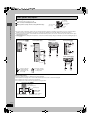
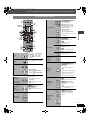
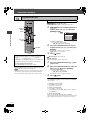
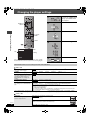
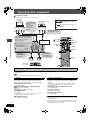
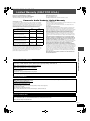
Using on-screen menus
Items shown differ depending on the
type of disc.
AV SYSTEM
TV
DISC
VCR
TV/VIDEO TUNER/BAND DVD/CD
1
2
3
4
5
6
7
8
Main menu
CH
Numbered
buttons
9
Program
Group
Title
Chapter
Track
Playlist
Content
VOLUME
ENTER
CANCEL
0
CANCEL
S10
SLOW/SEARCH
SKIP
TOP MENU
MENU
PLAY
LIST
Using on-screen menus
DIRECT
NAVIGATOR
ENTER
FUNCTIONS
RETURN
TV VOL
TV VOL
3, 4, 2, 1
ENTER
FUNCTIONS
1
FUNCTIONS
2
Select
Go to the
next menu
Press once.
Except iR/
iRW
Make the settings.
ENTER
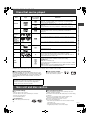
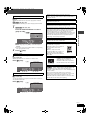
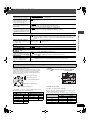
Thumbnail
To show thumbnail images
Subtitle
(➜ page 19, Changing subtitles)
[RAM]
To recall a marker recorded on DVD-Video
Marker (VR) recorders
To recall a marker: Press [3, 4] ➜ Press
[ENTER]
Angle
Register
2
3
4
5
6
7
8
9
Rotate
Picture
Slideshow
ENTER
0
4
S10
FUNCTIONS
[WMA] [MP3]
To display the current disc type
Still Picture To switch still pictures
Return to the
previous menu
1
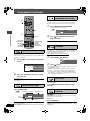
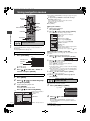
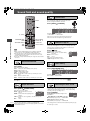
To skip incrementally or decrementally§ (Time
Slip for play only)
1 Press [ENTER] twice to show the Time Slip
indicator.
2 Press [3, 4] to select the time and press
[ENTER].
≥Press and hold [3, 4] to alter faster.
To start from a specific time§ (Time Search)
To change remaining/elapsed time display
(➜ page 19, Changing soundtracks)
Audio
Register
3
§
Select the menu.
ENTER
Select
Time
To start from a specific item
Press to exit.
Other
Settings
(with multiple angles)
To select the angle
To rotate picture
To turn on/off slideshow
To change the slideshow timing (0–30 sec)
(➜ below)
Other Settings
Except [RAM]
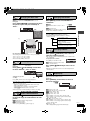
To mark up to 5 positions to play again
[DVD-A] (Motion picture part) [RAM] [DVD-V]
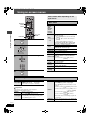
Play Speed To change play speed
– from “k0.6” to “k1.4” (in 0.1 unit steps)
∫ Play Menu
(Only when the elapsed play time can be displayed.
[JPEG]: Works with all JPEG content.)
Repeat
(➜ page 19, Repeat play)
A-B Repeat
Except [JPEG] [RAM] (Still picture part)
To repeat a specified section
Press [ENTER] at the starting and ending points.
Press [ENTER] again to cancel.
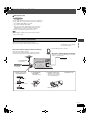
Marker
Advanced
Disc Review
RQT7972
24
Press [ENTER] (The unit is now ready to accept
markers.)
To mark a position: Press [ENTER] (at the desired
point)
To mark another position: Press [2, 1] to select
“¢” ➜ Press [ENTER]
To recall a marker: Press [2, 1] ➜ Press
[ENTER]
To erase a marker: Press [2, 1] ➜ Press
[CANCEL]
≥This feature does not work during program and
random play.
[➜ page 18, Reviewing titles to play (ADVANCED
DISC REVIEW)]