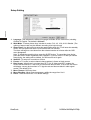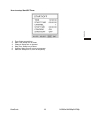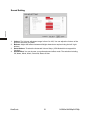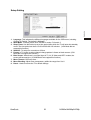
1
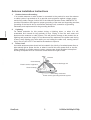
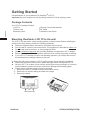
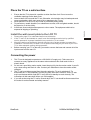
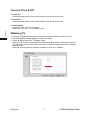
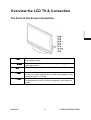
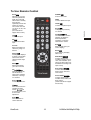
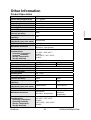
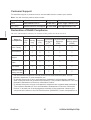
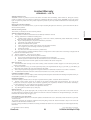
ViewSonic ® N3290w/N4290p/N4790p LCD TV ၬ手册 8VHU*XLGH ViewSonic® 0RGHO1R96 * 96 * 96 * Contents Getting Started Package Contents ........................................................................................... 5 Mounting ViewSonic LCD TV to the wall......................................................... 5 Place the TV on a solid surface....................................................................... 6 Install the wall mount plate to the LCD TV....................................................... 6 Connecting the power...................................................................................... 6 Turn the TV on & Off........................................................................................ 7 Watching TV.................................................................................................... 7 Overview the LCD TV & Connection The Front of the Screen Introduction............................................................... 8 Signal Source Interface from Rear View.......................................................... 9 Signal Source Interface from Side View............. ............................................. 11 To Use Remote Control.................................................................................... 12 Remote Control Battery Installation............................... .................................. 13 OSD Functions To Use the OSD Menu..................................................................................... 14 To Select Input Source..................................................................................... 14 OSD Menu in AV/TV Mode............................................................. ................. 14 OSD Menu in PC Mode ................................................................................... 20 Other Information Specifications .................................................................................................. 24 Troubleshooting............................................................................................... 25 Customer Support ........................................................................................... 27 Declaration of RoHS Compliance.................................................................... 27 Limited Warranty ............................................................................................. 28 ENGLISH Important Safety Instructions........................................................................... 1 Copyright Information ...................................................................................... 2 Product Registration........................................................................................ 2 Antenna Installation Instructions ..................................................................... 3 Cleaning the LCD TV ...................................................................................... 4 Important Safety Instructions 1. 2. 3. 4. 5. 6. ENGLISH 7. 8. Read these instructions completely before using the equipment. Keep these instructions in a safe place. Heed all warnings. Follow all instructions. Do not use this equipment near water. Warning: To reduce the risk of fire or electric shock, do not expose this apparatus to rain or moisture. Clean with a soft, dry cloth. If further cleaning is required, see “Cleaning the LCD TV” in this guide for further instructions. Do not block any ventilation openings. Install the equipment in accordance with the manufacturer’s instructions. Do not install near any heat sources such as radiators, heat registers, stoves, or other devices (including amplifier) that produce heat. 9. Do not attempt to circumvent the safety provisions of the polarized or grounding-type plug. A polarized plug has two blades with one wider than the other. A grounding type plug has two blades and a third grounding prong. The wide blade and the third prong are provided for your safety. If the plug does not fit into your outlet, consult an electrician for replacement of the outlet. 10. Protect the power cord from being tread upon or pinched, particularly at the plug, and the point where if emerges from the equipment. Be sure that the power outlet is located near the equipment so that it is easily accessible. 11. Only use attachments/accessories specified by the manufacturer. 12. Use only with a cart, stand, tripod, bracket, or table specified by the manufacturer, or sold with the apparatus. When a cart is used, use caution when moving the cart/apparatus combination to avoid injury from tip-over. 13. Unplug this equipment when it will be unused for long periods of time. 14. Refer all servicing to qualified service personnel. Service is required when the unit has been damaged in any way, such as: if the power-supply cord or plug is damaged, if liquid is spilled onto or objects fall into the unit, if the unit is exposed to rain or moisture, or if the unit does not operate normally or has been dropped. 15. This product is only to perform the useful function of entertainment and visual display tasks are excluded. ViewSonic 1 N3290w/N4290p/N4790p Copyright Information Copyright © ViewSonic ® Corporation, All rights reserved. Disclaimer:ViewSonic Corporation shall not be liable for technical or editorial errors or omissions contained herein; nor for incidental or consequential damages resulting from furnishing this material, or the performance or use of this product. In the interest of continuing product improvement, ViewSonic Corporation reserves the right to change product specifications without notice. Information in this document may change without notice. No part of this document may be copied, reproduced, or transmitted by any means, for any purpose without prior written permission from ViewSonic Corporation. Product Registration To meet your future needs, and to receive any additional product information as it becomes available, please register your product on the Internet at: www.viewsonic.com. For your Record Product Name: N3290w/N4290p/N4790p ViewSonic LCD TV Model Number: VS12277-1G/VS12278-1G/VS12279-1G Document Number: N3290w_N4290p_N4790p_UG-ENG Rev.1A 06-16-08 Serial Number: Purchase Date: Product disposal at end of product life ViewSonic is concerned about the preservation of our environment. Please dispose of this product properly at the end of its useful life. Your local waste disposal company may provide information about proper disposal. The lamp in this product contains mercury. Please dispose of properly in accordance with environmental laws of your location. ViewSonic 2 N3290w/N4290p/N4790p ENGLISH ViewSonic, the three birds logo, OnView, ViewMatch, and ViewMeter are registered trademarks of ViewSonic Corporation. Antenna Installation Instructions Outdoor Antenna Grounding If an outside antenna or cable system is connected to the product be sure the antenna or cable system is grounded so as to provide some protection against voltage surges and built-up static charges, Article 810 of the National Electrical Code, ANSI/NFPA 70, provides information with regard to proper grounding of the mast and supporting structure, grounding of the lead-in wire to an antenna discharge unit, connection to grounding electrodes, and requirements for the grounding electrode. 2. Lightning For added protection for this product during a lightning storm, or when it is left unattended and unused for long periods of time, unplug it from the wall outlet and disconnect the antenna or cable system. This will prevent damage to the product due to lightning and power-line surges. Do not disconnect the antenna or the power cord during a heavy storm lighting may strike while you are holding the cable cord, causing serious injury; turn off your LCD TV and wait for the weather to improve. 3. Power Lines An outside antenna system should not be located in the vicinity of overhead power lines or other electric light or power circuits, or where it can fall into such power lines or circuits, When installing an outside antenna system, extreme care should be taken to keep from touching such power lines or circuits as contact with them might be fatal. Antenna ENGLISH ENGLISH 1. Ground clamp Antenna discharge unit Electric service equipment Ground clamps Grounding conductors Power service grounding electrode system ViewSonic 3 N3290w/N4290p/N4790p Cleaning the LCD TV • Make sure the LCD TV is turned off. • Never spray or pour any liquid directly onto the screen or case. To clean the case: 1. Use a soft, dry cloth. 2. If still not clean, apply a small amount of a non-ammonia, non-alcohol based, mild nonabrasive detergent onto a clean, soft, lint-free cloth, then wipe the surface. Disclaimer ViewSonic® does not recommend the use of any ammonia or alcohol-based cleaners on the LCD TV screen or case. Some chemical cleaners have been reported to damage the screen and/or case of the LCD TV. ViewSonic will not be liable for damage resulting from use of any ammonia or alcohol-based cleaners. ViewSonic 4 N3290w/N4290p/N4790p ENGLISH To clean the screen: 1. Wipe the screen with a clean, soft, lint-free cloth. This removes dust and other particles. 2. If still not clean, apply a small amount of non-ammonia, non-alcohol based glass cleaner onto a clean, soft, lint-free cloth, and wipe the screen. Getting Started Congratulations on your purchase of a ViewSonic® LCD TV. Important! Save the original box and all packing material for future shipping needs. ENGLISH Package Contents Your LCD TV package includes: • LCD TV • Power Cord • Warranty Card* • Remote Control with batteries • RF Cable • ViewSonic User Guide Mounting ViewSonic LCD TV to the wall The LCD TV can be used in a free standing position or wall-mounted. Before installing the product to the wall, please consider the following guidelines: z Read the Important Safety Instructions, at the start of this manual. z Do not install in a moist or wet environment. This equipment is intended for indoor use. z Do not install near heat source, or strong magnetic fields. z Use only ViewSonic approved wall-mounting brackets to support the LCD TV weight. z Before attaching the wall mount plate to the back cover, ensure the product is working. z If your LCD TV is already set up for free-standing operation, you need to first remove the stand before mounting the device to the wall. To attach the wall-mount bracket to LCD TV safely, please use the following guidelines: z Disconnect the power and any other cables that might hinder moving the LCD TV. z Set the LCD TV on a table or work surface, placing the screen face down on a towel or woolen blanket to protect the screen surface from damage while installing plate. z Please refer the following steps to remove the stand. 1. Remove the base. It is attached to the stand with 4 screws. 2. Remove the 4 screws holding the stand to the hinge. 3. Remove the stand. ViewSonic 5 N3290w/N4290p/N4790p Place the TV on a solid surface 2. 3. 4. 5. Ensure that the TV is placed in a position to allow free flow of air. Do not cover the ventilation openings on the back cover. Leave at least 15cm around the TV set. Otherwise, air-circulation may be inadequate and cause overheating, which may cause a fire or damage to the TV set. Never place the TV set in hot, oily humid or excessively dusty places. To prevent any unsafe situations, no naked flame sources, such as lighted candles, should be placed on or in the vicinity. Avoid heat, direct sunlight and exposure to rain or water. The equipment shall not be exposed to dripping or splashing. Install the wall mount plate to the LCD TV 1. 2. 3. 4. Please refer page 27 to understand wall mount dimension. If the TV set is to be installed on a wall, have the installation carried out by qualified service personnel. Improper installation may render the TV set unsafe.. Mount the wall mount bracket to the wall ensuring use of proper screws to support the installation. Ensure there is at least 6 cm of space surrounding any air-vents of your LCD TV to allow adequate cooling during operation. Before mounting your TV on the wall, you need to remove the base and connect all of the input source from the rear I/O. Connecting the power 1. 2. 3. 4. This TV set is designed to operate on a 220–240V AC supply only. Take care not to connect too many appliances to the same mains socket as this could result in fire or electric shock. Do not use a poor fitting mains socket. Insert the plug fully into the mains socket. A poor fit may cause arcing and result in a fire. Contact your electrician to have the mains socket changed. The TV set is not disconnected from the mains when the TV set is switched off. To disconnect the TV set completely, pull the plug from the mains. However, some TV sets may have features which need the TV set to be left in standby to work correctly. The instructions in this manual will inform you if this applies. If you will not be using the TV set for several days, the TV set should be disconnected from the mains for environmental and safety reasons. ViewSonic 6 N3290w/N4290p/N4790p ENGLISH 1. Turn the TV on & Off 1. Power On : Press the power button on the remote control or key to pad to turn it on. 2. Power Off : Press the power button on the remote control or key to pad to turn it on. ENGLISH 3. LED Indicator Lights up in blue : the TV is turned on. Lights up in red : the TV is in standby mode. Watching TV 1. Press the TV button on the remote control or press source button to select TV input. 2. Press the MENU button to display the OSD main menu. 3. Press or to select the “TV Setting” menu. Press or to select “Auto Search, and then press to perform Auto Search function. The Auto Scan screen will be shown, and after it is done, the screen will return to the rst found channel. Press the number buttons or Channel up /down to select a TV Channel. ViewSonic 7 N3290w/N4290p/N4790p Overview the LCD TV & Connection ENGLISH The Front of the Screen Introduction Power(䶣ᄭ): Turn the power on from standby mode or turn the power off return to the standby mode. Source(ॾ㢆ᄭ): Press this button to display selected source, press button to select input source. Press this button to display or exit the OSD menu. Menu(လ㧧): CH/ (咢ሐ): Vol/ (ଃၦ): ViewSonic When the OSD menu appears, press these two buttons to select the item you want to execute; when no OSD menu appears, use to change channels in TV mode. When the OSD menu appears, press these two buttons to confirm the selected item; when no OSD menu appears, use to adjust the volume. 8 N3290w/N4290p/N4790p Signal Source Interface from Rear View ENGLISH You can connect numerous items of source equipment to your TV. The figure below shows you how to connect these. Place the TV on a table with the LCD screen facing down to facilitate easy connection with the external equipment. Please take precautionary measures to avoid damaging the LCD screen. (1)Antenna Input: Connect the antenna or CATV cable Note: CATV cable to this 75 coaxial cable input (2)AV1 & S-Video1 Input: Connect the Video signal or S-Video cable to DVD player, Laser Disc player, videocassette recorder or camcorder (Note: For S-Video, Audio and AV1 are shared). Audio Input: Connect the audio signal source (PC, DVD player, Laser Disc player, videocassette recorder or camcorder) to the audio Input ports. (Note: S-Video & AV1 are shared same audio input). (3) Video & Audio output: Video output: Connect the video signal source to other TV video signal Input port Audio output: Connect the audio signal source to the other TV audio Input ports. Notes: AV1 & S-Video can accept to do Video & Audio output function. (4)Component signal Cr (Pr), Cb (Pb), Y Input: Connect the component signal source of audio and video (DVD player, Laser Disc player, videocassette recorder or camcorder) to the Component Input port. (5)Ear phone: User can plug ear phone jack in this connector DŽ (6)HDMI 1/2 input : HDMI: HDMI is the leading new standard for Digital video and audio interconnection. To the HDMI connector you can connect HDMI devices such as a Set Top Box or compatible DVD-R or DVD player with HDMI export, or DVI-equipped devices like a computer. So you can display high-definition pictures on this TV in the digital form. Notes: 1. Your TV supports HDCP(High-bandwidth Digital Content Protection).This is a system for protecting DVD content outputted via DVI from being copied. It provides a secure digital link between a video source (DVD,PC etc.) and your TV. Content is encrypted at the source device to prevent unauthorized copies from being made. ViewSonic 9 N3290w/N4290p/N4790p 2. Digital devices from different manufacturers have the possibility of differing output standards which may cause difficulties for the television to properly display. 3. In case no signal is detected from your HDMI device, turn off the HDMI device and then on again. 4. To get an optimal viewing, it is advised to turn your DVD player to one of the following TV display standards:1280x720p@ 60hz Note: If no signal is present on the VGA screen, the TV will enter into standby mode automatically after 60seconds. ViewSonic 10 N3290w/N4290p/N4790p ENGLISH (7)VGA Signal Input: Use the VGA signal cable to connect signals from a PC to the TV Input. Connect the PC audio cable supplied with the TV to the TV’s PC Audio Input. ENGLISH Signal Source Interface from Side View (9) AV1 & S-Video1 Input: Connect the Video signal or S-Video cable to DVD player, Laser Disc player, videocassette recorder or camcorder (Note: For S-Video, Audio and AV1 are shared). Audio Input: Connect the audio signal source (PC, DVD player, Laser Disc player, videocassette recorder or camcorder) to the audio Input ports. (Note: S-Video2 & AV2 are shared same audio input). ViewSonic 11 N3290w/N4290p/N4790p To Use Remote Control POWER/⬉⑤ Press to turn on/off. Sleep/ⴵ With this key you can set a time period after which the TV should switch itself to standby. Press the key repeatedly to select the number of minutes. The counter runs from 15, 30, 45, 60, 90, 120 minutes. (PC mode did not support this function) HDMI To select HDMI/ PC input. Recall/१ڃ To display the previously TV channel VOLġĢ䷇䞣ġĢ Use this button to confirm selection or adjust the desired parameter; otherwise, to increase /decrease the volume TV/䶣儆 To select TV input. AV/儆咢 To select AV/S-Video input. Exit/ಯנ Exits the OSD menu (onscreen display). 0-9/-100 Select and switch to a channel by using 0-9 buttons.. Menu/လ㧧 Press this key to display OSD menu. Display/ᰒ⼎ Pressing once displays a variety of information such as the current channel and the input source. Wide Mode/䨞ቝڤ Ito select picture size. Includes 4 modes: Full, 4:3, 16:9, & 16:9 Subtitle. (The options of aspect ratio may be different according to its input source) Mute/䈌ଃ Mutes and restores your LCD TV sound. Sound Effect/㥔ଃ֊䮨 To select Stereo, News, Movie, Music, Surround, User and off. CHġĢ/乥䘧ġĢ When in menu mode, use this button to select to the up/down; otherwise, to change TV channels. Picture Mode/㪃凝冕ᖞ To select picture mode. Included: User, Drama, DV, Sport, Movie.DŽ (VGA mode did not support this function) Source/ֵো⑤ To select input source. ġĢІЇ Press these buttons to navigate the OSD menus. ġĢІЇare for function select, and is for function adjustment. Enter/⹂䅸 Press the button to confirm selection. ViewSonic 12 N3290w/N4290p/N4790p ENGLISH YPbPr/㡆Ꮒ To select component input. Remote Control Battery Installation ENGLISH Follow the steps below to insert batteries. 1. Open the remote control’s rear battery compartment cover. 2. Insert two AAA (1.5v) batteries. Ensure that the positive and negative ends match as indicated on the bottom of the battery compartment. 3. Replace the battery compartment cover. CAUTION 1. 2. 3. 4. 5. 6. Only use the specified AAA batteries. Do not mix new and old batteries. This may result in cracking or leakage, which may pose a risk of fire or lead to personal injury Insert batteries according to (+) and (-) markings. Inserting the batteries incorrectly may result in cracking or leakage, which may pose a risk of fire or lead to personal injury. Dispose of the battery in accordance with local laws and regulations. Keep the battery away from children and pets. When the remote control will not to be used for an extended period, remove the batteries. ViewSonic 13 N3290w/N4290p/N4790p OSD function All the functions for the LCD TV are control either by the remote control or the control button on the front control screen at bottom of right side. 1. Press the Menu button to display or exit the OSD main menu. 2. Use the Up or Down buttons to select the function to be adjusted. The function where the cursor is located is the selected one. 3. Use the Left or Right buttons to enter into the submenu, or to enable or adjust the selected function. The function where the cursor is located is the one that can be adjusted. 4. Press the Exit button to exit the OSD menu. To Select Input Source In different input source, the functions can be adjusted are different. Press Source key to select the input source. It offers the following input source: TV, AV1, AV2, S-Video1, S-Video 2, YPBPR, HDMI1, HDMI2 & VGA. OSD Menu in AV/TV Mode Press the MENU button on the remote control to display the OSD main menu. It offers the following options: Picture Setting, Sound Setting, Setup Setting & TV Setting. (note: In different input source, the functions which can be adjusted are different.) ViewSonic 14 N3290w/N4290p/N4790p ENGLISH To Use the OSD Menu ENGLISH Picture Setting 1. Picture Mode: User can select User, Drama, DV, Sport & Movie if selected except User item, Contrast, brightness, Saturation, Sharpness, DNR, Backlight can’t adjust. 2. Contrast: Adjust black and white level, suitable contrast can make picture more lightly. Adjustment range is from 0 to 100DŽ 3. Brightness: Adjust background brightness, user can collocation it with contrast adjustment range is from 0 to 100. 4. Saturation: Adjust color saturation, range is from 0 to 100. 5. Hue: When the TV uses in the NTSC system, you can adjust to the Hue as you prefer. The adjustment range is from 0 to 100. 6. Sharpness: Adjustment picture sharpness, range is from 0 to 10. 7. Backlight: The adjustment range of black Level is from 0 to 10. 8. Edge Enhance: Enhance the edge particularity of dynamic images. Selection: Off, Low & High. 9. Dynamic contrast: Add image contrast automatically. Selection: Off & On. 10. DNR: When the signal is poor, you can turn on the noise reduction function. Selection: Off, Low & High. 11. Color Temperature: You can select or adjust the color temperature according to your requirements. Selection: Cool Warm & Middle. ViewSonic 15 N3290w/N4290p/N4790p ENGLISH Sound Setting 1. Volume: The Volume adjustment range is from 0 to 100, You can adjust the Volume of the picture to the level you prefer 2. Balance: Adjust the balance between left/right channels as required using the left / right buttons. 3. Smart Volume: To select the Automatic Volume Setup. 4. Sound Effect: You can choose your preferred sound effect mode. The selection including Off, News, Movie, Music, Surround, Stereo & User. 5. 100Hz, 300Hz, 1KHz, 3KHz, 10KHz: When you choose Sound Effect in User mode, you can choose the prefer frequency to increase or decrease. ViewSonic 16 N3290w/N4290p/N4790p ENGLISH Setup Setting 1. Language: This indicates the different languages available for the OSD menu, including Chinese, & English. The default is Chinese 2. Wide Mode: To select picture size. Includes 4 modes: Full, 4:3, 16:9, & 16:9 Subtitle. (The options of aspect ratio may be different according to its input source) 3. Sleep Timer: Use this button to set a time period after which the TV will enter into standby mode. The time period can be 0>15>30>45>60>90>120 minutes. The timer will begin to count down from the selected number of minutes after the OSD menu disappears. Note: To check the remaining time, press the SLEEP button. To cancel the sleep timing, press the SLEEP button repeatedly until 0 appears. If you turn off the TV after you set the sleep timing, the setting will be cleared. You will need to set it again. 4. Start/Off : To setup turn on and turn off time. 5. Freeze: In TV mode, to select channel change pattern is freeze or black screen. 6. Blue Screen: When there is no signal input in TV, AV, S-Video and HDTV modes, the screen will become blue. If set to On, the screen will become blue. If set to Off, the screen will display a snowy picture when in TV signal mode and become black in other signal modes. The default is On. 7. Menu Timeout: OSD stay timer. 8. Menu Blending: Adjust menu transparency within the range from 0 to 6. 9. Reset : Used to resume the TV’s default settings. ViewSonic 17 N3290w/N4290p/N4790p ENGLISH How to setup Start/Off Timer 1. 2. 3. 4. 5. 6. Time: Setup current time. Start Time: Setup turn on timer. Channel: Setup turn on channel. Stop Time: Setup turn off timer. Confirm: Setup turn off or turn on message. Start/Off: Setup turn on, turn off frequency. ViewSonic 18 N3290w/N4290p/N4790p ENGLISH TV Setting 1. 2. 3. 4. Channel: To display current channel number. Frequency: To display current channel frequency. Color System: To select TV broadcast system. Sound System: Select the sound system for a TV broadcast system.DK system shall be selected for most areas of Mainland China. 5. Auto Search: Used to scan all the TV channels and save to memory. The TV’s total number of channels is 199 (1-199). If you use the remote control to select a number out of the range of 1-120, it will automatically skip to the channel number you previously watched. 6. Manual Search: Used to scan the TV channels one at a time. When you scan a channel and press MENU, the last channel will be automatically saved. 7. Update Search: Fine-tunes the frequency of a channel to obtain better image quality. 8. Fine Tune: Fine-tunes the frequency of a channel to obtain better image quality. 9. Channel Swap: Swap current channel with others. 10. Channel Skip: If set to “On”, this channel will be shielded. When you press the Channel Up/Down button, you cannot enter this channel. But when you press the digit buttons, you can enter it. To regain full access this channel, set this item to Off. ViewSonic 19 N3290w/N4290p/N4790p OSD Menu in PC Mode This TV has a DVI-D digital interface (Through HDMI)and VGA analog interface, which can be switched using VGA input. Press the MENU button to enter into the OSD main menu. Adjustable items include: Picture Setting, Audio Setting, Setup Setting & VGA Setting DŽ ENGLISH Picture Setting 1. Contrast: Adjust black and white level, suitable contrast can make picture more lightly. Adjustment range is from 0 to 100. 2. Brightness: Adjust background brightness, user can collocation it with contrast adjustment range is from 0 to 100. 3. Color Temperature: You can select or adjust the color temperature according to your requirements. Selection: cool, warm & User. When you select in User mode, you can adjust Red, Green & Blue item. ViewSonic 20 N3290w/N4290p/N4790p ENGLISH Sound Setting 1. 2. 3. 4. Volume: The Volume adjustment range is from 0 to 100, You can adjust the Volume of the picture to the level you prefer Balance: Adjust the balance between left/right channels as required using the left / right buttons. Smart Volume: To select the Automatic Volume Setup. (VGA Mode did not support this function) Sound Effect: You can choose your preferred sound effect mode. The selection including Off, News, Movie, Music, Surround, Stereo & User. ViewSonic 21 N3290w/N4290p/N4790p ENGLISH Setup Setting 1. Language: This indicates the different languages available for the OSD menu, including Chinese, & English. The default is Chinese 2. Wide Mode: To select picture size. Includes 2 modes: Full and 4:3. 3. Sleep Timer: Use this button to set a time period after which the TV will enter into standby mode. The time period can be 0>15>30>45>60>90>120 minutesDŽ(VGA Mode did not support this function) 4. Start/Off : To setup turn on and turn off time. 5. Freeze: In TV mode, to select channel change pattern is freeze or black screen. (VGA Mode did not support this function) 6. Blue Screen: When there is no signal input in TV, AV, S-Video and HDTV modes, the screen will become blue. (VGA Mode did not support this function) 7. Menu Timeout: OSD stay timer DŽ 8. Menu Blending: Adjust menu transparency within the range from 0 to 6. 9. Reset : Used to resume the TV’s default settings. . ViewSonic 22 N3290w/N4290p/N4790p ENGLISH VGA Setting 1. 2. 3. 4. 5. Clock: To adjust horizontal size. ( The function is only in VGA mode) Phase: To improve focus clarity and image stability. H. Position: Adjust horizontal position on screen. V. Position : Adjust vertical position on screen. Auto Setting: Auto fine tune to a best status on screen. (The function is only in VGA mode) ViewSonic 23 N3290w/N4290p/N4790p Other Information Product Speciation N3290w 31.5”, 800mm 1366x768 5Wx2 PAL D/K, I, B/G AC100-240V 50/60Hz Dimensions (W)x(H)x(D) (mm) (with stand) Wall Mount Kits 783x559x209 Wall Mount dimension Environmental Considerations Operating Temperature Operating Humanity Storage Temperature Storage Humanity Model Screen Size (Diagonal Size) Resolution Audio Output TV Tuning System Sound System Power Voltage Power Consumption (Normal operation) Power Consumption (Standby) Dimensions (W)x(H)x(D) (mm) (with stand) Wall Mount Kits Wall Mount dimension Environmental Considerations Operating Temperature Operating Humanity Storage Temperature Storage Humanity ViewSonic ENGLISH Model Screen Size (Diagonal Size) Resolution Audio Output TV Tuning System Sound System Power Voltage Power Consumption (Normal operation) Power Consumption (Standby) 180W 1W Not Include 200x200mm M6x10mm, 4 pcs (Screw) 0ºC~35ºCΰ32ºF~95ºFα 20~80% -10ºC~50ºCΰ14ºF~122ºFα 20~80% N4290p 42”, 1067mm 1920x1080 7Wx2 PAL D/K, I, B/G AC100-240V 50/60Hz N4790p 47”, 1193mm 250W 300W 1W 1W 1009x688x262 1125x768x314 Not Include 400x200mm M6x10mm, 4pcs(Screw) (200+200)x200mm M6x10mm, 6pcs(Screw) 0ºC~35ºCΰ32ºF~95ºFα 20~80% -10ºC~50ºCΰ14ºF~122ºFα 20~80% 24 N3290w/N4290p/N4790p Troubleshooting Please make these simple checks before calling service. These tips may save you time and money since charges for receiver installation and adjustments of customer controls are not covered under your warranty. Symptoms Items to Check and Actions to follow ENGLISH “Ghost ” or double image No power No TV picture *This may be caused by obstruction to the antenna due to high rise buildings or hills. Using a highly directional antenna may improve the picture. * Make sure turn on AC power switch. *Check that the TV’s AC power cord is plugged into the mains socket. *Unplug the TV, wait for 60 seconds. Then re-insert plug into the mains socket and turn on the TV again. *Check antenna connections at the rear of the TV to see if it is properly connected to the TV. *Possible broadcast station trouble. Try another channel. *Adjust the contrast and brightness settings. *Check the Closed Captions control. Some TEXT modes could block the screen. Good picture but no sound *Increase the VOLUME. *Check that the TV is not muted; press the button on the remote control. Good sound but poor color *Adjust the contrast, color Î(Saturation) and brightness settings. *Sometimes, poor picture quality occurs when having activated an S-VHS camera or camcorder connected and having connected another peripheral at the same time. In this case switch off one of the other peripherals. *Check the antenna connection and TV signal level. *This may be caused by electrical interference (e.g. hairdryer, nearby neon lights, etc.) *Turn off or move away the equipment. Poor picture Snowy picture and noise Horizontal dotted line Television not responding to remote control ViewSonic *Check whether the batteries are working. Replace if necessary *Clean the remote control sensor lens on the TV. *You can still use the buttons at the front of your TV. *Select the TV mode to be sure your remote control is in the TV mode. 25 N3290w/N4290p/N4790p • External influences such as lightning or static electricity may cause improper operation. In this case, operate the unit after first turning on the power of the LCD TV and the AVC System, or unplug the AC cord for 1 to 2 minutes, then re-plug again. Power is cut off suddenly • Is the sleep timer set in advance? • Is there no signal in PC mode or HDMI mode? • The internal temperature of the unit has increased. Remove any object blocking the vent or clean as necessary. No CATV reception • CATV is connected improperly or not connected; please check all the CATV connections. • The cable TV service is interrupted; please contact your cable operator Picture is cut off/with sidebar screen • Is the image positioned correctly? • Are screen mode adjustments such as picture size set correctly? • Press WIDE button repeatedly on the remote control to see if you can get the picture you prefer. ViewSonic 26 N3290w/N4290p/N4790p ENGLISH Unit cannot be operated Customer Support For technical support or product service, see the table below or contact your reseller. Note: You will need the product serial number. Country/Region Web Site Telephone 800 820 3870 Email China www.viewsonic.com.cn [email protected] Hong Kong www.hk.viewsonic.com/support/ 852 3102 2900 [email protected] ENGLISH Declaration of RoHS Compliance The toxic and hazardous substances or elements of this product are shown as below: Hazardous substances or elements Name of Components Lead (Pb) Hexavalent Polybrominated Polybrominated Mercury Cadmium Chromium biphenyls diphenyl ethers (Hg) (Cd) (Cr6+) (PBB) (PBDE) Outer Casing ○ ○ ○ ○ ○ ○ Circuit Board* × ○ ○ ○ ○ ○ Power Cord / Adaptor × ○ ○ ○ ○ ○ External Signal Cable × ○ ○ ○ ○ ○ LCD Panel × × × ○ ○ ○ Remote Control (battery included) ○ ○ ○ ○ ○ ○ * : The circuit board components include printed circuit board and other parts, such as resisters, capacitors, IC, and connectors, etc. ○ : To indicate the amount of toxic and hazardous substance in all homogenous materials ofthe component does not exceed what indicated in “The Limitation Standard of Toxic and Hazardous Substances in Electronic Information Product”. × : To indicate the amount of toxic and hazardous substance has exceeded what indicated in “The Limitation Standard of Toxic and Hazardous Substances in Electronic Information Product” in at least one of the homogenous materials of the component. However, the component still confirms to the EU RoHS directive (2002/95/EC), and is exempted from it. ViewSonic 27 N3290w/N4290p/N4790p Limited Warranty VIEWSONIC® LCD TV What the warranty covers: ViewSonic warrants its products to be free from defects in material and workmanship, under normal use, during the warranty period. If a product proves to be defective in material or workmanship during the warranty period, ViewSonic will at its sole option repair or replace the product with a like product. Replacement product or parts may include remanufactured or refurbished parts or components. How long the warranty is effective: ViewSonic LCD TV are warranted for one (1) year for all parts excluding the light source and one (1) year for labor from the date of the first customer purchase. ENGLISH Who the warranty protects: This warranty is valid only for the first consumer purchaser. What the warranty does not cover: 1. Any product on which the serial number has been defaced, modified or removed. 2. Damage, deterioration or malfunction resulting from: a. b. c. d. e. f. g. h. Accident, misuse, neglect, fire, water, lightning, or other acts of nature, unauthorized product modification, or failure to follow instructions supplied with the product. Repair or attempted repair by anyone not authorized by ViewSonic. Any damage of the product due to shipment. Removal or installation of the product. Causes external to the product, such as electric power fluctuations or failure. Use of supplies or parts not meeting ViewSonic’s specifications. Normal wear and tear. Any other cause which does not relate to a product defect. Any product exhibiting a condition commonly known as “image burn-in” which results when a static image is displayed on the product for an extended period of time. 4. Removal, installation, and set-up service charges. 5. When you mount it on the wall, the following must be noticed: a. The accessories attached with this product are applicable for this product only. b. When the product is mounted on the wall, holes and fixed screws will remain in the wall body. c. Wall face may discolor when this product has been mounted on the wall for a long time. 3. How to get service: 1. For information about receiving service under warranty, contact ViewSonic Customer Support. You will need to provide your product’s serial number. 2. To obtain warranted service, you will be required to provide (a) the original dated sales slip, (b) your name, (c) your address, (d) a description of the problem, and (e) the serial number of the product. 3. Take or ship the product freight prepaid in the original container to an authorized ViewSonic service center or ViewSonic. 4. For additional information or the name of the nearest ViewSonic service center, contact ViewSonic. Limitation of implied warranties: There are no warranties, express or implied, which extend beyond the description contained herein including the implied warranty of merchantability and fitness for a particular purpose. Exclusion of damages: ViewSonic’s liability is limited to the cost of repair or replacement of the product. ViewSonic shall not be liable for: 1. Damage to other property caused by any defects in the product, damages based upon inconvenience, loss of use of the product, loss of time, loss of profits, loss of business opportunity, loss of goodwill, interference with business relationships, or other commercial loss, even if advised of the possibility of such damages. 2. Any other damages, whether incidental, consequential or otherwise. 3. Any claim against the customer by any other party. Effect of state law: This warranty gives you specific legal rights, and you may also have other rights which vary from state to state. Some states do not allow limitations on implied warranties and/or do not allow the exclusion of incidental or consequential damages, so the above limitations and exclusions may not apply to you. Sales outside the U.S.A. and Canada: For warranty information and service on ViewSonic products sold outside of the U.S.A. and Canada, contact ViewSonic or your local ViewSonic dealer. The warranty period for this product in mainland China (Hong Kong, Macao and Taiwan Excluded) is subject to the terms and conditions of the Maintenance Guarantee Card. For users in Europe and Russia, full details of warranty providedcan be found in www.viewsoniceurope.com under Support/Warranty Information. 4.3: ViewSonic LCD TV Warranty ViewSonic LTV_LW01 Rev. 1C 06-25-07 28 N3290w/N4290p/N4790p ViewSonic ® Q41T4701709 1A