1
Components Guide
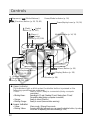
Front View
Zoom Lever
Shooting:
(Telephoto)/
(Wide Angle) p. 35
Replaying:
(Zoom in)/
(Zoom out) p. 106
Shutter button
(p. 33)
Optical Viewfinder Window (p. 32)
Shooting Mode Dial (p. 13)
AF-assist Beam (p. 34)
Red-Eye Reduction Lamp (p. 54)
Self-Timer Lamp (p. 64)
Microphone (p. 113)
Flash (p. 54)
Speaker
(Audio/Video
Out) Terminal
(p. 144)
Lens Cover
(p. 24)
Lens
Terminal Cover
Terminal*
(p. 126, 127)
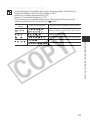
* To connect the camera to a computer or printer, use one of the following cables.
• Computer: USB Interface Cable IFC-300PCU (supplied with this camera)
• Direct Print Compatible Printer (optional): Direct Interface Cable DIF-100 (supplied
with Direct Print compatible printers)
• Bubble Jet Printer with the direct print function (optional): Please refer to the
Bubble Jet Printer user guide.
Please refer to your System Map to find out which direct print function compatible
printer can be used with this camera.
10