1
Charm bar
English
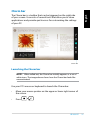
The Charm bar is a toolbar that can be triggered on the right side
of your screen. It consists of several tools that allow you to share
applications and provide quick access for customizing the settings
of your PC.
Charm Bar
Launching the Charm bar
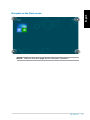
NOTE: When called out, the Charm bar initially appears as a set of
white icons. The image above shows how the Charm bar looks like
once activated.
Use your PC’s mouse or keyboard to launch the Charm bar:
•
Move your mouse pointer on the upper or lower right corner of
the screen.
•
Press
.
EB1035 PC
31