1
Red Hat Enterprise Linux 3
Installation Guide for the IBM®
S/390® and IBM® eServer™
zSeries® Architectures
Red Hat Enterprise Linux 3: Installation Guide for the IBM® S/390® and IBM® eServer™ zSeries® Architectures
Copyright © 2003 by Red Hat, Inc.
Red Hat, Inc.
1801 Varsity Drive
Raleigh NC 27606-2072 USA
Phone: +1 919 754 3700
Phone: 888 733 4281
Fax: +1 919 754 3701
PO Box 13588
Research Triangle Park NC 27709 USA
rhel-ig-s390-multi(EN)-3-Print-RHI (2003-07-25T17:10)
Copyright © 2003 by Red Hat, Inc. This material may be distributed only subject to the terms and conditions set forth in the
Open Publication License, V1.0 or later (the latest version is presently available at http://www.opencontent.org/openpub/).
Distribution of substantively modified versions of this document is prohibited without the explicit permission of the copyright
holder.
Distribution of the work or derivative of the work in any standard (paper) book form for commercial purposes is prohibited
unless prior permission is obtained from the copyright holder.
Red Hat, Red Hat Network, the Red Hat "Shadow Man" logo, RPM, Maximum RPM, the RPM logo, Linux Library,
PowerTools, Linux Undercover, RHmember, RHmember More, Rough Cuts, Rawhide and all Red Hat-based trademarks and
logos are trademarks or registered trademarks of Red Hat, Inc. in the United States and other countries.
Linux is a registered trademark of Linus Torvalds.
Motif and UNIX are registered trademarks of The Open Group.
XFree86 is a trademark of The XFree86 Project, Inc, and is pending registration.
Intel and Pentium are registered trademarks of Intel Corporation. Itanium and Celeron are trademarks of Intel Corporation.
AMD, Opteron, Athlon, Duron, and K6 are registered trademarks of Advanced Micro Devices, Inc.
Netscape is a registered trademark of Netscape Communications Corporation in the United States and other countries.
Java and Swing are trademarks or registered trademarks of Sun Microsystems, Inc. in the U.S. or other countries.
Oracle is a registered trademark, and Oracle8i, Oracle9i, and interMedia are trademarks or registered trademarks of Oracle
Corporation.
Microsoft and Windows are either registered trademarks or trademarks of Microsoft Corporation in the United States and/or
other countries.
SSH and Secure Shell are trademarks of SSH Communications Security, Inc.
FireWire is a trademark of Apple Computer Corporation.
IBM, AS/400, OS/400, RS/6000, S/390, and zSeries are registered trademarks of International Business Machines
Corporation. eServer, iSeries, and pSeries are trademarks of International Business Machines Corporation.
All other trademarks and copyrights referred to are the property of their respective owners.
The GPG fingerprint of the [email protected] key is:
CA 20 86 86 2B D6 9D FC 65 F6 EC C4 21 91 80 CD DB 42 A6 0E
Table of Contents
Introduction.......................................................................................................................................... i
1. Document Conventions.......................................................................................................... i
2. How to Use This Manual .....................................................................................................iii
2.1. We Need Feedback! ..............................................................................................iii
3. Accessibility Solutions ........................................................................................................ iv
1. Steps to Get You Started................................................................................................................. 1
1.1. Additional S/390 Hardware Preparation for Installation Notes......................................... 1
1.2. Basic Overview of the Boot Method.................................................................................. 1
1.3. Preparing for a Network Installation.................................................................................. 1
1.3.1. Using ISO Images for NFS Installs .................................................................... 3
1.4. Preparing for a Hard Drive Installation.............................................................................. 3
1.5. Installing under VM........................................................................................................... 3
1.6. Installing in an LPAR using the Red Hat Enterprise Linux LPAR CD ............................. 7
1.7. Installing in an LPAR without the Red Hat Enterprise Linux for S/390 CD-ROMs ......... 7
1.8. Installing in an LPAR (Common Steps) ............................................................................ 8
1.9. Do You Have Enough Disk Space?.................................................................................... 8
2. Installing Red Hat Enterprise Linux............................................................................................. 9
2.1. The Graphical Installation Program User Interface ........................................................... 9
2.2. The Text Mode Installation Program User Interface ......................................................... 9
2.2.1. Using the Keyboard to Navigate ....................................................................... 11
2.3. Running the Installation Program .................................................................................... 11
2.3.1. Installation using X11 Forwarding ................................................................... 12
2.3.2. Installation using VNC ..................................................................................... 12
2.4. Installing from a Hard Drive (DASD).............................................................................. 12
2.5. Installing via NFS ............................................................................................................ 13
2.6. Installing via FTP............................................................................................................. 13
2.7. Installing via HTTP.......................................................................................................... 14
2.8. Welcome to Red Hat Enterprise Linux ............................................................................ 15
2.9. Language Selection.......................................................................................................... 15
2.10. Disk Partitioning Setup .................................................................................................. 16
2.11. Automatic Partitioning................................................................................................... 17
2.12. Partitioning Your System ............................................................................................... 18
2.12.1. Graphical Display of DASD Device(s)........................................................... 19
2.12.2. Disk Druid’s Buttons ..................................................................................... 19
2.12.3. Partition Fields ................................................................................................ 19
2.12.4. Recommended Partitioning Scheme ............................................................... 20
2.12.5. Editing Partitions ............................................................................................ 20
2.13. Network Configuration .................................................................................................. 21
2.14. Firewall Configuration ................................................................................................... 22
2.15. Language Support Selection .......................................................................................... 24
2.16. Time Zone Configuration............................................................................................... 25
2.17. Set Root Password ......................................................................................................... 26
2.18. Package Group Selection ............................................................................................... 28
2.19. Preparing to Install......................................................................................................... 29
2.20. Installing Packages......................................................................................................... 30
2.21. Installation Complete ..................................................................................................... 30
A. Removing Red Hat Enterprise Linux......................................................................................... 33
B. Sample Parameter Files ............................................................................................................... 35
C. Red Hat Linux to Red Hat Enterprise Linux Migration Solution .......................................... 37
D. Troubleshooting Your Installation of Red Hat Enterprise Linux............................................ 39
D.1. You are Unable to Boot Red Hat Enterprise Linux......................................................... 39
D.1.1. Is Your System Displaying Signal 11 Errors?.................................................. 39
D.2. Trouble During the Installation....................................................................................... 39
D.2.1. No devices found to install Red Hat Enterprise Linux Error
Message........................................................................................................... 39
D.2.2. Trouble with Partition Tables ........................................................................... 39
D.2.3. Other Partitioning Problems............................................................................. 39
D.2.4. Are You Seeing Python Errors? ....................................................................... 40
D.3. Problems After Installation ............................................................................................. 41
D.3.1. Problems with the X Window System (GUI)................................................... 41
D.3.2. Remote Graphical Desktops and XDMCP....................................................... 41
D.3.3. Problems When You Try to Log In .................................................................. 42
D.3.4. Your Printer Will Not Work ............................................................................. 42
D.3.5. Apache-based httpd service/Sendmail Hangs During Startup ...................... 42
E. Additional Boot Options .............................................................................................................. 43
Index................................................................................................................................................... 45
Colophon............................................................................................................................................ 49
Introduction
Welcome to the Red Hat Enterprise Linux Installation Guide. This guide contains useful information
to assist you during the installation of Red Hat Enterprise Linux 3. From fundamental concepts such as
installation preparation to the step-by-step installation procedure, this book will be a valuable resource
as you install Red Hat Enterprise Linux.
1. Document Conventions
When you read this manual, certain words are represented in different fonts, typefaces, sizes, and
weights. This highlighting is systematic; different words are represented in the same style to indicate
their inclusion in a specific category. The types of words that are represented this way include the
following:
command
Linux commands (and other operating system commands, when used) are represented this way.
This style should indicate to you that you can type the word or phrase on the command line
and press [Enter] to invoke a command. Sometimes a command contains words that would be
displayed in a different style on their own (such as file names). In these cases, they are considered
to be part of the command, so the entire phrase is displayed as a command. For example:
Use the cat testfile command to view the contents of a file, named testfile, in the current
working directory.
file name
File names, directory names, paths, and RPM package names are represented this way. This style
should indicate that a particular file or directory exists by that name on your system. Examples:
The .bashrc file in your home directory contains bash shell definitions and aliases for your own
use.
The /etc/fstab file contains information about different system devices and file systems.
Install the webalizer RPM if you want to use a Web server log file analysis program.
application
This style indicates that the program is an end-user application (as opposed to system software).
For example:
Use Mozilla to browse the Web.
[key]
A key on the keyboard is shown in this style. For example:
To use [Tab] completion, type in a character and then press the [Tab] key. Your terminal displays
the list of files in the directory that start with that letter.
[key]-[combination]
A combination of keystrokes is represented in this way. For example:
The [Ctrl]-[Alt]-[Backspace] key combination exits your graphical session and return you to the
graphical login screen or the console.
ii
Introduction
text found on a GUI interface
A title, word, or phrase found on a GUI interface screen or window is shown in this style. Text
shown in this style is being used to identify a particular GUI screen or an element on a GUI
screen (such as text associated with a checkbox or field). Example:
Select the Require Password checkbox if you would like your screensaver to require a password
before stopping.
top level of a menu on a GUI screen or window
A word in this style indicates that the word is the top level of a pulldown menu. If you click on
the word on the GUI screen, the rest of the menu should appear. For example:
Under File on a GNOME terminal, the New Tab option allows you to open multiple shell
prompts in the same window.
If you need to type in a sequence of commands from a GUI menu, they are shown like the
following example:
Go to Main Menu Button (on the Panel) => Programming => Emacs to start the Emacs text
editor.
button on a GUI screen or window
This style indicates that the text can be found on a clickable button on a GUI screen. For example:
Click on the Back button to return to the webpage you last viewed.
computer output
Text in this style indicates text displayed to a shell prompt such as error messages and responses
to commands. For example:
The ls command displays the contents of a directory. For example:
Desktop
Mail
about.html
backupfiles
logs
mail
paulwesterberg.png
reports
The output returned in response to the command (in this case, the contents of the directory) is
shown in this style.
prompt
A prompt, which is a computer’s way of signifying that it is ready for you to input something, is
shown in this style. Examples:
$
#
[stephen@maturin stephen]$
leopard login:
user input
Text that the user has to type, either on the command line, or into a text box on a GUI screen, is
displayed in this style. In the following example, text is displayed in this style:
To boot your system into the text based installation program, you must type in the text command at the boot: prompt.
replaceable
Text used for examples which is meant to be replaced with data provided by the user is displayed
in this style. In the following example, version-number is displayed in this style:
Introduction
iii
The directory for the kernel source is /usr/src/ version-number /, where
version-number is the version of the kernel installed on this system.
Additionally, we use several different strategies to draw your attention to certain pieces of information. In order of how critical the information is to your system, these items are marked as note, tip,
important, caution, or a warning. For example:
Note
Remember that Linux is case sensitive. In other words, a rose is not a ROSE is not a rOsE.
Tip
The directory /usr/share/doc/ contains additional documentation for packages installed on your
system.
Important
If you modify the DHCP configuration file, the changes will not take effect until you restart the DHCP
daemon.
Caution
Do not perform routine tasks as root — use a regular user account unless you need to use the root
account for system administration tasks.
Warning
Be careful to remove only the necessary Red Hat Enterprise Linux partitions. Removing other partitions could result in data loss or a corrupted system environment.
2. How to Use This Manual
This manual focuses on a VM and LPAR-based installation and is ideal for users (both new and old)
who want a quick and simple installation solution. It helps you prepare your system and walk you
through the installation of Red Hat Enterprise Linux.
If you are an experienced user and you do not need a review of the basics, you can skip ahead to
Chapter 2 Installing Red Hat Enterprise Linux to begin the installation process.
iv
Introduction
2.1. We Need Feedback!
If you discover a typo in the Red Hat Enterprise Linux Installation Guide or have thought of a way to
make this manual better, we would love to hear from you. Submit a bug report against the component
rhel-ig-s390-multi in Bugzilla at:
http://bugzilla.redhat.com/bugzilla/
When submitting a bug report, be sure to mention the manual’s identifier:
rhel-ig-s390-multi(EN)-3-Print-RHI (2003-07-25T17:10)
If you have a suggestion for improving the documentation, try to be as specific as possible when describing it. If you have found an error, please include the section number and some of the surrounding
text so we can find it easily.
If you have a support question (for example, if you need help configuring X, or if you are not sure
how to partition your hard drive[s]), use the online support system by registering your product at:
http://www.redhat.com/apps/activate/
3. Accessibility Solutions
While the graphic user interface (GUI) is convenient for sighted users, it is often inhibiting to those
with visual impairments because of the difficulty speech synthesizers have interpreting graphics. Red
Hat Enterprise Linux is an ideal operating system for users with visual limitations because the GUI is
not required by the kernel. Most modern tools including email, news, Web browsers, calendars, calculators, and much more can run on Linux without a graphical environment. The working environment
can also be customized to meet the hardware or software needs of the user.
Red Hat, Inc. is the distribution of choice for people with special needs because of the outstanding
support that is offered with the purchase of any boxed set. Many Linux distributions provide limited
or nonexistent support to customers. Red Hat’s installation support is deliverable via email or via
the telephone and special circumstances will be considered and addressed for users with physical
limitations. Customers should inform the support technician if they require specialized support.
For more information, refer to:
•
http://www.tldp.org/HOWTO/Accessibility-HOWTO/
•
http://www.tldp.org/HOWTO/Keyboard-and-Console-HOWTO.html
•
The README-Accessibility file provides more information and instructions for
using some of the tools available for users with special needs. This file can be found in
/usr/share/doc/redhat-release-X/, where X is the release number of your installed
product.
Chapter 1.
Steps to Get You Started
The installation process assumes basic familarity with the IBM S/390 and IBM eServer zSeries platform and makes reference to the IBM Linux for S/390 Redbook (SG24-4987-00 and SG24-6264-00)
guide (refer to http://www.redbooks.ibm.com/ for more information). In general, this section assumes
that you have reviewed the Redbook and are familiar with setting up logical partitions (LPARs) and
virtual machines (VMs) on an S/390 system.
Note
For the most current IBM resources, visit http://www.ibm.com/eserver/zseries/.
Before you install Red Hat Enterprise Linux, you must to perform the following steps:
1. Allocate sufficient DASD1 partitions to provide suitable disk space (for example, 2 GB is sufficient for server installations, while 5 GB is minimally required to install all packages).
2. Acquire a minimum of 256 MB RAM (512 MB is strongly recommended) to designate for the
Linux virtual machine.
3. Determine if you need swap space and if so how much. While it is possible (and recommended)
to assign enough memory to the VM and let the VM do the necessary swapping, there may be
cases where the amount of required RAM is not predictable. Such instances should be examined
on a case-by-case basis.
4. Decide what environment under which to run the Red Hat Enterprise Linux operating system
(on an LPAR or as a guest operating system on one or more virtual machines).
5. Finally, it is important to review sections 3.3 through 3.8, and Chapters 5 and 6 of the IBM Linux
for S/390 Redbook, as it explains the different configurations and install scenarios available on
the S/390 platform as well as how to setup an initial LPAR or Linux virtual machine (VM).
1.1. Additional S/390 Hardware Preparation for Installation Notes
The network configuration must be determined beforehand. Red Hat Enterprise Linux for S/390 supports multiple network devices including CTC, IUCV, LCS, and QDIO-enabled devices. For the purposes of this installation, it is recommended that two 2 GB DASD partitions be allocated for the
installation process. All DASD disk allocations should be completed prior to the install process. After
the installation, more DASD disk partitions may be added or deleted as necessary.
1.2. Basic Overview of the Boot Method
For installation you must start a kernel (with the Linux kernel), an initrd.img, and a parameter
file with some information about your network configuration. Once this is started on the S/390, the
networking is configured. You can then use telnet or ssh on another computer to log into your Red
Hat Enterprise Linux install image and start an installation script to install Red Hat Enterprise Linux.
1.
Direct Access Storage Devices (or DASDs) are hard disks that allow a maximum of three (3) partitions per
DASD. For example, dasda has dasda[123].
2
Chapter 1. Steps to Get You Started
1.3. Preparing for a Network Installation
The Red Hat Enterprise Linux installation media must be available for either a network installation
(via NFS, FTP, or HTTP) or installation via local storage. Use the following steps if you are performing an NFS, FTP, or HTTP installation.
The NFS, FTP, or HTTP server to be used for installation over the network must be a seperate machine
which can provide the complete RedHat/ directory. Both the RedHat/base/ and RedHat/RPMS/
directories must be available and populated with all files from all installation CD-ROMs.
Note
The directory specified in the following refers to /location/of/disk/space/. This means it is the
directory up to, but not including, the RedHat/ distribution directory. For example, if you have Red Hat
Enterprise Linux 3 installation files located in /export/redhat/ on the installation staging server,
/location/of/disk/space/ would be /export/redhat/.
To copy the RedHat/ directory from the installation CD-ROMs to a Linux machine which acts as an
installation staging server, perform the following steps:
•
For each binary CD-ROM, execute the following commands:
•
mount /mnt/cdrom
•
cp -var /mnt/cdrom/RedHat /location/of/disk/space
•
umount /mnt/cdrom/
where /location/of/disk/space/ is a directory you create such as /export/redhat/
•
Note that the Release Notes are not included in the RedHat directory. Unless they are specifically
copied over, the Release Notes will not be available during your installation of Red Hat Enterprise
Linux. The Release Notes are formatted in HTML files located at the root of the disc. Copy the files
to your installation directory. For example:
cp /mnt/cdrom/RELEASE-NOTES*.html /location/of/disk/space/
The Release Notes are also available online from http://www.redhat.com/docs/.
•
Next, make /location/of/disk/space/ accessible to the installation program via NFS, FTP,
or HTTP and verify access from a client.
•
For NFS, export the directory by adding an entry to /etc/exports to export to a specific system:
/location/of/disk/space client.ip.address(ro,no_root_squash)
To export to all machines (not appropriate for all NFS systems), add:
/location/of/disk/space *(ro,no_root_squash)
Start the NFS daemon (on a Red Hat Enterprise Linux machine, use /sbin/service nfs
start). If NFS is already running, reload the configuration file (on a Red Hat Enterprise Linux
system, use /usr/bin/service nfs reload).
Be sure to test the NFS share following the directions in the Red Hat Enterprise Linux System
Administration Guide.
If the RedHat/ directory does not appear in the NFS shared directory, the wrong path may have
been mounted and/or exported.
Chapter 1. Steps to Get You Started
•
3
FTP and HTTP installations also support a second type of tree structure. To make it easier to access
the contents of the installation CD-ROMs, mount each CD-ROM or ISO image with the following
mount point on the FTP or HTTP server (where X is the number of the CD-ROM or ISO image):
/location/of/disk/space/discX/
For example:
mount -o loop CD1.iso /location/of/disk/space/disc1/
1.3.1. Using ISO Images for NFS Installs
NFS installations can use ISO (or CD-ROM) images rather than copying an entire installation tree.
After placing the required ISO images (the binary Red Hat Enterprise Linux CD-ROMs) in a directory,
choose to install via NFS. You will then point the installation program at that directory to perform the
installation.
Verifying that the ISO images are intact before you attempt an installation will help to avoid problems
that are often encountered during an NFS installation. To verify the ISO images are intact prior to
performing an installation, use an md5sum program (many md5sum programs are available for various
operating systems). An md5sum program should be available on the same server as the ISO images.
Additionally, if a file called updates.img exists in the directory from which you install, then it will
be used for installation program updates. Refer to the file install-methods.txt in the anaconda
RPM package for detailed information on the various ways to install Red Hat Enterprise Linux, as
well as how to apply the installation program updates.
Note
You can only have the ISO images for one release and one variant of Red Hat Enterprise Linux in the
directory.
1.4. Preparing for a Hard Drive Installation
Hard drive installations require a working Linux system installed and the use of ISO (or CD-ROM)
images rather than the entire installation tree.
Hard drive installations only work from ext2 or ext3 file systems.
•
Set of CD-ROMs — Create CD-ROM ISO image files from each installation CD-ROMs. For each
CD-ROM, execute the following command on a Linux system:
dd if=/dev/cdrom of=/tmp/file-name.iso
This command may raise an error message when the end of data on the CD-ROM is reached which
can be ignored. The ISO images created can now be used for installation, once copied to the correct
DASD.
•
ISO images — transfer these images to the system to be installed (or to the correct DASD).
Verifying that ISO images are intact before you attempt an installation, helps to avoid problems.
To verify the ISO images are intact prior to performing an installation, use an md5sum program
(many md5sum programs are available for various operating systems). An md5sum program should
be available on the same Linux machine as the ISO images.
Make the correct DASDs accessible to the new VM or LPAR, and then proceed with installation.
4
Chapter 1. Steps to Get You Started
1.5. Installing under VM
Log onto the VM as the Linux guest account. You can use x3270 or c3270 (from the x3270-text package in Red Hat Enterprise Linux) to log in to the VM from other Linux systems. Alternatively, use the
OS/2 3270 terminal emulator on the S/390 management console. If you are working from a Windows
based machine, Jolly Giant (http://www.jollygiant.com/) offers an SSL enabled 3270 emulator.
If you are not in CMS mode, enter it now.
i cms
If necessary, add the device containing the VM’s TCP/IP tools to your CMS disk list. For example:
vmlink tcpmaint 592
FTP to the machine containing the Red Hat Enterprise Linux boot images (kernel.img and
initrd.img), log in, and execute the following commands (use the (repl option if you are
overwriting existing kernel.img and initrd.img image files):
• cd /location/of/boot/images/
• locsite fix 80
• bin
• get kernel.img (repl
• get initrd.img (repl
• quit
You may now create the parameter file (for example, redhat.parm). Refer to Appendix B Sample
Parameter Files for sample parm files. Below is an explanation of the parm file contents.
Important
Follow these guidelines when creating a parameter file.
• The parameter file should contain no more than 80 characters per line.
• The VM reader has a limit of 11 lines for the parameter file (for a total of 880 characters).
• The DASD and the tape IPL have limits of 896 characters.
The following parameters are required and must be included in the parameter file:
• DASD= dasd-list
Where dasd-list represents the list of DASD devices to be used by Red Hat Enterprise Linux.
Although autoprobing for DASDs is done if this parameter is omitted, it is highly recommended
to include the DASD= parameter, as the device numbers (and therefore the device names) can vary
when a new DASD is added to the Red Hat Enterprise Linux guest. This can result in an unusable
system.
• root= file-system
where file-system represents the device on which the root file system can be found. For
installation purposes, it should be set to /dev/ram0, which is the ramdisk containing the Red Hat
Enterprise Linux installation program.
The following parameters are required to set up networking:
Chapter 1. Steps to Get You Started
5
• CHANDEV= device , input , output
Where:
is the type of device (for example, ctc0, escon0, or lcs0)
device
input
is the input port for this device
output
is the output port for this device
For example:
CHANDEV=ctc0,0x600,0x601
CHANDEV=escon0,0x605,0x608
CHANDEV=qeth,0x700,0x701,0x702,0,0
To force a specific CTC protocol, additionals parameters can be added. For example:
CHANDEV=ctc0,0x600,0x601,0, n
Where
n
is one of the following:
0 for compatibility mode (used with non-Linux peers other than S/390 and zSeries operating
systems)
1 for extended mode
2 for CTC-based tty (only supported on Linux-to-Linux connections)
3 for compatibility mode with S/390 and zSeries operating systems
• IUCV= userid
Where userid represents the ID of the guest machines you want to connect to. Note that the
ID must be written in capital letters. For example, an IUCV connection to the VM TCP/IP service
machine should be written as:
IUCV=TCPIP
The following parameters are optional:
• HOSTNAME= string
Where
string
• NETTYPE= type
Where
type
• IPADDR= IP
Where
IP
is the hostname of the newly-installed Linux guest.
must be one of the following: ctc, escon, tr, hsi, iucv, or eth.
is the IP address of the new Linux guest.
• NETWORK= network
Where
• NETMASK= netmask
Where
netmask
is the address of your network.
network
is the netmask.
• BROADCAST= broadcast
Where
broadcast
• GATEWAY= gw
is the broadcast address.
Where gw is either the gateway-IP for your eth device or the IP address of the ctc/escon/iucv
point-to-point partner.
• MTU= mtu
6
Chapter 1. Steps to Get You Started
Where
mtu
is the Maximum Transmission Unit (MTU) for this connection.
• DNS= server1 : server2 :...: serverN
Where server1 : server2 :...: serverN
colons. For example:
is a list of DNS servers, separated by
DNS=10.0.0.1:10.0.0.2
• SEARCHDNS= domain1 : domain2 :...: domainN
Where domain1 : domain2 :...: domainN is a list of the search domains, separated by
colons. For example:
SEARCHDNS=example.com:example.org
• chandev=ctc0, read_channel_address , write_channel_address
CHANDEV=ctc0, read_channel_address , write_channel_address
This setup parameter allows the ctc driver to properly connect to the ctc read and write channels
if connections are reversed. If the chandev parameter is not set, the driver will default to detected
settings, which, depending on the system setup, may have ctc read and write channels reversed.
Example: CHANDEV=ctc0,0x600,0x601 — As an alternative to setting this parameter, the read
and write channel connections can be physically swapped.
Note
When setting the parameters, you must either set both or neither of the parameters (chandev and
CHANDEV). These values are necessary for proper boot loader configuration, therefore exactly the
same values have to be given for both parameters.
The following parameter for installations using a qeth device is optional:
• QETHPARM=
Use this option to specify additional parameters for your QETH device (for CHANDEV) such as:
add_parms,0x10,{lo_devno,hi_devno},portname: port_name
The following parameter for kickstart installations is optional:
• RUNKS= value
Where value is defined as 1 if you want to run the installation program in noninteractive mode
in the 3270 terminal, or 0 otherwise.
Note
Make sure that your kickstart file contains all required parameters before you use this option.
If any of the network parameters required to make the network operate correctly are omitted from the
parm file, a prompt appears during the installation boot process.
If you logged off, reconnect and log in using the VM guest ID you configured for installation. If you
are not in CMS mode, enter it now.
i cms
Create an executable script containing the commands necessary to IPL the kernel image and start the
installation. The following sample script is a typical initial start-up script:
Chapter 1. Steps to Get You Started
7
/* */
’CL RDR’
’PURGE RDR ALL’
’SPOOL PUNCH * RDR’
’PUNCH KERNEL IMG A (NOH’
’PUNCH REDHAT PARM A (NOH’
’PUNCH INITRD IMG A (NOH’
’CH RDR ALL KEEP NOHOLD’
’IPL 00C CLEAR’
The initial installation start-up script prompts you for information about your networking and DASDs
unless you have specified all necessary information in the parm file.
Once all questions have been answered, you are ready to begin the core installation program, loader.
To continue with the installation, refer to Chapter 2 Installing Red Hat Enterprise Linux for further
instructions.
Note
If you install over a network with FTP or HTTP you must perform a text mode installation.
1.6. Installing in an LPAR using the Red Hat Enterprise Linux LPAR CD
The following steps must be taken when installing Red Hat Enterprise Linux onto an LPAR.
•
Log in on the Support Element Workplace (SEW) (some older versions of the SEW are called
Hardware Management Consoles) as a user with sufficient privileges to install a new OS to an
LPAR. The SYSPROG user is recommended.
•
Select Images, then select the LPAR to which you wish to install. Use the arrows in the frame on
the right side to navigate to the CPC Recovery menu.
•
Double-click on Load from CD-ROM or Server.
•
In the dialog box that follows, select Local CD-ROM then click Continue.
•
In the dialog that follows, keep the default selection of redhat.ins then click Continue.
•
Skip to Section 1.8 Installing in an LPAR (Common Steps) to continue.
1.7. Installing in an LPAR without the Red Hat Enterprise Linux for
S/390 CD-ROMs
•
Log in on the Support Element Workplace as a user with sufficient privileges to install a new OS to
an LPAR.
•
Select Images, then select the LPAR you wish to install to.
•
Use the arrows in the frame on the right side to navigate to the CPC Recovery menu.
•
Double-click on Load from CD-ROM or Server.
•
In the dialog box that follows, select FTP Source, and enter the following information:
8
Chapter 1. Steps to Get You Started
Host Computer:
Hostname or IP address of the FTP server you wish to install from (for example,
ftp.redhat.com)
User ID:
Your user name on the FTP server (or anonymous)
Password:
Your password (use your email address if you are logging in as anonymous)
Account:
Leave this field empty
File location (can be left blank):
Directory on the FTP server holding Red Hat Enterprise Linux for S/390 (for example,
/pub/redhat/linux/rawhide/s390)
•
Click Continue.
•
In the dialog that follows, keep the default selection of redhat.ins and click Continue.
•
Refer to Section 1.8 Installing in an LPAR (Common Steps) to continue.
1.8. Installing in an LPAR (Common Steps)
Once the Red Hat Enterprise Linux installation program has started (if the red field behind the LPAR
icon is disappearing, the installation program has begun), select the LPAR and double-click on Operating System Messages.
The initial installation start-up script asks you questions about your networking and DASDs unless
you have specified all necessary information in the lpar.parm file.
Once all questions have been answered, you are ready to begin the core installation program, loader.
To continue with the installation, refer to Chapter 2 Installing Red Hat Enterprise Linux for further
instructions.
Note
If you install over a network with FTP or HTTP you must perform a text mode installation.
1.9. Do You Have Enough Disk Space?
Nearly every modern-day operating system (OS) uses disk partitions, and Red Hat Enterprise Linux is
no exception. When you install Red Hat Enterprise Linux, you may have to work with disk partitions.
The disk space used by Red Hat Enterprise Linux must be separate from the disk space used by other
OSes you may have installed on your system.
For more information about disks and partition configuration, refer to Section 2.12.4 Recommended
Partitioning Scheme.
Chapter 2.
Installing Red Hat Enterprise Linux
This chapter explains how to perform a Red Hat Enterprise Linux installation using the graphical,
mouse-based installation program. The following topics are discussed:
•
Becoming familiar with the installation program’s user interface
•
Starting the installation program
•
Selecting an installation method
•
Configuration steps during the installation (language, keyboard, mouse, partitioning, etc.)
•
Finishing the installation
2.1. The Graphical Installation Program User Interface
If you have used a graphical user interface (GUI) before, you are already familiar with this process;
use your mouse to navigate the screens, click buttons, or enter text fields. You can also navigate
through the installation using the [Tab] and [Enter] keys.
2.2. The Text Mode Installation Program User Interface
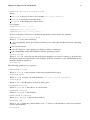
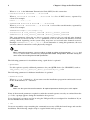
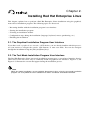
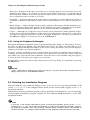
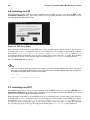
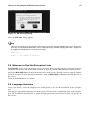
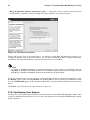
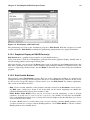
The Red Hat Enterprise Linux text mode installation program uses a screen-based interface that includes most of the on-screen widgets commonly found on graphical user interfaces. Figure 2-1, and
Figure 2-2, illustrate the screens that appear during the installation process.
Note
While text mode installations are not explicitly documented, those using the text mode installation
program can easily follow the GUI installation instructions and obtain all needed information.
10
Chapter 2. Installing Red Hat Enterprise Linux
Figure 2-1. Installation Program Widgets as seen in Boot Loader Configuration
Figure 2-2. Installation Program Widgets as seen in Disk Druid
Here is a list of the most important widgets shown in Figure 2-1 and Figure 2-2:
•
Window — Windows (usually referred to as dialogs in this manual) appear on your screen throughout the installation process. At times, one window may overlay another; in these cases, you can only
interact with the window on top. When you are finished in that window, it disappears, allowing you
to continue working in the window underneath.
•
Checkbox — Checkboxes allow you to select or deselect a feature. The box displays either an
asterisk (selected) or a space (unselected). When the cursor is within a checkbox, press [Space] to
select or deselect a feature.
•
Text Input — Text input lines are regions where you can enter information required by the installation program. When the cursor rests on a text input line, you may enter and/or edit information on
that line.
•
Text Widget — Text widgets are regions of the screen for the display of text. At times, text widgets
may also contain other widgets, such as checkboxes. If a text widget contains more information
Chapter 2. Installing Red Hat Enterprise Linux
11
than can be displayed in the space reserved for it, a scroll bar appears; if you position the cursor
within the text widget, you can then use the [Up] and [Down] arrow keys to scroll through all
the information available. Your current position is shown on the scroll bar by a # character, which
moves up and down the scroll bar as you scroll.
•
Scroll Bar — Scroll bars appear on the side or bottom of a window to control which part of a list or
document is currently in the window’s frame. The scroll bar makes it easy to move to any part of a
file.
•
Button Widget — Button widgets are the primary method of interacting with the installation program. You progress through the windows of the installation program by navigating these buttons,
using the [Tab] and [Enter] keys. Buttons can be selected when they are highlighted.
•
Cursor — Although not a widget, the cursor is used to select (and interact) with a particular widget.
As the cursor is moved from widget to widget, it may cause the widget to change color, or the cursor
itself may only appear positioned in or next to the widget. In Figure 2-1, the cursor is positioned on
the OK button. Figure 2-2, shows the cursor on the Edit button.
2.2.1. Using the Keyboard to Navigate
Navigation through the installation dialogs is performed through a simple set of keystrokes. To move
the cursor, use the [Left], [Right], [Up], and [Down] arrow keys. Use [Tab], and [Alt]-[Tab] to cycle
forward or backward through each widget on the screen. Along the bottom, most screens display a
summary of available cursor positioning keys.
To "press" a button, position the cursor over the button (using [Tab], for example) and press [Space]
or [Enter]. To select an item from a list of items, move the cursor to the item you wish to select and
press [Enter]. To select an item with a checkbox, move the cursor to the checkbox and press [Space]
to select an item. To deselect, press [Space] a second time.
Pressing [F12] accepts the current values and proceeds to the next dialog; it is equivalent to pressing
the OK button.
Caution
Unless a dialog box is waiting for your input, do not press any keys during the installation process
(doing so may result in unpredictable behavior).
2.3. Running the Installation Program
After following the steps outlined in Chapter 1 Steps to Get You Started for booting an LPAR or VM
system, telnet or ssh to the configured Linux install system on the S/390. Logging on via ssh is
the preferred method.
Although the text mode installation program is run by default for most installations, you can optionally
run the graphical installation program available for both VM and LPAR installations via the NFS
installation method.
Note
If you have a slow network connection or prefer a text-based installation, do not set the DISPLAY=
variable in the parm file. The text-based installation is similar to the graphical installation; however,
the graphical installation offers more package selection details and other options not available in
text-based installs. It is strongly recommended to use the graphical installation whenever possible.
12
Chapter 2. Installing Red Hat Enterprise Linux
To run the graphical installation, use a workstation that has an X Window System server or VNC
client installed. Use an SSH client that allows X11 forwarding or a Telnet client. SSH is strongly
recommended for its security features as well as its ability to forward X and VNC sessions. Enable
X11 forwarding in your SSH client prior to connecting to the Linux image (the Linux guest running
on z/VM).
2.3.1. Installation using X11 Forwarding
For example, to connect to the Linux image and display the graphical installation program using
OpenSSH with X11 forwarding on a Linux workstation, type the following at the workstation shell
prompt:
ssh -X linuxvm.example.com
The -X option enables X11 forwarding.
The graphical installation program cannot be started if your DNS or hostnames are not set correctly,
or the Linux image is not allowed to open applications on your display. You can prevent this by setting
a correct DISPLAY= variable. Add the parameter DISPLAY=workstationname:0.0 in the parameter file, replacing workstationname with the hostname of the client workstation connecting to
the Linux Image. Allow the Linux image to connect to the workstation using the command xhost
+linuxvm on the local workstation.
If the graphical installation via NFS does not automatically begin for you, verify the DISPLAY= variable settings in the parm file. If performing a VM installation, rerun the installation to load the new
parm file on the reader. Additionally, make sure when performing an X11 forwarded display that the
X server is started on the workstation machine. Finally, make sure the NFS installation method is
chosen, as this is the only method that supports graphical installations.
2.3.2. Installation using VNC
If you are using VNC, a message on the workstation SSH terminal prompts you to start the VNC client
viewer and details the VNC display specifications. Enter the specifications from the SSH terminal into
the VNC client viewer and connect to the Linux image to begin the installation.
Once you have logged into the Linux image the loader will start the installation program.
When the loader starts, several screens appear for selecting the installation method.
2.4. Installing from a Hard Drive (DASD)
Note
DASD installations only work from ext2 or ext3 file systems. If you have a file system other than ext2
or ext3 you will not be able to perform a DASD installation.
Additionally, if a file called RedHat/base/updates.img exists in the directory from which you
install, it is used for installation program updates. Refer to the file install-methods.txt in the
anaconda RPM package for detailed information on the various ways to install Red Hat Enterprise
Linux, as well as how to apply the installation program updates.
Chapter 2. Installing Red Hat Enterprise Linux
13
The Select Partition screen applies only if you are installing from a disk partition (that is, if you
selected Hard Drive in the Installation Method dialog). This dialog allows you to name the disk
partition and directory from which you are installing Red Hat Enterprise Linux.
Enter the device name of the partition containing the Red Hat Enterprise Linux ISO images. There is
also a field labeled Directory holding images.
If the ISO images are in the root (top-level) directory of that partition, enter the path to the ISO images
(for example, if the partition on which the ISO images are located is normally mounted as /home/,
and the images are in /home/new/, you would enter new).
If the ISO images are not in the root (top-level) directory of that partition, enter the full path to the ISO
images (for example, if the ISO images are located in /test/new/, you would enter /test/new/).
After you have identified the disk partition, the Welcome dialog appears.
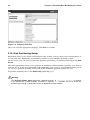
2.5. Installing via NFS
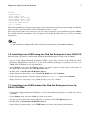
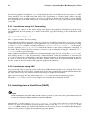
The NFS dialog applies only if you are installing from an NFS server (if you selected NFS Image in
the Installation Method dialog).
Enter the domain name of your NFS server. For example, if you are installing from a host named
eastcoast in the domain example.com, enter eastcoast.example.com in the NFS Server field.
Next, enter the name of the exported directory. If you followed the setup described in Section 1.3
Preparing for a Network Installation, you would enter the directory /location/of/disk/space/
which contains the RedHat/ directory.
If the NFS server is exporting a mirror of the Red Hat Enterprise Linux installation tree, enter
the directory which contains the RedHat/ directory. (If you do not know this directory
path, ask your system administrator.) For example, if the NFS site contains the directory
/mirrors/redhat/arch/RedHat/, enter /mirrors/redhat/arch/ (where arch is replaced
with the architecture type of your system, such as i386, ia64, ppc, or s390). If everything was
specified properly, a message appears indicating that the installation program for Red Hat Enterprise
Linux is running.
Figure 2-3. NFS Setup Dialog
If the NFS server is exporting the ISO images of the Red Hat Enterprise Linux CD-ROMs, enter the
directory which contains the ISO images.
Next, the Welcome dialog appears.
14
Chapter 2. Installing Red Hat Enterprise Linux
2.6. Installing via FTP
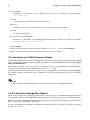
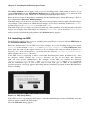
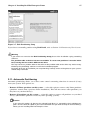
The FTP dialog applies only if you are installing from an FTP server (if you selected FTP in the
Installation Method dialog). This dialog allows you to identify the FTP server from which you are
installing Red Hat Enterprise Linux.
Figure 2-4. FTP Setup Dialog
Enter the name or IP address of the FTP site you are installing from, and the name of the directory
containing the RedHat/ installation files for your architecture. For example, if the FTP site contains
the directory /mirrors/redhat/arch/RedHat/, enter /mirrors/redhat/arch/ (where arch
is replaced with the architecture type of your system, such as i386, ia64, ppc, or s390). If everything
was specified properly, a message box appears indicating that base/hdlist is being retrieved.
Next, the Welcome dialog appears.
Tip
You can save disk space by using the ISO images you have already copied to the server. To accomplish this, install Red Hat Enterprise Linux using ISO images without copying them into a single tree
by loopback mounting them. For each ISO image:
mkdir disc1
mount -o loop example-1.iso disc1
2.7. Installing via HTTP
The HTTP dialog applies only if you are installing from an HTTP server (if you selected HTTP in the
Installation Method dialog). This dialog prompts you for information about the HTTP server from
which you are installing Red Hat Enterprise Linux.
Enter the name or IP address of the HTTP site you are installing from, and the name of the directory
containing the RedHat/ installation files for your architecture. For example, if the HTTP site contains
the directory /mirrors/redhat/arch/RedHat/, enter /mirrors/redhat/arch/ (where arch
is replaced with the architecture type of your system, such as i386, ia64, ppc, or s390). If everything
was specified properly, a message box appears indicating that base/hdlist is being retrieved.
Chapter 2. Installing Red Hat Enterprise Linux
15
Figure 2-5. HTTP Setup Dialog
Next, the Welcome dialog appears.
Tip
You can save disk space by using the ISO images you have already copied to the server. To accomplish this, install Red Hat Enterprise Linux using ISO images without copying them into a single tree
by loopback mounting them. For each ISO image:
mkdir disc1
mount -o loop example-1.iso disc1
2.8. Welcome to Red Hat Enterprise Linux
The Welcome screen does not prompt you for any input. Read over the help text in the left panel for
additional instructions and information on where to register your Red Hat Enterprise Linux product.
Notice the Hide Help button at the bottom left corner of the screen. The help screen is open by default.
If you do not want to view the help information, click on Hide Help to minimize the help portion of
the screen.
Click on the Next button to continue.
2.9. Language Selection
Using your mouse, select the language you would prefer to use for the installation (refer to Figure
2-6).
Selecting the appropriate language also helps target your time zone configuration later in the installation. The installation program tries to define the appropriate time zone based on what you specify on
this screen.
16
Chapter 2. Installing Red Hat Enterprise Linux
Figure 2-6. Language Selection
Once you select the appropriate language, click Next to continue.
2.10. Disk Partitioning Setup
Partitioning allows you to divide your hard drive into isolated sections, where each section behaves as
its own hard drive. Partitioning is particularly useful if you run multiple operating systems.
On this screen, you can choose to perform automatic partitioning, or manual partitioning using Disk
Druid.
Automatic partitioning allows you to perform an installation without having to partition your drive(s)
yourself. If you do not feel comfortable with partitioning your system, it is recommended that you do
not choose to partition manually and instead let the installation program partition for you.
To partition manually, choose the Disk Druid partitioning tool.
Warning
The Red Hat Update Agent downloads updated packages to /var/spool/up2date/ by default.
If you partition the system manually, and create a separate /var/ partition, be sure to create the
partition large enough (3.0 GB more more) to download package updates.
Chapter 2. Installing Red Hat Enterprise Linux
17
Figure 2-7. Disk Partitioning Setup
If you chose to manually partition using Disk Druid, refer to Section 2.12 Partitioning Your System.
Warning
If you receive an error after the Disk Partitioning Setup phase of the installation saying something
similar to
The partition table on device hda was unreadable. To create new partitions it must be initialized, causing the loss of ALL DATA on this drive.
You may not have a partition table on that drive or the partition table on the drive may not be recognizable by the partitioning software used in the installation program.
No matter what type of installation you are performing, backups of the existing data on your systems
should always be made.
2.11. Automatic Partitioning
Automatic partitioning allows you to have some control concerning what data is removed (if any)
from your system. Your options are:
•
Remove all Linux partitions on this system — select this option to remove only Linux partitions
(partitions created from a previous Linux installation). This will not remove other partitions you
may have on your hard drive(s).
•
Remove all partitions on this system — select this option to remove all partitions on your hard
drive(s) (this includes partitions created by other operating systems).
Caution
If you select this option, all data on the selected hard drive(s) is removed by the installation program. Do not select this option if you have information that you want to keep on the hard drive(s)
where you are installing Red Hat Enterprise Linux.
18
•
Chapter 2. Installing Red Hat Enterprise Linux
Keep all partitions and use existing free space — select this option to retain your current data
and partitions, assuming you have enough free space available on your hard drive(s).
Figure 2-8. Automatic Partitioning
Using your mouse, choose the hard drive(s) on which you want Red Hat Enterprise Linux to be
installed. If you have two or more hard drives, you can choose which hard drive(s) should contain this
installation. Unselected hard drives, and any data on them, are not touched.
Note
It is always a good idea to back up any data that you have on your systems. For example, if you are
upgrading or creating a dual-boot system, you should back up any data you wish to keep on your
hard drive(s). Mistakes do happen and can result in the loss of all your data.
To review and make any necessary changes to the partitions created by automatic partitioning, select
the Review option. After selecting Review and clicking Next to move forward, the partitions created
for you in Disk Druid appear. You can make modifications to these partitions if they do not meet your
needs.
Click Next once you have made your selections to proceed.
2.12. Partitioning Your System
At this point, you must tell the installation program where to install Red Hat Enterprise Linux. This
is done by defining mount points for one or more disk partitions in which Red Hat Enterprise Linux
will be installed.
Chapter 2. Installing Red Hat Enterprise Linux
19
Figure 2-9. Partitioning with Disk Druid
The partitioning tool used by the installation program is Disk Druid. With the exception of certain
esoteric situations, Disk Druid can handle the partitioning requirements for a typical installation.
2.12.1. Graphical Display of DASD Device(s)
Disk Druid offers a graphical representation of your DASD device(s).
Using your mouse, click once to highlight a particular field in the graphical display. Double-click to
edit an existing partition and assign a mount point.
Above the display, you can review the Drive name (such as /dev/dasda), the Geom (which shows the
hard disk’s geometry and consists of three numbers representing the number of cylinders, heads, and
sectors as reported by the hard disk), and the Model of the hard drive as detected by the installation
program.
2.12.2. Disk Druid’s Buttons
These buttons control Disk Druid’s actions. They are used to change the attributes of a partition (for
example the file system type and mount point) and also to create RAID devices. Buttons on this screen
are also used to accept the changes you have made, or to exit Disk Druid. For further explanation,
take a look at each button in order:
•
Edit: Used to modify attributes of the partition currently selected in the Partitions section. Selecting Edit opens a dialog box. Some or all of the fields can be edited, depending on whether the
partition information has already been written to disk.
•
Make RAID: Make RAID can be used if you want to provide redundancy to any or all disk
partitions. It should only be used if you have experience using RAID. To read more about RAID,
refer to the RAID (Redundant Array of Independent Disks) chapter in the Red Hat Enterprise Linux
System Administration Guide.
•
To make a RAID device, you must first create (or reuse existing) software RAID partitions. Once
you have created two or more software RAID partitions, select Make RAID to join the software
RAID partitions into a RAID device.
20
Chapter 2. Installing Red Hat Enterprise Linux
2.12.3. Partition Fields
Above the partition hierarchy are labels which present information about the partitions you are creating. The labels are defined as follows:
•
Device: This field displays the partition’s device name.
•
Mount Point/RAID/Volume: A mount point is the location within the directory hierarchy at which
a volume exists; the volume is "mounted" at this location. This field indicates where the partition is
mounted. If a partition exists, but is not set, then you need to define its mount point. Double-click
on the partition or click the Edit button.
•
Type: This field shows the partition’s type (for example, ext2 or ext3).
•
Format: This field shows if the partition being created will be formatted.
•
Size (MB): This field shows the partition’s size (in MB).
•
Start: This field shows the cylinder on your hard drive where the partition begins.
•
End: This field shows the cylinder on your hard drive where the partition ends.
Hide RAID device/LVM Volume Group members: Select this option if you do not want to view
any RAID device or LVM Volume Group members that have been created.
2.12.4. Recommended Partitioning Scheme
Unless you have a reason for doing otherwise, we recommend that you create the following partitions:
•
A swap partition (at least 256 MB) — swap partitions are used to support virtual memory. In other
words, data is written to a swap partition when there is not enough RAM to store the data your
system is processing. The size of your swap partition should be equal to twice your computer’s
RAM, or 256 MB, whichever amount is larger, but no more than 2048 MB (or 2 GB).
For example, if you have 1 GB of RAM or less, your swap partition should be at least equal to the
amount of RAM on your system, up to two times the RAM. For more than 1 GB of RAM, 2 GB of
swap is recommended. Creating a large swap space partition can be especially helpful if you plan
to upgrade your RAM at a later time.
Tip
If your partitioning scheme requires a swap partition that is larger than 2 GB, you should create
an additional swap partition. For example, if you have 4 GB of RAM, you may want to create two 2
GB swap partitions.
•
A /boot/ partition (100 MB) — the partition mounted on /boot/ contains the operating system
kernel (which allows your system to boot Red Hat Enterprise Linux), along with files used during
the bootstrap process. Due to the limitations of most PC BIOSes, creating a small partition to hold
these files is a good idea. For most users, a 100 MB boot partition is sufficient.
•
A root partition (1.2 - 5.0 GB) — this is where "/" (the root directory) is located. In this setup, all
files (except those stored in /boot) are on the root partition. A 1.2 GB root partition permits the
equivalent of a basic installation (with very little free space), while a 5.0 GB root partition lets you
install all package groups.
•
A /var/ partition (3.0 GB or larger) — the /var/ partition is where variable data files are written. This includes spool directories and files, administrative and logging data, and transient and
temporary files. Updates that are applied to Red Hat Enterprise Linux are written to the /var/
partition.
Chapter 2. Installing Red Hat Enterprise Linux
21
2.12.5. Editing Partitions
To edit a partition, select the Edit button or double-click on the existing partition.
Note
If the partition already exists on your hard disk, you can only change the partition’s mount point. To
make any other changes, you must delete the partition and recreate it.
2.13. Network Configuration
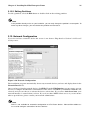
If you do not have a network device this screen is not shown. Skip ahead to Section 2.14 Firewall
Configuration.
Figure 2-10. Network Configuration
The installation program automatically detects any network devices you have and display them in the
Network Devices list.
Once you have selected a network device, click Edit. From the Edit Interface pop-up screen, you can
choose to configure the IP address and Netmask of the device via DHCP (or manually if DHCP is not
selected) and you can choose to activate the device at boot time. If you select Activate on boot, your
network interface is started when you boot. If you do not have DHCP client access or you are unsure
what to provide here, please contact your network administrator.
Note
DHCP is not available for automatic configuration of CTC/Escon devices. Point-to-Point addresses
are used to configure connections for these devices.
22
Chapter 2. Installing Red Hat Enterprise Linux
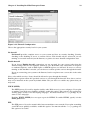
Figure 2-11. Editing a Network Device
Note
Do not use the numbers as seen in this sample configuration. These values will not work for your own
network configuration. If you are not sure what values to enter, contact your network administrator for
assistance.
If you have a hostname (fully qualified domain name) for the network device, you can choose to have
DHCP (Dynamic Host Configuration Protocol) automatically detect it or you can manually enter the
hostname in the field provided.
Finally, if you entered the IP and Netmask information manually, you may also enter the Gateway
address and the Primary, Secondary, and Tertiary DNS addresses.
Tip
Even if your computer is not part of a network, you can enter a hostname for your system. If you do
not take this opportunity to enter a name, your system will be known as localhost.
Tip
To change your network configuration after you have completed the installation, use the Network
Administration Tool.
Type the redhat-config-network command in a shell prompt to launch the Network Administration Tool. If you are not root, it prompts you for the root password to continue.
2.14. Firewall Configuration
Red Hat Enterprise Linux offers firewall protection for enhanced system security. A firewall exists
between your computer and the network, and determines which resources on your computer remote
users on the network can access. A properly configured firewall can greatly increase the security of
your system.
Chapter 2. Installing Red Hat Enterprise Linux
23
Figure 2-12. Firewall Configuration
Choose the appropriate security level for your system.
No firewall
No firewall provides complete access to your system and does no security checking. Security
checking is the disabling of access to certain services. This should only be selected if you are
running on a trusted network (not the Internet) or plan to do more firewall configuration later.
Enable firewall
If you choose Enable firewall, connections are not accepted by your system (other than the
default settings) that are not explicitly defined by you. By default, only connections in response
to outbound requests, such as DNS replies or DHCP requests, are allowed. If access to services
running on this machine is needed, you can choose to allow specific services through the firewall.
If you are connecting your system to the Internet, but do not plan to run a server, this is the safest
choice.
Next, select which services, if any, should be allowed to pass through the firewall.
Enabling these options allow the specified services to pass through the firewall. Note, these services
may not be installed on the system by default. Make sure you choose to enable any options that you
may need.
WWW (HTTP)
The HTTP protocol is used by Apache (and by other Web servers) to serve webpages. If you plan
on making your Web server publicly available, enable this option. This option is not required for
viewing pages locally or for developing webpages. You must install the httpd package if you
want to serve webpages.
Enabling WWW (HTTP) does not open a port for HTTPS. To enable HTTPS, specify it in the
Other ports field.
FTP
The FTP protocol is used to transfer files between machines on a network. If you plan on making
your FTP server publicly available, enable this option. You must install the vsftpd package for
this option to be useful.
24
Chapter 2. Installing Red Hat Enterprise Linux
SSH
Secure SHell (SSH) is a suite of tools for logging in to and executing commands on a remote
machine. If you plan to use SSH tools to access your machine through a firewall, enable this option. You need to have the openssh-server package installed in order to access your machine
remotely, using SSH tools.
Telnet
Telnet is a protocol for logging in to remote machines. Telnet communications are unencrypted
and provide no security from network snooping. Allowing incoming Telnet access is not recommended. To allow inbound Telnet access, you must install the telnet-server package.
Mail (SMTP)
If you want to allow incoming mail delivery through your firewall, so that remote hosts can
connect directly to your machine to deliver mail, enable this option. You do not need to enable
this if you collect your mail from your ISP’s server using POP3 or IMAP, or if you use a tool such
as fetchmail. Note that an improperly configured SMTP server can allow remote machines to
use your server to send spam.
You can allow access to ports which are not listed here by listing them in the Other ports field. Use
the following format: port:protocol. For example, if you want to allow IMAP access through
your firewall, you can specify imap:tcp. You can also explicitly specify numeric ports; to allow
UDP packets on port 1234 through the firewall, enter 1234:udp. To specify multiple ports, separate
them with commas.
Finally, select any devices should allow access to your system for all traffic from that device.
Selecting any of these trusted devices excludes them from the firewall rules. For example, if you are
using eth0 as a local networking device and using eth1 to connect to the Internet, any traffic coming
from your local network is allowed. Selecting eth0 as trusted means all traffic over the Ethernet is
allowed, but the eth1 interface is still firewalled. If you want to restrict traffic on an interface, leave it
unchecked.
It is not recommended that you make any device that is connected to public networks, such as the
Internet, a trusted device.
Tip
To change your security level configuration after you have completed the installation, use the Security
Level Configuration Tool.
Type the redhat-config-securitylevel command in a shell prompt to launch the Security Level
Configuration Tool. If you are not root, it prompts you for the root password to continue.
2.15. Language Support Selection
You can install and support multiple languages for use on your system.
You must select a language to use as the default language. The default language is the language used
on the system once the installation is complete. If you choose to install other languages during this
installation, you can change your default language after the installation.
If you are only going to use one language on your system, selecting only that language saves significant disk space. The default language is the language you selected to use during the installation.
Chapter 2. Installing Red Hat Enterprise Linux
25
Caution
If you select only one language, you can only use that specified language after the installation is
complete.
Figure 2-13. Language Support Selection
To use more than one language on your system, choose specific languages to be installed or select all
languages to have all available languages installed on your Red Hat Enterprise Linux system.
Use the Reset button to cancel your selections. Resetting reverts to the default; only the language you
selected for use during the installation is installed.
Tip
To change the language configuration after you have completed the installation, use the Language
Configuration Tool.
Type the redhat-config-language command in a shell prompt to launch the Language Configuration Tool. If you are not root, it prompts you for the root password to continue.
2.16. Time Zone Configuration
You can set your time zone by selecting your computer’s physical location or by specifying your time
zone’s offset from Universal Time, Coordinated (UTC).
Notice the two tabs at the top of the screen (refer to Figure 2-14). The first tab allows you to configure
your time zone by your location.
On the interactive map, you can also click on a specific city, which is marked by a yellow dot; a red X
appears indicating your selection. You can also scroll through a list and choose a time zone.
26
Chapter 2. Installing Red Hat Enterprise Linux
The second tab allows you to specify a UTC offset. The tab displays a list of offsets to choose from,
as well as an option to set daylight saving time.
Figure 2-14. Configuring the Time Zone
On both tabs, you can select System Clock uses UTC. Please select this if you know that your system
is set to UTC.
Tip
To change your time zone configuration after you have completed the installation, use the Time and
Date Properties Tool.
Type the redhat-config-date command in a shell prompt to launch the Time and Date Properties
Tool. If you are not root, it prompts you for the root password to continue.
To run the Time and Date Properties Tool as a text-based application, use the command
timeconfig.
2.17. Set Root Password
Setting up a root account and password is one of the most important steps during your installation.
Your root account is similar to the administrator account used on Windows NT machines. The root
account is used to install packages, upgrade RPMs, and perform most system maintenance. Logging
in as root gives you complete control over your system.
Note
The root user (also known as the superuser) has complete access to the entire system; for this reason, logging in as the root user is best done only to perform system maintenance or administration.
Chapter 2. Installing Red Hat Enterprise Linux
27
Figure 2-15. Root Password
Use the root account only for system administration. Create a non-root account for your general use
and su - to root when you need to fix something quickly. These basic rules minimize the chances of
a typo or an incorrect command doing damage to your system.
Tip
To become root, type su - at the shell prompt in a terminal window and then press [Enter]. Then,
enter the root password and press [Enter].
The installation program prompts you to set a root password1 for your system. You cannot proceed to
the next stage of the installation process without entering a root password.
The root password must be at least six characters long; the password you type is not echoed to the
screen. You must enter the password twice; if the two passwords do not match, the installation program
asks you to enter them again.
You should make the root password something you can remember, but not something that is easy for
someone else to guess. Your name, your phone number, qwerty, password, root, 123456, and anteater
are all examples of bad passwords. Good passwords mix numerals with upper and lower case letters
and do not contain dictionary words: Aard387vark or 420BMttNT, for example. Remember that the
password is case-sensitive. If you write down your password, keep it in a secure place. However, it is
recommended that you do not write down this or any password you create.
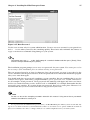
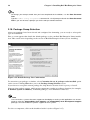
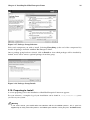
Note
Do not use one of the example passwords offered in this manual. Using one of these passwords
could be considered a security risk.
1.
A root password is the administrative password for your Red Hat Enterprise Linux system. You should only
log in as root when needed for system maintenance. The root account does not operate within the restrictions
placed on normal user accounts, so changes made as root can have implications for your entire system.
28
Chapter 2. Installing Red Hat Enterprise Linux
Tip
To change your root password after you have completed the installation, use the Root Password
Tool.
Type the redhat-config-rootpassword command in a shell prompt to launch the Root Password
Tool. If you are not root, it prompts you for the root password to continue.
2.18. Package Group Selection
After your partitions have been selected and configured for formatting, you are ready to select packages for installation.
First, a screen appears that details the default package set for your Red Hat Enterprise Linux installation. This screen varies depending on the version of Red Hat Enterprise Linux you are installing.
Figure 2-16. Default Package List Confirmation
To customize your package set further, select Customize the set of packages to be installed option
on the screen. Clicking Next takes you to the Package Group Selection screen.
If you choose to accept the current package list, skip ahead to Section 2.19 Preparing to Install.
You can select package groups, which group components together according to function (for example,
X Window System and Editors), individual packages, or a combination of the two.
Note
Users of zSeries systems who want support for developing or running 31-bit applications are encouraged to select the Compatibility Arch Support and Compatibility Arch Development Support
packages to install architecure specific support for their systems.
To select a component, click on the checkbox beside it (refer to Figure 2-17).
Chapter 2. Installing Red Hat Enterprise Linux
29
Figure 2-17. Package Group Selection
Select each component you wish to install. Selecting Everything (at the end of the component list)
installs all packages included with Red Hat Enterprise Linux.
Once a package group has been selected, click on Details to view which packages will be installed by
default, and to add or remove optional packages from that group.
Figure 2-18. Package Group Details
2.19. Preparing to Install
A screen preparing you for the installation of Red Hat Enterprise Linux now appears.
For your reference, a complete log of your installation can be found in /root/install.log once
you reboot your system.
Warning
If, for some reason, you would rather not continue with the installation process, this is your last
opportunity to safely cancel the process and reboot your machine. Once you press the Next button,
30
Chapter 2. Installing Red Hat Enterprise Linux
partitions will be written and packages will be installed. If you wish to abort the installation, you should
reboot now before any existing information on any hard drive is rewritten.
To cancel this installation process, you must stop the VM. To do this, and restart CMS, type #cp i
cms in the 3270 console window.
2.20. Installing Packages
At this point there is nothing left for you to do until all the packages have been installed. How quickly
this happens depends on the number of packages you have selected and your computer’s speed.
2.21. Installation Complete
Congratulations! Your Red Hat Enterprise Linux 3 installation is now complete!
The installation program prompts you to prepare your system for reboot.
Once the installation is complete, you must IPL (boot) from the DASD(s) where Red Hat Enterprise
Linux has been installed. For example, on the 3270 console you may issue the command #cp i 200.
Note
Assuming you are to disconnect from the 3270 console, use #cp disc instead of #cp logout or #cp
log. This allows Red Hat Enterprise Linux for S/390 to continue running when not connected to the
3270 console.
Following IPLing the installed Red Hat Enterprise Linux OS, you may log on to the system via
telnet or ssh. It is important to note that the only place you can log in as root is from the 3270 or
from other devices as listed in /etc/securetty. To log in as root from remote systems, use ssh.
The first time you start your Red Hat Enterprise Linux machine in run level 5 (the graphical run level),
the Setup Agent is presented, which guides you through the Red Hat Enterprise Linux configuration.
Using this tool, you can set your system time and date, install software, register your machine with
Red Hat Network, and more. The Setup Agent lets you configure your environment at the beginning,
so that you can get started using your Red Hat Enterprise Linux system quickly.
If you are not sure what to do next, we suggest you begin with the other Red Hat Enterprise Linux
manuals available online or on the Red Hat Enterprise Linux Documentation CD included with your
Red Hat Enterprise Linux product.
HTML, PDF, and RPM versions of the manuals are available on the Red Hat Enterprise Linux Documentation CD and online at http://www.redhat.com/docs/.
Note
Although this manual reflects the most current information possible, read the Red Hat Enterprise
Linux Release Notes for information that may not have been available prior to our documentation being finalized. They can be found on the Red Hat Enterprise Linux CD #1 and online at
http://www.redhat.com/docs/.
Chapter 2. Installing Red Hat Enterprise Linux
31
If you are a more experienced user looking for information on administration topics, you may find the
Red Hat Enterprise Linux Reference Guide to be more helpful.
For an overview of system administration, refer to the Red Hat Enterprise Linux Introduction to System Administration. If you are looking for information on system configuration, you may find the Red
Hat Enterprise Linux System Administration Guide to be helpful.
If you are looking for information on securing your system, refer to the Red Hat Enterprise Linux
Security Guide.
Do not forget to register for the benefits you are entitled to as a Red Hat customer. Registration enables
access to the Red Hat Services you have purchased, such as technical support and Red Hat Network.
To register your product, go to:
http://www.redhat.com/apps/activate/
32
Chapter 2. Installing Red Hat Enterprise Linux
Appendix A.
Removing Red Hat Enterprise Linux
To remove Red Hat Enterprise Linux from the S/390 you can either remove the DASD allocation from
the VM or you can start the installation program and re-format all of the DASD partitions. Instead of
selecting OK you will select Cancel to exit the installation program.
34
Appendix A. Removing Red Hat Enterprise Linux
Appendix B.
Sample Parameter Files
Use the following samples as a guide to format proper parameter files.
Sample file with minimally required parameters:
root=/dev/ram0 DASD=200
Note
The Red Hat Enterprise Linux installation program prompts the user for any required parameters not
specified in the parameter file.
Sample file configuring a CTC networking device:
DASD=200
HOSTNAME=client.z900.example.com NETTYPE=ctc IPADDR=192.168.0.10
CHANDEV=ctc0,0x150,0x151 NETWORK=192.168.0.0 NETMASK=255.255.255.0
SEARCHDNS=example.com:dns.example.com:z900.example.com
BROADCAST=192.168.5.255 GATEWAY=192.168.0.1 DNS=192.168.0.254
MTU=1492
36
Appendix B. Sample Parameter Files
Appendix C.
Red Hat Linux to Red Hat Enterprise Linux
Migration Solution
This appendix discusses how to migrate Red Hat Linux 7.1 to Red Hat Enterprise Linux 3 on the IBM
zSeries and S/390 architectures.
If you currently use Red Hat Linux 7.2 for the IBM zSeries and S/390 architectures, upgrades via the
installation program are not available. However, the following migration solution will assist you in
moving to Red Hat Enterprise Linux.
First you must back up any existing data that you wish to keep for future use under Red Hat Enterprise
Linux. Make sure to back up any necessary configuration files as well, such as the the configuration
files from /etc/.
Once you have completed a backup of your data, you can reinstall the system using the instructions
provided in this guide. Note that you may want to add additional space while partitioning to account
for the new installation, future data, and any data that you intend to restore.
This recommended reinstallation method helps to ensure the best system stability possible.
Once the reinstallation has been completed, you can then begin to restore your data and any configuration files you may have backed up.
38
Appendix C. Red Hat Linux to Red Hat Enterprise Linux Migration Solution
Appendix D.
Troubleshooting Your Installation of Red Hat
Enterprise Linux
This appendix discusses some common installation problems and their solutions.
D.1. You are Unable to Boot Red Hat Enterprise Linux
D.1.1. Is Your System Displaying Signal 11 Errors?
A signal 11 error, commonly know as a segmentation fault, means that the program accessed a memory
location that was not assigned.
If you receive a fatal signal 11 error during your installation, it is probably due to a hardware error in
memory on your system’s bus. A hardware error in memory can be caused by problems in executables
or with the system’s hardware. Like other operating systems, Red Hat Enterprise Linux places its own
demands on your system’s hardware. Some of this hardware may not be able to meet those demands,
even if they work properly under another OS.
Review if you have the latest installation and supplemental boot diskettes from Red Hat. Review the
online errata to check if newer versions are available. If the latest images still fail, it may be due to a
problem with your hardware.
D.2. Trouble During the Installation
D.2.1. No devices found to install Red Hat Enterprise Linux Error
Message
If you receive an error message stating No devices found to install Red Hat Enterprise
Linux, then there may be an issue with your DASD devices. If you encounter this error, add the
DASD= disks parameter to your parm file (where disks is the DASD range reserved for instal
lation), and start the install again.
Additionally, make sure that you format the DASDs using the dasdfmt command within a Linux root
shell, instead of formatting the DASDs using CMS.
D.2.2. Trouble with Partition Tables
If you receive an error after the Disk Partitioning Setup (Section 2.10 Disk Partitioning Setup) phase
of the installation saying something similar to
The partition table on device hda was unreadable. To create new partitions it must be initialized,
causing the loss of ALL DATA on this drive.
you may not have a partition table on that drive or the partition table on the drive may not be recognizable by the partitioning software used in the installation program.
No matter what type of installation you are performing, backups of the existing data on your systems
should always be made.
40
Appendix D. Troubleshooting Your Installation of Red Hat Enterprise Linux
D.2.3. Other Partitioning Problems
If you are using Disk Druid to edit partitions, but cannot move to the next screen, you probably have
not created all the partitions necessary for Disk Druid’s dependencies to be satisfied.
You must have the following partitions as a bare minimum:
•
A / (root) partition
•
A
swap
partition of type swap
Tip
When defining a partition’s type as swap, you do not have to assign it a mount point. Disk Druid
automatically assigns the mount point for you.
D.2.4. Are You Seeing Python Errors?
During some upgrades or installations of Red Hat Enterprise Linux, the installation program (also
known as anaconda) may fail with a Python or traceback error. This error may occur after the selection
of individual packages or while trying to save the upgrade log in /tmp/. The error may look similar
to:
Traceback (innermost last):
File "/var/tmp/anaconda-7.1//usr/lib/anaconda/iw/progress_gui.py",
line 20, in run
rc = self.todo.doInstall ()
File "/var/tmp/anaconda-7.1//usr/lib/anaconda/todo.py", line 1468, in
doInstall
self.fstab.savePartitions ()
File "fstab.py", line 221, in savePartitions
sys.exit(0)
SystemExit: 0
Local variables in innermost frame:
fstab.GuiFstab instance at 8446fe0
self:
sys:
module ’sys’ (built-in)
ToDo object:
(itodo
ToDo
p1
(dp2
S’method’
p3
(iimage
CdromInstallMethod
p4
(dp5
S’progressWindow’
p6
failed
This error occurs in some systems where links to /tmp/ are symbolic to other locations or have been
changed since creation. These symbolic or changed links are invalid during the installation process,
so the installation program cannot write information and fails.
Appendix D. Troubleshooting Your Installation of Red Hat Enterprise Linux
41
If you experience such an error, first try to download any available errata for anaconda. Errata can be
found at:
http://www.redhat.com/support/errata/
The anaconda website may also be a useful reference and can be found online at:
http://rhlinux.redhat.com/anaconda/
You can also search for bug reports related to this problem. To search Red Hat’s bug tracking system,
go to:
http://bugzilla.redhat.com/bugzilla/
Finally, if you are still facing problems related to this error, register your product and contact our
support team. To register your product, go to:
http://www.redhat.com/apps/activate/
D.3. Problems After Installation
D.3.1. Problems with the X Window System (GUI)
If you are having trouble getting X (the X Window System) to start, you may not have installed it
during your installation.
If you want X, you can either install the packages from the Red Hat Enterprise Linux CD-ROMs or
perform an upgrade.
If you elect to upgrade, select the X Window System packages, and choose GNOME, KDE, or both,
during the upgrade package selection process.
D.3.2. Remote Graphical Desktops and XDMCP
If you have installed the X Window System and would like to log in to your Red Hat Enterprise Linux
system using a graphical login manager, enable the X Display Manager Control Protocol (XDMCP).
This protocol allows users to remotely log in to a desktop environment from any X Window System compatible client (such as a network-connected workstation or X terminal). To enable remote
login using XDMCP, edit the following line in the /etc/X11/gdm/gdm-config file on the Red Hat
Enterprise Linux system with a text editor such as vi or nano:
[xdmcp]
Enable=false
Edit the line to read Enable=true, save the file, and exit the text editor. Switch to runlevel 5 to start
the X server:
/sbin/init 5
From the client machine, start remote X session using X. For example:
X :1 -query s390vm.example.com
42
Appendix D. Troubleshooting Your Installation of Red Hat Enterprise Linux
The command connects to the remote X server via XDMCP (replace s390vm.example.com with
the hostname of the remote X server) and displays the remote graphical login screen on display :1 of
the client system (usually accessible by using the [Ctrl]-[Alt]-[F8] key combination).
You may also access remote desktop sessions using a nested X server, which opens the remote
desktop as a window in your current X session. Xnest allows users to open a remote desktop nested
within their local X session. For example, run Xnest using the following command, replacing
s390vm.example.com with the hostname of the remote X server:
Xnest :1 -query s390vm.example.com
D.3.3. Problems When You Try to Log In
If you did not create a user account in the Setup Agent, log in as root and use the password you
assigned to root.
If you cannot remember your root password, boot your system as linux single.
Once you have booted into single user mode and have access to the # prompt, you must type passwd
root, which allows you to enter a new password for root. At this point you can type shutdown -r
now to reboot the system with the new root password.
If you cannot remember your user account password, you must become root. To become root, type su
username . This allows you
to enter a new password for the specified user account.
- and enter your root password when prompted. Then, type passwd
If the graphical login screen does not appear, check your hardware for compatibility issues. The Hardware Compatibility List can be found at:
http://hardware.redhat.com/hcl/
D.3.4. Your Printer Will Not Work
If you are not sure how to set up your printer or are having trouble getting it to work properly, try
using the Printer Configuration Tool.
Type the redhat-config-printer command at a shell prompt to launch the Printer Configuration Tool. If you are not root, it prompts you for the root password to continue.
D.3.5. Apache-based httpd service/Sendmail Hangs During Startup
If you are having trouble with the Apache-based httpd service or Sendmail hanging at startup, make
sure the following line is in the /etc/hosts file:
127.0.0.1
localhost.localdomain
localhost
Appendix E.
Additional Boot Options
This appendix discusses additional boot and kernel boot options available for the Red Hat Enterprise
Linux installation program.
Add these boot options to the parameter file. For more information, refer to Section 1.5 Installing
under VM.
Boot Time Command Arguments
askmethod
This command asks you to select the installation method you would like to use when booting
from the Red Hat Enterprise Linux CD-ROM.
dd
This argument causes the installation program to prompt you to use a driver diskette.
dd=url
This argument causes the installation program to prompt you to use a driver image from a specified HTTP, FTP, or NFS network address.
display=IP:0
This command allows remote display forwarding. In this command, IP should be replaced with
the IP address of the system on which you want the display to appear.
On the system you want the display to appear on, you must execute the command xhost
+remotehostname, where remotehostname is the name of the host from which you are
running the original display. Using the command xhost +remotehostname limits access
to the remote display terminal and does not allow access from anyone or any system not
specifically authorized for remote access.
driverdisk
This command performs the same function as the dd command and also prompts you to use a
driver diskette during the installation of Red Hat Enterprise Linux.
mediacheck
This command gives you the option of testing the integrity of the install source (if an ISO-based
method). This command works with the CD, DVD, hard drive ISO, and NFS ISO installation
methods. Verifying that the ISO images are intact before you attempt an installation helps to
avoid problems that are often encountered during an installation.
mem=xxxM
This command allows you to override the amount of memory the kernel detects for the machine.
This may be needed for some older systems where only 16 MB is detected and for some new
machines where the video card shares the video memory with the main memory. When executing
this command, xxx should be replaced with the amount of memory in megabytes.
44
Appendix E. Additional Boot Options
nopass
This command disables the passing of keyboard and mouse information to stage 2 of the installation program. It can be used to test keyboard and mouse configuration screens during stage 2
of the installation program when performing a network installation.
nopcmcia
This command ignores any PCMCIA controllers in system.
noprobe
This command disables hardware detection and instead prompts the user for hardware information.
noshell
This command disables shell access on virtual console 2 during an installation.
nousb
This command disables the loading of USB support during the installation. If the installation
program tends to hang early in the process, this command may be helpful.
nousbstorage
This command disables the loading of the usbstorage module in the installation program’s loader.
It may help with device ordering on SCSI systems.
rescue
This command runs rescue mode. Refer to the Red Hat Enterprise Linux System Administration
Guide for more information about rescue mode.
resolution=
Tells the installation program which video mode to run. It accepts any standard resolution, such
as 640x480, 800x600, 1024x768, and so on.
serial
This command turns on serial console support.
text
This command disables the graphical installation program and forces the installation program to
run in text mode.
updates
This command prompts you to insert a floppy diskette containing updates (bug fixes). It is not
needed if you are performing a network installation and have already placed the updates image
contents in RHupdates/ on the server.
vnc
This command allows you to install from a VNC server.
vncpassword=
This command sets the password used to connect to the VNC server.
Index
Symbols
/boot/, 20
/boot/ partition
recommended partitioning, 20
/root/install.log
install log file location, 29
/var/ partition
recommended partitioning, 20
A
accessibility, iv
automatic partitioning, 16, 17
B
boot method
overview, 1
boot options
additional, 43
kernel, 43
C
clock, 25
configuration
clock, 25
network, 21
time, 25
time zone, 25
conventions
document, i
D
DASD installation, 12
Disk Druid
buttons, 19
editing partitions, 21
partitions, 18
disk partitioning, 16
disk space, 8
E
editing partitions, 21
F
feedback
contact information for this manual, iv
firewall configuration, 22
customize incoming services, 23
customize trusted services, 23
security levels
enable firewall, 23
no firewall, 23
FTP
installation, 2, 14
G
graphical installation program
running from NFS, 11
VNC, 12
x11 forwarding, 12
H
hard drive installation, 12
preparing for, 3
hardware
preparation, 1
hostname configuration, 22
how to use this manual, iii
HTTP
installation, 2, 14
I
install log file
/root/install.log, 29
installation
DASD, 12
disk space, 8
FTP, 2, 14
GUI
CD-ROM, 9
hard drive, 3, 12
HTTP, 2, 14
keyboard navigation, 11
network, 2
NFS, 2, 13
server information, 13
partitioning, 18
program
graphical user interface, 9
text mode user interface, 9
installation program
starting, 11
installing
without the LPAR CD
46
using a recent SEW, 7
without the Red Hat Enterprise Linux for S/390
CD-ROMs, 7
installing packages, 28
introduction, i
K
kernel
boot options, 43
keyboard
navigating the installation program using, 11
L
language
selecting, 15
support for multiple languages, 24
LPAR
installing
common steps, 8
using the LPAR CD, 7
without the Red Hat Enterprise Linux for S/390
CD-ROMs, 7
M
migration, software, 37
N
network
configuration, 21
installations
FTP, 14
HTTP, 14
NFS, 13
network installation
preparing for, 2
NFS
installation, 2, 13
O
online help
hiding, 15
P
packages
groups, 28
selecting, 28
installing, 28
selecting, 28
parameter files
ctc sample, 35
minimal configuration, 35
samples, 35
partitioning, 18
automatic, 16, 17
recommended, 20
password
setting root, 26
R
recursion
(See recursion)
root / partition, 20
recommended partitioning, 20
root password, 26
S
selecting
packages, 28
steps
disk space, 8
steps to get you started, 1
swap, 20
swap parition
recommended partitioning, 20
T
time zone
configuration, 25
troubleshooting, 39
after the installation
Apache-based httpd service hangs during
startup, 42
after the installation, 41
graphical login, 41
logging in, 42
printers, 42
Sendmail hangs during startup, 42
X (X Window System), 41
booting, 39
signal 11 error, 39
during the installation
No devices found to install Red Hat Enterprise
Linux error message, 39
47
during the installation, 39
completing partitions, 40
partition tables, 39
Python errors, 40
U
uninstalling, 33
upgrade
(See migration, software)
user interface, graphical
installation program, 9
user interface, text mode
installation program, 9
V
VM
installing, 4
VNC, 12
X
x11 forwarding, 12
XDMCP, 41
Colophon
The manuals are written in DocBook SGML v4.1 format. The HTML and PDF formats are produced
using custom DSSSL stylesheets and custom jade wrapper scripts. The DocBook SGML files are
written in Emacs with the help of PSGML mode.
Garrett LeSage created the admonition graphics (note, tip, important, caution, and warning). They
may be freely redistributed with the Red Hat documentation.
The Red Hat Product Documentation Team consists of the following people:
Sandra A. Moore — Primary Writer/Maintainer of the Red Hat Enterprise Linux Installation Guide
for x86, Itanium™, AMD64, and Intel® Extended Memory 64 Technology (Intel® EM64T); Primary
Writer/Maintainer of the Red Hat Enterprise Linux Installation Guide for the IBM® eServer™ iSeries™ and IBM® eServer™ pSeries™ Architectures; Contributing Writer to the Red Hat Enterprise
Linux Step By Step Guide
Tammy Fox — Primary Writer/Maintainer of the Red Hat Enterprise Linux System Administration
Guide; Contributing Writer to the Red Hat Enterprise Linux Installation Guide for x86, Itanium™,
AMD64, and Intel® Extended Memory 64 Technology (Intel® EM64T); Contributing Writer to the
Red Hat Enterprise Linux Security Guide; Contributing Writer to the Red Hat Enterprise Linux Step
By Step Guide; Writer/Maintainer of custom DocBook stylesheets and scripts
Edward C. Bailey — Primary Writer/Maintainer of the Red Hat Enterprise Linux Introduction to System Administration; Primary Writer/Maintainer of the Release Notes; Contributing Writer to the Red
Hat Enterprise Linux Installation Guide for x86, Itanium™, AMD64, and Intel® Extended Memory
64 Technology (Intel® EM64T)
Johnray Fuller — Primary Writer/Maintainer of the Red Hat Enterprise Linux Reference Guide; Cowriter/Co-maintainer of the Red Hat Enterprise Linux Security Guide; Contributing Writer to the Red
Hat Enterprise Linux Introduction to System Administration
John Ha — Primary Writer/Maintainer of the Red Hat Cluster Suite Configuring and Managing a
Cluster; Primary Writer/Maintainer of the Red Hat Glossary; Primary Writer/Maintainer of the Red
Hat Enterprise Linux Installation Guide for the IBM® S/390® and IBM® eServer™ zSeries® Architectures; Co-writer/Co-maintainer of the Red Hat Enterprise Linux Security Guide; Contributing
Writer to the Red Hat Enterprise Linux Introduction to System Administration; Contributing Writer to
the Red Hat Enterprise Linux Step By Step Guide
The Red Hat Localization Team consists of the following people:
Jean-Paul Aubry — French translations
David Barzilay — Brazilian Portuguese translations
Bernd Groh — German translations
James Hashida — Japanese translations
Michelle Ji-yeen Kim — Korean translations
Yelitza Louze — Spanish translations
Noriko Mizumoto — Japanese translations
Nadine Richter — German translations
Audrey Simons — French translations
Francesco Valente — Italian translations
Sarah Saiying Wang — Simplified Chinese translations
Ben Hung-Pin Wu — Traditional Chinese translations
50