1
CAT31
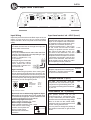
Input and controls
Input Wiring
Input Level control ch. A/B/C (Level)
Inputs may be low level from the RCA output of the car
stereo or high level from the car stereo speaker
output.Low level = RCA is to prefer for the best sound
quality.
Important
Use either the low level or the high level input, do
not use both at same time.
Low level input
Use a pair of shielded stereo audio cables with RCA
type jack. The cable length varies depending on type
of vehicle. Most cables can be
bought in lengths from 1 up
to 5,5 meters.
Avoid placing the RCA cable
close to speaker cables,
power cables and remote
control cable. Connect to input socket A & B.
High Level Input
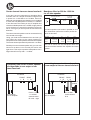
Connect left and right speaker wires coming from
the car stereo to the high level input as shown. You
must connect both plus and minus as the inputs are
balanced, connecting plus only gives lower level and
bad sound quality. By changing the polarity of plus
and minus, you can change the phase.
High Input
White
White/black
Grey/black
Grey
:A ch.+
:A ch.:B ch.:B ch.+
Hihg level input socket.
Automatic turn on when using high level input.
With the Hi/Low input swich set to Hi, the amplifier turns
on automatically on high input. You don´t need to connect
a separate remote wire from your head unit.
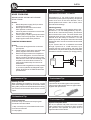
When using High Level input:
Set the switch to position ”Hi / Level”
When using Low level input:
Set the switch to position ”Low / Level”
If the switch is set to wrong
Hi / Level
position, the amplifier still
Low / Level
works, but the risk for
disturbances or distortion
increases.
The input level control, 5V – 0,25 V,
matches the output of your radio to the
input of the amplifier. After installation
is complete, make sure the input of the
amplifier is turned down all the way
( counter-clockwise at 5V ). Play a tape
or CD, make sure all bass or treble
settings or equalizer are flat, and turn
the volume of the radio up until you
just start to hear distortion. Turn the
volume control down just a bit. On the
amplifier increase the input level control
( clockwise or to the right ) until you just
start to hear distortion, then back the
level control just a bit. Now your radio
and amplifier levels are matched.
Level
5V
0,25 V
Subsonic filter ch. C
The Subsonic filter blocks the very Subsonic
deepest frequencies from reaching the
subwoofers. The filter crossover is 25
Off
On
Hz and can be disconnected.
Low pass filter ch. C (LPF)
The LPF ( low pass filter ) allow low
frequencies only and blocks higher
frequencies. A typical setting is 60 – 80
Hz. Choose the setting that sounds best
in your car.
LPF
50Hz 120Hz
Phase control ch. C (PHASE)
The phase control can be set
continuously from 0 - 180 degrees. This
is very useful when you want to adjust
the bass sound for best front stage image.
Start on 0 and turn the control slowly
clockwise until you experience the bass
sound coming from the front.
You may have to change the polarity of
the speaker connection to get the best
result.
Phase
0o
180o
5