1
®
A Division of Cisco Systems, Inc.
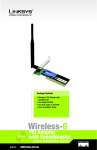
2.4 GHz Wireless-G
802.11g
PCI Adapter
WIRELESS
Model No.
WMP54GS
with SpeedBooster
User Guide
Wireless-G PCI Adapter with SpeedBooster
Copyright and Trademarks
Specifications are subject to change without notice. Linksys is a registered trademark or trademark of Cisco
Systems, Inc. and/or its affiliates in the U.S. and certain other countries. Copyright © 2005 Cisco Systems, Inc. All
rights reserved. Other brands and product names are trademarks or registered trademarks of their respective
holders.
WARNING: This product contains chemicals, including lead, known
to the State of California to cause cancer, and birth defects or other
reproductive harm. Wash hands after handling.
How to Use This User Guide
This User Guide has been designed to make understanding networking with the Wireless-G PCI Adapter easier
than ever. Look for the following items when reading this User Guide:
This checkmark means there is a note of interest and is
something you should pay special attention to while
using the Wireless-G PCI Adapter.
This exclamation point means there is a caution or
warning and is something that could damage your
property or the Wireless-G PCI Adapter.
This question mark provides you with a reminder about
something you might need to do while using the
Wireless-G PCI Adapter.
In addition to these symbols, there are definitions for technical terms that are presented like this:
word: definition.
Also, each figure (diagram, screenshot, or other image) is provided with a figure number and description, like
this:
Figure 0-1: Sample Figure Description
Figure numbers and descriptions can also be found in the “List of Figures” section in the “Table of Contents”.
WMP54GS-UG-50215A BW
Wireless-G PCI Adapter with SpeedBooster
Table of Contents
Chapter 1: Introduction
1
Welcome
What’s in this Guide?
1
2
Chapter 2: Planning your Wireless Network
Network Topology
Roaming
Network Layout
Chapter 3: Software Installation and Configuration
Chapter 4: Connecting the PCI Adapter
Chapter 5: Using the Wireless Network Monitor
Overview
Accessing the Wireless Network Monitor
The Link Information Tab
The Site Survey Tab
The Profiles Tab
Creating a New Profile
Appendix A: Troubleshooting
Common Problems and Solutions
Frequently Asked Questions
Appendix B: Windows XP Wireless Zero Configuration
Overview
Appendix C: Wireless Security
Security Precautions
Security Threats Facing Wireless Networks
Appendix D: Windows Help
Appendix E: Specifications
Appendix F: Warranty Information
Appendix G: Glossary
Appendix H: Regulatory Information
Appendix I: Contact Information
4
4
4
5
6
15
17
17
17
17
20
22
24
32
32
33
36
36
39
39
39
42
43
44
45
49
51
Wireless-G PCI Adapter with SpeedBooster
List of Figures
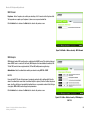
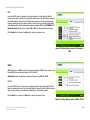
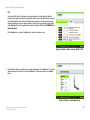
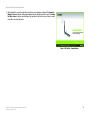
Figure 3-1: The Setup Wizard’s Welcome Screen
Figure 3-2: The License Agreement Screen
Figure 3-3: The Wireless Mode Screen
Figure 3-4: The Ad-Hoc Mode Settings Screen
Figure 3-5: The Wireless Security Screen
Figure 3-6: Wireless Security - WEP
Figure 3-7: Wireless Security - WPA Personal
Figure 3-8: Wireless Security - WPA2 Personal
Figure 3-9: Wireless Security - WPA Enterprise - EAP-TLS
Figure 3-10: Wireless Security - WPA Enterprise - PEAP
Figure 3-11: Wireless Security - RADIUS - EAP-TLS
Figure 3-12: Wireless Security - RADIUS - PEAP
Figure 3-13: The Check Settings Screen
Figure 3-14: The Windows Digital Signature Screen
Figure 3-15: The Congratulations Screen
Figure 4-1: Your Computer’s PCI slot with Adapter installed
Figure 4-2: Proper Positioning of the Antenna
Figure 5-1: The Link Information Tab
Figure 5-2: The Link Information Tab
Figure 5-3: The Link Information Tab - More Information
Figure 5-4: The Link Information Tab - Statistics
Figure 5-5: The Site Survey Tab
Figure 5-6: WEP Key Needed for Connection
Figure 5-7: WPA-Personal Needed for Connection
Figure 5-8: WPA2-Personal Needed for Connection
Figure 5-9: The Profiles Tab
Figure 5-10: Importing a Profile
Figure 5-11: Exporting a Profile
Figure 5-12: The Profiles Tab
Figure 5-13: Create Connection Profile
6
7
7
8
8
9
10
10
11
11
12
12
13
13
14
15
16
17
17
18
19
20
21
21
21
22
23
23
24
24
Wireless-G PCI Adapter with SpeedBooster
Figure 5-14: Profiles - Network Settings
Figure 5-15: Profiles - Wireless Mode
Figure 5-16: Profiles - Ad-Hoc Mode Settings
Figure 5-17: Profiles - Wireless Security
Figure 5-18: Profiles - Wireless Security - WEP
Figure 5-19: Profiles - Wireless Security - WPA Personal
Figure 5-20: Profiles - Wireless Security - WPA2 Personal
Figure 5-21: Profiles - Wireless Security - WPA Enterprise - EAP-TLS
Figure 5-22: Profiles - Wireless Security - WPA Enterprise - PEAP
Figure 5-23: Profiles - Wireless Security - RADIUS - EAP-TLS
Figure 5-24: Profiles - Wireless Security - RADIUS - PEAP
Figure 5-25: Profiles - Confirm New Settings
Figure 5-26: Profiles - Congratulations
Figure B-1: Wireless Network Monitor Icon
Figure B-2: Windows XP - Use Windows XP Wireless Configuration
Figure B-3: Windows XP - Use Linksys Wireless Network Monitor
Figure B-4: Windows XP Wireless Zero Configuratin Icon
Figure B-5: Network Connection - No WEP
Figure B-6: Network Connection - WEP
Figure B-7: Optional Settings
25
25
26
26
27
27
28
28
29
29
30
30
31
36
36
36
37
37
38
38
Wireless-G PCI Adapter with SpeedBooster
Chapter 1: Introduction
Welcome
Thank you for choosing the Wireless-G PCI Adapter. With this Adapter, your wireless networking experience will
be faster and easier than ever.
Like all wireless products, the Adapter allows for greater range and mobility within your wireless network. This
adapter communicates over the 54Mbps 802.11g wireless standard, which is almost five times faster than
802.11b. But since they share the same 2.4GHz radio band, the Adapter can also communicate with the widely
used 11Mbps 802.11b standard.
PCs equipped with wireless cards and adapters can communicate without cumbersome cables. By sharing the
same wireless settings, within their transmission radius, they form a wireless network.
The included Setup Wizard will walk you through configuring the adapter to your network's settings, step by step.
Then just slide it into your computer's PCI Card slot and enjoy network access with the freedom of wireless.
Once you're connected, you can keep in touch with your e-mail, access the Internet, and share files and other
resources such as printers and network storage with other computers on the network. At home, you can surf the
web or use instant messaging to chat with friends while sitting out on the patio. Your wireless connection is
protected by the new, industrial-strength security of Wireless Protected Access (WPA).
Get connected to current-standard 802.11b networks today, and be prepared for the future with the Wireless-G
PCI Adapter from Linksys.
Chapter 1: Introduction
Welcome
network: a series of computers or devices
connected for the purpose of data sharing,
storage, and/or transmission between users.
adapter: a device that adds network functionality
to your PC.
Mbps: one million bits per second; a unit of
measurement for data transmission
802.11g an IEEE wireless networking standard
that specifies a maximum data transfer rate of
54Mbps, an operating frequency of 2.4GHz, and
backward compatibility with 802.11b devices.
802.11b: an IEEE wireless networking standard
that specifies a maximum data transfer rate of
11Mbps and an operating frequency of 2.4GHz
1
Wireless-G PCI Adapter with SpeedBooster
What’s in this Guide?
This user guide covers the steps for setting up and using the Wireless-G PCI Adapter.
• Chapter 1: Introduction
This chapter describes the Adapter’s applications and this User Guide.
• Chapter 2: Planning Your Wireless Network
This chapter discusses a few of the basics about wireless networking.
• Chapter 3: Getting to Know the Wireless-G PCI Adapter
This chapter describes the physical features of the Adapter.
• Chapter 4: Software Installation and Configuration
This chapter instructs you on how to install the Adapter’s Setup Wizard and Configure the Adapter
• Chapter 5: Hardware Installation
This chapter shows you how to connect the Adapter to your PC.
• Chapter 6: Using the Wireless Network Monitor
This chapter show you how to use the Adapter’s Wireless Network Monitor.
• Appendix A: Troubleshooting
This appendix describes some problems and solutions, as well as frequently asked questions, regarding
installation and use of the Adapter.
• Appendix B: Windows XP Wireless Zero Configuration
This chapter instructs you on how to install Window XP Wireless Zero Configuration
• Appendix C: Wireless Security
This appendix discusses security issues regarding wireless networking and measures you can take to help
protect your wireless network.
• Appendix D: Windows Help
This appendix describes how you can use Windows Help for instructions about networking, such as installing
the TCP/IP protocol.
• Appendix E: Glossary
This appendix gives a brief glossary of terms frequently used in networking.
• Appendix F: Specifications
This appendix provides the Adapter’s technical specifications.
Chapter 1: Introduction
What’s in this Guide?
2
Wireless-G PCI Adapter with SpeedBooster
• Appendix G: Warranty Information
This appendix supplies the Adapter’s warranty information.
• Appendix H: Regulatory Information
This appendix supplies the Adapter’s regulatory information.
• Appendix I: Contact Information
This appendix provides contact information for a variety of Linksys resources, including Technical Support.
Chapter 1: Introduction
What’s in this Guide?
3
Wireless-G PCI Adapter with SpeedBooster
Chapter 2: Planning your Wireless Network
Network Topology
A wireless network is a group of computers, each equipped with one wireless adapter. Computers in a wireless
network must be configured to share the same radio channel. Several PCs equipped with wireless cards or
adapters can communicate with one another to form an ad-hoc network.
Linksys wireless adapters also provide users access to a wired network when using an access point or wireless
router. An integrated wireless and wired network is called an infrastructure network. Each wireless PC in an
infrastructure network can talk to any computer in a wired network infrastructure via the access point or wireless
router.
An infrastructure configuration extends the accessibility of a wireless PC to a wired network, and can double the
effective wireless transmission range for two wireless adapter PCs. Since an access point is able to forward data
within a network, the effective transmission range in an infrastructure network can be doubled.
topology: the physical layout of a network.
ad-hoc: a group of wireless devices
communicating directly with each other (peerto-peer) without the use of an access point.
access point: a device that allows wirelessequipped computers and other devices to
communicate with a wired network. Also used to
expand the range of a wireless network
infrastructure: a wireless network that is
bridged to a wired network via an access point.
Roaming
Infrastructure mode also supports roaming capabilities for mobile users. Roaming means that you can move your
wireless PC within your network and the access points will pick up the wireless PC's signal, providing that they
both share the same channel and SSID.
Before enabling you consider roaming, choose a feasible radio channel and optimum access point position.
Proper access point positioning combined with a clear radio signal will greatly enhance performance.
Chapter 2: Planning your Wireless Network
Network Topology
roaming: the ability to take a wireless device
from one access point's range to another without
losing the connection.
ssid: your wireless network's name.
4
Wireless-G PCI Adapter with SpeedBooster
Network Layout
Linksys wireless access points and wireless routers have been designed for use with 802.11a, 802.11b, and
802.11g products. With 802.11g products communicating with the 802.11b standard and some products
incorporating both “a” and “g”, products using these standards can communicate with each other.
Access points and wireless routers are compatible with 802.11a, 802.11b and 802.11g adapters, such at the PC
Cards for your laptop computers, PCI Card for your desktop PC, and USB Adapters for when you want to enjoy USB
connectivity. Wireless products will also communicate with the wireless PrintServer.
When you wish to connect your wired network with your wireless network, network ports on access points and
wireless routers can be connected to any of Linksys's switches or routers.
switch: a data switch that connects computing devices
to host computers, allowing a large number of devices
to share a limited number of ports
router: a networking device that connects multiple
networks together
With these, and many other, Linksys products, your networking options are limitless. Go to the Linksys website at
www.linksys.com for more information about wireless products.
Chapter 2: Planning your Wireless Network
Network Layout
5
Wireless-G PCI Adapter with SpeedBooster
Chapter 3: Software Installation and Configuration
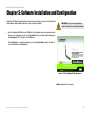
The Wireless-G PCI Adapter Setup Wizard will guide you through the installation procedure. The Setup Wizard will
install the Wireless Network Monitor and driver, as well as configure the Adapter.
IMPORTANT: You must run the Setup Wizard to
install the software before connecting the Adapter. .
1. Insert the Setup Wizard CD-ROM into your CD-ROM drive. The Setup Wizard should run automatically, and the
Welcome screen should appear. If it does not, click the Start button and choose Run. In the field that appears,
enter D:\setup.exe (if “D” is the letter of your CD-ROM drive).
Click the Install button to continue the installation process. Clicking User Guide opened this User Guide. To
close the Setup Wizard, click the Exit button.
Figure 3-1: The Setup Wizard’s Welcome Screen
software: Instructions for the computer.
Chapter 3: Software Installation and Configuration
6
Wireless-G PCI Adapter with SpeedBooster
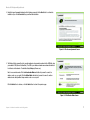
2. Read the License Agreement displayed on the following screen and click the Next button to continue the
installation. If you click the Cancel button, you will end the installation.
Figure 3-2: The License Agreement Screen
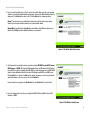
3. The Wireless Mode screen will ask for some information about your wireless network. In the SSID field, enter
your network’s SSID (Service Set Identifier). The SSID is your wireless network name and must be identical
for all devices in the network. The default setting is linksys (all lowercase).
Next, choose a wireless mode. Click the Infrastructure Mode radio button if you want to connect to a
wireless router or access point. Click the Ad-Hoc Mode radio button if you want to connect to another
wireless device directly without using a wireless router or access point.
Click the Next button to continue, or click the Back button to return to the previous page.
Figure 3-3: The Wireless Mode Screen
Chapter 3: Software Installation and Configuration
7
Wireless-G PCI Adapter with SpeedBooster
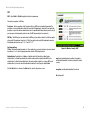
4. If you chose Infrastructure Mode, go to Step 5 now. If you chose Ad-Hoc Mode, select the correct operating
channel for your network from the Channel drop-down menu. Then, select the Network Mode from the dropdown menu. Click the Next button, and go to Step 5. Click the Back button to change any settings.
Channel - The channel you choose should match the channel set on the other devices in your wireless
network. If you are unsure about which channel to use, leave the default channel.
Network Mode - Keep the default setting, Mixed, if you have Wireless-G and Wireless-B devices in your
network. Select G-Only if you have only Wireless-G devices in your network.
Figure 3-4: The Ad-Hoc Mode Settings Screen
5. Select the method of security that is used on your wireless network: WEP, WPA-Personal, WPA2-Personal,
WPA-Enterprise, or RADIUS. WEP stands for Wired Equivalent Privacy, and WPA stands for Wi-Fi Protected
Access. WPA is a stronger security method than WEP. WPA2 is a newer and stronger version of WPA. RADIUS
stands for Remote Authentication Dial-In User Service. WPA-Enterprise and RADIUS use a RADIUS server.
Click the Next button to continue or the Back button to return to the previous screen. For more information
about the information on this screen, you can also click the Help button.
If you don’t want to use encryption, select Disabled and then click the Next button. Proceed to Step 8.
6. Proceed to the appropriate section for your security method: WEP, WPA-Personal, WPA2-Personal, WPAEnterprise, or RADIUS.
Figure 3-5: The Wireless Security Screen
Chapter 3: Software Installation and Configuration
8
Wireless-G PCI Adapter with SpeedBooster
WEP
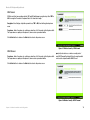
WEP - Select 64-bit or 128-bit encryption from the drop-down menu.
Then enter a passphrase or WEP key.
Passphrase - Enter a passphrase in the Passphrase field, so a WEP key is automatically generated. The
passphrase is case-sensitive and should not be longer than 16 alphanumeric characters. It must match the
passphrase of your other wireless network devices and is compatible with Linksys wireless products only. (If
you have any non-Linksys wireless products, enter the WEP key manually on those products.)
WEP Key - The WEP key you enter must match the WEP key of your wireless network. For 64-bit encryption,
enter exactly 10 hexadecimal characters. For 128-bit encryption, enter exactly 26 hexadecimal characters.
Valid hexadecimal characters are “0” to “9” and “A” to “F”.
For Advanced Users
TX Key - The default transmit key number is 1. If your network’s access point or wireless router uses transmit
key number 2, 3, or 4, select the appropriate number from the TX Key drop-down box.
Authentication -The default is set to Auto, so it will auto-detect for Shared Key or Open System
authentication. For Shared Key authentication, both the sender and the recipient share a WEP key for
authentication. For Open System authentication, the sender and the recipient do not share a WEP key for
authentication. If you are not sure which authentication method to select, keep the default, Auto.
Click the Next button to continue or the Back button to return to the previous screen.
Figure 3-6: Wireless Security - WEP
wep (wired equivalent privacy): a method of encrypting
network data transmitted on a wireless network for greater
security.
encryption: encoding data transmitted in a network.
bit: a binary digit
Chapter 3: Software Installation and Configuration
9
Wireless-G PCI Adapter with SpeedBooster
WPA Personal
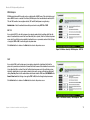
WPA Personal offers two encryption methods, TKIP and AES, with dynamic encryption keys. Select TKIP or
AES for encryption. Then enter a Passphrase that is 8-63 characters in length.
Encryption - Select the type of algorithm you want to use, TKIP or AES, from the Encryption drop-down
menu.
Passphrase - Enter a Passphrase, also called a pre-shared key, of 8-63 characters in the Passphrase field.
The longer and more complex your Passphrase is, the more secure your network will be.
Click the Next button to continue or the Back button to return to the previous screen.
Figure 3-7: Wireless Security - WPA Personal
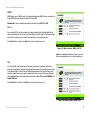
WPA2 Personal
Passphrase - Enter a Passphrase, also called a pre-shared key, of 8-63 characters in the Passphrase field.
The longer and more complex your Passphrase is, the more secure your network will be.
wpa (wi-fi protected access: a wireless security protocol
using TKIP (Temporal Key Integrity Protocol) encryption, which
can be used in conjunction with a RADIUS server.
Click the Next button to continue or the Back button to return to the previous screen.
Figure 3-8: Wireless Security - WPA2 Personal
Chapter 3: Software Installation and Configuration
10
Wireless-G PCI Adapter with SpeedBooster
WPA Enterprise
WPA Enterprise features WPA security used in coordination with a RADIUS server. (This should only be used
when a RADIUS server is connected to the Router.) WPA Enterprise offers two authentication methods, EAPTLS and PEAP, as well as two encryption methods, TKIP and AES, with dynamic encryption keys.
Authentication - Select the authentication method your network is using, EAP-TLS or PEAP.
EAP-TLS
If you selected EAP-TLS, enter the login name of your wireless network in the Login Name field. Enter the
name of the authentication server in the Server Name field (this is optional). From the Certificate drop-down
menu, select the certificate you have installed to authenticate you on your wireless network. Select the type
of encryption, TKIP or AES, from the Encryption drop-down menu.
Click the Next button to continue or the Back button to return to the previous screen.
Figure 3-9: Wireless Security - WPA Enterprise - EAP-TLS
PEAP
If you selected PEAP, enter the login name of your wireless network in the Login Name field. Enter the
password of your wireless network in the Password field. Enter the name of the authentication server in the
Server Name field (this is optional). From the Certificate drop-down menu, select the certificate you have
installed to authenticate you on your wireless network; if you want to use any certificate, keep the default
setting, Trust Any. Then select the authentication method used inside the PEAP tunnel, EAP-MSCHAP v2 or
Generic Token Card. Select the type of encryption, TKIP or AES, from the Encryption drop-down menu.
Click the Next button to continue or the Back button to return to the previous screen
Figure 3-10: Wireless Security - WPA Enterprise - PEAP
Chapter 3: Software Installation and Configuration
11
Wireless-G PCI Adapter with SpeedBooster
RADIUS
RADIUS features use of a RADIUS server. (This should only be used when a RADIUS server is connected to the
Router.) RADIUS offers two authentication types: EAP-TLS and PEAP.
Authentication - Select the authentication method your network is using, EAP-TLS or PEAP.
EAP-TLS
If you selected EAP-TLS, enter the login name of your wireless network in the Login Name field. Enter the
name of the authentication server in the Server Name field (this is optional). From the Certificate drop-down
menu, select the certificate you have installed to authenticate you on your wireless network.
Click the Next button to continue or the Back button to return to the previous screen.
Figure 3-11: Wireless Security - RADIUS - EAP-TLS
radius (remote authentication dial-in user service): a protocol
that uses an authentication server to control network access.
PEAP
If you selected PEAP, enter the login name of your wireless network in the Login Name field. Enter the
password of your wireless network in the Password field. Enter the name of the authentication server in the
Server Name field (this is optional). From the Certificate drop-down menu, select the certificate you have
installed to authenticate you on your wireless network; if you want to use any certificate, keep the default
setting, Trust Any. Then select the authentication method used inside the PEAP tunnel, EAP-MSCHAP v2 or
Generic Token Card.
Click the Next button to continue or the Back button to return to the previous screen.
Figure 3-12: Wireless Security - RADIUS - PEAP
Chapter 3: Software Installation and Configuration
12
Wireless-G PCI Adapter with SpeedBooster
7. The Setup Wizard will ask you to review your settings before it starts to copy files. Click the Next button to
save these settings, or click the Back button to change any settings.
Figure 3-13: The Check Settings Screen
8. For Windows 2000 users, a screen stating that a digital signature was not found may appear. This software
has been tested and found to work properly with Windows 2000. Click the Yes button to continue installation.
Figure 3-14: The Windows Digital Signature Screen
Chapter 3: Software Installation and Configuration
13
Wireless-G PCI Adapter with SpeedBooster
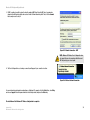
9. After the files have been successfully copied, the Congratulations screen will appear. Click the Exit button.
Figure 3-15: The Congratulations Screen
Now that the software installation is complete, proceed to Chapter 4: Connecting the Wireless-G PCI Adapter.
Chapter 3: Software Installation and Configuration
14
Wireless-G PCI Adapter with SpeedBooster
Chapter 4: Connecting the PCI Adapter
1. Before connecting the PCI Adapter to your PC, turn off your desktop PC.
2. Open your PC case and locate an available PCI slot on the motherboard. Check with your computer
manufacturer for instructions.
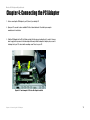
3. Slide the PCI Adapter into the PCI slot. Make sure that all of its pins are touching the slot's contacts. You may
have to apply a bit of pressure to slide the adapter all the way in. After the adapter is firmly in place, secure its
fastening tab to your PC's chassis with a mounting screw. Then, close your PC.
Figure 4-1: Your Computer’s PCI slot with Adapter installed
Chapter 4: Connecting the PCI Adapter
15
Wireless-G PCI Adapter with SpeedBooster
4. Attach the external antenna to the adapter’s antenna port.
port: the connection point on a computer or networking
device used for plugging in a cable or an adapter.
Figure 4-2: Proper Positioning of the Antenna
5. Power on your desktop PC.
6. For Windows 2000 users, a screen stating that a digital signature was not found may appear. This software
has been tested and found to work properly with Windows 2000. Click the Yes button to continue installation
The installation of the Wireless-G PCI Adapter is complete. If you want to check the link information, search for
available wireless networks, or make additional configuration changes, proceed to “Chapter 5: Using the Wireless
Network Monitor.”
Chapter 4: Connecting the PCI Adapter
16
Wireless-G PCI Adapter with SpeedBooster
Chapter 5: Using the Wireless Network Monitor
Overview
Use the Wireless Network Monitor to check the link information, search for available wireless networks, or create
profiles that hold different configuration settings.
Accessing the Wireless Network Monitor
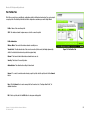
After installing the Adapter’s Setup Wizard, the Wireless Network Monitor icon will appear in your system tray. If
the Wireless Network Monitor is enabled, then the icon will be green. If the Wireless Network Monitor is disabled
or the Adapter is not connected, then the icon will be gray.
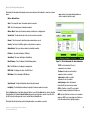
Figure 5-1: The Link Information Tab
Double-click the icon. The Link Information tab will appear. From this tab, you can find out the strength of the
current wireless signal as well as its quality. You can also click the More Information button to view additional
status information about the current wireless connection. To search for available wireless networks, click the
Site Survey tab. To perform configuration changes, click the Profiles tab.
The Link Information Tab
The Link Information tab displays the signal strength and link quality information about the current connection
and provides a button to click for additional status information.
Ad-Hoc Mode or Infrastructure Mode - The screen indicates whether the Adapter is currently working in adhoc or infrastructure mode.
Signal Strength - The Signal Strength bar indicates the signal strength.
Link Quality - The Link Quality bar indicates the quality of the wireless network connection.
Click the More Information button to view more information about the wireless network connection.
Click the X (Close) button in the upper right corner to exit the Wireless Network Monitor.
Figure 5-2: The Link Information Tab
Chapter 5: Using the Wireless Network Monitor
Overview
17
Wireless-G PCI Adapter with SpeedBooster
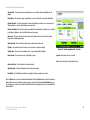
Clicking the More Information button displays much more information about the Adapter’s connection, as shown
below:
wep: a method of encrypting data transmitted on a
wireless network for greater security.
Wireless Network Status
Status - This shows the status of the wireless network connection.
SSID - This is the unique name of the wireless network.
Wireless Mode - The mode of the wireless network currently in use is displayed here.
Transfer Rate - The data transfer rate of the current connection is shown here.
Channel - This is the channel to which the wireless network devices are set.
Security - The status of the WEP encryption security feature is shown here.
Authentication - This is your wireless network’s authentication method.
IP Address - This shows the Adapter’s IP Address.
Subnet Mask - This shows the Adapter’s Subnet Mask.
Default Gateway - This is the Adapter’s Default Gateway address.
DNS - The DNS address of the Adapter is displayed here.
DHCP Client- This displays the status of the DHCP client.
MAC Address- This is the Adapter’s MAC Address.
Signal Strength - The Signal Strength bar indicates the signal strength.
Link Quality - The Link Quality bar indicates the quality of the wireless network connection.
Click the Statistic button for the Wireless Network Statistics screen. Click the Back button to return to the initial
Link Information tab. Clicking the Save to Profile button save the currently active connection to a profile. Click
the X (Close) button in the upper right corner to exit the Wireless Network Monitor.
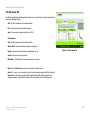
Clicking the Statistics button brings up the following information on your wireless connection:
Chapter 5: Using the Wireless Network Monitor
The Link Information Tab
Figure 5-3: The Link Information Tab - More Information
TCP/IP: a set of instructions PCs use to
communicate over a network.
IP address: the address used to identify a
computer or device on a network
subnet mask: an address code that
determines the size of a network
default gateway: a device that forwards
Internet traffic from your local area network
DNS: the IP address of your ISP's server, which
translates the names of websites into IP addresses.
DHCP: a protocol that lets one device on a local network,
known as a DHCP server, assign temporary IP addresses
to the other network devices, typically computers.
18
Wireless-G PCI Adapter with SpeedBooster
Transmit Rate - This shows the speed, in megabits per second, at which data is transmitted from the
Adapter.
Receive Rate - This shows the speed, in megabits per second, at which data is received by the Adapter.
Packets Received - This shows the packets received by the Adapter, in real time, since connecting to the
Wireless Network or since the Refresh button was last pressed.
Packets Transmitted - This shows the packets transmitted from the Adapter, in real time, since connecting
to the Wireless Network or since the Refresh button was last pressed.
Noise Level - This shows the level of background noise affecting the wireless signal. A lower reading
translates into a higher quality signal.
Signal Strength - This is the intensity of the wireless signal received by the card.
Up Time - This shows the period of the most recent connection to a wireless network.
Figure 5-4: The Link Information Tab - Statistics
Total Up Time - This shows the cummulative total of connection time with the Adapter.
Driver Version - This shows the version of the Adapter’s driver.
packet: a unit of data sent over a network
byte: a unit of data that is usually eight bits long
Refresh Statistics - Click this button to refresh the statistics.
Signal Strength - The Signal Strength bar indicates the signal strength.
Link Quality - The Link Quality bar indicates the quality of the wireless network connection.
Click the Back button to return to the initial Link Information tab. Click the Status button to return to the Wireless
Network Status screen of information about your wireless connection. Clicking the Save to Profile button save
the currently active connection to a profile. Click the X (Close) button in the upper right corner to exit the Wireless
Network Monitor.
Chapter 5: Using the Wireless Network Monitor
The Link Information Tab
19
Wireless-G PCI Adapter with SpeedBooster
The Site Survey Tab
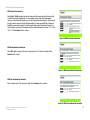
The Site Survey tab displays available networks and allows you to connect to them. The information about these
networks are displayed as below:
SSID - The SSID or unique name of the wireless network.
CH - The channel upon which the network broadcasts.
Signal - The percentage of signal strength, from 0 to 100%.
Site Information
SSID - The SSID or unique name of the wireless network.
Wireless Mode - The mode of the wireless network currently in use.
Channel - The channel to which the wireless network devices are set.
Figure 5-5: The Site Survey Tab
Security - The status of the security feature.
MAC Address - The MAC address of the wireless network’s access point.
Refresh - Click the Refresh button to perform a new search for wireless devices.
Connect - To connect to one of the networks on the list, select the wireless network (by SSID), and click the
Connect button. If the wireless network has WEP encryption, WPA, or WPA2 enabled, you will need to
configure the wireless security with that network. For more information, refer to the following section.
Chapter 5: Using the Wireless Network Monitor
The Site Survey Tab
20
Wireless-G PCI Adapter with SpeedBooster
WEP Key Needed for Connection
Select 64-bit or 128-bit encryption from the drop-down menu. Enter a passphrase in the Passphrase field,
so a WEP key is automatically generated. It is case-sensitive, cannot be longer than 16 alphanumeric
characters, and must match the passphrase of your other Linksys wireless network devices. (If you have any
non-Linksys wireless products, enter the WEP key manually.) If you enter a manual WEP key, it must match
the WEP key of your wireless network. For 64-bit encryption, enter exactly 10 hexadecimal characters. For
128-bit encryption, enter exactly 26 hexadecimal characters. Valid hexadecimal characters are “0” to “9” and
“A” to “F”. Click the Connect button to continue.
Figure 5-6: WEP Key Needed for Connection
WPA-Personal Needed for Connection
Select TKIP or AES for encryption. Then enter a Passphrase that is 8-63 characters in length. Click the
Connect button to continue.
Figure 5-7: WPA-Personal Needed for Connection
WPA2-Personal Needed for Connection
Enter a Passphrase that is 8-63 characters in length. Click the Connect button to continue.
Figure 5-8: WPA2-Personal Needed for Connection
Chapter 5: Using the Wireless Network Monitor
The Site Survey Tab
21
Wireless-G PCI Adapter with SpeedBooster
The Profiles Tab
The Profiles screen lets you save different configuration profiles for different network setups. You can also import
or export profiles. The default profile holds the initial configuration saved when you ran the Setup Wizard.
Profile - Name of the connection profile.
SSID - The wireless network’s unique name, as set in the connection profile.
Profile Information
Wireless Mode - The mode of the wireless network currently in use.
Transfer Rate - The data transfer rate of the current connection. (In Auto mode, the Adapter dynamically
shifts to the fastest data transfer rate possible at any given time.)
Figure 5-9: The Profiles Tab
Channel - The channel to which the wireless network devices are set.
Security - The status of the security feature.
Authentication - The authentication setting for the network.
Connect - To connect to a wireless network using a specific profile, select the profile, and click the Connect
button.
New - Click the New button to create a new profile. See the next section, “Creating a New Profile,” for
detailed instructions.
Edit - Select a profile, and click the Edit button to change an existing profile.
Chapter 5: Using the Wireless Network Monitor
The Profiles Tab
22
Wireless-G PCI Adapter with SpeedBooster
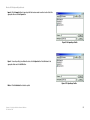
Import - Click the Import button to import a profile that has been saved in another location. Select the
appropriate file and click the Open button.
Figure 5-10: Importing a Profile
Export - To save the profile(s) in a different location, click the Export button. Direct Windows to the
appropriate folder and click the OK button.
Figure 5-11: Exporting a Profile
Delete - Click the Delete button to delete a profile.
Chapter 5: Using the Wireless Network Monitor
The Profiles Tab
23
Wireless-G PCI Adapter with SpeedBooster
Creating a New Profile
1. On the Profiles tab, click the New button to create a new profile.
Figure 5-12: The Profiles Tab
2. When the Create connection profile screen appears, enter a name for the new profile. Click OK to save the
profile name or click Cancel to return to the previous screen.
Figure 5-13: Create Connection Profile
Chapter 5: Using the Wireless Network Monitor
Creating a New Profile
24
Wireless-G PCI Adapter with SpeedBooster
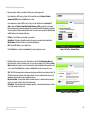
3. Enter your network’s settings on the Network Settings screen, which appears next.
If your network has a DHCP server (or Router), click the radio button next to Obtain an IP address
automatically (DHCP) and click the Next button to continue.
If your network does not have a DHCP server (or router), click the radio button next to Specify the IP
address. Enter an IP Address, Subnet Mask, Default Gateway, and DNS appropriate for your network.
Enter each address in this format: xxx.xxx.xxx.xxx (the x’s represent the numbers that make up each address).
You must specify the IP Address and Subnet Mask on this screen. If you are unsure about the Default Gateway
and DNS addresses, then leave these fields alone.
IP Address - This IP Address must be unique to your network.
Subnet Mask - The Adapter’s Subnet Mask must be the same as your wired network’s Subnet Mask.
Default Gateway - Enter the IP address of your network’s Gateway here.
DNS - Enter the DNS addresses of your network here.
Click the Next button to continue or the Cancel button to return to the previous screen.
Figure 5-14: Profiles - Network Settings
4. The Wireless Mode screen shows a choice of two wireless modes. Click the Infrastructure Mode radio
button if you want to connect to a wireless router or access point, and continue to Step 6. Click the Ad-Hoc
Mode radio button if you want to connect to another wireless device directly without using a wireless router
or access point. Click the Next button to continue or the Back button to return to the previous screen.
SSID - The SSID is the unique wireless network name shared among all devices in your wireless network. The
SSID must be identical for all devices in the wireless network. It is case-sensitive and must not exceed 32
alphanumeric characters, which can be any keyboard character.
Infrastructure Mode - This mode allows wireless and wired networks to communicate through a wireless
router or access point. Continue to Step 6 if selecting this mode.
Ad-Hoc Mode - This mode allows wireless-equipped computers to communicate directly with each other. No
access point or wireless router is used.
Figure 5-15: Profiles - Wireless Mode
Chapter 5: Using the Wireless Network Monitor
Creating a New Profile
25
Wireless-G PCI Adapter with SpeedBooster
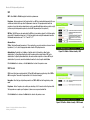
5. The Ad-Hoc Mode Settings screen, for those who chose an Ad-hoc network, will appear next. Select the
correct operating channel for your network from the Channel drop-down menu. Then, select the Network
Mode from the drop-down menu. Click the Next button to continue or click the Back button to change any
settings.
Channel - The channel you choose should match the channel set on the other devices in your wireless
network. If you are unsure about which channel to use, leave the default channel.
Network Mode - Select Mixed Mode, and both Wireless-G and Wireless-B computers will be allowed on the
network, but the speed will be reduced. Select G-Only Mode for maximum speed, but no Wireless-B users
will be allowed on the network.
Figure 5-16: Profiles - Ad-Hoc Mode Settings
6. Select the method of security that is used on your wireless network: WEP, WPA-Personal, WPA2-Personal,
WPA-Enterprise, or RADIUS. WEP stands for Wired Equivalent Privacy, and WPA stands for Wi-Fi Protected
Access. WPA is a stronger security method than WEP. WPA2 is a newer and stronger version of WPA. RADIUS
stands for Remote Authentication Dial-In User Service. WPA-Enterprise and RADIUS use a RADIUS server.
Click the Next button to continue or the Back button to return to the previous screen. For more information
about the information on this screen, you can also click the Help button.
If you don’t want to use encryption, select Disabled and then click the Next button to continue. Proceed to
Step 9.
7. Proceed to the appropriate section for your security method: WEP, WPA-Personal, WPA2-Personal, WPAEnterprise, or RADIUS.
Figure 5-17: Profiles - Wireless Security
Chapter 5: Using the Wireless Network Monitor
Creating a New Profile
26
Wireless-G PCI Adapter with SpeedBooster
WEP
WEP - Select 64-bit or 128-bit encryption from the drop-down menu.
Passphrase - Enter a passphrase in the Passphrase field, so a WEP key is automatically generated. It is casesensitive and should not be longer than 16 alphanumeric characters. This passphrase must match the
passphrase of your other wireless network devices and is compatible with Linksys wireless products only. (If
you have any non-Linksys wireless products, enter the WEP key manually on those products.)
WEP Key - The WEP key you enter must match the WEP key of your wireless network. For 64-bit encryption,
enter exactly 10 hexadecimal characters. For 128-bit encryption, enter exactly 26 hexadecimal characters.
Valid hexadecimal characters are “0” to “9” and “A” to “F”.
Advanced Users
TX Key - The default transmit key number is 1. If your network’s access point or wireless router uses transmit
key number 2, 3, or 4, select the appropriate number from the TX Key drop-down box.
Authentication -The default is set to Auto, so it will auto-detect for Shared Key or Open System
authentication. For Shared Key authentication, both the sender and the recipient share a WEP key for
authentication. For Open System authentication, the sender and the recipient do not share a WEP key for
authentication. If you are not sure which authentication method to select, keep the default, Auto.
Figure 5-18: Profiles - Wireless Security - WEP
Click the Next button to continue, or click the Back button to return to the previous screen.
WPA Personal
WPA Personal offers two encryption methods, TKIP and AES, with dynamic encryption keys. Select TKIP or
AES for encryption. Then enter a Passphrase that is 8-63 characters in length.
Encryption - Select the type of algorithm you want to use, TKIP or AES, from the Encryption drop-down
menu.
Passphrase - Enter a Passphrase, also called a pre-shared key, of 8-63 characters in the Passphrase field.
The longer and more complex your Passphrase is, the more secure your network will be.
Click the Next button to continue or the Back button to return to the previous screen.
Figure 5-19: Profiles - Wireless Security - WPA Personal
Chapter 5: Using the Wireless Network Monitor
Creating a New Profile
27
Wireless-G PCI Adapter with SpeedBooster
WPA2 Personal
Passphrase - Enter a Passphrase, also called a pre-shared key, of 8-63 characters in the Passphrase field.
The longer and more complex your Passphrase is, the more secure your network will be.
Click the Next button to continue or the Back button to return to the previous screen.
Figure 5-20: Profiles - Wireless Security - WPA2 Personal
WPA Enterprise
WPA Enterprise features WPA security used in coordination with a RADIUS server. (This should only be used
when a RADIUS server is connected to the Router.) WPA Enterprise offers two authentication methods, EAPTLS and PEAP, as well as two encryption methods, TKIP and AES, with dynamic encryption keys.
Authentication - Select the authentication method your network is using, EAP-TLS or PEAP.
EAP-TLS
If you selected EAP-TLS, enter the login name of your wireless network in the Login Name field. Enter the
name of the authentication server in the Server Name field (this is optional). From the Certificate drop-down
menu, select the certificate you have installed to authenticate you on your wireless network. Select the type
of encryption, TKIP or AES, from the Encryption drop-down menu.
Click the Next button to continue or the Back button to return to the previous screen.
Figure 5-21: Profiles - Wireless Security - WPA Enterprise EAP-TLS
Chapter 5: Using the Wireless Network Monitor
Creating a New Profile
28
Wireless-G PCI Adapter with SpeedBooster
PEAP
If you selected PEAP, enter the login name of your wireless network in the Login Name field. Enter the
password of your wireless network in the Password field. Enter the name of the authentication server in the
Server Name field (this is optional). From the Certificate drop-down menu, select the certificate you have
installed to authenticate you on your wireless network; if you want to use any certificate, keep the default
setting, Trust Any. Then select the authentication method used inside the PEAP tunnel, EAP-MSCHAP v2 or
Generic Token Card. Select the type of encryption, TKIP or AES, from the Encryption drop-down menu.
Click the Next button to continue or the Back button to return to the previous screen.
Figure 5-22: Profiles - Wireless Security - WPA Enterprise PEAP
RADIUS
RADIUS features use of a RADIUS server. (This should only be used when a RADIUS server is connected to the
Router.) RADIUS offers two authentication types: EAP-TLS and PEAP.
Authentication - Select the authentication method your network is using, EAP-TLS or PEAP.
EAP-TLS
If you selected EAP-TLS, enter the login name of your wireless network in the Login Name field. Enter the
name of the authentication server in the Server Name field (this is optional). From the Certificate drop-down
menu, select the certificate you have installed to authenticate you on your wireless network.
Click the Next button to continue or the Back button to return to the previous screen.
Figure 5-23: Profiles - Wireless Security - RADIUS - EAP-TLS
Chapter 5: Using the Wireless Network Monitor
Creating a New Profile
29
Wireless-G PCI Adapter with SpeedBooster
PEAP
If you selected PEAP, enter the login name of your wireless network in the Login Name field. Enter the
password of your wireless network in the Password field. Enter the name of the authentication server in the
Server Name field (this is optional). From the Certificate drop-down menu, select the certificate you have
installed to authenticate you on your wireless network; if you want to use any certificate, keep the default
setting, Trust Any. Then select the authentication method used inside the PEAP tunnel, EAP-MSCHAP v2 or
Generic Token Card.
Click the Next button to continue or the Back button to return to the previous screen.
Figure 5-24: Profiles - Wireless Security - RADIUS - PEAP
8. The Confirm New Settings screen will appear. To save the new settings, click the Save button. To cancel the
settings and return to the Profiles screen, click the Exit button. To edit the new settings, click the Back
button.
Figure 5-25: Profiles - Confirm New Settings
Chapter 5: Using the Wireless Network Monitor
Creating a New Profile
30
Wireless-G PCI Adapter with SpeedBooster
9. The Congratulations screen shows that the new Profile has successfully been configured. Click Connect to
Network to implement the new settings immediately and return to the Link Information screen. Click Return
to Profiles Screen to keep the current settings active, and return to the Profiles screen so that you can edit
your profile or create another profile.
Figure 5-26: Profiles - Congratulations
Chapter 5: Using the Wireless Network Monitor
Creating a New Profile
31
Wireless-G PCI Adapter with SpeedBooster
Appendix A: Troubleshooting
This appendix consists of two parts: “Common Problems and Solutions” and “Frequently Asked Questions.” This
appendix provides solutions to problems that may occur during the installation and operation of the Wireless-G
PCI Adapter. Read the description below to solve your problems. If you can't find an answer here, check the
Linksys website at www.linksys.com.
Common Problems and Solutions
1. The Wireless-G PCI Adapter does not work properly.
• Reinsert the Wireless-G PCI Adapter into your PC’s PCI slot.
• Right click on My Computer and select Properties. Select the device manager and click on the Network
Adapter. You will find the Wireless-G PCI Adapter if it is installed successfully. If you see the yellow
exclamation mark, the resources are conflicting. You will see the status of the Wireless-G PCI Adapter. If
there is a yellow question mark, please check the following:
• Make sure that your PC has a free IRQ (Interrupt ReQuest, a hardware interrupt on a PC.)
• Make sure that you have inserted the right adapter and installed the proper driver.
If the Wireless-G PCI Adapter does not function after attempting the above steps, remove the adapter and do
the following:
• Uninstall the driver software from your PC.
• Restart your PC and repeat the hardware and software installation as specified in this User Guide.
2. I cannot communicate with the other computers linked via Ethernet in the Infrastructure
configuration.
• Make sure that the PC to which the Wireless-G PCI Adapter is associated is powered on.
• Make sure that your Wireless-G PCI Adapter is configured on the same channel and with the same
security options as with the other computers in the Infrastructure configuration.
Appendix A: Troubleshooting
Common Problems and Solutions
32
Wireless-G PCI Adapter with SpeedBooster
Frequently Asked Questions
Can I run an application from a remote computer over the wireless network?
This will depend on whether or not the application is designed to be used over a network. Consult the
application’s user guide to determine if it supports operation over a network.
Can I play computer games with other members of the wireless network?
Yes, as long as the game supports multiple players over a LAN (local area network). Refer to the game’s user
guide for more information.
What is the IEEE 802.11b standard?
It is one of the IEEE standards for wireless networks. The 802.11b standard allows wireless networking hardware
from different manufacturers to communicate, provided that the hardware complies with the 802.11b standard.
The 802.11b standard states a maximum data transfer rate of 11Mbps and an operating frequency of 2.4GHz.
What is the IEEE 802.11g standard?
It is one of the IEEE standards for wireless networks. The 802.11g standard allows wireless networking hardware
from different manufacturers to communicate, provided that the hardware complies with the 802.11g standard.
The 802.11g standard states a maximum data transfer rate of 54Mbps and an operating frequency of 2.4GHz.
What IEEE 802.11b features are supported?
The product supports the following IEEE 802.11b functions:
• CSMA/CA plus Acknowledge protocol
• Multi-Channel Roaming
• Automatic Rate Selection
• RTS/CTS feature
• Fragmentation
• Power Management
•
What IEEE 802.11g features are supported?
The product supports the following IEEE 802.11g functions:
• CSMA/CA plus Acknowledge protocol
• OFDM protocol
• Multi-Channel Roaming
• Automatic Rate Selection
• RTS/CTS feature
• Fragmentation
• Power Management
Appendix A: Troubleshooting
Frequently Asked Questions
33
Wireless-G PCI Adapter with SpeedBooster
What is ad-hoc mode?
When a wireless network is set to ad-hoc mode, the wireless-equipped computers are configured to
communicate directly with each other. The ad-hoc wireless network will not communicate with any wired
network.
What is infrastructure mode?
When a wireless network is set to infrastructure mode, the wireless network is configured to communicate with a
wired network through a wireless access point.
What is roaming?
Roaming is the ability of a portable computer user to communicate continuously while moving freely throughout
an area greater than that covered by a single access point. Before using the roaming function, the workstation
must make sure that it is the same channel number with the access point of dedicated coverage area.
To achieve true seamless connectivity, the wireless LAN must incorporate a number of different functions. Each
node and access point, for example, must always acknowledge receipt of each message. Each node must
maintain contact with the wireless network even when not actually transmitting data. Achieving these functions
simultaneously requires a dynamic RF networking technology that links access points and nodes. In such a
system, the user’s end node undertakes a search for the best possible access to the system. First, it evaluates
such factors as signal strength and quality, as well as the message load currently being carried by each access
point and the distance of each access point to the wired backbone. Based on that information, the node next
selects the right access point and registers its address. Communications between end node and host computer
can then be transmitted up and down the backbone.
As the user moves on, the end node’s RF transmitter regularly checks the system to determine whether it is in
touch with the original access point or whether it should seek a new one. When a node no longer receives
acknowledgment from its original access point, it undertakes a new search. Upon finding a new access point, it
then re-registers, and the communication process continues.
What is ISM band?
The FCC and their counterparts outside of the U.S. have set aside bandwidth for unlicensed use in the ISM
(Industrial, Scientific and Medical) band. Spectrum in the vicinity of 2.4 GHz, in particular, is being made available
worldwide. This presents a truly revolutionary opportunity to place convenient high-speed wireless capabilities in
the hands of users around the globe.
What is Spread Spectrum?
Spread Spectrum technology is a wideband radio frequency technique developed by the military for use in
reliable, secure, mission-critical communications systems. It is designed to trade off bandwidth efficiency for
reliability, integrity, and security. In other words, more bandwidth is consumed than in the case of narrowband
transmission, but the trade-off produces a signal that is, in effect, louder and thus easier to detect, provided that
Appendix A: Troubleshooting
Frequently Asked Questions
34
Wireless-G PCI Adapter with SpeedBooster
the receiver knows the parameters of the spread-spectrum signal being broadcast. If a receiver is not tuned to
the right frequency, a spread-spectrum signal looks like background noise. There are two main alternatives,
Direct Sequence Spread Spectrum (DSSS) and Frequency Hopping Spread Spectrum (FHSS).
What is DSSS? What is FHSS? And what are their differences?
Frequency-Hopping Spread-Spectrum (FHSS) uses a narrowband carrier that changes frequency in a pattern that
is known to both transmitter and receiver. Properly synchronized, the net effect is to maintain a single logical
channel. To an unintended receiver, FHSS appears to be short-duration impulse noise. Direct-Sequence SpreadSpectrum (DSSS) generates a redundant bit pattern for each bit to be transmitted. This bit pattern is called a chip
(or chipping code). The longer the chip, the greater the probability that the original data can be recovered. Even if
one or more bits in the chip are damaged during transmission, statistical techniques embedded in the radio can
recover the original data without the need for retransmission. To an unintended receiver, DSSS appears as low
power wideband noise and is rejected (ignored) by most narrowband receivers.
Would the information be intercepted while transmitting on air?
The Adapter features two-fold protection in security. On the hardware side, as with Direct Sequence Spread
Spectrum technology, it has the inherent security feature of scrambling. On the software side, the Adapter offers
the encryption function (WEP) to enhance security and access control.
What is WEP?
WEP is Wired Equivalent Privacy, a data privacy mechanism based on a shared key algorithm, as described in the
IEEE 802.11 standard. For more information, refer to “Appendix C: Wireless Security.”
What is WPA?
WPA is Wi-Fi Protected Access, a wireless security protocol that can be used in conjunction with a RADIUS server.
For more information, refer to “Appendix C: Wireless Security.”
What is RADIUS?
RADIUS is Remote Authentication Dial-In User Service, which uses an authentication server to control network
access. For more information, refer to “Appendix C: Wireless Security.”
Appendix A: Troubleshooting
Frequently Asked Questions
35
Wireless-G PCI Adapter with SpeedBooster
Appendix B: Windows XP Wireless Zero Configuration
Windows XP Wireless Zero Configuration
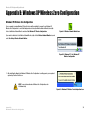
If your computer is running Windows XP, then this choice will be available. If you want to use Windows XP
Wireless Zero Configuration to control the Adapter, instead of using the Wireless Network Monitor, then rightclick on the Wireless Network Monitor and select Use Windows XP Wireless Configuration.
Figure B-1: Wireless Network Monitor Icon
If you want to switch back to the Wireless Network Monitor, right-click the Wireless Network Monitor icon, and
select Use Linksys Wireless Network Monitor.
Figure B-2: Windows XP - Use Windows XP
Wireless Configuration
1. After installing the Adapter, the Windows XP Wireless Zero Configuration icon will appear in your computer’s
system tray. Double-click the icon.
NOTE: For more information about Wireless Zero Configuration, refer
to Windows Help.
Figure B-3: Windows XP Wireless Zero Configuration Icon
Appendix B:
Windows XP Wireless Zero Configuration
36
Wireless-G PCI Adapter with SpeedBooster
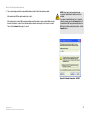
2. The screen that appears will show any available wireless network. Select the network you want.
If this network has WEP encryption enabled, go to step 3.
If this network does not have WEP encryption enabled, you will be asked to select a network. Make sure the
box next to Allow me to connect to the selected wireless network, even though it is not secure is checked.
Then, click the Connect button, and go to step 4.
NOTE: Steps 2 and 3 are the instructions and
screenshots for Windows XP with Service Pack 1
installed.
If you have not installed Service Pack 1, select the
network you want, and click the Connect button. If
the network has WEP encryption enabled, enter the
WEP key in the Network key field, and then click the
Connect button.
Figure B-4: Network Connection - No WEP
Appendix B:
Windows XP Wireless Zero Configuration
37
Wireless-G PCI Adapter with SpeedBooster
3. If WEP is enabled, you will be asked to enter the network (WEP) key. Enter the WEP key of your wireless
network in the Network key field, and re-enter it in the Confirm network key field. Then, click the Connect
button, and proceed to step 4.
Figure B-5: Network Connection - WEP
NOTE: Windows XP Wireless Zero Configuration does
not support the use of a passphrase. Enter the exact
WEP key used by your access point.
4. The Zero Configuration icon, showing a connection, will appear if your connection is active.
Figure B-6: Wireless Network Connection
For more information about wireless networking on a Windows XP computer, click the Start button, select Help,
and choose Support. Enter the keyword wireless in the field provided, and press the Enter key.
The installation of the Windows XP Wireless Configuration is complete.
Appendix B:
Windows XP Wireless Zero Configuration
38
Wireless-G PCI Adapter with SpeedBooster
Appendix C: Wireless Security
Linksys wants to make wireless networking as safe and easy for you as possible. The current generation of
Linksys products provide several network security features, but they require specific action on your part for
implementation. So, keep the following in mind whenever you are setting up or using your wireless network.
Security Precautions
The following is a complete list of security precautions to take (at least steps 1 through 5 should be followed):
1. Change the default SSID.
2. Disable SSID Broadcast.
3. Change the default password for the Administrator account.
4. Enable MAC Address Filtering.
5. Change the SSID periodically.
6. Use the highest encryption algorithm possible. Use WPA if it is available. Please note that this may reduce
your network performance.
Note: Some of these security features are
available only through the network router or
access point. Refer to the router or access
point’s documentation for more information.
7. Change the WEP encryption keys periodically.
Security Threats Facing Wireless Networks
Wireless networks are easy to find. Hackers know that in order to join a wireless network, wireless networking
products first listen for “beacon messages”. These messages can be easily decrypted and contain much of the
network’s information, such as the network’s SSID (Service Set Identifier). Here are the steps you can take:
Change the administrator’s password regularly. With every wireless networking device you use, keep in mind
that network settings (SSID, WEP keys, etc.) are stored in its firmware. Your network administrator is the only
person who can change network settings. If a hacker gets a hold of the administrator’s password, he, too, can
change those settings. So, make it harder for a hacker to get that information. Change the administrator’s
password regularly.
SSID. There are several things to keep in mind about the SSID:
Appendix C: Wireless Security
Security Precautions
39
Wireless-G PCI Adapter with SpeedBooster
1. Disable Broadcast
2. Make it unique
3. Change it often
Most wireless networking devices will give you the option of broadcasting the SSID. While this option may be
more convenient, it allows anyone to log into your wireless network. This includes hackers. So, don’t broadcast
the SSID.
Wireless networking products come with a default SSID set by the factory. (The Linksys default SSID is “linksys”.)
Hackers know these defaults and can check these against your network. Change your SSID to something unique
and not something related to your company or the networking products you use.
Change your SSID regularly so that any hackers who have gained access to your wireless network will have to
start from the beginning in trying to break in.
MAC Addresses. Enable MAC Address filtering. MAC Address filtering will allow you to provide access to only
those wireless nodes with certain MAC Addresses. This makes it harder for a hacker to access your network with
a random MAC Address.
WEP Encryption. Wired Equivalent Privacy (WEP) is often looked upon as a cure-all for wireless security
concerns. This is overstating WEP’s ability. Again, this can only provide enough security to make a hacker’s job
more difficult.
There are several ways that WEP can be maximized:
1. Use the highest level of encryption possible
2. Use “Shared Key” authentication
3. Change your WEP key regularly
WPA. Wi-Fi Protected Access (WPA) is the newest and best available standard in Wi-Fi security. Three modes are
available: WPA-Personal, WPA Radius, and Radius. Radius-PSK gives you a choice of two encryption methods:
TKIP (Temporal Key Integrity Protocol), which utilizes a stronger encryption method and incorporates Message
Integrity Code (MIC) to provide protection against hackers, and AES (Advanced Encryption System), which utilizes
a symmetric 128-Bit block data encryption. WPA RADIUS offers two encryption methods, TKIP and AES, with
dynamic encryption keys. RADIUS (Remote Authentication Dial-In User Service) utilizes a RADIUS server for
authentication.
Appendix C: Wireless Security
Security Threats Facing Wireless Networks
Important: Always remember that each
device in your wireless network MUST use
the same encryption method and encryption
key or your wireless network will not function
properly.
40
Wireless-G PCI Adapter with SpeedBooster
WPA-Personal. If you do not have a RADIUS server, Select the type of algorithm, TKIP or AES, and enter a
password in the Passphrase field of 8-63 characters.
WPA2-Personal. Enter a password in the Passphrase field of 8-63 characters.
WPA-Enterprise. WPA used in coordination with a RADIUS server. (This should only be used when a RADIUS
server is connected to the Router or other device.) WPA Radius offers two encryption methods, TKIP and AES,
with dynamic encryption keys.
RADIUS. WEP used in coordination with a RADIUS server. (This should only be used when a RADIUS server is
connected to the Router or other device.)
Implementing encryption may have a negative impact on your network’s performance, but if you are transmitting
sensitive data over your network, encryption should be used.
These security recommendations should help keep your mind at ease while you are enjoying the most flexible
and convenient technology Linksys has to offer.
Appendix C: Wireless Security
Security Threats Facing Wireless Networks
41
Wireless-G PCI Adapter with SpeedBooster
Appendix D: Windows Help
All wireless products require Microsoft Windows. Windows is the most used operating system in the world and
comes with many features that help make networking easier. These features can be accessed through Windows
Help and are described in this appendix.
TCP/IP
Before a computer can communicate with an access point or wireless router, TCP/IP must be enabled. TCP/IP is a
set of instructions, or protocol, all PCs follow to communicate over a network. This is true for wireless networks
as well. Your PCs will not be able to utilize wireless networking without having TCP/IP enabled. Windows Help
provides complete instructions on enabling TCP/IP.
Shared Resources
If you wish to share printers, folder, or files over your network, Windows Help provides complete instructions on
utilizing shared resources.
Network Neighborhood/My Network Places
Other PCs on your network will appear under Network Neighborhood or My Network Places (depending upon the
version of Windows you're running). Windows Help provides complete instructions on adding PCs to your
network.
Appendix D: Windows Help
42
Wireless-G PCI Adapter with SpeedBooster
Appendix E: Specifications
Standards
802.11g, 802.11b
LEDs
Act: Solid when linked, flashes with traffic
Transmit Power
15dBm
Sensitivity
-80 dBm
Security features
WEP, WPA, and WPA2
Modulation
802.11b: CCK (11 Mbps), DQPSK (2 Mbps), DBPSK (1 Mbps)
802.11g: OFDM
WEP key bits
64Bit and 128Bit
Network Protocol
TCP/IP, IPX, NetBEUI
Dimensions
6.3" x 8.27" x 0.83" (160 mm x 210 mm x 21 mm)
Unit Weight
3.175 oz. (0.09 kg.)
Certifications
FCC, Wi-Fi
Operating Temp.
0° C to 65° C (32° F to 150° F)
Storage Temp.
-40° C to 85° C (-40° F to 185° F)
Operating Humidity
0% to 95% Non-Condensing
Storage Humidity
0% to 95% Non-Condensing
Appendix E: Specifications
43
Wireless-G PCI Adapter with SpeedBooster
Appendix F: Warranty Information
LIMITED WARRANTY
Linksys warrants to You that, for a period of three years (the “Warranty Period”), your Linksys Product will be substantially
free of defects in materials and workmanship under normal use. Your exclusive remedy and Linksys' entire liability under
this warranty will be for Linksys at its option to repair or replace the Product or refund Your purchase price less any
rebates. This limited warranty extends only to the original purchaser.
If the Product proves defective during the Warranty Period call Linksys Technical Support in order to obtain a Return
Authorization Number, if applicable. BE SURE TO HAVE YOUR PROOF OF PURCHASE ON HAND WHEN CALLING. If You are
requested to return the Product, mark the Return Authorization Number clearly on the outside of the package and include a
copy of your original proof of purchase. RETURN REQUESTS CANNOT BE PROCESSED WITHOUT PROOF OF PURCHASE. You
are responsible for shipping defective Products to Linksys. Linksys pays for UPS Ground shipping from Linksys back to You
only. Customers located outside of the United States of America and Canada are responsible for all shipping and handling
charges.
ALL IMPLIED WARRANTIES AND CONDITIONS OF MERCHANTABILITY OR FITNESS FOR A PARTICULAR PURPOSE ARE LIMITED
TO THE DURATION OF THE WARRANTY PERIOD. ALL OTHER EXPRESS OR IMPLIED CONDITIONS, REPRESENTATIONS AND
WARRANTIES, INCLUDING ANY IMPLIED WARRANTY OF NON-INFRINGEMENT, ARE DISCLAIMED. Some jurisdictions do not
allow limitations on how long an implied warranty lasts, so the above limitation may not apply to You. This warranty gives
You specific legal rights, and You may also have other rights which vary by jurisdiction.
This warranty does not apply if the Product (a) has been altered, except by Linksys, (b) has not been installed, operated,
repaired, or maintained in accordance with instructions supplied by Linksys, or (c) has been subjected to abnormal
physical or electrical stress, misuse, negligence, or accident. In addition, due to the continual development of new
techniques for intruding upon and attacking networks, Linksys does not warrant that the Product will be free of
vulnerability to intrusion or attack.
TO THE EXTENT NOT PROHIBITED BY LAW, IN NO EVENT WILL LINKSYS BE LIABLE FOR ANY LOST DATA, REVENUE OR PROFIT,
OR FOR SPECIAL, INDIRECT, CONSEQUENTIAL, INCIDENTAL OR PUNITIVE DAMAGES, REGARDLESS OF THE THEORY OF
LIABILITY (INCLUDING NEGLIGENCE), ARISING OUT OF OR RELATED TO THE USE OF OR INABILITY TO USE THE PRODUCT
(INCLUDING ANY SOFTWARE), EVEN IF LINKSYS HAS BEEN ADVISED OF THE POSSIBILITY OF SUCH DAMAGES. IN NO EVENT
WILL LINKSYS’ LIABILITY EXCEED THE AMOUNT PAID BY YOU FOR THE PRODUCT. The foregoing limitations will apply even
if any warranty or remedy provided under this Agreement fails of its essential purpose. Some jurisdictions do not allow the
exclusion or limitation of incidental or consequential damages, so the above limitation or exclusion may not apply to You.
Please direct all inquiries to: Linksys, P.O. Box 18558, Irvine, CA 92623.
44
Appendix F: Warranty Information
Wireless-G PCI Adapter with SpeedBooster
Appendix G: Glossary
802.11a - An IEEE wireless networking standard that specifies a maximum data transfer rate of 54Mbps and an
operating frequency of 5GHz.
802.11b - An IEEE wireless networking standard that specifies a maximum data transfer rate of 11Mbps and an
operating frequency of 2.4GHz.
802.11g - An IEEE wireless networking standard that specifies a maximum data transfer rate of 54Mbps, an
operating frequency of 2.4GHz, and backward compatibility with 802.11b devices.
Access Point - A device that allows wireless-equipped computers and other devices to communicate with a
wired network. Also used to expand the range of a wireless network.
Adapter - A device that adds network functionality to your PC.
Ad-hoc - A group of wireless devices communicating directly with each other (peer-to-peer) without the use of
an access point.
AES (Advanced Encryption Standard) - A method that uses up to 256-bit key encryption to secure data.
Backbone - The part of a network that connects most of the systems and networks together, and handles the
most data.
Bandwidth - The transmission capacity of a given device or network.
Bit - A binary digit.
Byte - A unit of data that is usually eight bits long.
CSMA/CA (Carrier Sense Multiple Access/Collision Avoidance) - A method of data transfer that is used to prevent
data collisions.
CTS (Clear To Send) - A signal sent by a wireless device, signifying that it is ready to receive data.
Default Gateway - A device that forwards Internet traffic from your local area network.
DHCP (Dynamic Host Configuration Protocol) - A networking protocol that allows administrators to assign
temporary IP addresses to network computers by "leasing" an IP address to a user for a limited amount of time,
instead of assigning permanent IP addresses.
Appendix G: Glossary
45
Wireless-G PCI Adapter with SpeedBooster
DNS (Domain Name Server) - The IP address of your ISP's server, which translates the names of websites into IP
addresses.
Domain - A specific name for a network of computers.
DSSS (Direct-Sequence Spread-Spectrum) - Frequency transmission with a redundant bit pattern resulting in a
lower probability of information being lost in transit.
Encryption - Encoding data transmitted in a network.
Ethernet - IEEE standard network protocol that specifies how data is placed on and retrieved from a common
transmission medium.
Fragmentation -Breaking a packet into smaller units when transmitting over a network medium that cannot
support the original size of the packet.
Gateway - A device that interconnects networks with different, incompatible communications protocols.
Hardware - The physical aspect of computers, telecommunications, and other information technology devices.
IEEE (The Institute of Electrical and Electronics Engineers) - An independent institute that develops networking
standards.
Infrastructure - A wireless network that is bridged to a wired network via an access point.
IP (Internet Protocol) - A protocol used to send data over a network.
IP Address - The address used to identify a computer or device on a network.
ISM band - Radio bandwidth utilized in wireless transmissions.
ISP (Internet Service Provider) - A company that provides access to the Internet.
LAN - The computers and networking products that make up your local network.
MAC (Media Access Control) Address - The unique address that a manufacturer assigns to each networking
device.
Mbps (MegaBits Per Second) - One million bits per second; a unit of measurement for data transmission.
Network - A series of computers or devices connected for the purpose of data sharing, storage, and/or
transmission between users.
Appendix G: Glossary
46
Wireless-G PCI Adapter with SpeedBooster
Node - A network junction or connection point, typically a computer or work station.
Packet - A unit of data sent over a network.
Passphrase - Used much like a password, a passphrase simplifies the WEP encryption process by automatically
generating the WEP encryption keys for Linksys products.
Port - The connection point on a computer or networking device used for plugging in cables or adapters.
RADIUS (Remote Authentication Dial-In User Service) - A protocol that uses an authentication server to control
network access.
RJ-45 (Registered Jack-45) - An Ethernet connector that holds up to eight wires.
Roaming - The ability to take a wireless device from one access point's range to another without losing the
connection.
Router - A networking device that connects multiple networks together.
RTS (Request To Send) - A networking method of coordinating large packets through the RTS Threshold setting.
Server - Any computer whose function in a network is to provide user access to files, printing, communications,
and other services.
Software - Instructions for the computer. A series of instructions that performs a particular task is called a
"program".
Spread Spectrum - Wideband radio frequency technique used for more reliable and secure data transmission.
SSID (Service Set IDentifier) - Your wireless network's name.
Subnet Mask - An address code that determines the size of the network.
Switch - 1. A data switch that connects computing devices to host computers, allowing a large number of
devices to share a limited number of ports. 2. A device for making, breaking, or changing the connections in an
electrical circuit.
TCP (Transmission Control Protocol) - A network protocol for transmitting data that requires acknowledgement
from the recipient of data sent.
TCP/IP (Transmission Control Protocol/Internet Protocol) - A set of instructions PCs use to communicate over a
network.
Appendix G: Glossary
47
Wireless-G PCI Adapter with SpeedBooster
TKIP (Temporal Key Integrity Protocol) - a wireless encryption protocol that provides dynamic encryption keys for
each packet transmitted.
Topology - The physical layout of a network.
WEP (Wired Equivalent Privacy) - A method of encrypting network data transmitted on a wireless network for
greater security.
WPA (Wi-Fi Protected Access) - a wireless security protocol using TKIP (Temporal Key Integrity Protocol)
encryption, which can be used in conjunction with a RADIUS server.
Appendix G: Glossary
48
Wireless-G PCI Adapter with SpeedBooster
Appendix H: Regulatory Information
FCC STATEMENT
This product has been tested and complies with the specifications for a Class B digital device, pursuant to Part 15
of the FCC Rules. These limits are designed to provide reasonable protection against harmful interference in a
residential installation. This equipment generates, uses, and can radiate radio frequency energy and, if not
installed and used according to the instructions, may cause harmful interference to radio communications.
However, there is no guarantee that interference will not occur in a particular installation. If this equipment does
cause harmful interference to radio or television reception, which is found by turning the equipment off and on,
the user is encouraged to try to correct the interference by one or more of the following measures:
Reorient or relocate the receiving antenna
Increase the separation between the equipment or devices
Connect the equipment to an outlet other than the receiver's
Consult a dealer or an experienced radio/TV technician for assistance
FCC Radiation Exposure Statement
This equipment complies with FCC radiation exposure limits set forth for an uncontrolled environment. This
equipment should be installed and operated with minimum distance 20cm between the radiator and your body.
INDUSTRY CANADA (CANADA)
This Class B digital apparatus complies with Canadian ICES-003, RSS210.
Cet appareil numérique de la classe B est conforme à la norme NMB-003 du Canada.
The use of this device in a system operating either partially or completely outdoors may require the user to obtain
a license for the system according to the Canadian regulations.
EC DECLARATION OF CONFORMITY (EUROPE)
Linksys declares that this product conforms to the specifications listed below, following the provisions of the
European R&TTE directive 1999/5/EC:
EN 301 489-1, 301 489-17 General EMC requirements for Radio equipment.
EN 609 50 Safety
Appendix H: Regulatory Information
49
Wireless-G PCI Adapter with SpeedBooster
EN 300-328-1, EN 300-328-2 Technical requirements for Radio equipment.
Caution: This equipment is intended to be used in all EU and EFTA countries. Outdoor use may be restricted to
certain frequencies and/or may require a license for operation. Contact local Authority for procedure to follow.
Note: Combinations of power levels and antennas resulting in a radiated power level of above 100 mW equivalent
isotropic radiated power (EIRP) are considered as not compliant with the above mentioned directive and are not
allowed for use within the European community and countries that have adopted the European R&TTE directive
1999/5/EC.
For more details on legal combinations of power levels and antennas, contact Linksys Corporate Compliance.
Linksys vakuuttaa täten että dieses produkt tyyppinen laite on direktiivin 1999/5/EY oleellisten vaatimusten ja
sitä koskevien näiden direktiivien muiden ehtojen mukainen.
Linksys Group déclare que le produit est conforme aux conditions essentielles et aux dispositions relatives à la
directive 1999/5/EC.
Belgique:
Dans le cas d'une utilisation privée, à l'extérieur d'un bâtiment, au-dessus d'un espace public, aucun
enregistrement n'est nécessaire pour une distance de moins de 300m. Pour une distance supérieure à 300m un
enregistrement auprès de l'IBPT est requise. Pour une utilisation publique à l'extérieur de bâtiments, une licence
de l'IBPT est requise. Pour les enregistrements et licences, veuillez contacter l'IBPT.
France:
2.4 GHz Bande : les canaux 10, 11, 12, 13 (2457, 2462, 2467, et 2472 MHz respectivement) sont complétement
libres d'utilisation en France (en utilisation intérieur). Pour ce qui est des autres canaux, ils peuvent être soumis à
autorisation selon le départment. L'utilisation en extérieur est soumis à autorisation préalable et très restreint.
Vous pouvez contacter l'Autorité de Régulation des Télécommunications (http://www.art-telecom.fr) pour de plus
amples renseignements.
SAFETY NOTICES
Caution: To reduce the risk of fire, use only No.26 AWG or larger telecommunication line cord.
Do not use this product near water, for example, in a wet basement or near a swimming pool.
Avoid using this product during an electrical storm. There may be a remote risk of electric shock from lightning.
Appendix H: Regulatory Information
50
Wireless-G PCI Adapter with SpeedBooster
Appendix I: Contact Information
Need to contact Linksys?
Visit us online for information on the latest products and updates
to your existing products at:
http://www.linksys.com or
ftp.linksys.com
Can't find information about a product you want to buy
on the web? Do you want to know more about networking
with Linksys products? Give our advice line a call at:
Or fax your request in to:
800-546-5797 (LINKSYS)
949-823-3002
If you experience problems with any Linksys product,
you can call us at:
Don't wish to call? You can e-mail us at:
800-326-7114
[email protected]
If any Linksys product proves defective during its warranty period,
you can call the Linksys Return Merchandise Authorization
department for obtaining a Return Authorization Number at:
(Details on Warranty and RMA issues can be found in the Warranty
Information section in this Guide.)
949-823-3000
51
Appendix I: Contact Information