1
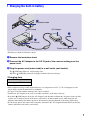
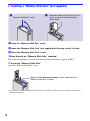
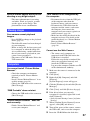
2 Inserting a “Memory Stick Duo” (not supplied)
“Memory Stick Duo” cover
Insert the “Memory Stick Duo” all the
way in as shown in the illustration
until it clicks.
1 Open the “Memory Stick Duo” cover.
2 Insert the “Memory Stick Duo” (not supplied) all the way in until it clicks.
3 Close the “Memory Stick Duo” cover.
[ When there is no “Memory Stick Duo” inserted
The camera records/plays back images using the internal memory (approx. 8 MB).
[ To remove “Memory Stick Duo”
Open the “Memory Stick Duo” cover.
Make sure that the access lamp is not lit, then push the
“Memory Stick Duo” in once.
• Never remove “Memory Stick Duo” when the access lamp is lit. This may cause damage to data in the
“Memory Stick Duo”.
8