1
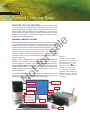
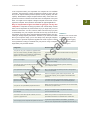
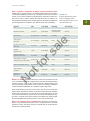
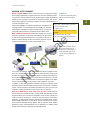
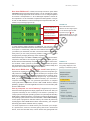
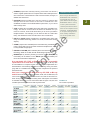
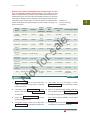
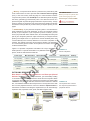
63 comp uter har dw are In the computer industry, the equivalent of a compact car is a sub-$600 computer. The technology in these computers is usually a year or two old and you can expect reduced processor speed, memory capacity, and drive capacity. Nevertheless, budget computers feature many of the same components that owners coveted in their state-of-the-art computers a few years back. You might have to replace a budget computer sooner than a more expensive computer, but it should be serviceable for typical applications. 2 Why is it important to figure out how I’m going to use my new computer? Computers can help you perform such a wide variety of tasks Figure 2-9 Situations such as those listed in the left column help to narrow down the mind-boggling number of choices offered to computer shoppers. rs al e that it can be impossible to predict all the ways you might use your new machine in the future. You can, however, make a list of the ways you plan to immediately use your computer and that list can help you think about the features you’ll need. Some computer-based activities require more processing or storage capacity than others. Therefore, if you have some ideas about your computer usage, you’re more likely to buy the right computer and not have to purchase expensive upgrades for it later. Figure 2-9 offers some guidelines to help you evaluate how your plan for using a computer might affect your purchase decision. Usage Plan Purchase Recommendation A mid-priced computer with standard features might meet your needs. You’re on a budget. A budget-priced computer will handle the same applications as a mid-priced computer, but some tasks might run more slowly. fo You plan to use your computer for popular tasks such as e-mail, browsing the Web, playing a few games, managing your checkbook, downloading digital music, and writing school papers. Consider one of the business systems offered by your computer vendor. You spend lots of time playing computer games. Buy a computer with the fastest processor and graphics card you can afford. You plan to work extensively with video editing or desktop publishing. Select a computer system with a fast processor, lots of hard disk capacity, and a graphics card loaded with memory. N ot You plan to work on accounting and budgeting for a small business. Someone who will use the computer has special needs. Consider purchasing appropriate adaptive equipment, such as a voice synthesizer or one-handed keyboard. You plan to use specialized peripheral devices. Make sure the computer you purchase can accommodate the devices you plan to use. Your work at home overlaps your work at school or on the job. Shop for a computer that’s compatible with those you use at school or work. You want to work with specific software, such as a game or graphics tool. Make sure you select a computer that meets the s pecifications listed on the software box or Web site. You’re buying a new computer to replace an old one. If you have a big investment in software, you should select a new computer that’s compatible with the old one.