1
Appendix A Concerns for Replacing a Failed
Controller
There is a “1GB” parameter threshold for NVRAM defaults in earlier Galaxy disk array
firmware. The 1GB threshold determines whether your RAID supports a standard or a
large number of logical configurations by the size of cache memory.
NOTE that the 1GB threshold no longer applies to all HDX4 models (ASIC667). All HDX4
models come with max. numbers of logical configurations, e.g., 32 LDs and 1024 LUNs.
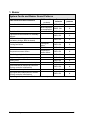
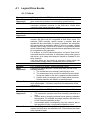
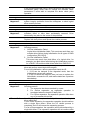
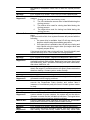
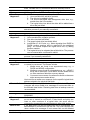
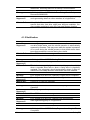
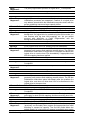
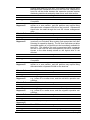
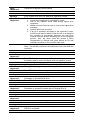
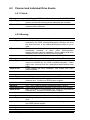
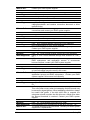
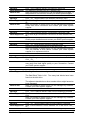
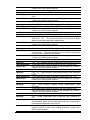
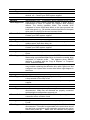
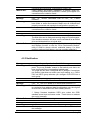
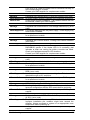
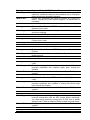
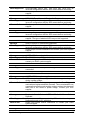
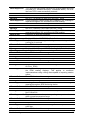
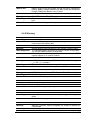
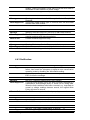
The supported numbers by different DIMM sizes are shown below:
Feature
64-bit LBA Support (>2TB)
De f a u lt Va lu e
<1GB DIMM
>= 1GB DIMM
Yes
Yes
Number of LDs
16 (Max.)
32 (Max.)
Number of LVs
8 (Max.)
16 (Max.)
Number of Partitions per LD
16 (Max.)
64 (Max.)
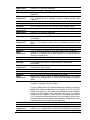
Number of LUNs per Channel lD
8 (32 Max.)
8 (32 Max.)
Number of LUNs
128 (Max.)
1024 (Max.)
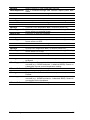
Optimization Mode
Sequential I/O
Caching Mode (Default)
Write-Back
Stripe size(Optimization for Sequential I/Os-RAID 5)
128KB
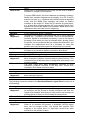
Auto-assign Global Spare
Disable
Max. LD capacity (Optimization for Sequential I/Os)
No. of Media Scan Task Schedules
Max. No. of members per DIMM size (RAID5)
64TB (Max.)
16 (Max.)
128 drives max. / 512MB
Note that these numbers can be slightly different across different firmware revisions and
in most situations 16 logical drive entries will be sufficient.
This parameter threshold, however, can cause problems if users upgrade DIMM modules
to a larger size, especially when combining two RAID controllers, without knowing their
NVRAM defaults. The fault can also occur when replacing a faulty controller in a
redundant-controller configuration.
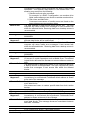
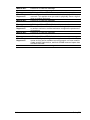
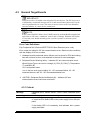
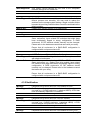
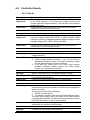
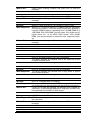
Fault Scenarios:
1. Field-side Upgrade:
1-1.
1-2.
Customers upgrade controller DIMM modules, e.g., from 2GB to 4GB.
Combine controllers into a redundant configuration. One retains the
“1GB” defaults, while the other the “≥ 2GB” defaults.
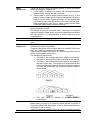
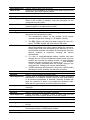
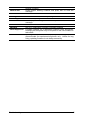
2. Replacing a Failed Controller:
2-1.
48
Branch office acquires a replacement controller and upgrades its
memory to the size of surviving controller.
Galaxy DS