1
4.1. GUI FEATURES
Cage position indication As in the hardware model,
the GUI should also show the whereabouts of the
cage on some kind of indicator on each floor. The
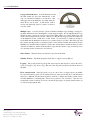
same approach as the hardware (two lights when between floors) can be used. A dial model, such as
used in old fashioned elevator systems would be a
very nice touch.
Multiple cages A serious elevator system would have multiple cages, making a strategy for
up and down buttons more meaningful to system and passengers. In your implementation you
should be able to support at least two cages in the GUI, where one of these GUI cages will
monitor the hardware elevator model. The idea is that this GUI cage presents the behaviour
of the hardware model, synchronous to that model. You should try to make an attempt to
let the GUI and the hardware model move as synchronously as possible. The GUI cage will
have all the missing features as mentioned above and otherwise mimic the hardware model
faithfully. For instance if the red button is used as the obstruct button, and the monitor provides
obstruction behaviour, then both the hardware cage and this monitor cage should reopen its
door and wait for the obstruction to be removed.
Nurse button The nurse button should also be present in the GUI.
Number of floors The GUI design should be able to support at least 10 floors.
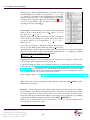
Logging The system should log all up and down requests and arrivals as well as the motor
cycles of all cages. (Up, down, stop). The tail of this log (the last entries) should be shown in
the GUI.
Floor announcement Once the elevator stops at a floor due to a target request, an audible
floor announcement is given. In an extended version of the system, this floor announcement
may have a different announcement signal for each floor. Simple but distinct sounds can be
used but thinkable is something like “fourth floor, penthouse and restaurant”. The floor announcement system could also be used to inform the passengers of special situations like out
of order messages and the like.
File: gui.tex
Author:Pieter van den Hombergh
Reviewer:Pieter van den Hombergh
Revision: 14, May 13, 2013
16