1
MAKE PENCIL MARKS ON
THE END OF THE TUBE
WHERE THE BRACKET
NOTCHES ARE
Figure 2
ALIGN THE APPROPRIATE
LINE FOR YOUR SECONDARY
HOLDER SIZE WITH THE
CENTER OF YOUR FOCUSER
Marking the bracket centerlines
Step 2
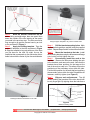
Mark the bracket centerlines on the
tube. Using a straight edge, draw two pencil lines
down the outside of the tube starting at the marks
you made in the previous step. The lines need to be
long enough to go past the focuser base by an inch
or two as shown in Figure 3.
Step 3
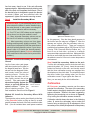
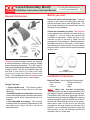
Apply the drilling template. Tape the
paper drill template to the tube as shown in Figure
4. Align the template’s long axis with one of the lines
you just drew on the tube. By sight, line up the
centerline that corresponds to your secondary mirror
holder’s size with the center of your focuser drawtube.
Figure 4
Using the paper template to lay out the bracket holes.
Step 4
Drill the bracket mounting holes. Mark
the bracket hole positions, and drill using the supplied
drill bit. Repeat Steps 3 and 4 for the second bracket.
Step 5
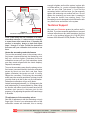
Mount the brackets to the tube. Install
the mounting brackets using the #8 screws and flange
nuts, but do not fully tighten the nuts.
Step 6
Permanently install the arch to the
brackets. Remove the #6 screws holding the arch
to the brackets, and remove the arch. Note that the
brackets have three positions for the tangs at the
feet of the arch to snap in to. This allows for precise
positioning of the secondary mirror within the tube.
Find the best position for the arch that best positions
the secondary mirror within the tube. Reinstall the #6
fasteners, and fully tighten (see Figure 5).
Step 7
Edge-on arch adjustments. The #8
screws holding the brackets to the tube should still
be only finger tight. By sighting down the tube from a
PARALLEL PENCIL LINES
#6 FLANGE
NUT
#8 FLANGE
NUT
#6-32 SCREW
(BLACK)
BRACKET
#8-32 SCREW
Figure 3
TUBE WALL
Drawing the bracket centerlines on the tube.
Figure 5
Bracket mounting detail.
Protostar P.O. Box 448 Worthington, Ohio 43085
(614)-855-5341
Copyright © 1996-2013 Protostar
www.fpi-protostar.com