1
610 RAM Commander User’s Guide
Appendix D
Component Import Formats
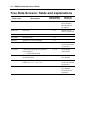
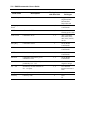
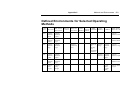
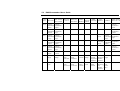
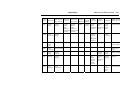
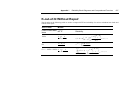
The following tables list, by screen name, the various input fields used in import files.
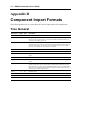
Tree General
Field name
Length Type
Description
TRrefdes
10
Text
Reference designator
TRdepth
2
Int
Tree depth level in the Import file: The first line (i.e. top of the importing Sub tree)
must always have a depth equal to 1. Note that the RAM Commander handles up to
10 tree levels (including project top).
TRicode
4
S text
Predefined shortcuts of Item codes: Family type is determined by the RAM
Commander due to the Item code. Mechanical and Electro Mechanical item codes are
moved to other families. Tree hierarchy items (assemblies) must have the 'UNDEF'
item code. If not specified or not included set to UNDEF.
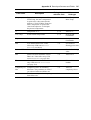
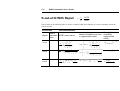
TRqty
4
Int
Quantity of item(s)
TRgname
21
Text
Generic name (Short library code)
TRcatnum
31
Text
Catalog Number (Factory ID): Library may be accessed through the Cross Reference
option.
TRmilnum
31
Text
Military Number. Library may be accessed through the Cross Reference option.
TRpN
31
Text
Part name (Manufacture ID). Library may be accessed through the Cross Reference
option.
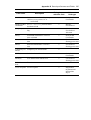
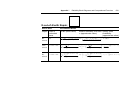
FindName
31
Text
one of the four item's identifiers (Generic name or Catalog Number or Military
Number or Part name). If one column (field) of an Import file includes two or more
item's identifiers (e.g. Generic names and Military Numbers) then you should use this
field type. Upon completing the RTF import procedure you must run the 'Load from
library' option to retrieve imported data.
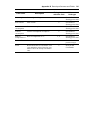
TRdscr
41
Text
Item description.
TRrem
21
Text
Item remark.
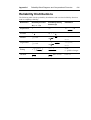
TRManuf
10
Text
Manufacturer’s name
TRlcn
19
Text
Logistics Control Number