1
Basic Operation Instruction
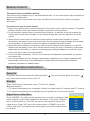
TV
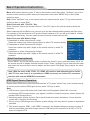
Select
to enter the TV submenu. Press "Up/Down" key on the remote control or "CH+/CH-" key
on the control panel to choose what you need. Press the
"Left/Right" key on the remote control or the "VOL+/VOL-"
key on the control panel to adjust analog value or state
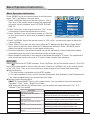
Color System
PAL
(see below table).
Sound System
DK
Option
Color System
Sound System
Skip
Auto Search
Manual Search
Fine Tune
Channel Edit
Function
Select color system
Select sound system
Select skip or not
Select auto search
Select manul search
Select fine tune
Select channel edit
Description
"PAL, NTSC, AUTO" three modes.
"I, DK, M, BG" four modes.
"Off/On" two states.
Please refer to "Auto Search"
Please refer to "Manual Search"
Please refer to "Fine Tune"
Please refer to "Channel Edit"
Skip
Auto Search
Manual Search
Fine Tune
Channel Edit
On
45.30 MHz
Adjust
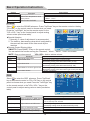
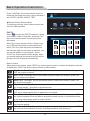
Auto Search
Select
to enter the submenu of TV. Then press ''Up/Down'' key on
the remote control or ''CH+/CH-'' on the control panel to select ''Auto
Search''. The machine perform search after pressing ''Right '' key on
the remote control or ''VOL+'' on the control panel. (In the process of
searching the channel automatically, press the key of ''MENU'' on the
remote control ,a dialogue of "Do you want to exit searching?" display
on the screen. Press "Left" cursor key to confirm and exit. Press "Right"
cursor key to cancel operation and continue auto search). All of the
TV programs will be saved automatically.
Select
Menu:Exit
Auto Search
Found
0
:
0
Progtranme
%... 50.25 MHz
VHF-L
Menu:Exit
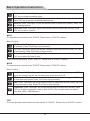
Manual Search
CH: 1
Search
Manual Search
Frequency 45.25 MHz
Select
to enter the submenu of TV. Then press ''Up/Down'' key on
Menu:Exit
the remote control or ''CH+/CH-''on the control panel to select ''Manual
Search''. Then press the key of ''Right'' on the remote control to enter submenu of Manual Search.
Press ''Left/Right'' key on the remote control to select channel No.. Press ''Up/Down'' key on the
remote control to select ''SEARCH'', press ''Left/Right'' key on the remote control again, the machine
begin searching toward low frequency or high frequency. (In the process of searching the channel
automatically, press the key of ''MENU'' on the remote control to
Channel Edit
stop searching).
1 CH
Fine Tune
2 CH
Select
to enter the submenu of TV. Then press ''Up/Down'' key
3 CH
on the remote control or ''CH+/CH-'' on the control panel to select
4 CH
''Fine Tune''. Press ''Left/Right'' key on the remote control to
5 CH
adjust from low frequency or high frequency.
6 CH
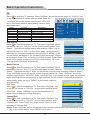
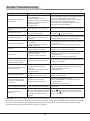
Channel Edit
Select
to enter the submenu of TV. Then press ''Up/Down'' key
on the remote control or ''CH+/CH-'' on the control panel to select
''Channel Edit''. Press ''Right'' key on the remote control to enter
submenu of ''Channel Edit''
7 CH
8 CH
9 CH
1:Delete
OK:Enter
2:Move
3:Skip
Menu:Exit
Delete: Press ''Up/Down'' key on the remote control to select channel which you wish delete. Press
"1" key on the remote control, press "MENU" key to return .
11