1
LE32K700
Table of Contents
Characteristic Functions… … … … … … … … … … … … … … … … … … … … … … … … … … … … … …1
Important Safety Instructions…………………………………………………………………………1
Technical Specifications… … … … … … … … … … … … … … … … … … … … … … … … … … … … … …3
The Technical Specifications for Final Product… … … … … … … … … … … … … … … … … … … … …3
Technical Specifications for TV…………………………………………………………………………4
VGA Display Mode………………………………………………………………………………………4
Power Management………………………………………………………………………………………4
Packing Listing……………………………………………………………………………………………4
Installation & Connection………………………………………………………………………………5
Base Assembly Installation………………………………………………………………………………5
Antenna Connection………………………………………………………………………………………5
Power Connection … … … … … … … … … … … … … … … … … … … … … … … … … … … … … … … … …6
Computer Connection ……………………………………………………………………………………6
HDMI Digital Port Connection … … … … … … … … … … … … … … … … … … … … … … … … … … … …6
AV Video Signal Connection… … … … … … … … … … … … … … … … … … … … … … … … … … … … …6
AV Output Connection……………………………………………………………………………………6
YPbPr/YCbCr Input Connection…………………………………………………………………………6
Position of Control Keys ………………………………………………………………………………7
Remote Control……………………………………………………………………………………………7
Basic Operation Instruction… … … … … … … … … … … … … … … … … … … … … … … … … … … …8
Power On…………………………………………………………………………………………………8
Standby……………………………………………………………………………………………………8
Signal Source Selection…………………………………………………………………………………8
Menu Operation Instruction… … … … … … … … … … … … … … … … … … … … … … … … … … … … …9
PICTURE…………………………………………………………………………………………………9
SOUND……………………………………………………………………………………………………10
OSD………………………………………………………………………………………………………10
TV…………………………………………………………………………………………………………11
Hotel Function(optional)……………………………………………………………………………………11
USB Signal Source Operation… … … … … … … … … … … … … … … … … … … … … … … … … … … …12
Simple Troubleshooting …………………………………………………………………………………15
Characteristic Functions
1. LCD panel with no glint and low radiation can ease eyes' fatigue and protect eyes.
2. High-quality LCD with LED backlight panel is adopted with high brightness, high contrast, wide
viewing angle, and super fast response time. Super fast response time can greatly eliminate the
shadow of moving images.
3. TV/Monitor with two in one and multiple input ports can easily switch among the modes.
4. De-interlacing image disposal is adopted. Today's most advanced technique for movement
compensation, can completely improve the saw tooth and vague edges of the athletic picture.
5. There are four smart sound modes and four smart image modes.
6. Dynamic contrast technology can obviously improve the definition and contrast of the picture
7. Tuner for frequency synthesis can support full auto search and manual search.
8. With perfect timing function, you can set time to turn off. It will be turned off in state of no signals,
too.
9. Auto Adjustment can help you to setup the image into the best performance in a few seconds
instead of complicated adjustment in PC mode.
10. Auto color balance adjustment technology can make the machine to reach the best color setting
in PC mode.
11. Support hi-definitionYPbPr and HDMI.
12. All functions can be realized with remote control, which is really a convenient operation.
13. Power is designed to save energy.
14. Input ports include VGA, YPbPr, HDMI, CVBS, USB and TV.
15. Output ports include AV.
16. Supports USB interface. USB Support Full HD Streaming media.
Important Safety Instructions
Thank you to choose the LCD TV with LED backlight made by our company, a valuable product with
excellent quality and multiple functions. This machine will bring you more audiovisual enjoyment. Its
design can insure user's safety. All machine are strictly tested before leaving factory. But incorrect
use can lead to electric shock or fire. In order to insure safety and extend its life, please read below
regulations carefully before using it and comply with the following safety instructions.
● When the following troubles occur, please pull out the plug and call the professional engineers to
repair.
A. The cable or plug is damaged.
B. The product was fallen down or the case is damaged.
C. Obvious abnormal situation occurs. In spite of correct
operation according to the user manual but it still can't work
normally.
D. Some abnormal substances or liquid fall into it.
E. Unusual sound or smell sends out.
● There is high voltage inside the machine but no parts which can
be repaired by users themselves. In order to assure the people's
safety, please do not open the case to repair it by yourself. If it is
needed to repair, please contact qualified engineer to repair.
● Please put this machine in the place of well ventilation, instead
of extremely hot, cool or moist, and direct sunlight.
1
Important Safety Instructions
● The slots on the case is designed to release heat so as to assure that all inside components will
not reach an extra high temperature and can work normally for a long time. Please do not cover
the holes while place it.
● Unless there is good ventilation installation, please do not put
this machine in inlaid device.
● Please do not place it on an unstable position so as to avoid
falling off.
● Do not place the LCD TV near water source, like a bathtub,
pool, washing machine, or moist cellar and similar environment.
● During a thunder rain weather, do not touch the power cord and
antenna cable. Please pull out the power line and aerial plugs
for preventing thunder and lightning damage to this machine.
● All cables can be connected or pull out only after power supply
is turned off.
● The power cord must be taken off before you clean the machine.
Do not use the liquid cleanser or aerosol cleanser. It is
recommended to use a wet soft cloth to clean the machine. Do
not use the alcohol, impregnant or ammoniac liquid to wipe the
screen.
● If you will not use the machine for a long time, please pull out
the power cord. Do not keep the sleeping mode for too long time.
● Read the manual and marking label before using the machine, and keep the user manual for
later use.
● Don't use the attachments which are not recommended by the machine manufacturer as they
may cause hazards.
● The power cord must be placed correctly so as to avoid be trample or crush.
● Please do not make the power socket overloaded or the power cord extended. Otherwise it will
cause fire or electrical shock.
● The LCD panel is fragile and expensive. The surface of the panel is easy to be scratched. Please
do not use the hard thing to knock, press, score the panel. Otherwise it will be harmful for the
panel. The exchange cost is very high.
● All technical specification on this instruction book and outer package are subject to change
without notice. If the instruction book has slight difference with actual operation, please take the
actual operation as standard.
● When the MAINS plug or an appliance coupler is used as the
disconnect device, the disconnect device shall remain readily
operable.
● The machine should not suffer from waterdrop or watersplash,
do not place the vessel with water (or other liquids) on it, for
like this it is possibly to cause fire or electric shock.
● The attaching plug should be inserted into the power point completely, otherwise it may cause
spark to bring fire.
● Please do not put candle, ash-tray, incense, inflammables or explosive nearby this machine.
● Please do not stretch into any sharp object, metal or liquid, or touch the signal attachment or the
inner of radiation hole, in order to avoid short circuit and product damage, or possibly causing
electric shock. Especially pay attention when there are children on the spot.
2
Important Safety Instructions
● Please do not use the machine immediately when moving the machine from low temperature place
to high temperature one, or install and use at the place of facing air conditioning, otherwise it may
cause the condensation in the machine, to cause fault.
● Must be careful when moving this machine, avoiding being struck, especially pay attention to
protect the screen part. In addition, if using handcart, must note the injury as the product is
overturned from the handcart because of hard braking, overexerting and uneven ground.
Technical Specifications
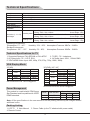
The Technical Specifications for Final Product
Panel size
Max. Resolution
Best Resolution
Pixel Pitch
Active Area
Color
Power Supply
Power Consumption
of Speaker
32" (HD)
1366×768
1360×768@60Hz
0.51075mm×0.51075mm
697.685mm×392.256mm
16.7M
100V-240VAC 60/50Hz
32" (FHD)
1920×1080
1920×1080@60Hz
0.36375mm×0.36375mm
698.40mm×392.85mm
1.06 Billion
8W+8W
Unpacking: 758×462×49mm or 772×480×49mm Net Weight: 9Kg
Packing: 870×580×135mm
Gross Weight: 10.5Kg
Excluding base
Dimension (L×H×W)
Unpacking: 758×462×49mm or 772×480×49mm Net Weight: 9Kg
and Weight
Packing: 890×610×175mm
Gross Weight: 10.5Kg
Unpacking: 758×523×49mm or 772×532×49mm Net Weight: 9.5Kg
Including base
Packing: 965×580×145mm
Gross Weight: 11Kg
Panel size
Max. Resolution
Best Resolution
Pixel Pitch
Active Area
Color
Power Supply
Power Consumption
of Speaker
40"
1920×1080
1920×1080@60Hz
0.46125mm×0.46125mm
885.6mm×498.15mm
16.7M
100V-240VAC 60/50Hz
8W+8W
Unpacking: 945×567×47mm or 959×583×47mm Net Weight: 12.5Kg
Packing: 1070×700×135mm
Gross Weight: 14.5Kg
Excluding base
Dimension (L×H×W)
Unpacking: 945×567×47mm or 959×583×47mm Net Weight: 12.5Kg
and Weight
Packing: 1100×715×175mm
Gross Weight: 14.5Kg
Unpacking: 945×641×47mm or 959×648×47mm Net Weight: 13.5Kg
Including base
Packing: 1165×700×145mm
Gross Weight: 15.5Kg
3
Technical Specifications
Panel size
Max. Resolution
Best Resolution
Pixel Pitch
Active Area
Color
Power Supply
Power Consumption
of Speaker
42"
1920×1080
1920×1080@60Hz
0.4845mm×0.4845mm
930.24mm×523.26mm
1.06 Billion
100V-240VAC 60/50Hz
8W+8W
Unpacking: 992×597×49mm or 1005×615×47mm
Packing: 1105×720×135mm
Excluding base
Dimension (L×H×W)
Unpacking: 992×597×49mm or 1005×615×47mm
and Weight
Packing: 1135×750×175mm
Unpacking: 992×668×49mm or 1005×674×47mm
Including base
Packing: 1200×720×145mm
Operating Environment:
Temperature: 5℃~40℃
Storage Environment:
Temperature: -20℃~55℃
Net Weight: 14Kg
Gross Weight: 16Kg
Net Weight: 14Kg
Gross Weight: 16Kg
Net Weight: 15Kg
Gross Weight: 17Kg
Humidity: 10%~85%
Atmosphere Pressure: 86kPa~104kPa
Humidity: 5%~95%
Atmosphere Pressure: 86kPa~104kPa
Technical Specifications for TV
1. Supported Systems: PAL+SECAM or PAL+NTSC
2. TV(RF): 75Ω Imbalance
3. AV Video-Input: 75Ω,1VP-P, RCA
4. AV Audio-Input: 20KΩ, 500mV RMS
5. YPbPr/HDMI Video Input: 480i, 480p, 576i, 576p, 720p, 1080i, 1080p
VGA Display Mode
32"(HD)
32"(FHD) / 40" / 42"
Mode
Resolution
Refresh
NO.
1
720×400
70Hz
VGA
2
640×480
60Hz
SVGA
3
800×600
60Hz
XGA
4
1024×768
60Hz
WXGA
5
1360×768
60Hz
Recommended mode:1360X768@60Hz
Mode
Resolution
Refresh
NO.
1
720×400
70Hz
VGA
2
640×480
60Hz
SVGA
3
800×600
60Hz
1024×768
60Hz
4
XGA
1280×720
60Hz
5
1360×768
60Hz
6
WXGA
1600×900
60Hz
7
WUXGA 1920×1080
60Hz
8
Recommended mode:1920X1080@60Hz
Power Management
This product is complied with EPA Energy
Star Standard and compatible with VESA
DPMS standard.
Mode
LED Indicator
On
Standby
Off
Lighting
Power Consumption
32"
40"
42"
≤75W ≤110W ≤140W
≤0.5W ≤0.5W ≤0.5W
Note: All the specifications in the user manual or on the packing carton may be changed without
additional notice.
Packing Listing
1. LCD TV 2. User Manual
4. Remote Control
3. Power Cable (or the TV attached with power cable)
4
Installation & Connection
Base Assembly Installation
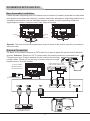
Fasten the base supporting cover to the back cover of machine (It needn't to operate this step when
base support cover had been installed.), and then Insert base assembly to supporting shield hole of
complete machine back cover as illustrated direction of arrow, to make supporting shield and
supporting hole center in the same line, finally fasten the screw.
Screws
Screws
Screw
Base supporting cover
Remarks: The base and machine appearance may not same as the picture, specific in accordance
with work order
Antenna Connection
It is better to use outdoor antenna or CATV cable if you want to watch the colorful and hi-definition
pictures. Attention: Please turn off TV power before the outdoor antenna is connected to the
TV signal input port. Outdoor antenna can't be located near the high
voltage cables. Please pull out the plug of outdoor antenna to avoid
thunder shock in thunder weather.
CVBS, DVD Player or other
machine with CVBS/S-Video.
Y Yellow (VIDEO)
W White(AUDIO-L )
R Red (AUDIO-R)
To power socket
(AC 100-240V, 60/50Hz)
Power cable
Y
Audio/Video machine
with HDMI interfaces.
5
W
R
RF
Installation & Connection
Power Connection
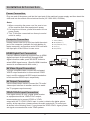
Plug one end of the power cord into the input port of the machine's power supply and then insert the
other end into the socket of the electrical source (AC 100V-240V, 60/50Hz).
Notes:
1. When connecting the power cord, be sure to turn
off the machine and other equipment's power.
2. If a long time at leisure, please disconnect it from
power supply
3. This TV must be connected to a three pin socket
outlet for safety.
Computer Connection
USB
Y Yellow (VIDEO)
Please connect one end of VGA cord with the output
port of the computer (available for both desktop or
laptop computer), and another end of VGA cord with
the input port of the VGA on its rear cover.
W White(AUDIO-L )
R Red (AUDIO-R, Pr/Cr)
G Green (Y)
B Blue (Pb/Cb)
R
HDMI Digital Port Connection
Connect external HDMI high signal source to HDMI
digital input port of this machine through HDMI
digital connector cable; push"SOURCE" button to
select HDMI signal source. (Specific HDMI interface
amount in accordance with work order. )
W
AV machine
Y
AV Video Signal Connection
Through composite cable, connect AV equipment
VIDEO output termination to this machine VIDEO
input, and AV equipment AUDIO output termination
to this machine AUDIO input, respectively.
R
AV Output Connection
W
Use the audio/video cable to connect the TV audio/
video output interface to another monitor to watch
the TV programs synchronously.
R
YPbPr/YCbCr Input Connection
CVBS, DVD Player or other
If the signal source is DVD, Digital wired receiver
machine with YPbPr/YCbCr.
or equipments with the YPbPr/YCbCr output,
recommends you to connect YPbPr or YCbCr
output with the TV YPbPr/YCbCr input. In order to obtains the better picture
quality, at the same time, please connect its audio output with TV audio input
as shown in the following chart. If you choose the YPbPr/YCbCr signal, please
set signal source selection under YPbPr pattern.
6
B
G
Position of Control Keys
1
2
3
4
5
6
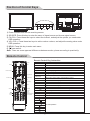
1) Power indicator and remote receiving sensor.
2) SOURCE: Press this key to enter the menu of signal source and choose signal source.
3) CH-/CH+: Press these two keys to select the channel, and adjust the options you need under
OSD operation.
4) VOL-/VOL+: Press these two keys to add or reduce volume, and adjust the analog value under
OSD operation.
5) MENU: Press this key to enter main menu.
6) Power switch .
Note: There are some apparent differences between modes, please according to practicality.
Remote Control
Remote Control Key Instruction
Invalid
Power
Mute
Numerical key
Program list
Smart sound
Smart image
OK
Cursor Key
Menu
Channel
Volume
INFO
Info
Time
Invalid
Color
16:9
COLOR
P N
AUDIO
PLAY
PAUSE
STOP
ROTATE
PREV.
NEXT
REV.
FWD.
Source
Zoom
Return
NICAM(optional)
Color system
Key
POWER
MUTE
Numerical key
F1
Program list
SMART S
SMART P
Function
Turn on or standby
Eliminate sound
Number input button
Freeze picture
Look through program list
Intelligent sound mode selection
Intelligent image mode selection
Up or Down cursor button: function select;
Cursor key
Left or right cursor button: analog add or reduce
VOL+/VOLSound volume add or reduce button
MENU
Press this button to display menu
SOURCE
Press this button to display signal source selection menu
CH+/CHSelect channel Number
INFO
System information display switch
Time ( )
Timer setting button, press this key can set time of turning down
Return ( )
Press this button to return to last watching channel
16:9
Switch aspect ratio
Color
Color temperature mode selection button
P/N
Color system mode selection button
AUDIO(optional) Select NICAM mode
OK
Confirm operation
PLAY ( )
PAUSE ( )
STOP ( )
ROTATE ( )
For USB operation
PREV. ( )
NEXT ( )
REV. ( )
F WD. ( )
7
Remote Control
Telecontrol battery installation method
Take off the cover of battery box, fix two AAA batteries with 1.5 volt, and conform with the polarity of
remote control battery box.
Note: Appearance of the remote control may be different from this picture, please according to
practicality.
Precautions for use of remote control
1. When using remote control you should point it to the remote-control inductive window. The goods
between remote control and inductive window may hinder normal operation.
2. Do not cause the remote control to receive fierce vibration. In addition, do not set or place the
remote control under direct sunlight, for the thermal energy will cause the distortion of remote
control.
3. When remote-control inductive window of main machine is under direct sunlight or intense
illumination, the remote control may malfunction, by now, please change the angle of illumination
or this machine, or approach the inductive window to operate the remote control.
4. When the battery voltage is insufficiency it influences the remote control distance, you should
replace with new battery; when not to use the remote control for long or the battery is exhausted,
please take out the battery, in order to avoid bringing the battery leakage to corrode the remote
control and thus cause it out of commission.
5. Do not use different batteries. The mix use of new and old batteries is not allowed, you should
use battery pair.
6. Do not throw battery into fire, charge or disassembly, especially do not charge, assemble and
disassemble, heat or burn to the used battery. Please observe the related environmental
protection stipulation on wasted battery.
Basic Operation Instruction
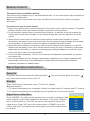
Power On
Plug power cord into the electrical socket and press ''
key on the remote control to turn on the TV.
'' key on the control panel, then press ''
''
Standby
Press ''Power''key on the remote control. TV will be in standby.
★Special Attention:
1.TV set will automatically turn to standby if there is no signal input for 5 minutes when TV turns on.
2.TV set will automatically tu rn to standby when the preset time of turning off reaches.
Signal Source Selection
Input Source
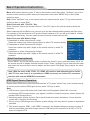
Press ''SOURCE'' key either on the remote control or on the control panel, then
menu of signal source will be displayed on the screen. Then press ''Up/Down''
key on remote control or "CH+/CH-" key on the control panel to choose the
signal source. Press ''OK'' key on the remote control or ''MENU" key on the
control panel and TV will switch the current signal source to the signal source
you choose.
8
TV
AV
YPbPr
PC
HDMI1
HDMI2
USB
Basic Operation Instruction
Menu Operation Instruction
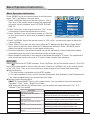
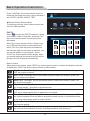
Press ''MENU'' key on the remote control or on the control
panel. The TV will display the main menu.
1. Press ''Left/Right'' key on the remote control or ''VOL+/
Picture Mode
Soft
VOL-''key on the control panel to select the adjustment
48
Contrast
Brightness
48
sort menu, which includes 4 sorts: PICTURE, SOUND,
Saturation
50
OSD, TV.
Hue
50
Sharpness
55
2. Press ''Down''key on the remote control or ''CH-'' on the
Aspect Ratio
Full
control panel to enter the adjustment sort menu.
Color Temp.
Standard
3. Press ''Up/Down'' key on the remote control or ''CH+/CH-''
Noise Reduction
Off
on the control panel to select what is needed to adjust in
Adjust
Select
Menu:Exit
sort menu.
4. Press ''Left/Right'' key on the remote control or ''VOL+/VOL-''on the control panel to adjust the
value or setting.
5. Press ''Menu'' key to exit the main menu when the TV displays the Main Menu; Press ''Menu''
key to return to previous menu when the TV displays the submenu; Press ''SOURCE'' key to
display the signal source menu or exit signal source menu.
6. During the operation, the selections which can not be adjusted at current mode will be hidden
automatically and the color of the selections will be changed into gray.
7. Menu Operation Instruction in this manual is explained according to TV mode. The operations in
other modes are similar to the one in TV mode. Users can take it as reference.
PICTURE
Select
to enter the PICTURE submenu. Press "Up/Down" key on the remote control or "CH+/CH-"
key on the control panel to choose what you need. Press the "Left/Right" key on the remote control
or the "VOL+/VOL-" key on the control panel to adjust analog value or state (see below table).
★Special Attention
1. The Hue function is available only for NTSC system.
2. The value adjusted by user, such as Contrast, Brightness, Hue, Saturation, and Sharpness will
be saved automatically by the machine as User mode.
★Remote Control Shortcut Keys
SMART P: Press SMART P key on the remote control. You can switch the function among the
"Standard", "Soft", "User", "Bright" four modes .
16:9: Press 16:9 key on the remote control, you can switch the mode among the "Full, "4:3",
"Subtitle","Film" four modes.
Option
Picture Mode
Contrast
Brightness
Saturation
Hue
Sharpness
Function
Select picture mode
Adjust the contrast of whole
picture
Adjust brightness and blackness
of whole picture
Adjust the saturation of whole
picture
Adjust the hue of whole picture
Adjust the sharpness of whole
picture
Description
"Standard", "Soft", "User," "Bright" four modes.
Increasing analog value increases Contrast;
Decreasing analog value decreases Contrast(0-100).
Increasing analog value increases brightness;
Decreasing analog value decreases brightness(0-100).
Increasing analog value increases color;
Decreasing analog value decreases color (0-100).
Increasing analog value increases green;
Decreasing analog value increases purple(0-100).
Increasing analog value increases definition;
Decreasing analog value decreases definition (0-100).
9
Basic Operation Instruction
Option
Aspect Ratio
Color Temp
Noise Reduction
Function
Select picture scale
Select color temperature mode
of the picture
Select model of 3D NR
Description
"Full, "4:3", "Subtitle","Film" four modes
There are three Color Temperature modes, "Standard",
"Warm", "Cool ".
"Middle", "High", "Off", "Low".
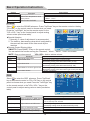
SOUND
Select
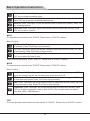
to enter the SOUND submenu. Press "Up/Down" key on the remote control or the key
"CH+/CH-" on the control panel to choose what you need.
Press the "Left/Right" key on the remote control or the
"VOL+/VOL-" key on the control panel to adjust analog
Sound Mode
Standard
value or state (see below table).
50
Treble
★Special Attention
Bass
50
Balance
0
1. Normally, 0 value of adjustment is recommended;
Auto Volume
Off
2. The treble or bass analog value which is adjusted by
the users will be saved as the User mode by the
machine
★Remote Control Shortcut Keys
Adjust
Select
Menu:Exit
SMART S: Press SMART S key on the remote control.
You can switch the function among the "Standard", "Music", "Movie", "User" four modes.
MUTE: Open or close sound.
VOL+/VOL-: Add or reduce volume.
Option
Sound Mode
Treble
Function
Adjust audio effect mode
Adjust treble value
Bass
Adjust bass value
Balance
Adjust balance of left or right sound
Auto Volume
Select Auto Volume
Description
"Standard", "Music", Movie", "User" four modes.
Increasing analog value increases treble;
Decreasing analog value decreases treble (0-100).
Increasing analog value increases bass;
Decreasing analog value decreases bass (0-100).
Increasing analog value decreasing left volume;
Decreasing analog value decreases right volume(L50-R50).
"On/Off", two states.
OSD
Select
to enter the OSD submenu. Press "Up/Down"
key on the remote control or "CH+/CH-"key on the control
panel to choose what you need. Press the "Left/Right" key
on the remote control or the"VOL+/VOL-" key on the
control panel to adjust analog value or state (see below
table).
OSD Language
OSD Duration
OSD Transparency
Blue Screen
Sleep Time
Recall
Adjust
Option
OSD Language
OSD Duration
Function
Select language for OSD display
Adjust duration of OSD menu
OSD Transparency Adjust halftone of OSD menu
Blue Screen
Sleep Time
Recall
Open or close blue screen
Set sleep time of the machine
Resume to setting of factory
English
60 Second
0
On
Off
Select
Menu:Exit
Description
There are many languages to select
Increasing analog value, extend duration time of OSD menu;
(15, 30, 45, 60). Unit: second
Increasing analog value increases halftone;
Decreasing analog value decreases halftone(0-100).
"On/Off", two states.
"Off, 15M, 30M, 45M, 60M,90M, 120M, 240M", unit: minute.
Reset all values to setting of factory.
10
Basic Operation Instruction
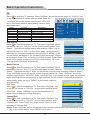
TV
Select
to enter the TV submenu. Press "Up/Down" key on the remote control or "CH+/CH-" key
on the control panel to choose what you need. Press the
"Left/Right" key on the remote control or the "VOL+/VOL-"
key on the control panel to adjust analog value or state
Color System
PAL
(see below table).
Sound System
DK
Option
Color System
Sound System
Skip
Auto Search
Manual Search
Fine Tune
Channel Edit
Function
Select color system
Select sound system
Select skip or not
Select auto search
Select manul search
Select fine tune
Select channel edit
Description
"PAL, NTSC, AUTO" three modes.
"I, DK, M, BG" four modes.
"Off/On" two states.
Please refer to "Auto Search"
Please refer to "Manual Search"
Please refer to "Fine Tune"
Please refer to "Channel Edit"
Skip
Auto Search
Manual Search
Fine Tune
Channel Edit
On
45.30 MHz
Adjust
Auto Search
Select
to enter the submenu of TV. Then press ''Up/Down'' key on
the remote control or ''CH+/CH-'' on the control panel to select ''Auto
Search''. The machine perform search after pressing ''Right '' key on
the remote control or ''VOL+'' on the control panel. (In the process of
searching the channel automatically, press the key of ''MENU'' on the
remote control ,a dialogue of "Do you want to exit searching?" display
on the screen. Press "Left" cursor key to confirm and exit. Press "Right"
cursor key to cancel operation and continue auto search). All of the
TV programs will be saved automatically.
Select
Menu:Exit
Auto Search
Found
0
:
0
Progtranme
%... 50.25 MHz
VHF-L
Menu:Exit
Manual Search
CH: 1
Search
Manual Search
Frequency 45.25 MHz
Select
to enter the submenu of TV. Then press ''Up/Down'' key on
Menu:Exit
the remote control or ''CH+/CH-''on the control panel to select ''Manual
Search''. Then press the key of ''Right'' on the remote control to enter submenu of Manual Search.
Press ''Left/Right'' key on the remote control to select channel No.. Press ''Up/Down'' key on the
remote control to select ''SEARCH'', press ''Left/Right'' key on the remote control again, the machine
begin searching toward low frequency or high frequency. (In the process of searching the channel
automatically, press the key of ''MENU'' on the remote control to
Channel Edit
stop searching).
1 CH
Fine Tune
2 CH
Select
to enter the submenu of TV. Then press ''Up/Down'' key
3 CH
on the remote control or ''CH+/CH-'' on the control panel to select
4 CH
''Fine Tune''. Press ''Left/Right'' key on the remote control to
5 CH
adjust from low frequency or high frequency.
6 CH
Channel Edit
Select
to enter the submenu of TV. Then press ''Up/Down'' key
on the remote control or ''CH+/CH-'' on the control panel to select
''Channel Edit''. Press ''Right'' key on the remote control to enter
submenu of ''Channel Edit''
7 CH
8 CH
9 CH
1:Delete
OK:Enter
2:Move
3:Skip
Menu:Exit
Delete: Press ''Up/Down'' key on the remote control to select channel which you wish delete. Press
"1" key on the remote control, press "MENU" key to return .
11
Basic Operation Instruction
Move: After select channel, press "2" key on the remote control, then press ''Up/Down'' key on the
remote control to select position where you wish place, then press "MENU" key on the remote
control to return.
Skip: Press ''Up/Down'' key on the remote control to select channel, press ''3'' key on the remote
control to open or close "Skip".
Select Channels with "CH+/CH-" Key
Press ''Channel'' key on the remote control or ''CH+/CH-" key on the control panel to select the
channels.
Select channels with the Return key you can go to the last channel when pressing the Return key.
For example, if the last channel is 10 and the current channel is 20, you will go to channel 10 when
pressing the Return key. You can switch the two favourite channels as you like.
Select Channels with Numeric Keys
1. Operations to select channels with 1 digit:
Press the number keys on the remote control to select TV channel directly.
2. Operations to select channels with 2 digits:
Press the number keys with 2 digits on the remote control to select TV
channels.
3. Operations to select channels with 3 digits:
Press the number keys with 3 digits on the remote control to select TV
channels.
HOTEL MODE
ON
CH LOCK
OFF
MAX VOL
100
AUTO SET
PICTURE MODE
ON
STANDARD
POWER VOL
30
POWER SOURCE
TV
CH NUMBER
KEY LOCK
LOCK CH NUM
LOCK
1
OFF
1
OFF
CLONE
Hotel Function(optional)
Press "MENU" key on the remote control to display the main TV menu, and then press "4578" on
the remote control to display the hotel function menu. Press "Up/Down" key to enter into the menu
and select the item which you need to adjust, and then press "Left/ Right" key to adjust the value
or state.
Note: With the mode of AV, YPbPr, PC, HDMI, all functions and adjustments are similar
with TV. User can check it at convenience. HDMI connector can realize DVI connector
function with external HDMI/DVI commutator.
USB Signal Source Operation
Please insert USB memory card into USB interface of TV, press "source" key on the remote control
or control panel to select USB signal source, press "OK" key to enter.
Note:
① USB function support file format with video file/sound file/graphic file/text file. For some
nonstandard USB storage devices, may appear condition of unable recognize, please replace the
standard USB storage device.
② Streaming media system to play a file for each format has certain limitations, if more than the
system limit, then play will be wrong
③ Do not pull up USB storage devices when system playing, this may result in system or equipment
problems
④ The system supports USB1.1 and USB2.0 connector, the standard transport protocol such as U
disk and removable hard disk storage devices. USB devices file format must be FAT or FAT32,
does not support NTFS.
12
Basic Operation Instruction
Press "Left/Right" key on the remote control to
select the document sort menu, which includes 4
sort: PHOTO, MUSIC, MOVIE, TEXT.
USB 2.0
★Remote Control Shortcut Keys
The last two row keys on the remote control are
used for USB operation.
PHOTO
PHOTO
Select
to enter the PHOTO submenu. Select
your mobile U disk or hard disk, and press "OK"
key on the remote control to read your photo
documents.
Select to return previous menu. Press cursor
key on the remote control to select photo and
press "OK" key (After the photo was selected,
the file lower right corner shows a red hook. you
can choose photos to join playlist.). Press
"PLAY" key on the remote control to play. when
you choose nothing, the machine will join all the
photos in the file in playlist automatically.
MUSIC
MOVIE
TEXT
1 / 11
C:\PICTURE
Return
Up Folder
10.jpg
11.jpg
12.jpg
13.jpg
14.jpg
15.jpg
16.jpg
17.jpg
18.jpg
19.jpg
Basic Function
When photos are playing, press "INFO" key on the remote control, a toolbar will display under the
screen(Press "Down" key on the remote control to hide toolbar).
Play/Pause: Press "Left/Right" key on the remote control to select this function, press
"OK" key to play or pause .
Prev.: Press "Left/Right" key on the remote control to select this function, press "OK"
key to read previous photo.
Next: Press "Left/Right" key on the remote control to select this function, press "OK"
key to read next photo.
Stop: Press "Left/Right" key on the remote control to select this function, press "OK"
key to stop playing and return to previous menu.
Repeat: Press "Left/Right" key on the remote control to select this function, press
"OK" key to select repeat One or repeat all or not repeat.
Music: Press "Left/Right" key on the remote control to select this function, press "OK"
key to play background music.(Musics and photos need to place in the identical folder,
or you may select some music in music file first.)
Playlist: Press "Left/Right" key on the remote control to select this function, press "OK"
key to show playlist.
Info. : Press "Left/Right" key on the remote control to select this function, press "OK"
key to show the information of photo. Including resolution, size and so on.
13
Basic Operation Instruction
Clockwise: Press "Left/Right" key on the remote control to select this function, press
"OK" key to clockwise rotation photo.
Counter-clockwise: Press "Left/Right" key on the remote control to select this function,
press "OK" key to counter-clockwise rotation photo.
Zoom in: Press "Left/Right" key on the remote control to select this function, press "OK"
key to enlarge picture.
Zoom out: Press "Left/Right" key on the remote control to select this function, press
"OK" key to reduce picture.
MUSIC
The operations are similar to the "PHOTO".Please refer to "PHOTO" options.
Basic Function
FB: Press "Left/Right" key on the remote control to select this function, press "OK" key
to fast back. Press "PLAY"key to play normally.
FF: Press "Left/Right" key on the remote control to select this function, press "OK" key
to fast forward. Press "PLAY"key to play normally.
Select time: Press "Left/Right" key on the remote control to select this function, press
"OK" key to select the time to play .
Other functions are similar to the "PHOTO", Please refer to "PHOTO" options.
MOVIE
The operations are similar to the "PHOTO".Please refer to "PHOTO" options.
Basic Function
Set A: Press "Left/Right" key on the remote control to select this function, press "OK"
key to set A and B, the film will circulating play in the time of A to B.
SF: Press "Left/Right" key on the remote control to select this function, press "OK" key
to slow down play speed. Press "PLAY"key to play normally.
Step: Press "Left/Right" key on the remote control to select this function, press "OK" key
to play one step by step. Press "PLAY"key to play normally.
Proportion: Press "Left/Right" key on the remote control to select this function, press
"OK" key to select proportion among Auto/4:3/Full.(This function does not support
more than 1920×1080 HDvideo.)
Note: Zoom Function does not support more than 1920X1080 HD video.
TEXT
The most operations and functions are the similar to "PHOTO". Please refer to "PHOTO" options.
14
Simple Troubleshooting
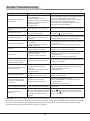
Symptom
Factor
Snowflake speckle and
sound noise.
1.Antenna cable connector is loose,
cable is damaged.
2.Channel setting is incorrect.
3.Antenna cable type is not matching.
4.Direction or position of antenna
cable is incorrect.
5.Signal is weak.
1.Check the antenna cable connector plug whether or
not loose, cable whether or not perfect.
2.Refer to channel setting method, resetting again.
3.Check antenna cable type(VHF/UHF)
4.Adjust direction or position of antenna cable .
5.Attempt to use signal amplifier.
TV image is better, but has
noise.
TV system setting is incorrect.
Enter to "TV" menu, reset sound system again .
No image. No sound.
Power plug is loose, power
cord don't connect well.
1.Check power cord whether or not connect well.
2.Check if " " on the panel is on.
TV image have stripe.
TV image have shadow.
Solution
Signal is exposed to disturb,
such as car, neon light, electric
blower etc.
1.TV signal is reflected by valley
or building.
2.Toward direction of antenna
cable is incorrect.
Don't use electric blower around machine, adjust
antenna cable direction to reduce disturb.
1.Use high directional antenna cable. Use Fine
Tune of "TV".
2.Adjust toward direction of antenna cable.
No color.
1.Color saturation is too low.
2.Color system is incorrect .
TV no sound.
1.Volume setting is too low.
2.Sound is muted.
3.Sound system is incorrect.
Computer no display,and
prompt no signal input,red
indicator LED twinkling.
Signal cable is loose or fall off.
Check signal cable whether or not loose, fall off,
reconnect well again.
Remote control distance is
short, lose control.
1.Receive window of remote
continue was covered by
objects.
2.The battery energy of remote
control is to low.
1.Remove objects, avoiding cover the receive
window of remote control.
2.Change battery.
Computer display faintly.
1.Adjustment is incorrect.
2.Display mode is incorrect.
1.Use auto-adjustment function.
2.Use commend mode.
Computer display image
excursion, not full screen,
over screen.
1.Adjustment is incorrect.
2.Display mode is incorrect.
1.Use auto-adjustment function.
2.Enter "GEOMETRY" to adjust horizontal or
vertical position.
3.Use recommended mode.
Noise Signals at turning off. Electrical release at turning off.
Can not operate this
machine.
Exterior influence, for example
lightning, static electricity and so
on, which are possibly to disturb
the normal operation of this
machine.
1.Enter "PICTURE" to add up color saturation.
2.Enter "TV" to change color system.
1.Adjust volume to proper value.
2.Press "MUTE" button on remote control to
eliminate mute.
3.Enter "TV" to change sound system.
It is normal.
Press " " button to turn off electrical source,
then press " " button to turn on the TV again
after 1-2 minutes.
CAUTION: Don't let your machine display the same picture for a long time, please set up a screen protection
procedure. If a high contrast picture remains for along time, this picture will bring a 'leave shadow' in screen.
Usually the 'leave shadow' will disappear gradually when you turn off the machine power. However, this
trouble can't be repaired, Which isn't in range of warranty.
15