1
Testing, testing, 1, 2, 3...
Apply power to the unit making sure you are applying the power correctly. Check that no
device is running hot. Any sign of smoke or strange smells turn off the power immediately and
recheck the polarity of the power supply, and the direction of the ICs in their sockets and the
polarity of the electrolytic capacitors.
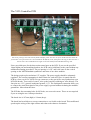
Now if you have not done so already it is time to plug the unit into your modular. You will
have several interconnects to fit before you can use the VCO Controller.
Set up a standard synthesiser patch of keyboard interface (midiDAC), two VCOs, a VCF,
VCA and an ADSR to gate the VCA. Set all the pots on the VCO Controller to their
minimum settings. Now play a few notes on your keyboard. You may notice that the pitch
goes slightly out of tune as you work your way up the keyboard. This is fine, you'll be
calibrating the scale later. Make sure that both octave switches change the pitch of the
connected VCOs. Again, you will not have a perfect octave shift but it should be fairly close.
Now turn the LFO/CV vibrato depth pot up. You should notice that both VCOs will start to
change pitch with the actions of the module's internal sine wave LFO. Check that the depth of
the effect gets greater the more the pot is turned up. Now change the LFO rate pot. Check
that the LFO frequency goes up as the pot is turned up. It should go to very slow to around
50Hz at its fastest.
Turn up the VCA Vibrato Depth. Hopefully, this should not do anything yet. If it does you
may have a problem with the VCA part of the circuitry.
Insert a patch lead from the ADSR or another LFO output into the CV IN socket. Check that
the VCO Controller's internal LFO is disconnected and that the inserted modulation source is
now controlling both VCOs instead. The LFO/CV Vibrato depth pot should still control the
depth of the modulation. Turn this pot to its lowest setting ready for the next test.
Remove the patch lead from the external modulation source. Connect the patch lead from the
aftertouch or modulation wheel CV output of the midi-CV convertor (or any other variable
CV source) to the VCA CV IN socket. Now turn up the VCA Vibrato Depth pot again. You
should find that as the applied CV goes up the internal LFO is once again modulating both
VCOs. The overall depth of the modulation is therefore controlled by both the depth pot and
the externally applied CV. With no aftertouch or mod wheel CV applied there should be no
LFO modulation heard.
Turn down the vibrato depth pot and connect another patch lead from the VCA CV OUT
socket to a cut off CV input on your filter. You should find that as the aftertouch or mod
wheel is applied then the filter's cut-off frequency rises. It should be smooth and not lumpy
like it normally is with CC information.
Check now that you have a rough sine wave output from the SINE OUT socket, and a square
wave output from the SQR OUT socket. You can modulate the cut-off frequency of the
connected VCF to hear the LFO's affects. The sine wave should cause the cut off frequency to
rise and fall smoothly, while the square wave will cause abrupt changes between two values.
12