1
Controller Features
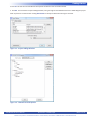
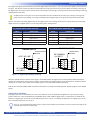
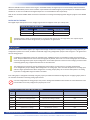
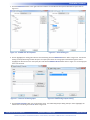
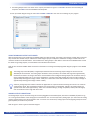
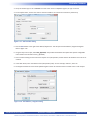
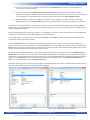
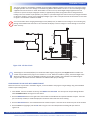
Figure 2-24 - Modbus Properties
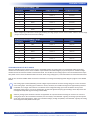
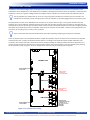
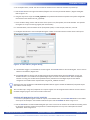
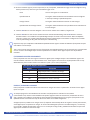
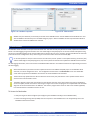
Figure 2-25 - Add Interface
Modbus TCP (over Ethernet) is now ready to be used on the ICM-BB-P13-XX. Several additional function blocks are used with the Modbus TCP Ethernet port in the ladder diagram project. More on Modbus and the required function blocks is
detailed in the P-Series EZ LADDER User’s Manual.
SD Card Features
The ICM-BB-P13-XX controller can accept a Micro SD Flash card. This card currently may be used to install / update the controller’s
kernel or for data-logging using Structured Text. The user ladder diagram compiled project can also be installed and updated using
the SD Card. Installation/update of Kernel and Ladder Diagram project will only occur on power up of the ICM-BB-P13-XX controller
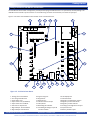
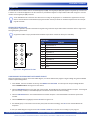
(when the SD Card is configured to do so). Refer to Figure 1-5 for the location of the SD Card socket (SD).
For SD Card updates to work, the SD card must have a directory named “update”. In this update directory, the kernel (.dat) and the ladder diagram compiled programs (.hex) must be placed for the SD card to update the ICM-BB-P13-XX controller.
For data logging information, refer to the P-Series EZ LADDER Toolkit Manual or our website for details on implementing structured
text data-logging.
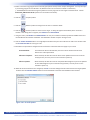
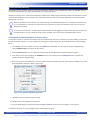
Before the SD Card may be used to install or update the kernel or EZ LADDER compiled project to the ICM-BB-P13-XX
controller, it must be configured to do so. This configuration must be done in the Bootloader screen. The Bootloader
screen will only operate if EZ LADDER is connected to an actual ICM-BB-P13-XX controller.
The kernel will only update from the SD Card when the kernel name (.dat) matches the unit to update and the version
of the kernel on the SD CARD is newer.
The ladder diagram program will only update from the SD Card when the name (.hex) matches the program installed on the unit to update, the kernel version is new enough to support the version the program was compiled with and the ladder diagrams version and build numbers are different. This allows a program either newer or older to be installed (updated) from the SD Card if the conditions set here are met.
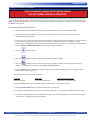
To Access the Bootloader:
1. Verify the target has been configured (see Configuring the ICM-BB-P13-XX Target in EZ LADDER Toolkit).
2. Connect the Programming cable (SI-PGM) from the computer to the ICM-BB-P13-XX. See Programming Port in the
ICM-BB-P13-XX Features section.
ICM-BB-P13-XX User’s Manual
Document #: 2013008.5.pdf
Divelbiss Corporation • 9778 Mt. Gilead Road • Fredericktown, Ohio 43019 • 1-800-245-2327 • www.divelbiss.com
PAGE 33 of 44