1
✔
•
SPEED - adjust the speed of the camera rotation in the follow mode. Don't set big values that
motors can not handle (if motor does not produce enough torque, it will skip steps and
synchronization will be broken). In this case, acceleration limiter may help to have big speed
but do not miss steps.
Operation in the Follow Mode
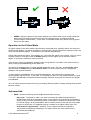
At system startup in the follow mode, keep the frame horizontally and manually adjust the camera to
the horizontal position, and adjust it's heading. Camera easily "jumps" between the magnetic poles, and
when left near desired position, it will stick to home position automatically.
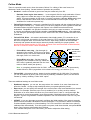
Gently rotate and tilt the frame. Turns within ± 45º will control the speed of the camera from 0 to 100%.
Camera rotates in accordance with the SPEED settings until it's angles are not equal the frame's
angles, or until given restrictions will be achieved.
If the camera moves unpredictably, perhaps its the wrong direction of rotation of the motors and you
need to change the Reverse flag in the 'Basic' tab .
To achieve the smooth motion, increase the LPF parameter (in the 'RC' tab), increase Expo curve,
and decrease the SPEED and the Acceleration limits. For more dynamic control, change these
settings in the opposite direction.
In case of failure of stabilization due to external disturbances, the camera can completely lose
synchronization with the frame . In this case, it is necessary to return it to the proper position by hands.
IT IS VERY IMPORTANT to keep the frame horizontally, because at this point the frame's zero angles
are calibrated.
You can switch between modes on-the-fly by activating different profiles. Camera will keep their position
between modes.
Advanced tab
•
AHRS - options influencing camera angle determination accuracy.
◦ Gyro trust – The higher is value, the more trust to the gyro data compared with the
accelerometer data when estimating angles. It can reduce errors caused by accelerations
during moving, but also decreases gyro drift compensation, resulting in horizon drift in time.
For smooth flying, it is recommended to set low values (40-80), which will give more stable
horizon for longer time. For aggressive flying, it's better to set higher values (100-150).
◦ Accelerations compensation – enable it to use a physical model of multirotor to
compensate accelerations during flight. This option works only when external FC is
connected and calibrated.
© 2013 Basecamelectronics®
8