1
CHAPTER 6 TestPlans
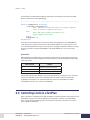
3.0 Running a TestPlan
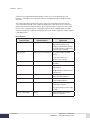
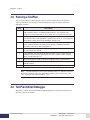
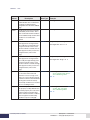
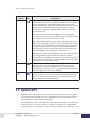
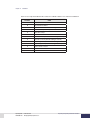
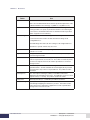
This section describes (at a basic level) the sequence of internal events that occur whenever a
Top-Level TestPlan is selected and run. Understanding these steps can often be useful when
debugging a TestPlan.
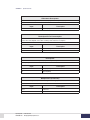
Step
Description
1
All TestPlan components – the selected Top-Level TestPlan as well as the GLOBAL,
CALCULATED Functions, and LIMIT Handler TestPlans – are compiled. These
components must compile with no errors. NOTE: They are not run until a later step.
2
All language extensions are instantiated and registered. This includes an object for
each virtual channel, each defined limit, each Data File Format, etc. Once registered,
these objects can be referenced by all DSBasic TestPlan code.
3
The overall TestSystem is validated. For example, a DSBasic function must exist for
each configured TestPlan calculated channel. Similarly, a DSBasic limit handler
procedure must exist for each configured limit.
4
Data Acquisition is started. The 20 Hz Master Timing loop and device sampling loops
are started and synchronized.
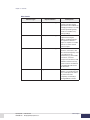
5
2 Second Delay. This delay allows the data acquisition system to begin retrieving
valid data samples prior to beginning execution of the TestPlan code, monitoring
limits, recording data files, etc.
6
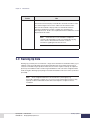
The TestPlan Flight Recorder is started. The Flight Recorder is explained below.
7
The “Main” routine in the selected Top-Level TestPlan is started. Your TestPlan is now
officially running.
8
The High and Low priority limit threads are started.
Note: The data acquisition system can be started by itself (i.e. no TestPlan is selected
and run) by selecting ‘Control’ then ‘Start Data Acquisition’ from the main menu. In this
case, only the first four steps listed above occur.
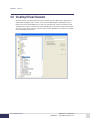
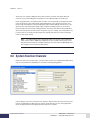
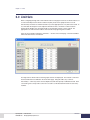
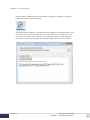
4.0 TestPlan Editor/Debugger
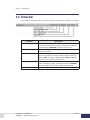
All TestPlan creation is done with the DSBasic Editor/Debugger. It is fully documented in the Cell
Assistant on-line documentation.
6.4
TestPlan Editor/Debugger
DyneSystems • Cell Assistant
DPD-008-02 • © Copyright DyneSystems, Inc.