1
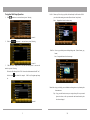
Interface setup :
4、 Click the cursor
,then click cursor
into map interface。
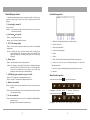
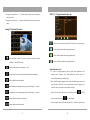
Screen Display District
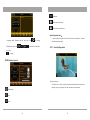
Theme setup:1、Select left/ hand, also put the controlling button on the left/right hand.
2、Click the theme picture under subject setup ,choose your favorite theme
style in the file of storage equipment.(file with suffix “ui”),then click
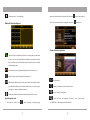
A:Time & Date display district
note:Click area “A”,will come out Image, sound effect mode quick sets
cursor
and confirm it。
Play MP3‟s music under DVD mode ,image full screen , Click area “A” to exit
full screen .
B:Currently function & information display
C:System information & volume played area
D、F:Currently function control area
E:Picture in Picture area
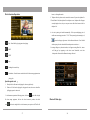
Special Operation Reminder:
1、 In the information area ,let B area for the middle point ,Touch screen slide to
right is increase volume , slide left is decrease volume .
2、
:Under any function mode,click screen right corner speaker icon,go to
mute mode.
25
6