1
Network Video Recorder Quick Start Guide
As the default array type is RAID 5, at least 3 HDDs must be installed in you device. And if more than 10 HDDs
are installed, 2 arrays can be configured.
Steps:
1. Enter the Physical Disk Settings interface.
Menu > HDD > RAID
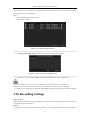
Figure 3. 11 RAID Settings Interface
2. Click One-touch Configuration to enter the One-touch Array Configuration interface.
Figure 3. 12 One-touch Array Configuration
3. Edit the array name in the Array Name text field and click OK button to start configuring array.
If you install 4 HDDs or more for one-touch configuration, a hot spare disk will be set by default. It is
recommended to set a hot spare disk for automatically rebuilding the array when the array is abnormal.
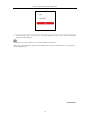
4. When the array configuration is completed, click OK button in the pop-up message box to finish the settings.
3.10 Recording Settings
Before you start:
Make sure that the disk has already been installed. If not, please install a disk and initialize it. You may refer to the
user manual for detailed information.
Purpose:
Two kinds of record types are introduced in the following section, including Instant Record and All-day Record.
21