1
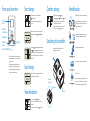
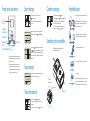
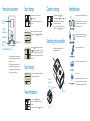
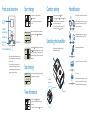
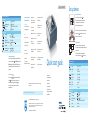
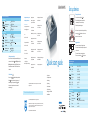
Front panel overview
Start therapy
LCD display
screen
1. From the main menu, turn the control wheel to
(Therapy) and press.
2. The monitor screen will be displayed and the device
will start.
i
Humidifier
number settings
AVAPS
U
S/T
Humidifier icon
4.0 cmH 2 O
Alarm silence
button
21 I/min
Ramp button
Control wheel/Push button
MinVent
4.0
VTE
400
21
RR
10
4
i
Humidification
1. From the patient screen, highlight (Comfort).
The Flex (
), Ramp start ( ), and Rise Time ( ) comfort
features will be shown in this menu selection if enabled.
2. Turn wheel to specific setting and press.
3. Turn control wheel to desired option and press to select.
4. To exit, turn control wheel to
(Back) and press.
Undocking the humidifier
In provider mode ( ), simultaneously pressing the alarm silence
button ( ) and the ramp button ( ) for a few seconds gives
access to the full monitoring screen, allowing all parameters to
be viewed at once. To get back to the monitor screen, push the
control wheel.
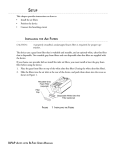
Refer to diagram below. Hold entire unit at each end
and slide release latch to the right.
AVAPS
S/T
While the monitor screen is displayed, press the control wheel
for a few seconds and the device will stop.
4.0 cmH 2 O
View information
i
1. Turn the control wheel to
(Info) and press.
2. Turn the control wheel to desired option to view the
information.
3. To exit out, turn the control wheel to
(Back) and press.
1. (a) Lift humidifier door until it locks in place. Do not force
door higher than the locked position. (b) Grasp front of
chamber and slide toward you.
2. (a) Gently push tab located inside round opening on top
of chamber. (b) Separate top and bottom of chamber.
3. Fill bottom chamber with distilled water.
5. Do not overfill.
Reassemble the chamber by placing the hinges on lid over the
two tabs on back of chamber. Close lid until it locks in place
with an audible click. Insert filled chamber into humidifier.
Humidifier
(bottom view)
21 I/min
With device turned off, remove and fill chamber with water.
4. Observe maximum fill lines located on sides of chamber.
Stop therapy
U
1. If the humidifier is attached to the device, when blower is
activated, the humidification icon and numerical setting will
light up on the device.
2. Turn control wheel to adjust humidifier number to the
desired setting (0 to 5). The settings represent relative
humidity levels that will remain consistent throughout the
night even if room temperature changes.
Note: You can select the measured parameter to display on
the monitor screen. Choose from (Leak), RR, MinVent,
or VTE .
Comfort settings
Release latch
Release latch