1
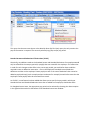
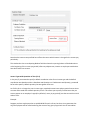
If this option is selected however, individual basic income elements will be combined into a single
income item on employee payslips.
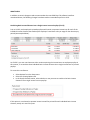
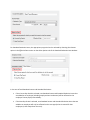
The example below shows the payslip of the same employee from the previous example above, but this
time with this option selected:
Note:
•
•
•
This is a global setting, and if selected it will affect the payslips of all employees on your payroll.
This option affects only the way in which the basic income elements are reflected on payslips.
The payroll administrator will still see the basic income elements reflected individually under
the Income tab of the Employee Payslip window, regardless of whether or not this option is
selected.
Even if this option is selected, it is automatically overridden when printing the payslips of
employees who have no basic salary or basic wage income items (e.g. employees who earn
commission only).
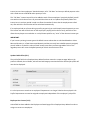
“Reinstate Employee” Renamed (V3.0.4)
The Reinstate Employee function in the main Employees window has been renamed to Clear
Termination Details in order to better communicate what this function actually does.
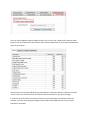
New Report: Period Recon (By Tax Class) (V3.0.4)
A New report has been added to the Payroll section to print payroll reconciliations (by tax classification)
for individual pay periods and/or pay groups.
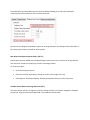
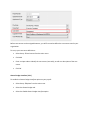
To access this report:
•
Go to the Payroll section.
•
Select the relevant pay group and pay period in the navigation pane to the left of the window.
•
Right-click in the centre of the Pay Periods section, then select Print Period Recon (By Tax
Class) from the resulting pop-up menu.