1
Chapter 1 - Polycom® RSS™ 4000 Introduction
•
Supports the recordings of audio-only and conversion to MP3 files for
downloading and playing.
•
Supports the maximum security mode (MSM) for meeting high-security
environment requirements.
•
Supports SSL certificate authentication encryption to ensure the data
security of Web communication.
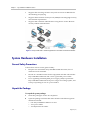
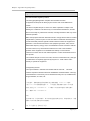
Figure 1-1 Polycom® RSS™ 4000's Application in the Video Conference Network
System Hardware Installation
General Safety Precautions
Follow these rules to ensure general safety:
•
Keep the area around the Polycom® RSS™ 4000 unit clean, free of
clutter and well ventilated.
•
Decide on a suitable location for the equipment rack that will hold the
Polycom® RSS™ 4000 unit and is near a grounded power outlet.
•
Use a regulating uninterruptible power supply (UPS) to protect the
Polycom® RSS™ 4000 unit from power surges and voltage spikes, and
to keep it operating in case of a power failure.
Unpack the Package
To unpack the system package:
1
Check the package to ensure its completion.
2
Open the package and check the items included. The following items
should be included:
― One Polycom® RSS™ 4000 server unit
― Two power cables
― Two RJ-45 network cables
1-2
Polycom, Inc.