1
Introduction
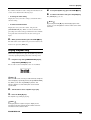
Introducing the MRS-802
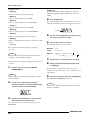
• CD-R/RW drive section
Lets you burn an audio CD using the contents of the master
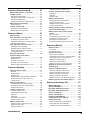
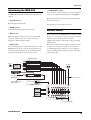
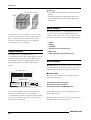
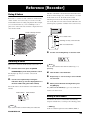
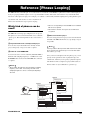
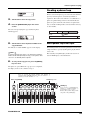
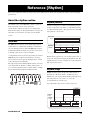
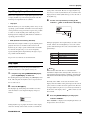
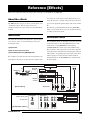
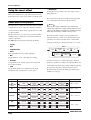
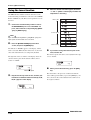
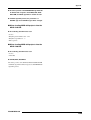
The MRS-802 is internally divided into the following five
tracks, or read audio material from CDs and CD-ROMs.
sections.
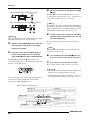
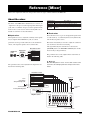
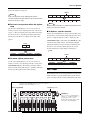
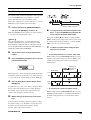
The diagram below shows the relationship and signal flow
between each section.
• Recorder section
Records and plays back audio.
Now let's take a closer look at each section.
• Rhythm section
Uses internal drum machine to play rhythms.
Recorder section
• Mixer section
The recorder section of the MRS-802 has eight mono tracks
Mixes the signals from the recorder section and rhythm
(tracks 1 - 8). (A "track" is a separate section for recording
section, for output via the stereo output jacks and for
audio data.) Up to two tracks can be recorded
mixdown on dedicated master tracks.
simultaneously and up to eight tracks can be played back
simultaneously.
• Effect section
Each of the tracks has ten switchable virtual tracks (called
Processes input signals or signals of the mixer section. The
"V-takes"). In each track, one V-take can be selected for
MRS-802 has two types of effects: an insert effect that is
recording/playback. For example, you can record guitar
inserted in a specific signal path, and a send/return effect
solos onto multiple V-takes, and then compare them later to
that uses the send/return loop of the mixer section.
select the best take.
Recorder section
INPUT
Insert
effect
CD-R/RW section
Track 1
Track 2
Track 3
Track 4
Track 5
Track 6
Track 7
Track 8
OUTPUT
Master track
From immediately after
[MASTER] fader
To immediately before
[MASTER] fader
To master tracks
Drum sound
Rhythm section
DRUM
1
2
3
4
5
6
7
8
MASTER
REVERB
CHORUS
DELAY
Send/return effect
Mixer section
From master tracks
ZOOM MRS-802
9