1
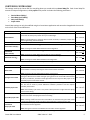
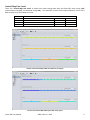
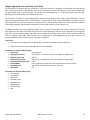
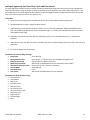
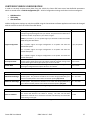
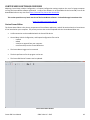
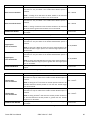
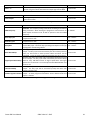
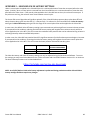
Road Dyno Power Calculator The Cortex Nexus Logger includes a power calculation algorithm that can be used to display horsepower and torque estimates based on the data collected from the Cortex EBC device. For the Road Dyno Power Calculator to work properly you must provide the Cortex Nexus Logger with the following information: The gear and final drive ratios utilized in your drivetrain. The size of the tires on your vehicle. The weight, frontal area, and coefficient of drag of your vehicle. The outside temperature and barometric pressure during the Data Stream or Log. This information is used to calculate the power required to accelerate your vehicle based on its weight in addition to the power required for your vehicle to “push” through the air. Road Dyno Configuration File The settings used by the Cortex Nexus Logger to perform power calculations are stored within a Dyno Configuration File. Road Dyno Configuration settings are broken into Gear Ratio, Vehicle, and Environment categories. NOTE: Road Dyno Configuration settings are accessed from the Cortex Nexus Logger portion of the Cortex Nexus software application. GEAR RATIO PARAMETERS Gear 1-6 Ratio Final Drive Ratio DESCRIPTION The gear ratio for each gear inside the vehicle’s transmission. The final drive ratio for the vehicle’s drivetrain. Gear Ratio Settings RANGE 0.000 – 9.999 0.000 – 9.999 VEHICLE PARAMETERS Tire Width Tire Profile Wheel Diameter Mass Frontal Area Coefficient of Drag DESCRIPTION The width of the vehicle’s tires (e.g. 225/45/R17). The profile is the aspect-ratio of the vehicle’s tires (e.g. 225/45/R17). The diameter of the vehicle’s wheels (e.g. 225/45/R17). The weight of the vehicle and all of its contents. The frontal area of the vehicle. The coefficient of drag for the vehicle. Vehicle Settings RANGE 0 – 500 mm 0 – 100 % 0 – 25 in 0 – 10,000 lbs 2 0 – 200 ft 0.000 – 100.000 ENVIRONMENT PARAMETERS Temperature Barometric Pressure DESCRIPTION The outside temperature when the Data Stream/Log was collected. The barometric pressure when the Data Stream/Log was collected. Environment Settings RANGE 0 – 120 °F 0.00 – 15.00 PSI Cortex EBC User Manual SIRHC Labs LLC - 2015 20