1
Most cameras cannot handle a bulb exposure shorter than 1/30th of a second. For
exposures less than 1 second, bulb exposure is not recommended as deviation can
occur in the bulb timing between the camera and the MX3.
6.5. Controlling Focus, Waking Camera up from Sleep
For some creative shots or to wake the camera up before exposing during long intervals, it may
be necessary to control the focus line for the camera before triggering a shot.
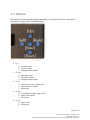
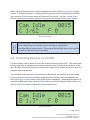
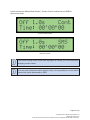
To control the focus line, go to the Camera Control screen, and use the [Right] button until the
Focus Time control is highlighted. Now, use the [Up] and [Down] buttons to modify the focus
time in half-second increments.
To wake a camera up from a soft sleep during long intervals, not more than ½ second of focus
time should be required.
Focus Control Enabled
Most cameras will require at least 1-3 seconds to autofocus in a well-lit scene, for
darker scenes, you may have to set the focus time much longer.
6.6. Multiple Exposures
For multiple exposures, such as using auto-bracketing when your camera requires you to trigger
the shutter for each bracketed exposure (single frame drive mode) or if you want to use the
Mirror LockUp function on your camera (MUP). This is especially useful when shooting very long
exposures in Shoot-Move-Shoot mode and you want to use the camera’s Mirror Lockup function
so that no vibration happens during an exposure. In this case set the Repeat shots to 1; one
Page 19 of 45
Copyright © 2013 Dynamic Perception LLC
dynamicperception.com
All Contents licensed under the Creative Commons Attribution Share-Alike 3.0 License