1
Section 1: Installation
Welcome to the Field-Pro™ configuration program for the Hydro-Flow™ Series of vortex flowmeters.
Together with the Field-Pro Communicator, the Field-Pro software is used to set the configuration
values for a Hydro-Flow flowmeter. The Field-Pro User’s Manual is a step by step guide to installing
the software, connecting the hardware and using the program to reconfigure your Hydro-Flow flowmeters.
WINDOWS SYSTEM REQUIREMENTS
To use the Field-Pro configuration program, you need the following hardware and software:
• Personal computer with 25 MHz 80386 or better, with math coprocessor (80486DX or Pentium
recommended)
• VGA resolution video adapter
• Microsoft® Windows® 3.1, Windows 95 or Windows NT™ version 4.0 or better
• 4 MB random-access memory (RAM); 8 MB RAM with Windows 95
• Approximately 3 MB available hard disk space
• EIA-232 serial port (COM1 through COM4 are supported) with standard 9-pin connector
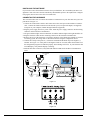
THE FIELD-PRO PACKAGE CONTENTS
• Field-Pro Communicator
• Serial interface cable, 6 foot long 9-pin male to 9-pin female
• Power supply, 120 VAC 60 Hz input, 12 VDC 300 mA unregulated output
• Flowmeter cable with alligator clips for connecting to the flowmeter power terminals
• Two 31/2" high density floppy disks with the Field-Pro software
• Field-Pro Installation and Operation Manual
INSTALLING THE SOFTWARE
This section describes how to install the Field-Pro software.
1. Start Windows, if necessary.
2. Insert Disk 1 into your floppy disk drive.
3. For Windows 3.1: In the Program Manager, from the File menu, choose Run. Type
a:\SETUP.EXE and press enter. Follow the prompts.
For Windows 95 and Windows NT: From Start in the task bar, choose Run. Type a:\SETUP.EXE
[enter]. Follow the prompts.
The following files are installed in the directories shown, assuming that the default directories are not
changed during installation.
C:\FIELDPRO\FIELDPRO.BMP
C:\FIELDPRO\FIELDPRO.CAL
C:\FIELDPRO\FIELDPRO.EXE
C:\FIELDPRO\FIELDPRO.INI
C:\FIELDPRO\PANELS.UIR
C:\FIELDPRO\UNINST.EXE
C:\FIELDPRO\UNINST.LRM
C:\FIELDPRO\VORTCOMM.DLL
C:\CVIRTE\CVIRT4.EXE
C:\CVIRTE\BIN\CVIRT4.RSC
C:\CVIRTE\BIN\MSGRT4.TXT
C:\CVIRTE\FONTS\NISYSTEM.TTF
C:\CVIRTE\FONTS\NI7SEG.TTF
The CVIRTE directory includes the runtime files necessary for the National Instruments
LabWindows/CVI™ executables. If you already have LabWindows/CVI installed on your system,
then the CVIRTE directory is not created; the Field-Pro software uses the LabWindows/CVI runtime
files already installed on your system.
In addition to the files, a Windows program group titled “Field-Pro Configuration" is created with
two items
• Field-Pro Configuration Program
• Uninstall Field-Pro Configuration Program.
3