1
Location of Controls
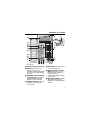
H TRANSFER: Used to transfer
a call to another party.
I REDIAL: Used to redial the
last dialled number.
J MESSAGE: Used to leave a
message waiting indication or
call back the party who left
the message waiting
indication.
K Headset Jack
L FLASH/RECALL: Used to
disconnect the current call
and make another call without
hanging up.
M HOLD: Used to place a call
on hold.
N SP-PHONE
(Speakerphone): Used for
performing hands-free
operations.
O ENTER: Used to assign the
selected item.
P Microphone: Used for
hands-free conversations.
4
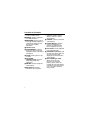
Q Navigator Key: Used to
adjust the volume and the
display contrast or select
desired items.
R CANCEL: Used to cancel the
selected item.
S Flexible Buttons: Used to
seize an outside line or
perform a feature that has
been assigned to the key.
T LCD Panel: Can be adjusted
to the desired angle.
U Soft Buttons (S1-S4): S1-S4
(located from left to right) are
used to select the item
displayed on the bottom line
of the display.
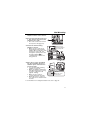
V Message/Ringer Lamp:
When you receive an
intercom call, the lamp
flashes green, and on an
outside call, the lamp flashes
red. When someone has left
you a message, the lamp
stays on red.