1
Battery Installation
We recommend using lithium or high-capacity
rechargeable batteries for longest life.
Note: Standard zinc-carbon batteries marked
“heavy-duty” or “long-lasting” are not adequate.
The battery status circuitry is designed for the voltage drop over the life of lithium batteries.
To install new batteries:
1) Turn the Battery Cover Plate Opener counterclockwise, open the battery compartment and remove any old batteries.
2) Insert the new battery (or batteries) into the housing, positive (+)
terminal first.
Important: On dual-battery transmitters, BOTH
batteries go positive (+) terminal first.
3) Replace the Battery Cover Plate and tighten the Opener.
Configuring for Remote Control Use
Some transmitter settings can be changed with the
Lectrosonics RM Remote Control. However, you
must first configure the SM Series transmitter to
accept commands from the RM:
1) Press and hold the Down Arrow Button then
power on the transmitter by pressing the
Audio and Freq buttons simultaneously.
Remote Control Screens
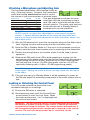
2) The LCD will display the status, either “rc ON” or “rc OFF.” To change the
setting, press the Up or Down arrow button.
3) Power Off the transmitter by pressing the Audio and Freq buttons simultaneously. The RC setting will persist when you Power Up the transmitter
again.
Note: SM Series transmitters with firmware version 1.6 and later are
factory set to “rc ON” by default.
Configuring for Power Restore (SMV & SMQV ONLY)
When using external power source through a
battery eliminator, Power Restore will return
your transmitter to settings it had before it was
powered off. This eliminates the need to power on
through the unit itself.
1) Press and hold the Down Arrow Button then
power on the transmitter by pressing the
Audio and Freq buttons simultaneously.
Power Restore Screens
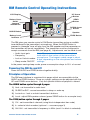
2) The LCD will display the status, either “rc ON” or “rc OFF.” Press “AUDIO”
or “FREQ” key to scroll to the “PbAc 0” setting and use arrow keys to
turn to “PbAc 1” for on.
3) When power is restored the unit will turn on with previous settings.
6
LECTROSONICS, INC.