1
Appendix A
Manual Clarifications and Additions
Data Format—The compatibility VIs for the LabVIEW 4.x Automation
functions require that you pass flattened data in the LabVIEW 4.x format.
LabVIEW 5.x loads your LabVIEW 4.x VIs and automatically selects the
Convert 4.x Data option for the Flatten To String and Unflatten From
String functions, which are found in the Advanced»Data Manipulations
palette.
Instrumentation
Signal Generator by Duration VI —The Signal Generator by Duration
VI has been added to the Signal Processing»Signal Generation palette.
This VI generates a signal with a shape given by the waveform type: sine,
cosine, triangle, square, sawtooth, increasing ramp, or decreasing ramp.
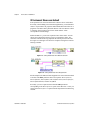
CVI Function Panel Converter Changes—The improved CVI Function
Panel Converter creates hierarchical text menus so you can find functions
quickly. Two new options have been added to the CVI Function Panel
Converter. These options are ON by default.
•
Map ViSession type to VISA Session RefNum—This option
specifies that instrument session numbers of type ViSession in the CVI
Function Panel are converted to LabVIEW VISA RefNums in the
resulting VI. Functions that contain the string _init in their name
automatically register with the VISA refnum; functions that contain
_close in their name automatically close the VISA refnum.
•
Create instr.lib menu mirroring CVI Class Hierarchy —
This option specifies that when converting a Function Panel file,
a palette menu for the instrument is created in the Instrument Drivers
menu. This menu is organized hierarchically according to the Function
Panel Tree in the .fp file.
General Interface Features
Icon and Text Palettes
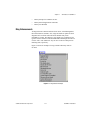
You can display palettes in three modes: Standard, All Icons, or All Text.
Choose the palette display mode in the Edit»Select Palette Set»Display
Style submenu.
In All Text mode, you right-click to access the Controls or Functions
palette. These text palettes contain the names of options. Items in text
palettes are organized in the same order as in the icon palettes when you
read the icon palette row by row, left to right. Empty spaces in the icon
LabVIEW 5.1 Addendum
A-2
© National Instruments Corporation