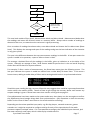
1
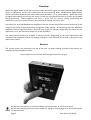
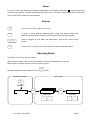
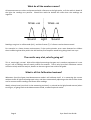
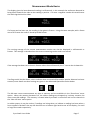
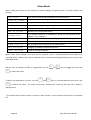
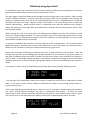
Effectively using Sync-‐One2 To be effective, there are some basic tips which when combined with an understanding of the statistics gathered will enable effective measuring of synchronisation errors. The light trigger is based on detecting the change from dark to light and is very sensitive. When testing involves projectors however, it may be required to put Sync-‐One2 into the projector beam (facing the projector, naturally) rather than rely on the reflected light from a screen. Audio detection is essentially looking for the start of a noise, it doesn’t matter is the audio is in or out of phase as this is taken into account automatically. Ideally perform tests in a darkened room with low ambient noise, doing so makes the distinction of the light flash and sound easier to detect and so measurements will be more accurate and reliable. When turning the unit on or going back into Measurement Mode Sync-‐One2 will calibrate to take account for ambient light and noise. It is best to hold the unit in the measuring position when turning on, or going back into measurement mode such that the calibration can be optimally set for the current measurement conditions and unit position. In any given installation there will be a variance between all the readings taken. This is because when digital processing is involved there will be slight differences in how the signals are processed, this is where the use of statistics is the most useful to determine any given error. Always take a number of readings to determine an error, to help smooth out the variances. Then the average and span of a set of readings give the best indication of the situation in any given system. A low span of readings means the system is stable in its operation, ideally a span of 10ms or 0.5 frames or lower is ideal. The average will give the delay in the system, naturally an average of 0ms / 0.00 frames would be perfect but in the real world anything under 10ms or 0.5 frames would be hard for anyone to detect. For example, if after a series of measurements, the Show Stats menu gives the following screen… A +046 M01 S 0002 ms +047 …the low span of 2 milliseconds indicates the system is stable but suffers from a video delay of about 46ms. If this were a home cinema, adding an audio delay of 46ms and re-‐testing should result in a synchronised solution. If the same readings were obtained with a frame rate set, for example in a video editing environment, the screen would alternate between the stats in milliseconds and frames. So with the same measurements with a frame rate of 48 frames/second set there is a span of 00.1 frames, which is good. The average error is the audio leads the video by 2.19 frames so adjustments need to be made. A+2.19 M01 F S 00.1 25 +2.23 Page 14 Sync-‐One2 User Guide